2020 Hyundai Sonata brake
[x] Cancel search: brakePage 156 of 537
Convenient Features5-26
If the digital key (card key) does not
work, please detach the key around
4 inches (0.1 m) from the handle
authentication pad and retry to contact.
The card key may be damaged by the
impact. It would not work properly if
the key is damaged. You should buy a
new card and register again. Long-time
exposure to high temperature may cause
the card key to malfunction. Please be
careful not to expose the key to direct
sunlight or high temperature.
After unlock the door or start up the
vehicle with digital key, even though
the driver tries to lock the doors by the
central door lock switch, the door lock
will be once locked and immediately
released at the moment of door closed. Start-up with Card key
After placing your registered card key
ont
o the interior authentication pad
(wireless charger), step on the brake and
press the Engine Start/Stop button.
WARNING
• If you do not place the digital key
(card key) onto the center of the
interior authentication pad (wireless
charger) exactly, the card key may
not be recognized. If the engine is
not turned on, adjust and place the
key again.
• If you overlap and use the key
with NFC-enabled cards such as
transportation card or credit card,
the card key may not be recognized.
• If the digital key (card key) does not
work, please detach the key around
4 inches (0.1 m) from the handle
authentication pad and retry to
contact.
• The card key may be damaged due to
impact. It would not work properly if
the key is damaged. You should buy a
new card and register again.
For more information, refer to the
Engine Start/Stop button in chapter 6.
Page 163 of 537

05
5-33
With the central door lock switch
Driver’s doorDriver’s door
ODN8A059013ODN8A059013
Front passenger’s doorFront passenger’s door
ODN8059014ODN8059014
• When pressing the () portion (1) of
the switch, all vehicle doors will lock.
- If the key is in the ignition switch and any door is opened, the doors
will not lock even though the lock
button (1) of the central door lock
switch is pressed.
- If the smart key is in the vehicle and any door is opened, the doors
will not lock even though the lock
button (1) of the central door lock
switch is pressed.
• When pressing the (
) portion (2)
of the switch, all vehicle doors will
unlock.
• Doors indicating light (3) When all vehicle doors are locked, the
indicating lights on the driver’s door
and passenger’s door will turn on. If
any door is unlocked, it would go off.
WARNING
• The doors should always be fully closed and locked while the
vehicle is in motion. If the doors
are unlocked, the risk of being
thrown from the vehicle in a crash is
increased.
• Do not pull the inner door handle of the driver’s or passenger’s door while
the vehicle is moving.
WARNING
Do not leave children or animals
unattended in your vehicle. An enclosed
vehicle can become extremely hot,
causing death or serious injury to
unattended children or animals who
cannot escape the vehicle.
Children might operate features of the
vehicle that could injure them, or they
could encounter other harm, possibly
from someone gaining entry to the
vehicle.
WARNING
Always secure your vehicle.
Leaving your vehicle unlocked increases
the potential risk to you or others from
someone hiding in your vehicle.
To secure your vehicle, while depressing
the brake, move the shift button to the
P (Park) position, engage the parking
brake, and place the ignition switch
in the LOCK/OFF position, close all
windows, lock all doors, and always
take the key with you.
CAUTION
Opening a door when something is
approaching may cause damage or
injury. Be careful when opening doors
and watch for vehicles, motorcycles,
bicycles or pedestrians approaching the
vehicle in the path of the door.
Page 167 of 537
05
5-37
Vehicle Auto-Shut Off Function
If your parked vehicle in a garage is on
for a period of time, the engine turns
off automatically to prevent carbon
monoxide poisoning.
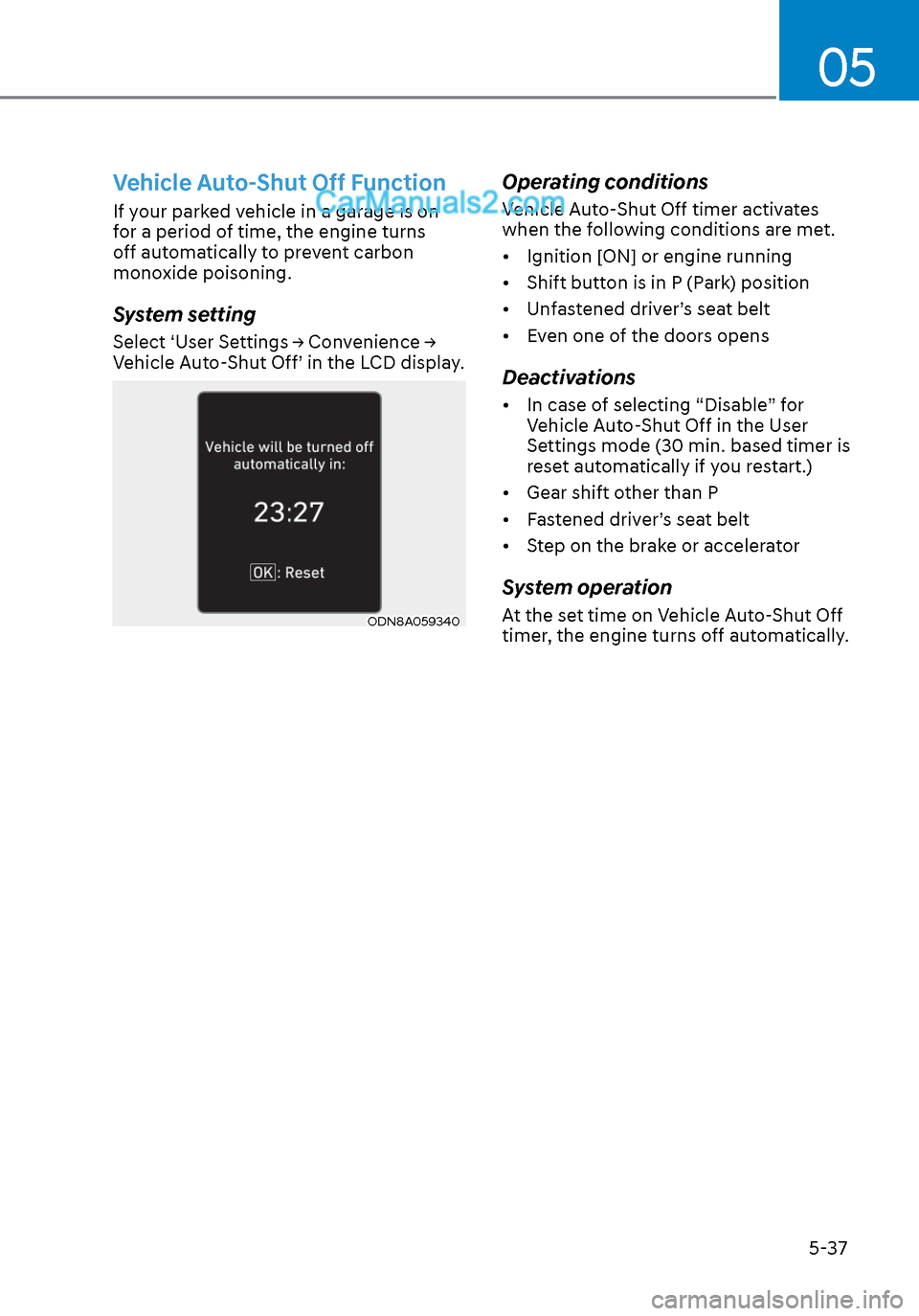
System setting
Select ‘User Settings → Convenience →
Vehicle Auto-Shut Off’ in the LCD display.
ODN8A059340ODN8A059340
Operating conditions
Vehicle Auto-Shut Off timer activates
when the following conditions are met.
• Ignition [ON] or engine running
• Shift button is in P (Park) position
• Unfastened driver’s seat belt
• Even one of the doors opens
Deactivations
• In case of selecting “Disable” for Vehicle Auto-Shut Off in the User
Settings mode (30 min. based timer is
reset automatically if you restart.)
• Gear shift other than P
• Fastened driver’s seat belt
• Step on the brake or accelerator
System operation
At the set time on Vehicle Auto-Shut Off
timer, the engine turns off automatically.
Page 194 of 537
Convenient Features5-64
EXTERIOR FEATURES
Hood
Opening the hood
ODN8A059040ODN8A059040
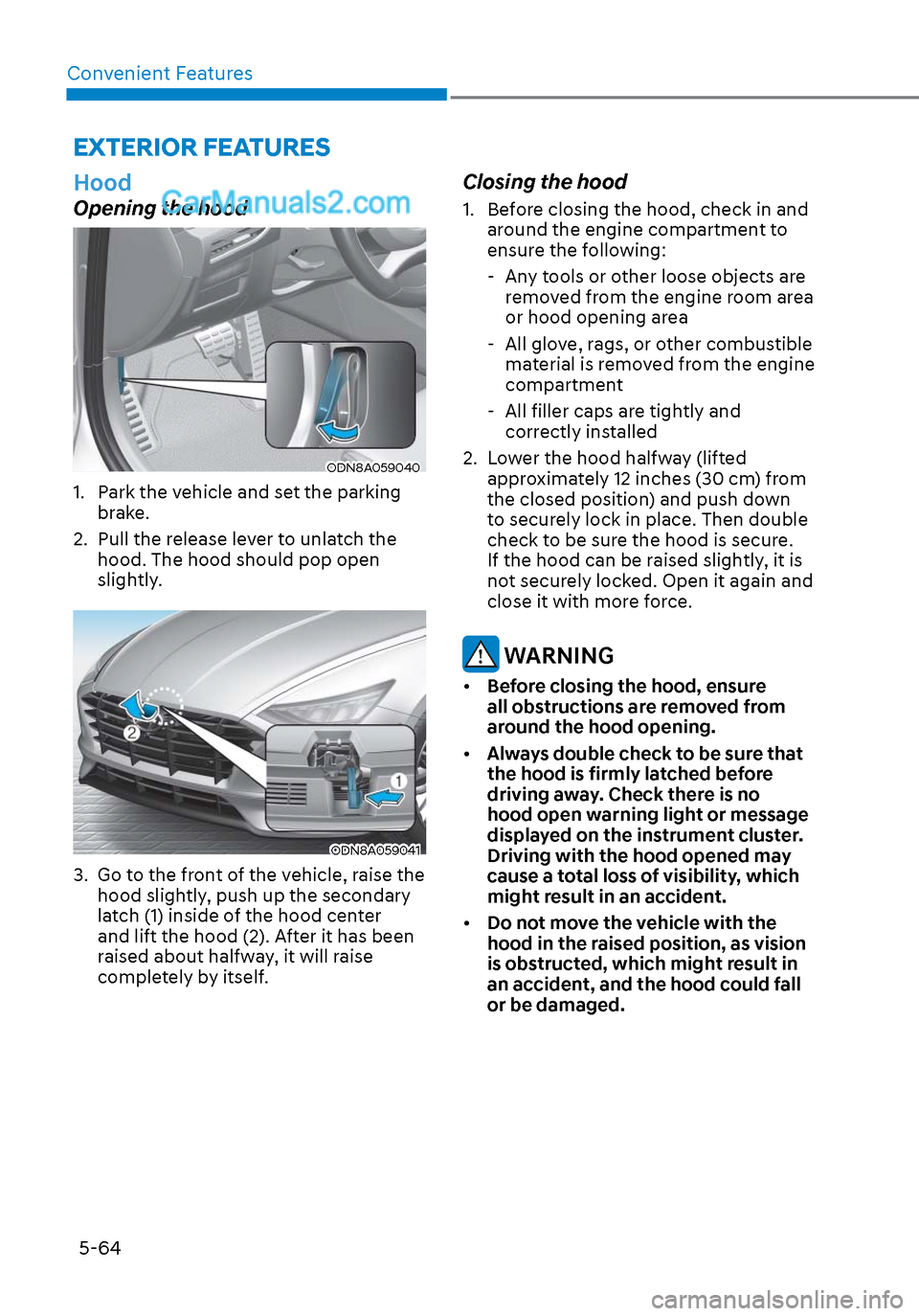
1. Park the vehicle and set the parking brake.
2. Pull the release lever to unlatch the hood. The hood should pop open
slightly.
ODN8A059041ODN8A059041
3. Go to the front of the vehicle, raise the hood slightly, push up the secondary
latch (1) inside of the hood center
and lift the hood (2). After it has been
raised about halfway, it will raise
completely by itself.
Closing the hood
1. Before closing the hood, check in and around the engine compartment to
ensure the following:
- Any tools or other loose objects are removed from the engine room area
or hood opening area
- All glove, rags, or other combustible material is removed from the engine
compartment
- All filler caps are tightly and
correctly installed
2. Lower the hood halfway (lifted approximately 12 inches (30 cm) from
the closed position) and push down
to securely lock in place. Then double
check to be sure the hood is secure.
If the hood can be raised slightly, it is
not securely locked. Open it again and
close it with more force.
WARNING
• Before closing the hood, ensure
all obstructions are removed from
around the hood opening.
• Always double check to be sure that
the hood is firmly latched before
driving away. Check there is no
hood open warning light or message
displayed on the instrument cluster.
Driving with the hood opened may
cause a total loss of visibility, which
might result in an accident.
• Do not move the vehicle with the
hood in the raised position, as vision
is obstructed, which might result in
an accident, and the hood could fall
or be damaged.
Page 201 of 537
05
5-71
• Do not get back into a vehicle
once you have begun refueling.
You can generate a buildup of
static electricity by touching,
rubbing or sliding against any item
or fabric capable of producing
static electricity. Static electricity
discharge can ignite fuel vapors
causing a fire. If you must re-enter
the vehicle, you should once again
eliminate potentially dangerous
static electricity discharge by
touching a metal part of the vehicle,
away from the fuel filler neck, nozzle
or other gasoline source, with your
bare hand.
• When using an approved portable
fuel container, be sure to place the
container on the ground prior to
refueling. Static electricity discharge
from the container can ignite fuel
vapors causing a fire.
Once refueling has begun, contact
between your bare hand and the
vehicle should be maintained until
the filling is complete.
• Use only approved portable plastic
fuel containers designed to carry and
store gasoline.
• When refueling, always move the
shift button to the P (Park) position,
set the parking brake, and place
the ignition switch to the LOCK/
OFF position. Sparks produced by
electrical components related to the
engine can ignite fuel vapors causing
a fire.
• Do not use matches or a lighter and
do not smoke or leave a lit cigarette
in your vehicle while at a gas station,
especially during refueling.
• Do not over-fill or top-off your
vehicle tank, which can cause
gasoline spillage.• If a fire breaks out during refueling,
leave the vicinity of the vehicle, and
immediately contact the manager
of the gas station and then contact
the local fire department. Follow any
safety instructions they provide.
• If pressurized fuel sprays out, it can
cover your clothes or skin and thus
subject you to the risk of fire and
burns. Always remove the fuel cap
carefully and slowly. If the cap is
venting fuel or if you hear a hissing
sound, wait until the condition stops
before completely removing the cap.
• Always check that the fuel cap is
installed securely to prevent fuel
spillage in the event of an accident.
Information
Make sure to refuel your vehicle according
to the “Fuel Requirements” suggested in
the Introduction chapter.
NOTICE
• Do not spill fuel on the exterior
surfaces of the vehicle. Any type of
fuel spilled on painted surfaces may
damage the paint.
• If the fuel filler cap requires
replacement, use only a genuine
HYUNDAI cap or the equivalent
specified for your vehicle. An
incorrect fuel filler cap can result
in a serious malfunction of the fuel
system or emission control system.
Page 204 of 537
Convenient Features5-74
LIGHTING
Exterior Lights
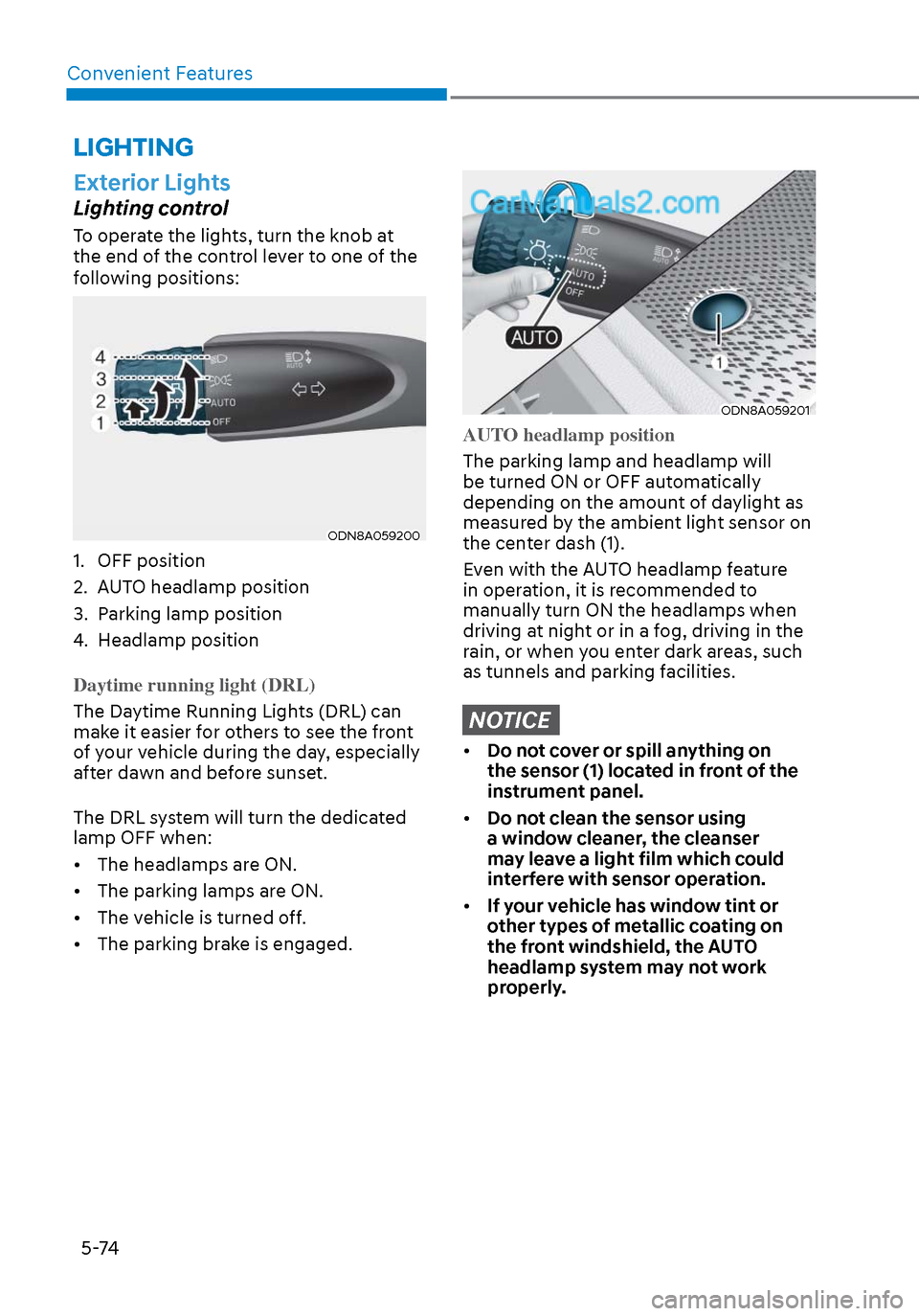
Lighting control
To operate the lights, turn the knob at
the end of the control lever to one of the
following positions:
ODN8A059200ODN8A059200
1. OFF position
2. AUTO headlamp position
3. Parking lamp position
4. Headlamp position
Daytime running light (DRL)
The Daytime Running Lights (DRL) can
mak
e it easier for others to see the front
of your vehicle during the day, especially
after dawn and before sunset.
The DRL system will turn the dedicated
lamp OFF when:
• The headlamps are ON.
• The parking lamps are ON.
• The vehicle is turned off.
• The parking brake is engaged.
ODN8A059201ODN8A059201
AUTO headlamp position
The parking lamp and headlamp will
be turned ON or OFF aut
omatically
depending on the amount of daylight as
measured by the ambient light sensor on
the center dash (1).
Even with the AUTO headlamp feature
in operation, it is recommended to
manually turn ON the headlamps when
driving at night or in a fog, driving in the
rain, or when you enter dark areas, such
as tunnels and parking facilities.
NOTICE
• Do not cover or spill anything on
the sensor (1) located in front of the
instrument panel.
• Do not clean the sensor using
a window cleaner, the cleanser
may leave a light film which could
interfere with sensor operation.
• If your vehicle has window tint or
other types of metallic coating on
the front windshield, the AUTO
headlamp system may not work
properly.
Page 220 of 537

Convenient Features5-90
Operating conditions
Reverse Parking Collision-Avoidance
Assist system enters the ready status,
when ‘Active Assist’ or ‘Warning Only’ is
selected in the AVN system screen and
the following conditions are satisfied:
• The trunk is closed
• The shift lever is in R (Reverse)
• Vehicle speed is below 6 mph (10 km/h)
• System components such as the rear view camera and the rear ultrasonic
sensors are in normal conditions
The driver needs to select ‘Active Assist’
on the LCD display or infotainment
system display for collision-avoidance
assist.
The solid lines behind the vehicle in the
cluster LCD display indicates that the
system is ready to assist the driver.
Note that the system assists the driver
only once. The driver has to shift the gear
to R (Reverse) from another gear position
to reactivate the system.
The performance of Reverse Parking
Collision-Avoidance Assist system may
vary under certain conditions. If the
vehicle speed exceeds 2 mph (3 km/h),
the system can assist only pedestrian
collision avoidance.
As always, be careful when backing
up your vehicle and be aware of your
surroundings.
Warning and System Control
Active assist
Cluster LCD displayCluster LCD display
ODN8A049043ODN8A049043
Infotainment system display Infotainment system display
OHI059255NOHI059255N
• If the system detects a risk of collision with a pedestrian or an object behind
the vehicle, the system will warn the
driver with audible warning, steering
wheel vibration, and warnings on
the cluster LCD display and the
infotainment system display.
• If the system detects imminent collision with a pedestrian or an object
behind the vehicle, the system may
apply braking power. The driver needs
to pay attention as the brake will
release within 2 seconds. The driver
must immediately depress the brake
pedal and check surroundings.
Page 221 of 537
05
5-91
The brake assist will turn off when: - The driver shifts the gear to P (Park) or D (Drive)
- The driver depresses the brake pedal with sufficient power
- The braking has been assisted for approximately 2 seconds
The warning will turn off when: - The driver shifts the gear to P (Park), N (Neutral), or D (Drive)
The brake control may not operate
properly depending on the status of the
ESC (Electronic Stability Control). There
will only be a warning when: - The ESC (Electronic Stability Control) warning light is on
- The ESC (Electronic Stability Control) is engaged in a different function
Warning only
• If the system detects a risk of collision with a pedestrian or an object, the
system will warn the driver with
audible warning and warnings on the
cluster LCD display or infotainment
system display.
• If ‘Warning Only’ is selected, braking will not be assisted.
The warning will turn off when: - The driver shifts the gear to P (Park), N (Neutral), or D (Drive)
WARNING
• Reverse Parking Collision-
Avoidance Assist system may
not operate properly or may
operate unnecessarily in some
circumstances.
• Always pay extreme caution while
driving. The driver is responsible for
controlling the brake appropriately.
CAUTION
• Always pay attention to road and
traffic conditions while driving,
whether or not there is a warning.
• Playing the vehicle audio system at
high volume may prevent occupants
from hearing Reverse Parking
Collision-Avoidance Assist system
warning sounds.
• If any other warning sound, such as
seat belt warning chime, is already
generated, Reverse Parking Collision-
Avoidance Assist system warning
may not sound.
Information
The system can detect a pedestrian or an
object when:
• A pedestrian is standing behind the
vehicle.
• A large obstacle, such as a vehicle, is
parked in the rear center of the vehicle.