2020 Hyundai Ioniq Plug-in Hybrid turn signal
[x] Cancel search: turn signalPage 177 of 635
3-85
Convenient features of your vehicle
3
Check headlight (High/Low)
(if equipped)
This warning message is displayed if
the headlamps are not operating
properly. A headlamp bulb may need
to be replaced.
Check turn signal (if equipped)
This warning message is displayed if
the turn signal lamps are not operat-
ing properly. A lamp may need to be
replaced.
Information
Make sure to replace the burned out
bulb with a new one of the same
wattage rating.
Check headlamp LED
(if equipped)
This warning message is displayed if
there is a problem with the LED
headlamps. We recommend that you
have the vehicle inspected by an
authorized HYUNDAI dealer.
Check brake light (if equipped)
This warning message is displayed if
the brake lights are not operating
properly. A lamp may need to be
replaced.
Check Lane Keeping Assist
(LKA) (if equipped)
This message is displayed if there is
a problem with Lane Keeping Assist
System. Have the vehicle inspected
by an authorized HYUNDAI dealer.
For more information, refer to
"Lane Keeping Assist (LKA)" in
chapter 5.
Check Driver Attention Warning
(DAW) system
This warning message is displayed if
there is a problem with Driver
Attention Warning system. Have the
vehicle inspected by an authorized
HYUNDAI dealer.
For more information, refer to
"Driver Attention Warning (DAW)"
in chapter 5.i
Page 196 of 635

3-104
Convenient features of your vehicle
ItemsExplanation
One touch turn signal
The one touch turn signal function will be deactivated.
The turn signal indicator will blink 3, 5, or 7 times when the turn signal lever is
moved slightly.
For more details, refer to "Lighting" in this chapter.
Headlight DelayTo activate or deactivate the headlight delay function.
For more details, refer to "Lighting" in this chapter.
High beam Assist To activate or deactivate the high beam assist system.
For more details, refer to "High Beam Assist (HBA) system" in this chapter.
ItemsExplanation
Cluster soundTo adjust the cluster volume.
- OFF/Level 1/Level 2/Level 3
4. Sound 3. Lights
❈ ❈
The information provided may differ depending on which functions are applicable to your vehicle.
Page 216 of 635

3-124
Convenient features of your vehicle
Turn signals and lane change
signals
To signal a turn, push down on the
lever for a left turn or up for a right
turn in position (A).
If an indicator stays on and does not
flash or if it flashes abnormally, one of
the turn signal bulbs may be burned
out and will require replacement. (Continued)
Do not disassemble a front
view camera temporarily for
tinted window or attaching
any types of coatings and
accessories. If you disassem-
ble the camera and assemble
it again, take your vehicle to
an authorized HYUNDAI deal-
er and have the system
checked to need a calibration.
When you replace or reinstall
the windshield glass, front
view camera, take your vehi-
cle to an authorized HYUNDAI
dealer and have the system
checked.
Be careful that water doesn't
get into the High Beam Assist
unit and do not remove or
damage related parts of High
Beam Assist system.
Do not place objects on the
crash pad that reflect light
such as mirrors, white paper,
etc. The system may malfunc-
tion if sunlight is reflected.
(Continued)
(Continued)
At times, the High Beam
Assist may not work properly.
The system is for your con-
venience only. It is the respon-
sibility of the driver for safe
driving practices and always
check the road conditions for
your safety.
When the system does not
operate normally, change the
lamp position manually
between the high beam and
low beam.
OLF044091N
Page 217 of 635

3-125
Convenient features of your vehicle
3
One-touch turn signal function
To activate the One Touch Turn
Signal function, push the turn signal
lever up or down to position (B) and
then release it.
The lane change signals will blink 3,
5 or 7 times.
You can activate or deactivate the
One Touch Turn Signal function or
choose the number of blinks (3, 5, or
7) from the User Settings mode
(Light) on the LCD display.
For more information, refer to the
"LCD Display" section in this
chapter.
Battery saver function
The purpose of this feature is to pre-
vent the battery from being dis-
charged. The system automatically
turns off the parking lamp when the
driver turns the vehicle off and opens
the driver-side door.
With this feature, the parking lamps
will turn off automatically if the driver
parks on the side of road at night.
If necessary, to keep the lamps on
when the vehicle is turned off, per-
form the following:
1) Open the driver-side door.
2) Turn the parking lamps OFF and
ON again using the light switch on
the steering column.
Headlamp delay function
(if equipped)
If the Engine Start/Stop button is
placed in the ACC position or the
OFF position with the headlamps
ON, the headlamps (and/or parking
lamps) remain on for about 5 min-
utes. However, if the driver's door is
opened and closed, the headlights
are turned off after 15 seconds. Also,
with the vehicle off if the driver's door
is opened and closed, the head-
lamps (and/or parking lamps) are
turned off after 15 seconds.
The headlamps (and/or parking
lamps) can be turned off by pressing
the lock button on the smart key
twice or turning the light switch to the
OFF or AUTO position.
You can activate or deactivate the
Headlamp Delay function from the
User Settings mode (Light) on the
LCD display.
For more information, refer to the
"LCD Display" section in this
chapter.
Page 250 of 635

3-158
Convenient features of your vehicle
When the Auto Defogging
System operates, the indi-
cator will illuminate.
If high levels of moisture are sensed in
the vehicle, the Auto Defogging System
will operate in the following order:
Step 1 : Outside air position
Step 2 :Operating the air conditioning
Step 3 : Blowing air toward the wind-
shield
Step 4 : Increasing air flow toward
the windshield
If the air conditioning is off or recircu-
lated air position is manually select-
ed while Auto Defogging System is
ON, the Auto Defogging System
Indicator will blink 3 times to signal
that the manual operation has been
canceled.
To cancel or reset the
Auto Defogging System
Press the front windshield defroster
button for 3 seconds when the
Engine Start/Stop button is in the ON
position. When the Auto Defogging
System is canceled, the ADS OFF
symbol will blink 3 times and ADS
OFF will be displayed on the climate
control information screen.
When the Auto Defogging System is
reset, the ADS OFF symbol will blink
6 times without a signal.
Information
• When the air conditioning is turned
on by Auto defogging system, if you
try to turn off the air conditioning, the
indicator will blink 3 times and the air
conditioning will not be turned off.
• For efficiency, do not select recircu-
lated air position while the Auto
defogging system is operating.
• When Auto defogging mode is
selected, fan speed, temperature and
intake mode which is adjusted man-
ually are canceled for better defog-
ging result. Do not remove the sensor cover
located on the upper end of the
windshield glass.
Damage to system parts could
occur and may not be covered by
your vehicle warranty.
NOTICE
i
Page 349 of 635

5-83
Driving your vehicle
5
LKA system will not be in the
ENABLED state and the steering
wheel will not be assisted when:
The turn signal is turned on before
changing a lane. If you change
lanes without the turn signal on,
the steering wheel might be con-
trolled.
The vehicle is not driven in the mid-
dle of the lane when the system is
turned on or right after changing a
lane.
ESC (Electronic Stability Control) or
VSM (Vehicle Stability Management)
is activated.
The vehicle is driven on a sharp
curve.
Vehicle speed is below 37 mph (60
km/h) and over 112 mph (180
km/h).
The vehicle makes sharp lane
changes.
The vehicle brakes suddenly.
One lane marker is detected.
The lane is very wide or narrow. There are more than two lane
markers on the road. (e.g. construc-
tion area)
The vehicle is driven on a steep
incline.
The steering wheel is turned sud-
denly.
There are more than two lane
markers on the road in front of you.
The system may not operate for 15
seconds after the vehicle is started
or the camera is initialized or
rebooting of the front view camera.
Radius of a curve is too small.
Limitations of the System
LKA system may operate premature-
ly even if the vehicle does not depart
from the intended lane, OR, LKA
system may not assist your steering
or warn you if the vehicle leaves the
intended lane under the following cir-
cumstances:
When the lane and road condi-
tions are poor
It is difficult to distinguish the lane
marking from the road surface or
the lane marking is faded or not
clearly marked.
It is difficult to distinguish the color
of the lane marker from the road.
There are markings on the road
surface that look like a lane marker
that is inadvertently being detected
by the camera.
The lane marker is merged or
divided (e.g. tollgate).
The lane number increases or
decreases or the lane marker are
crossing complicatedly.
There are more than two lane
markers on the road in front of you.
Page 352 of 635

5-86
Driving your vehicle
System description
Blind-Spot Collision Warning
(BCW)
Blind-Spot Collision Warning system
uses radar sensors in the rear
bumper to monitor and warn the driv-
er when it detects an approaching
vehicle in the driver's blind spot area.
1) Blind-Spot Area
The blind spot detection range varies
relative to vehicle speed.
Note that if your vehicle is traveling
much faster than the vehicles around
you, the warning will not occur.2) Closing at high speed
BCW system will alert you when it
detects a vehicle is approaching in
an adjacent lane at a high rate of
speed. If the driver activates the turn
signal when the system detects an
oncoming vehicle, the system
sounds an audible alert.
B BL
LI
IN
ND
D-
-S
SP
PO
OT
T
C
CO
OL
LL
LI
IS
SI
IO
ON
N
W
WA
AR
RN
NI
IN
NG
G
(
(B
BC
CW
W)
)
(
(I
IF
F
E
EQ
QU
UI
IP
PP
PE
ED
D)
)
OAD058153L
OAD058154L
Always be aware of road con-
ditions while driving and be
alert for unexpected situa-
tions even though Blind-Spot
Collision Warning system is
operating.
Blind-Spot Collision Warning
system is supplemental sys-
tems to assist you. Do not
entirely rely on the systems.
Always pay attention, while
driving, for your safety.
Blind-Spot Collision Warning
system is not substitutes for
proper and safe driving.
Always drive safely and use
caution when changing lanes
or backing up the vehicle.
Blind-Spot Collision Warning
system may not detect every
object alongside the vehicle.
WARNING
Page 355 of 635
5-89
Driving your vehicle
5
Warning message and system
control
Blind-Spot Collision Warning
system
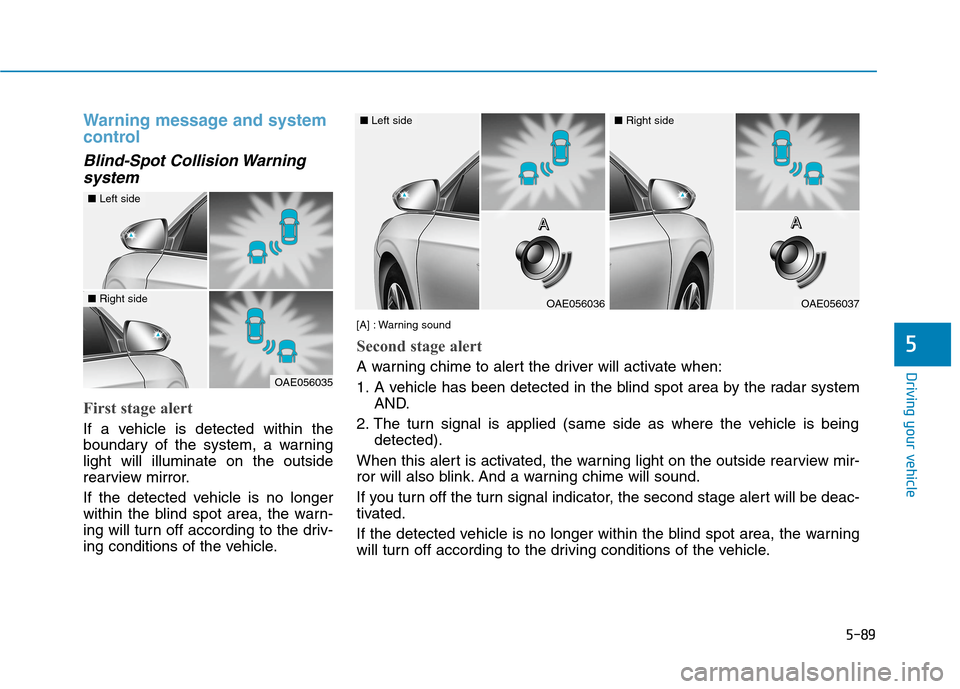
First stage alert
If a vehicle is detected within the
boundary of the system, a warning
light will illuminate on the outside
rearview mirror.
If the detected vehicle is no longer
within the blind spot area, the warn-
ing will turn off according to the driv-
ing conditions of the vehicle.
OAE056035
■Left side
■Right sideOAE056036
■Left side
OAE056037
■Right side
[A] : Warning sound
Second stage alert
A warning chime to alert the driver will activate when:
1. A vehicle has been detected in the blind spot area by the radar system
AND.
2. The turn signal is applied (same side as where the vehicle is being
detected).
When this alert is activated, the warning light on the outside rearview mir-
ror will also blink. And a warning chime will sound.
If you turn off the turn signal indicator, the second stage alert will be deac-
tivated.
If the detected vehicle is no longer within the blind spot area, the warning
will turn off according to the driving conditions of the vehicle.A A A AA A A A