Page 104 of 561
3-19
Convenient features of your vehicle
3
Inside Rearview Mirror
Before you start driving, adjust the
rearview mirror to the center on the
view through the rear window.
When cleaning the mirror, use a
paper towel or similar material
dampened with glass cleaner. Do
not spray glass cleaner directly on
the mirror as that may cause the
liquid cleaner to enter the mirror
housing.
Day/night rearview mirror
(if equipped)
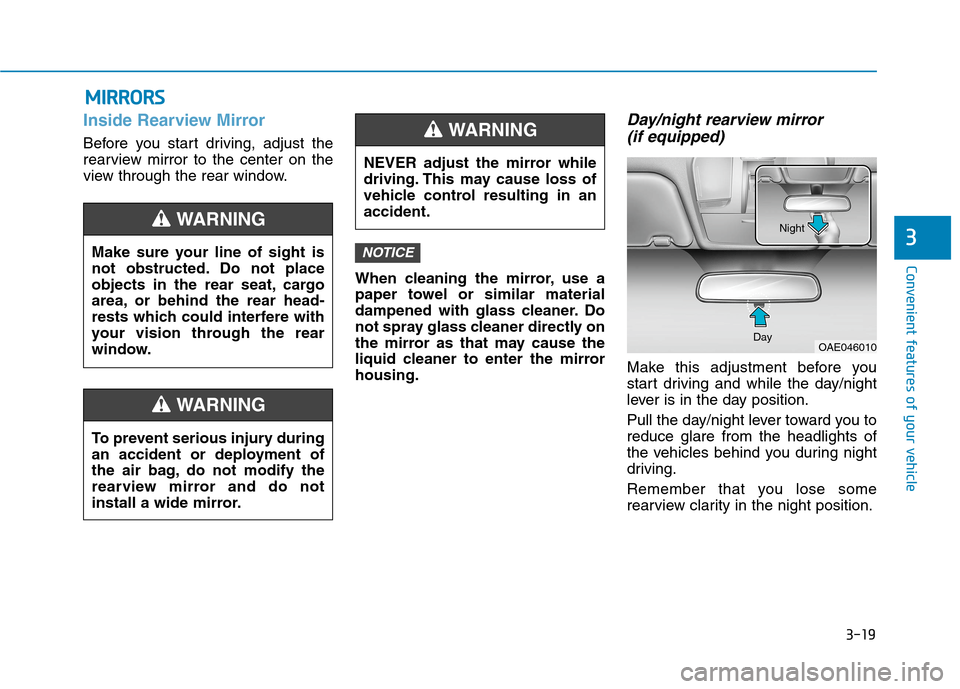
Make this adjustment before you
start driving and while the day/night
lever is in the day position.
Pull the day/night lever toward you to
reduce glare from the headlights of
the vehicles behind you during night
driving.
Remember that you lose some
rearview clarity in the night position.
NOTICE
M MI
IR
RR
RO
OR
RS
S
Make sure your line of sight is
not obstructed. Do not place
objects in the rear seat, cargo
area, or behind the rear head-
rests which could interfere with
your vision through the rear
window.
WARNING
NEVER adjust the mirror while
driving. This may cause loss of
vehicle control resulting in an
accident.
WARNING
To prevent serious injury during
an accident or deployment of
the air bag, do not modify the
rearview mirror and do not
install a wide mirror.
WARNING
OAE046010 DayNight
Page 105 of 561

3-20
Convenient features of your vehicle
Blue Link®center (if equipped)
For details, refer to the Blue Link®
Owner's Guide, Navigation Manual
or Audio Manual.
Electrochromic mirror (ECM) with
HomeLink®system, compass and
Blue Link®(if equipped)
Your vehicle may be equipped with a
Gentex Automatic-Dimming Mirror
with a Z-Nav™ Electronic Compass
Display and an Integrated HomeLink
®
Wireless Control System. During
nighttime driving, this feature will
automatically detect and reduce
rearview mirror glare while the com-
pass indicates the direction the vehicle
is traveling. The HomeLink
®Universal
Transceiver allows you to activate your
garage door(s), electric gate, home
lighting, etc.(1) HomeLink Channel 1
(2) HomeLink Channel 2
(3) HomeLink Channel 3
(4) Garage Door Opener Status
Indicator : Closing or Closed
(5) HomeLink Operation Indicator
(6) Garage Door Opener Status
Indicator : Opening or Opened
(7) HomeLink User Interface Indicator
OAD045011N
OOS047093N
HomeLink Indicator
HomeLink ButtonTelematics buttons
Page 106 of 561
3-21
Convenient features of your vehicle
3
Automatic-Dimming Night Vision
Safety™ (NVS®) Mirror
The NVS®Mirror automatically
reduces glare by monitoring light lev-
els in the front and the rear of the
vehicle. Any object that obstructs
either light sensor will degrade the
automatic dimming control feature.
For more information regarding
NVS
®mirrors and other applica-
tions, please refer to the Gentex
website:
www.gentex.com
Your mirror will automatically dim
upon detecting glare from the vehi-
cles traveling behind you.
The mirror defaults to the ON posi-
tion each time the vehicle is started.
Z-Nav™ Compass Display
The NVS™ Mirror in your vehicle is
also equipped with a Z-Nav™
Compass that shows the vehicle
Compass heading in the Display
Window using the 8 basic cardinal
headings (N, NE, E, SE, etc.).
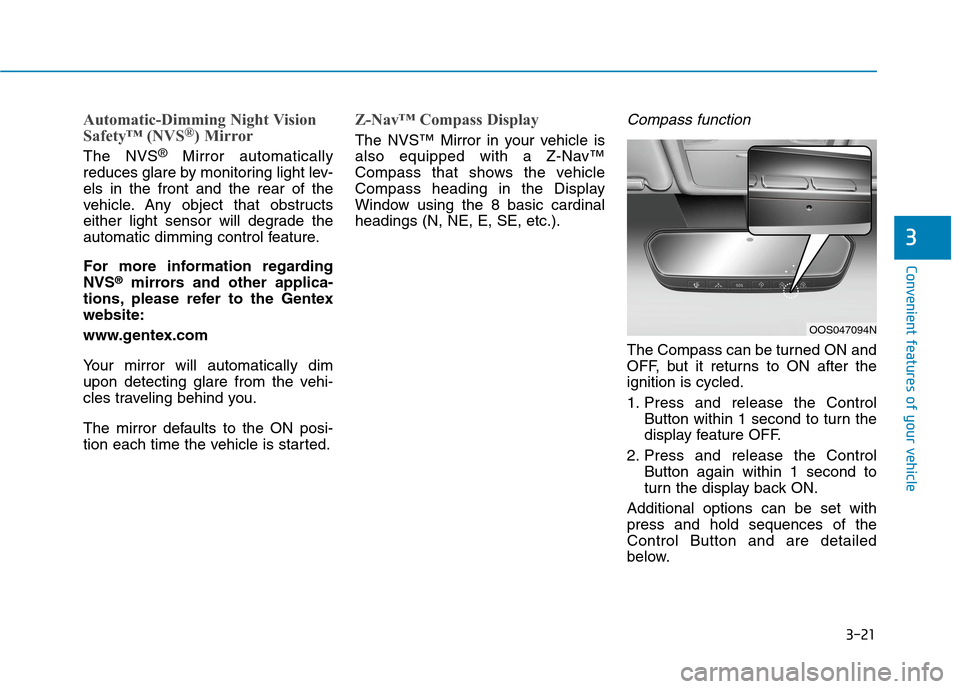
Compass function
The Compass can be turned ON and
OFF, but it returns to ON after the
ignition is cycled.
1. Press and release the Control
Button within 1 second to turn the
display feature OFF.
2. Press and release the Control
Button again within 1 second to
turn the display back ON.
Additional options can be set with
press and hold sequences of the
Control Button and are detailed
below.
OOS047094N
Page 110 of 561
3-25
Convenient features of your vehicle
3
2. Press and hold the button you
wish to program for approximately
15-25 seconds until the LED flash-
es in Orange for several times.
3. Hold the Garage Door Opener
Original Transmitter (OT) near the
HomeLink Mirror.
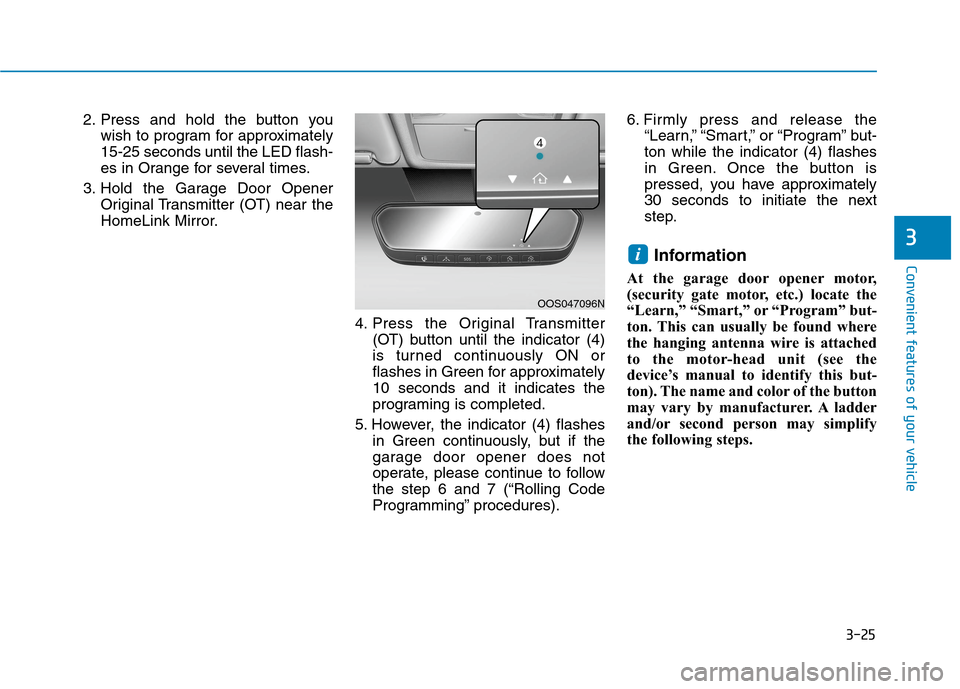
4. Press the Original Transmitter
(OT) button until the indicator (4)
is turned continuously ON or
flashes in Green for approximately
10 seconds and it indicates the
programing is completed.
5. However, the indicator (4) flashes
in Green continuously, but if the
garage door opener does not
operate, please continue to follow
the step 6 and 7 (“Rolling Code
Programming” procedures).6. Firmly press and release the
“Learn,” “Smart,” or “Program” but-
ton while the indicator (4) flashes
in Green. Once the button is
pressed, you have approximately
30 seconds to initiate the next
step.
Information
At the garage door opener motor,
(security gate motor, etc.) locate the
“Learn,” “Smart,” or “Program” but-
ton. This can usually be found where
the hanging antenna wire is attached
to the motor-head unit (see the
device’s manual to identify this but-
ton). The name and color of the button
may vary by manufacturer. A ladder
and/or second person may simplify
the following steps.
i
OOS047096N
Page 111 of 561
3-26
Convenient features of your vehicle
7. Return to the vehicle and firmly
press, hold for two seconds and
release the HomeLink button up to
three times. Do not press the
HomeLink button rapidly. At this
point programming is complete
and your device should operate
when the HomeLink button is
pressed and released.
Information
• Some garage door openers require
to press the programmed button on
the mirror up to three times right
after the programming is just com-
pleted to operate the garage door.
• The indicator (4) is turned ON in
Orange and flashes for about 60sec-
onds, during the programing mode
and if a programing is not succeed-
ed within the 60 seconds, the pro-
graming mode will be abort.
HomeLink
®should now activate your
rolling code equipped device.
Gate operator & Canadian program-
ming
During programming, your handheld
transmitter may automatically stop
transmitting. Continue to press the
Integrated HomeLink
®Wireless
Control System button while you
press and re-press ("cycle") your
handheld transmitter every two sec-
onds until the frequency signal has
been learned. The indicator light will
flash slowly and then rapidly after
several seconds upon successful
training.
Operating HomeLink®
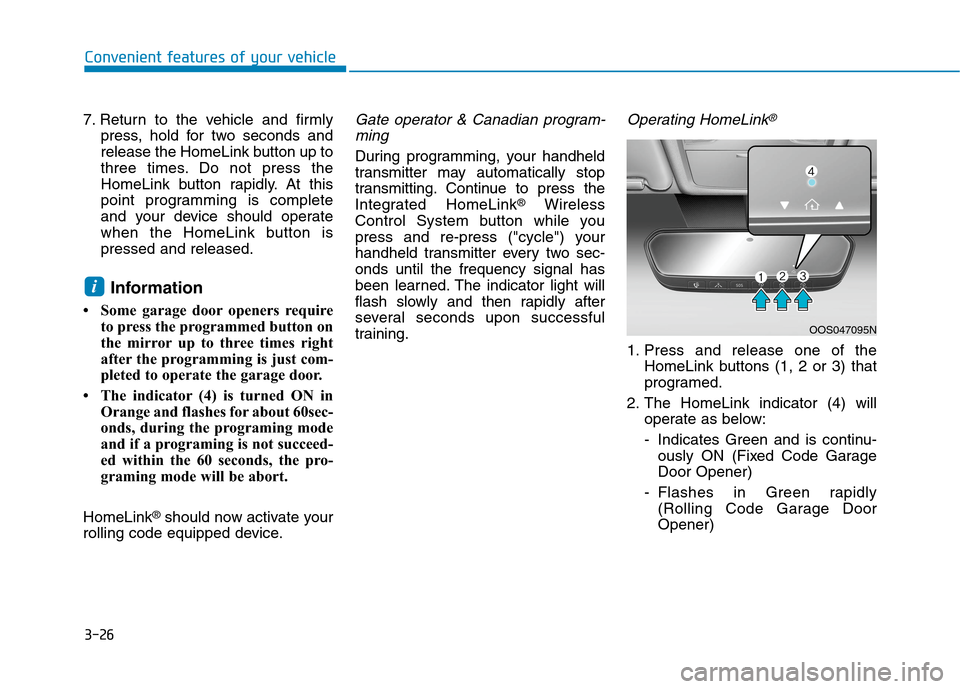
1. Press and release one of the
HomeLink buttons (1, 2 or 3) that
programed.
2. The HomeLink indicator (4) will
operate as below:
- Indicates Green and is continu-
ously ON (Fixed Code Garage
Door Opener)
- Flashes in Green rapidly
(Rolling Code Garage Door
Opener)
i
OOS047095N
Page 113 of 561
3-28
3. Press and release the programed
HomeLink button to activate the
garage door.
4. Once the garage door is stopped,
press and release the "Learn" or
"Smart" button on the Garage door
opener within 1 minute from the
time of pressing the programed
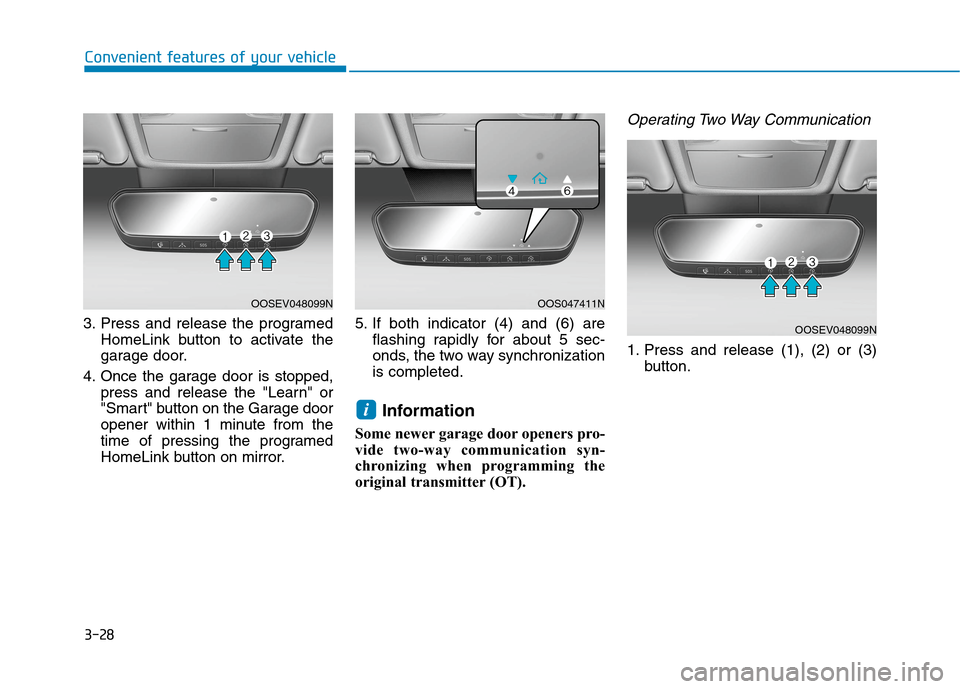
HomeLink button on mirror.5. If both indicator (4) and (6) are
flashing rapidly for about 5 sec-
onds, the two way synchronization
is completed.
Information
Some newer garage door openers pro-
vide two-way communication syn-
chronizing when programming the
original transmitter (OT).
Operating Two Way Communication
1. Press and release (1), (2) or (3)
button.
i
Convenient features of your vehicle
OOSEV048099NOOS047411N
OOSEV048099N
Page 114 of 561
3-29
Convenient features of your vehicle
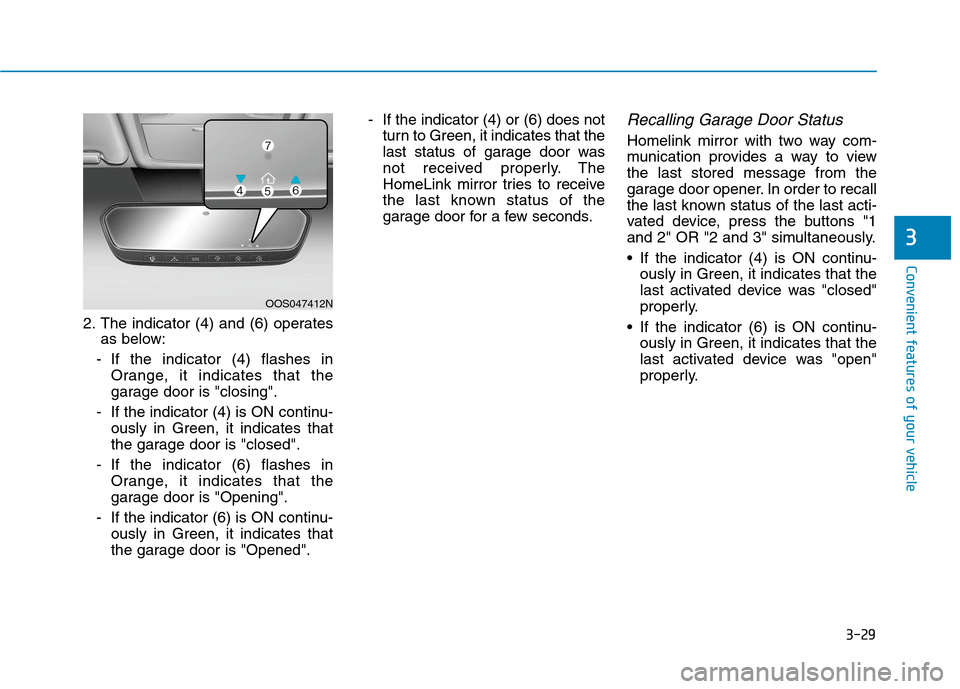
2. The indicator (4) and (6) operates
as below:
- If the indicator (4) flashes in
Orange, it indicates that the
garage door is "closing".
- If the indicator (4) is ON continu-
ously in Green, it indicates that
the garage door is "closed".
- If the indicator (6) flashes in
Orange, it indicates that the
garage door is "Opening".
- If the indicator (6) is ON continu-
ously in Green, it indicates that
the garage door is "Opened".- If the indicator (4) or (6) does not
turn to Green, it indicates that the
last status of garage door was
not received properly. The
HomeLink mirror tries to receive
the last known status of the
garage door for a few seconds.
Recalling Garage Door Status
Homelink mirror with two way com-
munication provides a way to view
the last stored message from the
garage door opener. In order to recall
the last known status of the last acti-
vated device, press the buttons "1
and 2" OR "2 and 3" simultaneously.
If the indicator (4) is ON continu-
ously in Green, it indicates that the
last activated device was "closed"
properly.
If the indicator (6) is ON continu-
ously in Green, it indicates that the
last activated device was "open"
properly.
3
OOS047412N
Page 115 of 561
3-30
Convenient features of your vehicle
Information
Two way communication range dis-
tance between "vehicle" and "garage
door opener" is 100m.
The range may be reduced or
increased a little due to obstacle condi-
tions around the garage door opener,
such as houses or trees.
Electric chromic mirror (ECM)
with compass and HomeLink®
system (for Canada)
Your vehicle may be equipped with a
Gentex Automatic-Dimming Mirror
with a Z-Nav™ Electronic Compass
Display and an Integrated HomeLink
®
Wireless Control System.
During nighttime driving, this feature
will automatically detect and reduce
rearview mirror glare while the com-
pass indicates the direction the vehi-
cle is pointed. The HomeLink
®
Universal Transceiver allows you to
activate your garage door(s), electric
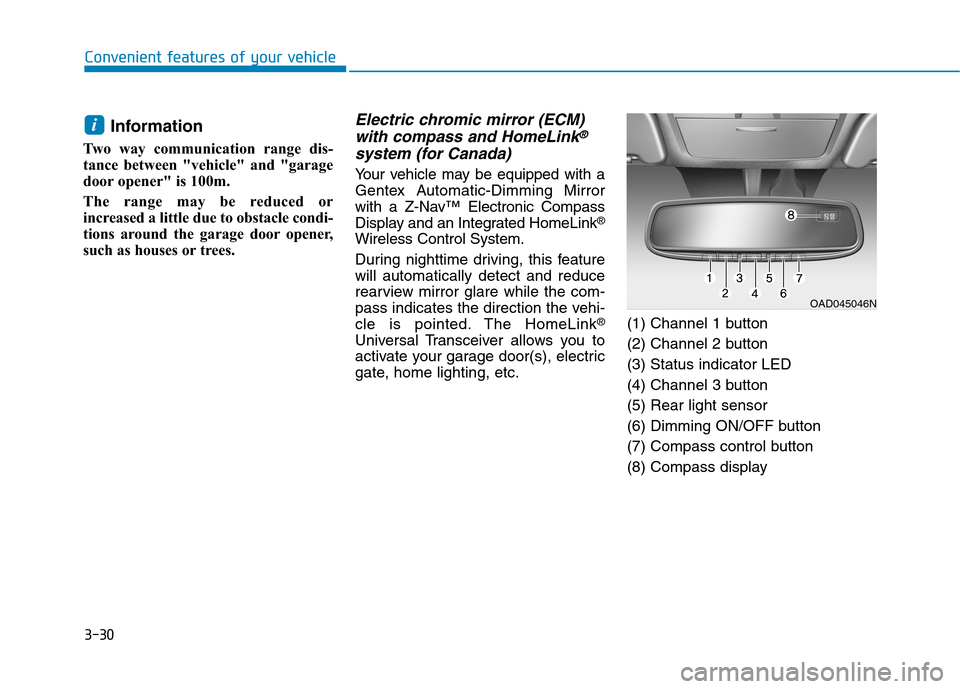
gate, home lighting, etc.(1) Channel 1 button
(2) Channel 2 button
(3) Status indicator LED
(4) Channel 3 button
(5) Rear light sensor
(6) Dimming ON/OFF button
(7) Compass control button
(8) Compass display
i
OAD045046N