Page 502 of 743

uuBluetooth ® HandsFreeLink ®u HFL Menus
500
Features
■Read or Stop reading a message
1. Go to the text message screen.
2. Select Play.
u The system starts reading the message
aloud.
3. Select Pause to stop reading.
Select Play again to start reading the
message.
■Reply to a message
1. Go to the text message screen.
2. Select Reply.
3. Select the reply message.
u The pop-up menu appears on the screen.
4. Select Send to send the message.
u Message sent appears on the screen
when the reply message was successfully
sent.1 Reply to a message
The available fixed reply messages are as follows:
•Talk to you later, I’m driving.
•I’m on my way.
•I’m running late.•OK
•Yes
•No
You can add a reply message by selecting + Create
New Message .
2 To edit a reply message P. 501
Only certain phones receiv e and send messages when
paired and connected. For a list of compatible
phones:
•U.S.: Visit automobiles.honda.com /handsfreelink/,
or call 1-888-528-7876.
•Canada: For more info rmation on smartphone
compatibility, call 1-855-490-7351.
20 PILOT-31TG76401.book 500 ページ 2019年7月24日 水曜日 午後3時32分
Page 505 of 743

Continued503
uuBluetooth ® HandsFreeLink ®u HFL Menus
Features
■Automatic collis ion notification
If your vehicle’s airbags deploy or if the unit
detects that the vehicle is severely impacted,
your vehicle automatically will attempt to
connect to the HondaLink ® operator. If
connected, information about your vehicle, its
location, and its condition can be sent to the
operator
*1; you also can speak to the operator
when connected.
IMPORTANT: For vehicles equipped with HondaLink ® Assist, owner activation
constitutes authorization for Honda to collect information from your vehicle needed
to provide the service, and agreement to the Terms of Use at
www.hondalink.com/TermsAndConditions . In a crash, HondaLink® Assist will
attempt to notify emergency services but NEITHER HONDA NOR ITS SERVICE
PROVIDERS GUARANTEE THAT SUCH NOTIFICATION WILL OCCUR.
Honda reserves the right to terminate HondaLink ® Assist services at any time or for
any reason, and in the future may not be ab le to provide services due to changes in,
or obsolescence of, technology integral to the service or changes in governmental
regulation.
*1: Depending on your phone and adequate cellul ar coverage, your vehicle’s location may not
be sent to the operator.
■In Case of Emergency1 In Case of Emergency
Your vehicle may not be able to connect to the
operator if the battery level is low, the line is
disconnected, or you do not have adequate cellular
coverage.
You cannot use this emergency service when:
•You travel outside the HondaLink ® service coverage
areas.
•There is a problem with the connecting devices,
such as the microphones, speakers, or the unit
itself.
You cannot operate othe r phone-related functions
using the screen while talking to the operator.
Select Hang Up to terminate the connection to your
vehicle.
1 Automatic collision notification
If the unit fails to connect to the operator, it
repeatedly tries until it succeeds.
20 PILOT-31TG76401.book 503 ページ 2019年7月24日 水曜日 午後3時32分
Page 506 of 743
uuBluetooth ® HandsFreeLink ®u HFL Menus
504
Features
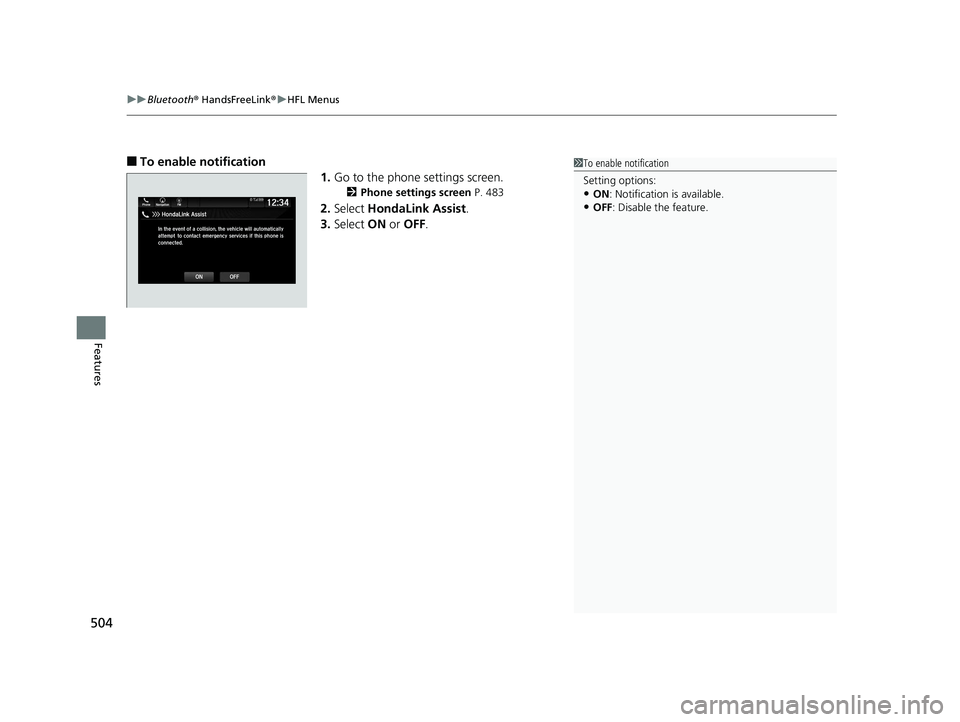
■To enable notification
1.Go to the phone settings screen.
2 Phone settings screen P. 483
2.Select HondaLink Assist .
3. Select ON or OFF .
1To enable notification
Setting options:
•ON : Notification is available.
•OFF: Disable the feature.
20 PILOT-31TG76401.book 504 ページ 2019年7月24日 水曜日 午後3時32分
Page 508 of 743
506
Features
CabinTalkTM *
Your audio system allows you or the front passenger voices to be broadcast to the
second and third row seat’s passengers using the rear speakers and/or headphones.
1. Select .
2. Select CabinTalk .
u Select Speakers to broadcast to the rear
speakers.
u Select Headphones to broadcast to
headphones.
u Select Mic is On to mute your voice.
■How to use
1CabinTalkTM *
You can also switch to the CabinTalk screen by
selecting CabinTalk on the front control panel for
the Blu-ray/DVD rear entertainment system. 2 Front Control Panel Operation P. 391
When Speakers is selected, you can adjust the
speaker volume by tu rning the volume knob.
Models with center speakerModels with center speaker
Models without center speaker
Models with center speaker
* Not available on all models
20 PILOT-31TG76401.book 506 ページ 2019年7月24日 水曜日 午後3時32分
Page 633 of 743

631
Maintenance
This chapter discusses basic maintenance.
Before Performing MaintenanceInspection and Maintenance ............ 632
Safety When Performing Maintenance ..633
Parts and Fluids Used in Maintenance Service ........................................... 634
Maintenance Minder
TM..................... 635
Maintenance Under the Hood Maintenance Items Under the Hood .. 641
Opening the Hood ........................... 642
Engine Compartment Cover ............. 643
Recommended Engine Oil ................ 644
Oil Check ......................................... 645
Adding Engine Oil ............................ 646
Changing the Engine Oil and Oil Filter ...647 Engine Coolant ................................ 649
Transmission Fluid ............................ 651
Brake Fluid ....................................... 652
Refilling Window Washer Fluid......... 652
Replacing Light Bulbs ....................... 653Checking and Maintaining Wiper Blades... 658Checking and Maintaining Tires
Checking Tires ................................. 662
Tire and Loading Information Label .. 663
Tire Labeling .................................... 663
DOT Tire Quality Grading (U.S. Vehicles).. 665Wear Indicators................................ 667
Tire Service Life ................................ 667 Tire and Wheel Replacement ........... 668
Tire Rotation .................................... 669
Winter Tires ..................................... 670
Battery ............................................... 671
Remote Transmitter Care ................. 673
Remote Control and Wireless Headphone Care
*........................... 674Heating and Cooling System*/Climate
Control System* Maintenance............. 676Cleaning Interior Care .................................... 678
Exterior Care.................................... 680
Accessories and Modifications ........ 683
* Not available on all models
20 PILOT-31TG76401.book 631 ページ 2019年7月24日 水曜日 午後3時32分
Page 676 of 743
674
Maintenance
Remote Control and Wireless Headphone Care*
Replacing the Battery
If it takes several pushes on the remote control buttons to operate the Blu-ray/DVD
rear entertainment system, replace the batteries.
1.Remove the cover.
2. Make sure to replace the batteries with the
correct polarity.
■Remote Control
Models with Blu-ray/DVD rear entertainment system
1Replacing the Battery
NOTICE
An improperly disposed of battery can damage the
environment. Always conf irm local regulations for
battery disposal.
Replacement batteries are commercially available or
at a dealer.
Make sure to replace the two batteries at once.
Battery type: AAA
* Not available on all models
20 PILOT-31TG76401.book 674 ページ 2019年7月24日 水曜日 午後3時32分
Page 677 of 743
675
uuRemote Control and Wireless Headphone Care*uReplacing the Battery
Maintenance
If there is no sound coming from the wireless headphone, replace the battery.
1.Remove the screw.
2. Open the cover.
3. Make sure to replace the batteries with the
correct polarity.
■Wireless Headphone
Battery type: AAA
Cover
Battery
20 PILOT-31TG76401.book 675 ページ 2019年7月24日 水曜日 午後3時32分
Page 731 of 743
729
Information
Authorized Manuals
■Service Express
For electronic copies of service publications, you can purchase a subscription to
Service Express. Visit www.techinfo.honda.com for pricing and options.
■For U.S. Owners
Manuals can be purchased from Helm Incorporated. You can order a manual by
phone at 1 (800) 782-4356 (credit ca rd orders only), or online at www.helminc.com.
■For Canadian Owners
Please contact a dealer to order any manuals that you may require.
20 PILOT-31TG76401.book 729 ページ 2019年7月24日 水曜日 午後3時32分