2020 HONDA CLARITY PLUG-IN rear view mirror
[x] Cancel search: rear view mirrorPage 417 of 595
Continued415
uuWhen Driving uAdaptive Cruise Control (ACC) with Low Speed Follow
Driving
■Automatic cancellation
The beeper sounds and a message appears on the driver information interface when
ACC with Low Speed Follow is automatically canceled. Any of these conditions may
cause the ACC with Low Speed Fo llow to automatically cancel:
• Bad weather (rain, fog, snow, etc.)
• When the radar sensor in the front grille gets dirty.
• An abnormal tire condition is de tected, or the tires are skidding.
• Driving on a mountainous road, or driving off road for extended periods.
• Abrupt steering wheel movement.
• When the ABS, VSA ® or CMBS
TM is activated.
• When the ABS or VSA ® system indicator comes on.
• When the vehicle is stopped on a very steep slope.
• When you manually apply the parking brake.
• When the detected vehicle within the AC C with Low Speed Follow range is too
close to your vehicle.
• When a detected vehicle goes out of the ACC with Low Speed Follow range while
your vehicle is stationary.
• The camera behind the rearview mirror, or the area around the camera, including
the windshield, gets dirty.
The ACC with Low Speed Follow automatic cancellation can be also triggered by the
following causes. In these cases, the parking brake will be automatically applied.
• The driver’s seat belt is unfastened when the vehicle is stationary.
• The vehicle stops for more than 10 minutes.
• The power system is turned off.
1Automatic cancellation
Even though ACC with Low Speed Follow has been
automatically canceled, you can still resume the prior
set speed. Wait until the condition that caused ACC
with Low Speed Follow to cancel improves, then
press the RES/+ button.
20 CLARITY PHEV-31TRW6200.book 415 ページ 2019年9月24日 火曜日 午後12時9分
Page 426 of 595
424
uuWhen Driving uLane Keeping Assist System (LKAS)
Driving
■The LKAS may automatically be canceled when:
• The camera temperature gets extremely high or low.
• The camera behind the rearview mirror, or the area around the camera, including
the windshield, gets dirty.
• The ABS or VSA ® systems engage.
The beeper sounds if the LKAS is automatically canceled.
The system may not detect lane markings and therefore may not keep the vehicle in
the middle of a lane under certain conditions, including the following:
■Environmental conditions
• Driving in bad weather (rain, fog, snow, etc.).
• Sudden changes between light and dark, such as an entrance or exit of a tunnel.
• There is little contrast between la ne lines and the roadway surface.
• Driving into low sunlight (e.g., at dawn or dusk).
• Strong light is reflected onto the roadway.
• Driving in the shadows of trees, buildings, etc.
• Shadows of adjacent objects are parallel to lane markings.
• Roadway objects or structures are misinterpreted as lane markers.
• Reflections on the interi or of the windshield.
■LKAS Conditions and Limitations
20 CLARITY PHEV-31TRW6200.book 424 ページ 2019年9月24日 火曜日 午後12時9分
Page 435 of 595
433
uuWhen Driving uLaneWatchTM
Continued
Driving
LaneWatchTM
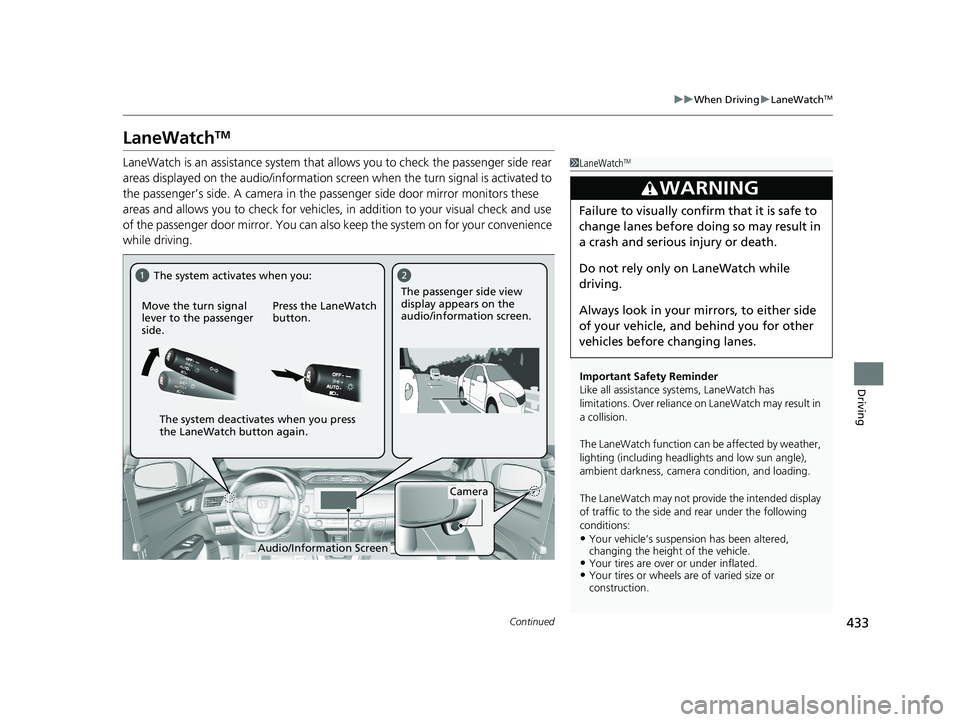
LaneWatch is an assistance system that al lows you to check the passenger side rear
areas displayed on the audio/information screen when the turn signal is activated to
the passenger’s side. A camera in the pa ssenger side door mirror monitors these
areas and allows you to check for vehicles, in addition to your visual check and use
of the passenger door mirror. You can also keep the system on for your convenience
while driving.1 LaneWatchTM
Important Safety Reminder
Like all assistance systems, LaneWatch has
limitations. Over reliance on LaneWatch may result in
a collision.
The LaneWatch func tion can be affected by weather,
lighting (including headli ghts and low sun angle),
ambient darkness, camera condition, and loading.
The LaneWatch may not prov ide the intended display
of traffic to the side and rear under the following
conditions:
•Your vehicle’s suspension has been altered,
changing the height of the vehicle.
•Your tires are over or under inflated.•Your tires or wheels are of varied size or
construction.
3WARNING
Failure to visually confirm that it is safe to
change lanes before doing so may result in
a crash and serious injury or death.
Do not rely only on LaneWatch while
driving.
Always look in your mi rrors, to either side
of your vehicle, and behind you for other
vehicles before changing lanes.
12
Camera
Move the turn signal
lever to the passenger
side.
Press the LaneWatch
button.The passenger side view
display appears on the
audio/information screen.
The system activates when you:
The system deactivates when you press
the LaneWatch button again.
Audio/Information Screen
20 CLARITY PHEV-31TRW6200.book 433 ページ 2019年9月24日 火曜日 午後12時9分
Page 436 of 595
uuWhen Driving uLaneWatchTM
434
Driving
■Customizing the LaneWatch settings
You can customize the following items using the audio/information screen.
• Show with Turn Signal : Selects whether LaneWatch monitor comes on when
you operate the turn signal lever.
• Display Time after Turn Signal Off: Changes the length of time the LaneWatch
display stays on after you pull the turn signal lever back.
• Reference Line : Selects whether the reference lines appear on the LaneWatch
monitor.
• Display : Allows for display adjustments of item s, such as brightness, contrast and
black level. This se tting is part of the System setup group.
2Customized Features P. 306
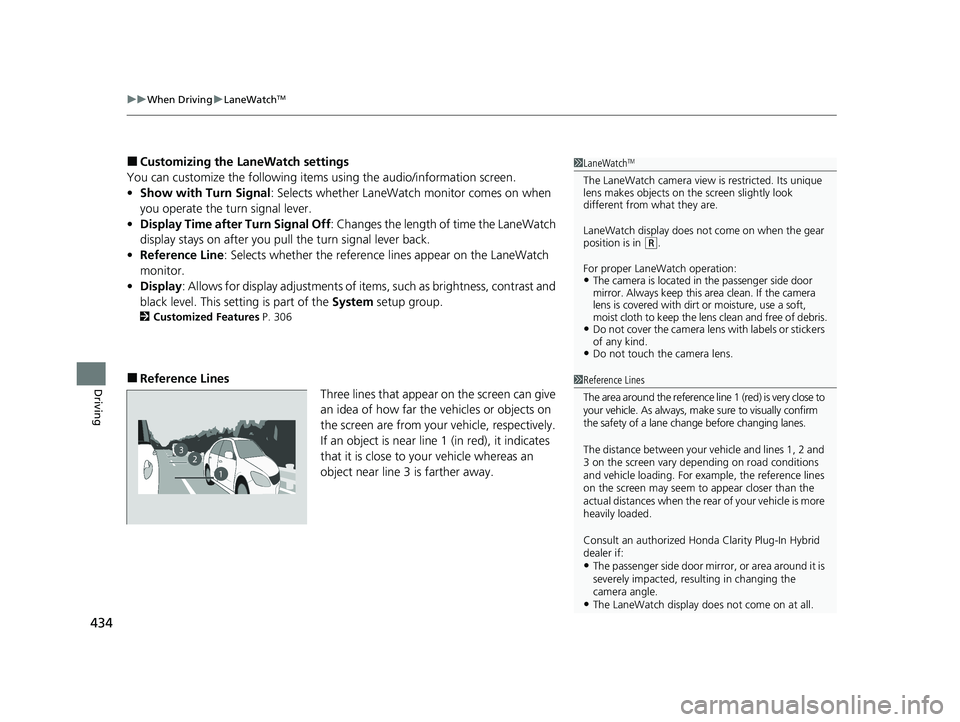
■Reference Lines
Three lines that appear on the screen can give
an idea of how far the vehicles or objects on
the screen are from your vehicle, respectively.
If an object is near line 1 (in red), it indicates
that it is close to your vehicle whereas an
object near line 3 is farther away.
1 LaneWatchTM
The LaneWatch camera view is restricted. Its unique
lens makes objects on the screen slightly look
different from what they are.
LaneWatch display does not come on when the gear
position is in
( R.
For proper LaneWatch operation:
•The camera is located in the passenger side door
mirror. Always keep this area clean. If the camera
lens is covered with dirt or moisture, use a soft,
moist cloth to keep the lens clean and free of debris.
•Do not cover the camera lens with labels or stickers
of any kind.
•Do not touch the camera lens.
23
1
1Reference Lines
The area around the reference line 1 (red) is very close to
your vehicle. As always, m ake sure to visually confirm
the safety of a lane chan ge before changing lanes.
The distance betwee n your vehicle and lines 1, 2 and
3 on the screen vary depending on road conditions
and vehicle loading. For ex ample, the reference lines
on the screen may seem to appear closer than the
actual distances when the rear of your vehicle is more
heavily loaded.
Consult an authorized Honda Clarity Plug-In Hybrid
dealer if:
•The passenger side door mirr or, or area around it is
severely impacted, resulting in changing the
camera angle.
•The LaneWatch display doe s not come on at all.
20 CLARITY PHEV-31TRW6200.book 434 ページ 2019年9月24日 火曜日 午後12時9分
Page 445 of 595
443
uuBraking uCollision Mitigation Braking SystemTM (CMBSTM)
Continued
Driving
Collision Mitigation Braking SystemTM (CMBSTM)
Can assist you when there is a possibility of your vehicle colliding with a vehicle or a
pedestrian detected in front of yours. The CMBSTM is designed to alert you when a
potential collision is determined, as well as to reduce your vehicle speed to help
minimize collision severity when a collision is deemed unavoidable.
■How the system works
1 Collision Mitigation Braking SystemTM (CMBSTM)
Important Safety Reminder
The CMBS
TM is designed to reduce the severity of an
unavoidable collision. It do es not prevent a collision
nor stop the vehicle automati cally. It is still your
responsibility to operate the brake pedal and steering
wheel appropriately acco rding to the driving
conditions.
The CMBS
TM may not activate or may not detect a
vehicle in front of y our vehicle under certain
conditions: 2 CMBS
TM Conditions and Limitations P. 447
You can read about handling information for the
camera equipped with this system. 2 Front Sensor Camera P. 396
Be careful not to severely impact the radar sensor
cover.
1 How the system works
Rapid vibrations on the steering wheel alert you
when the your vehicle speed is between 19 and 62
mph (30 and 100 km/h) with an oncoming vehicle
detected in front of you.
When the CMBS
TM activates, it may automatically
apply the brake. It will be canceled when your vehicle
stops or a potential coll ision is not determined.
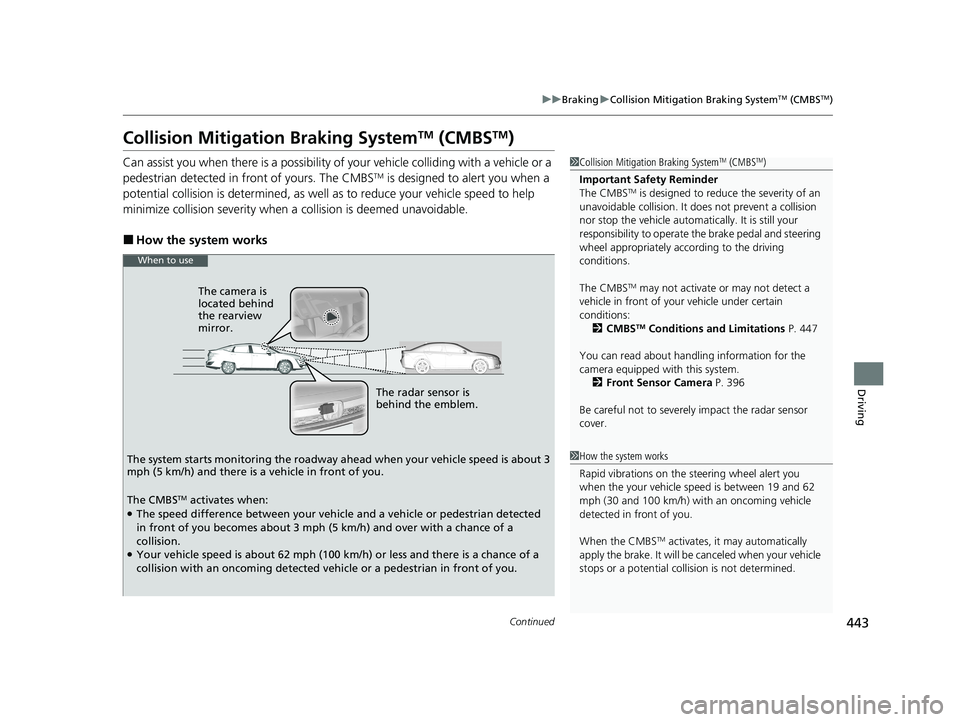
The radar sensor is
behind the emblem.
The camera is
located behind
the rearview
mirror.
The system starts monitoring the roadway ah ead when your vehicle speed is about 3
mph (5 km/h) and there is a vehicle in front of you.
When to use
The CMBSTM activates when:●The speed difference between your vehicle and a vehicle or pedestrian detected
in front of you becomes about 3 mph (5 km/h) and over with a chance of a
collision.
●Your vehicle speed is about 62 mph (100 km/h) or less and there is a chance of a
collision with an oncoming detected vehicle or a pedestrian in front of you.
20 CLARITY PHEV-31TRW6200.book 443 ページ 2019年9月24日 火曜日 午後12時9分
Page 451 of 595
449
uuBraking uCollision Mitigation Braking SystemTM (CMBSTM)
Continued
Driving
• When there is a group of people in front of your vehicle walking together side by
side.
• Surrounding conditions or belongings of the pedestrian alter the pedestrian’s
shape, preventing the system from recogn izing that the person is a pedestrian.
• When the pedestrian is shorte r than about 3.3 feet (1 meter) or taller than about
6.6 feet (2 meters) in height.
• When a pedestrian blends in with the background.
• When a pedestrian is bent over or squatting, or when their hands are raised or
they are running.
• When several pedestrians are walking ahead in a group.
• When the camera cannot correctly identify that a pedestrian is present due to an
unusual shape (holding luggage, body position, size).
■Automatic shutoff
The CMBSTM may automatically shut itself off and the CMBSTM indicator comes and
stays on when:
• The temperature inside the system is high.
• You drive off-road or on a mountain road, or curved and winding road for an
extended period.
• An abnormal tire condition is detected (wrong tire size, flat tire, etc.).
• The camera behind the rearview mirror, or the area around the camera, including
the windshield, gets dirty.
Once the conditions th at caused the CMBS
TM to shut off improve or are addressed
(e.g., cleaning), the system comes back on.
Limitations applicable to pedestrian detection only
20 CLARITY PHEV-31TRW6200.book 449 ページ 2019年9月24日 火曜日 午後12時9分
Page 586 of 595

584
Index
Collision Mitigation Braking SystemTM
(CMBSTM) .................................................. 443
Console Compartment ............................. 186
Control Box ............................................... 465
Controls ..................................................... 135
Coolant (Engine) ....................................... 492
Adding to the Radiator ............................ 493
Adding to the Reserve Tank ..................... 492
Overheating............................................. 546
Coolant (High Voltage Battery and Inverter) ................................................... 494
Creeping (Transmission) ........................... 383
Cup Holders ............................................... 187
Customer Service Information ................. 580
Customized Features ........................ 133, 306
D
Daytime Running Lights ........................... 165
Dead Battery (12-Volt) ............................. 543
Deceleration Paddle Selector ................... 392
Deceleration Paddle Sele ctor Indicator ....... 91
Defrosting the Windshield and Windows .................................................. 197
Devices that Emit Radio Waves ................ 573
Dimming Headlights ............................................... 162
Rearview Mirror ....................................... 173
Dipstick (Engine Oil) ................................. 487
Directional Signals (Turn Signal) .............. 161
Display Button .......................................... 211 Door Mirrors
............................................. 174
Doors ......................................................... 137
Auto Door Locking .................................. 149
Auto Door Unlocking .............................. 149
Door Open Message.................................. 46
Keys ........................................................ 137
Locking/Unlocking the Doors from the Inside .............................................. 25, 146
Locking/Unlocking the Doors from the Outside ................................................. 139
Lockout Prevention System ...................... 145
DOT Tire Quality Grading ........................ 506
Drive Cycle Score/Lifetime Points ............ 131
Driver Information Interface ................... 124
Driver’s Knee Airbag .................................. 61
Driving ...................................................... 371
Braking ................................................... 435
Shifting Gear ........................................... 384
Transmission ........................................... 383
Turning on the Power.............................. 378
Driving Position Memory System ............ 170
Dust and Pollen Filter ............................... 516
E
Eco Assist® System ...................................... 20
Eco Drive Display ...................................... 130
ECON Mode .............................................. 390
Elapsed Time ............................................. 127
Electric Power Steering (EPS) System
Indicator.................................................... 94 Electronic Stability Control (ESC)
............ 426
Emergency ................................................ 565
Emissions Testing (Readiness Codes) ...... 575
Energy Flow Screen .................................. 215
Engine
Coolant .................................................. 492
Oil .......................................................... 486
Engine Coolant ........................................ 492
Adding to the Radiator ........................... 493
Adding to the Reserve Tank .................... 492
Overheating ............................................ 546
Engine Oil ................................................. 486
Adding ................................................... 488
Checking ................................................ 487
Recommended Engine Oil ....................... 486
EPS (Electric Power Steering) System ........ 94
EV Indicator ................................................ 89
Exhaust Gas Hazard (Carbon Monoxide) .. 82
Exterior Care (Cleaning) .......................... 519
Exterior Mirrors ........................................ 174
F
Features.................................................... 203
Filters Dust and Pollen....................................... 516
Oil .......................................................... 489
Flat Tire ..................................................... 526
Floor Mats ................................................ 518
Fluids
Brake ...................................................... 496
20 CLARITY PHEV-31TRW6200.book 584 ページ 2019年9月24日 火曜日 午後12時9分
Page 588 of 595
586
Index
I
Identification NumbersEngine, Motor, and Transmission ............. 572
Vehicle Identification ............................... 572
Immobilizer System .................................. 153
Indicator .................................................... 97
Indicators ..................................................... 86
12-Volt Battery Charging System ....... 90, 550
Adaptive Cruise Control (ACC) with Low Speed Follow .......................... 100, 403
Anti-lock Brake System (ABS) ..................... 93
Automatic Brake Hold........................ 87, 439
Automatic Brake Hold System ............ 87, 439
Collision Mitigati on Braking System
TM
(CMBSTM) ....................................... 101, 102
Deceleration Paddle Selector ...................... 91
ECON Mode .............................................. 98
Electric Power Steering (EPS) System .. 94, 553
EV ............................................................. 89
Gear Position ............................................. 91
High Beam................................................. 97
HV ............................................................. 89
HV Charge................................................. 89
Immobilizer System .................................... 97
Lane Keeping Assist System (LKAS) .. 101, 421
Lights On ................................................... 97
Low Fuel .................................................... 91
Low Tire Pressure/TPMS ............. 96, 429, 431
Malfunction Indicator Lamp ....................... 90
Parking Brake and Brake System (Amber) ........................................... 88, 554 Parking Brake and Brake
System (Red)...................... 86, 87, 552, 554
POWER SYSTEM ........................................ 88
READY ...................................................... 90
Road Departure Mitigation (RDM) ............. 99
Seat Belt Reminder .............................. 49, 93
Security System Alarm ............................... 98
SPORT Mode ..................................... 98, 391
Supplemental Restraint System ............ 66, 94
System Message ........................................ 98
Transmission System.................................. 92
Turn Signal and Hazard Warning ............... 97
Vehicle Stability Assist
TM (VSA ®) OFF .. 95, 427
Vehicle Stability AssistTM (VSA ®)
System ............................................ 95, 426
Information .............................................. 569
Instant Fuel Economy ............................... 127
Instrument Panel ........................................ 85
Interior Lights ........................................... 183
Interior Rearview Mirror .......................... 173
iPod ........................................................... 255
J
Jacking Points ........................................... 538
Jump Starting ........................................... 543
K
Key Number Tag ....................................... 138
Keyless Lockout Prevention ..................... 145Keys
........................................................... 137
Lockout Prevention ................................. 145
Number Tag............................................ 138
Rear Door Won’t Open ........................... 148
Remote Transmitter ................................ 143
Types and Functions................................ 137
Kickdown .................................................. 383
L
Lane Keeping Assist System (LKAS) ........ 419
LaneWatchTM............................................ 433
LATCH (Child Seats) ................................... 74
Lights ................................................ 162, 498
Automatic............................................... 163
Bulb Replacement ................................... 498
Daytime Running Lights .......................... 165
High Beam Indicator ................................. 97
Interior.................................................... 183
Light Switches......................................... 162
Lights On Indicator .................................... 97
Turn Signals ............................................ 161
Load Limits ............................................... 375
Locking/Unlocking ................................... 137
Auto Door Locking/Unlocking ................. 149
Childproof Door Locks ............................ 148
From Inside ............................................. 146
From Outside .......................................... 139
Keys........................................................ 137
Using a Key............................................. 144
Lockout Prevention System ..................... 145
20 CLARITY PHEV-31TRW6200.book 586 ページ 2019年9月24日 火曜日 午後12時9分