2020 GMC SAVANA ECO mode
[x] Cancel search: ECO modePage 135 of 355

GMC Savana Owner Manual (GMNA-Localizing-U.S./Canada-13882574) -
2020 - CRC - 11/1/19
134 Infotainment System
To skip through large lists, the five
softkeys can be used to navigate in
the following order:
.First softkey, first item in the list.
. Second softkey, 1% through the
list each time the softkey is
pressed.
. Third softkey, 5% through the list
each time the softkey is pressed.
. Fourth softkey, 10% through the
list each time the softkey is
pressed.
. Fifth softkey, end of the list.
h:Press the softkey belowhto view and select a file on an iPod,
using the iPod's menu system. Files
are sorted by:
.
Playlists
. Artists
. Albums
. Genres
. Songs
. Composers To select files:
1. Press the softkey below
h.
2. Turn
fto scroll through the list
of menus.
3. Press
fto select the
desired menu.
4. Turn
fto scroll through the
folders or files in the
selected menu.
5. Press
fto select the desired
file to be played.
To skip through large lists, the five
softkeys can be used to navigate in
the following order:
. First softkey, first item in the list.
. Second softkey, 1% through the
list each time the softkey is
pressed.
. Third softkey, 5% through the list
each time the softkey is pressed. .
Fourth softkey, 10% through the
list each time the softkey is
pressed.
. Fifth softkey, end of the list.
Repeat Functionality
To use Repeat:
Press the softkey below
"or'
to select between Repeat All and
Repeat Track.
": Press the softkey below"to
repeat all tracks. The tab appears
lowered when Repeat All is being
used. This is the default mode when
a USB storage device or iPod is first
connected.
': Press the softkey below'to
repeat one track. The tab appears
raised when Repeat Track is
being used.
Page 137 of 355

GMC Savana Owner Manual (GMNA-Localizing-U.S./Canada-13882574) -
2020 - CRC - 11/1/19
136 Infotainment System
Phone
Bluetooth
For vehicles equipped with
Bluetooth capability, the system can
interact with many cell phones,
allowing:
.Placement and receipt of calls in
a hands-free mode.
. Sharing of the cell phone’s
address book or contact list with
the vehicle.
To minimize driver distraction,
before driving, and with the vehicle
parked:
. Become familiar with the
features of the cell phone.
Organize the phone book and
contact lists clearly and delete
duplicate or rarely used entries.
If possible, program speed dial
or other shortcuts.
. Review the controls and
operation of the infotainment
system. .
Pair cell phone(s) to the vehicle.
The system may not work with
all cell phones. See “Pairing”in
this section for more information.
. If the cell phone has voice
dialing capability, learn to use
that feature to access the
address book or contact list. See
“Voice Pass-Thru” in this section
for more information.
. See “Storing and Deleting Phone
Numbers” in this section for
more information.
{Warning
When using a cell phone, it can
be distracting to look too long or
too often at the screen of the
phone or the infotainment system.
Taking your eyes off the road too
long or too often could cause a
crash resulting in injury or death.
Focus your attention on driving.
A Bluetooth system can use a
Bluetooth-capable cell phone with a
Hands-Free Profile to make and receive phone calls. The system
can be used while the ignition is on
or in ACC/ACCESSORY. The range
of the Bluetooth system can be up
to 9.1 m (30 ft). Not all phones
support all functions, and not all
phones work with the in-vehicle
Bluetooth system. See
www.gm.com/bluetooth for more
information on compatible phones in
U.S. and Canada only.
Voice Recognition
The Bluetooth system uses voice
recognition to interpret voice
commands to dial phone numbers
and name tags.
For additional information, say
“Help”
while you are in a voice
recognition menu.
Noise : Keep interior noise levels to
a minimum. The system may not
recognize voice commands if there
is too much background noise.
When to Speak : A short tone
sounds after the system responds
indicating when it is waiting for a
voice command. Wait until the tone
and then speak.
Page 148 of 355

GMC Savana Owner Manual (GMNA-Localizing-U.S./Canada-13882574) -
2020 - CRC - 11/1/19
Climate Controls 147
Rear Climate Control Panel
1. Fan Control
2. Air Delivery Mode Control
3. Temperature Control
For vehicles with a rear climate
control panel, it is located overhead
behind the driver and front
passenger, centered in front of the
second row. To adjust the rear
climate control panel settings by a
rear seat passenger, the front
climate control panel fan knob must
be in the AUX position. The fan
speed, air delivery mode, and
temperature can then be adjusted. AUX :
Turn the fan knob on the
front climate control panel to AUX to
let rear seat passengers use the
control panel in the rear seating
area. This disables the front control
panel. To return control to the front
panel, move the fan knob out
of AUX.
9: Turns the system off.
9:Turn clockwise or
counterclockwise to increase or
decrease the fan speed in the rear
seating area. Temperature Control :
Turn
clockwise or counterclockwise to
increase or decrease the
temperature in the rear
seating area.
The air conditioning system on the
main climate control panel must be
turned on to direct cooled air to the
rear of the vehicle. If it is not on,
then the temperature in the rear of
the vehicle remains at cabin
temperature.
Air Delivery Mode Control : Turn
clockwise or counterclockwise to
change the direction of the airflow in
the rear seating area.
To change the current mode, select
one of the following:
H: Air is directed to the upper
outlets, with some directed to the
floor outlets.
2: Air is directed to the floor
outlets.
Page 150 of 355

GMC Savana Owner Manual (GMNA-Localizing-U.S./Canada-13882574) -
2020 - CRC - 11/1/19
Driving and Operating 149
Driving and
Operating
Driving Information
Driving for Better FuelEconomy . . . . . . . . . . . . . . . . . . . . 150
Distracted Driving . . . . . . . . . . . . 150
Defensive Driving . . . . . . . . . . . . . 151
Drunk Driving . . . . . . . . . . . . . . . . . 151
Control of a Vehicle . . . . . . . . . . . 152
Braking . . . . . . . . . . . . . . . . . . . . . . . 152
Steering . . . . . . . . . . . . . . . . . . . . . . 152
Off-Road Recovery . . . . . . . . . . . 153
Loss of Control . . . . . . . . . . . . . . . 153
Driving on Wet Roads . . . . . . . . 154
Hill and Mountain Roads . . . . . 155
Winter Driving . . . . . . . . . . . . . . . . 155
If the Vehicle Is Stuck . . . . . . . . 157
Vehicle Load Limits . . . . . . . . . . . 157
Starting and Operating
New Vehicle Break-In . . . . . . . . . 161
Ignition Positions . . . . . . . . . . . . . 162
Starting the Engine . . . . . . . . . . . 164
Fast Idle System . . . . . . . . . . . . . 165
Retained Accessory Power (RAP) . . . . . . . . . . . . . . . . 166 Engine Coolant Heater . . . . . . . 166
Shifting Into Park . . . . . . . . . . . . . 168
Shifting out of Park . . . . . . . . . . . 169
Parking over Things
That Burn . . . . . . . . . . . . . . . . . . . 169
Engine Exhaust
Engine Exhaust . . . . . . . . . . . . . . 169
Running the Vehicle While
Parked . . . . . . . . . . . . . . . . . . . . . . 170
Automatic Transmission
Automatic Transmission . . . . . . 170
Manual Mode . . . . . . . . . . . . . . . . . 173
Tow/Haul Mode . . . . . . . . . . . . . . . 174
Brakes
Antilock BrakeSystem (ABS) . . . . . . . . . . . . . . . 175
Parking Brake . . . . . . . . . . . . . . . . 176
Brake Assist . . . . . . . . . . . . . . . . . . 176
Hill Start Assist (HSA) . . . . . . . . 176
Ride Control Systems
Traction Control/Electronic Stability Control . . . . . . . . . . . . . 177
Locking Rear Axle . . . . . . . . . . . . 179
Cruise Control
Cruise Control . . . . . . . . . . . . . . . . 179
Driver Assistance Systems
Driver Assistance Systems . . . 181
Rear Vision Camera (RVC) . . . 183
Park Assist . . . . . . . . . . . . . . . . . . . 184
Forward Collision Alert (FCA) System . . . . . . . . . . . . . . . . . . . . . . 185
Side Blind Zone Alert (SBZA) . . . . . . . . . . . . . . . . 187
Lane Departure Warning (LDW) . . . . . . . . . . . . . 189
Fuel
Top Tier Fuel . . . . . . . . . . . . . . . . . 190
Recommended Fuel . . . . . . . . . . 191
Prohibited Fuels . . . . . . . . . . . . . . 191
Fuels in Foreign Countries . . . 191
Fuel Additives . . . . . . . . . . . . . . . . 191
E85 or FlexFuel . . . . . . . . . . . . . . 192
Filling the Tank . . . . . . . . . . . . . . . 193
Filling a Portable FuelContainer . . . . . . . . . . . . . . . . . . . 194
Page 174 of 355
GMC Savana Owner Manual (GMNA-Localizing-U.S./Canada-13882574) -
2020 - CRC - 11/1/19
Driving and Operating 173
vehicle has this feature, see“Range
Selection Mode” underManual
Mode 0173.
1 : This position reduces vehicle
speed without using the brakes.
You can use it for major/severe
downgrades where the vehicle
would otherwise accelerate due to
steepness of grade. When you shift
to 1 (First) it provides the lowest
gear appropriate to current road
speed and continues to downshift
as the vehicle slows, eventually
downshifting to 1 (First) gear. The
transmission can be held in 1 (First)
gear using Range Selection Mode
or the shift lever. See “Range
Selection Mode” underManual
Mode 0173.
Caution
Spinning the tires or holding the
vehicle in one place on a hill
using only the accelerator pedal
may damage the transmission.
The repair will not be covered by
the vehicle warranty. If the vehicle
(Continued)
Caution (Continued)
is stuck, do not spin the tires.
When stopping on a hill, use the
brakes to hold the vehicle in
place.
Normal Mode Grade Braking
This mode is enabled when the
vehicle is started, but is not enabled
in Range Selection Mode. It assists
in maintaining desired vehicle
speeds when driving on downhill
grades by using the engine and
transmission to slow the vehicle.
The first time the system activates
for each ignition key cycle.
To disable or enable Normal Mode
Grade Braking within the current
ignition key cycle, press and hold
the Tow/Haul button for
three seconds.
For other forms of grade braking,
seeTow/Haul Mode 0174 and
Cruise Control 0179.
Manual Mode
Range Selection Mode
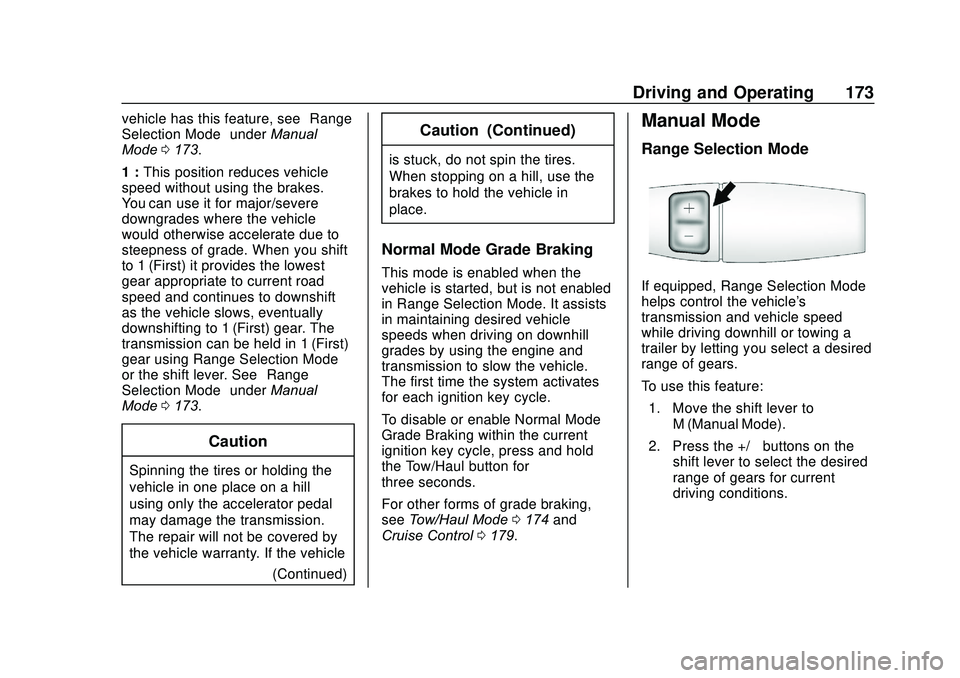
If equipped, Range Selection Mode
helps control the vehicle's
transmission and vehicle speed
while driving downhill or towing a
trailer by letting you select a desired
range of gears.
To use this feature:
1. Move the shift lever to M (Manual Mode).
2. Press the +/− buttons on the
shift lever to select the desired
range of gears for current
driving conditions.
Page 176 of 355
GMC Savana Owner Manual (GMNA-Localizing-U.S./Canada-13882574) -
2020 - CRC - 11/1/19
Driving and Operating 175
Tow/Haul Mode Grade Braking
Tow/Haul Mode Grade Braking is
only enabled while the Tow/Haul
Mode is selected and the vehicle is
not in the Range Selection Mode.
See“Tow/Haul Mode” listed
previously and Manual Mode0173.
Tow/Haul Mode Grade Braking
assists in maintaining desired
vehicle speeds when driving on
downhill grades by using the engine
and transmission to slow the
vehicle.
To disable or enable Tow/Haul Mode
Grade Braking within the current
ignition key cycle, press and hold
the Tow/Haul button for
three seconds.
See Towing Equipment 0207.
For other forms of grade braking,
see Automatic Transmission 0170.
Brakes
Antilock Brake
System (ABS)
The Antilock Brake System (ABS)
helps prevent a braking skid and
maintain steering while
braking hard.
ABS performs a system check when
the vehicle is first driven.
A momentary motor or clicking noise
may be heard while this test is going
on, and the brake pedal may move
slightly. This is normal.
If there is a problem with ABS, this
warning light stays on. See Antilock
Brake System (ABS) Warning Light
0 95. ABS does not change the time
needed to get a foot on the brake
pedal and does not always
decrease stopping distance. If you
get too close to the vehicle ahead,
there will not be enough time to
apply the brakes if that vehicle
suddenly slows or stops. Always
leave enough room ahead to stop,
even with ABS.
Using ABS
Do not pump the brakes. Just hold
the brake pedal down firmly.
Hearing or feeling ABS operate is
normal.
Braking in Emergencies
ABS allows steering and braking at
the same time. In many
emergencies, steering can help
even more than braking.
Page 197 of 355

GMC Savana Owner Manual (GMNA-Localizing-U.S./Canada-13882574) -
2020 - CRC - 11/1/19
196 Driving and Operating
.Vehicles can tow in D (Drive).
Tow/Haul Mode is recommended
for heavier trailers. See Tow/
Haul Mode 0174. If the
transmission downshifts too
often, a lower gear may be
selected using Manual Mode.
See Manual Mode 0173.
If equipped, the following driver
assistance features should be
turned off when towing a trailer:
. Adaptive Cruise Control (ACC)
. Super Cruise Control
. Lane Keep Assist (LKA)
. Park Assist
. Automatic Parking Assist (APA)
. Reverse Automatic
Braking (RAB)
If equipped, the following driver
assistance features should be
turned to alert or off when towing a
trailer:
. Automatic Emergency
Braking (AEB)
. Intelligent Brake Assist (IBA)
. Front Pedestrian Braking (FPB) If equipped with Lane Change Alert
(LCA), the LCA detection zones that
extend back from the side of the
vehicle do not move further back
when a trailer is towed. Use caution
while changing lanes when towing a
trailer.
If equipped with Rear Cross Traffic
Alert (RCTA), use caution while
backing up when towing a trailer, as
the RCTA detection zones that
extend out from the back of the
vehicle do not move further back
when a trailer is towed.
{Warning
To prevent serious injury or death
from carbon monoxide (CO),
when towing a trailer:
. Do not drive with the
liftgate, trunk/hatch,
or rear-most window open.
. Fully open the air outlets on
or under the instrument
panel.
(Continued)
Warning (Continued)
.Adjust the climate control
system to a setting that
brings in only outside air.
See “Climate Control
Systems” in the Index.
For more information about
carbon monoxide, see Engine
Exhaust 0169.
Towing a trailer requires experience.
The combination of the vehicle and
trailer is longer and not as
responsive as the vehicle itself. Get
used to the handling and braking of
the combination by driving on a
level road surface before driving on
public roads.
The trailer structure, the tires, and
the brakes must be all be rated to
carry the intended cargo.
Inadequate trailer equipment can
cause the combination to operate in
an unexpected or unsafe manner.
Before driving, inspect all trailer
hitch parts and attachments, safety
chains, electrical connectors, lamps,
Page 211 of 355

GMC Savana Owner Manual (GMNA-Localizing-U.S./Canada-13882574) -
2020 - CRC - 11/1/19
210 Driving and Operating
controller should be installed by
your dealer or a qualified service
center.
If equipped, wiring provisions for an
aftermarket electric trailer brake
controller are included with the
vehicle as part of the trailer wiring
package. The harness contains the
following circuits:Electric Trailer
Brakes Dark Blue
Battery Feed Red/White
Brake Apply
Signal Light Blue
Ground Black
There are four blunt cut wires under
the floor carpeting in front of the
brake pedal. It will be necessary to
have a technician connect the
12-volt power to the engine
compartment fuse block.
Refer to the aftermarket electric
trailer brake controller owner's
manual to determine wire color
coding of the electric trailer brake controller. The wire colors on the
brake controller may be different
from the vehicle.
Trailer Lamps
Always check all trailer lamps are
working at the beginning of each
trip, and periodically on longer trips.
Turn Signals When Towing a
Trailer
When properly connected, the trailer
turn signals will illuminate to indicate
the vehicle is turning, changing
lanes, or stopping. When towing a
trailer, the arrows on the instrument
cluster will illuminate even if the
trailer is not properly connected or
the bulbs are burned out.
Tow/Haul Mode
Tow/Haul assists when pulling a
heavy trailer or a large or heavy
load. For instructions on how to
enter Tow/Haul mode, see
Tow/Haul
Mode 0174.
Tow/Haul Mode is designed to be
most effective when the vehicle and
trailer combined weight is at least 75% of the vehicle's Gross
Combined Weight Rating (GCWR).
See
“Trailer Weight ”under Trailer
Towing 0200.
Tow/Haul Mode is most useful when
towing a heavy trailer or carrying a
large or heavy load:
. through rolling terrain
. in stop-and-go traffic
. in busy parking lots
Operating the vehicle in Tow/Haul
Mode when lightly loaded or not
towing will not cause damage;
however, it is not recommended and
may result in unpleasant engine and
transmission driving characteristics
and reduced fuel economy.
Trailer Sway
Control (TSC)
Vehicles with StabiliTrak/Electronic
Stability Control (ESC) have a
Trailer Sway Control (TSC) feature.
Trailer sway is unintended
side-to-side motion of a trailer while
towing. If the vehicle is towing a
trailer and the TSC detects that