2020 FORD TRANSIT CONNECT cross traffic
[x] Cancel search: cross trafficPage 8 of 509

Cruise Control
Principle of Operation
...............................203
Using Cruise Control ..................................
203
Using Adaptive Cruise Control ..............
204
Driving Aids
Driver Alert .....................................................
210
Lane Keeping System .................................
212
Blind Spot Information System .............
216
Cross Traffic Alert ........................................
218
Eco .....................................................................
221
Steering ...........................................................
222
Pre-Collision Assist ....................................
223
Load Carrying
Luggage Anchor Points ............................
229
Rear Under Floor Storage ........................
229
Cargo Nets ....................................................
230
Roof Racks and Load Carriers ................
232
Load Limit ......................................................
233
Towing
Towing a Trailer ...........................................
238
Trailer Sway Control ..................................
239
Recommended Towing Weights ..........
239
Essential Towing Checks ..........................
241
Transporting the Vehicle ..........................
244
Towing the Vehicle on Four Wheels .....
245
Driving Hints
Breaking-In ....................................................
247
Reduced Engine Performance ...............
247
Economical Driving ....................................
247
Cold Weather Precautions ......................
248
Driving Through Water .............................
248
Floor Mats .....................................................
248
Roadside Emergencies
Roadside Assistance .................................
250Hazard Flashers
............................................
251
Fuel Shutoff ...................................................
251
Jump Starting the Vehicle .......................
252
Post-Crash Alert System .........................
254
Towing Points ...............................................
254
Customer Assistance
Getting the Services You Need ..............
256
In California (U.S. Only) ............................
257
The Better Business Bureau (BBB) Auto Line Program (U.S. Only) ....................
258
Utilizing the Mediation/Arbitration Program (Canada Only) ......................
259
Getting Assistance Outside the U.S. and Canada .......................................................
259
Ordering Additional Owner's Literature ........................................................................\
.
261
Reporting Safety Defects (U.S. Only) ........................................................................\
.
261
Reporting Safety Defects (Canada Only) ........................................................................\
.
261
Fuses
Fuse Box Locations ....................................
263
Fuse Specification Chart .........................
264
Changing a Fuse .........................................
269
Maintenance
General Information ..................................
270
Opening and Closing the Hood .............
270
Under Hood Overview - 1.5L EcoBlue ........................................................................\
.
272
Under Hood Overview - 2.0L Duratec-HE (MI4)/2.0L Flex Fuel ..............................
273
Under Hood Overview - 2.5L, LHD ........
274
Under Hood Overview - 2.5L, RHD .......
275
Engine Oil Dipstick - 1.5L EcoBlue ........
276
Engine Oil Dipstick - 2.0L Duratec-HE (MI4)/2.0L Flex Fuel/2.5L ...................
276
Engine Oil Check .........................................
276
Oil Change Indicator Reset ......................
277
4
2020 Transit Connect (CHC) Canada/United States of America, CG3739en enUSA, Edition date: 201903, First-Printing Table of Contents
Page 63 of 509

PRINCIPLE OF OPERATION
The system is designed to promote good
driving behaviors using keys that you have
programmed with some restricted settings.
MYKEY SETTINGS
Non-Configurable Settings
Seatbelt Reminder
The audio system mutes when the seatbelt
reminder turns on. The seatbelt reminder
cannot be switched off with a MyKey.
Early Low Fuel
The low fuel level indicator turns on earlier.
Driving and Parking Aids
Parking aids, blind spot information system
and cross traffic alert turn on when you
start the engine and cannot be switched
off with a MyKey.
Pre-collision assist and lane keeping alert
turn on when you start the engine, but can
be switched off with a MyKey.
A new destination in the navigation system
can only be set using voice commands,
when using a MyKey and your vehicle is
moving.
Configurable Settings
You can configure the following settings
after creating a MyKey. See Creating a
MyKey (page 60). Speed Limit WARNING:
Do not set MyKey
maximum speed limit to a limit that will
prevent the driver from maintaining a
safe speed considering posted speed
limits and prevailing road conditions. The
driver is always responsible to drive in
accordance with local laws and
prevailing conditions. Failure to do so
could result in accident or injury.
You can set a speed limit for your vehicle.
Warning messages appear in the
information display and a tone sounds if
your vehicle reaches the set speed. You
cannot override the set speed when using
a MyKey.
Speed Reminder
You can set a speed reminder for your
vehicle. Warning messages appear in the
information display and a tone sounds if
your vehicle exceeds the set speed.
Audio System Volume Limit
The audio system maximum volume is
reduced. A message appears in the
information display if you attempt to
exceed the volume limit. Automatic
volume control turns off.
Emergency Assistance
If you set emergency assistance to be
always on, it cannot be switched off with
a MyKey.
Do Not Disturb
If you set do not disturb to be always on,
it cannot be switched off with a MyKey.
Traction Control
If you set traction control to be always on,
it cannot be switched off with a MyKey.
59
2020 Transit Connect (CHC) Canada/United States of America, CG3739en enUSA, Edition date: 201903, First-Printing MyKey
™
Page 103 of 509
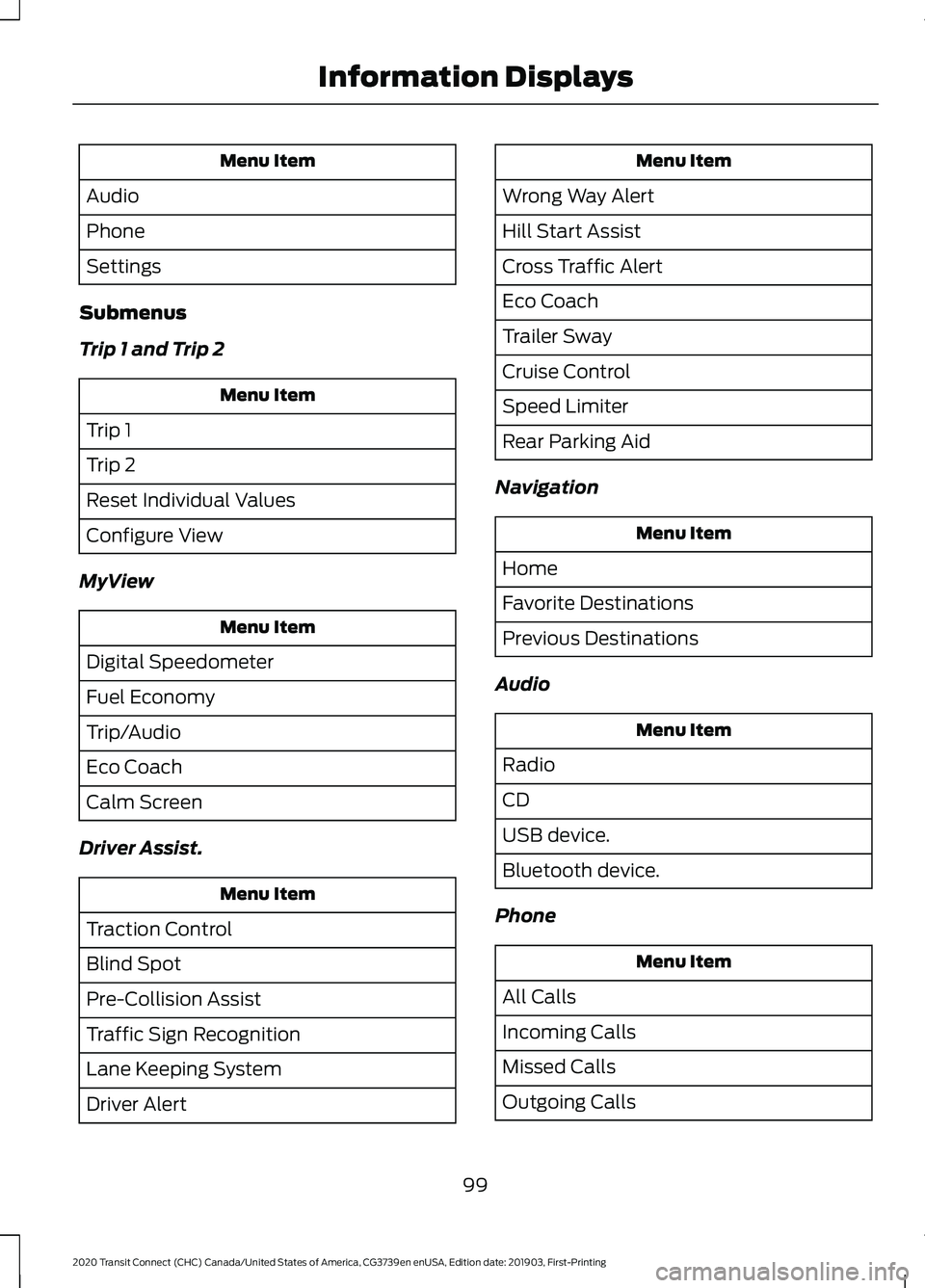
Menu Item
Audio
Phone
Settings
Submenus
Trip 1 and Trip 2 Menu Item
Trip 1
Trip 2
Reset Individual Values
Configure View
MyView Menu Item
Digital Speedometer
Fuel Economy
Trip/Audio
Eco Coach
Calm Screen
Driver Assist. Menu Item
Traction Control
Blind Spot
Pre-Collision Assist
Traffic Sign Recognition
Lane Keeping System
Driver Alert Menu Item
Wrong Way Alert
Hill Start Assist
Cross Traffic Alert
Eco Coach
Trailer Sway
Cruise Control
Speed Limiter
Rear Parking Aid
Navigation Menu Item
Home
Favorite Destinations
Previous Destinations
Audio Menu Item
Radio
CD
USB device.
Bluetooth device.
Phone Menu Item
All Calls
Incoming Calls
Missed Calls
Outgoing Calls
99
2020 Transit Connect (CHC) Canada/United States of America, CG3739en enUSA, Edition date: 201903, First-Printing Information Displays
Page 107 of 509

Blind Spot Information and Cross Traffic Alert Systems
Description
Message
The system has malfunctioned. Have your vehicle checked
as soon as possible.
Blind Spot System Fault
The system sensors are blocked. See Blind Spot Informa-
tion System (page 216).
Blind Spot Not Available
Sensor Blocked See
Manual
You have attached a trailer to your vehicle. The system turns
off.
Blis Deactivated Trailer
Attached
Displays instead of indication arrows when the system
detects a vehicle. Check for approaching traffic.
Cross Traffic Alert
The system has malfunctioned. Have your vehicle checked
as soon as possible.
Cross Traffic System
Fault
The system sensors are blocked. See
Cross Traffic Alert
(page 218).
Cross Traffic Not Avail-
able Sensor Blocked See
Manual
You have attached a trailer to your vehicle. The system turns
off.
Cross Traffic Alert Deac-
tivated Trailer Attached
The system applies the brakes. Check for approaching traffic.
Cross Traffic Alert
Applying Brakes
Brake System Description
Message
The system has malfunctioned. Stop your vehicle in a safe
place. Have your vehicle checked as soon as possible.
Check Brake System
103
2020 Transit Connect (CHC) Canada/United States of America, CG3739en enUSA, Edition date: 201903, First-Printing Information Displays
Page 222 of 509

If the sensors become blocked, a message
may appear in the information display. See
Information Messages (page 100). The
alert indicators remain illuminated but the
system does not alert you.
System Errors
If the system detects a fault, a warning
lamp illuminates and a message displays.
See Information Messages (page 100).
Switching the System On and Off
You can switch the system off using the
information display.
See General
Information (page 98). When you switch
the system off, a warning lamp illuminates
and a message displays. When you switch
the system on or off, the alert indicators
flash twice.
Note: The system remembers the last
setting when you start your vehicle.
Note: The system may not correctly operate
when towing a trailer. For vehicles with a
trailer tow module and tow bar approved
by us, the system turns off when you attach
a trailer. For vehicles with an aftermarket
trailer tow module or tow bar, we
recommend that you switch the system off
when you attach a trailer.
To permanently switch the system off,
contact an authorized dealer. CROSS TRAFFIC ALERT WARNING:
Do not use the cross
traffic alert system as a replacement for
using the interior and exterior mirrors or
looking over your shoulder before
reversing out of a parking space. The
cross traffic alert system is not a
replacement for careful driving. WARNING:
The system may not
operate properly during severe weather
conditions, for example snow, ice, heavy
rain and spray. Always drive with due
care and attention. Failure to take care
may result in a crash.
The system is designed to alert you of
vehicles approaching from the sides behind
your vehicle when you shift into reverse
(R). If you continue to reverse after the
system alerts you, the system is designed
to apply the brakes if it still detects an
approaching vehicle. If the system applies
the brakes, a message appears in the
information display.
Note: The system does not apply the brakes
if you override it by firmly pressing the
accelerator pedal.
Using Cross Traffic Alert
The system is designed to detect vehicles
that approach at a speed between
4 mph
(6 km/h) and 37 mph (60 km/h). Coverage
decreases when the sensors are partially,
mostly or fully obstructed. Slowly reversing
helps increase the coverage area and
effectiveness.
The system turns on when you start the
engine and you shift into reverse (R). The
system turns off when you shift out of
reverse (R).
218
2020 Transit Connect (CHC) Canada/United States of America, CG3739en enUSA, Edition date: 201903, First-Printing Driving Aids
Page 224 of 509

Zone coverage also decreases when
parking at narrow angles. The sensor on
the left-hand side is mostly obstructed and
zone coverage on that side is severely
reduced.
Cross Traffic Alert System Sensors
The sensors are behind the rear bumper
on both sides of your vehicle.
Note:
Keep the sensors free from snow, ice
and large accumulations of dirt.
Note: Do not cover the sensors with bumper
stickers, repair compound or other objects. Note:
Blocked sensors could affect system
performance.
If the sensors are blocked, a message may
appear in the information display when
you shift into reverse (R).
Cross Traffic Alert System
Limitations
The system may not correctly operate
when any of the following occur:
• The sensors are blocked.
• Adjacently parked vehicles or objects
are obstructing the sensors.
• Vehicles approach at speeds less than
4 mph (6 km/h) or greater than 37 mph
(60 km/h).
• The vehicle speed is greater than 7 mph
(12 km/h)
.
• You reverse out of an angled parking
space.
Switching Cross Traffic Alert On or Off
To switch cross traffic alert on or off, use the information display controls on the
steering wheel to select the following: Action
Menu Item
Press the menu button.
Driver Assist.
Press the
OK button.
Cross Traffic Alert
Note: If you temporarily switch the system
off, it turns on the next time you switch the
ignition on.
Note: The system may not correctly operate
when towing a trailer. For vehicles with a
trailer tow module and tow bar approved
by us, the system turns off when you attach
a trailer. For vehicles with an aftermarket
trailer tow module or tow bar, we
recommend that you switch the system off
when you attach a trailer. To permanently switch the system off,
contact an authorized dealer.
Cross Traffic Alert Indicator When the system detects an
approaching vehicle a tone
sounds, an indicator illuminates
in the relevant exterior mirror and arrows
appear in the information display to show
which side the approaching vehicle is
coming from.
220
2020 Transit Connect (CHC) Canada/United States of America, CG3739en enUSA, Edition date: 201903, First-Printing Driving AidsE205199 E268294
Page 225 of 509

Note:
If arrows do not display, a message
appears in the information display.
If the system malfunctions, an indicator
illuminates in the instrument cluster and
a message appears in the information
display. Have your vehicle checked as soon
as possible. Note:
In exceptional conditions, the system
could alert you or apply the brakes, even
when there is nothing in the detection zone,
for example a vehicle passing further away
from your vehicle.
Cross Traffic Alert Information Messages Action
Message
Displays instead of indication arrows when the system
detects a vehicle. Check for approaching traffic.
Cross Traffic Alert
Displays if the cross traffic alert system sensors are blocked.
Clean the sensors. If the message continues to appear, have
your vehicle checked as soon as possible.
Cross Traffic Not Avail-
able Sensor Blocked See
Manual
The system has malfunctioned. Have your vehicle checked
as soon as possible.
Cross Traffic System
Fault
Displays if you attach a trailer to your vehicle.
Cross Traffic Alert Deac-
tivated Trailer Attached
Displays if the system applies the brakes. Check for
approaching traffic.
Cross Traffic Alert
Applying Brakes
ECO
Principle of Operation
The system is designed to monitor certain
driving characteristics to help you drive
more efficiently. See Economical Driving
(page 247).
Note: The efficiency levels do not result in
a defined fuel consumption figure. See Fuel
Consumption
(page 163).
Note: The system only indicates the
efficiency level for the current trip. The
system resets each time you switch the
ignition on. Eco Mode System Display
You can view the instantaneous efficiency
level or the trip summary in the information
display.
Instantaneous Efficiency Level
The display ring increases as the
instantaneous efficiency level increases
and illuminates when it reaches maximum
efficiency. The level continuously updates
to indicate the efficiency level for the
current trip.
221
2020 Transit Connect (CHC) Canada/United States of America, CG3739en enUSA, Edition date: 201903, First-Printing Driving Aids
Page 496 of 509

Clearing All MyKeys.......................................63
MyKey Information Messages......................... 63
Climate Control..............................................114
Cold Weather Precautions.......................248
Connecting a Bluetooth Device - Vehicles Without: SYNC 3......................373
Pairing a Device................................................... 373
Connecting the Vehicle to a Mobile Network........................................................362
About the Modem............................................. 362
Enabling the Modem Using FordPass.......................................................... 362
Enabling the Modem Using the Touchscreen................................................... 362
Connecting the Vehicle to a Wi-Fi Network - Vehicles With: SYNC
3.......................................................................362
Coolant Check See: Engine Coolant Check............................ 278
Cornering Lamps............................................87
Crash Sensors and Airbag Indicator
.......50
Creating a MyKey - Vehicles With: Push Button Start
..................................................60
MyKey Information Messages.......................... 61
Creating a MyKey - Vehicles Without: Push Button Start.......................................60
MyKey Information Messages......................... 60
Creating a Wi-Fi Hotspot - Vehicles With: SYNC 3
.........................................................365
Connecting a Device to the Wi-Fi
Hotspot............................................................ 366
Finding the Wi-Fi Hotspot Name and Password......................................................... 366
Creating a Wi-Fi Hotspot - Vehicles Without: SYNC 3.......................................365
Connecting a Device to the Wi-Fi Hotspot............................................................ 365
Finding the Wi-Fi Hotspot Name and Password......................................................... 365
Cross Traffic Alert.........................................218 Cross Traffic Alert Indicator........................... 220
Cross Traffic Alert Information Messages.......................................................... 221
Cross Traffic Alert System Limitations...................................................... 220
Cross Traffic Alert System Sensors............220
Switching Cross Traffic Alert On or Off...................................................................... 220Using Cross Traffic Alert...................................
218
Cruise Control
...............................................203
Principle of Operation...................................... 203
Cruise control See: Using Cruise Control............................... 203
Customer Assistance.................................256
D
Data Recording
..................................................9
911 Assist Privacy Notice..................................... 13
Comfort, Convenience and Entertainment Data........................................................................\
11
Event Data................................................................. 11
Service Data............................................................ 10
Services That Third Parties Provide...............12
Services That We Provide.................................. 12
Vehicles With a Modem...................................... 12
Vehicles With SYNC............................................. 12
Daytime Running Lamps............................84 Type 1 - Conventional
(Non-Configurable)....................................... 84
Type 2 - Configurable......................................... 84
Declaration of Conformity - Vehicles With: SYNC 3
..............................................474
Radio Frequency Statement......................... 474
Declaration of Conformity - Vehicles With: Wireless Accessory
Charging
.......................................................474
Declaration of Conformity - Vehicles Without: SYNC 3.......................................473
Radio Frequency Statement......................... 473
Diesel Particulate Filter..............................170 Diesel Particulate Filter Automatic
Regeneration..................................................... 171
Diesel Particulate Filter Manual Regeneration.................................................... 172
On-Board Diagnostics System...................... 170
Direction Indicators
........................................87
Doors and Locks.............................................66
Drive Belt Routing - 1.5L EcoBlue..........295
Drive Belt Routing - 2.0L Duratec-HE (MI4)/2.0L Flex Fuel...............................295
Drive Belt Routing - 2.5L...........................295
Driver Alert
......................................................210
Driver Alert System Display.............................. 211
Driver Alert System Messages....................... 212
Driver Alert System Warnings........................ 210
492
2020 Transit Connect (CHC) Canada/United States of America, CG3739en enUSA, Edition date: 201903, First-Printing Index