2020 FORD TRANSIT CONNECT seats
[x] Cancel search: seatsPage 303 of 509

CLEANING THE WINDOWS AND
WIPER BLADES
Car wash chemicals and environmental
fallout can result in windshield and wiper
blade contamination. Dirty windshield and
wipers will result in poor windshield wiper
operation. Keep the windshield and wiper
blades clean to maintain windshield wiper
performance.
To clean the windshield and wiper blades:
•
Clean the windshield with a
non-abrasive glass cleaner. When
cleaning the interior of the windshield,
avoid getting any glass cleaner on the
instrument panel or door panels. Wipe
any glass cleaner off these surfaces
immediately.
• For windshields contaminated with
tree sap, chemicals, wax or bugs, clean
the entire windshield using steel wool
(no greater than 0000 grade) in a
circular motion and rinse with water.
• Clean the wiper blades with isopropyl
rubbing alcohol or windshield washer
concentrate.
Note: Do not use razor blades or other
sharp objects to clean or remove decals
from the inside of the heated rear window.
The vehicle warranty does not cover
damage caused to the heated rear window
grid lines.
CLEANING THE INTERIOR
Note: Do not allow air fresheners and hand
sanitizers to spill on interior surfaces. If a
spill occurs, wipe off immediately. Damage
may not be covered by the vehicle Warranty.
Note: Do not use household cleaning
products or glass cleaners, which can stain
and discolor the fabric and affect the flame
retardant abilities of the seat materials. Note:
We recommend distilled water when
cleaning.
Fabric, Carpets, Cloth Seats,
Headliners and Floor Mats
Note: Avoid soaking any surface. Do not
use excessive amounts of water to clean
the vehicle interior.
Note: To avoid spots or discoloration, clean
the entire surface.
To clean:
• Remove dust and loose dirt with a
vacuum cleaner or brush.
• Wipe the surface with a soft, damp
cloth and a mild soap and water
solution. Dry the area with a clean, soft
cloth.
• If a ring forms on the fabric after spot
cleaning, clean the entire area
immediately, but do not soak or the
ring will set.
Seatbelts WARNING: Do not use cleaning
solvents, bleach or dye on the vehicle's
seatbelts, as these actions may weaken
the belt webbing. WARNING:
On vehicles equipped
with seat-mounted airbags, do not use
chemical solvents or strong detergents.
Such products could contaminate the
side airbag system and affect
performance of the side airbag in a crash.
Note: Do not use abrasives, or chemical
solvents to clean them.
Note: Do not allow moisture to penetrate
the seatbelt retractor mechanism.
Cleaning may safely be carried out using
mild soap and water. Let them dry
naturally, away from artificial heat.
299
2020 Transit Connect (CHC) Canada/United States of America, CG3739en enUSA, Edition date: 201903, First-Printing Vehicle Care
Page 304 of 509

Leather Interior (If Equipped)
Note: Follow the same procedure as
cleaning leather seats for cleaning leather
instrument panels and leather interior trim
surfaces.
For routine cleaning, wipe the surface with
a soft, damp cloth and a mild soap and
water solution. Dry the area with a clean,
soft cloth.
For cleaning and removing stains such as
dye transfer, use a leather cleaning product
for automotive interiors.
Do not use the following products as these
may damage the leather:
• Oil and petroleum or silicone-based
leather conditioners.
• Household cleaners.
• Alcohol solutions.
• Solvents or cleaners intended
specifically for rubber, vinyl and
plastics.
Suede Micro Fiber Fabric
(If Equipped)
Note: Do not steam clean.
Note: To avoid spots or discoloration, clean
the entire surface.
Do not use the following products:
• Leather care products.
• Household cleaners.
• Alcoholic solutions.
• Spot removers.
• Shoe polish. To clean:
•
Remove dust and loose dirt with a
vacuum cleaner.
• Wipe the surface with a soft, damp
cloth and a mild soap and water
solution. Dry the area with a clean, soft
cloth.
• If a ring forms on the fabric after spot
cleaning, clean the entire area
immediately, but do not soak or the
ring will set.
Instrument Cluster Screens, LCD
Screens and Radio Screens
Note: Do not use abrasives, alcoholic
solvents or chemical solvents to clean the
instrument cluster screens, LCD screens or
radio screens. These cleaning products can
damage the screens.
Clean the instrument panel and cluster
lens with a clean, damp and soft cloth,
then use a clean, dry and soft cloth to dry
these areas.
Do not spray any liquid directly onto the
screens.
Do not use a microfiber cloth to clean the
bezel around the display screens as it could
damage the surface.
Rear Windows
Note: Do not use any abrasive materials to
clean the interior of the rear windows.
Note: Do not install stickers or labels to the
interior of the rear windows.
Mirrors
Do not clean the housing or glass of any
mirror with harsh abrasives, fuel or other
petroleum or ammonia-based cleaning
products.
300
2020 Transit Connect (CHC) Canada/United States of America, CG3739en enUSA, Edition date: 201903, First-Printing Vehicle Care
Page 305 of 509

Storage Compartments, Cup
Holders and Ashtrays
To clean:
•
Take out any removable inserts.
• Wipe the surface with a soft, damp
cloth and a mild soap and water
solution. Dry the area with a clean, soft
cloth.
CLEANING THE INSTRUMENT
PANEL AND INSTRUMENT
CLUSTER LENS WARNING: Do not use chemical
solvents or strong detergents when
cleaning the steering wheel or
instrument panel to avoid contamination
of the airbag system.
Note: Follow the same procedure as
cleaning leather seats for cleaning leather
instrument panels and leather interior trim
surfaces. See
Cleaning Leather Seats
(page 301).
Clean the instrument panel and cluster
lens with a clean, damp and soft cloth,
then use a clean, dry and soft cloth to dry
these areas.
• Avoid cleaners or polishes that increase
the gloss of the upper portion of the
instrument panel. The dull finish in this
area helps protect you from
undesirable windshield reflection.
• Do not use any household cleaning
products or glass cleaners as these
may damage the finish of the
instrument panel, interior trim and
cluster lens. •
Wash or wipe your hands clean if you
have been in contact with certain
products such as insect repellent and
suntan lotion to avoid possible damage
to the interior painted surfaces.
• Do not allow air fresheners and hand
sanitizers to spill onto interior surfaces.
If a spill occurs, wipe off immediately.
Your warranty may not cover these
damages.
If a staining liquid like coffee or juice has
been spilled on the instrument panel or on
interior trim surfaces:
1. Wipe up spilled liquid using a clean, soft cloth as quickly as possible.
2. Use Motorcraft Premium Leather and Vinyl Cleaner or a commercially
available leather cleaning product for
automotive interiors. Test any cleaner
or stain remover on an inconspicuous
area.
3. Alternatively, wipe the surface with a clean, soft cloth and a mild soap and
water solution. Dry the area with a
clean, soft cloth.
4. If necessary, apply more soap and water solution or cleaning product to
a clean, soft cloth and press it onto the
soiled area. Allow this to set at room
temperature for 30 minutes.
5. Remove the soaked cloth, then with a clean, damp cloth, use a rubbing
motion for 60 seconds on the soiled
area.
6. Dry the area with a clean, soft cloth.
CLEANING LEATHER SEATS
(IF
EQUIPPED)
Note: Follow the same procedure as
cleaning leather seats for cleaning leather
instrument panels and leather interior trim
surfaces.
301
2020 Transit Connect (CHC) Canada/United States of America, CG3739en enUSA, Edition date: 201903, First-Printing Vehicle Care
Page 384 of 509
Note:
On some models, SEEK NEXT may
be combined with PHONE REJECT and
SEEK PREVIOUS may be combined with
PHONE ACCEPT.
M:
Touch the control repeatedly to switch
between media sources (modes).
See
Steering Wheel (page 78).
Using Your Bezel Controls
Depending on your vehicle and option
package, you may also have these controls
on your instrument panel:
• Power:
Switch the audio system on
and off.
• VOL:
Control the volume of playing
audio.
• Seek
and Tune: se as you normally
would in audio modes.
• Eject:
Eject a CD from the audio
system.
• SOURCE
or MEDIA: Press repeatedly
to advance through available media
modes.
• SOUND:
Press to access the Sound
menu where you can adjust sound and
other audio settings.
• 1-6:
Press and hold to store or press to
select an AM, FM or SIRIUS memory
preset. See Audio System (page 367).
• DISP:
Switch the display on or off. You
can also touch the screen to switch the
display back on.
• Temperature, fan and climate
control buttons:
Control the
temperature, fan speed or settings of
the climate control system. See
Climate Control
(page 114). Safety Information WARNING:
Driving while
distracted can result in loss of vehicle
control, crash and injury. We strongly
recommend that you use extreme
caution when using any device that may
take your focus off the road. Your
primary responsibility is the safe
operation of your vehicle. We
recommend against the use of any
hand-held device while driving and
encourage the use of voice-operated
systems when possible. Make sure you
are aware of all applicable local laws
that may affect the use of electronic
devices while driving.
• Do not attempt to service or repair the
system. Have an authorized dealer
check your vehicle.
• Do not operate playing devices if the
power cords or cables are broken, split
or damaged. Place cords and cables
out of the way, so they do not interfere
with the operation of pedals, seats,
compartments or safe driving abilities.
• Do not leave playing devices in your
vehicle during extreme conditions as it
could cause them damage. See your
device's user guide for further
information.
• For your safety, some SYNC 3 functions
are speed-dependent. Their use is
limited to when your vehicle is traveling
at speeds under 3 mph (5 km/h). Make
sure that you review your device's
manual before using it with SYNC 3.
Speed-restricted Features
Some features of this system may be too
difficult to use while your vehicle is moving
so they are restricted from use unless your
vehicle is stationary.
380
2020 Transit Connect (CHC) Canada/United States of America, CG3739en enUSA, Edition date: 201903, First-Printing SYNC™ 3
Page 450 of 509
ELECTROMAGNETIC
COMPATIBILITY
WARNING: Do not place objects
or mount equipment on or near the
airbag cover, on the side of the seatbacks
(of the front seats), or in front seat areas
that may come into contact with a
deploying airbag. Failure to follow these
instructions may increase the risk of
personal injury in the event of a crash. WARNING:
Do not fasten antenna
cables to original vehicle wiring, fuel
pipes and brake pipes. WARNING:
Keep antenna and
power cables at least 4 in (10 cm) from
any electronic modules and airbags.
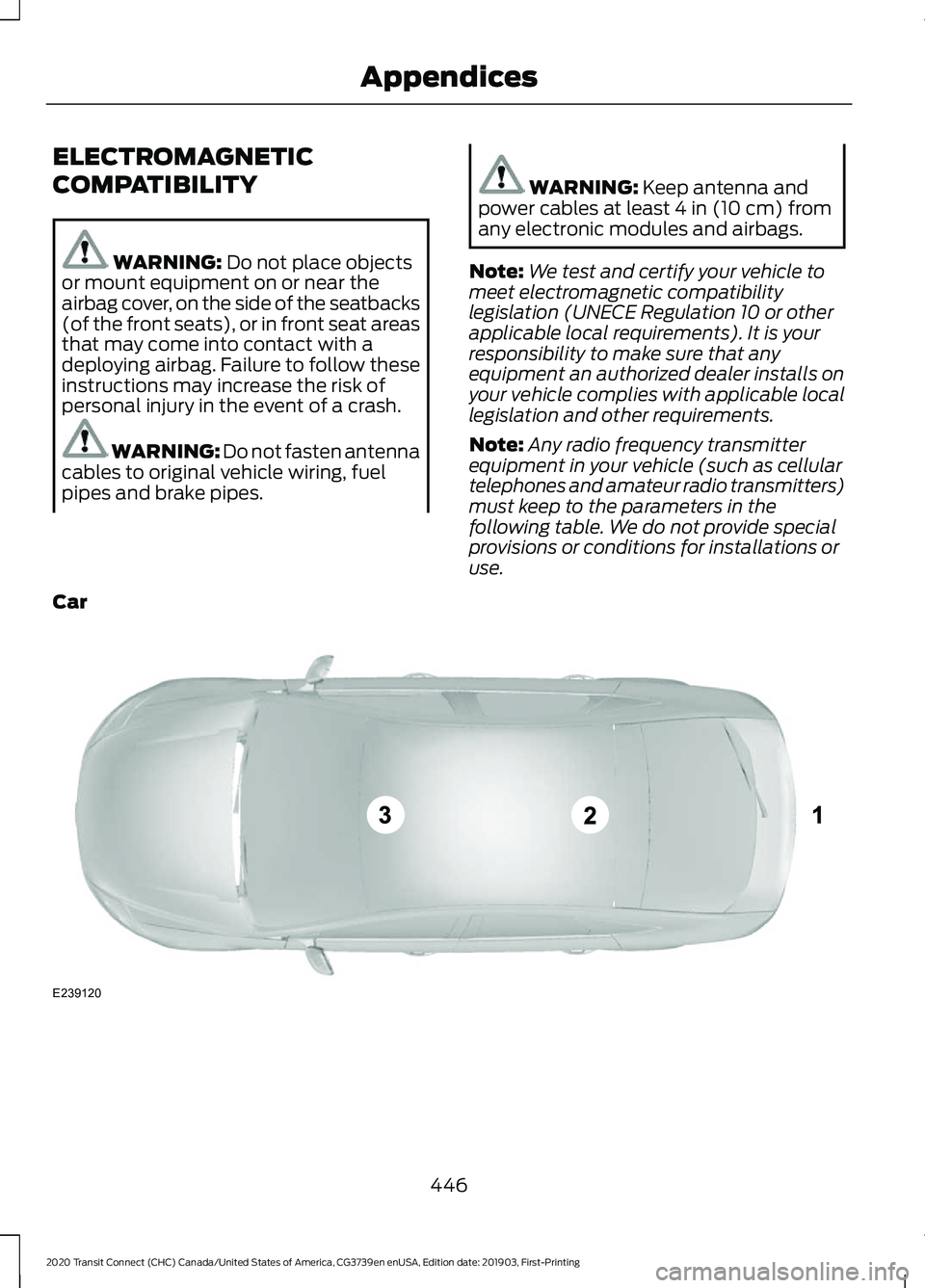
Note: We test and certify your vehicle to
meet electromagnetic compatibility
legislation (UNECE Regulation 10 or other
applicable local requirements). It is your
responsibility to make sure that any
equipment an authorized dealer installs on
your vehicle complies with applicable local
legislation and other requirements.
Note: Any radio frequency transmitter
equipment in your vehicle (such as cellular
telephones and amateur radio transmitters)
must keep to the parameters in the
following table. We do not provide special
provisions or conditions for installations or
use.
Car 446
2020 Transit Connect (CHC) Canada/United States of America, CG3739en enUSA, Edition date: 201903, First-Printing AppendicesE239120
Page 494 of 509

Using a Cell Phone..............................................
371
Autolamps........................................................83
Windshield Wiper Activated
Headlamps........................................................ 83
Automatic Climate Control........................115 Directing Air to the Footwell Air Vents........116
Directing Air to the Instrument Panel Air
Vents................................................................... 116
Directing Air to the Windshield Air Vents................................................................... 116
Setting the Blower Motor Speed................... 116
Setting the Temperature.................................. 116
Switching Auto Mode On and Off.................115
Switching Maximum Cooling On and Off........................................................................\
. 115
Switching Maximum Defrost On and Off........................................................................\
. 115
Switching the Air Conditioning On and Off........................................................................\
. 115
Switching the Climate Control On and Off........................................................................\
. 115
Switching the Recirculated Air On and Off........................................................................\
. 115
Automatic High Beam Control.................84 Automatic High Beam Control Information
Messages........................................................... 86
Automatic High Beam Indicator.................... 86
Overriding Automatic High Beam Control................................................................ 86
Switching Automatic High Beam Control On or Off............................................................. 85
Automatic Transmission - 6-Speed Automatic Transmission
.........................176
Brake Shift Interlock........................................... 176
Selector Lever Positions................................... 176
SelectShift™........................................................ 176
Automatic Transmission - 8-Speed Automatic Transmission.........................178
Brake Shift Interlock.......................................... 178
Selector Lever Positions................................... 178
SelectShift™........................................................ 178
Automatic Transmission Fluid Check.............................................................282
Auto-Start-Stop
............................................152
Information Messages...................................... 153
Principle of Operation....................................... 152
Replacing the Battery........................................ 153
Switching the System On and Off................153 Using Auto-Start-Stop.....................................
152
Autowipers........................................................79 Settings................................................................... 80
Auxiliary Power Points................................136 12 Volt DC Power Point..................................... 136
B
Battery See: Changing the 12V Battery..................... 284
Blind Spot Information System..............216 ........................................................................\
........... 216
Switching the System On and Off...............218
System Errors....................................................... 218
Using the Blind Spot Information System................................................................ 217
BLIS See: Blind Spot Information System...........216
Bonnet Lock See: Opening and Closing the Hood..........270
Booster Seats..................................................30 Types of Booster Seats...................................... 30
Brake Fluid Check
........................................283
Brakes................................................................181 General Information........................................... 181
Breaking-In.....................................................247
Bulb Specification Chart
..........................360
C
Cabin Air Filter................................................119
Capacities and Specifications - 1.5L EcoBlue........................................................345
Air Conditioning System................................. 345
Automatic Transmission................................ 349
Brake System...................................................... 349
Diesel Exhaust Fluid......................................... 348
Engine.................................................................... 346
Fuel Tank.............................................................. 348
Grease.................................................................... 350
Locks...................................................................... 350
Washer Reservoir............................................... 348
Capacities and Specifications - 2.0L Duratec-HE (MI4)/2.0L Flex
Fuel................................................................350
Air Conditioning System................................... 351
Automatic Transmission................................. 354
Brake System...................................................... 353
490
2020 Transit Connect (CHC) Canada/United States of America, CG3739en enUSA, Edition date: 201903, First-Printing Index
Page 495 of 509

Engine.....................................................................
351
Fuel Tank............................................................... 353
Grease.................................................................... 354
Locks...................................................................... 354
Washer Reservoir............................................... 353
Capacities and Specifications - 2.5L.................................................................355
Air Conditioning System................................. 355
Automatic Transmission................................. 359
Brake System...................................................... 358
Engine.................................................................... 356
Fuel Tank.............................................................. 358
Grease................................................................... 360
Locks...................................................................... 359
Washer Reservoir............................................... 358
Capacities and Specifications................337
Cargo Nets.....................................................230
Installing the Net............................................... 230
Removing the Net.............................................. 232
Car Wash See: Cleaning the Exterior............................... 297
Catalytic Converter
......................................166
On-Board Diagnostics System..................... 166
Changing a Bulb..........................................288 Central High Mounted Brake Lamp............292
Front Fog Lamps................................................. 291
Headlamp............................................................ 289
Interior Lamps..................................................... 292
License Plate Lamp.......................................... 292
Rear Lamps........................................................... 291
Side Direction Indicator.................................. 290
Changing a Fuse
..........................................269
Fuse Types........................................................... 269
General Information......................................... 269
Passenger Compartment Fuse Box...........269
Changing a Road Wheel...........................330 Changing a Road Wheel...................................331
Dissimilar Spare Wheel and Tire Assembly
Information..................................................... 330
Stowing the Flat or Spare Tire...................... 334
Changing the 12V Battery
.........................284
Changing the Engine Air Filter - 2.0L Duratec-HE (MI4)/2.0L Flex Fuel, 1.5L
EcoBlue........................................................293
Changing the Engine Air Filter - 2.5L
................................................................294
Changing the Front Wiper Blades.........285 Changing the Rear Wiper Blades -
Vehicles With: Manual Liftgate...........286
Changing the Rear Wiper Blades - Vehicles With: Rear Cargo Doors........287
Changing the Wi-Fi Hotspot Name or Password - Vehicles With: SYNC
3......................................................................366
Changing the Wi-Fi Hotspot Name or Password - Vehicles Without: SYNC
3......................................................................366
Checking MyKey System Status...............63
Checking the Wiper Blades
.....................285
Child Restraint and Seatbelt Maintenance..................................................41
Child Restraint Positioning.........................32
Child Safety
.......................................................21
General Information............................................. 21
Child Safety Locks..........................................33 Left-Hand Side...................................................... 34
Right-Hand Side................................................... 34
Cigar Lighter
...................................................136
Cleaning Leather Seats..............................301
Cleaning Products
.......................................296
Cleaning the Exterior..................................297 Cleaning the Headlamps................................ 297
Exterior Chrome Parts..................................... 298
Exterior Plastic Parts........................................ 298
Stripes or Graphics........................................... 298
Underbody........................................................... 298
Under Hood......................................................... 298
Cleaning the Instrument Panel and Instrument Cluster Lens.........................301
Cleaning the Interior...................................299 Fabric, Carpets, Cloth Seats, Headliners
and Floor Mats............................................... 299
Instrument Cluster Screens, LCD Screens and Radio Screens...................................... 300
Leather Interior.................................................. 300
Mirrors................................................................... 300
Rear Windows.................................................... 300
Seatbelts.............................................................. 299
Storage Compartments, Cup Holders and Ashtrays............................................................ 301
Suede Micro Fiber Fabric............................... 300
Cleaning the Wheels..................................302
Cleaning the Windows and Wiper Blades...........................................................299
491
2020 Transit Connect (CHC) Canada/United States of America, CG3739en enUSA, Edition date: 201903, First-Printing Index
Page 498 of 509

Ford Protect...................................................426
Ford Protect Extended Service Plan
(CANADA ONLY)........................................... 427
Ford Protect Extended Service Plans (U.S. Only).................................................................. 426
Front Fog Lamps............................................86 Front Fog Lamp Indicator................................. 86
Switching the Front Fog Lamps On or Off........................................................................\
. 86
Front Parking Aid..........................................189 Front Parking Aid Information
Messages........................................................... 191
Object Distance Indicator............................... 190
Front Passenger Sensing System............45
Front Wiper Blades See: Changing the Front Wiper Blades......285
Fuel and Refueling.......................................154
Fuel Consumption
........................................163
Advertised Capacity.......................................... 163
Fuel Economy...................................................... 163
Fuel Filler Funnel Location........................159
Fuel Quality - Diesel....................................154 Biodiesel................................................................ 156
Diesel Fuel Additives ......................................... 157
Fuel Requirements - Choosing The Right Fuel: Vehicles Operated Where Ultra Low
Sulfur Diesel Fuel Is Not Required ..........155
Fuel Requirements - Choosing The Right Fuel: Vehicles Operated Where Ultra Low
Sulfur Diesel Fuel Is Required (United
States/Canada/Puerto Rico/U.S. Virgin
Islands And Other Locales) ...................... 154
Fuel Quality - E85........................................158 Choosing the Right Fuel - Flex Fuel
Vehicles............................................................. 158
Switching Between E85 and Gasoline............................................................ 159
Fuel Quality - Gasoline...............................157 Choosing the Right Fuel................................... 157
Fuel Shutoff....................................................251 Ignition Switch..................................................... 251
Keyless Starting................................................... 251
Fuse Box Locations
.....................................263
Engine Compartment Fuse Box................... 263
Passenger Compartment Fuse Box............263
Fuses................................................................263
Fuse Specification Chart..........................264 Engine Compartment Fuse Box................... 264Passenger Compartment Fuse Box............267
G
Gauges...............................................................93 Engine Coolant Temperature Gauge............94
Fuel Gauge.............................................................. 93
Information Display............................................. 93
Gearbox See: Transmission............................................... 176
General Information on Radio Frequencies...................................................54
General Maintenance Information.......428 Multi-Point Inspection..................................... 430
Owner Checks and Services.......................... 429
Protecting Your Investment........................... 428
Why Maintain Your Vehicle?......................... 428
Why Maintain Your Vehicle at Your Dealership?..................................................... 428
Getting Assistance Outside the U.S. and Canada.........................................................259
Getting the Services You Need...............256 Away From Home.............................................. 256
Global Opening
..............................................90
H
Handbrake See: Parking Brake............................................. 182
Hazard Flashers
.............................................251
Headlamp Adjusting See: Adjusting the Headlamps..................... 287
Headlamp Exit Delay....................................84
Headrest See: Head Restraints......................................... 120
Head Restraints
............................................120
Adjusting the Head Restraint.......................... 121
Heated Exterior Mirrors
................................119
Heated Rear Window...................................118
Heated Seats..................................................135
Heated Windshield.......................................118
Heating See: Climate Control.......................................... 114
Hill Start Assist..............................................182 Switching the System On and Off...............183
Using Hill Start Assist....................................... 183
494
2020 Transit Connect (CHC) Canada/United States of America, CG3739en enUSA, Edition date: 201903, First-Printing Index