2020 FORD TRANSIT CONNECT transmission
[x] Cancel search: transmissionPage 181 of 509
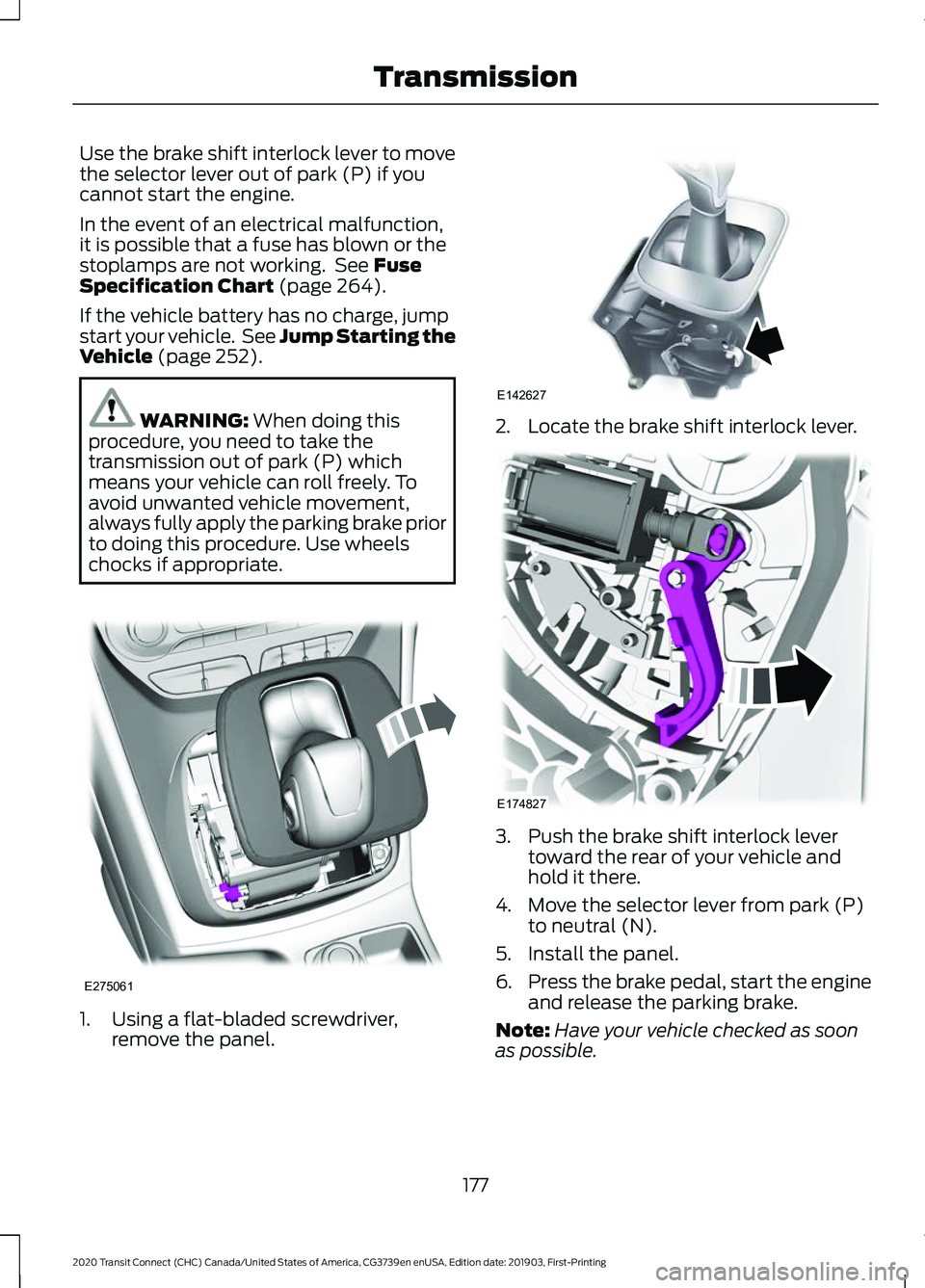
Use the brake shift interlock lever to move
the selector lever out of park (P) if you
cannot start the engine.
In the event of an electrical malfunction,
it is possible that a fuse has blown or the
stoplamps are not working. See Fuse
Specification Chart (page 264).
If the vehicle battery has no charge, jump
start your vehicle. See Jump Starting the
Vehicle
(page 252). WARNING:
When doing this
procedure, you need to take the
transmission out of park (P) which
means your vehicle can roll freely. To
avoid unwanted vehicle movement,
always fully apply the parking brake prior
to doing this procedure. Use wheels
chocks if appropriate. 1. Using a flat-bladed screwdriver,
remove the panel. 2. Locate the brake shift interlock lever.
3. Push the brake shift interlock lever
toward the rear of your vehicle and
hold it there.
4. Move the selector lever from park (P) to neutral (N).
5. Install the panel.
6. Press the brake pedal, start the engine
and release the parking brake.
Note: Have your vehicle checked as soon
as possible.
177
2020 Transit Connect (CHC) Canada/United States of America, CG3739en enUSA, Edition date: 201903, First-Printing TransmissionE275061 E142627 E174827
Page 182 of 509

AUTOMATIC TRANSMISSION
- 8-SPEED AUTOMATIC
TRANSMISSION
WARNING: Do not apply the brake
pedal and accelerator pedal
simultaneously. Applying both pedals
simultaneously for more than a few
seconds will limit engine performance,
which may result in difficulty maintaining
speed in traffic and could lead to serious
injury. WARNING:
When your vehicle is
stationary, keep the brake pedal fully
pressed when shifting gears. Failure to
follow this instruction could result in
personal injury, death or property
damage.
Selector Lever Positions
The instrument cluster displays the current
gear.
Park (P)
In park (P), power is not transmitted to the
driven wheels and the transmission is
locked. You can start the engine with the
transmission in this position.
Shift into park (P) only when your vehicle
is stationary.
Reverse (R)
Shift into reverse (R) only when your
vehicle is stationary and the engine is at
idle speed. Neutral (N) WARNING:
In neutral (N) your
vehicle has the ability to roll freely. If you
intend to leave your vehicle, make sure
you apply the parking brake.
In neutral (N), power is not transmitted to
the driven wheels but the transmission is
not locked. You can start the engine with
the transmission in this position.
Drive (D)
Drive (D) is the normal position for driving.
Manual (M)
In manual (M), you can upshift or
downshift using the buttons on the
selector lever.
SelectShift™
About SelectShift™
Use this feature to upshift or downshift
using the buttons on the selector lever.
Using SelectShift™
Shift into manual (M) to switch the feature
on.
• Press the
+ button to upshift.
• Press the
– button to downshift.
Shift into another gear to switch the
feature off.
Brake Shift Interlock
About Brake Shift Interlock
Brake shift interlock prevents you from
shifting out of park (P) when you have
switched the ignition on and not pressed
the brake pedal.
178
2020 Transit Connect (CHC) Canada/United States of America, CG3739en enUSA, Edition date: 201903, First-Printing Transmission
Page 183 of 509

Shifting Out of Park (P)
WARNING: Do not drive your
vehicle until you verify that the
stoplamps are working. WARNING:
If the parking brake is
fully released, but the brake warning
lamp remains illuminated, the brakes
may not be working properly. Have your
vehicle checked as soon as possible.
Use the brake shift interlock lever to move
the selector lever out of park (P) if you
cannot start the engine.
In the event of an electrical malfunction,
it is possible that a fuse has blown or the
stoplamps are not working. See
Fuse
Specification Chart (page 264).
If the vehicle battery has no charge, jump
start your vehicle. See Jump Starting the
Vehicle
(page 252). WARNING:
When doing this
procedure, you need to take the
transmission out of park (P) which
means your vehicle can roll freely. To
avoid unwanted vehicle movement,
always fully apply the parking brake prior
to doing this procedure. Use wheels
chocks if appropriate. 1. Using a flat-bladed screwdriver,
remove the panel. 2. Locate the brake shift interlock lever.
179
2020 Transit Connect (CHC) Canada/United States of America, CG3739en enUSA, Edition date: 201903, First-Printing TransmissionE275061 E142627
Page 184 of 509

3. Push the brake shift interlock lever
toward the rear of your vehicle and
hold it there.
4. Move the selector lever from park (P) to neutral (N).
5. Install the panel.
6. Press the brake pedal, start the engine
and release the parking brake.
Note: Have your vehicle checked as soon
as possible.
180
2020 Transit Connect (CHC) Canada/United States of America, CG3739en enUSA, Edition date: 201903, First-Printing TransmissionE174827
Page 185 of 509

GENERAL INFORMATION
Wet brakes result in reduced braking
efficiency. Gently press the brake pedal a
few times when driving from a car wash or
standing water to dry the brakes.
Note:
Occasional brake noise is normal. If
a metal-to-metal, continuous grinding or
continuous squeal sound is present, the
brake linings may be worn-out. Have the
system checked by an authorized dealer. If
your vehicle has continuous vibration or
shudder in the steering wheel while braking,
have it checked by an authorized dealer.
Note: Brake dust may accumulate on the
wheels, even under normal driving
conditions. Some dust is inevitable as the
brakes wear and does not contribute to
brake noise. See Cleaning the Wheels
(page 302).
Note: Depending on applicable laws and
regulations in the country for which your
vehicle was originally built, the brake lamps
could flash during heavy braking. Following
this, the hazard lights could also flash when
your vehicle comes to a stop.
Brake Over Accelerator
In the event that the accelerator pedal
becomes stuck or entrapped, apply steady
and firm pressure to the brake pedal to
slow your vehicle and reduce engine
power. If you experience this condition,
apply the brakes and bring your vehicle to
a safe stop. Move the transmission to park
(P), switch the engine off and apply the
parking brake. Inspect the accelerator
pedal for any interference. If none are
found and the condition persists, have your
vehicle towed to the nearest authorized
dealer. Brake Assist
Brake assist detects when you rapidly
brake by measuring the rate at which you
press the brake pedal. It provides
maximum braking efficiency as long as you
press the pedal, and can reduce stopping
distances in critical situations
Anti-Lock Brake System
This system helps you maintain steering
control during emergency stops by keeping
the brakes from locking.
If it illuminates when you are
driving, this indicates a
malfunction. Your vehicle
continues to have normal braking without
the anti-lock brake system function. Have
your vehicle checked as soon as possible.
It also momentarily illuminates when you
switch the ignition on to confirm the lamp
is functional. If it does not illuminate when
you switch the ignition on, or begins to
flash at any time, have the system checked
by an authorized dealer. It illuminates when you engage
the parking brake and the
ignition is on.
If it illuminates when your vehicle is
moving, make sure the parking brake is
disengaged. If the parking brake is
disengaged, this indicates low brake fluid
level or a brake system fault. Have your
vehicle immediately checked.
It also momentarily illuminates when you
switch the ignition on to confirm the lamp
is functional. If it does not illuminate when
you switch the ignition on, or begins to
flash at any time, have the system checked
by an authorized dealer.
181
2020 Transit Connect (CHC) Canada/United States of America, CG3739en enUSA, Edition date: 201903, First-Printing Brakes E138644
Page 187 of 509

once the engine has developed sufficient
torque to prevent your vehicle from rolling
down the slope. This is an advantage when
pulling away on a slope, for example from
a car park ramp, traffic lights or when
reversing uphill into a parking space.
The system will turn on automatically on
any slope which can result in significant
vehicle rollback.
Using Hill Start Assist
1. Press the brake pedal to bring your
vehicle to a complete standstill. Keep
the brake pedal pressed. If equipped
with a manual transmission, also press
the clutch pedal.
2. If the sensors detect that your vehicle is on a slope, the system will activate
automatically.
3. When you remove your foot from the brake pedal, your vehicle will remain
on the slope without rolling away for
approximately two to three seconds.
This hold time will automatically be
extended if you are in the process of
driving off.
4. Drive off in the normal manner. The brakes will be released automatically.
Switching the System On and Off
Vehicles with Manual Transmission
You can switch this feature on or off in the
information display. The system
remembers the last setting when you start
your vehicle.
Vehicles with Automatic Transmission
You cannot turn the system on or off.
When you switch the ignition on, the
system automatically turns on.
183
2020 Transit Connect (CHC) Canada/United States of America, CG3739en enUSA, Edition date: 201903, First-Printing Brakes
Page 191 of 509

PRINCIPLE OF OPERATION
WARNING: The system may not
detect objects with surfaces that absorb
reflection. Always drive with due care
and attention. Failure to take care may
result in a crash. WARNING: To help avoid personal
injury, always use caution when in
reverse (R) and when using the sensing
system. WARNING:
Traffic control
systems, inclement weather, air brakes,
external motors and fans may affect the
correct operation of the sensing
system.This may cause reduced
performance or false alerts. WARNING:
The system may not
detect small or moving objects,
particularly those close to the ground.
Note: Some accessories such as large
trailer hitches, bike or surfboard racks can
cause reduced performance or false alerts.
Note: Keep the sensors free from snow, ice
and large accumulations of dirt. Blocked
sensors may affect system accuracy. Do
not clean the sensors with sharp objects.
Note: If your vehicle sustains damage
leaving the sensors misaligned, this will
cause inaccurate measurements or false
alerts.
Note: The sensing system cannot be turned
off when a MyKey is present. See Principle
of Operation
(page 59).
We recommend that you take some time
to get to know the system and its
limitations by reading this section. The sensing system warns the driver of
obstacles within a certain range of your
vehicle. The system automatically turns
on each time you switch the ignition on. You can turn the system on or
off by pressing the parking aid
button. If your vehicle does not
have a parking aid button, the system can
be switched off through the information
display menu or from the pop-up message
that appears once you shift the
transmission into reverse (R). See
General Information
(page 98).
If a fault is present in the system, a warning
message appears in the information
display and does not allow you to switch
the system on.
See
Information Messages (page 100).
REAR PARKING AID WARNING:
The system may not
detect objects with surfaces that absorb
reflection. Always drive with due care
and attention. Failure to take care may
result in a crash. WARNING:
The system may not
detect small or moving objects,
particularly those close to the ground. WARNING: To help avoid personal
injury, always use caution when in
reverse (R) and when using the sensing
system. WARNING: The parking aid system
can only assist you to detect objects
when your vehicle is moving at parking
speeds. To help avoid personal injury you
must take care when using the parking
aid system.
187
2020 Transit Connect (CHC) Canada/United States of America, CG3739en enUSA, Edition date: 201903, First-Printing Parking Aids
(If Equipped)E139213
Page 192 of 509

If the system malfunctions, a message
appears in the information display.
Note:
Keep the sensors free from snow, ice
and large accumulations of dirt.
Note: Do not cover up the sensors.
Note: Do not clean the sensors with sharp
objects.
Note: If your vehicle sustains damage
leaving the sensors misaligned, this may
cause inaccurate measurements or false
alerts.
Note: Some add-on accessories, for
example large trailer hitches or bike or
surfboard racks can cause reduced
performance or false alerts.
The sensors are active when the
transmission is in reverse (R) and the
vehicle speed is less than 3 mph (5 km/h).
When the parking aid system sounds a
tone, the audio system may reduce the set
volume.
A warning tone sounds when an object
approaches your vehicle. As your vehicle
moves closer to an object, the rate of the
tone increases. The warning tone
continuously sounds when an object is 12 in
(30 cm) or less from the center of the rear
bumper.
Note: There is a decreased coverage area
at the outer corners. Sensor coverage area is up to
70 in
(180 cm) from the rear bumper.
The system detects large objects when
you shift into reverse (R) and any of the
following occur:
• Your vehicle is moving backward at low
speed.
• Your vehicle is stationary but an object
is approaching the rear of your vehicle
at low speed.
• Your vehicle is moving backward at low
speed and an object is moving toward
your vehicle, for example another
vehicle at low speed.
If your vehicle remains stationary for two
seconds the audible warning turns off. If
your vehicle moves backward the tone
sounds again.
Note: If the detected object is 12 in (30 cm)
or less from the rear bumper, the audible
warning does not turn off.
Object Distance Indicator (If Equipped)
When you shift into reverse (R), the system
provides object distance indication through
the information display.
188
2020 Transit Connect (CHC) Canada/United States of America, CG3739en enUSA, Edition date: 201903, First-Printing Parking Aids
(If Equipped)E130178