2020 FORD GT lock
[x] Cancel search: lockPage 254 of 316

Possible Cause and Resolution
Symptom
–Incorrect device settings.
•Make sure that your device does not have an auto-
install program or active security settings.
• Check that your device is not set only to charge.
– Device lock screen enabled.
•Unlock your device before connecting it.
The system does not recog-
nize my device. –
Device limitation.
•Do not leave your device in your vehicle during very
hot or very cold weather conditions.
– Cable connection issue.
•Correctly connect the cable to your device and the
vehicle USB port.
– Incompatible cable.
•Use the cable recommended by the manufacturer
of your device.
The system does not under-
stand the name of a track or
artist. –
Device limitation. Bluetooth does not support voice
commands.
•Connect your device to a USB port.
• If you have an iOS device, press and hold the voice
control button on the steering wheel to use Siri to
play specific tracks.
I cannot stream audio from
my Bluetooth device. –
Incompatible device.
•Check the compatibility of your device on our
website.
– Device not connected.
•Pair your device. See Phone (page 238).
– Media player not running.
•Start the media player on your device.
The system does not recog-
nize the music on my device. –
Missing or incorrect audio file metadata, for example
artist, song title, album or genre.
•Repair the files on your device.
– Corrupt files.
•Repair the files on your device.
251
Ford GT (CGX) Canada/United States of America, enUSA, Edition date: 201908, First-Printing SYNC™ 3
Page 255 of 316
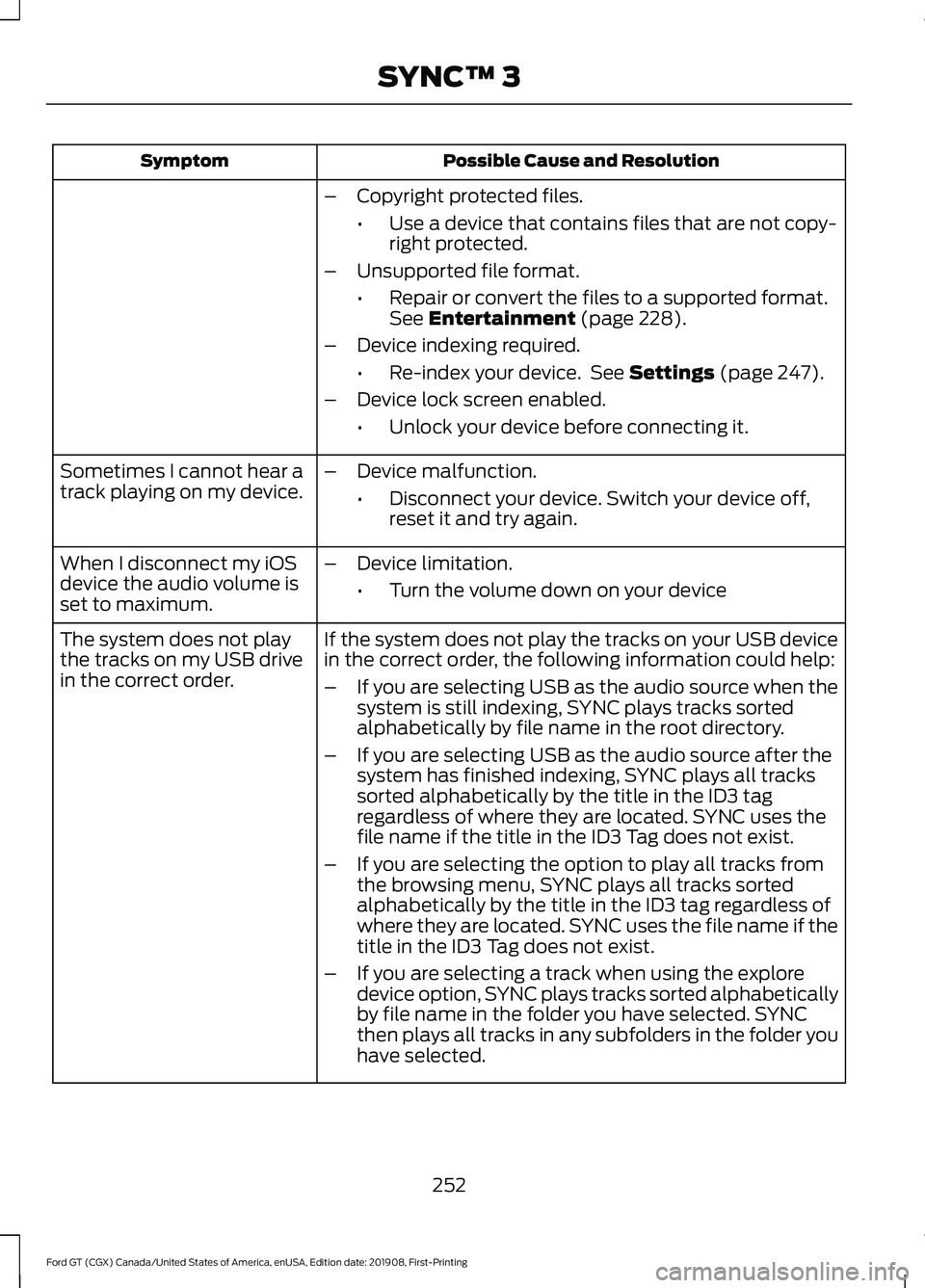
Possible Cause and Resolution
Symptom
–Copyright protected files.
•Use a device that contains files that are not copy-
right protected.
– Unsupported file format.
•Repair or convert the files to a supported format.
See Entertainment (page 228).
– Device indexing required.
•Re-index your device. See
Settings (page 247).
– Device lock screen enabled.
•Unlock your device before connecting it.
Sometimes I cannot hear a
track playing on my device. –
Device malfunction.
•Disconnect your device. Switch your device off,
reset it and try again.
When I disconnect my iOS
device the audio volume is
set to maximum. –
Device limitation.
•Turn the volume down on your device
If the system does not play the tracks on your USB device
in the correct order, the following information could help:
The system does not play
the tracks on my USB drive
in the correct order.
–If you are selecting USB as the audio source when the
system is still indexing, SYNC plays tracks sorted
alphabetically by file name in the root directory.
– If you are selecting USB as the audio source after the
system has finished indexing, SYNC plays all tracks
sorted alphabetically by the title in the ID3 tag
regardless of where they are located. SYNC uses the
file name if the title in the ID3 Tag does not exist.
– If you are selecting the option to play all tracks from
the browsing menu, SYNC plays all tracks sorted
alphabetically by the title in the ID3 tag regardless of
where they are located. SYNC uses the file name if the
title in the ID3 Tag does not exist.
– If you are selecting a track when using the explore
device option, SYNC plays tracks sorted alphabetically
by file name in the folder you have selected. SYNC
then plays all tracks in any subfolders in the folder you
have selected.
252
Ford GT (CGX) Canada/United States of America, enUSA, Edition date: 201908, First-Printing SYNC™ 3
Page 256 of 316

Phone
Possible Cause and Resolution
Symptom
During a call, I can hear
excessive background noise. –
Incorrect cell phone settings.
•Check and adjust the audio settings on your cell
phone. Refer to your cell phone's user manual.
– Cell phone malfunction.
•Switch your cell phone off, reset it and try again.
– Cell phone microphone muted.
•Unmute your cell phone microphone.
During a call, I can hear the
other person but they
cannot hear me.
During a call, I cannot hear
the other person and they
cannot hear me.
–
System restart required.
•Restart the system. Switch the ignition off and
open the door. Close the door and lock the vehicle.
Wait until the touchscreen is off and any illumin-
ated USB ports are not illuminated. Unlock the
vehicle, switch the ignition on and try again.
I cannot download phone-
book. –
Incompatible cell phone.
•Check the compatibility of your cell phone on our
website.
– Incorrect cell phone settings.
•Allow the system to retrieve contacts from your
cell phone. Refer to your cell phone's user manual.
– Incorrect system settings.
•Switch automatic phonebook download on. See
Settings (page 247).
– Cell phone malfunction.
•Switch your cell phone off, reset it and try again.
– Incorrect cell phone settings.
•Allow the system to retrieve contacts from your
cell phone. Refer to your cell phone's user manual.
• Check the location of the missing contacts on your
cell phone. If they are stored on the SIM card, move
them to the cell phone memory.
– Incorrect system settings.
•Switch automatic phonebook download on. See
Settings
(page 247).
A message displays
suggesting that my phone-
book has downloaded but it
is empty or it has missing
contacts.
253
Ford GT (CGX) Canada/United States of America, enUSA, Edition date: 201908, First-Printing SYNC™ 3
Page 262 of 316

Possible Cause and Resolution
Symptom
I cannot see SYNC when I
search for Wi-Fi networks on
my cell phone or other
device. –
System limitation.
•SYNC does not provide a Wi-Fi hotspot at this time.
– Weak network signal
•Move your vehicle closer to the Wi-Fi hotspot or to
a place where the network signal is not obstructed.
– Wi-Fi hotspot in high demand or has a slow Internet
connection.
•Use a more reliable Wi-Fi hotspot.
Software downloads take
too long.
–No software update available.
– Wi-Fi network requires a subscription or acceptance
of terms and conditions.
•Test the connection using another device. If the
network requires a subscription or acceptance of
terms and conditions, contact the network service
provider.
The system seems to
connect to a Wi-Fi network
and the signal strength is
excellent but the software
does not update.
Personal Profiles (If Equipped) Possible Cause and Solution
Symptom
You have not set up Personal Profiles.
I cannot create a profile. You entered an invalid profile.
You did not select a memory button when prompted.
You did not have the ignition on or in park (P), or you
shifted out park (P) when creating a profile.
Personal Profiles has been switched off.
You did not select the lock button on the remote control.
I cannot link a remote
control. The remote control selected was already associated with
another profile and the system declined to overwrite.
The system performed a profile recall when linking a
remote control.
You did not have the ignition on or in park (P), or you
shifted out park (P) when creating a profile.
259
Ford GT (CGX) Canada/United States of America, enUSA, Edition date: 201908, First-Printing SYNC™ 3
Page 263 of 316

Possible Cause and Solution
Symptom
You are using the old linking method.
Personal Profiles does not support your unsaved settings.
My personalized settings do
not save. A different personal profile is active.
Another user changed the settings for the wrong personal
profile.
You did not create a personal profile.
My profile will not recall. Personal Profiles is turned off.
The profile you requested is already active.
You did not link the memory button you are using to a
profile.
You did not link the remote control you are using to a
profile.
You are using the wrong remote control.
You are pressing a button other than the unlock or remote
start on a linked remote control.
You deleted the personal profile.
You switched the personal profiles off.
My preset positions recall,
but my profile does not.
The vehicle is in motion.
My profile recalls but my
preset positions do not. The preset positions are the same as the guest or previ-
ously active profile.
Unlink and relink your remote control in the Personal
Profiles menu. You may need to see your authorized dealer.
I lost a remote control.
You erased and reprogrammed the remote controls. This
could happen if you let a dealership add a new remote
control to replace a lost one.
I lost all profiles.
Someone performed a master reset without your know-
ledge.
260
Ford GT (CGX) Canada/United States of America, enUSA, Edition date: 201908, First-Printing SYNC™ 3
Page 308 of 316

9
911 Assist...........................................................43
A
A/C
See: Climate Control.......................................... 84
About This Manual...........................................5 Ford GT Concierge Phone Numbers................5
ABS See: Brakes............................................................ 110
ABS driving hints See: Hints on Driving With Anti-Lock
Brakes................................................................... 111
Accessories....................................................262
Accessories See: Replacement Parts
Recommendation............................................. 11
Adjustable Pedals.........................................60
Adjusting the Headlamps..........................170 Headlamp Aim Target....................................... 170
Adjusting the Pedals....................................60
Adjusting the Steering Wheel...................56
Airbag Disposal...............................................42
Air Conditioning See: Climate Control.......................................... 84
Air Filter See: Changing the Engine Air Filter...............171
Alarm See: Anti-Theft Alarm........................................ 55
Anti-Theft Alarm
............................................55
Arming the Alarm................................................. 55
Disarming the Alarm........................................... 55
Appendices.....................................................277
Apps..................................................................245 SiriusXM Traffic and Travel Link................... 246
Using Apps on an Android Device...............246
Using Apps on an iOS Device........................ 245
Using Mobile Navigation on an Android Device............................................................... 246
At a Glance........................................................16
Audible Warnings and Indicators..............73 Headlamps On Warning Chime...................... 73
Keyless Warning Alert......................................... 73
Audio Control
...................................................57
Seek, Next or Previous........................................ 57
Audio System.................................................218 Audio Unit
........................................................218
Autolamps........................................................63
Automatic Climate Control
........................84
Directing the Airflow........................................... 84
Setting the Blower Motor Speed................... 84
Setting the Temperature................................... 84
Switching Auto Mode On and Off.................84
Switching Recirculated Air On and Off........................................................................\
. 84
Switching the Air Conditioning On and Off........................................................................\
. 84
Automatic Transmission...........................105 Brake-Shift Interlock......................................... 108
If Your Vehicle Gets Stuck In Mud or Snow.................................................................. 109
Performance Shift Indicator........................... 107
SelectShift™ Automatic Transmission................................................... 106
Understanding the Positions of Your Automatic Transmission............................ 105
Automatic Transmission Fluid Check.............................................................165
Auxiliary Power Points
.................................89
DC Power Point.................................................... 89
Location................................................................... 89
B
Battery See: Changing the 12V Battery....................... 167
Body Styling Kits
...........................................182
Bonnet Lock See: Opening and Closing the Hood............157
Booster Seats..................................................24 Types of Booster Seats...................................... 25
Brake Fluid Check.........................................166
Brakes................................................................110 General Information........................................... 110
Breaking-In......................................................133 Cold Engine Operation...................................... 133
Hot Engine Shut down...................................... 133
C
Cabin Air Filter.................................................86
Capacities and Specifications.................212 Air Conditioning System................................... 212
Engine Coolant.................................................... 213
305
Ford GT (CGX) Canada/United States of America, enUSA, Edition date: 201908, First-Printing Index
Page 309 of 316

Engine Oil...............................................................
214
Fuel Tank................................................................ 215
Grease..................................................................... 215
Hydraulic Brake System................................... 216
Hydraulic Power Steering, Active Suspension, and Active Aero
System............................................................... 216
Locks........................................................................\
215
Transmission Gear.............................................. 212
Transmission Wet Clutch................................. 213
Washer Reservoir................................................. 217
Car Wash See: Cleaning the Exterior................................ 175
Catalytic Converter......................................102 On-Board Diagnostics (OBD-II)................... 103
Readiness for Inspection and Maintenance (I/M) Testing................................................... 104
Changing a Bulb.............................................171 LED Lamps............................................................. 171
Changing a Fuse...........................................155
Fuses....................................................................... 155
Changing a Road Wheel...........................205 Important Information for Lifting or
Jacking.............................................................. 205
Changing the 12V Battery..........................167 Battery Charger and Maintainer................... 168
Battery Management System....................... 169
Changing the Engine Air Filter...................171
Changing the Wiper Blades......................170
Checking the Wiper Blades......................169
Child Restraint and Seatbelt Maintenance.................................................33
Child Restraint Positioning
.........................26
Child Safety.......................................................19
General Information............................................. 19
Cleaning Leather Seats..............................180
Cleaning Products........................................175 Materials................................................................. 175
Cleaning the Engine......................................177
Cleaning the Exterior...................................175 Exterior Plastic Parts.......................................... 177
Matte Paint Finish............................................... 176
Raising the Rear Wing........................................ 177
Standard Paint Finish........................................ 176
Under Hood........................................................... 177
Cleaning the Instrument Panel and Instrument Cluster Lens..........................179 Cleaning the Interior....................................178
Cleaning Alcantara Microfiber Cloth...........178
Cleaning the Wheels...................................180
Cleaning the Windows and Wiper Blades............................................................178
Climate Control
..............................................84
Coolant Check See: Engine Coolant Check.............................. 161
Crash Sensors and Airbag Indicator
.........41
Cruise Control..................................................57
Principle of Operation....................................... 120
Cruise control See: Using Cruise Control................................ 120
Cup Holders
.....................................................90
Customer Assistance..................................139
D
Data Recording
..................................................7
Comfort, Convenience and Entertainment
Data........................................................................\
9
Event Data................................................................. 8
Service Data.............................................................. 7
Services That Third Parties Provide.................9
Services That We Provide.................................... 9
Vehicles With a Modem....................................... 9
Vehicles With an Emergency Call System................................................................. 10
Vehicles With SYNC............................................. 10
Daytime Running Lamps.............................63
Declaration of Conformity
.......................302
Declaration of Conformity - Vehicles With: SYNC 3
..............................................302
Radio Frequency Statement......................... 302
Direction Indicators
.......................................64
Doors and Locks.............................................50
Drive Mode Control.......................................58 Active Aerodynamics ........................................ 125
Damper Comfort Mode.................................... 125
Drive Mode Selection......................................... 121
Front Lift................................................................. 125
Driver and Passenger Airbags....................37 Children and Airbags........................................... 37
Proper Driver and Front Passenger Seating Adjustment........................................................ 37
Driver and Passenger Knee Airbags
.........41
Driving Aids.......................................................121
306
Ford GT (CGX) Canada/United States of America, enUSA, Edition date: 201908, First-Printing Index
Page 310 of 316

Driving at High Speed................................205
Tire Pressure - Speeds Greater Than
........................................................................\
..... 205
Driving Hints....................................................133
Driving Through Water................................133
DRL See: Daytime Running Lamps......................... 63
E
Electric Parking Brake
...................................111
Applying the Electric Parking brake...............111
Battery With No Charge.................................... 113
Releasing the Electric Parking Brake............112
Emergency Call Limitations.......................44
Emergency Call Requirements
.................43
Emergency Door Release............................53
Emission Law..................................................101
Noise Emissions Warranty, Prohibited
Tampering Acts and Maintenance..........102
Tampering With a Noise Control System................................................................ 101
End User License Agreement
...................277
VEHICLE SOFTWARE END USER LICENSE
AGREEMENT (EULA) .................................. 277
Engine Coolant Check
.................................161
Adding Coolant.................................................... 162
Coolant Change.................................................. 163
Engine Coolant Temperature Management................................................... 165
Fail-Safe Cooling................................................ 163
Recycled Coolant................................................ 163
Severe Climates.................................................. 163
Engine Emission Control
............................101
Engine Immobilizer See: Passive Anti-Theft System..................... 54
Engine Oil Check
..........................................160
Adding Engine Oil............................................... 160
Engine Oil Dipstick
.......................................160
Engine Specifications.................................207
Entertainment...............................................228 AM/FM Radio...................................................... 229
Apps........................................................................\
237
Bluetooth Stereo or USB................................ 236
CD (If equipped)................................................ 235
HD Radio ™ Information (If
Available)......................................................... 232SiriusXM® Satellite Radio (If
Activated)........................................................ 229
Sources.................................................................. 228
Supported Media Players, Formats and Metadata Information................................. 237
USB Ports.............................................................. 237
Environment
......................................................15
EPB See: Electric Parking Brake................................ 111
Event Data Recording See: Data Recording............................................... 7
Exterior Mirrors
................................................66
Fold-Away Exterior Mirrors............................... 66
Power Exterior Mirrors........................................ 66
F
Fastening the Seatbelts
..............................29
Seatbelt Locking Modes.................................... 30
Using Seatbelts During Pregnancy...............30
Using the Sliding Clip.......................................... 29
Flat Tire See: Changing a Road Wheel....................... 205
Flat Tire Inflation See: Tire Sealant and Inflator Kit.................183
Floor Mats........................................................134
Foot Pedals See: Adjusting the Pedals................................ 60
Ford Performance
...........................................13
Front Passenger Sensing System............38
Fuel and Refueling.........................................95
Fuel Consumption.........................................99
Calculating Fuel Economy.............................. 100
Filling the Fuel Tank.......................................... 100
Fuel Filler Funnel Location.........................96
Fuel Filter.........................................................167
Fuel Quality......................................................96 Choosing the Right Fuel.................................... 96
Fuel Shutoff
....................................................135
Fuses.................................................................145
Fuse Specification Chart...........................145 Front Power Distribution Box......................... 145
Passenger Compartment Fuse Panel..........151
Rear Power Distribution Box 1........................ 147
Rear Power Distribution Box 2....................... 150
307
Ford GT (CGX) Canada/United States of America, enUSA, Edition date: 201908, First-Printing Index