2020 FORD EXPLORER ECU
[x] Cancel search: ECUPage 128 of 555
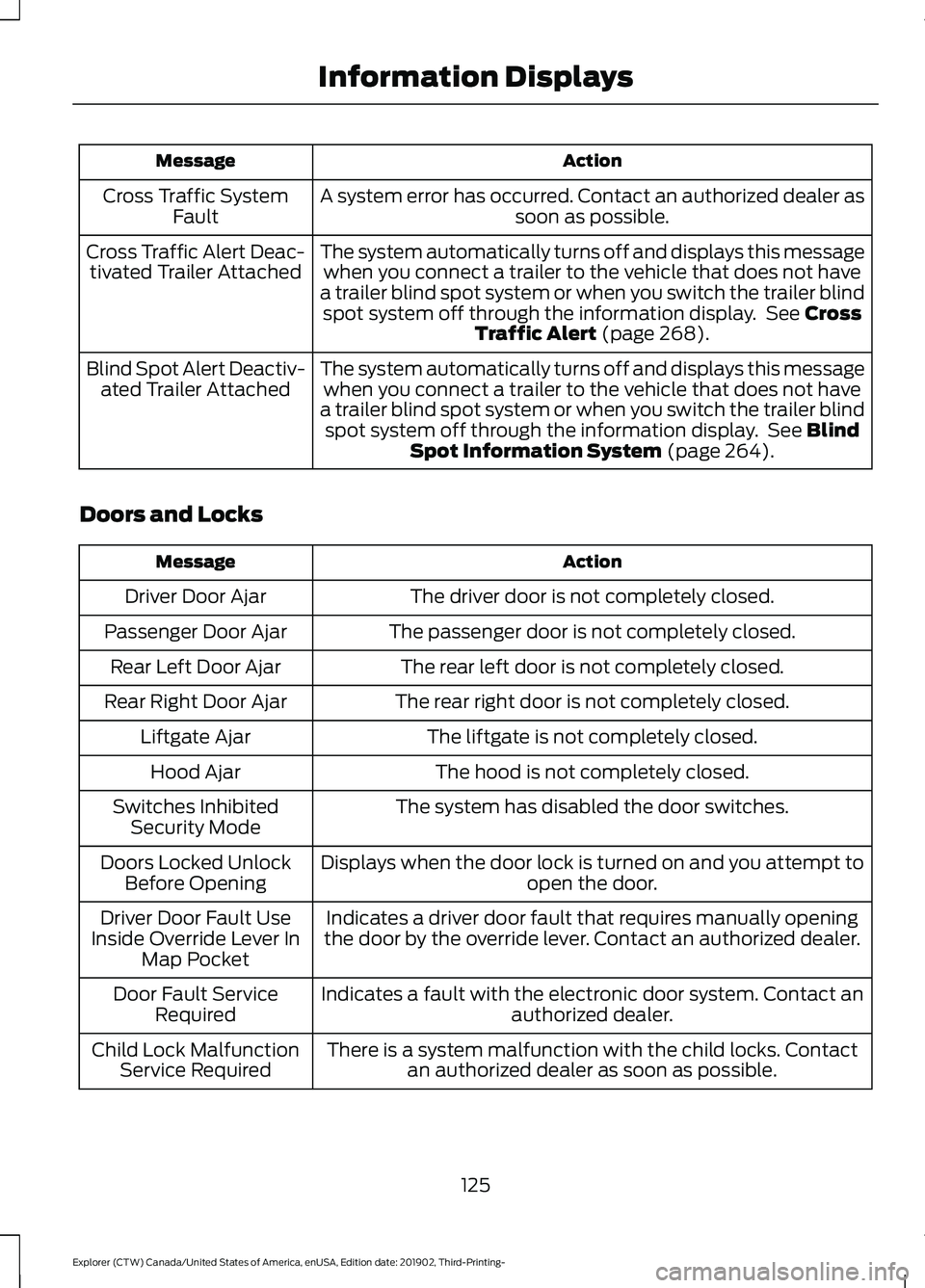
Action
Message
A system error has occurred. Contact an authorized dealer as soon as possible.
Cross Traffic System
Fault
The system automatically turns off and displays this messagewhen you connect a trailer to the vehicle that does not have
a trailer blind spot system or when you switch the trailer blind spot system off through the information display. See Cross
Traffic Alert (page 268).
Cross Traffic Alert Deac-
tivated Trailer Attached
The system automatically turns off and displays this messagewhen you connect a trailer to the vehicle that does not have
a trailer blind spot system or when you switch the trailer blind spot system off through the information display. See
Blind
Spot Information System (page 264).
Blind Spot Alert Deactiv-
ated Trailer Attached
Doors and Locks Action
Message
The driver door is not completely closed.
Driver Door Ajar
The passenger door is not completely closed.
Passenger Door Ajar
The rear left door is not completely closed.
Rear Left Door Ajar
The rear right door is not completely closed.
Rear Right Door Ajar
The liftgate is not completely closed.
Liftgate Ajar
The hood is not completely closed.
Hood Ajar
The system has disabled the door switches.
Switches Inhibited
Security Mode
Displays when the door lock is turned on and you attempt to open the door.
Doors Locked Unlock
Before Opening
Indicates a driver door fault that requires manually opening
the door by the override lever. Contact an authorized dealer.
Driver Door Fault Use
Inside Override Lever In Map Pocket
Indicates a fault with the electronic door system. Contact an authorized dealer.
Door Fault Service
Required
There is a system malfunction with the child locks. Contactan authorized dealer as soon as possible.
Child Lock Malfunction
Service Required
125
Explorer (CTW) Canada/United States of America, enUSA, Edition date: 201902, Third-Printing- Information Displays
Page 150 of 555
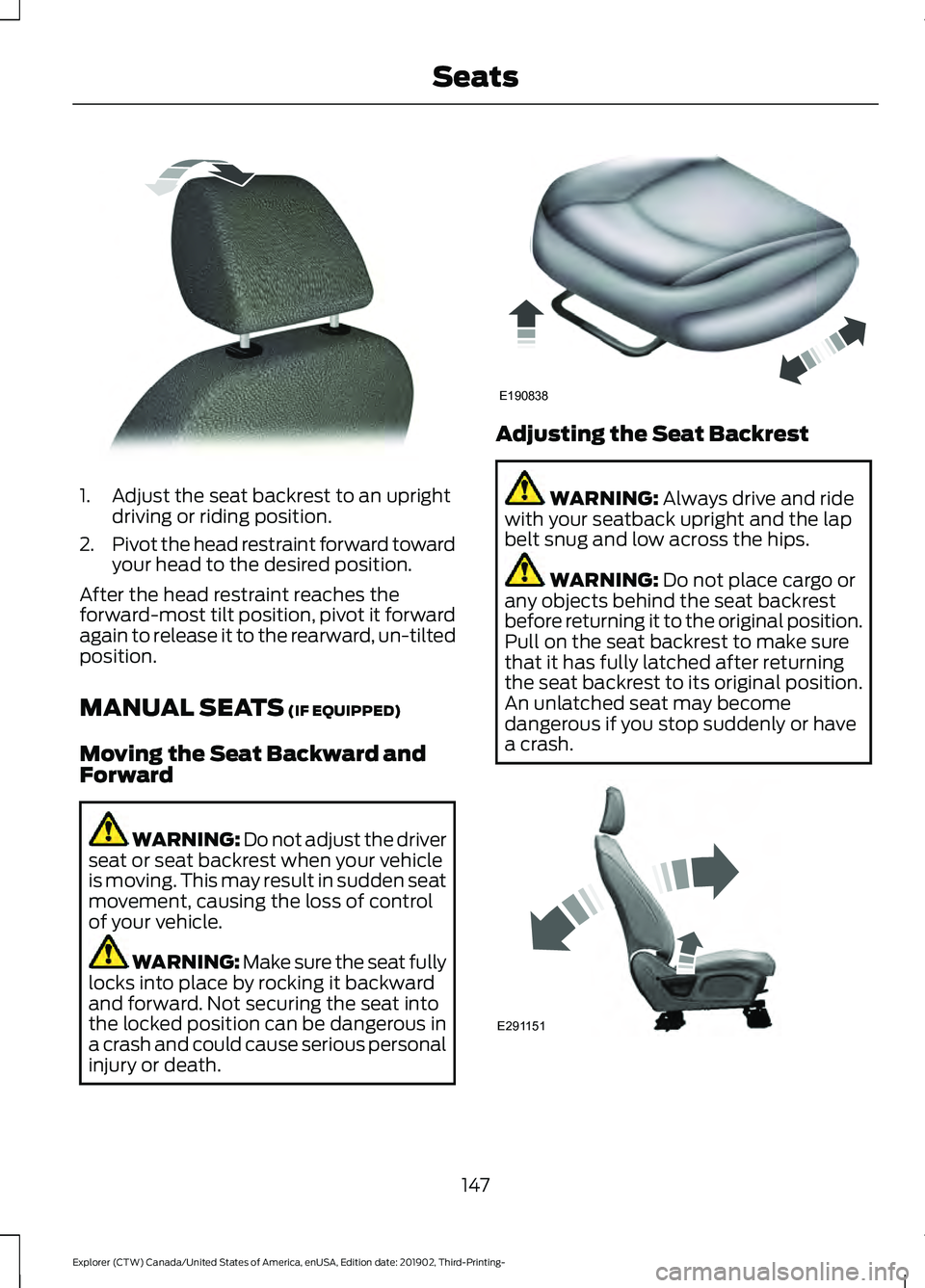
1. Adjust the seat backrest to an upright
driving or riding position.
2. Pivot the head restraint forward toward
your head to the desired position.
After the head restraint reaches the
forward-most tilt position, pivot it forward
again to release it to the rearward, un-tilted
position.
MANUAL SEATS (IF EQUIPPED)
Moving the Seat Backward and
Forward WARNING: Do not adjust the driver
seat or seat backrest when your vehicle
is moving. This may result in sudden seat
movement, causing the loss of control
of your vehicle. WARNING: Make sure the seat fully
locks into place by rocking it backward
and forward. Not securing the seat into
the locked position can be dangerous in
a crash and could cause serious personal
injury or death. Adjusting the Seat Backrest
WARNING:
Always drive and ride
with your seatback upright and the lap
belt snug and low across the hips. WARNING:
Do not place cargo or
any objects behind the seat backrest
before returning it to the original position.
Pull on the seat backrest to make sure
that it has fully latched after returning
the seat backrest to its original position.
An unlatched seat may become
dangerous if you stop suddenly or have
a crash. 147
Explorer (CTW) Canada/United States of America, enUSA, Edition date: 201902, Third-Printing- SeatsE144727 E190838 E291151
Page 165 of 555
UNIVERSAL GARAGE DOOR
OPENER
HomeLink Wireless Control
System
WARNING: Do not use the system
with any garage door opener that does
not have the safety stop and reverse
feature as required by U.S. Federal
Safety Standards (this includes any
garage door opener manufactured
before April 1, 1982). A garage door
opener which cannot detect an object,
signaling the door to stop and reverse,
does not meet current federal safety
standards. Using a garage door opener
without these features increases the risk
of serious injury or death.
Note: Make sure that the garage door and
security device are free from obstruction
when you are programming. Do not program
the system with the vehicle in the garage.
Note: Make sure you keep the original
remote control transmitter for use in other
vehicles as well as for future system
programming.
Note: We recommend that upon the sale
or lease termination of your vehicle, you
erase the programmed function buttons for
security reasons. See Erasing the Function
Button Codes
.
Note: You can program a maximum of
three devices. To change or replace any of
the three devices after it has been initially
programmed, you must first erase the
current settings. See Erasing the Function
Button Codes
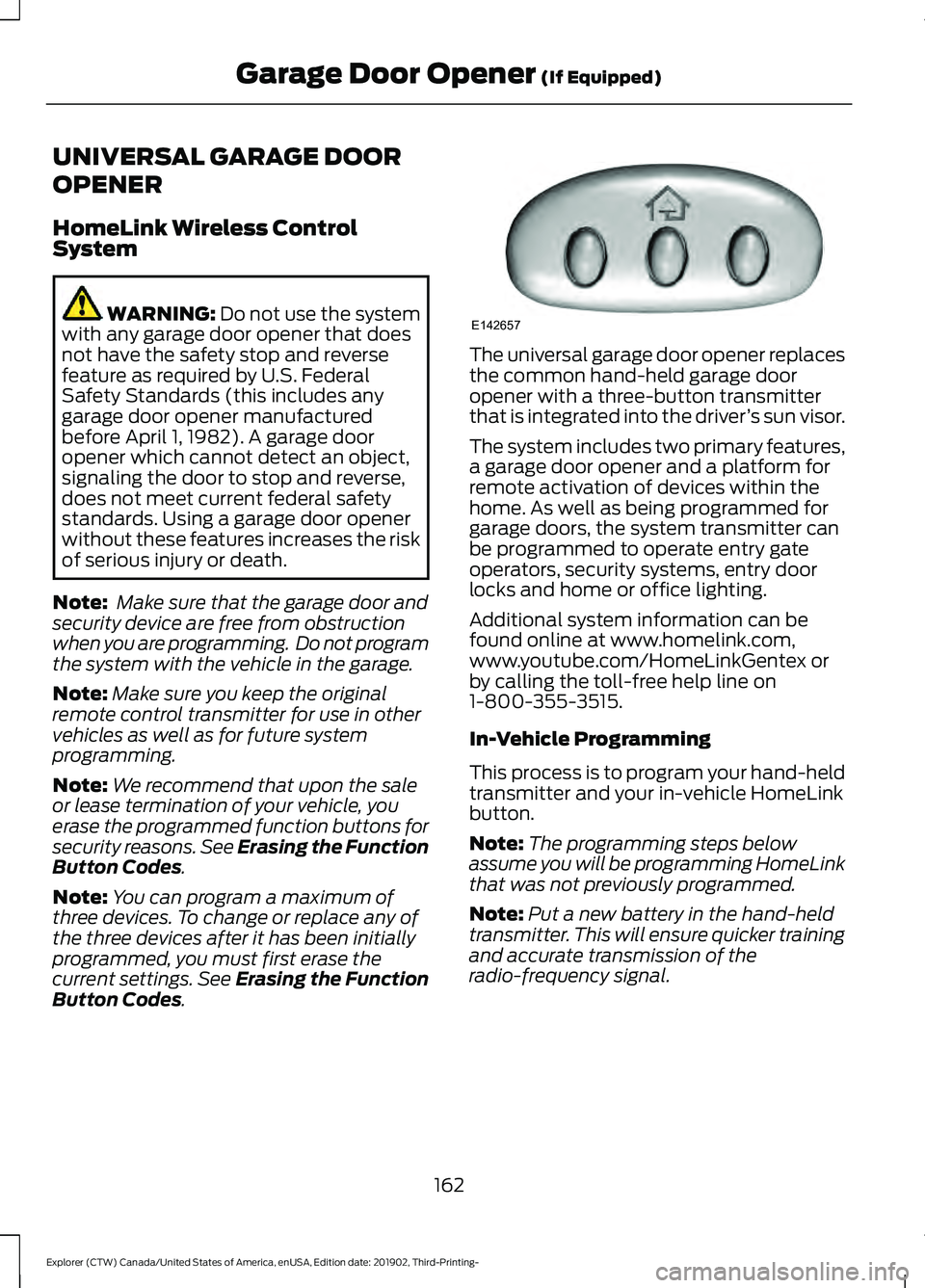
. The universal garage door opener replaces
the common hand-held garage door
opener with a three-button transmitter
that is integrated into the driver
’s sun visor.
The system includes two primary features,
a garage door opener and a platform for
remote activation of devices within the
home. As well as being programmed for
garage doors, the system transmitter can
be programmed to operate entry gate
operators, security systems, entry door
locks and home or office lighting.
Additional system information can be
found online at www.homelink.com,
www.youtube.com/HomeLinkGentex or
by calling the toll-free help line on
1-800-355-3515.
In-Vehicle Programming
This process is to program your hand-held
transmitter and your in-vehicle HomeLink
button.
Note: The programming steps below
assume you will be programming HomeLink
that was not previously programmed.
Note: Put a new battery in the hand-held
transmitter. This will ensure quicker training
and accurate transmission of the
radio-frequency signal.
162
Explorer (CTW) Canada/United States of America, enUSA, Edition date: 201902, Third-Printing- Garage Door Opener
(If Equipped)E142657
Page 284 of 555
REAR UNDER FLOOR
STORAGE (IF EQUIPPED)
Spare Tire Cover
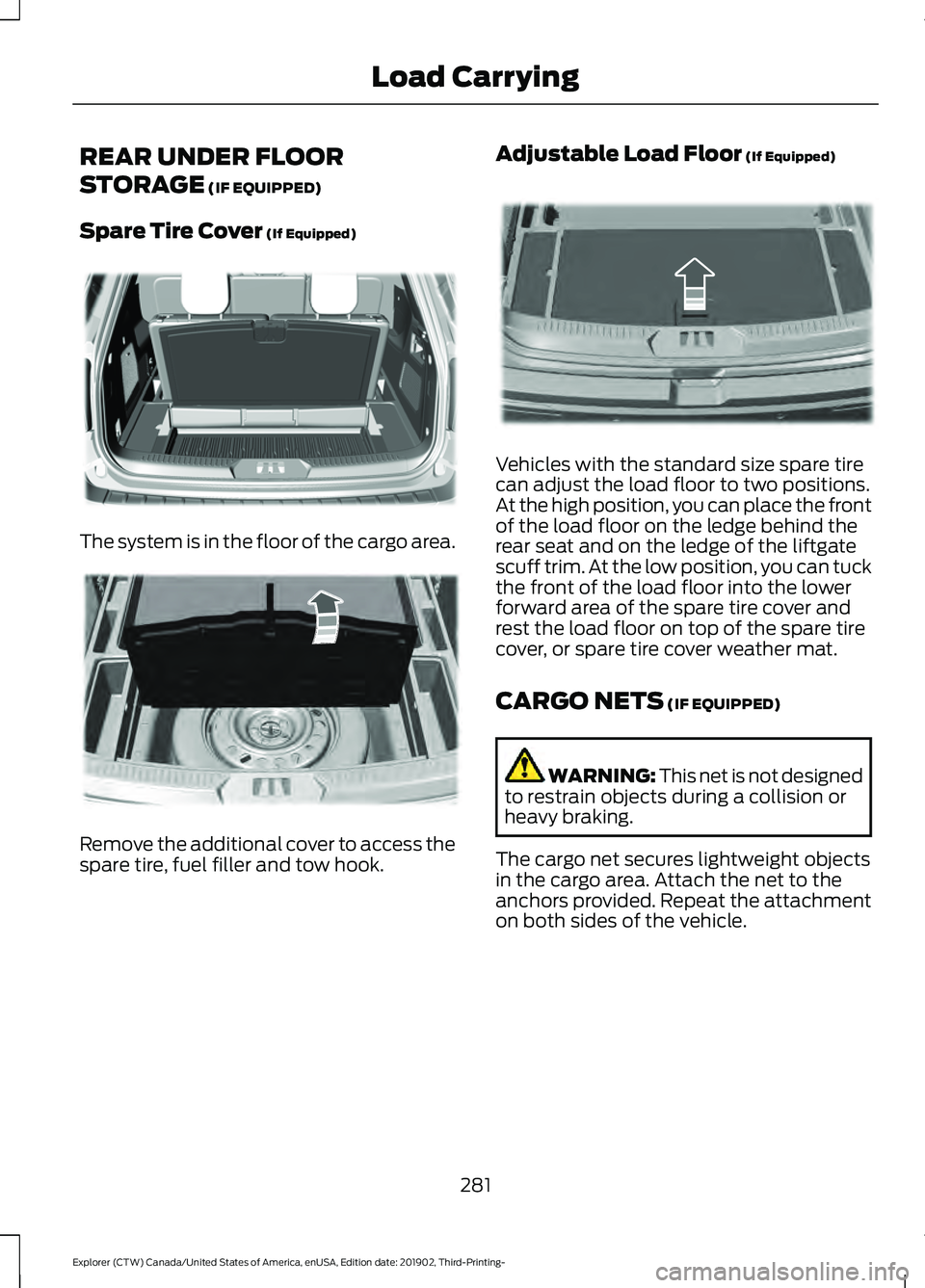
(If Equipped) The system is in the floor of the cargo area.
Remove the additional cover to access the
spare tire, fuel filler and tow hook. Adjustable Load Floor
(If Equipped) Vehicles with the standard size spare tire
can adjust the load floor to two positions.
At the high position, you can place the front
of the load floor on the ledge behind the
rear seat and on the ledge of the liftgate
scuff trim. At the low position, you can tuck
the front of the load floor into the lower
forward area of the spare tire cover and
rest the load floor on top of the spare tire
cover, or spare tire cover weather mat.
CARGO NETS
(IF EQUIPPED)
WARNING:
This net is not designed
to restrain objects during a collision or
heavy braking.
The cargo net secures lightweight objects
in the cargo area. Attach the net to the
anchors provided. Repeat the attachment
on both sides of the vehicle.
281
Explorer (CTW) Canada/United States of America, enUSA, Edition date: 201902, Third-Printing- Load CarryingE326709 E298021 E297641
Page 285 of 555
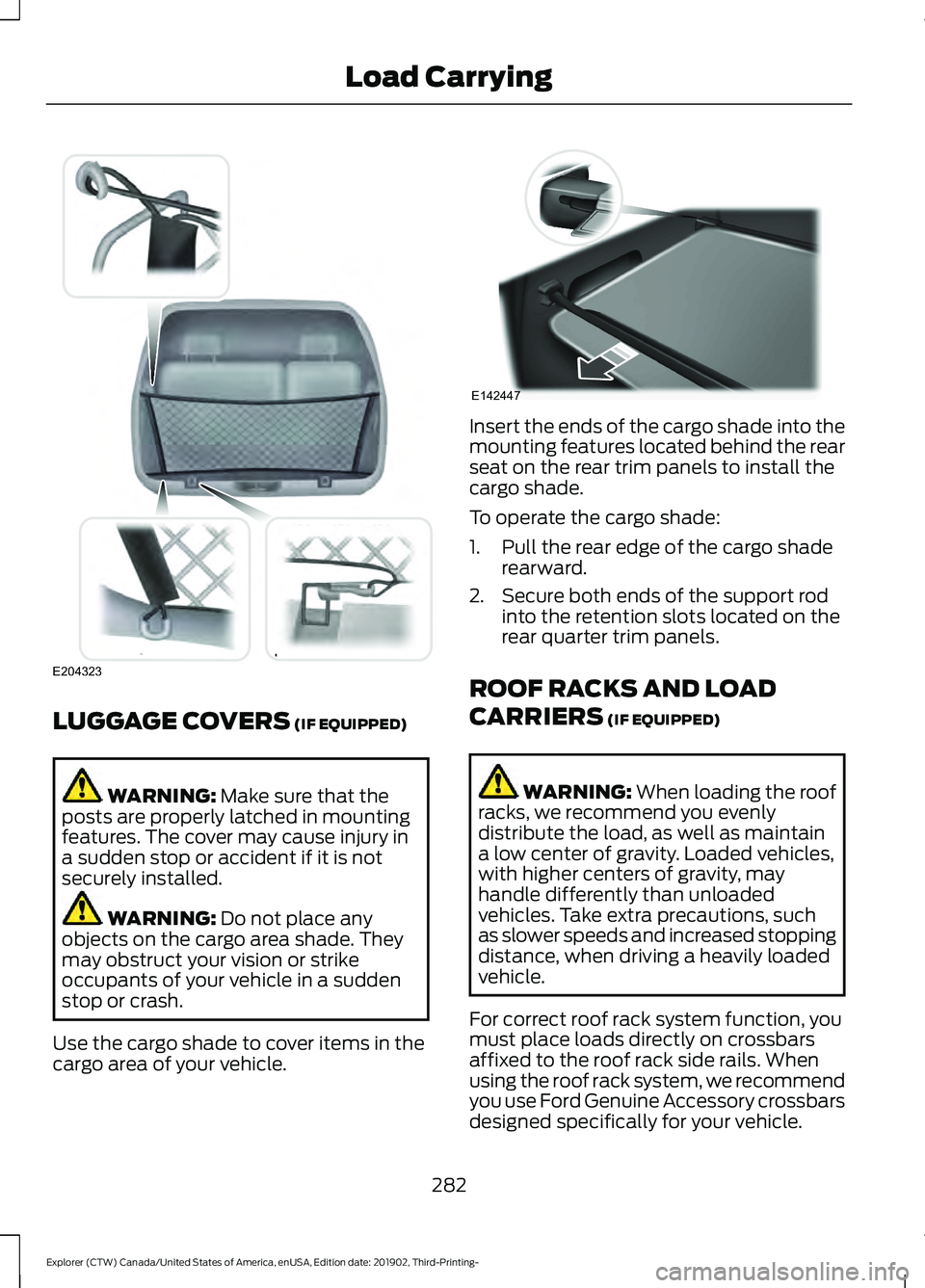
LUGGAGE COVERS (IF EQUIPPED)
WARNING:
Make sure that the
posts are properly latched in mounting
features. The cover may cause injury in
a sudden stop or accident if it is not
securely installed. WARNING:
Do not place any
objects on the cargo area shade. They
may obstruct your vision or strike
occupants of your vehicle in a sudden
stop or crash.
Use the cargo shade to cover items in the
cargo area of your vehicle. Insert the ends of the cargo shade into the
mounting features located behind the rear
seat on the rear trim panels to install the
cargo shade.
To operate the cargo shade:
1. Pull the rear edge of the cargo shade
rearward.
2. Secure both ends of the support rod into the retention slots located on the
rear quarter trim panels.
ROOF RACKS AND LOAD
CARRIERS
(IF EQUIPPED) WARNING:
When loading the roof
racks, we recommend you evenly
distribute the load, as well as maintain
a low center of gravity. Loaded vehicles,
with higher centers of gravity, may
handle differently than unloaded
vehicles. Take extra precautions, such
as slower speeds and increased stopping
distance, when driving a heavily loaded
vehicle.
For correct roof rack system function, you
must place loads directly on crossbars
affixed to the roof rack side rails. When
using the roof rack system, we recommend
you use Ford Genuine Accessory crossbars
designed specifically for your vehicle.
282
Explorer (CTW) Canada/United States of America, enUSA, Edition date: 201902, Third-Printing- Load CarryingE204323 E142447
Page 286 of 555
Make sure that you securely fasten the
load. Check the tightness of the load
before driving and at each fuel stop.
Note:
Never place loads directly on the roof
panel. The roof panel is not designed to
directly carry a load. Maximum Recommended Load
Amounts
Note:
The maximum recommended load
is based on the load being evenly distributed
on the crossbars. Maximum Recommended Load
Description
75 lb (35 kg)
Vehicles with Moonroof
165 lb (75 kg)
Vehicles without Moonroof
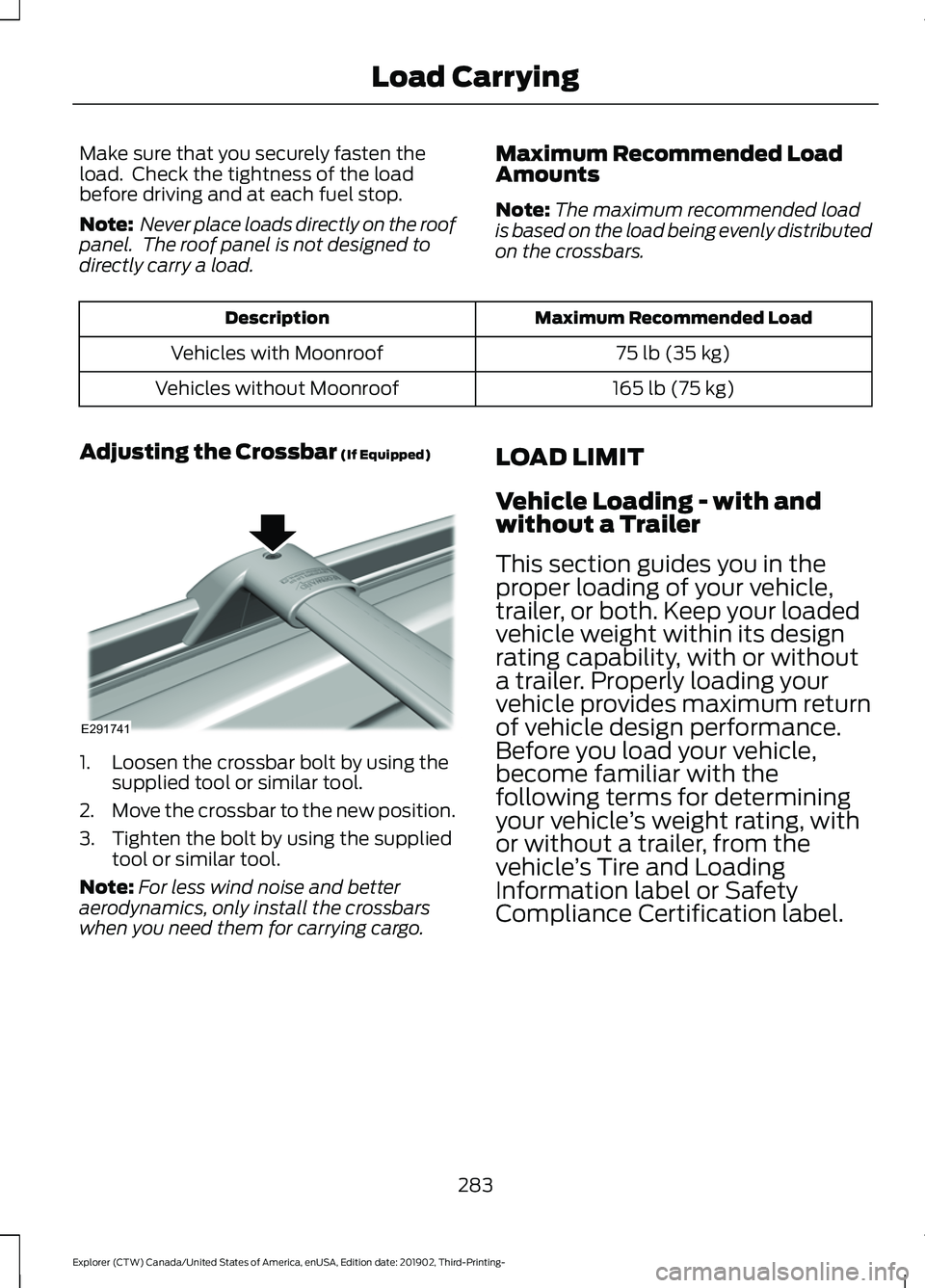
Adjusting the Crossbar (If Equipped) 1. Loosen the crossbar bolt by using the
supplied tool or similar tool.
2. Move the crossbar to the new position.
3. Tighten the bolt by using the supplied tool or similar tool.
Note: For less wind noise and better
aerodynamics, only install the crossbars
when you need them for carrying cargo. LOAD LIMIT
Vehicle Loading - with and
without a Trailer
This section guides you in the
proper loading of your vehicle,
trailer, or both. Keep your loaded
vehicle weight within its design
rating capability, with or without
a trailer. Properly loading your
vehicle provides maximum return
of vehicle design performance.
Before you load your vehicle,
become familiar with the
following terms for determining
your vehicle
’s weight rating, with
or without a trailer, from the
vehicle ’s Tire and Loading
Information label or Safety
Compliance Certification label.
283
Explorer (CTW) Canada/United States of America, enUSA, Edition date: 201902, Third-Printing- Load CarryingE291741
Page 301 of 555
When driving through standing water, drive
very slowly and do not stop your vehicle.
Your brake performance and traction may
be limited. After driving through water and
as soon as it is safe to do so:
•
Lightly press the brake pedal to dry the
brakes and to check that they work.
• Check that the horn works.
• Check that the exterior lights work.
• Turn the steering wheel to check that
the steering power assist works.
FLOOR MATS WARNING: Use a floor mat
designed to fit the footwell of your
vehicle that does not obstruct the pedal
area. Failure to follow this instruction
could result in the loss of control of your
vehicle, personal injury or death. WARNING:
Pedals that cannot
move freely can cause loss of vehicle
control and increase the risk of serious
personal injury. WARNING:
Secure the floor mat
to both retention devices so that it
cannot slip out of position and interfere
with the pedals. Failure to follow this
instruction could result in the loss of
control of your vehicle, personal injury or
death. WARNING: Do not place additional
floor mats or any other covering on top
of the original floor mats. This could
result in the floor mat interfering with the
operation of the pedals. Failure to follow
this instruction could result in the loss of
control of your vehicle, personal injury or
death. WARNING:
Always make sure that
objects cannot fall into the driver foot
well while your vehicle is moving. Objects
that are loose can become trapped
under the pedals causing a loss of
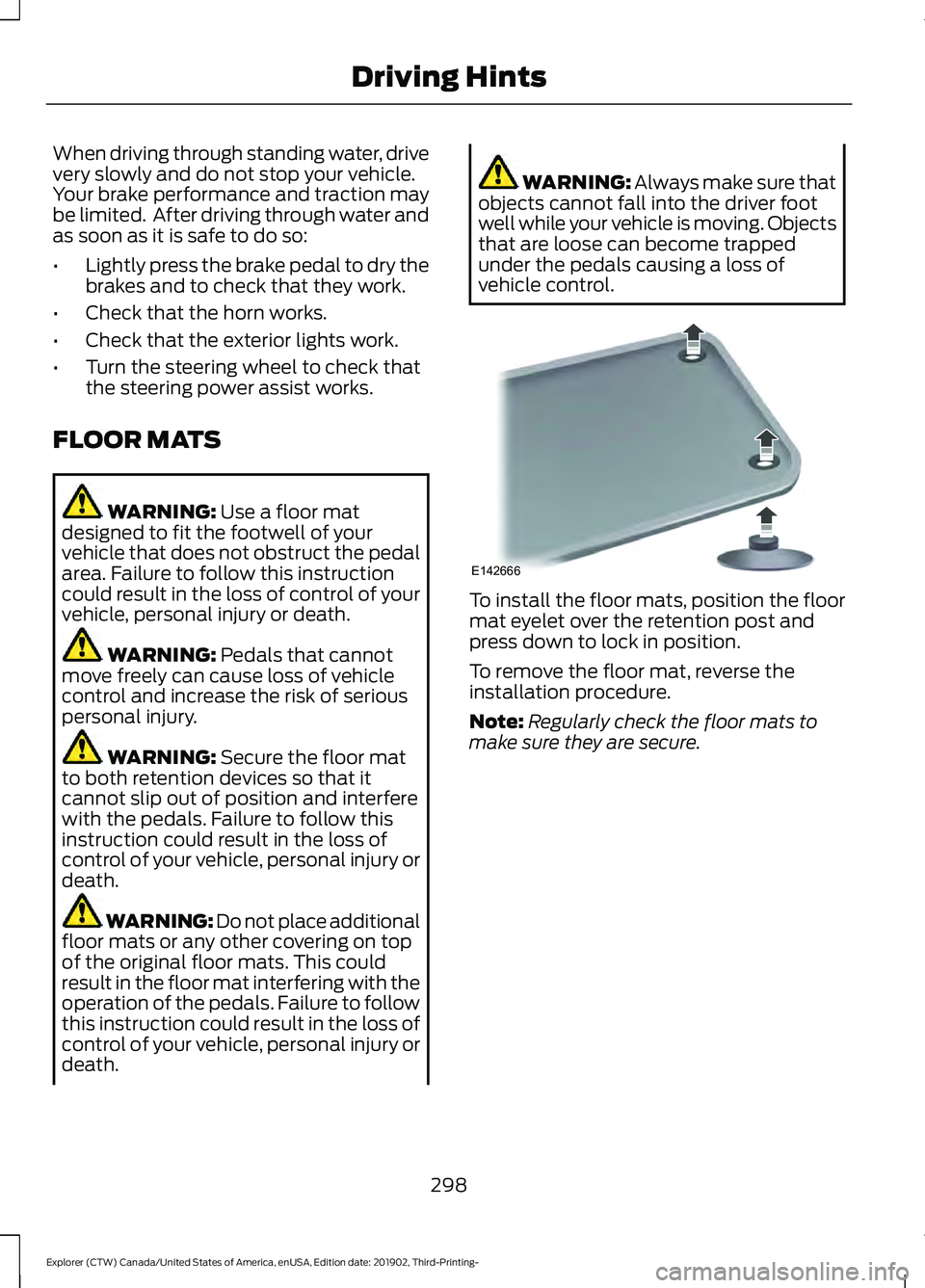
vehicle control. To install the floor mats, position the floor
mat eyelet over the retention post and
press down to lock in position.
To remove the floor mat, reverse the
installation procedure.
Note:
Regularly check the floor mats to
make sure they are secure.
298
Explorer (CTW) Canada/United States of America, enUSA, Edition date: 201902, Third-Printing- Driving HintsE142666
Page 310 of 555
Additional Assistance
If you have questions or concerns, or are
unsatisfied with the service you are
receiving, follow these steps:
1. Contact your Sales Representative or
Service Advisor at your selling or
servicing authorized dealer.
2. If your inquiry or concern remains unresolved, contact the Sales Manager,
Service Manager or Customer Relations
Manager.
3. If you require assistance or clarification
on Ford Motor Company policies,
please contact the Ford Customer
Relationship Center.
In order to help us serve you better, please
have the following information available
when contacting a Customer Relationship
Center:
• Vehicle Identification Number.
• Your telephone number (home and
business).
• The name of the authorized dealer and
city where located.
• The vehicle ’s current odometer reading.
In some states within the United States,
you must directly notify Ford in writing
before pursuing remedies under your
state's warranty laws, and Ford is also
allowed a final repair attempt.
Additionally, in some states within the
United States, a consumer has the option
of submitting a warranty dispute to the
BBB Auto Line before taking action under
the Magnuson-Moss Warranty Act, or to
the extent allowed by state law, before
pursuing replacement or repurchase
remedies provided by certain state laws.
This dispute handling procedure is not
required prior to enforcing state created
rights or other rights which are independent
of the Magnuson-Moss Warranty Act or
state replacement or repurchase laws. IN CALIFORNIA (U.S. ONLY)
California Civil Code Section 1793.2(d)
requires that, if a manufacturer or its
representative is unable to repair a motor
vehicle to conform to the vehicle
’s
applicable express warranty after a
reasonable number of attempts, the
manufacturer shall be required to either
replace the vehicle with one substantially
identical or repurchase the vehicle and
reimburse the buyer in an amount equal to
the actual price paid or payable by the
consumer (less a reasonable allowance
for consumer use). The consumer has the
right to choose whether to receive a refund
or replacement vehicle.
California Civil Code Section 1793.22(b)
presumes that the manufacturer has had
a reasonable number of attempts to
conform the vehicle to its applicable
express warranties if, within the first 18
months of ownership of a new vehicle or
the first 18,000 mi (29,000 km), whichever
occurs first:
1. Two or more repair attempts are made
on the same non-conformity likely to
cause death or serious bodily injury OR
2. Four or more repair attempts are made
on the same nonconformity (a defect
or condition that substantially impairs
the use, value or safety of the vehicle)
OR
3. The vehicle is out of service for repair of nonconformities for a total of more
than 30 calendar days (not necessarily
all at one time).
In the case of 1 or 2 above, the consumer
must also notify the manufacturer of the
need for the repair of the nonconformity
at the following address:
Ford Motor Company
16800 Executive Plaza Drive
Mail Drop 3NE-B
Dearborn, MI 48126
307
Explorer (CTW) Canada/United States of America, enUSA, Edition date: 201902, Third-Printing- Customer Assistance