2020 FORD EXPEDITION instrument cluster
[x] Cancel search: instrument clusterPage 5 of 542

Steering Wheel
Adjusting the Steering Wheel - Vehicles
With: Manual Adjustable Steering
Column ..........................................................87
Adjusting the Steering Wheel - Vehicles With: Power Adjustable Steering
Column ..........................................................
87
Audio Control .................................................
88
Voice Control ..................................................
89
Cruise Control - Vehicles With: Adaptive Cruise Control ............................................
89
Cruise Control - Vehicles With: Cruise Control ..........................................................
89
Information Display Control .....................
89
Heated Steering Wheel ..............................
89
Horn ...................................................................
90
Adjustable Pedals
Adjusting the Pedals .....................................
91
Wipers and Washers
Windshield Wipers ........................................
92
Autowipers ......................................................
92
Windshield Washers ....................................
93
Rear Window Wiper and Washers ..........
93
Lighting
General Information ....................................
94
Lighting Control .............................................
94
Autolamps .......................................................
95
Instrument Lighting Dimmer ....................
95
Headlamp Exit Delay ...................................
95
Daytime Running Lamps - Vehicles With: Configurable Daytime Running Lamps
........................................................................\
..
96
Daytime Running Lamps - Vehicles With: Daytime Running Lamps (DRL) .........
96
Front Fog Lamps ...........................................
96
Direction Indicators .......................................
97
Interior Lamps ................................................
97
Ambient Lighting ..........................................
98Automatic High Beam Control
What Is Automatic High Beam Control
........................................................................\
..
99
Switching Automatic High Beam Control On and Off ..................................................
99
Automatic High Beam Control Indicators ........................................................................\
..
99
Overriding Automatic High Beam Control ........................................................................\
..
99
Windows and Mirrors
Power Windows ............................................
101
Global Opening and Closing ....................
101
Exterior Mirrors .............................................
102
Interior Mirror .................................................
103
Childminder Mirror ......................................
104
Sun Visors ......................................................
104
Moonroof ........................................................
105
Liftgate Window ..........................................
106
Instrument Cluster
Gauges .............................................................
107
Warning Lamps and Indicators ...............
110
Audible Warnings and Indicators ............
113
Information Displays
General Information ....................................
114
Information Messages ...............................
123
Climate Control
Manual Climate Control ............................
139
Automatic Climate Control .......................
141
Hints on Controlling the Interior Climate - Vehicles With: Automatic
Temperature Control ..............................
143
Hints on Controlling the Interior Climate - Vehicles With: Manual Temperature
Control .........................................................
144
Rear Passenger Climate Controls - Vehicles With: Automatic
Temperature Control .............................
145
2
Expedition (TB8) Canada/United States of America, enUSA, Edition date: 201907, Third-Printing- Table of Contents
Page 8 of 542

Maintenance
General Information
..................................325
Opening and Closing the Hood .............
325
Under Hood Overview ..............................
326
Engine Oil Dipstick ......................................
327
Engine Oil Check ..........................................
327
Oil Change Indicator Reset .....................
328
Changing the Engine Air Filter ...............
329
Engine Coolant Check ..............................
329
Automatic Transmission Fluid Check ........................................................................\
333
Transfer Case Fluid Check .......................
334
Brake Fluid Check .......................................
334
Power Steering Fluid Check ....................
335
Changing the 12V Battery ........................
335
Adjusting the Headlamps ........................
337
Washer Fluid Check ...................................
338
Fuel Filter .......................................................
339
Checking the Wiper Blades ....................
339
Changing the Wiper Blades ....................
339
Removing a Headlamp ............................
340
Changing a Bulb .........................................
340
Vehicle Care
General Information ..................................
343
Cleaning Products ......................................
343
Cleaning the Exterior .................................
344
Waxing ............................................................
345
Cleaning the Engine ...................................
345
Cleaning the Windows and Wiper Blades ........................................................................\
345
Cleaning the Interior ..................................
346
Cleaning the Instrument Panel and Instrument Cluster Lens ......................
346
Cleaning Leather Seats .............................
347
Repairing Minor Paint Damage .............
348
Cleaning the Wheels .................................
348
Vehicle Storage ...........................................
348Wheels and Tires
General Information
...................................
351
Tire Care .........................................................
353
Using Snow Chains ....................................
367
Tire Pressure Monitoring System .........
368
Changing a Road Wheel ...........................
372
Technical Specifications ..........................
378
Capacities and Specifications
Engine Specifications ...............................
380
Motorcraft Parts .........................................
380
Vehicle Identification Number ...............
382
Vehicle Certification Label ......................
383
Transmission Code Designation ...........
383
Capacities and Specifications ...............
384
Bulb Specification Chart ..........................
392
Connected Vehicle
Connected Vehicle Requirements .......
394
Connected Vehicle Limitations .............
394
Connecting the Vehicle to a Mobile Network .....................................................
394
Connecting the Vehicle to a Wi-Fi Network .....................................................
394
Connected Vehicle – Troubleshooting ........................................................................\
395
Vehicle Wi-Fi Hotspot
Creating a Vehicle Wi-Fi Hotspot .........
397
Changing the Vehicle Wi-Fi Hotspot Name or Password .................................
397
Audio System
General Information ..................................
398
Audio Unit - Vehicles Without: Touchscreen Display .............................
398
Audio Unit - Vehicles With: Touchscreen Display .........................................................
401
Digital Radio .................................................
402
Satellite Radio .............................................
405
5
Expedition (TB8) Canada/United States of America, enUSA, Edition date: 201907, Third-Printing- Table of Contents
Page 21 of 542

INSTRUMENT PANEL
Direction indicators. See Direction Indicators (page 97).
A
Wiper lever. See
Wipers and Washers (page 92).
B
Information display controls. See
Information Displays (page 114).
C
Instrument cluster. See
Instrument Cluster (page 107).
D
Navigation, media, phone.
E
Entertainment display.
F
Hazard warning flasher switch. See
Hazard Flashers (page 303).
G
Audio. See
Audio System (page 398).
H
Climate control. See
Climate Control (page 139).
I
Rear defrost.
J
Start button. See
Keyless Starting (page 173).
K
Voice control. See
Voice Control (page 89).
L
18
Expedition (TB8) Canada/United States of America, enUSA, Edition date: 201907, Third-Printing- At a GlanceE251633
Page 55 of 542

•
Other passengers pushing or pulling on
the seat.
• Rear passenger feet and knees resting
or pushing on the seat.
The conditions listed above may cause the
weight of a properly seated occupant to
be incorrectly interpreted by the front
passenger sensing system. The person in
the front passenger seat may appear
heavier or lighter due to the conditions
described in the previous list. Make sure the front passenger
sensing system is operating
properly. See Crash Sensors
and Airbag Indicator (page 54).
If the airbag readiness light is lit, do the
following:
The driver and adult passengers should
check for objects lodged underneath the
front passenger seat or cargo interfering
with the seat.
If objects are lodged or cargo is interfering
with the seat, take the following steps to
remove the obstruction:
• Pull your vehicle over.
• Switch your vehicle off.
• Driver or adult passengers should
check for any objects lodged
underneath the front passenger seat
or cargo interfering with the seat.
• Remove the obstruction(s) (if found).
• Restart your vehicle.
• Wait at least two minutes and verify
that the airbag readiness light in the
instrument cluster is no longer
illuminated.
• If the airbag readiness light in the
instrument cluster remains illuminated,
this may or may not be a problem due
to the front passenger sensing system. Do not attempt to repair or service the
system. Take your vehicle immediately to
an authorized dealer.
If it is necessary to modify an advanced
front airbag system to accommodate a
person with disabilities, contact your
Customer Relationship Center.
SIDE AIRBAGS
WARNING:
Do not place objects
or mount equipment on or near the
airbag cover, on the side of the front or
rear seatbacks, or in areas that may
come into contact with a deploying
airbag. Failure to follow these
instructions may increase the risk of
personal injury in the event of a crash. WARNING:
Do not use accessory
seat covers. The use of accessory seat
covers may prevent the deployment of
the side airbags and increase the risk of
injury in an accident. WARNING:
Do not lean your head
on the door. The side airbag could injure
you as it deploys from the side of the
seatback. WARNING:
Do not attempt to
service, repair, or modify the
supplementary restraint system or
associated components. Failure to
follow this instruction could result in
personal injury or death. WARNING:
If a supplementary
restraint system component has
deployed, it will not function again. Have
the system and associated components
inspected as soon as possible. Failure to
follow this instruction could result in
personal injury or death.
52
Expedition (TB8) Canada/United States of America, enUSA, Edition date: 201907, Third-Printing- Supplementary Restraints SystemE67017
Page 58 of 542

The restraints control module also
monitors the readiness of the above safety
devices plus the crash and occupant
sensors. The readiness of the safety
system is indicated by a warning indicator
light in the instrument cluster or by a
backup tone if the warning light is not
working. See Instrument Cluster (page
107). Routine maintenance of the airbag is
not required.
A difficulty with the system is indicated by
one or more of the following: The readiness light will not
illuminate immediately after you
switch the ignition on.
• The readiness light either flashes or
stays lit.
• A series of five beeps will be heard. The
tone pattern will repeat periodically
until the problem, the light or both are
repaired.
If any of these things happen, even
intermittently, have the supplemental
restraint system serviced at an authorized
dealer immediately. Unless serviced, the
system may not function properly in the
event of a crash. The fact that the seatbelt pretensioners
or front airbags did not activate for both
front seat occupants in a crash does not
mean that something is wrong with the
system. Rather, it means the restraints
control module determined the accident
conditions (crash severity, belt usage)
were not appropriate to activate these
safety devices.
•
The design of the front airbags is to
activate only in frontal and near-frontal
crashes (not rollovers, side impacts or
rear impacts) unless the crash causes
sufficient frontal deceleration.
• The design of the seatbelt
pretensioners and rear inflatable belts
is to activate in frontal, near-frontal
and side crashes, and in rollovers.
• The design of the side airbags is to
inflate in certain side impact crashes
or rollover events. Side airbags may
activate in other types of crashes if the
vehicle experiences sufficient sideways
motion or deformation.
• The design of the Safety Canopy is to
inflate in certain side impact crashes
or rollover events. The Safety Canopy
may activate in other types of crashes
if the vehicle experiences sufficient
sideways motion or deformation, or a
certain likelihood of rollover.
AIRBAG DISPOSAL
Contact your authorized dealer as soon as
possible. Airbags must be disposed of by
qualified personnel.
55
Expedition (TB8) Canada/United States of America, enUSA, Edition date: 201907, Third-Printing- Supplementary Restraints SystemE67017
Page 82 of 542
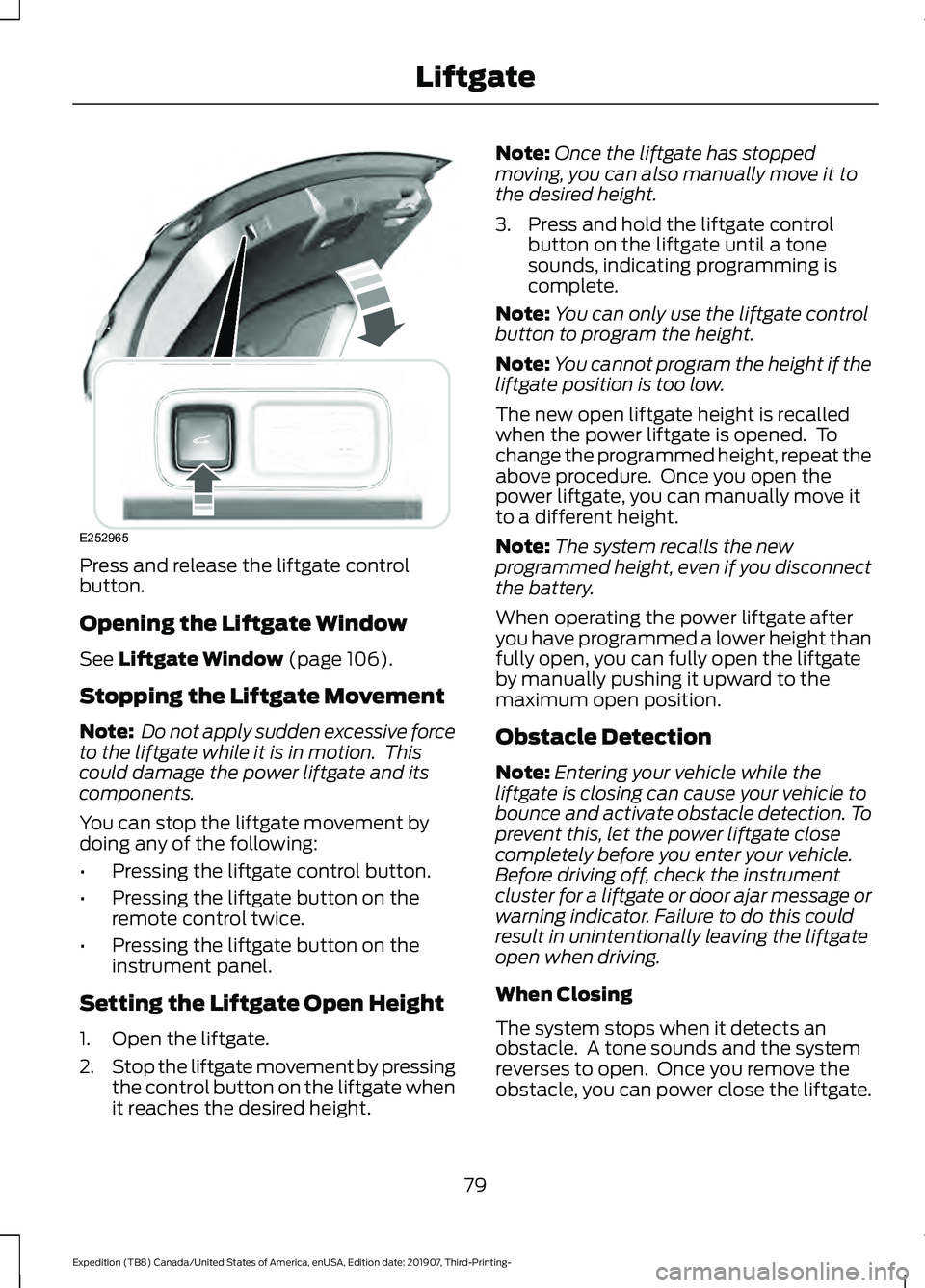
Press and release the liftgate control
button.
Opening the Liftgate Window
See Liftgate Window (page 106).
Stopping the Liftgate Movement
Note: Do not apply sudden excessive force
to the liftgate while it is in motion. This
could damage the power liftgate and its
components.
You can stop the liftgate movement by
doing any of the following:
• Pressing the liftgate control button.
• Pressing the liftgate button on the
remote control twice.
• Pressing the liftgate button on the
instrument panel.
Setting the Liftgate Open Height
1. Open the liftgate.
2. Stop the liftgate movement by pressing
the control button on the liftgate when
it reaches the desired height. Note:
Once the liftgate has stopped
moving, you can also manually move it to
the desired height.
3. Press and hold the liftgate control button on the liftgate until a tone
sounds, indicating programming is
complete.
Note: You can only use the liftgate control
button to program the height.
Note: You cannot program the height if the
liftgate position is too low.
The new open liftgate height is recalled
when the power liftgate is opened. To
change the programmed height, repeat the
above procedure. Once you open the
power liftgate, you can manually move it
to a different height.
Note: The system recalls the new
programmed height, even if you disconnect
the battery.
When operating the power liftgate after
you have programmed a lower height than
fully open, you can fully open the liftgate
by manually pushing it upward to the
maximum open position.
Obstacle Detection
Note: Entering your vehicle while the
liftgate is closing can cause your vehicle to
bounce and activate obstacle detection. To
prevent this, let the power liftgate close
completely before you enter your vehicle.
Before driving off, check the instrument
cluster for a liftgate or door ajar message or
warning indicator. Failure to do this could
result in unintentionally leaving the liftgate
open when driving.
When Closing
The system stops when it detects an
obstacle. A tone sounds and the system
reverses to open. Once you remove the
obstacle, you can power close the liftgate.
79
Expedition (TB8) Canada/United States of America, enUSA, Edition date: 201907, Third-Printing- LiftgateE252965
Page 110 of 542
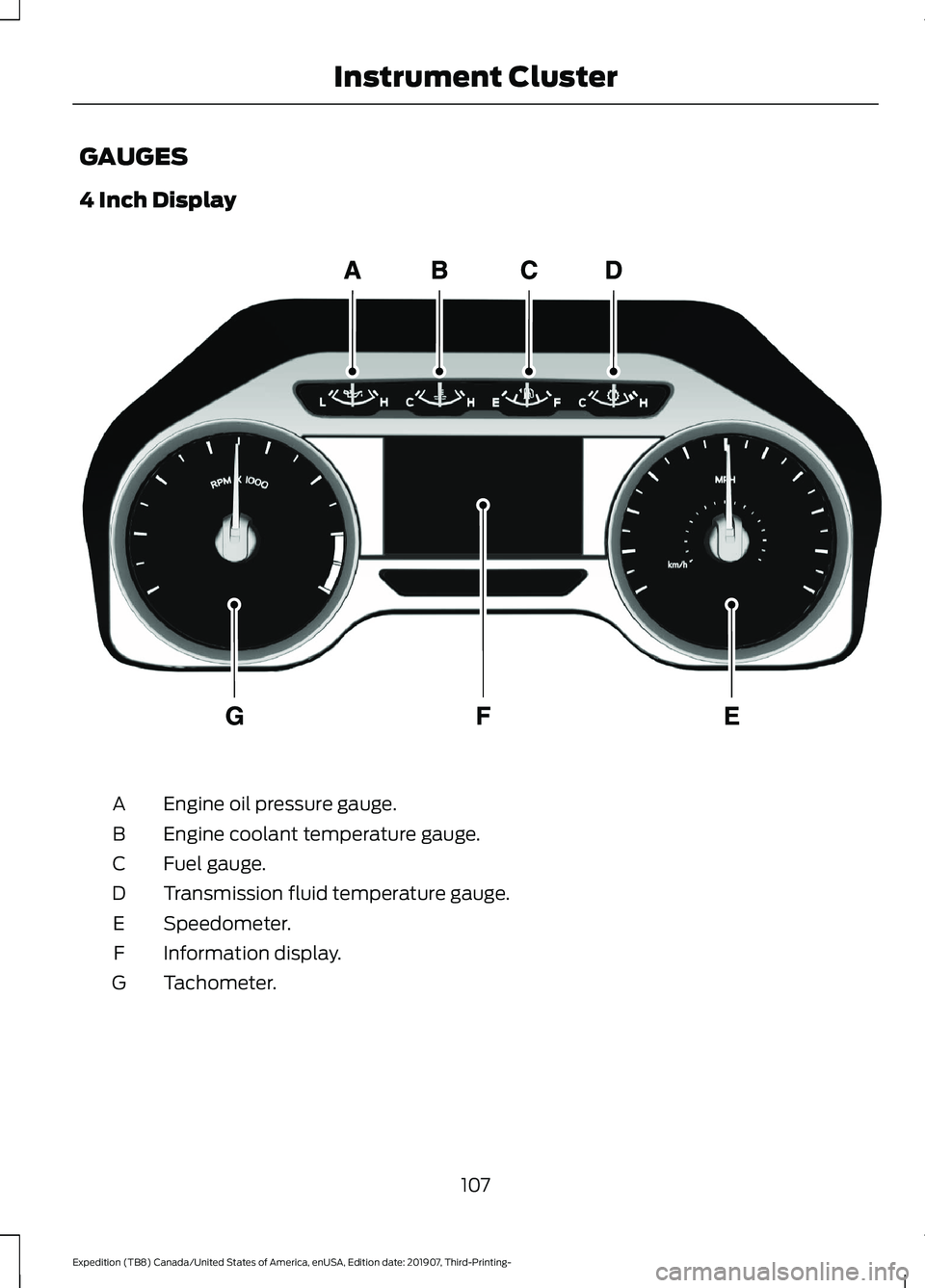
GAUGES
4 Inch Display
Engine oil pressure gauge.
A
Engine coolant temperature gauge.
B
Fuel gauge.
C
Transmission fluid temperature gauge.
D
Speedometer.
E
Information display.
F
Tachometer.
G
107
Expedition (TB8) Canada/United States of America, enUSA, Edition date: 201907, Third-Printing- Instrument ClusterE219638
Page 111 of 542
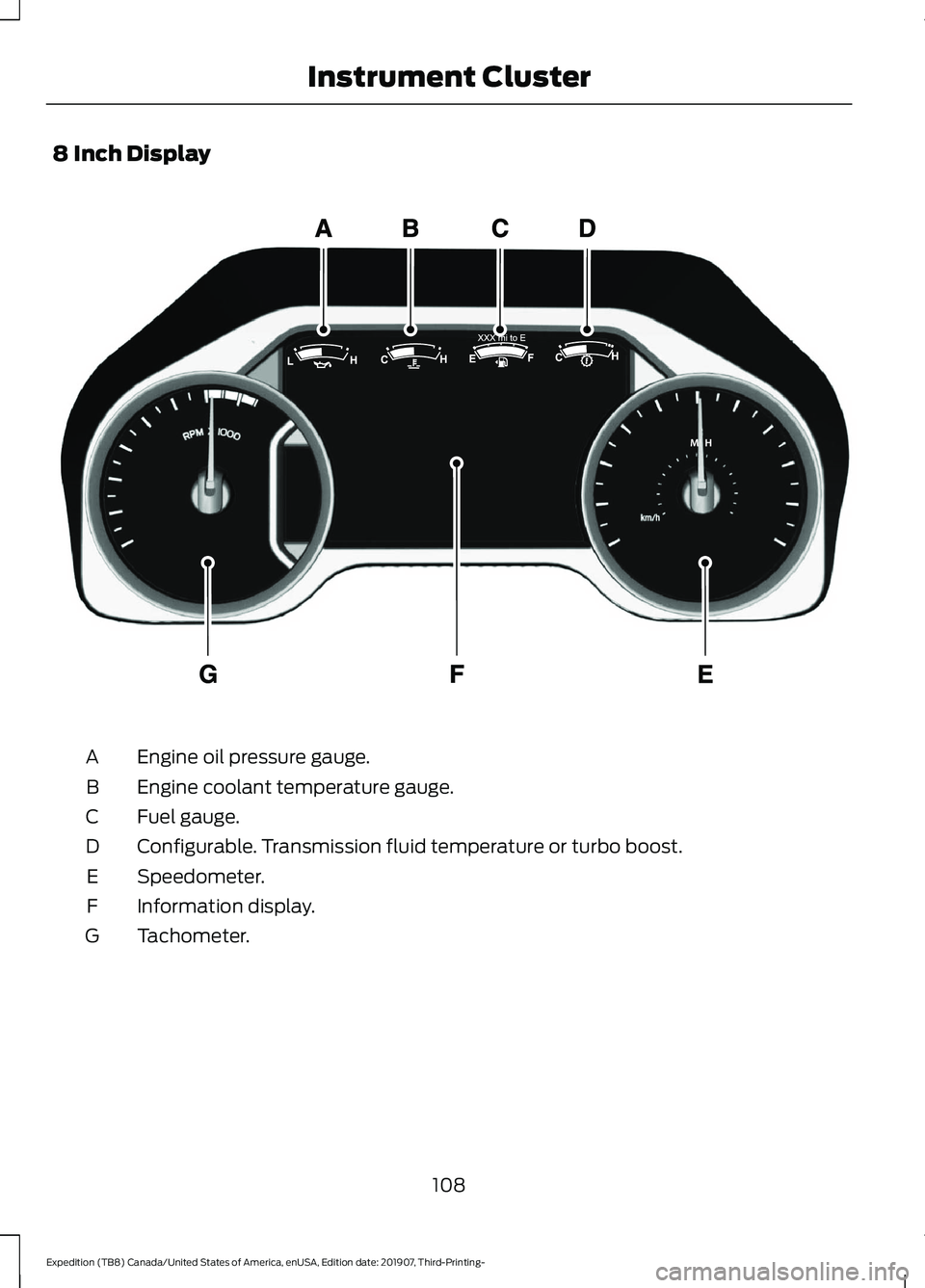
8 Inch Display
Engine oil pressure gauge.
A
Engine coolant temperature gauge.
B
Fuel gauge.
C
Configurable. Transmission fluid temperature or turbo boost.
D
Speedometer.
E
Information display.
F
Tachometer.
G
108
Expedition (TB8) Canada/United States of America, enUSA, Edition date: 201907, Third-Printing- Instrument ClusterE299699