2020 FORD ESCAPE wheel
[x] Cancel search: wheelPage 113 of 553

GENERAL INFORMATION
WARNING: Driving while distracted
can result in loss of vehicle control, crash
and injury. We strongly recommend that
you use extreme caution when using any
device that may take your focus off the
road. Your primary responsibility is the
safe operation of your vehicle. We
recommend against the use of any
hand-held device while driving and
encourage the use of voice-operated
systems when possible. Make sure you
are aware of all applicable local laws
that may affect the use of electronic
devices while driving.
You can control various systems on your
vehicle using the quick action menu (QAM)
buttons on the right-hand side of the
steering wheel. The information display
provides the corresponding information.
Information Display Controls Return button.
A
OK button.
B
Menu button.
C Return Button
Use the return button to go back or to exit.
OK Button
Use the
OK button to make a selection.
You can also use it to scroll through a
menu.
Menu Button
Use the menu button on the main screen
to display the submenu.
4 Inch Display Menu This icon shows the features on
or off status. A check in the box
indicates the feature is on, and
unchecked indicates the feature is off.
Note: Some options may appear slightly
different or not at all if the items are
optional.
Note: Some MyKey menu options only
appear if MyKey is enabled and at least one
MyKey is programmed.
110
Escape (CTC) Canada/United States of America, Vehicles Built From: 17-06-2019, enUSA, Edition date: 201906, Third-Printing- Information DisplaysABC
E250032 E204495
Page 122 of 553

Action
Message
The status of the AdvanceTrac sport mode after you switched it on.
AdvanceTrac SPORT
MODE
The status of the traction control system after you switched it off.
Traction Control Off
The status of the traction control system after you switched it on.
Traction Control On
Alarm Action
Message
Alarm triggered due to unauthorized entry. See Anti-Theft
Alarm (page 78).
Vehicle Alarm To Stop
Alarm, Start Vehicle.
AWD Action
Message
The all-wheel drive system temporarily turns off to protectitself from overheating.
AWD Temporarily
Disabled
The all-wheel drive system is locking up the torque transferclutch to help reduce clutch temperature.
AWD Temporarily
Locked
The all-wheel drive system temporarily turns off to protect
itself from overheating or if you are using the temporary spare tire.
AWD OFF
The all-wheel drive system will resume normal function and
clear this message after driving a short distance with the road tire re-installed or after the system cools.
AWD Restored
The all-wheel drive system is not operating properly. If the
warning stays on or continues to come on, have the system checked as soon as possible.
AWD Fault Service
Required
Displays when the transfer case fluid requires service.
Change AWD Power
Transfer Unit Lube
Displays when you have the transfer case fluid changed and reset to new.
AWD Power Transfer
Unit Lube Set to New
119
Escape (CTC) Canada/United States of America, Vehicles Built From: 17-06-2019, enUSA, Edition date: 201906, Third-Printing- Information Displays
Page 128 of 553

Action
Message
Your vehicle is in the accessory ignition state.
Full Accessory Power
Active
There is a problem with your vehicle ’s starting system. See
an authorized dealer for service.
Starting System Fault
During spare key programming, an intelligent access key isprogrammed to the system.
Key Program Successful
During spare key programming, the maximum number of keyshave been programmed.
Max Number of Keys
Learned
Displayed during spare key programming, when an intelligentaccess key has failed to be programmed.
Key Program Failure
Displayed during spare key programming when not enoughkeys have been programmed.
Not Enough Keys
Learned
Displays when the key battery is low. Change the battery as soon as possible.
Key Battery Low Replace
Soon
Displays when the vehicle is switched off.
Vehicle Switched Off
Lane Keeping System Action
Message
The system has malfunctioned. Have the system checked as soon as possible.
Lane Keeping Sys.
Malfunction Service Required
The system has detected a condition that has caused thesystem to be temporarily unavailable.
Front Camera Tempor-
arily Not Available
The system has detected a condition that requires the wind-shield to be cleaned to operate properly.
Front Camera Low Visib-
ility Clean Screen
The system has malfunctioned. Have the system checked assoon as possible.
Front Camera Malfunc-
tion Service Required
The system requests the driver to keep their hands on thesteering wheel.
Keep Hands on Steering
Wheel
125
Escape (CTC) Canada/United States of America, Vehicles Built From: 17-06-2019, enUSA, Edition date: 201906, Third-Printing- Information Displays
Page 137 of 553

Cleaning the Head Up Display
Use a damp, lint-free cloth to clean the
head up display.
Note:
Do not touch the display screen or
mirror.
Note: Do not use household cleaning
products or glass cleaners. This can cause
damage not covered by the vehicle
Warranty. Switching the Head Up Display On
or Off Press the button on the steering
wheel.
Note: The head up display menu appears
in the information display.
Use the information display controls on the steering wheel to select the following: Action
Menu Item
Press the OK button.
Head-Up Display (HUD)
Press the
OK button.
Note: The system remembers the last setting when you start the engine.
Adjusting the Head Up Display
Settings
Start the engine and switch the system on.
Note: Press the button on the steering
wheel if you do not see the head up display
menu in the information display. Note:
For your safety, some features are
speed-dependent. The system limits their
use to when your vehicle is not moving.
Use the information display controls on
the steering wheel to adjust the head up
display settings.
134
Escape (CTC) Canada/United States of America, Vehicles Built From: 17-06-2019, enUSA, Edition date: 201906, Third-Printing- Information DisplaysE265900
Page 138 of 553

Action
Menu Item
Press the OK button.
Adjustment
1. Press the
OK button.
2. Use the up and down toggle buttons to adjust the vertical position of the blue frame.
•Make sure that you can see all of the blue frame.
• Do not physically move the screen. This can cause
damage not covered by the vehicle Warranty.
Position
1. Press the
OK button.
2. Use the up and down toggle buttons to adjust the brightness of the display screen.
•The system adjusts the brightness based on how
dark it is. If you set the brightness to a high level,
the system reduces the brightness at night.
Brightness
1. Press the
OK button.
2. Use the up and down toggle buttons to adjust the vertical size of the display screen.
•A small vertical size could be more suitable if you
sit in a high position.
Vertical Size
Selecting Which Information the
System Displays
Start the engine and switch the system on.
Note: Press the button on the steering
wheel if you do not see the head up display
menu in the information display. Note:
For your safety, some features are
speed-dependent. The system limits their
use to when your vehicle is not moving.
Use the information display controls on
the steering wheel to select which
information the system displays.
135
Escape (CTC) Canada/United States of America, Vehicles Built From: 17-06-2019, enUSA, Edition date: 201906, Third-Printing- Information Displays
Page 139 of 553

Action
Menu Item
Press the OK button.
Content
Press the
OK button.
Distance Indication
Eco Advice
Incoming Calls
Lane Keeping System
Navigation
Speed Assistance
Speed Sign Recognition
Head Up Display Indicator Note:
The head up display indicator could
illuminate to supplement an information
message.
Head Up Display Information Messages Action
Message
The system is malfunctioning or something is obstructing the display.
Make sure that the head up display is free from obstruction. If the
message continues to appear, have your vehicle checked as soon as
possible.
Head Up
Display System
Fault See
Manual
Press the button on the steering wheel. The head up display menu
appears in the information display.
Make sure the blue frame is fully visible. Do not manually move the
screen. This can cause damage not covered by the vehicle Warranty.
Head Up
Display To Posi-
tion Use the
Information
Display
Note: Information messages only appear in the information display.
136
Escape (CTC) Canada/United States of America, Vehicles Built From: 17-06-2019, enUSA, Edition date: 201906, Third-Printing- Information DisplaysE265900
Page 150 of 553

REMOTE START (IF EQUIPPED)
The climate control system adjusts the
interior temperature during remote start.
You can switch this feature on or off and
adjust the settings using the touchscreen.
See
Settings (page 468).
You cannot adjust the climate control
setting during remote start operation.
Switch the ignition on to make
adjustments.
Based on your remote start settings, the
following vehicle-dependent features may
or may not remain on after remote starting
your vehicle:
• Climate controlled seats.
• Heated steering wheel.
• Heated mirrors.
• Heated rear window.
• Windshield wiper de-icer.
Note: For dual zone climate controlled
seats, the passenger seat setting defaults
to match the driver seat during remote start.
Automatic Settings
If
Auto is on, the system sets the interior
temperature to 72°F (22°C) and heats or
cools the vehicle interior as required to
achieve comfort.
Note: In cold weather, the heated rear
window and heated mirrors turn on.
Last Settings
If
Last Settings is on, the system uses the
settings last selected before you turned
off the vehicle.
Heated and Cooled Features
In Auto mode, certain heated features may
switch on during cold weather, and cooled
features during hot weather.
147
Escape (CTC) Canada/United States of America, Vehicles Built From: 17-06-2019, enUSA, Edition date: 201906, Third-Printing- Climate Control
Page 151 of 553
SITTING IN THE CORRECT
POSITION
WARNING: Sitting improperly, out
of position or with the seatback reclined
too far can take weight off the seat
cushion and affect the decision of the
passenger sensing system, resulting in
serious injury or death in the event of a
crash. Always sit upright against your
seat back, with your feet on the floor. WARNING: Do not recline the seat
backrest too far as this can cause the
occupant to slide under the seatbelt,
resulting in personal injury in the event
of a crash. WARNING:
Do not place objects
higher than the top of the seat backrest.
Failure to follow this instruction could
result in personal injury or death in the
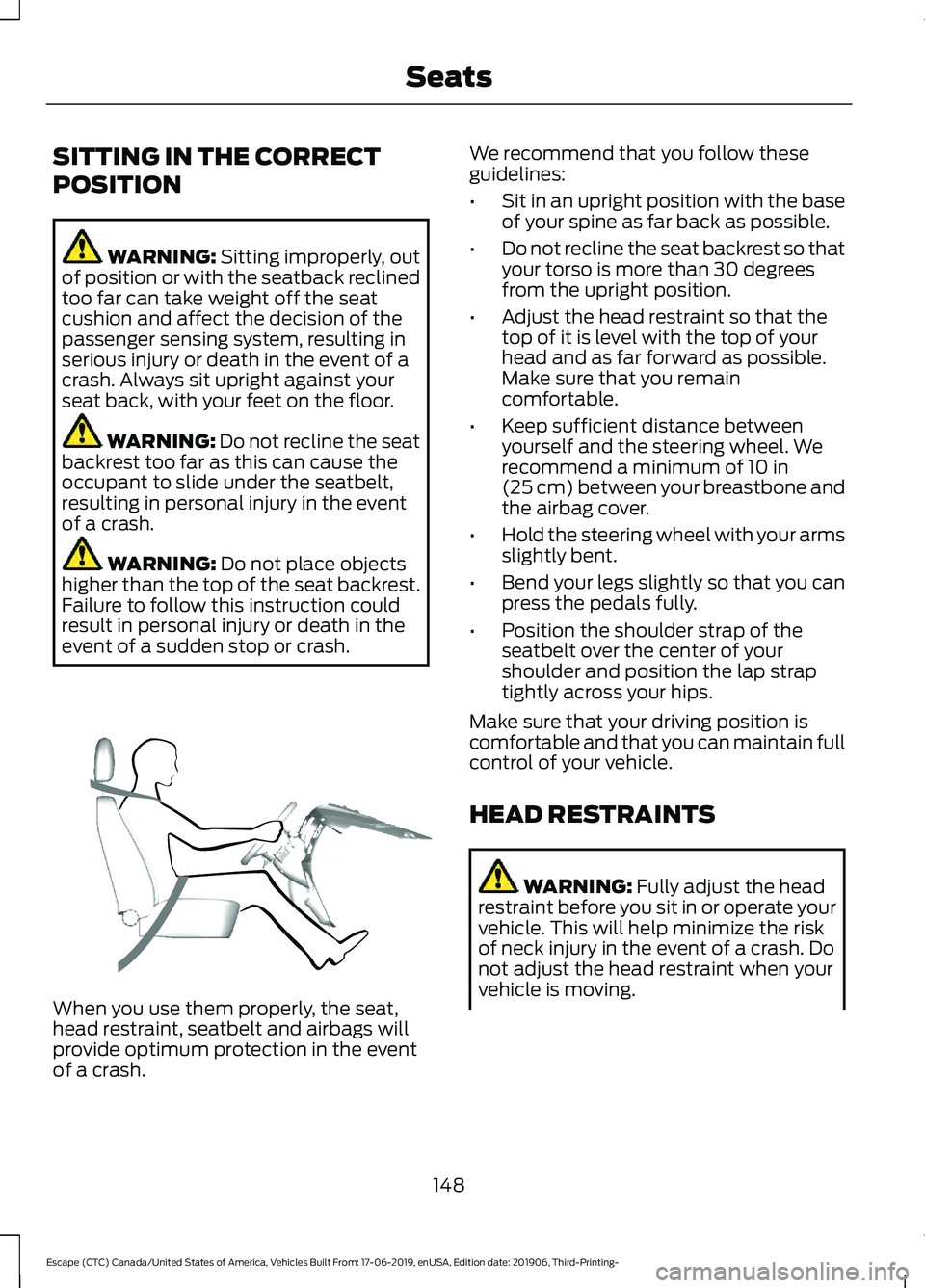
event of a sudden stop or crash. When you use them properly, the seat,
head restraint, seatbelt and airbags will
provide optimum protection in the event
of a crash. We recommend that you follow these
guidelines:
•
Sit in an upright position with the base
of your spine as far back as possible.
• Do not recline the seat backrest so that
your torso is more than 30 degrees
from the upright position.
• Adjust the head restraint so that the
top of it is level with the top of your
head and as far forward as possible.
Make sure that you remain
comfortable.
• Keep sufficient distance between
yourself and the steering wheel. We
recommend a minimum of
10 in
(25 cm) between your breastbone and
the airbag cover.
• Hold the steering wheel with your arms
slightly bent.
• Bend your legs slightly so that you can
press the pedals fully.
• Position the shoulder strap of the
seatbelt over the center of your
shoulder and position the lap strap
tightly across your hips.
Make sure that your driving position is
comfortable and that you can maintain full
control of your vehicle.
HEAD RESTRAINTS WARNING:
Fully adjust the head
restraint before you sit in or operate your
vehicle. This will help minimize the risk
of neck injury in the event of a crash. Do
not adjust the head restraint when your
vehicle is moving.
148
Escape (CTC) Canada/United States of America, Vehicles Built From: 17-06-2019, enUSA, Edition date: 201906, Third-Printing- SeatsE68595