2020 FORD ESCAPE door
[x] Cancel search: doorPage 408 of 553
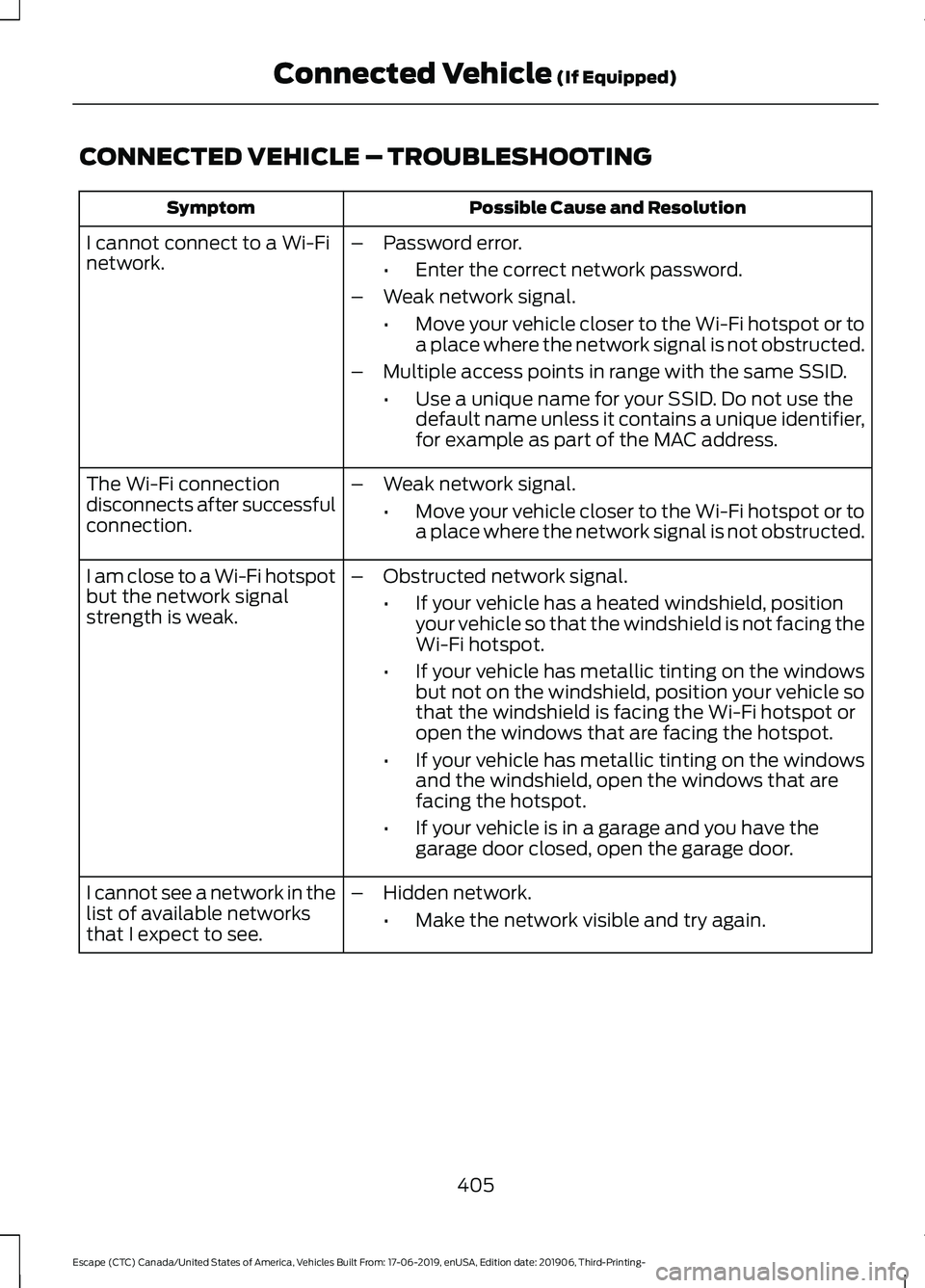
CONNECTED VEHICLE – TROUBLESHOOTING
Possible Cause and Resolution
Symptom
I cannot connect to a Wi-Fi
network. –
Password error.
•Enter the correct network password.
– Weak network signal.
•Move your vehicle closer to the Wi-Fi hotspot or to
a place where the network signal is not obstructed.
– Multiple access points in range with the same SSID.
•Use a unique name for your SSID. Do not use the
default name unless it contains a unique identifier,
for example as part of the MAC address.
The Wi-Fi connection
disconnects after successful
connection. –
Weak network signal.
•Move your vehicle closer to the Wi-Fi hotspot or to
a place where the network signal is not obstructed.
I am close to a Wi-Fi hotspot
but the network signal
strength is weak. –
Obstructed network signal.
•If your vehicle has a heated windshield, position
your vehicle so that the windshield is not facing the
Wi-Fi hotspot.
• If your vehicle has metallic tinting on the windows
but not on the windshield, position your vehicle so
that the windshield is facing the Wi-Fi hotspot or
open the windows that are facing the hotspot.
• If your vehicle has metallic tinting on the windows
and the windshield, open the windows that are
facing the hotspot.
• If your vehicle is in a garage and you have the
garage door closed, open the garage door.
I cannot see a network in the
list of available networks
that I expect to see. –
Hidden network.
•Make the network visible and try again.
405
Escape (CTC) Canada/United States of America, Vehicles Built From: 17-06-2019, enUSA, Edition date: 201906, Third-Printing- Connected Vehicle (If Equipped)
Page 438 of 553

GENERAL INFORMATION
WARNING: Driving while distracted
can result in loss of vehicle control, crash
and injury. We strongly recommend that
you use extreme caution when using any
device that may take your focus off the
road. Your primary responsibility is the
safe operation of your vehicle. We
recommend against the use of any
hand-held device while driving and
encourage the use of voice-operated
systems when possible. Make sure you
are aware of all applicable local laws
that may affect the use of electronic
devices while driving.
About SYNC
The system allows you to interact with the
entertainment, information and
communication systems on your vehicle
using voice commands and a touchscreen.
The system provides easy interaction with
audio, phone, navigation, mobile apps and
settings.
Note: You can switch the system on and
use it for up to an hour without switching
the ignition on.
Note: You can use the system after you
switch the ignition off for up to 10 minutes
or until you open a door.
Note: For your safety, some features are
speed-dependent. Their use is limited to
when your vehicle speed is less than 3 mph
(5 km/h). Using the Touchscreen
Status bar.
A
Home screen.
B
Clock. See Settings (page 468).
C
Outside air temperature.
D
Feature bar.
E
Status Bar Cell phone microphone muted.
Audio system muted.
Software update installed.
Wi-Fi connected.
Cell phone roaming.
Text message received.
435
Escape (CTC) Canada/United States of America, Vehicles Built From: 17-06-2019, enUSA, Edition date: 201906, Third-Printing- SYNC™ 3
(If Equipped)E293823
Page 456 of 553

Function
Button
Audio books
Composers
This button allows you to choose a specific
letter to view within the category you are
browsing.
A-Z Jump
If available, this allows you to browse the
folders and files on your USB device.
Explore Device
USB Ports The USB ports are in the center console or
behind a small access door in the
instrument panel.
This feature allows you to plug in USB
media devices, memory sticks, flash drives
or thumb drives, and charge devices if they
support this feature.
Select this option to play audio from your
USB device.
Apps
The system supports the use of certain
audio apps such as iHeartRadio through a
USB or Bluetooth enabled device.
Each app gives you different on-screen
options depending on the app's content.
See Apps (page 466). Supported Media Players, Formats
and Metadata Information
The system is capable of hosting nearly
any digital media player, including iPod,
iPhone, and most USB drives.
Supported audio formats include MP3,
WMA, WAV, AAC, and FLAC.
Supported audio file extensions include
MP3, WMA, WAV, M4A, M4B, AAC, and
FLAC.
Supported USB file systems include: FAT,
exFAT, and NTFS.
SYNC 3 is also able to organize the media
from your USB device by metadata tags.
Metadata tags, which are descriptive
software identifiers embedded in the
media files, provide information about the
file.
If your indexed media files contain no
information embedded in these metadata
tags, SYNC 3 may classify the empty
metadata tags as unknown.
SYNC 3 is capable of indexing up to
50,000 songs per USB device, for up to 10
devices.
453
Escape (CTC) Canada/United States of America, Vehicles Built From: 17-06-2019, enUSA, Edition date: 201906, Third-Printing- SYNC™ 3
(If Equipped)E285280
Page 477 of 553

Phone
Possible Cause and Resolution
Symptom
During a call, I can hear
excessive background noise. –
Incorrect cell phone settings.
•Check and adjust the audio settings on your cell
phone. Refer to your cell phone's user manual.
– Cell phone malfunction.
•Switch your cell phone and Bluetooth on and off
and try again.
– Cell phone microphone muted.
•Unmute your cell phone microphone.
During a call, I can hear the
other person but they
cannot hear me.
During a call, I cannot hear
the other person and they
cannot hear me.
–
System restart required.
•Restart the system. Switch the ignition off and
open the door. Close the door and lock the vehicle.
Wait until the touchscreen is off and any illumin-
ated USB ports are not illuminated. Unlock the
vehicle, switch the ignition on and try again.
I cannot download phone-
book. –
Incompatible cell phone.
•Check the compatibility of your cell phone on our
website.
– Incorrect cell phone settings.
•Allow the system to retrieve contacts from your
cell phone. Refer to your cell phone's user manual.
– Incorrect system settings.
•Switch automatic phonebook download on. See
Settings (page 468).
– Cell phone malfunction.
•Switch your cell phone off, reset it and try again.
– Incorrect cell phone settings.
•Allow the system to retrieve contacts from your
cell phone. Refer to your cell phone's user manual.
• Check the location of the missing contacts on your
cell phone. If they are stored on the SIM card, move
them to the cell phone memory.
– Incorrect system settings.
•Switch automatic phonebook download on. See
Settings
(page 468).
A message displays
suggesting that my phone-
book has downloaded but it
is empty or it has missing
contacts.
474
Escape (CTC) Canada/United States of America, Vehicles Built From: 17-06-2019, enUSA, Edition date: 201906, Third-Printing- SYNC™ 3
(If Equipped)
Page 482 of 553
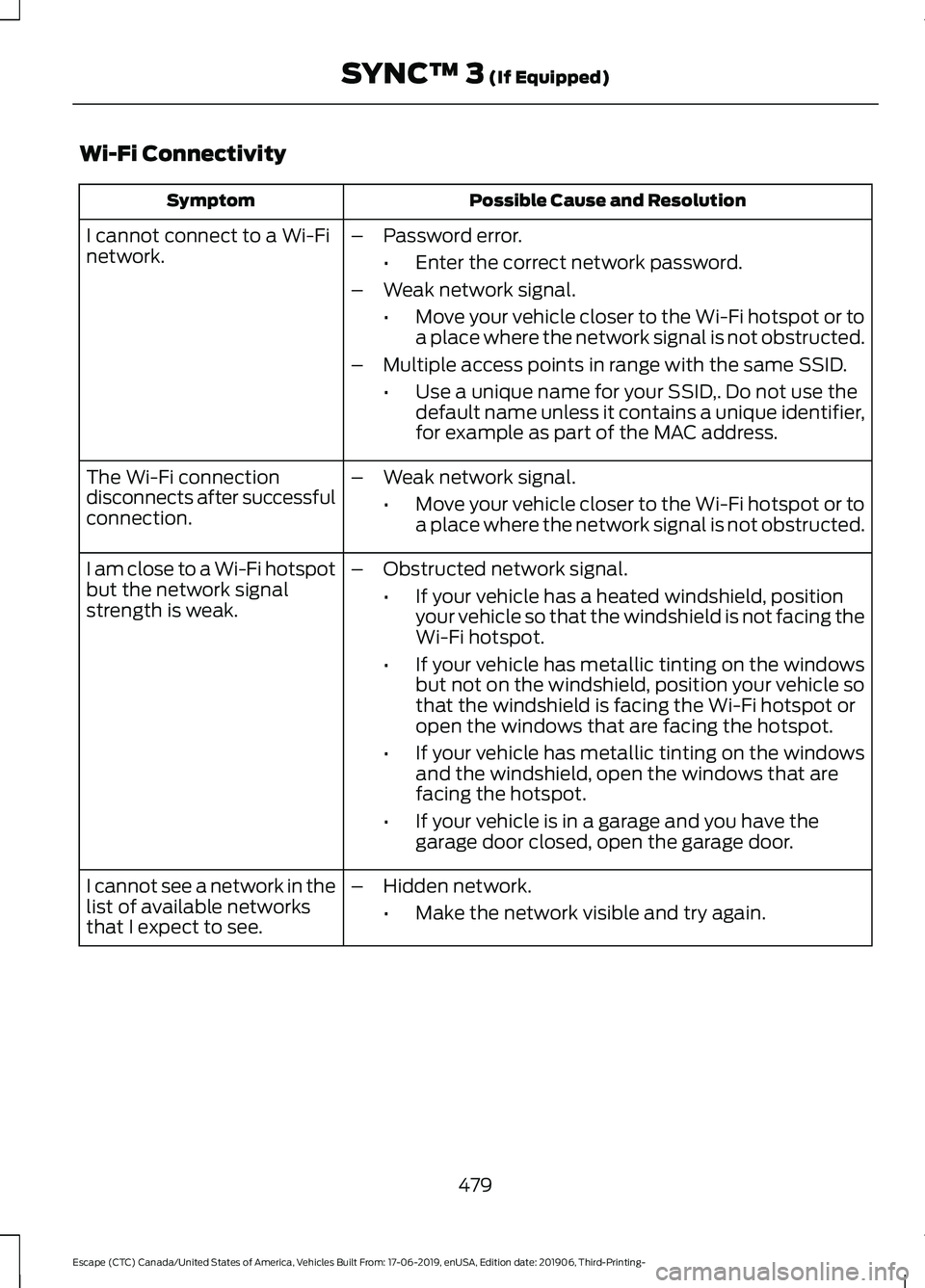
Wi-Fi Connectivity
Possible Cause and Resolution
Symptom
I cannot connect to a Wi-Fi
network. –
Password error.
•Enter the correct network password.
– Weak network signal.
•Move your vehicle closer to the Wi-Fi hotspot or to
a place where the network signal is not obstructed.
– Multiple access points in range with the same SSID.
•Use a unique name for your SSID,. Do not use the
default name unless it contains a unique identifier,
for example as part of the MAC address.
The Wi-Fi connection
disconnects after successful
connection. –
Weak network signal.
•Move your vehicle closer to the Wi-Fi hotspot or to
a place where the network signal is not obstructed.
I am close to a Wi-Fi hotspot
but the network signal
strength is weak. –
Obstructed network signal.
•If your vehicle has a heated windshield, position
your vehicle so that the windshield is not facing the
Wi-Fi hotspot.
• If your vehicle has metallic tinting on the windows
but not on the windshield, position your vehicle so
that the windshield is facing the Wi-Fi hotspot or
open the windows that are facing the hotspot.
• If your vehicle has metallic tinting on the windows
and the windshield, open the windows that are
facing the hotspot.
• If your vehicle is in a garage and you have the
garage door closed, open the garage door.
I cannot see a network in the
list of available networks
that I expect to see. –
Hidden network.
•Make the network visible and try again.
479
Escape (CTC) Canada/United States of America, Vehicles Built From: 17-06-2019, enUSA, Edition date: 201906, Third-Printing- SYNC™ 3 (If Equipped)
Page 491 of 553

Check Every Month
Windshield washer fluid level.
Fuel and water separator. Drain if necessary (or if indicated by the information display). Holes and slots in the tail pipe to make sure they are functional and clear of debris. Check Every Six Months
Battery connections. Clean if necessary.
Body and door drain holes for obstructions. Clean if necessary. Cooling system fluid level and coolant strength.
Door weatherstrips for wear. Lubricate if necessary.
Hinges, latches and outside locks for proper operation. Lubricate if necessary. Parking brake for proper operation.
Seatbelts and seat latches for wear and function.
Safety warning lamps (brake, ABS, airbag and seatbelt) for operation.
Washer spray and wiper operation. Clean or replace blades as necessary.
Multi-Point Inspection
In order to keep your vehicle running right,
it is important to have the systems on your
vehicle checked regularly. This can help
identify potential issues and prevent major
problems. We recommend having the
following multi-point inspection performed
at every scheduled maintenance interval
to help make sure your vehicle keeps
running great. Multi-Point Inspection
Hazard warning system operation
Accessory drive belt(s)
Horn operation
Battery performance
Radiator, cooler, heater and air conditioninghoses
Engine air filter
488
Escape (CTC) Canada/United States of America, Vehicles Built From: 17-06-2019, enUSA, Edition date: 201906, Third-Printing- Scheduled Maintenance
Page 542 of 553

Cross Traffic Alert.........................................257
Cross Traffic Alert Behavior When Trailer
is Attached...................................................... 259
Cross Traffic Alert Indicator........................... 259
Cross Traffic Alert Information Messages......................................................... 260
Cross Traffic Alert System Limitations...................................................... 259
Cross Traffic Alert System Sensors............259
Switching the System On and Off..............259
Using Cross Traffic Alert.................................. 257
Cruise Control................................................237
Cruise Control Indicators..........................238
Cruise Control - Vehicles With: Adaptive Cruise Control With Lane
Centering.........................................................81
Cruise Control - Vehicles With: Adaptive Cruise Control With Stop and Go
.........80
Cruise Control - Vehicles With: Cruise Control............................................................80
Customer Assistance
.................................297
D
Data Recording
..................................................11
Comfort, Convenience and Entertainment
Data....................................................................... 13
Event Data................................................................ 13
Service Data............................................................ 12
Services That Third Parties Provide...............14
Services That We Provide.................................. 14
Vehicles With a Modem...................................... 14
Vehicles With an Emergency Call System.................................................................. 15
Vehicles With SYNC............................................. 14
Daytime Running Lamps - Vehicles With: Configurable Daytime Running
Lamps.............................................................88
Daytime Running Lamps - Vehicles With: Daytime Running Lamps (DRL)............88
Declaration of Conformity........................533
Declaration of Conformity - Vehicles With: SYNC 3..............................................533
Radio Frequency Statement......................... 533
Digital Radio
...................................................412
HD Radio Reception and Station
Troubleshooting............................................. 413Direction Indicators
.......................................89
Direction Indicator............................................... 89
Switching the Direction Indicators On and Off........................................................................\
. 89
Doors and Locks.............................................66
Drive Mode Control.....................................266 Drive Modes......................................................... 266
Drive Modes
...................................................266
Deep Snow/Sand.............................................. 266
Eco........................................................................\
.. 266
Normal................................................................... 267
Slippery.................................................................. 267
Sport....................................................................... 267
Driver Alert.....................................................250 Using Driver Alert............................................... 250
Driver and Passenger Airbags...................45 Children and Airbags.......................................... 46
Proper Driver and Front Passenger Seating Adjustment........................................................ 45
Driver Knee Airbag
.........................................49
Driving Aids....................................................250
Driving Hints..................................................284
Driving Through Water...............................285
DRL See: Daytime Running Lamps - Vehicles With:
Configurable Daytime Running
Lamps................................................................. 88
See: Daytime Running Lamps - Vehicles With: Daytime Running Lamps (DRL)................88
E
Economical Driving
.....................................284
Electric Parking Brake.................................218 Applying the Electric Parking Brake.............218
Automatically Releasing the Electric
Parking Brake.................................................. 219
Manually Releasing the Electric Parking Brake................................................................... 219
Releasing the Electric Parking Brake if the Vehicle Battery is Running Out of
Charge................................................................ 219
Electric Vehicle Information.....................461 Charge Preferences.......................................... 464
Charge Settings.................................................. 462
Charge Time Settings...................................... 465
Departure Time Settings................................ 465
Engine On Due To............................................... 461
539
Escape (CTC) Canada/United States of America, Vehicles Built From: 17-06-2019, enUSA, Edition date: 201906, Third-Printing- Index
Page 544 of 553

Front Fog Lamps............................................88
Front Fog Lamp Indicator................................. 89
Switching the Front Fog Lamps On or Off........................................................................\
. 88
Front Parking Aid..........................................227 Object Distance Indicator............................... 228
Front Passenger Sensing System............46
Fuel and Refueling.......................................182
Fuel Consumption.......................................190 Advertised Capacity.......................................... 190
Calculating Fuel Economy.............................. 190
Filling the Fuel Tank.......................................... 190
Fuel Filler Funnel Location........................183
Fuel Filter
........................................................329
Fuel Quality.....................................................182
Choosing the Right Fuel................................... 182
Fuel Shutoff..................................................288
Fuses................................................................304
Fuse Specification Chart..........................304 Engine Compartment Fuse Box.................. 304
Passenger Compartment Fuse Box...........308
G
Garage Door Opener...................................159
Garage Door Opener See: Universal Garage Door Opener...........159
Gauges - Plug-In Hybrid Electric Vehicle (PHEV), Vehicles With: 12.3 Inch
Instrument Cluster Display
Screen............................................................102
Battery Gauge...................................................... 103
Engine Coolant Temperature Gauge..........103
Fuel Gauge............................................................ 103
Information Bar................................................... 102
Information Display........................................... 102
Low Fuel Reminder............................................ 103
Power Gauge........................................................ 104
Vehicle Driving Range....................................... 103
Gauges - Plug-In Hybrid Electric Vehicle (PHEV), Vehicles With: 6.5 Inch
Instrument Cluster Display
Screen.............................................................99
Battery Gauge....................................................... 101
Engine Coolant Temperature Gauge...........101
Fuel Gauge........................................................... 100
Information Bar.................................................. 100
Information Display............................................ 101Low Fuel Reminder.............................................
101
Power Gauge....................................................... 100
Vehicle Driving Range........................................ 101
Gauges - Vehicles With: 12.3 Inch Instrument Cluster Display
Screen.............................................................98
Distance to Empty............................................... 99
Engine Coolant Temperature Gauge............99
Fuel Gauge............................................................. 98
Information Bar.................................................... 98
Information Display............................................. 98
Low Fuel Reminder............................................. 99
Gauges - Vehicles With: 4.2 Inch Instrument Cluster Display
Screen...........................................................104
Engine Coolant Temperature Gauge..........105
Fuel Gauge............................................................ 105
Information Display........................................... 105
Gearbox See: Transmission............................................. 204
General Information on Radio Frequencies...................................................54
Intelligent Access................................................. 54
General Maintenance Information
.......486
Multi-Point Inspection.................................... 488
Owner Checks and Services.......................... 487
Protecting Your Investment.......................... 486
Why Maintain Your Vehicle?......................... 486
Why Maintain Your Vehicle at Your Dealership?.................................................... 486
Getting Assistance Outside the U.S. and Canada........................................................300
Getting the Services You Need...............297 Away From Home.............................................. 297
H
Hazard Flashers
...........................................288
Headlamp Adjusting See: Adjusting the Headlamps..................... 328
Headlamp Exit Delay....................................87
Headrest See: Head Restraints........................................ 148
Head Restraints
............................................148
Folding the Head Restraint............................. 150
Front Seat Head Restraints............................ 149
Installing the Head Restraint......................... 150
Lowering the Head Restraint......................... 149
541
Escape (CTC) Canada/United States of America, Vehicles Built From: 17-06-2019, enUSA, Edition date: 201906, Third-Printing- Index