Page 75 of 448
ADJUSTING THE STEERING
WHEEL
WARNING: Do not adjust thesteering wheel when your vehicle ismoving.
Note:Make sure that you are sitting in thecorrect position. See Sitting in the CorrectPosition (page 115).
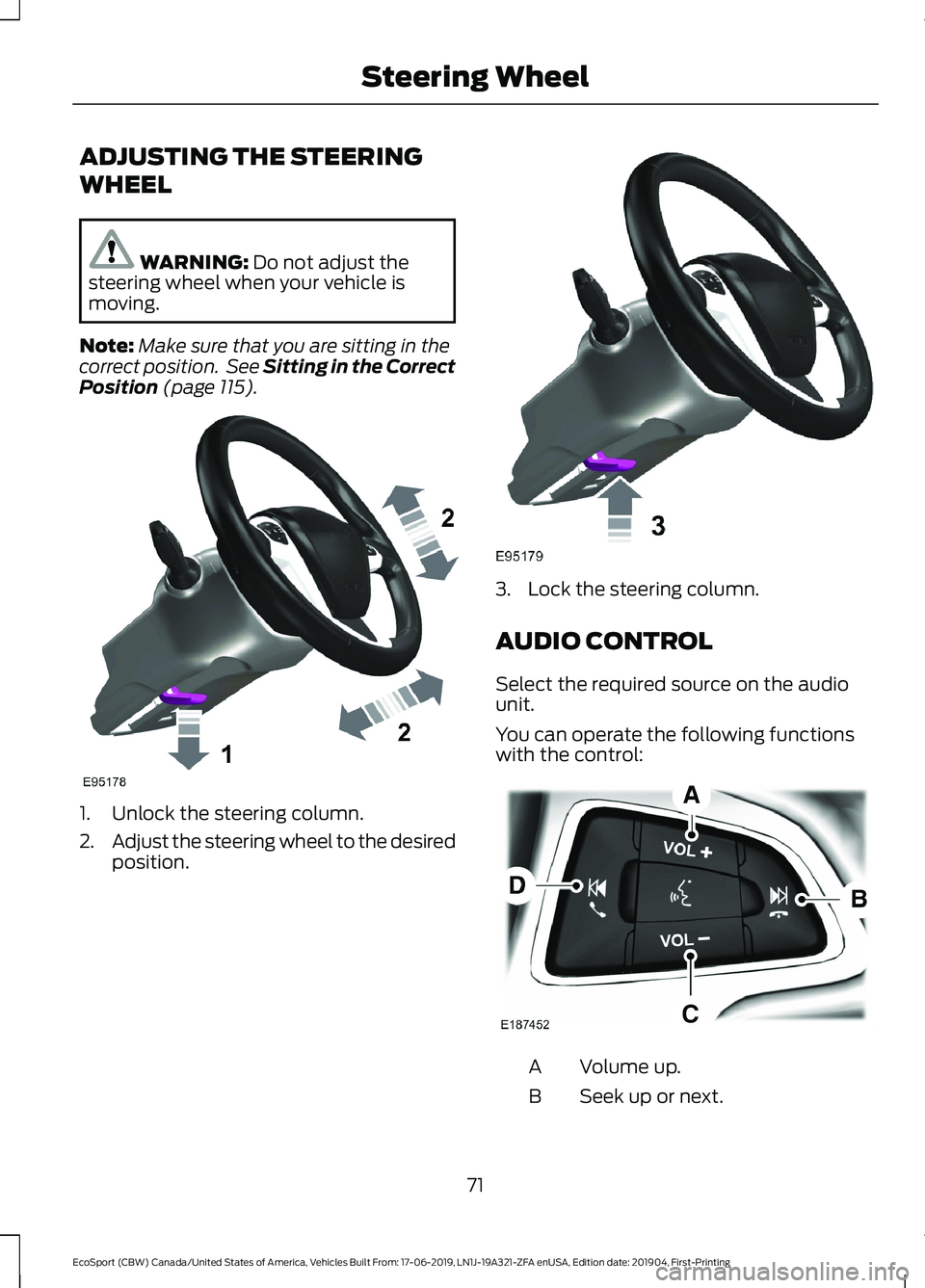
1.Unlock the steering column.
2.Adjust the steering wheel to the desiredposition.
3.Lock the steering column.
AUDIO CONTROL
Select the required source on the audiounit.
You can operate the following functionswith the control:
Volume up.A
Seek up or next.B
71
EcoSport (CBW) Canada/United States of America, Vehicles Built From: 17-06-2019, LN1J-19A321-ZFA enUSA, Edition date: 201904, First-PrintingSteering Wheel
Page 76 of 448
Volume down.C
Seek down or previous.D
Seek, Next or Previous
Press the seek button to:
•Tune the radio to the next or previousstored preset.
•Play the next or the previous track.
Press and hold the seek button to:
•Tune the radio to the next station upor down the frequency band.
•Seek through a track.
VOICE CONTROL
Press the button to select or deselect voicecontrol. See Using Voice Recognition(page 327).
CRUISE CONTROL
See Using Cruise Control (page 167).
INFORMATION DISPLAY
CONTROL
See General Information (page 93).
HEATED STEERING WHEEL (IF
EQUIPPED)
The heated steering wheel button is on theclimate controls.
Press the button to switch theheated steering wheel on andoff.
Note:You can use the heated steeringwheel only when the engine is running.
72
EcoSport (CBW) Canada/United States of America, Vehicles Built From: 17-06-2019, LN1J-19A321-ZFA enUSA, Edition date: 201904, First-PrintingSteering Wheel
Page 77 of 448
Note:The system uses a sensor and isdesigned to control the temperature of thesteering wheel and to prevent it fromoverheating.
Note:In warm temperatures, the steeringwheel quickly reaches its maximumtemperature and the system reduces thecurrent to the heating element. This couldcause you to think that the system hasstopped working but it has not. This isnormal.
73
EcoSport (CBW) Canada/United States of America, Vehicles Built From: 17-06-2019, LN1J-19A321-ZFA enUSA, Edition date: 201904, First-PrintingSteering Wheel
Page 79 of 448

High sensitivity.A
Autowipers on.B
Low sensitivity.C
Move the wiper lever upward to the firstposition to switch autowipers on.
Use the rotary control to adjust thesensitivity of the autowipers. When youselect low sensitivity, the wipers operatewhen the sensor detects a large amountof water on the windshield. When youselect high sensitivity, the wipers operatewhen the sensor detects a small amountof water on the windshield.
Note:Keep the outside of the windshieldclean. The rain sensor is very sensitive andthe wipers may operate if dirt, mist orinsects hit the windshield.
If you leave autowipers on, it may notoperate when you switch the ignition onduring freezing temperatures. This isbecause the system has deactivated therain sensor to prevent damage to thewindshield wipers. Defrost the windshieldbefore reactivating the rain sensor. Youcan reactivate the rain sensor by movingthe rotary control or switching autowipersoff and on.
Note:Fully defrost the windshield beforeyou switch the windshield wipers on.
Note:Make sure that you switch thewindshield wipers off before entering a carwash.
Wet or winter weather conditions couldcause unexpected wiping or smearing.
To keep the windshield clear:
•Lower the sensitivity of the autowipersto reduce the amount of smearing onthe windshield.
•Switch autowipers off.
Note: If streaks or smears appear on thewindshield, clean the windshield and thewiper blades. See Checking the WiperBlades (page 224). If that does not resolvethe issue, install new wiper blades. SeeChanging the Wiper Blades (page 225).
Settings
To switch autowipers on or off, use the information display controls on the steeringwheel to select the following:
ActionMenu Item
Press the menu button.Settings
Press the OK button.Vehicle Settings
Press the OK button.Wipers
Press the OK button.Rain Sensing
75
EcoSport (CBW) Canada/United States of America, Vehicles Built From: 17-06-2019, LN1J-19A321-ZFA enUSA, Edition date: 201904, First-PrintingWipers and Washers
Page 80 of 448
WINDSHIELD WASHERSPull the lever toward you to operate thewindshield washers. When you release thelever, the wipers operate for a short time.A courtesy wipe occurs a short time afterthe wipers stop to clear any remainingwasher fluid.
You can switch courtesy wipe on or off inthe information display.
Note: Do not operate the washers whenthe washer reservoir is empty. This couldcause the washer pump to overheat.
Settings
To switch courtesy wipe on or off, use the information display controls on thesteering wheel to select the following:
ActionMenu Item
Press the menu button.Settings
Press the OK button.Vehicle Settings
Press the OK button.Wipers
Press the OK button.Courtesy Wipe
76
EcoSport (CBW) Canada/United States of America, Vehicles Built From: 17-06-2019, LN1J-19A321-ZFA enUSA, Edition date: 201904, First-PrintingWipers and Washers
Page 81 of 448

REAR WINDOW WIPER AND
WASHERS
Rear Window Wiper
Intermittent wipe.A
Continuous wipe.B
Rear window wiper off.C
The rear window wiper also turns on whenyou shift into reverse and the windshieldwipers are on.
You can switch reverse wipe off in theinformation display.
Note:Make sure that you switch the rearwindow wiper off before entering a carwash.
Settings
To switch reverse wipe on or off, use the information display controls on thesteering wheel to select the following:
ActionMenu Item
Press the menu button.Settings
Press the OK button.Vehicle Settings
Press the OK button.Wipers
Press the OK button.Reverse Wiper
Rear Window WasherPush the lever away from you to operatethe rear window washer. When you releasethe lever, the wiper operates for a shorttime.
Note: Do not operate the washers whenthe washer reservoir is empty. This couldcause the washer pump to overheat.
77
EcoSport (CBW) Canada/United States of America, Vehicles Built From: 17-06-2019, LN1J-19A321-ZFA enUSA, Edition date: 201904, First-PrintingWipers and Washers
Page 97 of 448

GENERAL INFORMATION
WARNING: Driving whiledistracted can result in loss of vehiclecontrol, crash and injury. We stronglyrecommend that you use extremecaution when using any device that maytake your focus off the road. Yourprimary responsibility is the safeoperation of your vehicle. Werecommend against the use of anyhand-held device while driving andencourage the use of voice-operatedsystems when possible. Make sure youare aware of all applicable local lawsthat may affect the use of electronicdevices while driving.
You can control various systems on yourvehicle using the information displaycontrols on the steering wheel.
The information display shows thecorresponding information.
Information Display Controls
•Press the up and down arrow buttonsto scroll through and highlight theoptions within a menu.
•Press the right button to enter asubmenu.
•Press the left button to exit a submenu.
•Press the OK button to choose andconfirm settings or messages.
Menu Structure - InformationDisplay
You can access the menu using theinformation display control.
Note:It may describe options not fitted tothe vehicle you have purchased.
Trip computer 1 and 2
Trip 1
Trip 2
Reset AllReset Individual Values
Reset Trip Odometer
Reset Trip Timer
Reset Average Fuel
93
EcoSport (CBW) Canada/United States of America, Vehicles Built From: 17-06-2019, LN1J-19A321-ZFA enUSA, Edition date: 201904, First-PrintingInformation Displays
Page 107 of 448

Power Steering
ActionMessage
The power steering system is not working. Stop thevehicle in a safe place. Contact an authorized dealer.Steering loss Stop safely
The power steering system is not working. Stop thevehicle in a safe place. Contact an authorized dealer.Steering assist malfunctionService required
The power steering system has detected a conditionwithin the power steering system or passive entry orpassive start system requires service. Contact anauthorized dealer.
Steering malfunction Servicenow
Stability Control
ActionMessage
The system has detected a fault that requires service.Have your vehicle checked as soon as possible.SHIFT SYS FAULT SportUnavailable Service Required
Starting System
ActionMessage
Displays when you start your vehicle as a reminder tofully press the brake pedal.To START Press Brake
Displays when you start your vehicle as a reminder tofully press the clutch pedal.To START Press Clutch
Displays when you start your vehicle as a reminder tofully press the brake and clutch pedals.To START Press Brake andClutch
Displays if your vehicle fails to start.Cranking Time Exceeded
Displays when the system cannot detect a valid key.No Key Detected
Displays if you are unable to start your vehicle with acorrectly coded key. The system has detected a faultthat requires service. Have your vehicle checked assoon as possible.
Starting System Fault
Displays for 20 seconds if you switch the engine offand the system cannot detect a valid passive key. After10 seconds, you can no longer start your vehicle if itdoes not detect a valid passive key.
Restart Now or Key is Needed
103
EcoSport (CBW) Canada/United States of America, Vehicles Built From: 17-06-2019, LN1J-19A321-ZFA enUSA, Edition date: 201904, First-PrintingInformation Displays