2020 DODGE GRAND CARAVAN ignition
[x] Cancel search: ignitionPage 289 of 380

MULTIMEDIA287
Your radio will play the following formats:
MP3, WMA, AAC, M4A, CD Audio, DVD Audio,
and DVD Video.
Do not insert anything other than the supported
CD/DVD formats.
SACD (SACD layer), VCD DualDisc, SVCD, VCD
format on DVD MPEG-4 are not supported.
A complete list of supported CD/DVD formats is
available at DriveUconnect.com (US Residents)
or DriveUconnect.ca (Canadian Residents).
Inserting A Disc
1. Push the Load button once.
2. After the screen opens, with the printed side upward, insert the disc into the disc slot of
the radio. The radio pulls the disc automat-
ically and closes the flip screen. The radio
selects the appropriate mode after the disc
is recognized and starts playing the first
track. The display shows “Reading...” during
this process. NOTE:
A faulty CD is NOT automatically ejected. Use
only standard size discs. Discs that have
been modified with an adhesive label should
not be used in the CD/DVD player.
On Data CDs with a large number of songs it
may take several seconds to read, play and
display information for all songs on the disc.
Recording your own CD on a home computer
at a lower write speed will result in a more
consistent quality.
High definition content and media
(e.g, HD-DVD, Blu-Ray™) is not supported.
If the user does not remove an ejected CD
within approximately 10 seconds the CD will
reload.
Removing A Disc
1. Push the Load button.
2. After the display opens the disc is ejected and can be removed. NOTE:
If the disc is not removed within approximately
10 seconds, the unit pulls it back into the slot
(park position). The disc may be ejected when
the ignition is OFF.
3. Push the Load button to close the display. If
you do not push the Load button or insert a
new disc, the display will close 30 seconds
after the display was opened.
Selecting Disc Mode
Activate Disc Mode by pushing the Media
button located on the faceplate. The disc mode
can be selected by pressing the Disc button on
the touchscreen.
NOTE:
When a disc is inserted, the appropriate mode
is automatically selected once the disc is
recognized.
Scan Search
Press the Scan button.
The first few seconds of each individual track
will be played in succession.
Press the Stop Scan button to stop the scan
function.
9
20_RT_OM_EN_USC_t.book Page 287
Page 294 of 380

292MULTIMEDIA
After a short pause, the copy process begins
and the audio resumes playback from the start
of the track. The copy process continues in the
background while the audio plays. The progress
is shown in the display. Even if you change to
another mode (radio, AUX, etc.) or turn the radio
Off (ignition ON/RUN), the copy process will
continue in the background.
It is also possible to listen to radio modes during
this process. Copying time is greater than 4x the
normal playback rate.
NOTE:
When copying CD-Audio to HDD, audio files are
converted from CD-Audio to AAC. If available,
the artist name, album name, cover art, track
names and genres are stored with the tracks on
the HDD. DVD-Audio cannot be copied to the
HDD. If the CD-Audio disc is not recognized by
the Gracenote® Music Recognition Service, you
can rip the CD-Audio disc on your
internet-equipped computer first, then copy the
resulting compressed audio files to a USB
memory stick. Then insert the USB memory
stick in the radio and copy the audio files to the
HDD mode. Copy WMA/MP3 Files To Hard-Drive
MP3 and WMA formatted compressed audio
files from a disc or via USB (e.g., USB stick) can
be copied to the Hard Disc Drive.
It is recommended to sort music files into
folders.
Songs located in the root level (top level) of the
disc or USB device are saved on the Hard Disk
Drive in a root folder. Songs that are stored in
folders on the disc or USB devices are saved to
the same folder name on the Hard Disk Drive.
Only folders that contain song files are copied to
the Hard Disk Drive.
For the example above, the list on the HDD will
show the following:
Disc_Root_Level Songs (Playlist 1)
Song 1.mp3 (First song in playlist 1)
Song 2.mp3 (Second song in playlist 1)
Song 3.wma (Third song in playlist 1)
My Playlist Folder 1 (Playlist 2)
01 Song.mp3 (First song in playlist 2)
02 Song.mp3 (Second song in playlist 2)
03 Song.mp3 (Third song in playlist 2)
Copying Complete Disc
You can copy a complete music disc using the
following procedure:
1. Insert a disc with MP3/WMA files.
2. Press the Copy button to copy music files of the inserted disc to the hard disk drive.
The copy progress is shown in the display.
You can continue listening to any audio source
during the copy process.
20_RT_OM_EN_USC_t.book Page 292
Page 313 of 380

MULTIMEDIA311
Redial
To redial the last number called from your
mobile phone using Voice Command:
1. Push the Phone button to begin.
2. After the “Ready” prompt and the following
beep, say “Redial.”
The Uconnect Phone will call the last
number that was dialed from your mobile
phone.
NOTE:
This may not be the last number dialed from the
Uconnect Phone.
Call Continuation
Call continuation is the progression of a phone
call on the Uconnect Phone after the vehicle
ignition has been switched to OFF. Call contin -
uation functionality available on the vehicle can
be any one of three types:
1. After the ignition is switched to OFF, a call can continue on the Uconnect Phone either
until the call ends, or until the vehicle
battery condition dictates cessation of the
call on the Uconnect Phone and transfer of
the call to the mobile phone.
2. After the ignition is cycled to OFF, a call can
continue on the Uconnect Phone for a
certain duration, after which the call is
automatically transferred from the
Uconnect Phone to the mobile phone.
3. An active call is automatically transferred to the mobile phone after the ignition is cycled
to OFF.
Uconnect Phone Features
Language Selection
To change the language that the Uconnect
Phone is using:
Push the Phone button to begin.
After the “Ready” prompt and the following
beep, say the name of the language you wish
to switch to / English, Spanish, or French.
Continue to follow the system prompts to
complete the language selection.
After selecting one of the languages, all
prompts and voice commands will be in that
language. NOTE:
After every Uconnect Phone language change
operation, only the language-specific 32-name
phonebook is usable. The paired phone name is
not language-specific and usable across all
languages.
Emergency Assistance
If you are in an emergency and the mobile
phone is reachable:
Pick up the phone and manually dial the
emergency number for your area.
If the phone is not reachable and the Uconnect
Phone is operational, you may reach the
emergency number as follows:
Push the Phone button to begin.
After the “Ready” prompt and the following
beep, say “Emergency” and the Uconnect
Phone will instruct the paired mobile phone
to call the emergency number.
9
20_RT_OM_EN_USC_t.book Page 311
Page 320 of 380

318MULTIMEDIA
Warning
Read this information carefully before starting
to operate the navigation system and follow the
instructions in this manual. Neither the FCA US
LLC nor Garmin® shall be liable for problems or
accidents resulting from failure to observe the
instructions in this manual.
Failure to avoid the following potentially
hazardous situations could result in an accident
or collision resulting in death or serious injury.
Always drive safely. Only use the navigation
features in this vehicle when it is safe to do
so. You accept full responsibility for the use
of the features in this vehicle.
When navigating, carefully compare informa -
tion displayed on the navigation system to all
available navigation sources, including road
signs, road closures, road conditions, traffic
congestion, weather conditions, and other
factors that may affect safety while driving.
For safety, always resolve any discrepancies
before continuing navigation, and defer to
posted road signs and road conditions.
The navigation system is designed to provide
route suggestions. It is not a replacement for
driver attentiveness and good judgment. Do
not follow route suggestions if they suggest
an unsafe or illegal maneuver or would place
the vehicle in an unsafe situation.
Be careful of the ambient temperature. Using
the navigation system at extreme tempera -
tures can lead to malfunction or damage.
Also note that the unit can be damaged by
strong vibration, metal objects, or by water
getting inside the unit.
Caution
The navigation system is designed to provide
you with route suggestions. It does not reflect
road closures or road conditions, weather
conditions, or other factors that may affect
safety or timing while driving.
Use the navigation system only as a naviga -
tional aid. Do not attempt to use the navigation
system for any purpose requiring precise
measurement of direction, distance, location,
or topography. The Global Positioning System (GPS) is
operated by the United States government,
which is solely responsible for its accuracy and
maintenance. The government system is
subject to changes that could affect the
accuracy and performance of all GPS
equipment, including the navigation system.
Notice
This navigation system can be used when the
ignition key is turned to ON/RUN or ACC. To
preserve the battery, however, it should be used
with the engine running whenever possible.
Using the navigation system for a long time with
the engine switched off can cause the battery to
run down.
Map Data Information
Garmin® uses a combination of governmental
and private data sources. Virtually all data
sources contain some inaccurate or incomplete
data. In some countries, complete and accurate
map information is either not available or is
prohibitively expensive.
20_RT_OM_EN_USC_t.book Page 318
Page 346 of 380
344MULTIMEDIA
Previous Track
Use the Seek Down button, or push the VR
button on the radio and say “Previous Track,” to
jump to the previous music track on your
cellular phone.
Browse
Browsing is not available on a Bluetooth®
Streaming Audio (BTSA) device. Only the current
song that is playing will display info.
UCONNECT MULTIMEDIA — VIDEO
ENTERTAINMENT SYSTEM (VES) — IF
EQUIPPED
Your rear seat Video Entertainment System
(VES) is designed to give your family years of
enjoyment. You can play your favorite CDs or
DVDs, listen to audio over the wireless
headphones, or plug and play a variety of
standard video games or audio devices. Please
review this Owner's Manual to become familiar
with its features and operation. NOTE:
The screen is located in the 2nd row overhead
console.
Getting Started
Screen located in the overhead console
:
Unfold the overhead LCD screen(s) by
pushing the button on the overhead console
behind the screen(s).
Cycle the ignition to the ON/RUN or ACC
position.
Turn on the Player by pushing the Power
button, located on the far left, or by pushing
the button on the Remote Control.
When the video screen is open and a DVD is
inserted into the VES player, the screen turns
on automatically, the headphone transmit -
ters turn on and playback begins.
The system can be controlled by the front
seat occupants using either the touchscreen
radio, the DVD, or by the rear seat occupants
using the remote control.
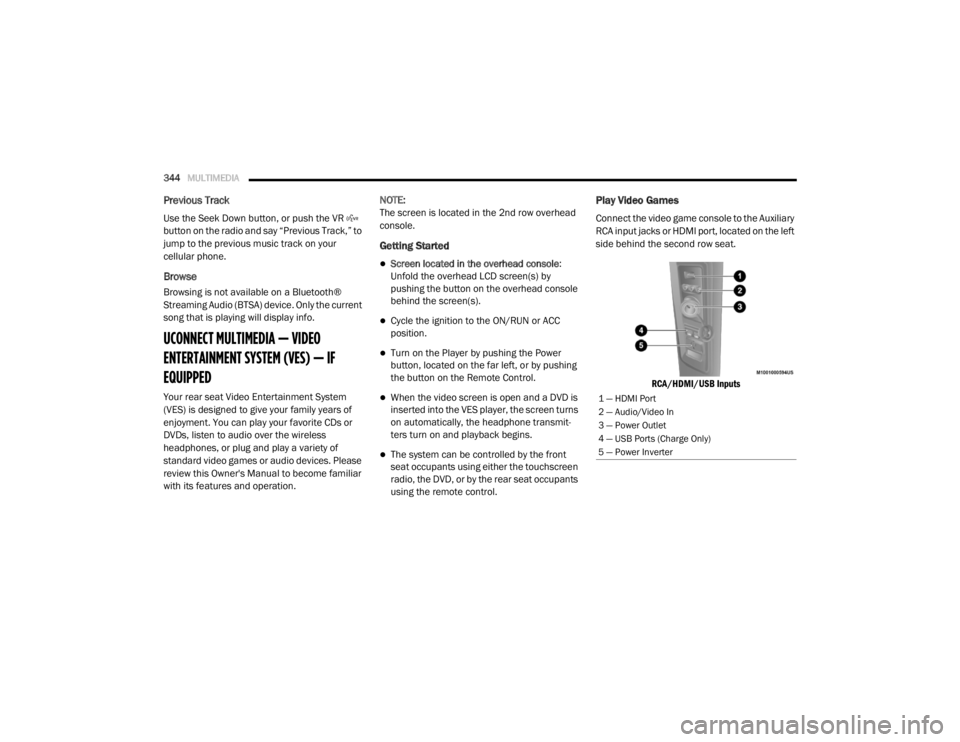
Play Video Games
Connect the video game console to the Auxiliary
RCA input jacks or HDMI port, located on the left
side behind the second row seat.
RCA/HDMI/USB Inputs
1 — HDMI Port
2 — Audio/Video In
3 — Power Outlet
4 — USB Ports (Charge Only)
5 — Power Inverter
20_RT_OM_EN_USC_t.book Page 344
Page 351 of 380

MULTIMEDIA349
15. SETUP – When in a video mode, push the
SETUP button to access the display settings
(see the display settings section) to access
the DVD setup menu, select the menu
button on the radio. When a disc is loaded
in the DVD player (if equipped) and the VES
mode is selected and the disc is stopped,
push the SETUP button to access the DVD
Setup menu.
16. BACK – When navigating in menu mode, push to return to the previous screen. When
navigating a DVD’s disc menu, the
operation depends on the disc’s contents.
17. ◂◂ – In radio modes, push to seek to the
previous tunable station. In disc modes,
push and hold to fast rewind through the
current audio track or video chapter. In
menu modes, use to navigate in the menu.
18. ENTER/OK – Push to select the highlighted option in a menu.
19. ▴ / NEXT – In radio modes, push to select to
the next station. In disc modes, push to
advance to the next audio track or video
chapter. In menu modes, use to navigate in
the menu.Remote Control Storage
The video screen comes with a built-in storage
compartment for the remote control which is
accessible when the screen is opened. To
remove the remote, use your index finger to pull
and rotate the remote towards you. Do not try to
pull the remote straight down as it will be very
difficult to remove. To return the remote back
into its storage area, insert one long edge of the
remote into the two retaining clips first, and
then rotate the remote back up into the other
two retaining clips until it snaps back into
position.
VES Remote Control Storage
Locking The Remote Control
All remote control functionality can be disabled
as a parental control feature.
To disable the Remote Control from making
any changes, push the Video Lock button on
the DVD player (if equipped). If the vehicle is
not equipped with a DVD player, follow the
radio’s instructions to turn Video Lock on.
The radio and the video screen(s) indicate
when Video Lock is active.
Pushing the Video Lock again or turning the
ignition OFF turns Video Lock OFF and allows
remote control operation of the VES.
Replacing The Remote Control Batteries
The remote control requires two AAA batteries
for operation. To replace the batteries:
1. Locate the battery compartment on the back of the remote, then slide the battery
cover downward.
2. Replace the batteries, making sure to orient them according to the polarity diagram
shown.
3. Replace the battery compartment cover.
9
20_RT_OM_EN_USC_t.book Page 349
Page 373 of 380

371
Fluid, Brake
................................................... 274Fluids And Lubricants.................................... 272Fog Lights........................................ 37, 39, 196Fog Lights, Service......................................... 196Fold In Floor (Stow ‘n Go) Seating.................... 21Fold-Flat Seats................................................. 20Freeing A Stuck Vehicle................................. 223Fuel............................................................... 267Adding....................................................... 181Additives................................................... 268Clean Air.................................................... 268Economy Mode.......................................... 167Ethanol...................................................... 268Gasoline.................................................... 267Materials Added........................................ 268Methanol................................................... 268Octane Rating................................. 267, 272Specifications............................................ 272Tank Capacity............................................ 271Fueling........................................................... 181Fuses................................................... 197, 198
G
Garage Door Opener (HomeLink).................... 63Gasoline, (Fuel)............................................. 267Gasoline, Clean Air........................................ 268Gasoline, Reformulated................................. 268Gear Ranges.................................................. 168
Gear Selector Override................................. 222Glass Cleaning.............................................. 265Gross Axle Weight Rating.............................. 183Gross Vehicle Weight Rating......................... 183GVWR............................................................ 182
H
Hands-Free Phone Uconnect
.................................................. 304HazardDriving Through Flowing, Rising,
Or Shallow Standing Water
....................... 192Hazard Warning Flashers.............................. 194Head Restraints............................................... 30Headlights....................................................... 37Automatic.................................................... 38Bulb Replacement.................................... 196Cleaning................................................... 263High Beam/Low Beam Select Switch... 37, 38Lights On Reminder.............................. 37, 39Passing................................................. 37, 38Replacing................................................. 196Switch.......................................................... 37Time Delay............................................ 37, 38Heated Mirrors.......................................... 34, 37Heater, Engine Block.................................... 163
High Beam/Low Beam Select
(Dimmer) Switch..............................................38Hill Start Assist.............................................. 108HitchesTrailer Towing........................................... 184HomeLink (Garage Door Opener).....................63Hood Prop........................................................61Hood Release...................................................61Hook, Coat.......................................................73
I
Ignition.............................................................11Switch..........................................................11Inside Rearview Mirror.....................................35Instrument Cluster...........................................82Descriptions....................................... 84, 100Display.........................................................85Display Controls...........................................85Menu Items.................................................87Instrument Panel Lens Cleaning................... 265Integrated Power Module (Fuses)................. 198Interior And Instrument Lights.........................39Interior Appearance Care.............................. 264Interior Lights...................................................39Intermittent Wipers (Delay Wipers)..................42InverterPower...........................................................77iPod/USB/MP3 Control................................. 340Bluetooth Streaming Audio.............. 343, 362
11
20_RT_OM_EN_USC_t.book Page 371