2020 DODGE GRAND CARAVAN ignition
[x] Cancel search: ignitionPage 208 of 380
206IN CASE OF EMERGENCY
(Continued)
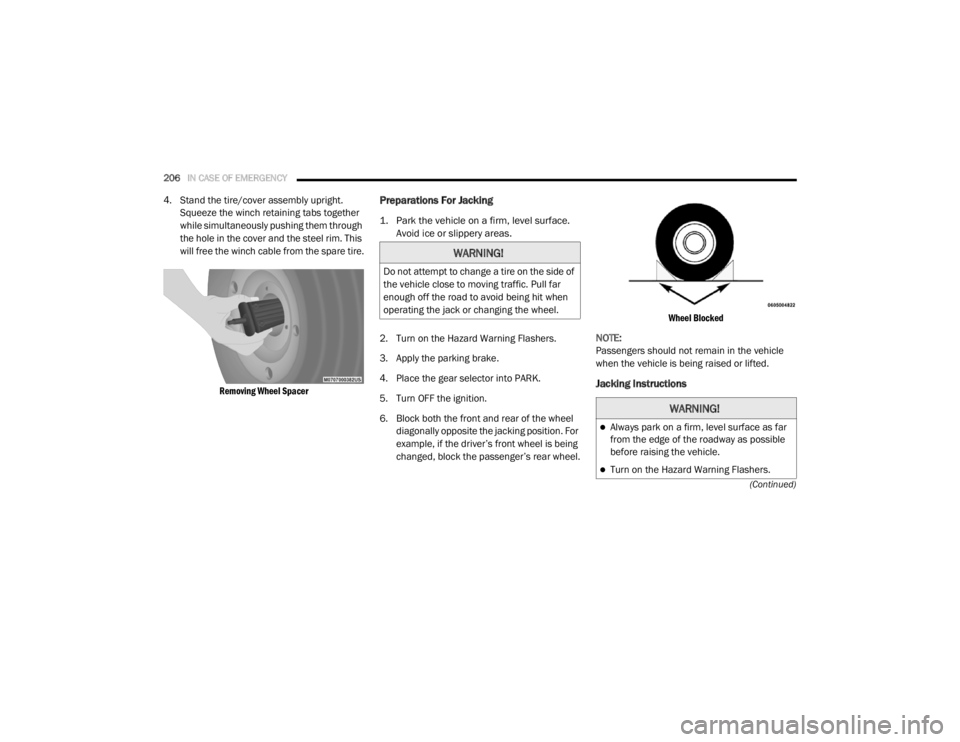
4. Stand the tire/cover assembly upright. Squeeze the winch retaining tabs together
while simultaneously pushing them through
the hole in the cover and the steel rim. This
will free the winch cable from the spare tire.
Removing Wheel Spacer
Preparations For Jacking
1. Park the vehicle on a firm, level surface. Avoid ice or slippery areas.
2. Turn on the Hazard Warning Flashers.
3. Apply the parking brake.
4. Place the gear selector into PARK.
5. Turn OFF the ignition.
6. Block both the front and rear of the wheel diagonally opposite the jacking position. For
example, if the driver’s front wheel is being
changed, block the passenger’s rear wheel.
Wheel Blocked
NOTE:
Passengers should not remain in the vehicle
when the vehicle is being raised or lifted.
Jacking Instructions
WARNING!
Do not attempt to change a tire on the side of
the vehicle close to moving traffic. Pull far
enough off the road to avoid being hit when
operating the jack or changing the wheel.
WARNING!
Always park on a firm, level surface as far
from the edge of the roadway as possible
before raising the vehicle.
Turn on the Hazard Warning Flashers.
20_RT_OM_EN_USC_t.book Page 206
Page 217 of 380

IN CASE OF EMERGENCY215
Sealing A Tire With Tire Service Kit
Whenever You Stop To Use Tire Service Kit:
1. Pull over to a safe location and turn on the
vehicle’s Hazard Warning Flashers.
2. Verify that the valve stem (on the wheel with
the deflated tire) is in a position that is near
to the ground. This will allow the Tire Service
Kit Hose to reach the valve stem and keep
the Tire Service Kit flat on the ground. This
will provide the best positioning of the kit
when injecting the sealant into the deflated
tire and running the air pump. Move the
vehicle as necessary to place the valve
stem in this position before proceeding.
3. Place the transmission in PARK and cycle the ignition in the OFF position.
4. Apply the parking brake.
Setting Up To Use Tire Service Kit:
1. Uncoil the Sealant Hose and then remove the cap from the fitting at the end of the
hose.
2. Place the Tire Service Kit flat on the ground next to the deflated tire.
3. Remove the cap from the valve
stem and then screw the fitting at
the end of the Sealant Hose onto
the valve stem. 4. Uncoil the Power Plug and
insert the plug into the vehicle’s
12 Volt power outlet.
NOTE:
Do not remove foreign objects (e.g., screws or
nails) from the tire.
Injecting Tire Service Kit Sealant Into The
Deflated Tire:
1. Always start the vehicle before
turning ON the Tire Service Kit.
2. Ensure the Mode Select Knob
is to the Sealant Mode position.
3. After pushing the Power Button,
the sealant (white fluid) will flow
from the Sealant Bottle through
the Sealant Hose and into the tire.
NOTE:
Sealant may leak out through the puncture in
the tire.
Take care not to allow the contents of Tire
Service Kit to come in contact with hair,
eyes, or clothing. Tire Service Kit sealant is
harmful if inhaled, swallowed, or absorbed
through the skin. It causes skin, eye, and
respiratory irritation. Flush immediately
with plenty of water if there is any contact
with eyes or skin. Change clothing as soon
as possible, if there is any contact with
clothing.
Tire Service Kit Sealant solution contains
latex. In case of an allergic reaction or rash,
consult a physician immediately. Keep Tire
Service Kit out of reach of children. If swal -
lowed, rinse mouth immediately with plenty
of water and drink plenty of water. Do not
induce vomiting! Consult a physician imme -
diately.
WARNING! (Continued)
6
20_RT_OM_EN_USC_t.book Page 215
Page 221 of 380

IN CASE OF EMERGENCY219
(Continued)
JUMP STARTING
If your vehicle has a discharged battery it can be
jump started using a set of jumper cables and a
battery in another vehicle or by using a portable
battery booster pack. Jump starting can be
dangerous if done improperly so please follow
the procedures in this section carefully.
NOTE:
When using a portable battery booster pack
follow the manufacturer’s operating
instructions and precautions.
Preparations For Jump Start
The battery in your vehicle is located on the left
side of the engine compartment.
Positive Battery Post
1. Apply the parking brake, shift the
automatic transmission into PARK and
turn the ignition to OFF/LOCK.
2. Turn off the heater, radio, and all unnecessary electrical accessories.
3. If using another vehicle to jump start the battery, park the vehicle within the jumper
cables reach, set the parking brake and
make sure the ignition is in the OFF/LOCK
position.
WARNING!
Do not attempt jump starting if the battery is
frozen. It could rupture or explode and cause
personal injury.
CAUTION!
Do not use a portable battery booster pack or
any other booster source with a system
voltage greater than 12 Volts or damage to
the battery, starter motor, alternator or
electrical system may occur.
WARNING!
Take care to avoid the radiator cooling fan
whenever the hood is raised. It can start
anytime the ignition switch is ON. You can
be injured by moving fan blades.
Remove any metal jewelry such as rings,
watch bands and bracelets that could
make an inadvertent electrical contact. You
could be seriously injured.
Batteries contain sulfuric acid that can
burn your skin or eyes and generate
hydrogen gas which is flammable and
explosive. Keep open flames or sparks
away from the battery.
WARNING!
Do not allow vehicles to touch each other as
this could establish a ground connection and
personal injury could result.
WARNING! (Continued)
6
20_RT_OM_EN_USC_t.book Page 219
Page 226 of 380

224IN CASE OF EMERGENCY
TOWING A DISABLED VEHICLE
This section describes procedures for towing a disabled vehicle using a commercial towing service.
Proper towing or lifting equipment is required to
prevent damage to your vehicle. Use only tow
bars and other equipment designed for this
purpose, following equipment manufacturer’s
instructions. Use of safety chains is mandatory.
Attach a tow bar or other towing device to main
structural members of the vehicle, not to
bumpers or associated brackets. State and
local laws regarding vehicles under tow must be
observed. If you must use the accessories (wipers,
defrosters, etc.) while being towed, the ignition
must be in the ON/RUN mode, not the ACC
mode.
If the key fob is unavailable or the vehicle's
battery is discharged, refer to "Gear Selector
Override" in this section for instructions on
shifting the transmission out of PARK for
towing.
Towing Condition
Wheels OFF The GroundALL MODELS
Flat Tow NONEIf transmission is operable:
Transmission in NEUTRAL
25 mph (40 km/h) max speed
15 miles (24 km) max distance
Wheel Lift Or Dolly Tow
Rear
Front
OK
Flatbed ALLBEST METHOD
CAUTION!
Do not use sling type equipment when
towing. Vehicle damage may occur.
When securing the vehicle to a flatbed
truck, do not attach to front or rear suspen-
sion components. Damage to your vehicle
may result from improper towing.
Do not push or tow this vehicle with another
vehicle as damage to the bumper fascia
and transmission may result.
20_RT_OM_EN_USC_t.book Page 224
Page 238 of 380

236SERVICING AND MAINTENANCE
The A/C air filter is located in the fresh air inlet
behind the glove compartment. Perform the
following procedure to replace the filter:
1. Open the glove compartment and remove
all contents.
2. Push in on the sides of the glove compartment, remove tether and lower the
door.
3. Pivot the glove compartment downward.
4. Disengage the two retaining tabs that secure the filter cover to the HVAC housing,
and remove the cover.
A/C Air Filter Replacement
5. Remove the A/C air filter by pulling it straight out of the housing.
6. Install the A/C air filter with the arrow on the filter pointing toward the floor. When
installing the filter cover, make sure the
retaining tabs fully engage the cover. 7. Rotate the glove compartment door back
into position and reinstall tether.
Accessory Drive Belt Inspection
WARNING!
Do not remove the cabin air filter while the
vehicle is running, or while the ignition is in
the ACC or ON/RUN mode. With the cabin air
filter removed and the blower operating, the
blower can contact hands and may propel dirt
and debris into your eyes, resulting in
personal injury.
CAUTION!
The cabin air filter is identified with an arrow
to indicate airflow direction through the filter.
Failure to properly install the filter will result
in the need to replace it more often.
WARNING!
Do not attempt to inspect an accessory
drive belt with vehicle running.
When working near the radiator cooling fan,
disconnect the fan motor lead. The fan is
temperature controlled and can start at any
time regardless of ignition mode. You could
be injured by the moving fan blades.
You can be badly injured working on or
around a motor vehicle. Only do service
work for which you have the knowledge and
the proper equipment. If you have any
doubt about your ability to perform a
service job, take your vehicle to a compe -
tent mechanic.
20_RT_OM_EN_USC_t.book Page 236
Page 241 of 380

SERVICING AND MAINTENANCE239
Under normal operating conditions, the
catalytic converter will not require
maintenance. However, it is important to keep
the engine properly tuned to ensure proper
catalyst operation and prevent possible catalyst
damage.
NOTE:
Intentional tampering with emissions control
systems can result in civil penalties being
assessed against you. In unusual situations involving grossly malfunc
-
tioning engine operation, a scorching odor may
suggest severe and abnormal catalyst
overheating. If this occurs, stop the vehicle, turn
off the engine and allow it to cool. Service,
including a tune-up to manufacturer's specifi -
cations, should be obtained immediately.
To minimize the possibility of catalytic converter
damage:
Do not interrupt the ignition when the trans -
mission is in gear and the vehicle is in
motion.
Do not try to start the vehicle by pushing or
towing the vehicle.
Do not idle the engine with any ignition
components disconnected or removed, such
as when diagnostic testing, or for prolonged
periods during very rough idle or malfunc -
tioning operating conditions.
Cooling System
Damage to the catalytic converter can
result if your vehicle is not kept in proper
operating condition. In the event of engine
malfunction, particularly involving engine
misfire or other apparent loss of perfor -
mance, have your vehicle serviced
promptly. Continued operation of your
vehicle with a severe malfunction could
cause the converter to overheat, resulting
in possible damage to the converter and
vehicle.
CAUTION! (Continued)
WARNING!
You or others can be badly burned by hot
engine coolant (antifreeze) or steam from
your radiator. If you see or hear steam
coming from under the hood, do not open
the hood until the radiator has had time to
cool. Never open a cooling system pressure
cap when the radiator or coolant bottle is
hot.
Keep hands, tools, clothing, and jewelry
away from the radiator cooling fan when
the hood is raised. The fan starts automati -
cally and may start at any time, whether the
engine is running or not.
When working near the radiator cooling fan,
disconnect the fan motor lead or turn the
ignition to the OFF mode. The fan is
temperature controlled and can start at any
time the ignition is in the ON mode.7
20_RT_OM_EN_USC_t.book Page 239
Page 279 of 380

MULTIMEDIA277
Care And Maintenance
Touchscreen
Do not press the touchscreen with any hard
or sharp objects (pen, USB stick, jewelry,
etc.), which could scratch the touchscreen
surface!
Do not spray any liquid or caustic chemicals
directly on the screen! Use a clean and dry
microfiber lens cleaning cloth in order to
clean the touchscreen.
If necessary, use a lint-free cloth dampened
with a cleaning solution, such as isopropyl
alcohol or an isopropyl alcohol and water
solution ratio of 50:50. Be sure to follow the
solvent manufacturer's precautions and
directions.
RADIO 430/430 NAV
General Handling
User Interface Elements
Power to operate the radio is supplied through
the ignition switch, which must be in the ON/
RUN, ACC, or in ACC Delay mode in order to
operate the radio.
1 — Voice Recognition
Push the Voice Recognition (VR)
button located on the faceplate and
wait for the confirmation beep before
you say a voice command. 2 — Load
To open or close the display, push the Load
button on the faceplate.
After opening the display, it takes a few seconds
to eject a CD/DVD, if one is in the slot.
When inserting a disc, make sure the label is
facing up.
The display closes after inserting the disc.
NOTE:
It may take several seconds to recognize the
type of inserted disc (CD, DVD, MP3, etc.).
3 — Menu
Push the Menu button on the faceplate to
access the system settings menu.
NOTE:
Push the Menu button on the faceplate in an
active mode to change mode specific settings.
4 — Audio
Push the Audio button located on the faceplate
to access the speaker balance/fade and tone
controls.
9
20_RT_OM_EN_USC_t.book Page 277
Page 280 of 380

278MULTIMEDIA
5 — My Files
Push the My Files button on the faceplate to
manage your music and picture files on the
internal storage drive.
6 — USB Connector
Connect a supported device into the USB
Connector to play music and to copy music and
picture files to the internal hard disk drive.
NOTE:
Refer to “USB Connector” in the “Remote
Devices” section of this chapter for further
information.
7 — AUX Input (Audio Jack)
Connect an external audio device into the AUX
Input (e.g., MP3 player, video game) to play the
device audio through the car audio system.
8 — On/Off Volume
It is also possible to set the unit in standby
mode while driving by pushing the On/Off
Volume rotary knob. NOTE:
If the ignition is switched OFF with the radio in
standby mode, the radio memorizes the
standby state when the ignition is switched to
ON/RUN again. Push the On/Off Volume rotary
knob to switch the radio On. The radio software
is always working when the ignition is switched
to ON/RUN, even if the radio is in standby
mode. It is still possible to eject the CD and to
display the time if the unit is switched Off.
9 — Media
Push the Media button located on the faceplate
to change to a Media mode or to toggle between
Media modes:
HDD (Hard Disk Drive)
CD/DVD
AUX
NOTE:
If you are viewing the NAV screen (Radio
430 Nav only), pushing the Media button will
return you to the Media mode screen. 10 — Radio
Push the Radio button located on the faceplate
to change to a Radio mode or to toggle between
Radio modes:
AM
FM
SAT (If Equipped)
NOTE:
If you are viewing the NAV screen (Radio
430 Nav only), pushing the Radio button will
return you to the Radio mode screen.
11 — Uconnect Phone Push the Uconnect Phone button
located on the faceplate to either
activate the Uconnect system or to
cancel an active phone call.
Audio Settings
Volume
Use the ON/OFF VOLUME rotary knob to adjust
the volume of the currently playing audio
source. While you adjust the volume, the name
of the audio source and a volume indicator is
displayed in the lower left corner of the display.
20_RT_OM_EN_USC_t.book Page 278