2020 DODGE GRAND CARAVAN ABS
[x] Cancel search: ABSPage 238 of 380

236SERVICING AND MAINTENANCE
The A/C air filter is located in the fresh air inlet
behind the glove compartment. Perform the
following procedure to replace the filter:
1. Open the glove compartment and remove
all contents.
2. Push in on the sides of the glove compartment, remove tether and lower the
door.
3. Pivot the glove compartment downward.
4. Disengage the two retaining tabs that secure the filter cover to the HVAC housing,
and remove the cover.
A/C Air Filter Replacement
5. Remove the A/C air filter by pulling it straight out of the housing.
6. Install the A/C air filter with the arrow on the filter pointing toward the floor. When
installing the filter cover, make sure the
retaining tabs fully engage the cover. 7. Rotate the glove compartment door back
into position and reinstall tether.
Accessory Drive Belt Inspection
WARNING!
Do not remove the cabin air filter while the
vehicle is running, or while the ignition is in
the ACC or ON/RUN mode. With the cabin air
filter removed and the blower operating, the
blower can contact hands and may propel dirt
and debris into your eyes, resulting in
personal injury.
CAUTION!
The cabin air filter is identified with an arrow
to indicate airflow direction through the filter.
Failure to properly install the filter will result
in the need to replace it more often.
WARNING!
Do not attempt to inspect an accessory
drive belt with vehicle running.
When working near the radiator cooling fan,
disconnect the fan motor lead. The fan is
temperature controlled and can start at any
time regardless of ignition mode. You could
be injured by the moving fan blades.
You can be badly injured working on or
around a motor vehicle. Only do service
work for which you have the knowledge and
the proper equipment. If you have any
doubt about your ability to perform a
service job, take your vehicle to a compe -
tent mechanic.
20_RT_OM_EN_USC_t.book Page 236
Page 245 of 380

SERVICING AND MAINTENANCE243
(Continued)
Master Cylinder — Brake Fluid Level Check
The fluid level in the master cylinder should be
checked when performing underhood services,
or immediately if the “Brake System Warning
Light” indicates system failure.
Clean the top of the master cylinder area before
removing the cap. Add fluid to bring the level up
to the top of the “FULL” mark on the side of the
master cylinder reservoir.
Overfilling of fluid is not recommended because
it may cause leaking in the system.
Add enough fluid to bring the level up to the
requirements described on the brake fluid
reservoir. With disc brakes, fluid level can be
expected to fall as the brake pads wear.
However, low fluid level may be caused by a
leak and a checkup may be needed.
Use only manufacturer's recommended brake
fluid. Refer to “Fluids And Lubricants” in
“Technical Specifications” for further
information.
Automatic Transmission
Selection Of Lubricant
It is important to use the proper transmission
fluid to ensure optimum transmission
performance and life. Use only the
manufacturer's specified transmission fluid.
Refer to “Fluids And Lubricants” in “Technical
Specifications” for fluid specifications. It is
important to maintain the transmission fluid at
the correct level using the recommended fluid.
No chemical flushes should be used in any
transmission; only the approved lubricant
should be used.
WARNING!
Use only manufacturer's recommended
brake fluid. Refer to “Fluids And Lubri -
cants” in “Technical Specifications” for
further information. Using the wrong type of
brake fluid can severely damage your brake
system and/or impair its performance. The
proper type of brake fluid for your vehicle is
also identified on the original factory
installed hydraulic master cylinder
reservoir.
To avoid contamination from foreign matter
or moisture, use only new brake fluid or
fluid that has been in a tightly closed
container. Keep the master cylinder reser -
voir cap secured at all times. Brake fluid in
a open container absorbs moisture from
the air resulting in a lower boiling point. This
may cause it to boil unexpectedly during
hard or prolonged braking, resulting in
sudden brake failure. This could result in a
collision.
Overfilling the brake fluid reservoir can
result in spilling brake fluid on hot engine
parts, causing the brake fluid to catch fire.
Brake fluid can also damage painted and
vinyl surfaces, care should be taken to
avoid its contact with these surfaces.
Do not allow petroleum based fluid to
contaminate the brake fluid. Brake seal
components could be damaged, causing
partial or complete brake failure. This could
result in a collision.
WARNING! (Continued)
7
20_RT_OM_EN_USC_t.book Page 243
Page 247 of 380

SERVICING AND MAINTENANCE245
TIRES
Tire Safety Information
Tire safety information will cover aspects of the
following information: Tire Markings, Tire Identi -
fication Numbers, Tire Terminology and
Definitions, Tire Pressures, and Tire Loading.
Tire Markings
Tire Markings
NOTE:
P (Passenger) — Metric tire sizing is based on
US design standards. P-Metric tires have the
letter “P” molded into the sidewall preceding
the size designation.
Example: P215/65R15 95H.
European — Metric tire sizing is based on
European design standards. Tires designed
to this standard have the tire size molded
into the sidewall beginning with the section
width. The letter "P" is absent from this tire
size designation. Example: 215/65R15 96H.
LT (Light Truck) — Metric tire sizing is based
on US design standards. The size designation
for LT-Metric tires is the same as for P-Metric
tires except for the letters “LT” that are
molded into the sidewall preceding the size
designation.
Example: LT235/85R16.
Temporary spare tires are designed for
temporary emergency use only. Temporary
high pressure compact spare tires have the
letter “T” or “S” molded into the sidewall
preceding the size designation.
Example: T145/80D18 103M.
High flotation tire sizing is based on US
design standards and it begins with the tire
diameter molded into the sidewall.
Example: 31x10.5 R15 LT.
1 — US DOT Safety Standards Code
(TIN)
2 — Size Designation
3 — Service Description
4 — Maximum Load
5 — Maximum Pressure
6 — Treadwear, Traction and Tempera -
ture Grades
7
20_RT_OM_EN_USC_t.book Page 245
Page 249 of 380
SERVICING AND MAINTENANCE247
Tire Identification Number (TIN)
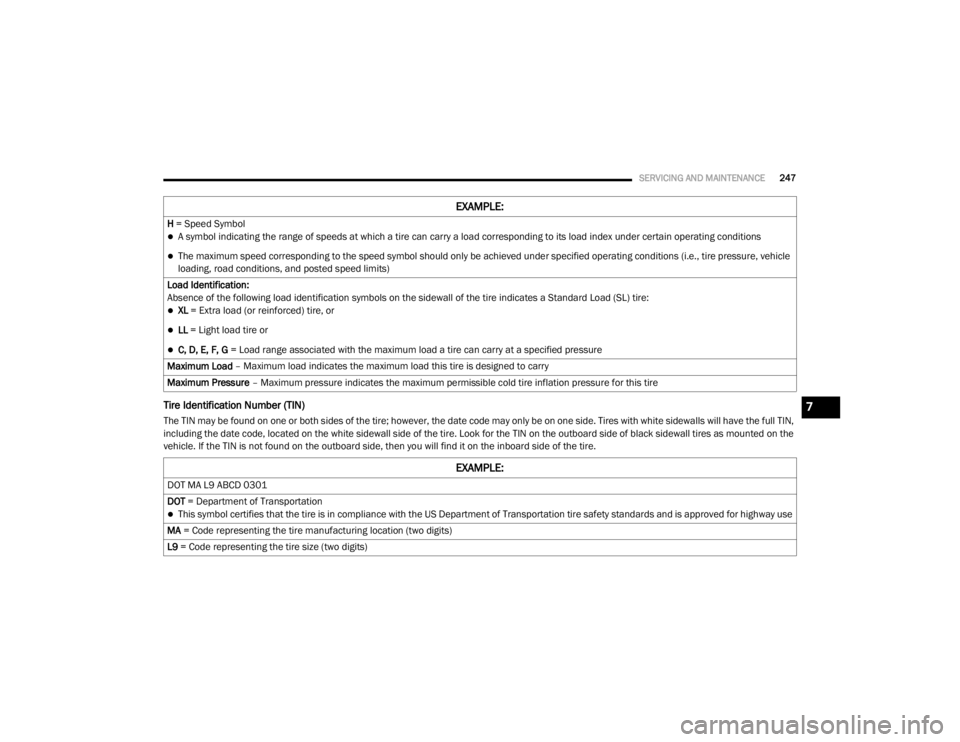
The TIN may be found on one or both sides of the tire; however, the date code may only be on one side. Tires with white sidewalls will have the full TIN,
including the date code, located on the white sidewall side of the tire. Look for the TIN on the outboard side of black sidewall tires as mounted on the
vehicle. If the TIN is not found on the outboard side, then you will find it on the inboard side of the tire.H = Speed Symbol
A symbol indicating the range of speeds at which a tire can carry a load corresponding to its load index under certain operating conditions
The maximum speed corresponding to the speed symbol should only be achieved under specified operating conditions (i.e., tire pressure, vehicle
loading, road conditions, and posted speed limits)
Load Identification:
Absence of the following load identification symbols on the sidewall of the tire indicates a Standard Load (SL) tire:
XL = Extra load (or reinforced) tire, or
LL = Light load tire or
C, D, E, F, G = Load range associated with the maximum load a tire can carry at a specified pressure
Maximum Load – Maximum load indicates the maximum load this tire is designed to carry
Maximum Pressure – Maximum pressure indicates the maximum permissible cold tire inflation pressure for this tire
EXAMPLE:
EXAMPLE:
DOT MA L9 ABCD 0301
DOT = Department of Transportation
This symbol certifies that the tire is in compliance with the US Department of Transportation tire safety standards and is approved for highway use
MA = Code representing the tire manufacturing location (two digits)
L9 = Code representing the tire size (two digits)
7
20_RT_OM_EN_USC_t.book Page 247
Page 267 of 380
SERVICING AND MAINTENANCE265
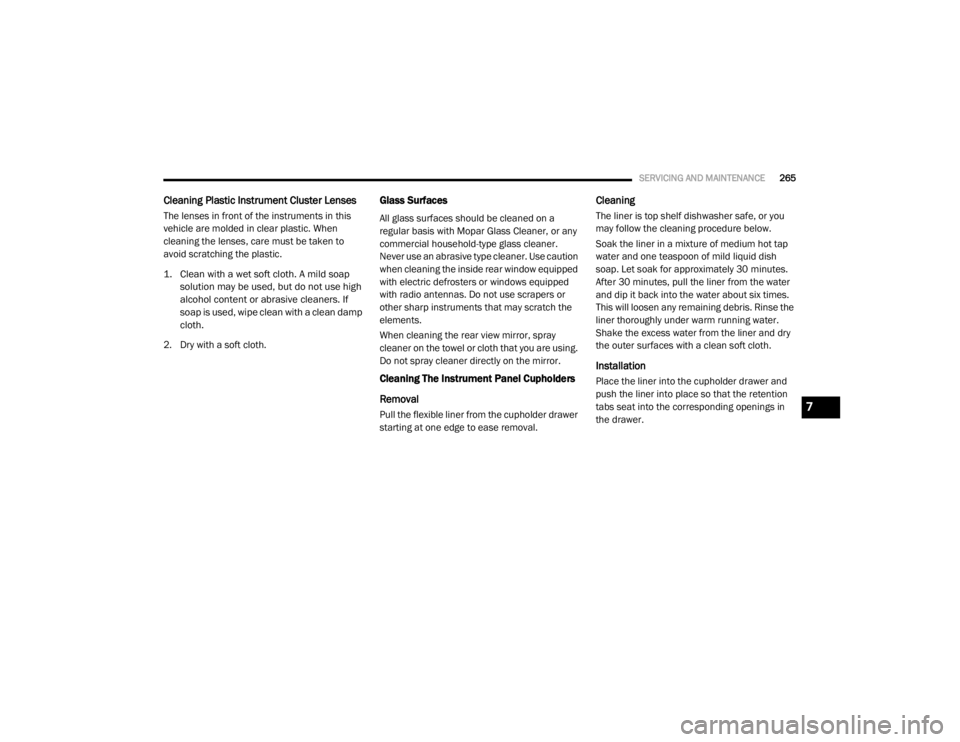
Cleaning Plastic Instrument Cluster Lenses
The lenses in front of the instruments in this
vehicle are molded in clear plastic. When
cleaning the lenses, care must be taken to
avoid scratching the plastic.
1. Clean with a wet soft cloth. A mild soap
solution may be used, but do not use high
alcohol content or abrasive cleaners. If
soap is used, wipe clean with a clean damp
cloth.
2. Dry with a soft cloth.
Glass Surfaces
All glass surfaces should be cleaned on a
regular basis with Mopar Glass Cleaner, or any
commercial household-type glass cleaner.
Never use an abrasive type cleaner. Use caution
when cleaning the inside rear window equipped
with electric defrosters or windows equipped
with radio antennas. Do not use scrapers or
other sharp instruments that may scratch the
elements.
When cleaning the rear view mirror, spray
cleaner on the towel or cloth that you are using.
Do not spray cleaner directly on the mirror.
Cleaning The Instrument Panel Cupholders
Removal
Pull the flexible liner from the cupholder drawer
starting at one edge to ease removal.
Cleaning
The liner is top shelf dishwasher safe, or you
may follow the cleaning procedure below.
Soak the liner in a mixture of medium hot tap
water and one teaspoon of mild liquid dish
soap. Let soak for approximately 30 minutes.
After 30 minutes, pull the liner from the water
and dip it back into the water about six times.
This will loosen any remaining debris. Rinse the
liner thoroughly under warm running water.
Shake the excess water from the liner and dry
the outer surfaces with a clean soft cloth.
Installation
Place the liner into the cupholder drawer and
push the liner into place so that the retention
tabs seat into the corresponding openings in
the drawer.
7
20_RT_OM_EN_USC_t.book Page 265
Page 283 of 380

MULTIMEDIA281
Radio Mode
Overview
The radio is equipped with three different
tuners:
FM 87.7 MHz - 107.9 MHz (RBDS capable)
AM 530 kHz - 1710 kHz
SiriusXM® Satellite Radio (if equipped)
Push the Radio button. The different tuner
modes can be selected by pressing the tabs on
the radio touchscreen.
SiriusXM® Satellite Radio
With over 130 channels, SiriusXM® Satellite
Radio brings you more of what you love. Get 69
channels of 100% commercial-free music, plus
all of your favorite sports, news, talk and
entertainment. Hear every NFL® game, every
NASCAR® race, college sports and more. The
biggest and most compelling names in talk with
Howard Stern and Martha Stewart,
laugh-out-loud comedy, plus kids' programming,
wold-class news, local traffic and weather. All of
this with crystal clear, coast-to-coast coverage.
Everything worth listening to is now on SiriusXM®. A one-year SiriusXM® Satellite
Radio subscription is included.
SiriusXM® and all related marks and logos are
trademarks of SiriusXM® Radio Inc. and its
subsidiaries. SiriusXM® Radio requires a
subscription, sold separately after trial
subscription included with vehicle purchase.
Prices and programming are provided by
SiriusXM® and are subject to change.
Subscriptions governed by Terms & Conditions
available at
www.siriusxm.com . SiriusXM®
Radio US service only available to those at least
18 years of age in the 48 contiguous United
States, D.C., and PR. Service available in
Canada; see www.siriusxm.ca .
To receive satellite radio, the vehicle needs to
be outside with a clear view to the sky. If the
screen shows Acquiring Signal, you might have
to change the vehicle position to receive a
signal. In most cases, the satellite radio does
not receive a signal in underground parking
garages or tunnels.
Station Presets
There are 12 station presets available for
storing the radio stations in each tuner range.
To store the desired station, press and hold one
of the station Presets buttons for two seconds
and you will see the highlighted button change
from green to beige. You will also see the radio
station stored in the highlighted button and you
will hear a confirmation beep when the station
is saved. Pressing the Presets buttons in SAT
mode changes the information shown in the list
between the Channel Name, name of the Artist
currently playing on the channel and name of
the Song currently playing on the channel.
9
20_RT_OM_EN_USC_t.book Page 281
Page 367 of 380
CUSTOMER ASSISTANCE365
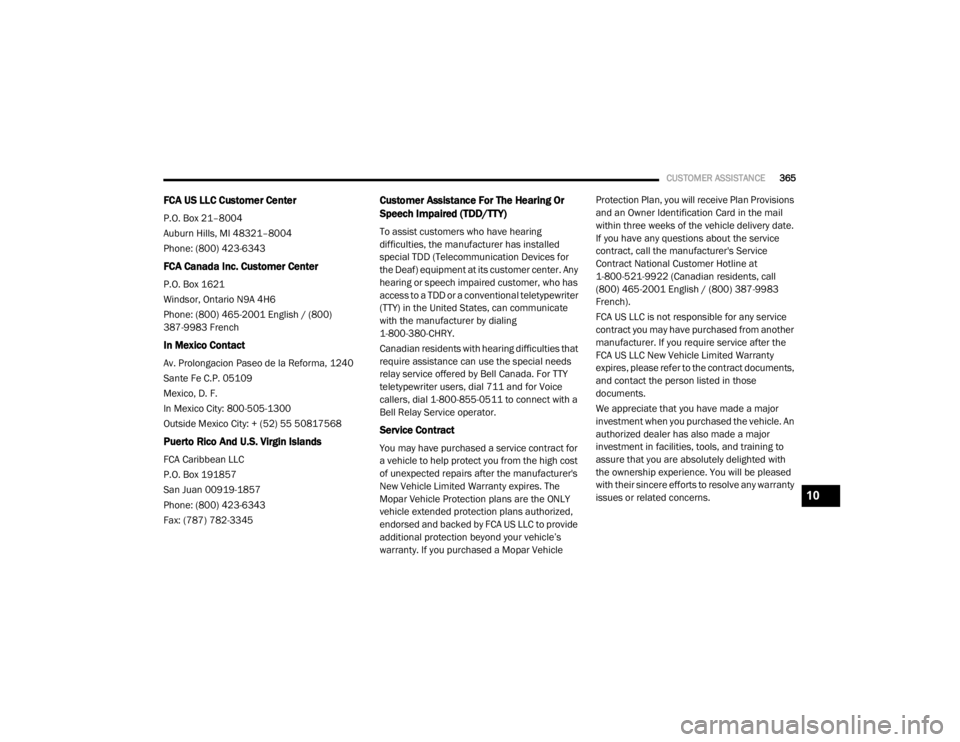
FCA US LLC Customer Center
P.O. Box 21–8004
Auburn Hills, MI 48321–8004
Phone: (800) 423-6343
FCA Canada Inc. Customer Center
P.O. Box 1621
Windsor, Ontario N9A 4H6
Phone: (800) 465-2001 English / (800)
387-9983 French
In Mexico Contact
Av. Prolongacion Paseo de la Reforma, 1240
Sante Fe C.P. 05109
Mexico, D. F.
In Mexico City: 800-505-1300
Outside Mexico City: + (52) 55 50817568
Puerto Rico And U.S. Virgin Islands
FCA Caribbean LLC
P.O. Box 191857
San Juan 00919-1857
Phone: (800) 423-6343
Fax: (787) 782-3345
Customer Assistance For The Hearing Or
Speech Impaired (TDD/TTY)
To assist customers who have hearing
difficulties, the manufacturer has installed
special TDD (Telecommunication Devices for
the Deaf) equipment at its customer center. Any
hearing or speech impaired customer, who has
access to a TDD or a conventional teletypewriter
(TTY) in the United States, can communicate
with the manufacturer by dialing
1-800-380-CHRY.
Canadian residents with hearing difficulties that
require assistance can use the special needs
relay service offered by Bell Canada. For TTY
teletypewriter users, dial 711 and for Voice
callers, dial 1-800-855-0511 to connect with a
Bell Relay Service operator.
Service Contract
You may have purchased a service contract for
a vehicle to help protect you from the high cost
of unexpected repairs after the manufacturer's
New Vehicle Limited Warranty expires. The
Mopar Vehicle Protection plans are the ONLY
vehicle extended protection plans authorized,
endorsed and backed by FCA US LLC to provide
additional protection beyond your vehicle’s
warranty. If you purchased a Mopar Vehicle Protection Plan, you will receive Plan Provisions
and an Owner Identification Card in the mail
within three weeks of the vehicle delivery date.
If you have any questions about the service
contract, call the manufacturer's Service
Contract National Customer Hotline at
1-800-521-9922 (Canadian residents, call
(800) 465-2001 English / (800) 387-9983
French).
FCA US LLC is not responsible for any service
contract you may have purchased from another
manufacturer. If you require service after the
FCA US LLC New Vehicle Limited Warranty
expires, please refer to the contract documents,
and contact the person listed in those
documents.
We appreciate that you have made a major
investment when you purchased the vehicle. An
authorized dealer has also made a major
investment in facilities, tools, and training to
assure that you are absolutely delighted with
the ownership experience. You will be pleased
with their sincere efforts to resolve any warranty
issues or related concerns.
10
20_RT_OM_EN_USC_t.book Page 365
Page 370 of 380

368
INDEX
A
About Your Brakes......................................... 266Adding Engine Coolant (Antifreeze)............... 240Adding Fuel.................................................... 181Adding Washing Fluid.................................... 232Additives, Fuel............................................... 268AdjustDown........................................................... 28Forward....................................................... 28Rearward..................................................... 28Up................................................................ 28Air Bag........................................................... 132Air Bag Operation...................................... 133Air Bag Warning Light................................ 131Driver Knee Air Bag................................... 134Enhanced Accident Response......... 138, 225Event Data Recorder (EDR)....................... 225If Deployment Occurs................................ 138Knee Impact Bolsters................................ 134Maintaining Your Air Bag System.............. 139Maintenance............................................. 139Side Air Bags............................................. 134Transporting Pets...................................... 159Air Bag Light..................................94, 131, 160Air Cleaner, Engine
(Engine Air Cleaner Filter).............................. 235
Air Conditioner Maintenance........................ 235Air Conditioner Refrigerant........................... 235Air Conditioner System................................. 235Air Conditioning................................................ 56Automatic Rear............................................ 51Rear............................................................. 45Air Conditioning Filter..............................58, 235Air Conditioning, Operating Tips....................... 57Air Filter........................................................ 235Air PressureTires......................................................... 253AlarmArm The System.......................................... 15Disarm The System..................................... 15Security Alarm............................................. 97Alterations/ModificationsVehicle........................................................... 8Antifreeze (Engine Coolant)................. 240, 271Disposal................................................... 242Anti-Lock Brake System (ABS)...................... 103Anti-Lock Warning Light................................... 97Ashtray............................................................. 78Assist, Hill Start............................................. 108Assistance Towing........................................ 312Automatic Dimming Mirror............................... 34Automatic Door Locks............................... 17, 18
Automatic Headlights.......................................38Automatic Transmission....................... 165, 244Adding Fluid..................................... 244, 274Fluid And Filter Change............................. 244Fluid Change............................................. 244Fluid Level Check............................. 243, 244Fluid Type........................................ 243, 274Gear Ranges............................................. 168Special Additives...................................... 244Torque Converter...................................... 172Axle Fluid....................................................... 274Axle Lubrication............................................ 274
B
Battery................................................... 95, 232Charging System Light.................................95Jump Starting........................................... 219Keyless Key Fob Replacement....................10Battery Saver Feature......................................39Belts, Seat.................................................... 160Body Mechanism Lubrication........................ 237B-Pillar Location............................................ 249Brake Assist System..................................... 104Brake Control System, Electronic.................. 104Brake Fluid.................................................... 274
20_RT_OM_EN_USC_t.book Page 368