Page 373 of 464

MULTIMEDIA371
Horn With Remote Start — If
Equipped On
Off
Passive Entry On Off
Remote Door Unlock/Door Lock Driver All
NOTE:
When “Driver” is programmed, only the driver's door will unlock on the first push of the key fob unlock button. You must push the key fob unlock button
twice to unlock the passengers’ doors. When “All” is programmed, all of the doors unlock on the first press of the key fob unlock button. If “All” is
programmed, all doors unlock no matter which Passive Entry equipped door handle is grasped. If “Driver” is programmed, only the driver’s door
unlocks when the driver’s door is grasped. Touching the handle more than once only results in the driver’s door opening once. If the driver door is
opened, the interior door lock/unlock switch can be used to unlock all doors (or use key fob). Personal Settings Linked To Key Fob — If Equipped On
Off
NOTE:
The “Personal Settings Linked To Key Fob” feature provides automatic recall of all settings stored to a memory location (driver’s seat, exterior mirrors,
steering column position, and radio station presets) to enhance driver mobility when entering and exiting the vehicle. Power Liftgate Alert — If Equipped On Off
NOTE:
The “Power Liftgate Alert” feature plays an alert when the power liftgate is raising or lowering.
Setting Name Selectable Options
9
20_WD_OM_EN_USC_t.book Page 371
Page 376 of 464

374MULTIMEDIA
Audio
After pressing the Audio button on the touchscreen, the following settings will be available:
Setting Name Selectable Options
EqualizerBassMidTreble
NOTE:
When in this display, you may adjust the “Bass”, “Mid”, and “Treble” settings. Adjust the settings with the + and – setting buttons on the touchscreen
or by selecting any point on the scale between the + and – buttons on the touchscreen. Bass/Mid/Treble also allow you to simply slide your finger up
or down to change the setting as well as press directly on the desired setting.
Balance/Fade Up Arrow
Button Down Arrow
Button Left Arrow
Button Right Arrow
Button Center C Button
NOTE:
When in this display, you may adjust the “Balance/Fade” of the audio by using the Arrow button on the touchscreen to adjust the sound level from
the front and rear or right and left side speakers. Press the Center C button on the touchscreen to reset the balance and fade to the factory setting. Speed Adjusted Volume Off123
Surround Sound — If Equipped OnOff
Loudness — If Equipped YesNo
NOTE:
This feature improves sound quality at lower volumes when enabled. AUX Volume Offset — If Equipped OnOff
NOTE:
This feature provides the ability to tune the audio level for portable devices connected through the AUX input.
20_WD_OM_EN_USC_t.book Page 374
Page 378 of 464
376MULTIMEDIA
Reset
After pressing the Reset button on the touchscreen, the following settings will be available:
Setting Name Selectable Options
Restore Settings to DefaultOKCancel X
NOTE:
When this feature is selected, it will reset all settings to their default settings. To restore the settings to their default setting, press the Restore Settings
to Default button on the touchscreen. A pop-up will appear asking "Are you sure you want to reset your settings to default?” Clear Personal Data YesCancel X
NOTE:
When this feature is selected, it will remove all personal data including Bluetooth® devices and presets. To remove personal information, press the
Clear Personal Data button and a pop-up will appear asking "Are you sure you want to clear all personal data?”
20_WD_OM_EN_USC_t.book Page 376
Page 379 of 464
MULTIMEDIA377
CUSTOMER PROGRAMMABLE FEATURES
— U
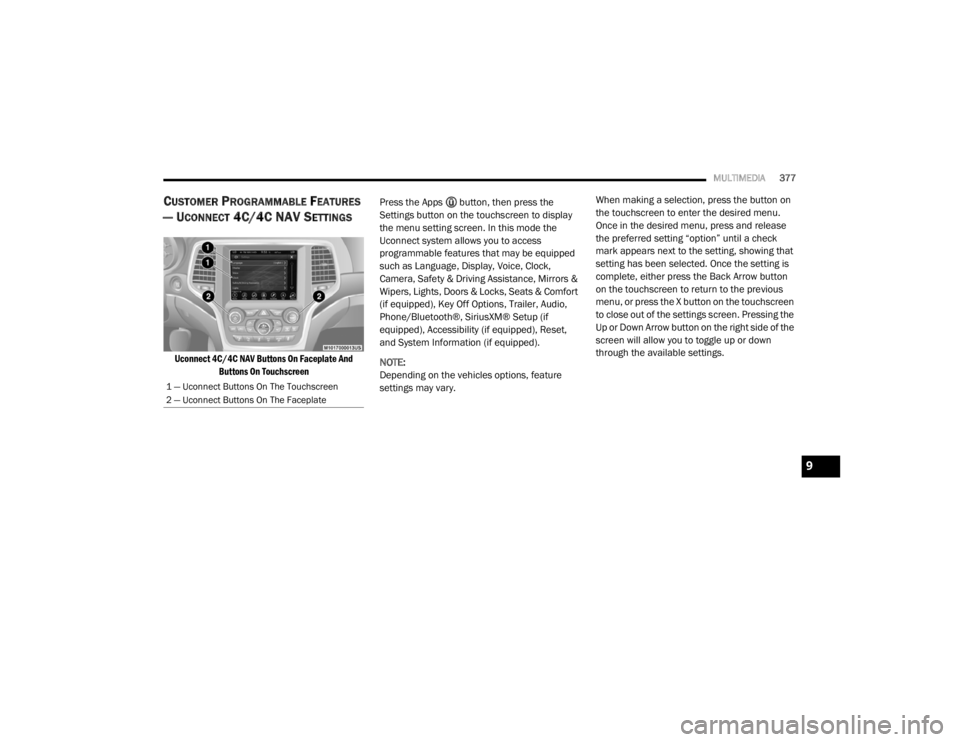
CONNECT 4C/4C NAV SETTINGS
Uconnect 4C/4C NAV Buttons On Faceplate And
Buttons On Touchscreen
Press the Apps button, then press the
Settings button on the touchscreen to display
the menu setting screen. In this mode the
Uconnect system allows you to access
programmable features that may be equipped
such as Language, Display, Voice, Clock,
Camera, Safety & Driving Assistance, Mirrors &
Wipers, Lights, Doors & Locks, Seats & Comfort
(if equipped), Key Off Options, Trailer, Audio,
Phone/Bluetooth®, SiriusXM® Setup (if
equipped), Accessibility (if equipped), Reset,
and System Information (if equipped).
NOTE:
Depending on the vehicles options, feature
settings may vary. When making a selection, press the button on
the touchscreen to enter the desired menu.
Once in the desired menu, press and release
the preferred setting “option” until a check
mark appears next to the setting, showing that
setting has been selected. Once the setting is
complete, either press the Back Arrow button
on the touchscreen to return to the previous
menu, or press the X button on the touchscreen
to close out of the settings screen. Pressing the
Up or Down Arrow button on the right side of the
screen will allow you to toggle up or down
through the available settings.
1 — Uconnect Buttons On The Touchscreen
2 — Uconnect Buttons On The Faceplate
9
20_WD_OM_EN_USC_t.book Page 377
Page 388 of 464

386MULTIMEDIA
1st Press Of Key Fob Unlocks Driver Door All Doors
NOTE:
When "Driver Door" is programmed with 1st Press Of Key Fob Unlocks, only the driver's door will unlock with the first press of the key fob unlock button.
You must push the key fob unlock button twice to unlock the passengers’ doors. When "All Doors" is programmed for 1st Press Of Key Fob Unlocks,
all doors will unlock on the first push of the key fob unlock button. If the vehicle is programmed 1st Press Of Key Fob Unlocks “All Doors”, all doors
will unlock no matter which Passive Entry equipped door handle is grasped. If 1st Press Of Key Fob Unlocks “Driver Door” is programmed, only the
driver’s door will unlock when the driver’s door is grasped. With Passive Entry, if 1st Press Of Key Fob Unlocks “Driver Door” is programmed, touching
the handle more than once will result in only the driver’s door opening. If “Driver Door” is selected, once the driver door is opened, the interior door
lock/unlock switch can be used to unlock all doors (or use the key fob). Passive Entry — If Equipped On Off
NOTE:
This feature allows you to lock and unlock the vehicle’s door(s) without having to push the key fob lock or unlock buttons.
Personal Settings Linked to Key Fob — If Equipped On
Off
NOTE:
This feature provides automatic recall of all settings stored to a memory location (driver’s seat, exterior mirrors, steering column position, and radio
station presets) to enhance driver mobility when entering and exiting the vehicle. Power Liftgate Alert — If Equipped On Off
Setting Name Selectable Options
20_WD_OM_EN_USC_t.book Page 386
Page 393 of 464

MULTIMEDIA391
SiriusXM® Setup — If Equipped
After pressing the SiriusXM® Setup button on the touchscreen, the following settings will be available:
Setting Name Selectable Options
Tune StartOnOff
NOTE:
The “Tune Start” feature begins playing the current song from the beginning when you tune to a music channel using one of the 12 presets, so you
can enjoy the complete song. This feature occurs the first time the preset is selected during that current song. Tune Start works in the background,
so you will not even realize it's on, except that you will miss the experience of joining your favorite song with only a few seconds left to play. Channel Skip List of Channels
NOTE:
SiriusXM® can be programmed to designate a group of channels that are the most desirable to listen to or to exclude undesirable channels while
scanning. This feature allows you to select the channels you would like to skip. Subscription Information Sirius ID
NOTE:
New vehicle purchasers or lessees will receive a free limited time subscription to SiriusXM® Satellite Radio with your radio. Following the expiration
of the free services, it will be necessary to access the information on the Subscription Information screen to re-subscribe.
1. Press the Subscription Information button on the touchscreen to access the Subscription Information screen.
2. Write down the Sirius ID numbers for your receiver. To reactivate your service, either call the number listed on the screen or visit the provider online.
SiriusXM® Travel Link is a separate subscription.
9
20_WD_OM_EN_USC_t.book Page 391
Page 394 of 464

392MULTIMEDIA
Accessibility — If Equipped
After pressing the Accessibility button on the touchscreen, the following setting will be available:
Reset
After pressing the Reset button on the touchscreen, the following settings will be available:
Setting Name Selectable Options
AccessibilityOnOff
NOTE:
The “Accessibility” feature announces a function prior to performing the action selected when using DVD/Blu-ray™ functions, when it is activated. For
example, when activated, and the Play button is selected, the system will announce Play button selected, and then once pressed again the Play button
will perform its action.
Setting Name Selectable Options
Reset App Drawer to Default OrderOK Cancel
Restore Apps OK Cancel
Restore Settings to Default OKCancel X
NOTE:
When this feature is selected, it will reset all settings to their default settings. To restore the settings to their default setting, press the “Restore
Settings to Default” button on the touchscreen. A pop-up will appear asking "Are you sure you want to reset your settings to default?”
20_WD_OM_EN_USC_t.book Page 392
Page 395 of 464
MULTIMEDIA393
System Information — If Equipped
After pressing the System Information button on the touchscreen, the following setting will be available:Clear Personal Data
OKCancel X
NOTE:
When this feature is selected, it will remove all personal data including Bluetooth® devices and presets. To remove personal information, press the
Clear Personal Data button and a pop-up will appear asking "Are you sure you want to clear all personal data?” Modem Reset OK Cancel
Setting Name Selectable Options
Setting NameSelectable Options
Software License System Software Information
NOTE:
When the “System Information” feature is selected, a “System Software Information” screen will appear, displaying the system software version.
9
20_WD_OM_EN_USC_t.book Page 393

