2020 DODGE DURANGO brake
[x] Cancel search: brakePage 360 of 464

358TECHNICAL SPECIFICATIONS
CHASSIS
Fuel Selection – 3.6L Engine 87 Octane (R+M)/2 Method , 0-15% Ethanol (Do not use E-85).
Fuel Selection – 5.7L Engine 89 Octane Recommended - 87 Octane Acceptable (R+M)/2 Method,
0-15% Ethanol (Do not use E-85).
Component
Fluid, Lubricant, or Genuine Part
Automatic Transmission
Use only Mopar ZF 8&9 Speed ATF Automatic Transmission Fluid or
equivalent. Failure to use the correct fluid may affect the function or
performance of your transmission.
Transfer Case – 3.6L Engine We recommend you use Shell Automatic Transmission Fluid.
Transfer Case – 5.7L Engine We recommend you use Mopar ATF+4 Automatic Transmission Fluid.
Axle Differential (Front-Rear) We recommend you use Mopar GL-5 Synthetic Axle Lubricant SAE
75W-85.
Brake Master Cylinder We recommend you use Mopar DOT 3 Brake Fluid, SAE J1703.
ComponentFluid, Lubricant, or Genuine Part
20_WD_OM_EN_USC_t.book Page 358
Page 362 of 464

360TECHNICAL SPECIFICATIONS
CHASSIS
Component Fluid, Lubricant, or Genuine Part
Automatic Transmission
Use only Mopar ZF 8&9 Speed ATF Automatic Transmission Fluid or
equivalent. Failure to use the correct fluid may affect the function or
performance of your transmission.
Transfer Case – Single-Speed We recommend you use Mopar ATF+4 Automatic Transmission Fluid.
Axle Differential (Front) We recommend you use Mopar GL-5 Synthetic Axle Lubricant SAE
75W-85.
Axle Differential (Rear) – With Electronic Limited-Slip Differential (ELSD) We recommend you use Mopar GL-5 Synthetic Axle Lubricant SAE
75W-85 with integrated friction modifier.
Brake Master Cylinder We recommend you use Mopar DOT 3 Brake Fluid, SAE J1703 should be
used. If DOT 3, SAE J1703 brake fluid is not available, then DOT 4 is
acceptable.
If using DOT 4 brake fluid, the fluid must be changed every 24 months.
This interval is time based only, mileage intervals do not apply.
20_WD_OM_EN_USC_t.book Page 360
Page 365 of 464
MULTIMEDIA363
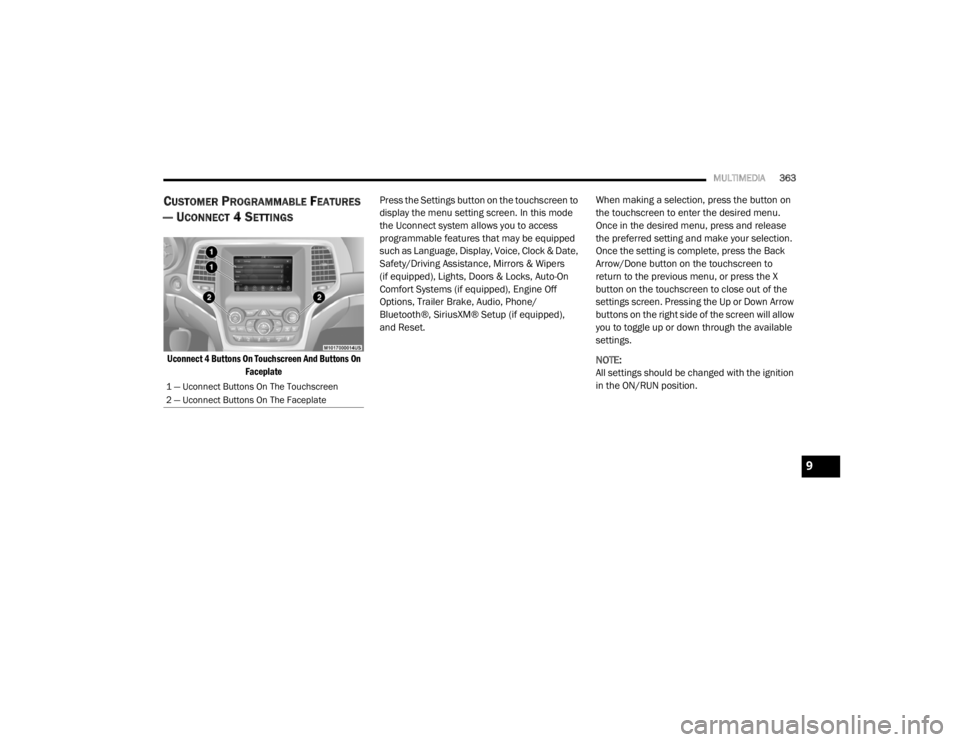
CUSTOMER PROGRAMMABLE FEATURES
— U
CONNECT 4 SETTINGS
Uconnect 4 Buttons On Touchscreen And Buttons On
Faceplate
Press the Settings button on the touchscreen to
display the menu setting screen. In this mode
the Uconnect system allows you to access
programmable features that may be equipped
such as Language, Display, Voice, Clock & Date,
Safety/Driving Assistance, Mirrors & Wipers
(if equipped), Lights, Doors & Locks, Auto-On
Comfort Systems (if equipped), Engine Off
Options, Trailer Brake, Audio, Phone/
Bluetooth®, SiriusXM® Setup (if equipped),
and Reset.
When making a selection, press the button on
the touchscreen to enter the desired menu.
Once in the desired menu, press and release
the preferred setting and make your selection.
Once the setting is complete, press the Back
Arrow/Done button on the touchscreen to
return to the previous menu, or press the X
button on the touchscreen to close out of the
settings screen. Pressing the Up or Down Arrow
buttons on the right side of the screen will allow
you to toggle up or down through the available
settings.
NOTE:
All settings should be changed with the ignition
in the ON/RUN position.
1 — Uconnect Buttons On The Touchscreen
2 — Uconnect Buttons On The Faceplate
9
20_WD_OM_EN_USC_t.book Page 363
Page 369 of 464

MULTIMEDIA367
Forward Collision Warning — If
Equipped Off
Warning Only Warning & Braking
NOTE:
Changing the FCW status to “Off” prevents the system from warning you of a possible collision with the vehicle in front of you.
The FCW system state is kept in memory from one ignition cycle to the next. If the system is turned OFF, it will remain off when the vehicle is restarted.
FCW includes Advanced Brake Assist (ABA). The ABA applies additional brake pressure when the driver requests insufficient brake pressure to avoid
a potential frontal collision. When the “Warning Only” option is selected, a chime sounds alerting you of a possible collision with the vehicle in front
of you and more brake pressure is needed. When the “Warning & Braking” option is selected, it applies the brakes to slow your vehicle in case of
potential forward collision and sounds an audible chime to alert you. Forward Collision Warning Sensitivity — If Equipped Far
Med Near
NOTE:
The “Forward Collision Warning Sensitivity” setting determines at what relative distance the vehicle directly in front of you needs to be at, based on
which option is selected. “Far” gives you the most amount of reaction time, whereas “Near” gives you the least amount of reaction time, based on
the distance between the two vehicles. ParkSense — If Equipped OffSound Only Sound & Display
NOTE:
The “ParkSense” system setting scans for objects behind the vehicle when the transmission gear selector is in REVERSE and the vehicle speed is less
than 7 mph (11 km/h), when enabled. It provides an alert (audible and/or visual) to indicate the proximity to other objects. The system can be enabled
with “Sound Only” or “Sound & Display”. Rear ParkSense Volume LowMedium High
Front ParkSense Volume LowMedium High
Setting Name Selectable Options
9
20_WD_OM_EN_USC_t.book Page 367
Page 375 of 464

MULTIMEDIA373
Trailer Brake
After pressing the Trailer Brake button on the touchscreen, the following setting will be available:
After selecting the specific trailer, the following programmable options become available:Easy Exit Seat — If Equipped
OnOff
NOTE:
When the “Easy Exit Seat” feature is selected, it provides automatic driver seat positioning to enhance driver mobility when entering and exiting the
vehicle.
Setting Name Selectable Options
Setting NameSelectable Options
TrailerTrailer 1 Trailer 2Trailer 3Trailer 4
Setting Name Selectable Options
Use This TrailerOn Off
Braking Light ElectricLight Electric Over Hydraulic Heavy Electric Heavy Electric
Over Hydraulic
Trailer Name List of Trailer Names
NOTE:
You can select and personalize your trailer name depending on the type of trailer you are hauling. Select the trailer name from the following list: trailer,
boat, car, cargo, equipment, flat, livestock, horse, motorcycle, snowmobile, travel, and utility.
9
20_WD_OM_EN_USC_t.book Page 373
Page 383 of 464

MULTIMEDIA381
Safety & Driving Assistance
After pressing the Safety & Driving Assistance button on the touchscreen, the following settings will be available:Active ParkView Backup Camera Guidelines
OnOff
NOTE:
The “Active ParkView Backup Camera Guidelines” feature overlays the Rear Backup Camera image with active, or dynamic, grid lines to help illustrate
the width of the vehicle and its projected backup path, based on the steering wheel position when the option is checked. A dashed center line overlay
indicates the center of the vehicle to assist with parking or aligning to a hitch/receiver.
Setting Name Selectable Options
Setting NameSelectable Options
Automatic Emergency Braking — If
Equipped Selectable Options
NOTE:
“Forward Collision Warning” and “Forward Collision Warning Sensitivity” are selectable options when the “Automatic Emergency Braking” setting is
selected first. Forward Collision Warning — If Equipped Off
Warning Only Warning & Braking
NOTE:
Changing the FCW status to “Off” prevents the system from warning you of a possible collision with the vehicle in front of you.
The FCW system state is kept in memory from one ignition cycle to the next. If the system is turned Off, it will remain off when the vehicle is restarted.
FCW includes Advanced Brake Assist (ABA). The ABA applies additional brake pressure when the driver requests insufficient brake pressure to avoid
a potential frontal collision. When the “Warning Only” option is selected a chime sounds alerting you of a possible collision with the vehicle in front of
you and more brake pressure is needed. When the “Warning & Braking” option is selected, it applies the brakes to slow your vehicle in case of a
potential forward collision and sounds an audible chime to alert you.
9
20_WD_OM_EN_USC_t.book Page 381
Page 396 of 464

394MULTIMEDIA
SAFETY AND GENERAL INFORMATION
SAFETY GUIDELINES
Ensure that all persons read this manual
carefully before using the system. It contains
instructions on how to use the system in a safe
and effective manner.
Do NOT attach any object to the touchscreen.
Doing so can result in damage to the
touchscreen. Please read and follow these safety
precautions. Failure to do so may result in injury
or property damage.
Glance at the screen only when safe to do so.
If prolonged viewing of the screen is required,
park in a safe location and set the parking
brake.
Stop use immediately if a problem occurs.
Failure to do so may cause injury or damage
to the product. Return it to an authorized
dealer for repair.
Ensure the volume level of the system is set
to a level that still allows you to hear outside
traffic and emergency vehicles.
Safe Usage Of The Uconnect System
Read all instructions in this manual carefully
before using your system to ensure proper
usage.
The Uconnect system is a sophisticated elec
-
tronic device. Do not let young children use
the system.
Permanent hearing loss may occur if you play
your music or the system at loud volumes.
Exercise caution when setting the volume on
the system.
Keep drinks, rain and other sources of mois -
ture away from the system. Besides damage
to the system, moisture can cause electric
shocks as with any electronic device.
NOTE:
Many features of this system are speed depen -
dent. For your own safety, it is not possible to
use some of the touchscreen features while the
vehicle is in motion.
Exposure To Radio Frequency Radiation
The internal wireless radio operates within
guidelines found in radio frequency safety
standards and recommendations, which reflect
the consensus of the scientific community. The
radio manufacturer believes the internal
wireless radio is safe for use by consumers. The
level of energy emitted is far less than the
electromagnetic energy emitted by wireless
devices such as mobile phones. However, the
use of wireless radios may be restricted in some
situations or environments, such as aboard
airplanes. If you are unsure of restrictions, you
are encouraged to ask for authorization before
turning on the wireless radio.
WARNING!
ALWAYS drive safely with your hands on the
steering wheel. You have full responsibility
and assume all risks related to the use of the
Uconnect features and applications in this
vehicle. Only use Uconnect when it is safe to
do so. Failure to do so may result in an
accident involving serious injury or death.
20_WD_OM_EN_USC_t.book Page 394
Page 450 of 464

448
INDEX
A
About Your Brakes......................................... 350Adaptive Cruise Control (ACC)
(Cruise Control).............................................. 208Adding Engine Coolant (Antifreeze)............... 322Adding Fuel.................................................... 238Additives, Fuel............................................... 352Adjust
Down.................................................... 38, 39Forward................................................ 38, 39Rearward.............................................. 38, 39Up......................................................... 38, 39Air BagAir Bag Operation...................................... 156Air Bag Warning Light................................ 153Driver Knee Air Bag................................... 157Enhanced Accident Response......... 161, 293Event Data Recorder (EDR)....................... 293If Deployment Occurs................................ 160Knee Impact Bolsters................................ 156Maintaining Your Air Bag System.............. 161Maintenance............................................. 161Redundant Air Bag Warning Light.............154Side Air Bags............................................. 157Transporting Pets...................................... 180Air Bag Light............................... 110, 153, 181
Air Cleaner, Engine (Engine Air Cleaner
Filter)............................................................ 311Air Conditioner Maintenance........................ 313Air Conditioner Refrigerant........................... 313Air Conditioner System................................. 313Air Conditioning................................................ 68Rear............................................................. 66Air Conditioning Filter.................... 70, 311, 314Air Conditioning System................................... 69Air Conditioning, Operating Tips....................... 69Air Filter........................................................ 311Air PressureTires......................................................... 336AlarmArm The System................................... 23, 24Disarm The System..................................... 24Rearm The System...................................... 24Security Alarm.......................................... 113Alarm SystemSecurity Alarm............................................. 23All Wheel Drive (AWD)................................... 199Alterations/ModificationsVehicle......................................................... 11Android Auto................................................. 442Antifreeze (Engine Coolant)........ 322, 355, 356Disposal................................................... 323
Anti-Lock Brake System (ABS)....................... 122Anti-Lock Warning Light................................ 116Apple CarPlay................................................ 442Arming SystemSecurity Alarm.............................................23Assist, Hill Start............................................. 128Audio Settings............................................... 402Audio Systems (Radio).................................. 361Auto Down Power Windows..............................71Automatic Headlights.......................................52Automatic High Beams.....................................51Automatic Temperature Control (ATC)..............69Automatic Transmission....................... 184, 193Adding Fluid..................................... 326, 360Fluid And Filter Change............................. 326Fluid Change............................................. 326Fluid Level Check...................................... 326Fluid Type............................... 326, 358, 360Special Additives...................................... 326Automatic Transmission Limp Home Mode... 197Aux Mode...................................................... 405Auxiliary Driving Systems.............................. 131Auxiliary Electrical Outlet (Power Outlet)..........87Auxiliary Power Outlet......................................87Axle Fluid....................................................... 358Axle Lubrication............................................ 360
20_WD_OM_EN_USC_t.book Page 448