2020 DODGE CHARGER wipers
[x] Cancel search: wipersPage 278 of 412
276SERVICING AND MAINTENANCE
(Continued)
recommends that air conditioning service be
performed by an authorized dealer using
recovery and recycling equipment.
NOTE:
Use only manufacturer approved A/C system
PAG compressor oil, and refrigerants.
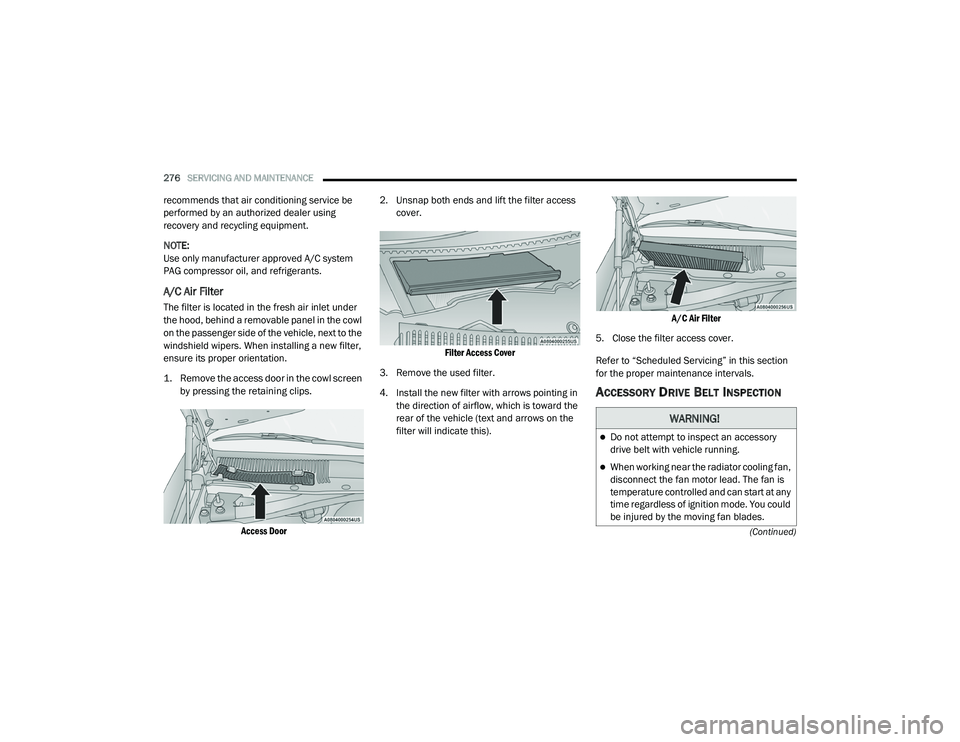
A/C Air Filter
The filter is located in the fresh air inlet under
the hood, behind a removable panel in the cowl
on the passenger side of the vehicle, next to the
windshield wipers. When installing a new filter,
ensure its proper orientation.
1. Remove the access door in the cowl screen by pressing the retaining clips.
Access Door
2. Unsnap both ends and lift the filter access
cover.
Filter Access Cover
3. Remove the used filter.
4. Install the new filter with arrows pointing in the direction of airflow, which is toward the
rear of the vehicle (text and arrows on the
filter will indicate this).
A/C Air Filter
5. Close the filter access cover.
Refer to “Scheduled Servicing” in this section
for the proper maintenance intervals.
ACCESSORY DRIVE BELT INSPECTION
WARNING!
Do not attempt to inspect an accessory
drive belt with vehicle running.
When working near the radiator cooling fan,
disconnect the fan motor lead. The fan is
temperature controlled and can start at any
time regardless of ignition mode. You could
be injured by the moving fan blades.
20_LD_OM_EN_USC_t.book Page 276
Page 280 of 412
278SERVICING AND MAINTENANCE
WINDSHIELD WIPER BLADES
Clean the rubber edges of the wiper blades and
the windshield periodically with a sponge or soft
cloth and a mild nonabrasive cleaner. This will
remove accumulations of salt or road film.
Operation of the wipers on dry glass for long
periods may cause deterioration of the wiper
blades. Always use washer fluid when using the
wipers to remove salt or dirt from a dry
windshield.
Avoid using the wiper blades to remove frost or
ice from the windshield. Keep the blade rubber
out of contact with petroleum products such as
engine oil, gasoline, etc.
NOTE:
Life expectancy of wiper blades varies
depending on geographical area and frequency
of use. Poor performance of blades may be
present with chattering, marks, water lines or
wet spots. If any of these conditions are
present, clean the wiper blades or replace as
necessary.
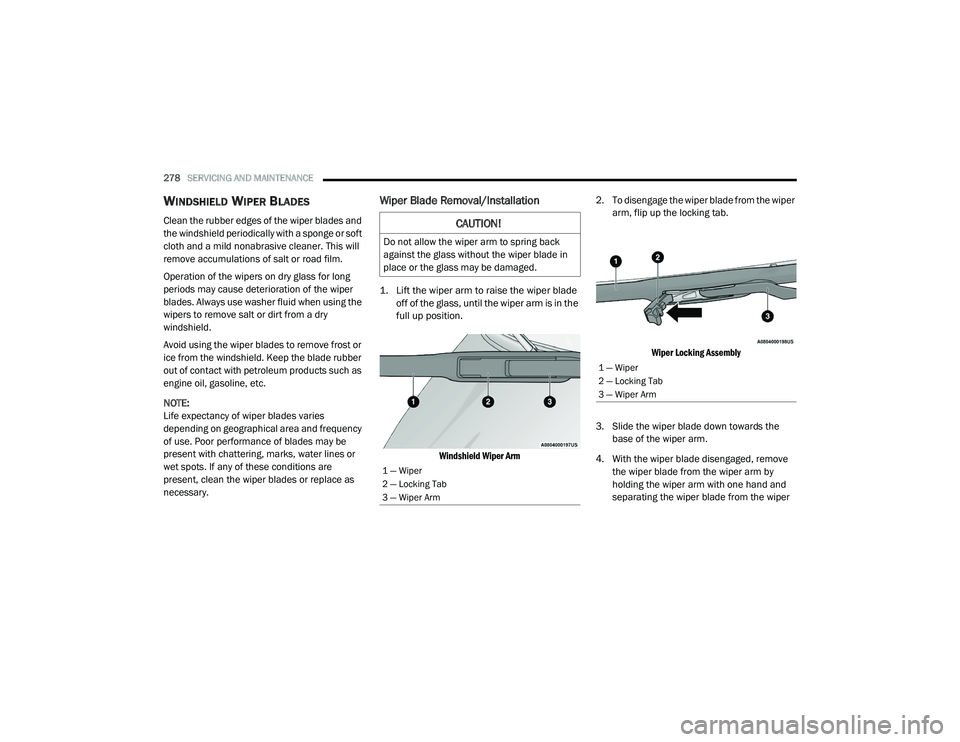
Wiper Blade Removal/Installation
1. Lift the wiper arm to raise the wiper blade
off of the glass, until the wiper arm is in the
full up position.
Windshield Wiper Arm
2. To disengage the wiper blade from the wiper
arm, flip up the locking tab.
Wiper Locking Assembly
3. Slide the wiper blade down towards the base of the wiper arm.
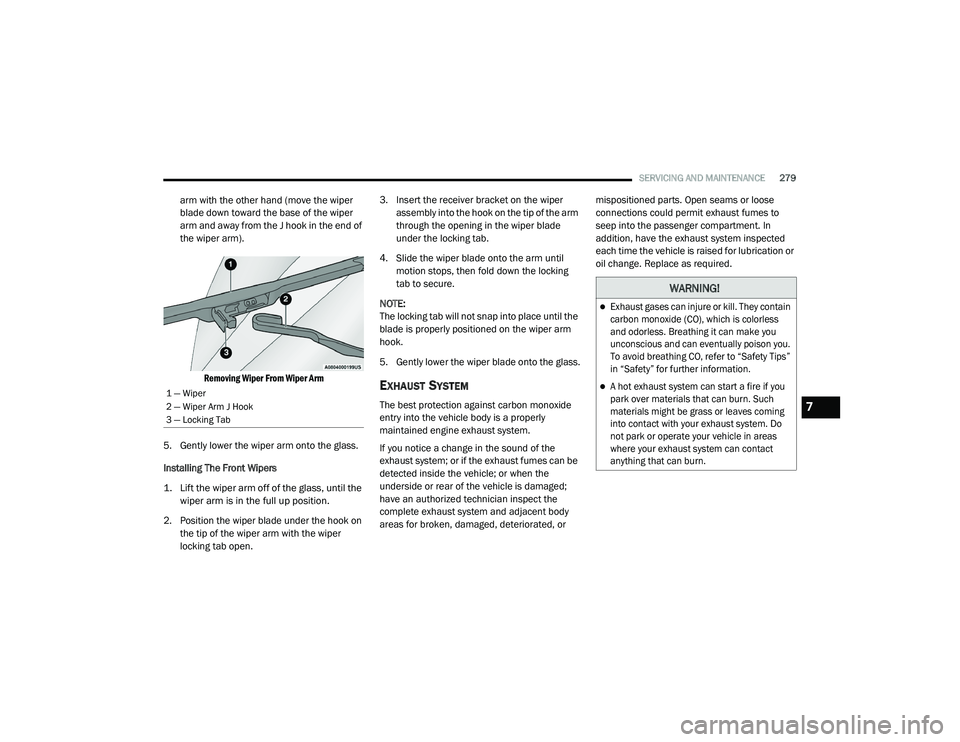
4. With the wiper blade disengaged, remove the wiper blade from the wiper arm by
holding the wiper arm with one hand and
separating the wiper blade from the wiper
CAUTION!
Do not allow the wiper arm to spring back
against the glass without the wiper blade in
place or the glass may be damaged.
1 — Wiper
2 — Locking Tab
3 — Wiper Arm
1 — Wiper
2 — Locking Tab
3 — Wiper Arm
20_LD_OM_EN_USC_t.book Page 278
Page 281 of 412
SERVICING AND MAINTENANCE279
arm with the other hand (move the wiper
blade down toward the base of the wiper
arm and away from the J hook in the end of
the wiper arm).
Removing Wiper From Wiper Arm
5. Gently lower the wiper arm onto the glass.
Installing The Front Wipers
1. Lift the wiper arm off of the glass, until the wiper arm is in the full up position.
2. Position the wiper blade under the hook on the tip of the wiper arm with the wiper
locking tab open. 3. Insert the receiver bracket on the wiper
assembly into the hook on the tip of the arm
through the opening in the wiper blade
under the locking tab.
4. Slide the wiper blade onto the arm until motion stops, then fold down the locking
tab to secure.
NOTE:
The locking tab will not snap into place until the
blade is properly positioned on the wiper arm
hook.
5. Gently lower the wiper blade onto the glass.
EXHAUST SYSTEM
The best protection against carbon monoxide
entry into the vehicle body is a properly
maintained engine exhaust system.
If you notice a change in the sound of the
exhaust system; or if the exhaust fumes can be
detected inside the vehicle; or when the
underside or rear of the vehicle is damaged;
have an authorized technician inspect the
complete exhaust system and adjacent body
areas for broken, damaged, deteriorated, or mispositioned parts. Open seams or loose
connections could permit exhaust fumes to
seep into the passenger compartment. In
addition, have the exhaust system inspected
each time the vehicle is raised for lubrication or
oil change. Replace as required.1 — Wiper
2 — Wiper Arm J Hook
3 — Locking Tab
WARNING!
Exhaust gases can injure or kill. They contain
carbon monoxide (CO), which is colorless
and odorless. Breathing it can make you
unconscious and can eventually poison you.
To avoid breathing CO, refer to “Safety Tips”
in “Safety” for further information.
A hot exhaust system can start a fire if you
park over materials that can burn. Such
materials might be grass or leaves coming
into contact with your exhaust system. Do
not park or operate your vehicle in areas
where your exhaust system can contact
anything that can burn.
7
20_LD_OM_EN_USC_t.book Page 279
Page 332 of 412
330MULTIMEDIA
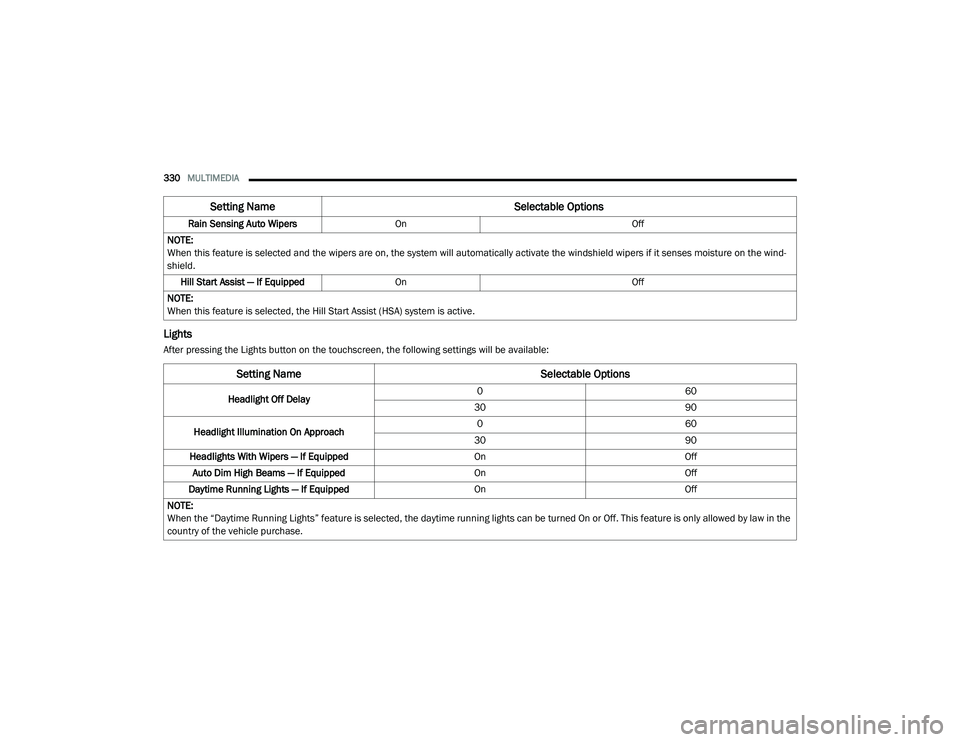
Lights
After pressing the Lights button on the touchscreen, the following settings will be available:Rain Sensing Auto Wipers
On Off
NOTE:
When this feature is selected and the wipers are on, the system will automatically activate the windshield wipers if it senses moisture on the wind -
shield.
Hill Start Assist — If Equipped On Off
NOTE:
When this feature is selected, the Hill Start Assist (HSA) system is active.
Setting Name Selectable Options
Setting NameSelectable Options
Headlight Off Delay0
60
30 90
Headlight Illumination On Approach 0
60
30 90
Headlights With Wipers — If Equipped OnOff
Auto Dim High Beams — If Equipped OnOff
Daytime Running Lights — If Equipped OnOff
NOTE:
When the “Daytime Running Lights” feature is selected, the daytime running lights can be turned On or Off. This feature is only allowed by law in the
country of the vehicle purchase.
20_LD_OM_EN_USC_t.book Page 330
Page 339 of 412

MULTIMEDIA337
Clear Personal Data
After pressing the Clear Personal Data button on the touchscreen, the following setting will be available:
CUSTOMER PROGRAMMABLE FEATURES
— U
CONNECT 4C/4C NAV SETTINGS
Uconnect 4C/4C NAV With 8.4-inch Display Buttons
On The Touchscreen And Buttons On The Faceplate
Press the Apps button, then press the
Settings button on the touchscreen to
display the menu setting screen. In this mode,
the Uconnect system allows you to access
programmable features that may be equipped
such as Language, Display, Units, Voice, Clock
& Date , Camera, Safety & Driving Assistance,
Mirrors & Wipers (if equipped), Lights, Doors &
Locks, Seats & Comfort (if equipped), Key Off
Options, Audio, Phone/Bluetooth® Settings,
SiriusXM® Setup (if equipped), Reset, and
System Information (if equipped).
NOTE:
Depending on the vehicle’s options, feature
settings may vary. When making a selection, press the button on
the touchscreen to enter the desired menu.
Once in the desired menu, press and release
the preferred setting “option” until a check
mark appears next to the setting, showing that
setting has been selected. Once the setting is
complete, press the X button on the
touchscreen to close out of the settings screen.
Pressing the Up or Down Arrow button on the
right side of the screen will allow you to toggle
up or down through the available settings.
The following tables list the settings that may be
found within the Uconnect 4C/4C NAV radio,
along with the selectable options pertaining to
each setting.
Setting Name
Selectable Options
Clear Personal DataYesCancel
NOTE:
When this feature is selected it will remove all personal data including Bluetooth® devices and presets. If “Yes” is selected a pop-up will appear asking
"Are you sure you want to clear all personal data?” select “Yes” to Clear, or “Cancel” to exit.
1 — Uconnect Buttons On The Touchscreen
2 — Uconnect Buttons On The Faceplate
9
20_LD_OM_EN_USC_t.book Page 337
Page 346 of 412
344MULTIMEDIA
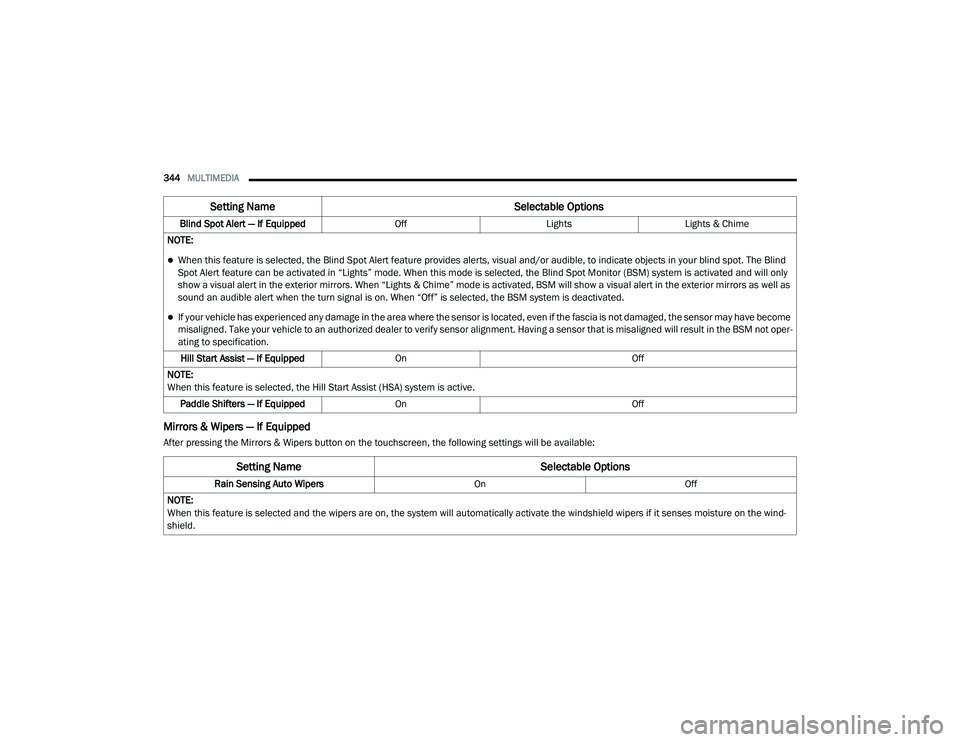
Mirrors & Wipers — If Equipped
After pressing the Mirrors & Wipers button on the touchscreen, the following settings will be available:Blind Spot Alert — If Equipped
OffLightsLights & Chime
NOTE:
When this feature is selected, the Blind Spot Alert feature provides alerts, visual and/or audible, to indicate objects in your blind spot. The Blind
Spot Alert feature can be activated in “Lights” mode. When this mode is selected, the Blind Spot Monitor (BSM) system is activated and will only
show a visual alert in the exterior mirrors. When “Lights & Chime” mode is activated, BSM will show a visual alert in the exterior mirrors as well as
sound an audible alert when the turn signal is on. When “Off” is selected, the BSM system is deactivated.
If your vehicle has experienced any damage in the area where the sensor is located, even if the fascia is not damaged, the sensor may have become
misaligned. Take your vehicle to an authorized dealer to verify sensor alignment. Having a sensor that is misaligned will result in the BSM not oper -
ating to specification.
Hill Start Assist — If Equipped On Off
NOTE:
When this feature is selected, the Hill Start Assist (HSA) system is active. Paddle Shifters — If Equipped On Off
Setting Name Selectable Options
Setting NameSelectable Options
Rain Sensing Auto WipersOnOff
NOTE:
When this feature is selected and the wipers are on, the system will automatically activate the windshield wipers if it senses moisture on the wind -
shield.
20_LD_OM_EN_USC_t.book Page 344
Page 347 of 412
MULTIMEDIA345
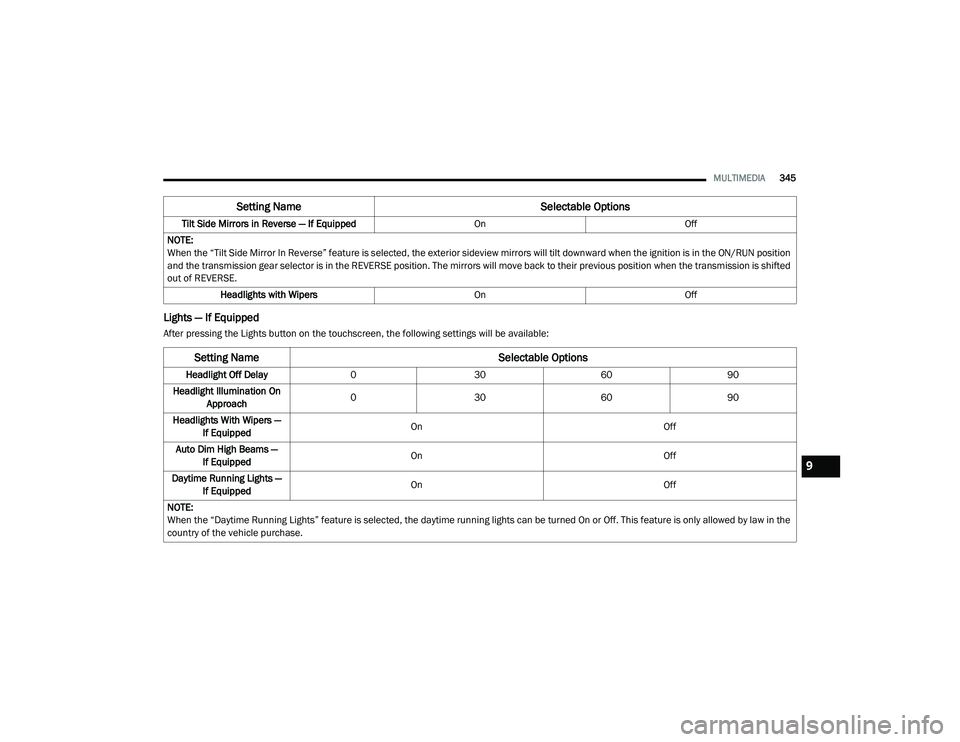
Lights — If Equipped
After pressing the Lights button on the touchscreen, the following settings will be available:Tilt Side Mirrors in Reverse — If Equipped
OnOff
NOTE:
When the “Tilt Side Mirror In Reverse” feature is selected, the exterior sideview mirrors will tilt downward when the ignition is in the ON/RUN position
and the transmission gear selector is in the REVERSE position. The mirrors will move back to their previous position when the transmission is shifted
out of REVERSE. Headlights with Wipers OnOff
Setting Name Selectable Options
Setting NameSelectable Options
Headlight Off Delay 0 30 6090
Headlight Illumination On Approach 0
30 6090
Headlights With Wipers — If Equipped On
Off
Auto Dim High Beams — If Equipped On
Off
Daytime Running Lights — If Equipped On
Off
NOTE:
When the “Daytime Running Lights” feature is selected, the daytime running lights can be turned On or Off. This feature is only allowed by law in the
country of the vehicle purchase.
9
20_LD_OM_EN_USC_t.book Page 345
Page 399 of 412

397
Cooling System
.............................................. 280Adding Coolant (Antifreeze)....................... 282Coolant Level.................................. 281, 283Cooling Capacity.............................. 313, 314Disposal Of Used Coolant.......................... 283Drain, Flush, And Refill.............................. 281Inspection................................................. 283Points To Remember................................. 283Pressure Cap............................................. 282Radiator Cap............................................. 282Selection Of Coolant (Antifreeze).... 281, 313, 314, 315, 318Corrosion Protection...................................... 304Cruise Control (Speed Control)............ 175, 177Cruise Light......................................... 102, 103Cupholders...................................................... 77Customer Assistance..................................... 391Customer Programmable Features................322Cybersecurity................................................. 321
D
Daytime Running Lights................................... 45Dealer Service............................................... 272Deck Lid Power Release............................................ 68Defroster, Windshield.................................... 156Delay (Intermittent) Wipers.............................. 51Diagnostic System, Onboard......................... 104
Dimmer SwitchHeadlight..................................................... 46DipsticksOil (Engine)............................................... 270Disabled Vehicle Towing............................... 248DisposalAntifreeze (Engine Coolant)...................... 283Disturb.......................................................... 379Do Not Disturb.............................................. 388Door Ajar.......................................................... 96Door Ajar Light................................................. 96Door LocksAutomatic.................................................... 30Child-Protection Door Lock — Rear Doors.... 30Doors............................................................... 25Driver’s Seat Back Tilt...................................... 32DrivingThrough Flowing, Rising, Or Shallow Standing Water
.................................... 211
E
Electric Brake Control System....................... 107Anti-Lock Brake System............................ 106Electronic Roll Mitigation................. 108, 113Electric Remote Mirrors................................... 43
Electronic Power Distribution Center (Fuses)... 221
Electronic Speed Control (Cruise Control)..... 175Electronic Stability Control (ESC).................. 108Electronic Throttle Control Warning Light......... 96
Emergency, In Case OfFreeing Vehicle When Stuck..................... 244Hazard Warning Flasher........................... 212Jacking............................................. 229, 286Jump Starting.................................. 240, 241Towing...................................................... 248Emission Control System Maintenance......... 105Engine............................... 266, 267, 268, 269Air Cleaner................................................ 275Block Heater............................................. 162Break-In Recommendations..................... 163Checking Oil Level.................................... 270Compartment......................... 266, 267, 269Compartment Identification............. 266, 268Coolant (Antifreeze)................ 281, 315, 318Cooling...................................................... 280Exhaust Gas Caution....................... 155, 312Fails To Start............................................. 162Flooded, Starting...................................... 162Fuel Requirements.................309, 313, 314Jump Starting.................................. 240, 241Oil........................ 272, 313, 314, 315, 318Oil Filler Cap.................................... 266, 274Oil Filter.................................................... 274Oil Selection............................ 272, 313, 314Oil Synthetic.............................................. 274Overheating.............................................. 242Starting..................................................... 15911
20_LD_OM_EN_USC_t.book Page 397