2020 CITROEN C4 mirror
[x] Cancel search: mirrorPage 123 of 260

121
Driving
6The system is automatically reactivated every
time the ignition is switched on.
Malfunction
In the event of a malfunction,
these warning lamps light up on
the instrument panel, accompanied by the
display of a message and an audible signal.
Have it checked by a CITROËN dealer or a
qualified workshop.
Blind spot monitoring
For more information, refer to the
General recommendations on the use
of driving and manoeuvring aids .
This system warns the driver of a potential
danger posed by the presence of another vehicle
(car, lorry, motorcycle) in the vehicle's blind
spots (areas hidden from the driver's field of
vision) using sensors located on the sides of the
bumpers.
The warning is given by a fixed warning lamp
that appears in the door mirror on the side in
question:
–
immediately
, when being overtaken;
–
after a delay of about one second, when
overtaking a vehicle slowly
.
Activation/Deactivation
It is set via theDriving/Vehicle touch
screen menu.
When starting the vehicle, the
warning lamp
comes on in each mirror to indicate that the
system is activated.
The status of the system is memorised when the
ignition is switched off.
The system is automatically deactivated when towing with a towing device
approved by CITROËN.
Operating conditions
– All vehicles are moving in the same direction
and in adjacent lanes.
–
The speed of your vehicle must be between
7
and 87 mph (12 and 140 km/h) (versions without Park Assist) or between 19
and 87 mph
(30 and 140 km/h) (versions with Park Assist).
–
When overtaking a vehicle, the speed
difference is less than 6
mph (10 km/h).
–
When overtaken by a vehicle, the speed
difference is less than 16
mph (25 km/h).
–
T
raffic is flowing normally.
–
Overtaking a vehicle over a certain period of
time and the vehicle being overtaken remains in
the blind spot.
–
Y
ou are driving on a straight or slightly curved
road.
–
Y
our vehicle is not pulling a trailer, a caravan,
etc.
Operating limits
Page 124 of 260

122
Driving
No alert is triggered in the following conditions:
– presence of stationary objects (e.g. parked
vehicles, safety rails, lampposts, signs).
–
vehicles travelling in the opposite direction.
–
on winding roads or in case of sharp turns.
–
when overtaking or being overtaken by a
very long vehicle (e.g.
truck, bus), which is both
detected in a blind spot from behind and present
in the driver's field of vision from the front.
–
quick overtaking manoeuvre.
–
very heavy traffic: vehicles detected in front
and behind are confused with a lorry or a
stationary object.
–
activation of
the Park Assist function.
Malfunction
If the event of a malfunction, this warning
lamp comes on in the instrument panel,
accompanied by the display of a message.
Have it checked by a CITROËN dealer or a
qualified workshop.
The system may be temporarily disturbed by certain climatic conditions (e.g. rain,
hail).
In particular, driving on a wet road or going
from a dry to a wet area can cause false
alerts (e.g.
presence of a cloud of water
droplets in the blind spot interpreted as a
vehicle).
In bad or wintry weather, ensure that the
sensors are not covered by mud, ice or snow.
Take care not to cover the warning zone in
the door mirrors, or the detection zones on
the front and rear bumpers with adhesive
labels or other objects; they may hamper
correct operation of the system.
Active Safety Brake with Collision Risk Alert and
Intelligent emergency
braking assistance
For more information, refer to the
General recommendations on the use
of driving and manoeuvring aids .
This system:
–
warns the driver that their vehicle is at risk of
collision with the vehicle in front, a pedestrian or
,
depending on version, a cyclist.
–
reduces the vehicle's speed to avoid a
collision or limit its severity
.
The speed will be reduced by a maximum of 12 mph (20 km/h) (versions
with camera only) or by a maximum of 31
mph (50
km/h) (versions with camera and
radar).
The system also takes motorcyclists into account.
This system is comprised of three functions:
–
Collision
Risk Alert.
–
Intelligent emergency braking assistance
(iEBA).
–
Active Safety Brake (automatic emergency
braking).
Page 130 of 260
128
Driving
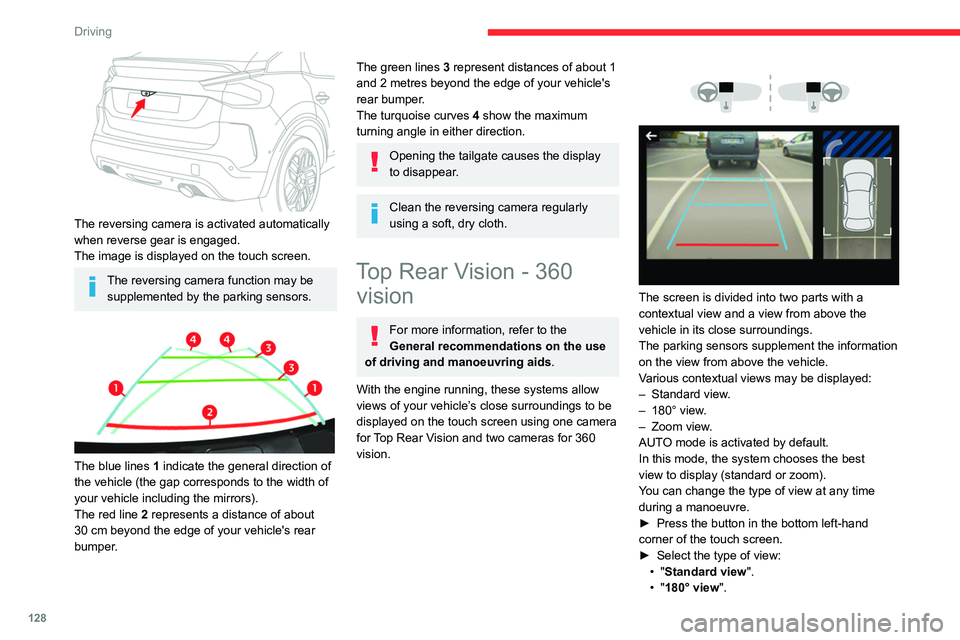
The reversing camera is activated automatically
when reverse gear is engaged.
The image is displayed on the touch screen.
The reversing camera function may be supplemented by the parking sensors.
The blue lines 1 indicate the general direction of
the vehicle (the gap corresponds to the width of
your vehicle including the mirrors).
The red line 2 represents a distance of about
30
cm beyond the edge of your vehicle's rear
bumper.
The green lines 3 represent distances of about 1
and 2 metres beyond the edge of your vehicle's
rear bumper.
The turquoise curves 4 show the maximum
turning angle in either direction.
Opening the tailgate causes the display
to disappear.
Clean the reversing camera regularly
using a soft, dry cloth.
Top Rear Vision - 360 vision
For more information, refer to the
General recommendations on the use
of driving and manoeuvring aids .
With the engine running, these systems allow
views of your vehicle’s close surroundings to be
displayed on the touch screen using one camera
for Top Rear Vision and two cameras for 360
vision.
The screen is divided into two parts with a
contextual view and a view from above the
vehicle in its close surroundings.
The parking sensors supplement the information
on the view from above the vehicle.
Various contextual views may be displayed:
–
Standard view
.
–
180° view
.
–
Zoom view
.
AUTO mode is activated by default.
In this mode, the system chooses the best
view
to display (standard or zoom).
You can change the type of view at any time
during a manoeuvre.
►
Press the button in the bottom left-hand
corner of the touch screen.
►
Select the type of view:
•
"Standard view".
•
"180° view".
Page 132 of 260

130
Driving
The blue lines 1 represent the width of your
vehicle, with the mirrors unfolded; their direction
changes according to the position of the steering
wheel.
The red line 2 represents a distance of 30
cm
from the rear bumper; the two blue lines 3 and 4
represent 1
m and 2 m, respectively.
This view is available with AUTO mode or in the
view selection menu.
Zoom view
The camera records the vehicle's surroundings
during the manoeuvre in order to create a
view from above the rear of the vehicle in its
near surroundings, allowing the vehicle to be
manoeuvred around nearby obstacles.
This view is available with AUTO mode or in the
view selection menu.
Obstacles may appear further away than
they actually are.
It is important to monitor the sides of the
vehicle during the manoeuvre, using the
mirrors.
Parking sensors also provide additional
information about the area around the vehicle.
180° view
The 180° view facilitates reversing out of a
parking space, making it possible to see the
approach of vehicles, pedestrians and cyclists.
This view is not recommended for carrying out a
complete manoeuvre.
It features 3 areas: left A, centre B and right C. This view is only available via the view selection
menu.
360 vision
The vehicle has a camera at the front
, fitted in
the grille, and a camera at the rear, located close
to the number plate lamps.
Using these cameras, the system displays the
vehicle's near surroundings on the touch screen,
offering views from the rear of the vehicle (rear
vision) when reverse gear is engaged and views
from the front of the vehicle (front vision) when
the gearbox is in neutral or a gear is engaged.
Rear vision
The system activates automatically when
reverse gear is engaged.
The system is deactivated:
–
Automatically
, at speeds above approximately
12 mph (20
km/h),
Page 133 of 260

131
Driving
6– when shifting out of reverse (the rear view
image is replaced by the front view image after
7 seconds).
–
By pressing the white arrow in the upper-left
corner of the touch screen.
If a trailer or a bicycle carrier is fitted to
the towball, the area behind the vehicle
on the view from above goes dark.
The surroundings are reconstructed by the
front camera only.
The rear vision views are similar to those for the
Top Rear Vision function.
For more information on the Top Rear
Vision
function, refer to the corresponding
section.
Front and rear vision
With the engine running and the speed
below 12 mph (20 km/h), the system is
activated via the Driving/Vehicle touch screen
menu: ►
Select "
Visual parking assistance".
AUTO mode is displayed by default, with front
vision, if the gearbox is in neutral or with a
gear engaged, or with rear vision, if reverse is
engaged.
The system is deactivated:
–
Automatically above about 19 mph (30
km/h)
(the image disappears temporarily from 12 mph
(20 km/h)).
–
By pressing the white arrow in the upper-left
corner of the touch screen.
AUTO mode
This mode is activated by default.
Using sensors in the front bumper, the automatic
view changes from the front view (standard) to
the view from above (zoom) as an obstacle is
approached during a manoeuvre.
Standard view
The area in front of your vehicle is displayed on
the screen.
The orange lines 1 represent the width of your
vehicle, with the mirrors unfolded; their direction
changes according to the position of the steering
wheel.
The red line 2 represents a distance of 30 cm
from the front bumper; the two orange lines 3
and 4 represent 1 m and 2 m, respectively.
This view is available with AUTO mode or in the
view selection menu.
Page 134 of 260

132
Driving
Zoom view
The camera records the vehicle's surroundings
during the manoeuvre in order to create a
view from above the front of the vehicle in its
near surroundings, allowing the vehicle to be
manoeuvred around obstacles nearby.
This view is available with AUTO mode or in the
view selection menu.
Obstacles may appear further away than
they actually are.
It is important to check the sides of the
vehicle during the manoeuvre, using the
mirrors.
The parking sensors also supplement the
information on the vehicle's surroundings.
180° view
The 180° view assists with exiting from a parking
space in forward gear, making it possible to
see the approach of vehicles, pedestrians and
cyclists.
This view is not recommended for carrying out a
complete manoeuvre.
It consists of 3 areas: left A, centre B and right
C.
This view is available only from the view
selection menu.
Park Assist
For more information, refer to the
General recommendations on the use
of driving and manoeuvring aids .
This system provides active parking assistance:
it detects a parking space and then steers in the
appropriate direction to park in the space while
the driver controls the driving direction, gear
changes, acceleration and braking.
To help the driver monitor the manoeuvre, the
system automatically triggers the display from
the Top Rear Vision or 360 vision function and
activates the parking sensors.
The system measures the available parking
spaces and calculates the distances to obstacles
using ultrasonic sensors built into the front and
rear bumpers of the vehicle.
The system assists with the following
manoeuvres:
A. Entering a "parallel" parking space
B. Leaving a "parallel" parking space
C. Entering a "bay" parking space
Page 187 of 260

185
Technical data
9Dimensions (mm)
These dimensions have been measured on an unladen vehicle.
* Mirrors folded
** Electric versions
Identification markings
Various visible markings for vehicle identification
and vehicle search.
A. Vehicle Identification Number (VIN), under
the bonnet.
Stamped on the chassis.
B. Vehicle Identification Number (VIN), on the
dashboard.
Printed on an adhesive label visible through the
windscreen.
C. Manufacturer's label.
Affixed to the right-hand door.
Bears the following information:
–
Manufacturer
’s name.
–
European whole vehicle type approval
number
.
–
V
ehicle Identification number (VIN).
–
Gross vehicle weight (GVW).
–
Gross train weight (GTW).
–
Maximum weight on the front axle.
–
Maximum weight on the rear axle.
D. T
yres/paint code label.
Affixed to the driver's door.
Bears the following information about the tyres:
–
T
yre pressures, unladen and laden.
–
T
yre specification, made up of the dimensions
and type as well as the load and speed indices.
–
Spare tyre inflation pressure.
Also indicates the paint colour code.
The vehicle may be originally equipped with tyres with higher load and speed
indices than those indicated on the label,
without affecting tyre pressure (on cold tyres).
In the event of a change in the type of tyres,
contact a CITROËN dealer for the tyre fits
approved for the vehicle.
Page 242 of 260

240
Alphabetical index
Instrument panel, LCD 9
Internet browser
218, 221
ISOFIX mountings
78, 81–82
J
Jack 165–166, 169, 224
Jump starting
176
K
Key 28–29, 32–33
Key, electronic
30–31
Keyless Entry and Starting
28, 30–31, 87–88
Key not recognised
88–89
Key with remote control
28, 86
Kit, hands-free
201–202, 226
Kit, puncture repair
166
Kit, temporary puncture repair
165–168
L
Labels, identification 185
Lamp, boot
56
Lamps, parking
58
Lamps, rear
174
Lams with Full LED technology
61
Lane assist
109, 113–115
Lane departure warning active
11 8
Leather (care) 163
LEDs - Light-emitting diodes
58, 172, 174
Level, AdBlue®
158
Level, brake fluid
157
Level, Diesel additive
158
Level, engine coolant
19, 157
Level, engine oil
19, 156
Levels and checks
155–157
Level, screenwash fluid
63, 157
Light-emitting diodes - LEDs
58, 172, 174
Lighting, cornering
61
Lighting dimmer
23
Lighting, exterior
57, 60
Lighting, guide-me home
29, 59–60
Lighting, interior
55
Lighting, mood
55
Lighting, welcome
59
Loading
152–153
Load reduction mode
154
Locking
29, 31
Locking from the inside
32
Locking the doors
32
Low fuel level
137
Lumbar
41
M
Mains socket (domestic network) 141
Maintenance (advice)
139, 162
Maintenance, routine
102, 158–160
Manoeuvring aids (recommendations)
101
Map reading lamps 55
Markings, identification
185
Massage function
41
Mat
54, 102
Menu, main
26
Menus (audio)
197–198, 210–211
Menu short cuts
26
Messages
228
Messages, quick
228
Minimum traction battery charge
level (Electric)
21
Mirror, rear view
43
Mirrors, door
43, 51, 121
Mirror, vanity
52
Misfuel prevention
138
Mobile application
27, 51, 148
Motor, electric
89, 156, 184
Mountings, ISOFIX
78, 81–82
Multimedia support
52
N
Navigation 215–217
Navigation, connected
218–220
O
Obstacle detection 126
Oil change
156
Oil consumption
156