2020 CHRYSLER PACIFICA key ignition
[x] Cancel search: key ignitionPage 105 of 516

GETTING TO KNOW YOUR VEHICLE103
(Continued)
(Continued)
Cargo Area Features
Cargo Area Storage
When the third row seats are not in the stowed
position, there is a large area for cargo storage.
Rear Cargo Area
NOTE:
With all rear seats stowed or removed, 4 x 8 ft
(1.2 x 2.4 m) sheets of building material will fit
on the vehicle floor with the liftgate closed. The
front seats must be moved slightly forward of
the rearmost position.
Stow ‘n Vac Integrated Vacuum — If Equipped
Your vehicle may be equipped with an
integrated vacuum system. This vacuum is for
in-vehicle use only and should only be used on
dry materials and on in-vehicle surfaces. It is
located in the rear trim panel behind the sliding
door on the driver’s side of the vehicle.
IMPORTANT SAFETY INSTRUCTIONS
Read all instructions before using. When using
your vacuum, basic precautions should be
followed, including the following:
WARNING!
Never leave children alone in a vehicle, or
with access to an unlocked vehicle.
Allowing children to be in a vehicle unat -
tended is dangerous for a number of
reasons. A child or others could be seriously
or fatally injured. Children should be
warned not to touch the parking brake,
brake pedal or the gear selector.
Do not leave the key fob in or near the
vehicle, or in a location accessible to chil -
dren, and do not leave the ignition of a
vehicle equipped with Keyless Enter-N-Go
in either ACC mode or engine running (ON)
unless you are using the vacuum system.
Be aware a child could operate power
windows, other controls, or move the
vehicle when the vacuum system is in use.
ALWAYS push ignition button to place igni -
tion in the OFF mode when finished using
the vacuum system.
WARNING!
To reduce the risk of fire, serious injury or
death:
Do not use vacuum while vehicle
is in motion or while driving.
Do not vacuum wet surfaces or any liquids.
Do not use to vacuum up anything outside
of the vehicle.
WARNING! (Continued)
2
20_RU_OM_EN_US_t.book Page 103
Page 106 of 516

104GETTING TO KNOW YOUR VEHICLE
(Continued)
1. Before Using Vacuum:
Accessory (ACC) Mode Operation - For up to
10 minutes of operation
Always apply the parking brake, shift the
transmission into PARK, and push ignition
button to place ignition in Accessory (ACC)
mode. The engine will not be running in this
mode. Do not leave the key fob in or near
the vehicle, or in a location accessible to
children.
NOTE:
The vacuum system will run for 10 minutes off
battery power and then the vacuum will shut
down. A low battery indication light (LOW PWR)
located below the vacuum nozzle storage loca -
tion will come on one minute before the vacuum
shuts down.
Engine Running (ON) Operation - For more
than 10 minutes of operation
Position vehicle outdoors and fully open
all side windows.
Always apply the parking brake, shift the
transmission into PARK, and leave
engine running.
Do not vacuum any flammable
liquids, such as gasoline, or use
around explosive vapors. Vapors
from flammable liquids may form an
explosive mixture with air and can be ignited
by heat, sparks, or flames. Vapors may travel
to a source of ignition and explode.
Do not vacuum anything that is burning or
smoking, such as cigarettes, matches, or
hot ashes/embers.
Do not allow to be used as a toy. Close
attention is necessary when used by or
near children.
Do not leave the vacuum running while
unattended.
Use only as described in this manual. Use
only attachments provided with your
vehicle.
Do not put any object into openings. Do not
use with any opening blocked; keep free of
dust, lint, hair, and anything that may
reduce air flow.
Do not vacuum toxic material such as chlo -
rine bleach, ammonia, drain cleaner, etc.
WARNING! (Continued)
Do not vacuum hard or sharp objects such
as glass, nails, screws, coins, etc.
Keep hair, loose clothing, fingers, and all
parts of body away from openings and
moving parts.
Only use with filter in place. Periodically
check that the filter is in place and in good
condition.
WARNING!
This equipment incorporates parts such as
switches, motors, or the like that tend to
produce arcs or sparks that can cause an
explosion. When using your vacuum near
gasoline-dispensing equipment or service
stations, park vehicle at least 20 ft (6 m)
away from the exterior enclosure of any
dispensing pump. The vacuum is mounted
more than 18 inches (45 cm) above ground
level in your vehicle.
WARNING! (Continued)
20_RU_OM_EN_US_t.book Page 104
Page 109 of 516
GETTING TO KNOW YOUR VEHICLE107
5. When finished, push power button to turn
vacuum off and store vacuum hose and any
attachments.
6. Before exiting the vehicle:
If the ignition is in the ACC position, push
the START/STOP ignition button to place
ignition in the OFF position, remove key
fob from the vehicle, and lock the vehicle.
If the engine is running, raise all of the
windows, push the START/STOP ignition
button to place ignition in the OFF posi -tion, remove key fob from the vehicle,
close all of the doors and the liftgate and
lock the vehicle.
Vacuum Troubleshooting
DO NOT use with any opening blocked. If an
object becomes lodged in the hose, attempt
to fully extend the hose in a straight line while
the vacuum motor is running. If this does not
dislodge the object, turn the vacuum OFF and
remove the hose from the vehicle following
the removal instructions below. If the filter is
clogged, follow the emptying debris bin
procedure and lightly tap the filter on the
collection bin to remove any collected debris
from the filter. Both the bin and the filter can
be rinsed with water if needed. To avoid mold
and stale odors, allow both to dry completely
before reinstalling in your vehicle. If the filter
has tears, holes or other damage and needs
to be replaced, please contact an authorized
dealer.
If there are any other issues with your
vacuum, contact an authorized dealer. Your
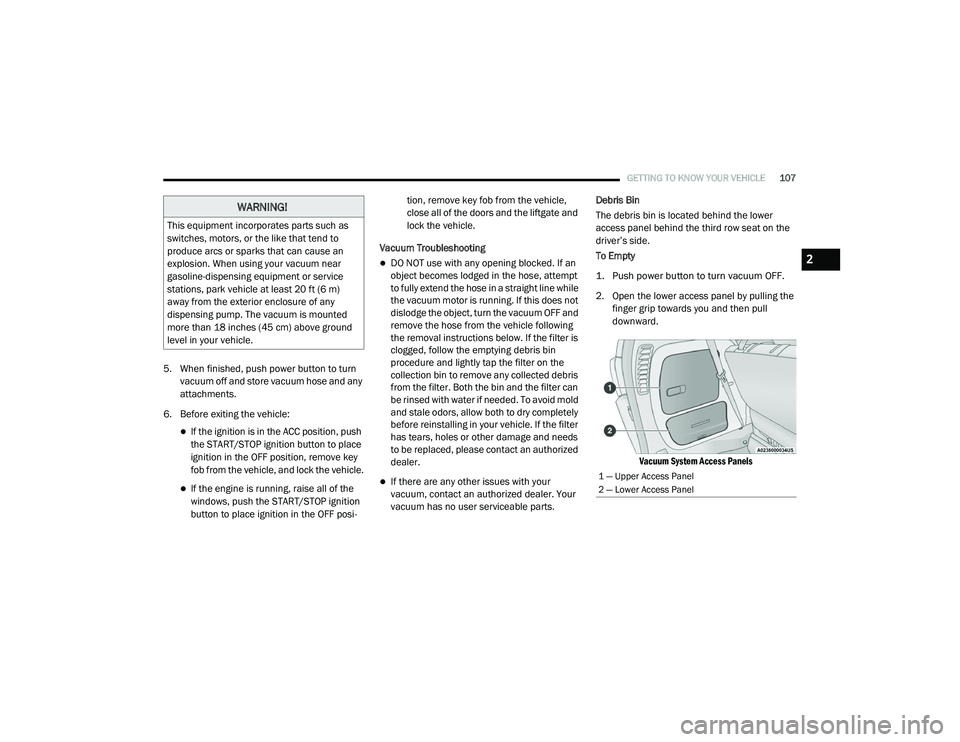
vacuum has no user serviceable parts. Debris Bin
The debris bin is located behind the lower
access panel behind the third row seat on the
driver’s side.
To Empty
1. Push power button to turn vacuum OFF.
2. Open the lower access panel by pulling the
finger grip towards you and then pull
downward.
Vacuum System Access Panels
WARNING!
This equipment incorporates parts such as
switches, motors, or the like that tend to
produce arcs or sparks that can cause an
explosion. When using your vacuum near
gasoline-dispensing equipment or service
stations, park vehicle at least 20 ft (6 m)
away from the exterior enclosure of any
dispensing pump. The vacuum is mounted
more than 18 inches (45 cm) above ground
level in your vehicle.
1 — Upper Access Panel
2 — Lower Access Panel
2
20_RU_OM_EN_US_t.book Page 107
Page 120 of 516

118GETTING TO KNOW YOUR VEHICLE
Once the screen is completely to the top of the
window, extend the top bar of the sun screen
over the two hooks attached to the top of the
window.
Sun Screen Extended
To lower the sun screen, gently lift the tab
upward to disengage the hooks, and feed the
screen back into the base sill.Power Outlets
Your vehicle is equipped with 12 Volt (15 Amp)
power outlets, and 5 Volt (2.5 Amp) USB power
outlets, that can be used to power cellular
phones, small electronics and other low
powered electrical accessories. The power
outlets can be labeled with either a “key” or a
“battery” symbol to indicate how the outlet is
powered. Power outlets labeled with a “key” are
powered when the ignition is in the ON or ACC
position, while the outlets labeled with a
“battery” are connected directly to the battery
and powered at all times.
NOTE:
All accessories connected to the “battery”
powered outlets should be removed or
turned off when the vehicle is not in use to
protect the battery against discharge. The front power outlet is located at the bottom
of the instrument panel.
12 Volt Front Power Outlet
In addition to the front power outlets, there is
also a power outlet located in the rear cargo
area.
CAUTION!
Power outlets are designed for accessory
plugs only. Do not insert any other object in
the power outlets as this will damage the
outlet and blow the fuse. Improper use of the
power outlet can cause damage not covered
by your New Vehicle Limited Warranty.
20_RU_OM_EN_US_t.book Page 118
Page 129 of 516

GETTING TO KNOW YOUR INSTRUMENT PANEL127
4. Fuel Gauge
The gauge shows the level of fuel in the
fuel tank when the ignition switch is in
the ON/RUN position.
The fuel pump symbol points
to the side of the vehicle where
the fuel door is located.
5. Temperature Gauge
The temperature gauge shows engine
coolant temperature. Any reading within
the normal range indicates that the
engine cooling system is operating satis -
factorily.
The gauge can indicate a higher tempera -
ture when driving in hot weather or up
mountain grades. It should not be
allowed to exceed the upper limits of the
normal operating range. NOTE:
The hard telltales will illuminate for a bulb check
when the ignition is first cycled.
INSTRUMENT CLUSTER DISPLAY
Your vehicle is equipped with an instrument
cluster display, which offers useful information
to the driver. With the ignition in the OFF
position (and the key removed, for vehicles with
mechanical key), opening/closing of a door will
activate the display for viewing, and display the
total miles or kilometers in the odometer. Your
instrument cluster display is designed to display
important information about your vehicle’s
systems and features. Using a driver interactive
display located on the instrument panel, your
instrument cluster display can show you how
systems are working and give you warnings
when they are not. The steering wheel mounted
controls allow you to scroll through and enter
the main menus and submenus. You can
access the specific information you want and
make selections and adjustments.
WARNING!
Driving with a hot engine cooling system
could damage your vehicle. If the
temperature gauge reaches “H” pull over and
stop the vehicle. Idle the vehicle with the air
conditioner turned off until the gauge drops
back into the normal range and is no longer
red. If the gauge remains on the “H”, turn the
engine off immediately and call an authorized
dealer for service.
WARNING!
A hot engine cooling system is dangerous.
You or others could be badly burned by steam
or boiling coolant. You may want to call an
authorized dealer for service if your vehicle
overheats. If you decide to look under the
hood yourself, refer to “Cooling System
Pressure Cap” in “Servicing And
Maintenance” for further information.
3
20_RU_OM_EN_US_t.book Page 127
Page 132 of 516

130GETTING TO KNOW YOUR INSTRUMENT PANEL
The vehicle will automatically exit the Fuel and Oil
Refresh Mode when conditions have been
satisfied. If the vehicle enters Fuel and Oil
Refresh Mode, due to fuel which has been in the
fuel tank for a long period of time (becoming stale
fuel), the engine will run whenever the vehicle is
operational (no electric only operation) until the
low fuel level warning is activated. It is also
possible to exit the Fuel and Oil Refresh Mode
sooner by adding a minimum of 4 gallons of new
fuel to the vehicle’s fuel tank.
NOTE:
If the vehicle enters Fuel and Oil Refresh Mode
to maintain engine lubrication, adding fuel will
not exit the mode sooner.
If the vehicle enters Fuel and Oil Refresh Mode
to maintain engine lubrication properties, the
engine may run for a period of up to 20 minutes
when fully warm whenever the vehicle is
operational (no electric only operation). If the
vehicle is shut down before conditions to exit
the refresh mode have been satisfied, the
engine may run for additional time on
subsequent trips.NOTE:
Frequent short trips at low ambient tempera
-
ture conditions are more likely to trigger the
lubrication based mode.
KeySense Cluster Messages — If Equipped
When the KeySense key is in use there will be:
Continuous, dedicated telltale
Unique Display Splash Screen
With KeySense in use there will be multiple
associated messages shown in the following
table:
Setting Instrument Cluster Display Message
None – With vehicle ignition ON “KeySense in use. Max vehicle speed set to xx MPH/or km/h”
Max Vehicle Speed
“Max speed reached. KeySense in use” supported by a chime
“Approaching max speed xx MPH/km/h” supported by a chime
Start Up Fuel Alert message “Range to empty xxx miles or km”
Early Low Fuel Alert Message “Fuel Low”
ParkSense “Feature cannot be disabled. KeySense in use”
Blind Spot “Feature cannot be disabled. KeySense in use”
Forward Collision Warning “Feature cannot be disabled. KeySense in use”
20_RU_OM_EN_US_t.book Page 130
Page 198 of 516

196SAFETY
Enhanced Accident Response System
In the event of an impact, if the communication
network remains intact, and the power remains
intact, depending on the nature of the event,
the ORC will determine whether to have the
Enhanced Accident Response System perform
the following functions:
Cut off fuel to the engine (if equipped).
Cut off battery power to the electric motor (if
equipped).
Flash hazard lights as long as the battery has
power.
Turn on the interior lights, which remain on
as long as the battery has power or for
15 minutes from the intervention of the
Enhanced Accident Response System.
Unlock the power door locks. Your vehicle may also be designed to perform
any of these other functions in response to the
Enhanced Accident Response System:
Turn off the Fuel Filter Heater, Turn off the
HVAC Blower Motor, Close the HVAC Circula
-
tion Door
Cut off battery power to the:
Engine
Electric Motor (if equipped)
Electric power steering
Brake booster
Electric park brake
Automatic transmission gear selector
Horn
Front wiper
Headlamp washer pump NOTE:
After an accident, remember to cycle the ignition
to the STOP (OFF/LOCK) position and remove the
key from the ignition switch to avoid draining the
battery. Carefully check the vehicle for fuel leaks
in the engine compartment and on the ground
near the engine compartment and fuel tank
before resetting the system and starting the
engine. If there are no fuel leaks or damage to
the vehicle electrical devices (e.g. headlights)
after an accident, reset the system by following
the procedure described below. If you have any
doubt, contact an authorized dealer.
Enhanced Accident Response System Reset
Procedure
If applicable, refer to the “Hybrid Supplement”
for additional information.
In order to reset the Enhanced Accident
Response System functions after an event, the
ignition switch must be changed from ignition
START or ON/RUN to ignition OFF. Carefully
check the vehicle for fuel leaks in the engine
compartment and on the ground near the
engine compartment and fuel tank before
resetting the system and starting the engine.
20_RU_OM_EN_US_t.book Page 196
Page 221 of 516

219
(Continued)
STARTING AND OPERATING
STARTING THE ENGINE
Before starting your vehicle, adjust your seat,
adjust both inside and outside mirrors, and
fasten your seat belts.Start the engine with the gear selector in the
NEUTRAL (N) or PARK (P) position. Apply the
brake before shifting to any driving range.
Normal Starting
NOTE:
Normal starting of either a cold or a warm
engine is obtained without pumping or pressing
the accelerator pedal.To Turn On The Engine Using ENGINE START/
STOP Button
1. The transmission must be in PARK or
NEUTRAL.
2. Press and hold the brake pedal while pushing the ENGINE START/STOP button
once.
3. The system takes over and attempts to start the vehicle. If the vehicle fails to start, the
starter will disengage automatically after 10
seconds.
4. If you wish to stop the cranking of the engine prior to the engine starting, push the
button again.
WARNING!
When exiting the vehicle, always remove
the key fob from the vehicle and lock your
vehicle.
Never leave children alone in a vehicle, or
with access to an unlocked vehicle.
Allowing children to be in a vehicle unat -
tended is dangerous for a number of
reasons. A child or others could be seriously
or fatally injured. Children should be
warned not to touch the parking brake,
brake pedal or the transmission gear
selector.
Do not leave the key fob in or near the
vehicle, or in a location accessible to chil-
dren, and do not leave the ignition of a
vehicle equipped with Keyless Enter-N-Go
in the ACC or ON/RUN mode. A child could
operate power windows, other controls, or
move the vehicle.
Do not leave children or animals inside
parked vehicles in hot weather. Interior
heat build-up may cause serious injury or
death.
WARNING! (Continued)
5
20_RU_OM_EN_US_t.book Page 219