2020 CHRYSLER PACIFICA mph
[x] Cancel search: mphPage 140 of 516

138GETTING TO KNOW YOUR INSTRUMENT PANEL
Speed Warning — If Equipped
Push and release the up or down arrow button
until Speed Warning is highlighted in the
instrument cluster display. Push and release the
OK button to enter speed warning. Use the up or
down arrow button to turn the speed warning ON
or OFF, then push and release the OK button to
confirm the selection. If the ON status is selected,
use the up or down arrow button to set the
desired speed, then push the OK button to set
the speed for the speed warning. A speed
warning telltale will illuminate in the instrument
cluster, with a number matching the set speed,
with a pop up message to inform the driver that
the speed warning has been set to the desired
speed. Each time the set speed is exceeded, a
single chime will sound and a pop up warning
message will display. If the set speed is exceeded
more than 2 mph (3 km/h), a continuous chime
will sound for up to 10 seconds, or until the speed
is no longer exceeded. The telltale in the
instrument cluster will also change from white to
yellow, and a pop up warning message will pop up
on the instrument cluster display.
NOTE:
Speed Warning is unavailable while KeySense
is in use.
Battery Saver On/Battery Saver Mode
Message — Electrical Load Reduction
Actions — If Equipped
This vehicle is equipped with an Intelligent
Battery Sensor (IBS) to perform additional
monitoring of the electrical system and status
of the vehicle battery.
In cases when the IBS detects charging system
failure, or the 12 Volt vehicle battery conditions
are deteriorating, electrical load reduction
actions will take place to extend the driving time
and distance of the vehicle. This is done by
reducing power to or turning off non-essential
12 Volt electrical loads. Load reduction will be
functional when the vehicle propulsion system
is active.
The vehicle may not be running depending on
the HV battery SOC or temperature. It will
display a message if there is a risk of battery
depletion to the point where the vehicle may
stall due to lack of electrical supply, or will not
restart after the current drive cycle.
When 12 Volt load reduction is activated, the
message “Battery Saver On” or “Battery Saver
Mode” will appear in the instrument cluster
display. These messages indicate the vehicle battery
has a low state of charge and continues to lose
electrical charge at a rate that the charging
system cannot sustain.
NOTE:
The charging system is independent from
load reduction. The charging system
performs a diagnostic on the charging
system continuously.
If the Battery Charge Warning Light is on it
may indicate a problem with the charging
system. Refer to “Battery Charge Warning
Light” in this chapter for further information.
The electrical loads that may be switched off (if
equipped), and vehicle functions which can be
effected by load reduction:
Heated Seat/Vented Seats/Heated Wheel
Heated/Cooled Cup Holders — If Equipped
Rear Defroster And Heated Mirrors
HVAC System
115 Volts AC Power Inverter System
Audio and Telematics System
20_RU_OM_EN_US_t.book Page 138
Page 142 of 516

140GETTING TO KNOW YOUR INSTRUMENT PANEL
Configurable Screen Setup Menu TitlesTRIP COMPUTER
The Trip Computer is located in the instrument
cluster display. Push and release the up or
down arrow button until “Trip Info” is
highlighted in the instrument cluster display.
Navigate between Trip A or Trip B by using the
right and left arrows.
For each trip the following information will be
displayed:
Trip A
Shows the total distance traveled for Trip A
since the last reset.
Shows the Average MPG for Trip A since the
last reset.
Shows the elapsed time traveled for Trip A
since the last reset. Elapsed time will incre -
ment when the ignition switch is in the ON or
START position. Trip B
Shows the total distance traveled for Trip B
since the last reset.
Shows the Average MPG for Trip B since the
last reset.
Shows the elapsed time traveled for Trip B
since the last reset. Elapsed time will incre
-
ment when the ignition switch is in the ON or
START position.
To Reset A Trip Function
Push and hold the OK button to reset the
currently displayed trip.
• Compass
• Trip A Distance
• Outside Temp • Trip B Distance
• Time • Audio Info
• Range to Empty • Menu Title
• Average MPG • Speedometer
(Digital Speed) select
between MPH/km
• Current MPG • Defaults (Restore/
Cancel)
• Odometer
20_RU_OM_EN_US_t.book Page 140
Page 147 of 516

GETTING TO KNOW YOUR INSTRUMENT PANEL145
Electronic Stability Control (ESC) OFF
Warning Light — If Equipped
This warning light indicates the
Electronic Stability Control (ESC) is
off.
Each time the ignition is turned to ON/
RUN or ACC/ON/RUN, the ESC system will be
on, even if it was turned off previously.
Electronic Stability Control (ESC) Active
Warning Light — If Equipped
This warning light will indicate when
the Electronic Stability Control system
is Active. The “ESC Indicator Light” in
the instrument cluster will come on
when the ignition is placed in the ON/RUN or
ACC/ON/RUN position, and when ESC is
activated. It should go out with the engine
running. If the “ESC Indicator Light” comes on
continuously with the engine running, a
malfunction has been detected in the ESC
system. If this warning light remains on after
several ignition cycles, and the vehicle has been
driven several miles (kilometers) at speeds
greater than 30 mph (48 km/h), see an
authorized dealer as soon as possible to have
the problem diagnosed and corrected.
The “ESC OFF Indicator Light” and the “ESC
Indicator Light” come on momentarily each
time the ignition is placed in the ON/RUN or
ACC/ON/RUN position.
The ESC system will make buzzing or clicking
sounds when it is active. This is normal; the
sounds will stop when ESC becomes inactive.
This light will come on when the vehicle is in
an ESC event.
Service LaneSense Warning Light — If
Equipped
This warning light will illuminate when
the LaneSense system is not
operating and requires service.
Please see an authorized dealer.
LaneSense Warning Light — If Equipped
The LaneSense Warning Light will be
solid yellow when the vehicle is
approaching a lane marker. The
warning light will flash when the
vehicle is crossing the lane marker. Refer to
“LaneSense — If Equipped” in “Starting And
Operating” for further information.
Low Fuel Warning Light
When the fuel level reaches
approximately 1.85 gal (7 L) this
warning light will turn on, and remain
on until fuel is added.
A single warning chime will sound with Low Fuel
Warning.
Low Washer Fluid Warning Light — If
Equipped
This warning light will illuminate when
the windshield washer fluid is low.
Engine Check/Malfunction Indicator Warning
Light (MIL)
The Engine Check/Malfunction
Indicator Light (MIL) is a part of an
Onboard Diagnostic System called
OBD II that monitors engine and
automatic transmission control systems. This
warning light will illuminate when the ignition is
in the ON/RUN position before engine start. If
the bulb does not come on when turning the
ignition switch from OFF to ON/RUN, have the
condition checked promptly.
Certain conditions, such as a loose or missing
gas cap, poor quality fuel, etc., may illuminate
3
20_RU_OM_EN_US_t.book Page 145
Page 158 of 516

156SAFETY
ESC Operating Modes
NOTE:
Depending upon model and mode of operation,
the ESC system may have multiple operating
modes.
ESC On
This is the normal operating mode for the ESC.
Whenever the vehicle is started, the ESC system
will be in this mode. This mode should be used
for most driving conditions. Alternate ESC
modes should only be used for specific reasons
as noted in the following paragraphs.
Partial Off
The “Partial Off” mode is intended for times
when a more spirited driving experience is
desired. This mode may modify TCS and ESC
thresholds for activation, which allows for more
wheel spin than normally allowed. This mode
may be useful if the vehicle becomes stuck.
To enter the “Partial Off” mode, momentarily
push the “ESC OFF” button and the “ESC OFF
Indicator Light” will illuminate. To turn the ESC
on again, momentarily push the “ESC OFF”
button and the “ESC OFF Indicator Light” will
turn off. NOTE:
When driving with snow chains, or when starting
off in deep snow, sand, or gravel, it may be
desirable to allow more wheel spin. This can be
accomplished by momentarily pushing the “ESC
OFF” button to enter partial mode “Partial Off”
mode. Once the situation requiring “Partial Off”
mode is overcome, turn ESC back on by
momentarily pushing the “ESC OFF” button.
This may be done while the vehicle is in motion.
ESC Activation/Malfunction Indicator Light
And ESC OFF Indicator Light
The “ESC Activation/Malfunction
Indicator Light” in the instrument
cluster will come on when the ignition
is turned to the ON mode. It should go
out with the engine running. If the “ESC
Activation/Malfunction Indicator Light” comes
on continuously with the engine running, a
malfunction has been detected in the ESC
system. If this light remains on after several
ignition cycles, and the vehicle has been driven
several miles (kilometers) at speeds greater
than 30 mph (48 km/h), see an authorized
dealer as soon as possible to have the problem
diagnosed and corrected.
The “ESC Activation/Malfunction Indicator
Light” (located in the instrument cluster) starts
to flash as soon as the tires lose traction and
the ESC system becomes active. The “ESC
Activation/Malfunction Indicator Light” also
flashes when TCS is active. If the “ESC
Activation/Malfunction Indicator Light” begins
to flash during acceleration, ease up on the
accelerator and apply as little throttle as
possible. Be sure to adapt your speed and
driving to the prevailing road conditions.
WARNING!
When in “Partial Off” mode, the TCS func -
tionality of ESC, (except for the limited slip
feature described in the TCS section), has
been disabled and the “ESC Off Indicator
Light” will be illuminated. When in “Partial
Off” mode, the engine power reduction
feature of TCS is disabled, and the
enhanced vehicle stability offered by the
ESC system is reduced.
Trailer Sway Control (TSC) is disabled when
the ESC system is in the “Partial Off” mode.
20_RU_OM_EN_US_t.book Page 156
Page 161 of 516

SAFETY159
to “Trailer Towing” in “Starting And Operating”
for further information. When TSC is
functioning, the “ESC Activation/Malfunction
Indicator Light” will flash, the engine power may
be reduced and you may feel the brakes being
applied to individual wheels to attempt to stop
the trailer from swaying. TSC is disabled when
the ESC system is in the “Partial Off” mode.
AUXILIARY DRIVING SYSTEMS
Blind Spot Monitoring (BSM) — If Equipped
The Blind Spot Monitoring (BSM) system uses
two radar-based sensors, located inside the
rear bumper fascia, to detect highway licensable vehicles (automobiles, trucks,
motorcycles, etc.) that enter the blind spot
zones from the rear/front/side of the vehicle.
Rear Detection Zones
When the vehicle is started, the BSM warning
light will momentarily illuminate in both outside
rear view mirrors to let the driver know that the
system is operational. The BSM system sensors
operate when the vehicle is in any forward gear
or REVERSE (R) and enters stand-by mode when
the vehicle is in PARK (P). The BSM detection zone covers approximately
one lane width on both sides of the vehicle 12 ft
(3.7 m). The zone length starts at the outside
rear view mirror and extends approximately
10 ft (3 m) beyond the rear bumper of the
vehicle. The BSM system monitors the
detection zones on both sides of the vehicle
when the vehicle speed reaches approximately
6 mph (10 km/h) or higher and will alert the
driver of vehicles in these areas.
NOTE:
The BSM system DOES NOT alert the driver
about rapidly approaching vehicles that are
outside the detection zones.
The BSM system detection zone DOES NOT
change if your vehicle is towing a trailer. There
-
fore, visually verify the adjacent lane is clear
for both your vehicle and trailer before making
a lane change. If the trailer or other object (i.e.,
bicycle, sports equipment) extends beyond the
side of your vehicle, this may result in false
detections. The BSM warning light may even
remain illuminated the entire time the vehicle
is in a forward gear.
WARNING!
If TSC activates while driving, slow the vehicle
down, stop at the nearest safe location, and
adjust the trailer load to eliminate trailer
sway.4
20_RU_OM_EN_US_t.book Page 159
Page 163 of 516

SAFETY161
Entering From The Rear
Vehicles that come up from behind your vehicle
on either side and enter the rear detection zone
with a relative speed of less than 30 mph
(48 km/h).
Rear Monitoring
Overtaking Traffic
If you pass another vehicle slowly with a relative
speed less than 15 mph (24 km/h) and the
vehicle remains in the blind spot for
approximately 1.5 seconds, the warning light
will be illuminated. If the difference in speed between the two vehicles is greater than
15 mph (24 km/h), the warning light will not
illuminate.
Overtaking/Approaching
Overtaking/Passing
The BSM system is designed not to issue an
alert on stationary objects such as guardrails,
posts, walls, foliage, berms, snow banks, car
washes etc. However, occasionally the system
may alert on such objects. This is normal
operation and your vehicle does not require
service.
The BSM system will not alert you of objects that
are traveling in the opposite direction of the
vehicle in adjacent lanes.
Opposing Traffic
4
20_RU_OM_EN_US_t.book Page 161
Page 164 of 516
162SAFETY
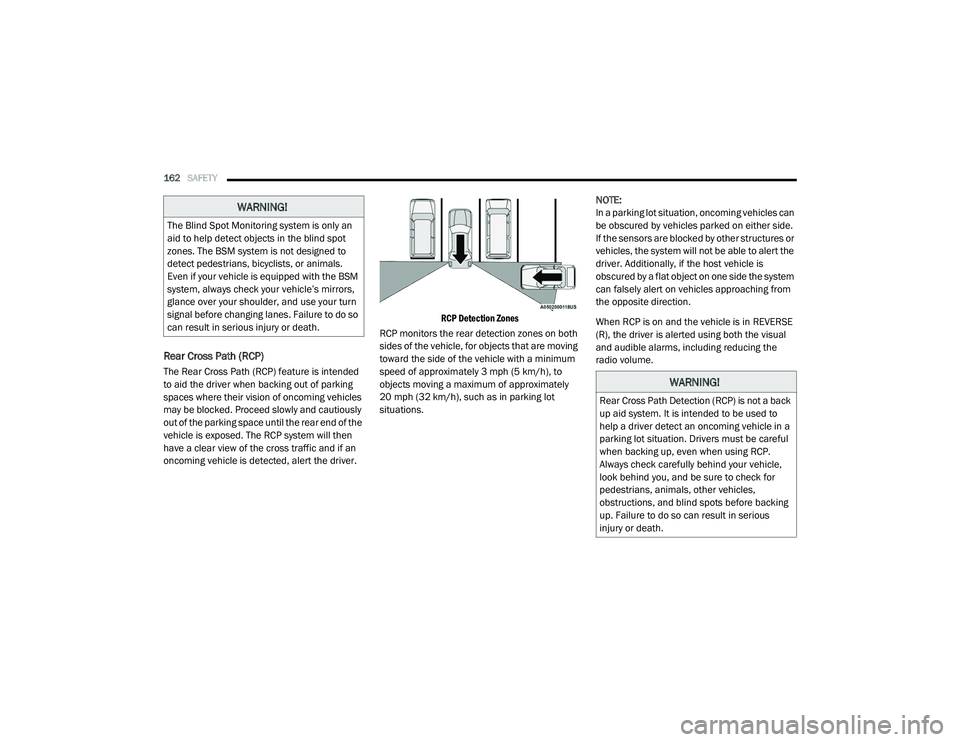
Rear Cross Path (RCP)
The Rear Cross Path (RCP) feature is intended
to aid the driver when backing out of parking
spaces where their vision of oncoming vehicles
may be blocked. Proceed slowly and cautiously
out of the parking space until the rear end of the
vehicle is exposed. The RCP system will then
have a clear view of the cross traffic and if an
oncoming vehicle is detected, alert the driver.
RCP Detection Zones
RCP monitors the rear detection zones on both
sides of the vehicle, for objects that are moving
toward the side of the vehicle with a minimum
speed of approximately 3 mph (5 km/h), to
objects moving a maximum of approximately
20 mph (32 km/h), such as in parking lot
situations. NOTE:
In a parking lot situation, oncoming vehicles can
be obscured by vehicles parked on either side.
If the sensors are blocked by other structures or
vehicles, the system will not be able to alert the
driver. Additionally, if the host vehicle is
obscured by a flat object on one side the system
can falsely alert on vehicles approaching from
the opposite direction.
When RCP is on and the vehicle is in REVERSE
(R), the driver is alerted using both the visual
and audible alarms, including reducing the
radio volume.
WARNING!
The Blind Spot Monitoring system is only an
aid to help detect objects in the blind spot
zones. The BSM system is not designed to
detect pedestrians, bicyclists, or animals.
Even if your vehicle is equipped with the BSM
system, always check your vehicle’s mirrors,
glance over your shoulder, and use your turn
signal before changing lanes. Failure to do so
can result in serious injury or death.
WARNING!
Rear Cross Path Detection (RCP) is not a back
up aid system. It is intended to be used to
help a driver detect an oncoming vehicle in a
parking lot situation. Drivers must be careful
when backing up, even when using RCP.
Always check carefully behind your vehicle,
look behind you, and be sure to check for
pedestrians, animals, other vehicles,
obstructions, and blind spots before backing
up. Failure to do so can result in serious
injury or death.
20_RU_OM_EN_US_t.book Page 162
Page 166 of 516

164SAFETY
La operación de este equipo está sujeta a las
siguientes dos condiciones:
1. es posible que este equipo o dispositivo no
cause interferencia perjudicial y
2. este equipo o dispositivo debe aceptar cualquier interferencia, incluyendo la que
pueda causar su operación no deseada.
NOTE:
Changes or modifications not expressly
approved by the party responsible for compli -
ance could void the user’s authority to operate
the equipment.
Forward Collision Warning (FCW) With
Mitigation — If Equipped
The Forward Collision Warning (FCW) system
with Mitigation provides the driver with audible
warnings, visual warnings (within the
instrument cluster display), and may apply a
brake jerk to warn the driver when it detects a
potential frontal collision. The warnings and
limited braking are intended to provide the
driver with enough time to react, avoid or
mitigate the potential collision. NOTE:
FCW monitors the information from the forward
looking sensors as well as the Electronic Brake
Controller (EBC), to calculate the probability of a
forward collision. When the system determines
that a forward collision is probable, the driver
will be provided with audible and visual warn-
ings and may provide a brake jerk warning.
If the driver does not take action based upon
these progressive warnings, then the system
will provide a limited level of active braking to
help slow the vehicle and mitigate the potential
forward collision. If the driver reacts to the warn
-
ings by braking and the system determines that
the driver intends to avoid the collision by
braking but has not applied sufficient brake
force, the system will compensate and provide
additional brake force as required.
If a FCW with Mitigation event begins at a speed
below 26 mph (42 km/h), the system may
provide the maximum braking possible to miti -
gate the potential forward collision. If the
Forward Collision Warning with Mitigation event stops the vehicle completely, the system will
hold the vehicle at standstill for two seconds
and then release the brakes.
FCW Message
When the system determines a collision with
the vehicle in front of you is no longer probable,
the warning message will be deactivated.
NOTE:
The minimum speed for FCW activation is
1 mph (2 km/h).
The FCW alerts may be triggered on objects
other than vehicles such as guard rails or
sign posts based on the course prediction.
This is expected and is a part of normal FCW
activation and functionality.
20_RU_OM_EN_US_t.book Page 164