2020 CHRYSLER 300 reset
[x] Cancel search: resetPage 228 of 328
226IN CASE OF EMERGENCY
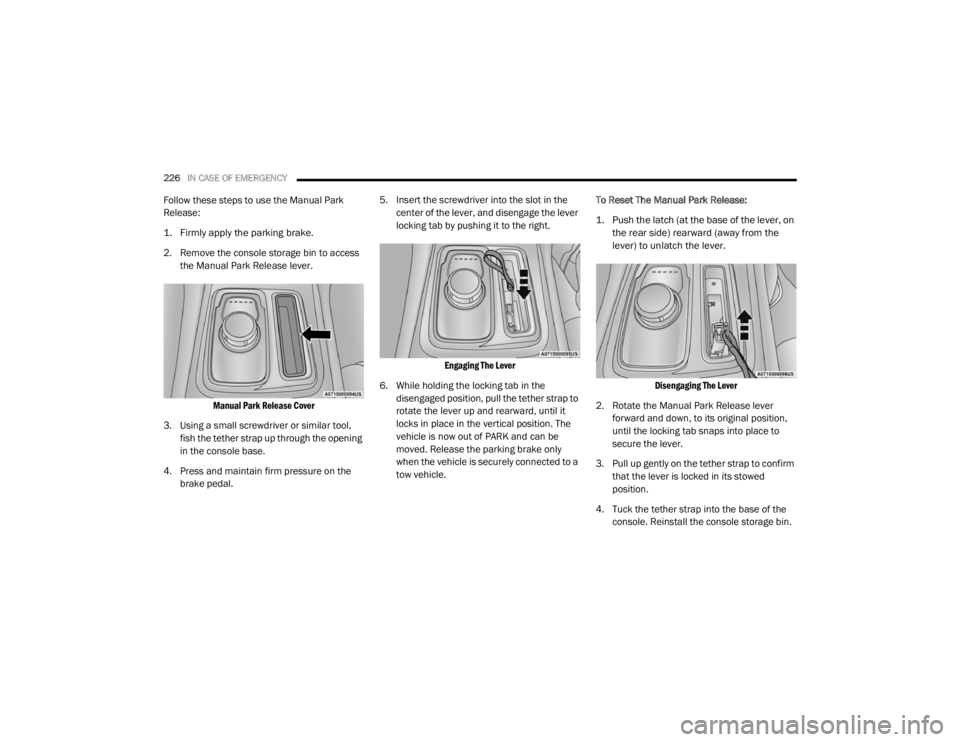
Follow these steps to use the Manual Park
Release:
1. Firmly apply the parking brake.
2. Remove the console storage bin to access
the Manual Park Release lever.
Manual Park Release Cover
3. Using a small screwdriver or similar tool, fish the tether strap up through the opening
in the console base.
4. Press and maintain firm pressure on the brake pedal. 5. Insert the screwdriver into the slot in the
center of the lever, and disengage the lever
locking tab by pushing it to the right.
Engaging The Lever
6. While holding the locking tab in the disengaged position, pull the tether strap to
rotate the lever up and rearward, until it
locks in place in the vertical position. The
vehicle is now out of PARK and can be
moved. Release the parking brake only
when the vehicle is securely connected to a
tow vehicle. To Reset The Manual Park Release:
1. Push the latch (at the base of the lever, on
the rear side) rearward (away from the
lever) to unlatch the lever.
Disengaging The Lever
2. Rotate the Manual Park Release lever forward and down, to its original position,
until the locking tab snaps into place to
secure the lever.
3. Pull up gently on the tether strap to confirm that the lever is locked in its stowed
position.
4. Tuck the tether strap into the base of the console. Reinstall the console storage bin.
20_LX_OM_EN_USC_t.book Page 226
Page 233 of 328

231
SERVICING AND MAINTENANCE
SCHEDULED SERVICING
This vehicle is equipped with an automatic oil
change indicator system. The oil change
indicator system will remind you that it is time to
take your vehicle in for scheduled maintenance.
Based on engine operation conditions, the oil
change indicator message will illuminate. This
means that service is required for the vehicle.
Operating conditions such as frequent
short-trips, trailer tow, and extremely hot or cold
ambient temperatures will influence when the
“Change Oil” or “Oil Change Required” message
is displayed. Severe Operating Conditions can
cause the change oil message to illuminate as
early as 3,500 miles (5,600 km) since last
reset. Have your vehicle serviced as soon as
possible, within the next 500 miles (805 km).
The “Oil Change Required” message will be
displayed in the instrument cluster and a single
chime will sound, indicating that an oil change
is necessary.An authorized dealer will reset the oil change
indicator message after completing the
scheduled oil change. If a scheduled oil change
is performed by someone other than an
authorized dealer, the message can be reset by
referring to “Instrument Cluster Display” in
“Getting To Know Your Instrument Panel” for
further information.
NOTE:
Under no circumstances should oil change
intervals exceed 10,000 miles (16,000 km),
12 months or 350 hours of engine run time,
whichever comes first. The 350 hours of engine
run or idle time is generally only a concern for
fleet customers.
Severe Duty All Models
Change Engine Oil at 4,000 miles (6,500 km) or
350 hours of engine run time if the vehicle is
operated in a dusty and off-road environment,
or is operated predominantly at idle or only very
low engine RPM. This type of vehicle use is
considered Severe Duty.Once A Month Or Before A Long Trip:Check engine oil level.
Check windshield washer fluid level.
Check tire pressure and look for unusual
wear or damage. Rotate tires at the first sign
of irregular wear, even if it occurs before your
next scheduled service.
Check the fluid levels of the coolant reservoir,
brake master cylinder, and power steering (if
equipped) and fill as needed.
Check function of all interior and exterior
lights.
7
20_LX_OM_EN_USC_t.book Page 231
Page 254 of 328

252SERVICING AND MAINTENANCE
NOTE:
No chemical flushes should be used in any
transmission; only the approved lubricant
should be used.
Special Additives
The manufacturer strongly recommends
against using any special additives in the
transmission. Automatic Transmission Fluid
(ATF) is an engineered product and its
performance may be impaired by supplemental
additives. Therefore, do not add any fluid
additives to the transmission. Avoid using
transmission sealers as they may adversely
affect seals.
Fluid Level Check
The fluid level is preset at the factory and does
not require adjustment under normal operating
conditions. Routine fluid level checks are not
required; therefore the transmission has no
dipstick. An authorized dealer can check your
transmission fluid level using special service
tools. If you notice fluid leakage or transmission
malfunction, visit an authorized dealer
immediately to have the transmission fluid level
checked. Operating the vehicle with an
improper fluid level can cause severe
transmission damage.
Fluid And Filter Changes
Under normal operating conditions, the fluid
installed at the factory will provide satisfactory
lubrication for the life of the vehicle.
Routine fluid and filter changes are not
required. However, change the fluid and filter if
the fluid becomes contaminated (with water,
etc.), or if the transmission is disassembled for
any reason.
CAUTION!
Using a transmission fluid other than the
manufacturer’s recommended fluid may
cause deterioration in transmission shift
quality and/or torque converter shudder.
Refer to “Fluids And Lubricants” in “Technical
Specifications” for fluid specifications.
CAUTION!
Do not use chemical flushes in your
transmission as the chemicals can damage
your transmission components. Such damage
is not covered by the New Vehicle Limited
Warranty.
CAUTION!
If a transmission fluid leak occurs, visit an
authorized dealer immediately. Severe
transmission damage may occur. An
authorized dealer has the proper tools to
adjust the fluid level accurately.
20_LX_OM_EN_USC_t.book Page 252
Page 303 of 328

MULTIMEDIA301
Reset
After pressing the Reset button on the touchscreen, the following settings will be available:
System Information — If Equipped
After pressing the System Information button on the touchscreen, the following setting will be available:
Setting Name Selectable Options
Restore SettingsOKCancel X
NOTE:
When this feature is selected, it will reset all settings to their default settings. To restore the settings to their default setting, press the Restore Settings
button on the touchscreen. A pop-up will appear asking "Are you sure you want to reset your settings to default?” Restore App Drawer OK Cancel
Restore Apps — If Equipped OK Cancel
Clear Personal Data OKCancel X
NOTE:
When this feature is selected, it will remove all personal data including Bluetooth® devices and presets. To remove personal information, press the
Clear Personal Data button and a pop-up will appear asking "Are you sure you want to clear all personal data?” Modem Reset — If Equipped OK Cancel
Setting Name Selectable Options
Software License System Software Information Screen
NOTE:
When the “System Information” feature is selected, a “System Software Information” screen will appear, displaying the system software version.
9
20_LX_OM_EN_USC_t.book Page 301
Page 304 of 328

302MULTIMEDIA
STEERING WHEEL AUDIO CONTROLS
The remote sound system controls are located
on the rear surface of the steering wheel at the
three and nine o’clock positions.
Steering Wheel Audio Controls
(Back View Of Steering Wheel)
The right-hand control is a rocker-type switch
with a push button in the center and controls
the volume and mode of the sound system.
Pushing the top of the rocker switch will
increase the volume, and pushing the bottom of
the rocker switch will decrease the volume.
Pushing the center button will make the radio
switch between the various modes available
(AM/FM/SXM/AUX, etc.). The left-hand control is a rocker-type switch with
a push button in the center. The function of the
left-hand control is different depending on
which mode you are in.
The following describes the left-hand control
operation in each mode.
RADIO OPERATION
Pushing the top of the switch will “Seek” up for
the next listenable station and pushing the
bottom of the switch will “Seek” down for the
next listenable station.
The button located in the center of the left-hand
control will tune to the next preset station that
you have programmed in the radio preset
button.
MEDIA MODE
Pushing the top of the switch once goes to the
next track on the selected media (USB/
Bluetooth®). Pushing the bottom of the switch
once goes to the beginning of the current track,
or to the beginning of the previous track if it is
within eight seconds after the current track
begins to play.
NOTE:
While In Media Mode, the center button on the
left rocker switch is nonfunctional.
AUX/USB CONTROL
This feature allows an external USB device to be
plugged into the USB port.
Plugging in a smartphone device to a USB Port
may activate Android Auto™ or Apple CarPlay®
features, if equipped. For further information,
refer to “Android Auto™” or “Apple CarPlay®” in
the Owner’s Manual Supplement.
AUX/USB Ports
1 — USB 1 Port
2 — AUX Jack
3 — USB 2 Port
20_LX_OM_EN_USC_t.book Page 302
Page 322 of 328

320 M
Maintenance Free Battery
............................. 238Maintenance Schedule........................ 231, 232Malfunction Indicator Light
(Check Engine)......................................... 88, 93Manual Park Release............................................. 225Service...................................................... 314Media Hub..................................................... 302Memory Feature (Memory Seats).................... 30Memory Seat................................................... 30Memory Seats And Radio................................ 30Methanol....................................................... 277Mirrors............................................................. 39Electric Powered......................................... 40Electric Remote........................................... 40Heated........................................................ 41Outside........................................................ 39Rearview............................................ 39, 201Vanity.......................................................... 42Modifications/AlterationsVehicle.......................................................... 9Monitor, Tire Pressure System....................... 109Mopar Parts................................................... 313MP3 Control.................................................. 302Multi-Function Control Lever............................ 42
N
New Vehicle Break-In Period......................... 150
O
Occupant Restraints..................................... 113Octane Rating, Gasoline (Fuel)............ 276, 281Oil Change Indicator........................................ 79Reset........................................................... 79Oil Filter, Change.......................................... 241Oil Filter, Selection........................................ 241Oil Pressure Light............................................. 87Oil, Engine............................................ 240, 281Capacity.................................................... 280Change Interval........................................ 240Checking................................................... 238Dipstick.................................................... 238Disposal................................................... 241Filter................................................ 241, 281Filter Disposal........................................... 241Identification Logo.................................... 240Materials Added To.................................. 241Pressure Warning Light............................... 87Recommendation............................ 240, 280Synthetic.................................................. 241Viscosity................................. 240, 241, 280Onboard Diagnostic System............................. 93
Operating Precautions.....................................93Operator ManualOwner's Manual....................................9, 314Outside Rearview Mirrors.................................39Overheating, Engine...................................... 225Owner’s Manual (Operator Manual)................... 9
P
Paddle Shift Mode........................................ 158Paddle Shifters............................................. 158Paint Care..................................................... 272Panic Alarm......................................................13Parking Brake............................................... 150ParkSense System, Rear............................... 177Passive Entry....................................................24Pets............................................................... 142Placard, Tire And Loading Information.......... 257PowerBrakes...................................................... 275Deck Lid Release.........................................62Distribution Center (Fuses)....................... 213Door Locks...................................................24Mirrors.........................................................40Outlet (Auxiliary Electrical Outlet).................74Seats...........................................................31Steering.................................................... 160Sunroof........................................................59Tilt/Telescoping Steering Column................38Windows......................................................57
20_LX_OM_EN_USC_t.book Page 320
Page 326 of 328

324 W
Warning Flashers, Hazard
............................. 201Warning Lights (Instrument Cluster
Descriptions)................................................... 89Warnings And Cautions..................................... 9Warranty Information..................................... 313Washer Adding Fluid.............................................. 238Washers, Windshield.............................. 49, 238Washing Vehicle............................................ 272WaterDriving Through......................................... 199Wheel And Wheel Tire Care........................... 268Wheel And Wheel Tire Trim............................ 268Wind Buffeting.......................................... 59, 60Window Fogging.............................................. 56
Windows.......................................................... 57Power.......................................................... 57Reset Auto-Up.............................................. 58Windshield Defroster.................................... 144Windshield Washers................................. 48, 49Fluid......................................................... 238Windshield Wiper Blades.............................. 244Windshield Wipers........................................... 48Wipers Blade Replacement.......................... 244Wipers, Intermittent......................................... 49Wipers, Rain Sensitive..................................... 49
20_LX_OM_EN_USC_t.book Page 324