2020 CHEVROLET SILVERADO 2500 change time
[x] Cancel search: change timePage 182 of 500
Chevrolet Silverado Owner Manual (GMNA-Localizing-U.S./Canada/Mexico-
13337620) - 2020 - CRC - 4/2/19
Climate Controls 181
or passenger side temperature
display shows the temperature
setting increasing or decreasing.
SYNC :Press to link the passenger
temperature setting to the driver
setting. The SYNC indicator light will
turn on. When the passenger setting
is adjusted, the SYNC indicator light
will turn off.
Air Delivery Mode Control : Press
z,Y, or[to change the
direction of the airflow. Any
combination of the three controls
can be selected. An indicator light
comes on in the selected mode
button.
Changing the mode cancels the
automatic operation and the system
goes into manual mode. Press
AUTO to return to automatic
operation.
To change the current mode, select
one or more of the following:
z: Air is directed to the
windshield, outboard a/c outlets,
and side window outlets.
Y: Air is directed to the a/c outlets.
[:Air is directed to the floor
outlets, with some air directed to the
windshield, outboard a/c outlets,
and side window outlets.
0MAX : Air is directed to the
windshield and the fan runs at a
higher speed if not already above a
medium fan speed. This mode
overrides the previous mode
selected and clears fog or frost from
the windshield more quickly. When
the control is pressed again, the
system returns to the previous mode
setting and fan speed.
For best results, clear all snow and
ice from the windshield before
defrosting.
@: Press to turn on recirculation.
An indicator light comes on. Air is
recirculated to quickly cool the
inside of the vehicle. It can also be
used to help reduce outside air and
odors that enter the vehicle. Avoid using recirculation for long
periods of time in cold or damp
conditions. Using recirculation in
cold or damp conditions can result
in window fogging.
A/C :
Press to turn the air
conditioning on or off. An indicator
light comes on to show that the air
conditioning is enabled. If the fan is
turned off, the air conditioner will not
run. The A/C light will stay on even
if the outside temperatures are
below freezing.
Rear Window Defogger
1REAR : If equipped, press to
turn the rear window defogger on or
off. An indicator light on the button
comes on to show that the rear
window defogger is on.
The rear window defogger only
works when the engine is running.
The defogger turns off if the ignition
is turned off or to ACC/
ACCESSORY.
Page 187 of 500
Chevrolet Silverado Owner Manual (GMNA-Localizing-U.S./Canada/Mexico-
13337620) - 2020 - CRC - 4/11/19
186 Driving and Operating
Lane Change Alert (LCA)(1500 Series) . . . . . . . . . . . . . . . 275
Lane Departure Warning (LDW) (2500/3500
Series) . . . . . . . . . . . . . . . . . . . . . . 277
Lane Keep Assist (LKA) (1500 Series) . . . . . . . . . . . . . . . . . . . . . . 278
Fuel
Top Tier Fuel . . . . . . . . . . . . . . . . . 280
Recommended Fuel (Except6.2L V8 Engine) . . . . . . . . . . . . . 281
Recommended Fuel (6.2L V8 Engine) . . . . . . . . . . . . . . . . . . 281
Prohibited Fuels . . . . . . . . . . . . . . 281
Fuels in Foreign Countries . . . 282
Fuel Additives . . . . . . . . . . . . . . . . 282
E85 or FlexFuel . . . . . . . . . . . . . . 282
Filling the Tank (Pickup Model) . . . . . . . . . . . . . . . . . . . . . . 283
Filling the Tank (Chassis Cab Model) . . . . . . . . . . . . . . . . . . . . . . 285
Filling a Portable Fuel Container . . . . . . . . . . . . . . . . . . . 286
Trailer Towing
General TowingInformation . . . . . . . . . . . . . . . . . . 287
Driving Characteristics and
Towing Tips . . . . . . . . . . . . . . . . . 287
Trailer Towing . . . . . . . . . . . . . . . . 292 Towing Equipment . . . . . . . . . . . . 297
Trailer Sway Control (TSC) . . . 308
Trailering App . . . . . . . . . . . . . . . . 310
Conversions and Add-Ons
Add-On Electrical
Equipment . . . . . . . . . . . . . . . . . . 322
Adding a Snow Plow or Similar Equipment . . . . . . . . . . . . . . . . . . 323
Pickup Conversion to Chassis Cab . . . . . . . . . . . . . . . . 326
Driving Information
Driving for Better Fuel
Economy
Driving habits can affect fuel
mileage. Here are some driving tips
to get the best fuel economy
possible:
. Set the climate controls to the
desired temperature after the
engine is started, or turn them
off when not required.
. Avoid fast starts and accelerate
smoothly.
. Brake gradually and avoid
abrupt stops.
. Avoid idling the engine for long
periods of time.
. When road and weather
conditions are appropriate, use
cruise control.
. Always follow posted speed
limits or drive more slowly when
conditions require.
. Keep vehicle tires properly
inflated.
Page 232 of 500
Chevrolet Silverado Owner Manual (GMNA-Localizing-U.S./Canada/Mexico-
13337620) - 2020 - CRC - 4/11/19
Driving and Operating 231
Shifting Into N (Neutral)
To shift into N (Neutral):1. Start the vehicle.
2. Shift the transmission to N (Neutral).
3. Shift the transfer case to 2
m.
4. Apply the parking brake and/or brake pedal.
5. Press 2
mfive times in
10 seconds until the N (Neutral)
graphic starts flashing in the
instrument cluster. When the
shift is complete, the graphic
stops flashing. If the parking
brake and/or brake pedal is not
applied within 20 seconds, the
transfer case will remain in the
original state.
6. If the transmission is not shifted into N (Neutral) or the
vehicle has not slowed to
5 km/h (3 mph) within
20 seconds, the transfer case
will remain in its original state.
This will be indicated in the
instrument cluster. Shifting Out of N (Neutral)
To shift out of N (Neutral):
1. Turn the ignition on with the engine off. See Ignition
Positions (Keyless Access)
0 208 or
Ignition Positions (Key Access)
0 210.
2. Set the parking brake. See Electric Parking Brake 0233.
3. Shift the transmission to N (Neutral).
4. Shift the transfer case to 2
m.
Transfer case shifts out of
N (Neutral) can only be made
into 2
m. When the shift to 2mis
complete, the graphic in the
instrument cluster will stop
flashing. If the transfer case
cannot complete a shift, the
graphic will return to the
previously selected setting. Single Speed Transfer Case
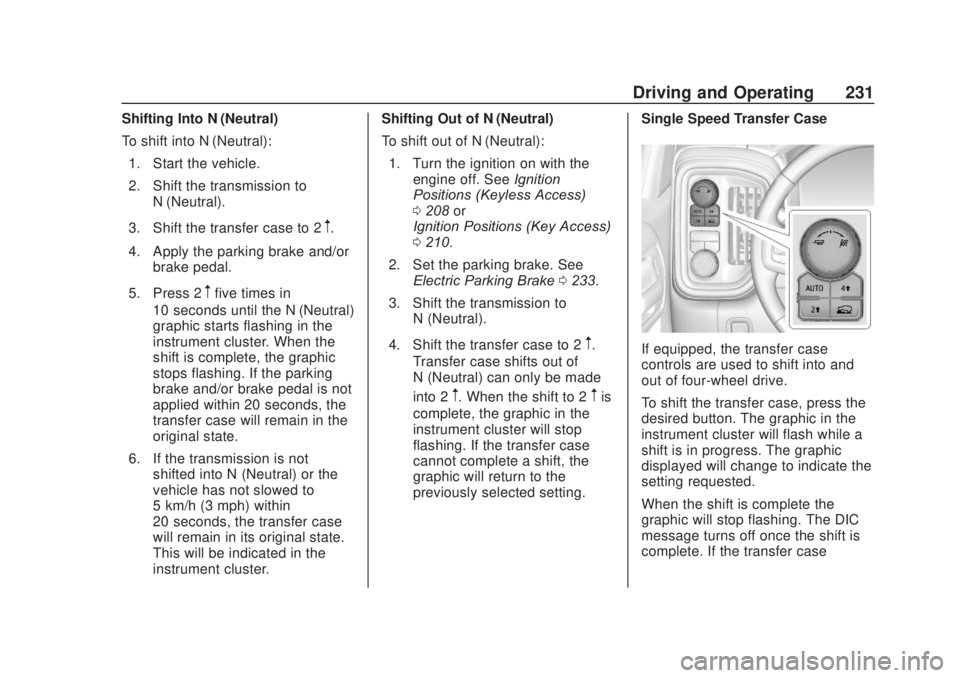
If equipped, the transfer case
controls are used to shift into and
out of four-wheel drive.
To shift the transfer case, press the
desired button. The graphic in the
instrument cluster will flash while a
shift is in progress. The graphic
displayed will change to indicate the
setting requested.
When the shift is complete the
graphic will stop flashing. The DIC
message turns off once the shift is
complete. If the transfer case
Page 233 of 500
Chevrolet Silverado Owner Manual (GMNA-Localizing-U.S./Canada/Mexico-
13337620) - 2020 - CRC - 4/11/19
232 Driving and Operating
cannot complete a shift request, it
will go back to its last chosen
setting.
The settings are:
2
m(Two-Wheel Drive High) :Use
for driving on most streets and
highways. The front axle is not
engaged. This setting provides the
best fuel economy.
4
m(Four-Wheel Drive High) : Use
this setting when extra traction is
needed, such as when driving on
snowy or icy roads, when
off-roading, or when plowing snow.
AUTO (Automatic Four-Wheel
Drive)
Use when road surface conditions
are variable. When driving in AUTO,
the front axle is engaged, and the
vehicle's power is sent to the front
and rear wheels automatically
based on driving conditions. This
setting provides slightly lower fuel
economy than 2
m. Shifts between 2
m, 4m, and AUTO
Any of these shifts can be made at
normal driving speed.
The actual 4x4 shift request is only
made after the button is released.
The 4x4 graphic will remain flashing
until the shift request has
completed. A DIC message
displays.
Once the 4x4 shift has completed,
the DIC message disappears, the
4x4 graphic stops flashing, and the
current setting is indicated.
The actual 4x4 shift request is only
made after the button is released.
The 4x4 graphic will remain flashing
until the shift request has
completed.
A DIC message displays. Once the
4x4 shift has completed, the DIC
message disappears, the 4x4
graphic stops flashing, and the
current setting is indicated.Brakes
Electric Brake Boost
Vehicles equipped with electric
brake boost have hydraulic brake
circuits that are electronically
controlled when the brake pedal is
applied during normal operation.
The system performs routine tests
and turns off within a few minutes
after the vehicle is shutdown. Noise
may be heard during this time. If the
brake pedal is pressed during the
tests or when the electric brake
boost system is off, a noticeable
change in pedal force and travel
may be felt. This is normal.
Antilock Brake
System (ABS)
The Antilock Brake System (ABS)
helps prevent a braking skid and
maintain steering while
braking hard.
ABS performs a system check when
the vehicle is first driven.
A momentary motor or clicking noise
Page 234 of 500
Chevrolet Silverado Owner Manual (GMNA-Localizing-U.S./Canada/Mexico-
13337620) - 2020 - CRC - 4/11/19
Driving and Operating 233
may be heard while this test is going
on, and the brake pedal may move
slightly. This is normal.
If there is a problem with ABS, this
warning light stays on. SeeAntilock
Brake System (ABS) Warning Light
0 141.
ABS does not change the time
needed to get a foot on the brake
pedal and does not always
decrease stopping distance. If you
get too close to the vehicle ahead,
there will not be enough time to
apply the brakes if that vehicle
suddenly slows or stops. Always
leave enough room ahead to stop,
even with ABS.
Using ABS
Do not pump the brakes. Just hold
the brake pedal down firmly.
Hearing or feeling ABS operate is
normal.
Braking in Emergencies
ABS allows steering and braking at
the same time. In many
emergencies, steering can help
even more than braking.
Electric Parking Brake
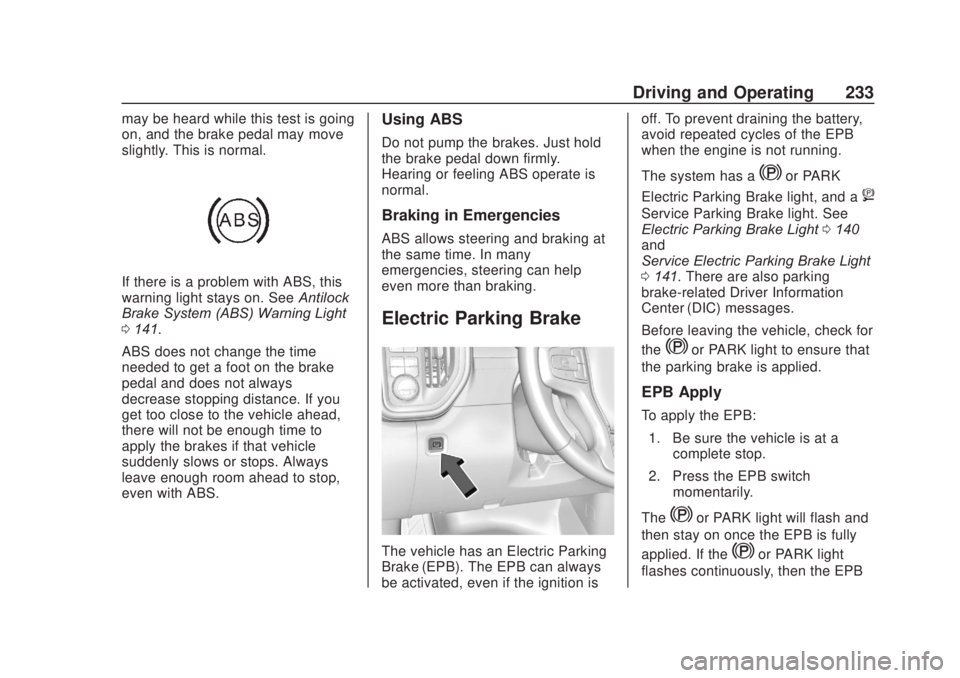
The vehicle has an Electric Parking
Brake (EPB). The EPB can always
be activated, even if the ignition is off. To prevent draining the battery,
avoid repeated cycles of the EPB
when the engine is not running.
The system has a
Yor PARK
Electric Parking Brake light, and a
8
Service Parking Brake light. See
Electric Parking Brake Light 0140
and
Service Electric Parking Brake Light
0 141. There are also parking
brake-related Driver Information
Center (DIC) messages.
Before leaving the vehicle, check for
the
Yor PARK light to ensure that
the parking brake is applied.
EPB Apply
To apply the EPB:
1. Be sure the vehicle is at a complete stop.
2. Press the EPB switch momentarily.
The
Yor PARK light will flash and
then stay on once the EPB is fully
applied. If the
Yor PARK light
flashes continuously, then the EPB
Page 239 of 500
Chevrolet Silverado Owner Manual (GMNA-Localizing-U.S./Canada/Mexico-
13337620) - 2020 - CRC - 4/11/19
238 Driving and Operating
If HDC is to be used for more than
three minutes or on grades steeper
than 25%, the transfer case should
be put into Four-Wheel Drive Low (4
n) to reduce the possibility of brake
overheating.
Noise from the Electronic Brake
Control Module (EBCM) is normal
when HDC is active.
When HDC is activated, the initial
HDC speed is set to the current
driving speed. It can be increased or
decreased by pressing +RES or
SET- on the steering wheel, or by
applying the accelerator or brake
pedal. This adjusted speed
becomes the new set speed.
HDC will remain enabled between
30 and 60 km/h (19 and 37 mph);
however, vehicle speed cannot be
set or maintained in this range. HDC
will automatically disable if the
vehicle speed is above 80 km/h
(50 mph) or above 60 km/h
(37 mph) for at least 30 seconds.
5must be pressed again to
re-enable HDC. HDC may disable
after an extended period of use. If this happens, HDC will require
time to cool down. The length of
time HDC remains active depends
on road conditions, grade, set
speed, vehicle loading, and outside
temperature.
When enabled, if the vehicle speed
is above 30 km/h (19 mph) and
below 60 km/h (37 mph), a DIC
message will display.
Driver Mode Control
This feature adds a sportier feel,
provides a more comfortable ride,
or assists in different weather
conditions or terrain. Depending on
the option package, available
features, and mode selected; the
suspension, steering, and
powertrain will change settings to
achieve the desired mode
characteristics. If the vehicle is
equipped with magnetic ride control,
selecting the various Driver Modes
enhances the ride performance for
the road conditions and the
selected mode.
Mode availability is dependent upon
vehicle trim level, region, and
optional features.
Not all drive modes are available
on. 1500 series vehicles may have
Normal, Sport, Snow/Ice, Off Road,
Terrain, and Tow Haul. 2500/3500
series vehicles may have Normal,
Off Road, Snow/Ice, and Tow/Haul.
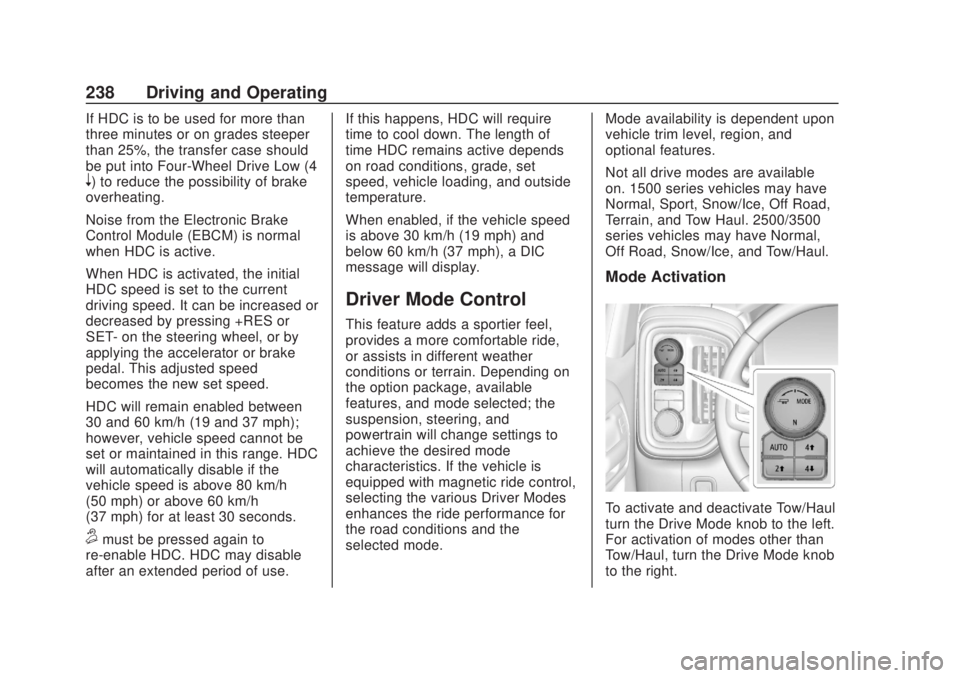
Mode Activation
To activate and deactivate Tow/Haul
turn the Drive Mode knob to the left.
For activation of modes other than
Tow/Haul, turn the Drive Mode knob
to the right.
Page 244 of 500

Chevrolet Silverado Owner Manual (GMNA-Localizing-U.S./Canada/Mexico-
13337620) - 2020 - CRC - 4/11/19
Driving and Operating 243
When Terrain Mode is selected:
.Auto Engine Start/Stop will be
disabled.
. The Terrain Mode indicator
displays on the instrument
cluster.
Limited-Slip Differential
If equipped, the limited-slip
differential can give more traction on
snow, mud, ice, sand, or gravel.
It works like a standard axle most of
the time, but when traction is low,
this feature allows the drive wheel
with the most traction to move the
vehicle. For vehicles with the
limited-slip differential, driven under
severe conditions, the rear axle fluid
should be changed. See
Maintenance Schedule 0441.
Locking Rear Axle
Vehicles with a locking rear axle can
give more traction on snow, mud,
ice, sand, or gravel. It works like a
standard axle most of the time, but when traction is low, this feature will
allow the rear wheel with the most
traction to move the vehicle.
Cruise Control
{Warning
Cruise control can be dangerous
where you cannot drive safely at
a steady speed. Do not use
cruise control on winding roads or
in heavy traffic.
Cruise control can be dangerous
on slippery roads. On such roads,
fast changes in tire traction can
cause excessive wheel slip, and
you could lose control. Do not use
cruise control on slippery roads.
If equipped with cruise control, a
speed of about 40 km/h (25 mph) or
more can be maintained without
keeping your foot on the
accelerator. Cruise control does not
work at speeds below about
40 km/h (25 mph).
If the cruise control is being used
and the Traction Control System
(TCS) or StabiliTrak/Electronic
Stability Control (ESC) begins to
limit wheel spin, the cruise control
Page 251 of 500
Chevrolet Silverado Owner Manual (GMNA-Localizing-U.S./Canada/Mexico-
13337620) - 2020 - CRC - 4/11/19
250 Driving and Operating
.To decrease the vehicle speed in
larger increments, hold SET−.
While holding SET−, the vehicle
speed decreases to the next
5 km/h (5 mph) step, then
continues to decrease by 5 km/h
(5 mph) at a time.
The set speed can also be
decreased while the vehicle is
stopped.
. If stopped with the brake
applied, press or hold SET− until
the desired set speed is
displayed.
Selecting the Follow Distance Gap
When a slower moving vehicle is
detected ahead within the selected
following gap, ACC will adjust the
vehicle's speed and attempt to
maintain the follow distance gap
selected.
Press
[on the steering wheel to
adjust the following gap. Each press
cycles the gap button through three
settings: Far, Medium, or Near. When pressed, the current gap
setting displays briefly on the
instrument cluster. The gap setting
will be maintained until it is
changed.
Since each gap setting corresponds
to a following time (Far, Medium,
or Near), the following distance will
vary based on vehicle speed. The
faster the vehicle speed, the further
back your vehicle will follow a
vehicle detected ahead. Consider
traffic and weather conditions when
selecting the following gap. The
range of selectable gaps may not be
appropriate for all drivers and
driving conditions.
Changing the gap setting
automatically changes the alert
timing sensitivity (Far, Medium,
or Near) for the Forward Collision
Alert (FCA) feature. See
Forward
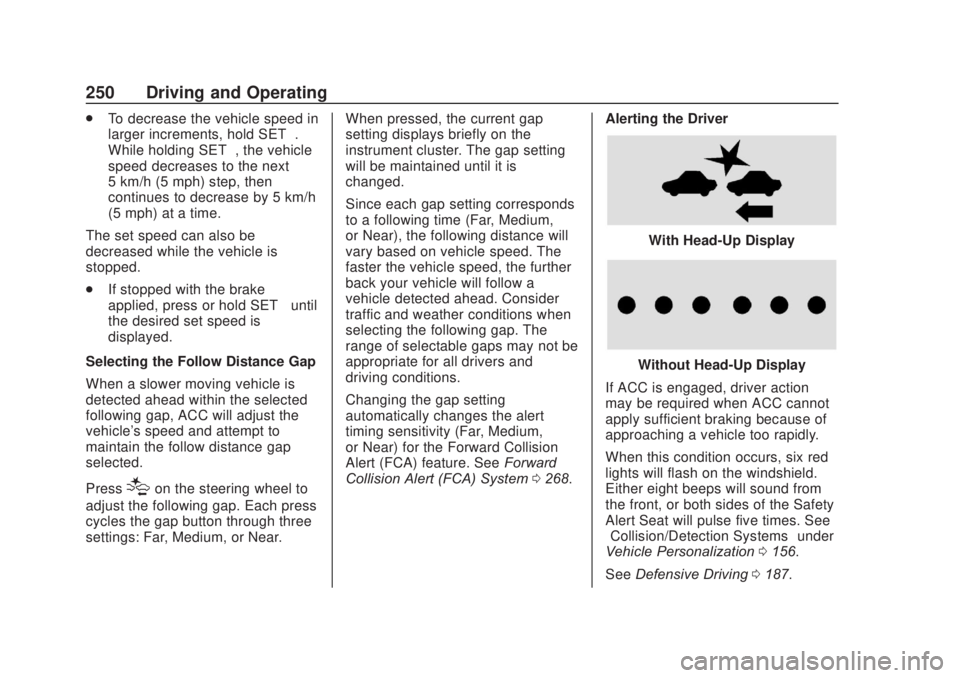
Collision Alert (FCA) System 0268. Alerting the Driver
With Head-Up Display
Without Head-Up Display
If ACC is engaged, driver action
may be required when ACC cannot
apply sufficient braking because of
approaching a vehicle too rapidly.
When this condition occurs, six red
lights will flash on the windshield.
Either eight beeps will sound from
the front, or both sides of the Safety
Alert Seat will pulse five times. See
“Collision/Detection Systems” under
Vehicle Personalization 0156.
See Defensive Driving 0187.