2020 CHEVROLET EQUINOX dic uplevel
[x] Cancel search: dic uplevelPage 7 of 415

Chevrolet Equinox Owner Manual (GMNA-Localizing-U.S./Canada/Mexico-
13555863) - 2020 - CRC - 8/2/19
6 Introduction
1.Air Vents 0159.
2. Turn Signal Lever. See Turn
and Lane-Change Signals
0 148.
IntelliBeam
®System Button (If
Equipped). See Exterior Lamp
Controls 0144.
3. Instrument Cluster (Base and
Midlevel) 0102 or
Instrument Cluster (Uplevel)
0 106.
Driver Information Center (DIC)
Display. See Driver Information
Center (DIC) (Base Level and
Midlevel) 0123 or
Driver Information Center (DIC)
(Uplevel) 0129.
4. Windshield Wiper/Washer 094.
5. Infotainment 0153.
6. Light Sensor. See Automatic
Headlamp System 0147.
7. Hazard Warning Flashers
0148.
8. Climate Control Systems 0154
(If Equipped). Dual Automatic Climate Control
System
0156 (If Equipped).
9. Heated and Ventilated Front
Seats 043 (If Equipped).
10. Power Outlets 097.
11. Wireless Charging 098 (If
Equipped).
12. USB Port. See the infotainment manual.
Auxiliary Input Jack. See the
infotainment manual.
13. All-Wheel Drive 0204 (If
Equipped).
Tow/Haul Mode 0203.
14. Electric Parking Brake 0205.
15. Shift Lever. See Automatic
Transmission 0200.
Manual Mode 0202.
16. ENGINE START/STOP Button. SeeIgnition Positions 0180.
17. Steering Wheel Controls 094.
Traction Control/Electronic
Stability Control 0208.
18. Horn 094. 19.
Steering Wheel Adjustment
094 (Out of View).
20. Cruise Control 0212.
Heated Steering Wheel 094 (If
Equipped).
Forward Collision Alert (FCA)
System 0230 (If Equipped).
Lane Keep Assist (LKA) 0238
(If Equipped).
21. Hood Release. See Hood
0 268.
22. Fog Lamps 0148 (If
Equipped).
23. Exterior Lamp Controls 0144.
24. Data Link Connector (DLC) (Out of View). See Malfunction
Indicator Lamp (Check Engine
Light) 0114.
25. Instrument Panel Illumination
Control 0149.
Page 94 of 415

Chevrolet Equinox Owner Manual (GMNA-Localizing-U.S./Canada/Mexico-
13555863) - 2020 - CRC - 8/2/19
Instruments and Controls 93
Instruments and
Controls
Controls
Steering Wheel Adjustment . . . . 94
Steering Wheel Controls . . . . . . . 94
Heated Steering Wheel . . . . . . . . 94
Horn . . . . . . . . . . . . . . . . . . . . . . . . . . . 94
Windshield Wiper/Washer . . . . . . 94
Rear Window Wiper/Washer . . . 96
Compass . . . . . . . . . . . . . . . . . . . . . . 96
Clock . . . . . . . . . . . . . . . . . . . . . . . . . . 97
Power Outlets . . . . . . . . . . . . . . . . . 97
Wireless Charging . . . . . . . . . . . . . 98
Warning Lights, Gauges, and
Indicators
Warning Lights, Gauges, andIndicators . . . . . . . . . . . . . . . . . . . 101
Instrument Cluster (Base and Midlevel) . . . . . . . . . . . . . . . . . . . . 102
Instrument Cluster (Uplevel) . . . . . . . . . . . . . . . . . . . . 106
Speedometer . . . . . . . . . . . . . . . . . 109
Odometer . . . . . . . . . . . . . . . . . . . . . 109
Trip Odometer . . . . . . . . . . . . . . . . 109
Tachometer . . . . . . . . . . . . . . . . . . . 109
Fuel Gauge . . . . . . . . . . . . . . . . . . . 110 Engine Coolant Temperature
Gauge . . . . . . . . . . . . . . . . . . . . . . . 111
Seat Belt Reminders . . . . . . . . . . 112
Airbag Readiness Light . . . . . . . 112
Passenger Airbag Status Indicator . . . . . . . . . . . . . . . . . . . . . 113
Charging System Light . . . . . . . 114
Malfunction Indicator Lamp (Check Engine Light) . . . . . . . . 114
Brake System Warning Light . . . . . . . . . . . . . . . . . . . . . . . . 116
Electric Parking Brake Light . . . . . . . . . . . . . . . . . . . . . . . . 117
Service Electric Parking Brake Light . . . . . . . . . . . . . . . . . . . . . . . . 117
Antilock Brake System (ABS) Warning Light . . . . . . . . . . . . . . . 117
Tow/Haul Mode Light . . . . . . . . . 118
Lane Keep Assist (LKA) Light . . . . . . . . . . . . . . . . . . . . . . . . 118
Vehicle Ahead Indicator . . . . . . . 118
Pedestrian Ahead Indicator . . . 119
Traction Off Light . . . . . . . . . . . . . 119
StabiliTrak OFF Light . . . . . . . . . 119
Traction Control System (TCS)/ StabiliTrak Light . . . . . . . . . . . . . 120
Wait-to-Start Light . . . . . . . . . . . . 120
Tire Pressure Light . . . . . . . . . . . 120
Engine Oil Pressure Light . . . . 121
Low Fuel Warning Light . . . . . . 121 Diesel Exhaust Fluid (DEF)
Warning Light . . . . . . . . . . . . . . . 122
Security Light . . . . . . . . . . . . . . . . . 122
High-Beam On Light . . . . . . . . . . 122
Front Fog Lamp Light . . . . . . . . . 123
Lamps On Reminder . . . . . . . . . 123
Cruise Control Light . . . . . . . . . . 123
Information Displays
Driver Information Center (DIC) (Base Level and Midlevel) . . . 123
Driver Information Center (DIC) (Uplevel) . . . . . . . . . . . . . . . . . . . . 129
Vehicle Messages
Vehicle Messages . . . . . . . . . . . . 133
Engine Power Messages . . . . . 134
Vehicle Speed Messages . . . . . 134
Vehicle Personalization
Vehicle Personalization . . . . . . . 134
Universal Remote System
Universal Remote System . . . . 140
Universal Remote SystemProgramming . . . . . . . . . . . . . . . 140
Universal Remote System Operation . . . . . . . . . . . . . . . . . . . 142
Page 105 of 415
Chevrolet Equinox Owner Manual (GMNA-Localizing-U.S./Canada/Mexico-
13555863) - 2020 - CRC - 8/2/19
104 Instruments and Controls
Cluster Menu (Midlevel)
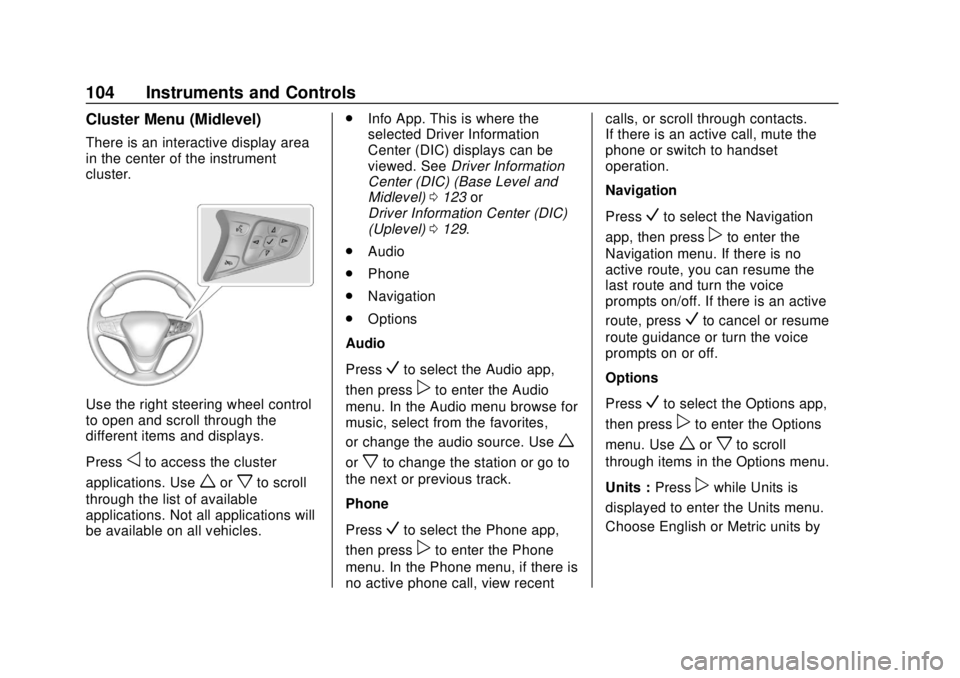
There is an interactive display area
in the center of the instrument
cluster.
Use the right steering wheel control
to open and scroll through the
different items and displays.
Press
oto access the cluster
applications. Use
worxto scroll
through the list of available
applications. Not all applications will
be available on all vehicles. .
Info App. This is where the
selected Driver Information
Center (DIC) displays can be
viewed. See Driver Information
Center (DIC) (Base Level and
Midlevel) 0123 or
Driver Information Center (DIC)
(Uplevel) 0129.
. Audio
. Phone
. Navigation
. Options
Audio
Press
Vto select the Audio app,
then press
pto enter the Audio
menu. In the Audio menu browse for
music, select from the favorites,
or change the audio source. Use
w
orxto change the station or go to
the next or previous track.
Phone
Press
Vto select the Phone app,
then press
pto enter the Phone
menu. In the Phone menu, if there is
no active phone call, view recent calls, or scroll through contacts.
If there is an active call, mute the
phone or switch to handset
operation.
Navigation
Press
Vto select the Navigation
app, then press
pto enter the
Navigation menu. If there is no
active route, you can resume the
last route and turn the voice
prompts on/off. If there is an active
route, press
Vto cancel or resume
route guidance or turn the voice
prompts on or off.
Options
Press
Vto select the Options app,
then press
pto enter the Options
menu. Use
worxto scroll
through items in the Options menu.
Units : Press
pwhile Units is
displayed to enter the Units menu.
Choose English or Metric units by
Page 106 of 415
Chevrolet Equinox Owner Manual (GMNA-Localizing-U.S./Canada/Mexico-
13555863) - 2020 - CRC - 8/2/19
Instruments and Controls 105
pressingVwhile the desired item is
highlighted. A checkmark will be
displayed next to the selected item.
Info Pages : Press
pwhile Info
Pages is displayed to enter the Info
Pages menu and select the items to
be displayed in the Info app. See
Driver Information Center (DIC)
(Base Level and Midlevel) 0123 or
Driver Information Center (DIC)
(Uplevel) 0129.
Traction and Stability : Press
pto
enter the Traction and Stability
menu. To turn the Traction Control
System (TCS) on or off, choose
Traction. To turn StabiliTrak/
Electronic Stability Control (ESC) on
or off, choose Stability. See Traction
Control/Electronic Stability Control
0 208.
Speed Warning : The Speed
Warning display allows the driver to
set a speed that they do not want to
exceed. To set the Speed Warning press
pwhen Speed Warning is
displayed. Press
worxto adjust
the value. Press
Vto set the speed.
Once the speed is set, this feature
can be turned off by pressing
V
while viewing this page. If the
selected speed limit is exceeded, a
pop-up warning is displayed with a
chime.
Page 109 of 415
Chevrolet Equinox Owner Manual (GMNA-Localizing-U.S./Canada/Mexico-
13555863) - 2020 - CRC - 8/2/19
108 Instruments and Controls
Uplevel Cluster Menu
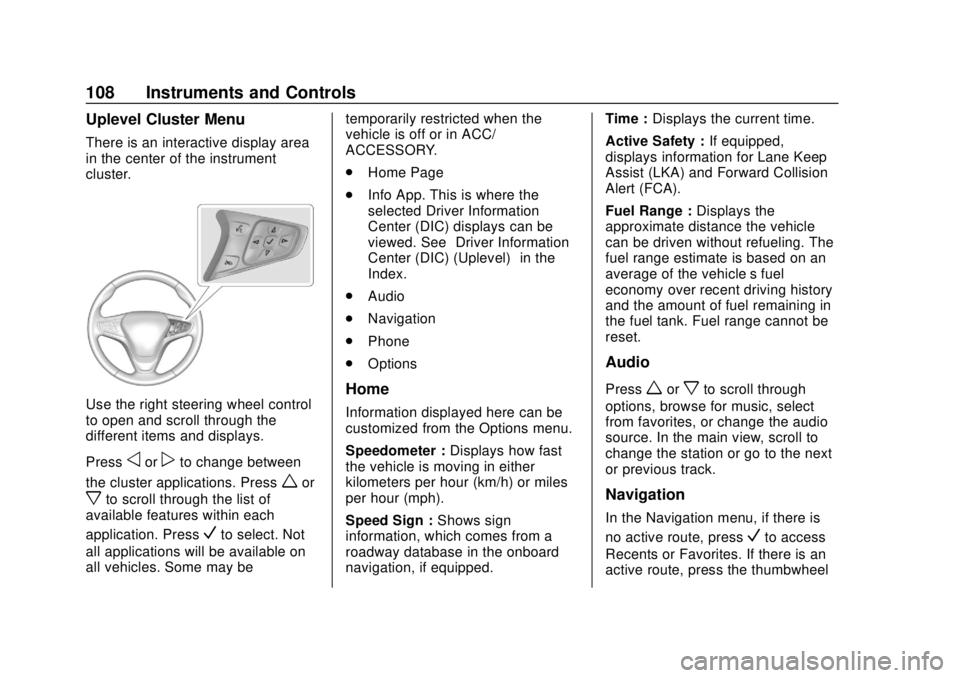
There is an interactive display area
in the center of the instrument
cluster.
Use the right steering wheel control
to open and scroll through the
different items and displays.
Press
oorpto change between
the cluster applications. Press
wor
xto scroll through the list of
available features within each
application. Press
Vto select. Not
all applications will be available on
all vehicles. Some may be temporarily restricted when the
vehicle is off or in ACC/
ACCESSORY.
.
Home Page
. Info App. This is where the
selected Driver Information
Center (DIC) displays can be
viewed. See “Driver Information
Center (DIC) (Uplevel)” in the
Index.
. Audio
. Navigation
. Phone
. Options
Home
Information displayed here can be
customized from the Options menu.
Speedometer : Displays how fast
the vehicle is moving in either
kilometers per hour (km/h) or miles
per hour (mph).
Speed Sign : Shows sign
information, which comes from a
roadway database in the onboard
navigation, if equipped. Time :
Displays the current time.
Active Safety : If equipped,
displays information for Lane Keep
Assist (LKA) and Forward Collision
Alert (FCA).
Fuel Range : Displays the
approximate distance the vehicle
can be driven without refueling. The
fuel range estimate is based on an
average of the vehicle’s fuel
economy over recent driving history
and the amount of fuel remaining in
the fuel tank. Fuel range cannot be
reset.
Audio
Pressworxto scroll through
options, browse for music, select
from favorites, or change the audio
source. In the main view, scroll to
change the station or go to the next
or previous track.
Navigation
In the Navigation menu, if there is
no active route, press
Vto access
Recents or Favorites. If there is an
active route, press the thumbwheel
Page 110 of 415

Chevrolet Equinox Owner Manual (GMNA-Localizing-U.S./Canada/Mexico-
13555863) - 2020 - CRC - 8/2/19
Instruments and Controls 109
to cancel or resume route guidance,
mute or unmute voice guidance,
or access Recents or Favorites.
Phone
In the Phone menu, if there is no
active phone call, view recent calls,
scroll through contacts, select from
the favorites, or change the phone
source. If there is an active call,
mute the phone or switch to handset
operation.
Options
Pressworxto scroll through
items in the Options menu. Press
V
to select the item. Pressoto exit
the item.
Traction and Stability : To turn the
Traction Control System (TCS) on
or off, choose Traction. To turn
StabiliTrak/Electronic Stability
Control (ESC) on or off, choose
Stability. See Traction Control/
Electronic Stability Control 0208.
Units : Choose US or Metric units.
A selected mark will be displayed
next to the selected item. Info Page Options :
Select the
items to be displayed in the Info
app. A selected mark will be
displayed next to the selected item.
Home Page Options : Select the
available elements to display. Not all
elements will be available on all
vehicles: Speedometer, Active
Safety, Speed Sign, Time, and Fuel
Range.
Speed Warning : Allows the driver
to set a speed that they do not want
to exceed. To set the Speed
Warning, press
Vwhen Speed
Warning is displayed. Use
worx
to adjust the value. PressVto set
the speed. Once the speed is set,
this feature can be turned off by
pressing the thumbwheel while
viewing this page. If the selected
speed limit is exceeded, a pop-up
warning is displayed with a chime.
Software Information : Displays
open source software information.
Speedometer
The speedometer shows the
vehicle's speed in either kilometers
per hour (km/h) or miles per
hour (mph).
Odometer
The odometer shows how far the
vehicle has been driven, in either
kilometers or miles.
Trip Odometer
The trip odometer shows how far
the vehicle has been driven since
the trip odometer was last reset.
The trip odometer is accessed and
reset through the Driver Information
Center (DIC). See Driver
Information Center (DIC) (Base
Level and Midlevel) 0123 or
Driver Information Center (DIC)
(Uplevel) 0129.
Tachometer
The tachometer displays the engine
speed in revolutions per
minute (rpm).
Page 111 of 415
Chevrolet Equinox Owner Manual (GMNA-Localizing-U.S./Canada/Mexico-
13555863) - 2020 - CRC - 8/2/19
110 Instruments and Controls
For vehicles with the Stop/Start
system, when the ignition is on, the
tachometer indicates the vehicle
status. When pointing to AUTO
STOP, the engine is off but the
vehicle is on and can move. The
engine could auto start at any time.
When the indicator points to OFF,
the vehicle is off.
When the engine is on, the
tachometer will indicate the engine’s
revolutions per minute (rpm). The
tachometer may vary by several
hundred rpm’s, during Auto Stop
mode, when the engine is shutting
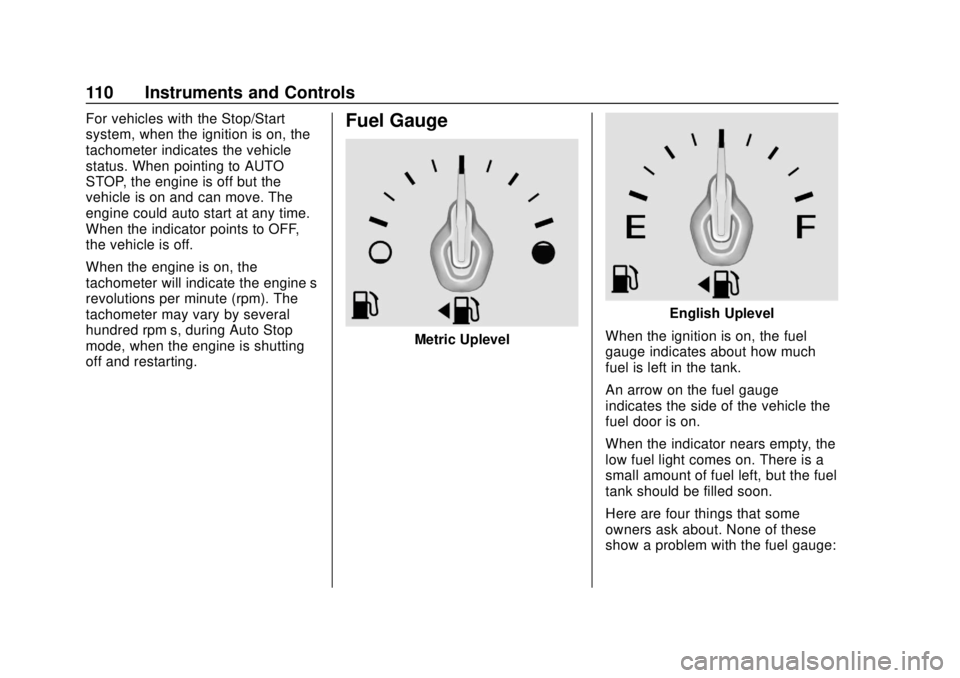
off and restarting.Fuel Gauge
Metric Uplevel
English Uplevel
When the ignition is on, the fuel
gauge indicates about how much
fuel is left in the tank.
An arrow on the fuel gauge
indicates the side of the vehicle the
fuel door is on.
When the indicator nears empty, the
low fuel light comes on. There is a
small amount of fuel left, but the fuel
tank should be filled soon.
Here are four things that some
owners ask about. None of these
show a problem with the fuel gauge:
Page 112 of 415
Chevrolet Equinox Owner Manual (GMNA-Localizing-U.S./Canada/Mexico-
13555863) - 2020 - CRC - 8/2/19
Instruments and Controls 111
.At the service station, the fuel
pump shuts off before the gauge
reads full.
. It takes a little more or less fuel
to fill up than the gauge
indicated. For example, the
gauge indicated the tank was
half full, but it actually took a
little more or less than half the
tank's capacity to fill the tank.
. The gauge moves a little while
turning a corner or speeding up.
. The gauge takes a few seconds
to stabilize after the ignition is
turned on, and goes back to
empty when the ignition is
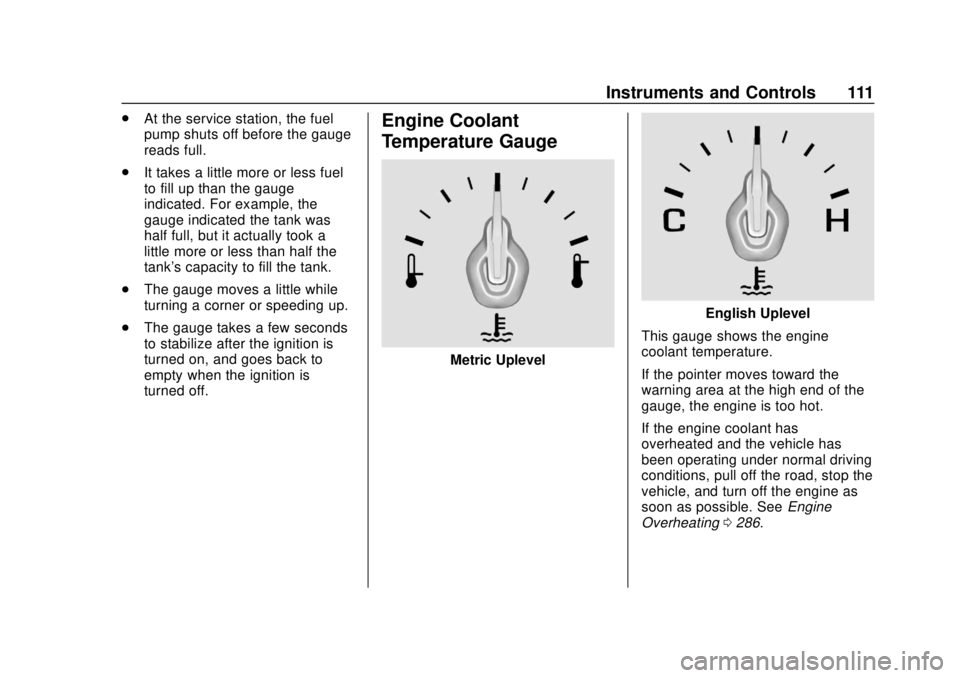
turned off.Engine Coolant
Temperature Gauge
Metric Uplevel
English Uplevel
This gauge shows the engine
coolant temperature.
If the pointer moves toward the
warning area at the high end of the
gauge, the engine is too hot.
If the engine coolant has
overheated and the vehicle has
been operating under normal driving
conditions, pull off the road, stop the
vehicle, and turn off the engine as
soon as possible. See Engine
Overheating 0286.