2020 CHEVROLET CORVETTE lock
[x] Cancel search: lockPage 82 of 336
Chevrolet Corvette Owner Manual (GMNA-Localizing-U.S./Canada/Mexico-
12470550) - 2020 - CRC - 4/23/20
Seats and Restraints 81
Move the seat upward or the
seatback to an upright position,
if needed, to get a tight
installation of the child
restraint.
When the passenger sensing
system has turned off the front
outboard passenger frontal
airbag, the OFF indicator on
the passenger airbag status
indicator should light and stay
lit when you start the vehicle.
SeePassenger Airbag Status
Indicator 0100.2. Be sure that the shoulder belt
is routed through the seat belt
guide. See Lap-Shoulder Belt
0 58 for proper belt routing.
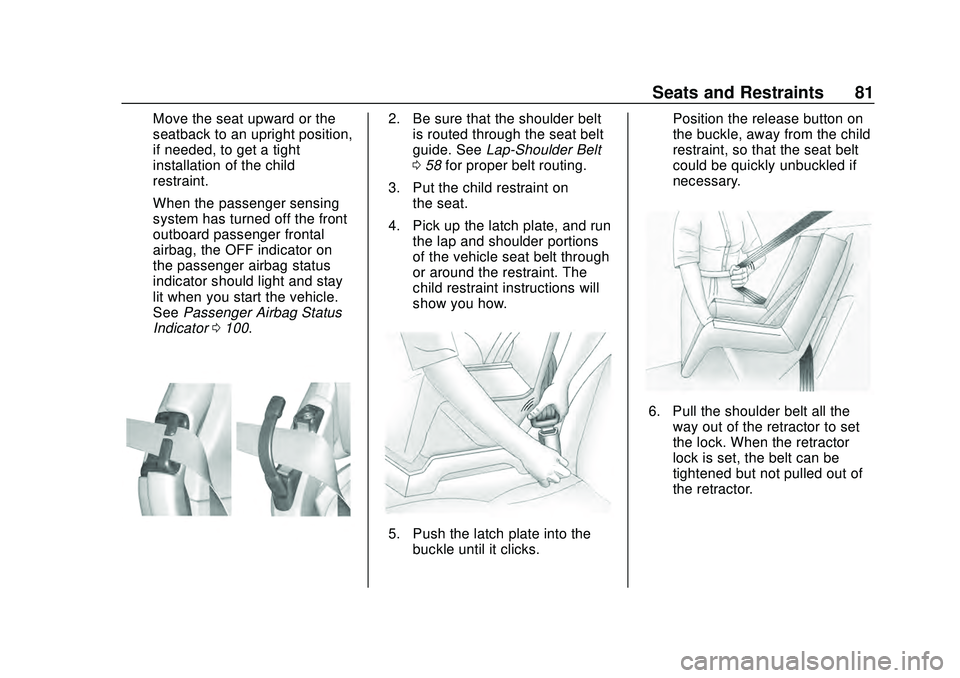
3. Put the child restraint on the seat.
4. Pick up the latch plate, and run the lap and shoulder portions
of the vehicle seat belt through
or around the restraint. The
child restraint instructions will
show you how.
5. Push the latch plate into thebuckle until it clicks. Position the release button on
the buckle, away from the child
restraint, so that the seat belt
could be quickly unbuckled if
necessary.
6. Pull the shoulder belt all the
way out of the retractor to set
the lock. When the retractor
lock is set, the belt can be
tightened but not pulled out of
the retractor.
Page 83 of 336

Chevrolet Corvette Owner Manual (GMNA-Localizing-U.S./Canada/Mexico-
12470550) - 2020 - CRC - 4/23/20
82 Seats and Restraints
7. To tighten the belt, push downon the child restraint, pull the
shoulder portion of the belt to
tighten the lap portion of the
belt, and feed the shoulder belt
back into the retractor. When
installing a forward-facing child
restraint, it may be helpful to
use your knee to push down on
the child restraint as you
tighten the belt.
Try to pull the belt out of the
retractor to make sure the
retractor is locked. If the
retractor is not locked, repeat
Steps 6 and 7. 8. Before placing a child in the
child restraint, make sure it is
securely held in place. To
check, grasp the child restraint
at the seat belt path and
attempt to move it side to side
and back and forth. When the
child restraint is properly
installed, there should be no
more than 2.5 cm (1 in) of
movement.
If the airbag is off, the OFF indicator
in the passenger airbag status
indicator will come on and stay on
when the vehicle is started.
If a child restraint has been installed
and the ON indicator is lit, see “If
the On Indicator Is Lit for a Child
Restraint ”under Passenger
Sensing System 068.
To remove the child restraint,
unbuckle the vehicle seat belt and
let it return to the stowed position.
Page 84 of 336

Chevrolet Corvette Owner Manual (GMNA-Localizing-U.S./Canada/Mexico-
12470550) - 2020 - CRC - 4/23/20
Storage 83
Storage
Storage Compartments
Storage Compartments . . . . . . . . 83
Glove Box . . . . . . . . . . . . . . . . . . . . . 83
Cupholders . . . . . . . . . . . . . . . . . . . . 83
Front Storage . . . . . . . . . . . . . . . . . . 83
Rear Storage . . . . . . . . . . . . . . . . . . 84
Center Console Storage . . . . . . . 85
Additional Storage Features
Cargo Tie-Downs . . . . . . . . . . . . . . 85
Convenience Net . . . . . . . . . . . . . . 85
Storage
Compartments
{Warning
Do not store heavy or sharp
objects in storage compartments.
In a crash, these objects may
cause the cover to open and
could result in injury.
Glove Box
The glove box locks when Valet
Mode is enabled. SeeVehicle
Personalization 0116.
Cupholders
Press the top of the cover to access
the cupholders.
Front Storage
There is storage in the front, under
the hood. To access the front
storage, open the hood. See Hood
0 21.
Page 86 of 336

Chevrolet Corvette Owner Manual (GMNA-Localizing-U.S./Canada/Mexico-
12470550) - 2020 - CRC - 4/23/20
Storage 85
Center Console Storage
To open, press the button on the
driver side.
Depending on the options, there
may be two USB ports and an
auxiliary port inside.
The center console locks when the
car alarm is armed. SeeVehicle
Alarm System 026.
The center console locks when
Valet Mode is enabled. See Vehicle
Personalization 0116.
Additional Storage
Features
Cargo Tie-Downs
The cargo tie-downs can be used to
secure small loads under the
convenience net inside the trunk.
Convenience Net
If equipped, the vehicle has two
convenience nets to be used for
small loads. One in the rear trunk
area and one in the front storage
area. See Front Storage 083.
Attach the net to the hooks in the
storage area. The net should not be
used to store heavy loads.
Page 87 of 336

Chevrolet Corvette Owner Manual (GMNA-Localizing-U.S./Canada/Mexico-
12470550) - 2020 - CRC - 4/23/20
86 Instruments and Controls
Instruments and
Controls
Controls
Steering Wheel Adjustment . . . . 87
Steering Wheel Controls . . . . . . . 87
Heated Steering Wheel . . . . . . . . 87
Horn . . . . . . . . . . . . . . . . . . . . . . . . . . . 87
Windshield Wiper/Washer . . . . . . 87
Compass . . . . . . . . . . . . . . . . . . . . . . 88
Clock . . . . . . . . . . . . . . . . . . . . . . . . . . 89
Power Outlets . . . . . . . . . . . . . . . . . 89
Wireless Charging . . . . . . . . . . . . . 90
Warning Lights, Gauges, and
Indicators
Warning Lights, Gauges, andIndicators . . . . . . . . . . . . . . . . . . . . 93
Instrument Cluster . . . . . . . . . . . . . 94
Speedometer . . . . . . . . . . . . . . . . . . 98
Odometer . . . . . . . . . . . . . . . . . . . . . . 98
Trip Odometer . . . . . . . . . . . . . . . . . 98
Tachometer . . . . . . . . . . . . . . . . . . . . 98
Fuel Gauge . . . . . . . . . . . . . . . . . . . . 98
Engine Coolant Temperature Gauge . . . . . . . . . . . . . . . . . . . . . . . . 99
Transmission Temperature Gauge . . . . . . . . . . . . . . . . . . . . . . . . 99 Seat Belt Reminders . . . . . . . . . . . 99
Airbag Readiness Light . . . . . . . 100
Passenger Airbag Status
Indicator . . . . . . . . . . . . . . . . . . . . 100
Charging System Light . . . . . . . 101
Malfunction Indicator Lamp
(Check Engine Light) . . . . . . . . 102
Front Lift System Light . . . . . . . 103
Brake System Warning Light . . . . . . . . . . . . . . . . . . . . . . . . 104
Electric Parking Brake Light . . . . . . . . . . . . . . . . . . . . . . . . 104
Service Electric Parking Brake Light . . . . . . . . . . . . . . . . . . . . . . . . 105
Antilock Brake System (ABS) Warning Light . . . . . . . . . . . . . . . 105
Traction Off Light . . . . . . . . . . . . . 105
Traction Control System (TCS)/ Electronic Stability Control
Light . . . . . . . . . . . . . . . . . . . . . . . . 106
Electronic Stability Control (ESC) Off Light . . . . . . . . . . . . . . 106
Tire Pressure Light . . . . . . . . . . . 106
Engine Oil Pressure Light . . . . 107
Security Light . . . . . . . . . . . . . . . . . 107
High-Beam On Light . . . . . . . . . . 107
Lamps On Reminder . . . . . . . . . 108
Cruise Control Light . . . . . . . . . . 108
Door Ajar Light . . . . . . . . . . . . . . . 108
Information Displays
Driver Information Center (DIC) . . . . . . . . . . . . . . . . 108
Head-Up Display (HUD) . . . . . . 110
Vehicle Messages
Vehicle Messages . . . . . . . . . . . . 114
Engine Power Messages . . . . . 115
Vehicle Speed Messages . . . . . 115
Vehicle Personalization
Vehicle Personalization . . . . . . . 116
Universal Remote System
Universal Remote System . . . . 121
Universal Remote System Programming . . . . . . . . . . . . . . . 121
Universal Remote System Operation . . . . . . . . . . . . . . . . . . . 123
Page 89 of 336

Chevrolet Corvette Owner Manual (GMNA-Localizing-U.S./Canada/Mexico-
12470550) - 2020 - CRC - 4/23/20
88 Instruments and Controls
INT :Move the lever up to INT for
intermittent wipes, then turn the
N
band up for more frequent wipes or
down for less frequent wipes.
OFF : Use to turn the wipers off.
1X : For a single wipe, briefly move
the wiper lever down. For several
wipes, hold the wiper lever down.
f: Pull the windshield wiper
lever toward you to spray washer
fluid and activate the wipers. The
wipers will continue until the lever is
released or the maximum wash time
is reached. When the lever is
released, additional wipes may
occur depending on how long the
windshield washer had been
activated. See Washer Fluid0231
for information on filling the
windshield washer fluid reservoir. Clear snow and ice from the wiper
blades and windshield before using
them. If frozen to the windshield,
carefully loosen or thaw them.
Damaged blades should be
replaced. See
Wiper Blade
Replacement 0236.
Heavy snow or ice can overload the
wiper motor.
{Warning
In freezing weather, do not use
the washer until the windshield is
warmed. Otherwise the washer
fluid can form ice on the
windshield, blocking your vision.
{Warning
Before driving the vehicle, always
clear snow and ice from the hood,
windshield, roof, and rear of the
vehicle, including all lamps and
windows. Reduced visibility from
snow and ice buildup could lead
to a crash. Wiper Parking
If the ignition is turned off while the
wipers are on LO, HI, or INT, they
will immediately stop.
If the windshield wiper lever is then
moved to OFF before the driver
door is opened or within 10 minutes,
the wipers will restart and move to
the base of the windshield.
If the ignition is turned off while the
wipers are performing wipes due to
windshield washing, the wipers
continue to run until they reach the
base of the windshield.
Compass
The vehicle may have a compass
display on the center stack. The
compass receives its heading and
other information from the Global
Positioning System (GPS) antenna,
Electronic Stability Control, and
vehicle speed information.
The compass system is designed to
operate for a certain number of
miles or degrees of turn before
needing a signal from the GPS
satellites. When the compass
Page 90 of 336

Chevrolet Corvette Owner Manual (GMNA-Localizing-U.S./Canada/Mexico-
12470550) - 2020 - CRC - 4/23/20
Instruments and Controls 89
display shows CAL, drive the
vehicle for a short distance in an
open area where it can receive a
GPS signal. The compass system
will automatically determine when a
GPS signal is restored and provide
a heading again.
Clock
The time and date for the clock can
be set using the infotainment
system. See“Time/Date”in
“System” under“Settings” in the
infotainment manual.
Power Outlets
There are two accessory power
outlets:
Interior Power OutletUnderhood Power Outlet
The outlet under the glove box can
be used to plug in electrical
equipment, such as a cell phone.
Lift the cover to access and replace
when not in use.
The power outlet under the glove
box is powered when the ignition is
on or in ACC/ACCESSORY, or until
the driver door is opened within
10 minutes of turning off the vehicle.
See Retained Accessory Power
(RAP) 0168.
The underhood outlet is powered at
all times. The vehicle battery may
run down if the power outlet is used
Page 97 of 336

Chevrolet Corvette Owner Manual (GMNA-Localizing-U.S./Canada/Mexico-
12470550) - 2020 - CRC - 4/23/20
96 Instruments and Controls
Lap Timer (with PDR) :The lap
times recorded with the PDR system
will automatically be displayed in
this window. This only happens if a
track has been selected in the PDR
system and a video recording is
started. See Performance Data
Recorder (PDR) 0132.
Oil Temperature : Shows the
current oil temperature in either
degrees Celsius (°C) or degrees
Fahrenheit (°F).
Oil Pressure : Shows the current oil
pressure in either kilopascal (kPa) or
in pounds per square inch (psi).
Battery Voltage : Shows the
current battery voltage.
Transmission Fluid
Temperature : Shows the
temperature of the transmission fluid
in either degrees Celsius (°C) or
degrees Fahrenheit (°F).
Tire Status : Shows individual tire
pressures and overall temperature
as either Cold, Cool, Normal, Warm,
or Hot. Normal is typical for normal
driving while Warm is typical for aggressive driving. Unknown may
be displayed if tire temperature
information is unavailable.
eLSD (Z51 Only) :
Displays the
amount of rear differential coupling
when the Electronic Limited-Slip
Differential (eLSD) is active and
functioning during vehicle operation.
A reading of 1% is an open
differential and 100% is locked. It is
normal for the value to make small
or large changes due to driving
conditions and driver inputs. See
Limited-Slip Differential (with Z51)
0 195 or
Limited-Slip Differential (without
Z51) 0195.
Front Lift : During a driver
requested Front Lift (if equipped),
the driver may "remember" using
the
S, or dismiss the display by
pressing the thumbwheel. When the
Front Lift is Raised due to location,
the driver may delete that stored
location using the
S, or dismiss the
display by pressing the thumbwheel.
See Front Lift System 0191.
Audio
In the Audio menu, use the
thumbwheel to scroll through audio
presets.
Options
Use the thumbwheel to scroll
through items in the Options menu.
Units
Press the thumbwheel while Units is
displayed to enter the Units menu.
Choose US or metric units by
pressing the thumbwheel while the
desired item is highlighted.
A selected mark will be displayed
next to the selected item.
Display Themes
Press the thumbwheel to enter the
Display menu. There are six
instrument cluster display
configurations to choose from.
Sport, Tour, Track, Weather, My
Mode, and Z-Mode. The style of the
cluster will change depending on
the theme selected.
Default is linked to Driver mode.
Other display themes can be set