2020 CHEVROLET CORVETTE ignition
[x] Cancel search: ignitionPage 109 of 336

Chevrolet Corvette Owner Manual (GMNA-Localizing-U.S./Canada/Mexico-
12470550) - 2020 - CRC - 4/23/20
108 Instruments and Controls
This light comes on when the
high-beam headlamps are in use.
SeeHeadlamp High/Low-Beam
Changer 0126.
Lamps On Reminder
This light comes on when the
exterior lamps are in use. See
Exterior Lamp Controls 0125.
Cruise Control Light
For vehicles with cruise control, the
cruise control light is white when the
cruise control is on and ready, and
turns green when the cruise control
is set and active.
The light turns off when the cruise
control is turned off. See Cruise
Control 0196.
Door Ajar Light
This light comes on when a door is
open or not securely latched. Before
driving, check that all doors are
properly closed.
Information Displays
Driver Information
Center (DIC)
The Info application is only available
when the ignition is on. The displays
show the status of many vehicle
systems.
SorT:Press to move left or right
between the interactive display
zones in the cluster. Press the
thumbwheel to select.
Page 116 of 336

Chevrolet Corvette Owner Manual (GMNA-Localizing-U.S./Canada/Mexico-
12470550) - 2020 - CRC - 4/23/20
Instruments and Controls 115
.Brakes
. Steering
. Ride Control Systems
. Driver Assistance Systems
. Cruise Control
. Front Lift System
. Lighting and Bulb Replacement
. Wiper/Washer Systems
. Doors and Windows
. Seat Belts
. Airbag Systems
. Engine and Transmission
. Tire Pressure
. BatteryEngine Power Messages
REDUCED ACCELERATION
DRIVE WITH CARE
This message displays when the
vehicle propulsion power is
reduced. A reduction in propulsion
power can affect the vehicle's ability
to accelerate. If this message is on,
but there is no observed reduction
in performance, proceed to your
destination. Under certain
conditions, the performance may be
reduced the next time the vehicle is
driven. The vehicle may be driven
while this message is on, but
maximum acceleration and speed
may be reduced. Anytime this
message stays on, or displays
repeatedly, the vehicle should be
taken to your dealer for service as
soon as possible.
Under certain operating conditions,
propulsion will be disabled. Try
restarting after the ignition has been
off for two minutes.
Vehicle Speed Messages
SPEED LIMITED TO XXX KM/
H (MPH)
This message shows that the
vehicle speed has been limited to
the speed displayed. The limited
speed is a protection for various
propulsion and vehicle systems,
such as lubrication, thermal, brakes,
suspension, Teen Driver (if
equipped), or tires.
Page 121 of 336

Chevrolet Corvette Owner Manual (GMNA-Localizing-U.S./Canada/Mexico-
12470550) - 2020 - CRC - 4/23/20
120 Instruments and Controls
Remote Left in Vehicle Alert
This feature sounds an alert when
the remote key is left in the vehicle.
Touch Off or On.
Remote Removed from Vehicle
Alert
This feature beeps the horn 3 times
when exiting a running vehicle with
the remote key.
Touch Off or On.
Ride Height
Touch and the following may
display:
Location Based Auto Lift
This setting enables the Front Lift to
automatically raise or lower when
the vehicle is near GPS stored
locations. SeeFront Lift System
0 191.
Touch Off or On.
Seating Position
Touch and the following may
display:
. Seat Entry Memory
. Seat Exit Memory
Seat Entry Memory
This feature automatically recalls
the previously stored 1 or 2 button
positions when the ignition is
changed from off to on. See
Memory Seats 050.
Touch Off or On.
Seat Exit Memory
This feature automatically recalls
the previously stored exit button
positions when the ignition is
changed from on to off if the driver
door is open or opened. See
Memory Seats 050.
Touch Off or On.
Teen Driver
See “Teen Driver” under“Settings”
in the infotainment manual.
Valet Mode
This will lock the infotainment
system and steering wheel controls.
It may also limit access to vehicle
storage locations, if equipped.
To enable valet mode:
1. Enter a four-digit code on the keypad.
2. Touch Enter to go to the confirmation screen.
3. Re-enter the four-digit code.
Touch Lock or Unlock to lock or
unlock the system. Touch Back to
go back to the previous menu.
To configure the Performance Data
Recorder (PDR) to automatically
record in Valet mode, see “Settings”
in Performance Data Recorder
(PDR) 0132.
Page 127 of 336

Chevrolet Corvette Owner Manual (GMNA-Localizing-U.S./Canada/Mexico-
12470550) - 2020 - CRC - 4/23/20
126 Lighting
To override AUTO mode, turn the
control to
O.
To reset to AUTO mode, turn the
control to
Oand then release back
to AUTO. Automatic mode also
resets when the vehicle is turned off
and then back on again if the control
is left in the AUTO position.
;: Turns on the parking lamps
including all lamps, except the
headlamps.
The parking lamp indicator light
comes on and stays on when the
parking lamps are on with the
engine off and the ignition in ACC/
ACCESSORY.
5: Turns on the headlamps
together with the parking lamps and
instrument panel lights.
Exterior Lamps Off
Reminder
A warning chime will sound if the
exterior lamp control is left on in
either the headlamp or parking lamp
position and the driver door is
opened with the ignition off.
Headlamp High/
Low-Beam Changer
Push the turn signal lever away
from you and release to turn the
high beams on. To return to low
beams, push the lever again or pull
it toward you and release.
This indicator light turns on in the
instrument cluster when the
high-beam headlamps are on.
Flash-to-Pass
To use the flash-to-pass feature,
briefly pull the turn signal lever
toward you. The high-beam
indicator flashes to indicate to the
other driver that you intend to pass.
Daytime Running
Lamps (DRL)
DRL can make it easier for others to
see the front of your vehicle during
the day. DRL are required on all
vehicles first sold in Canada.
The DRL system makes the
dedicated lamps come on when the
following conditions are met:
. The ignition is on.
. The exterior lamp control is in
the AUTO.
. The light sensor determines it is
daytime.
When DRL are on, only the front
lamps will be on. The parking
lamps, taillamps, instrument panel
lights, or other exterior lamps will
not be on when the DRL are
being used.
When it is dark enough outside, the
front lamps dim to parking lamps
and the normal low-beam
headlamps turn on.
The regular headlamp system
should be turned on when needed.
Page 128 of 336

Chevrolet Corvette Owner Manual (GMNA-Localizing-U.S./Canada/Mexico-
12470550) - 2020 - CRC - 4/23/20
Lighting 127
To turn off the DRL, turn the exterior
lamp control to
O. The DRL will stay
off until the control is toggled again.
Automatic Headlamp
System
When the exterior lamp control is
set to AUTO and it is dark enough
outside, the headlamps and parking
lamps come on automatically.
There is a light sensor on top of the
instrument panel. Do not cover the
sensor, otherwise the headlamps
will come on when they are not
needed. The system may also turn on the
headlamps and parking lamps when
driving through a parking garage or
tunnel.
If the vehicle is started in a dark
garage, the automatic headlamp
system comes on immediately. If it
is light outside when the vehicle
leaves the garage, there is a slight
delay before the automatic
headlamp system changes to the
DRL. During that delay, the
instrument cluster may not be as
bright as usual. Make sure the
instrument panel brightness control
is in the full bright position. See
Instrument Panel Illumination
Control
0129.
When it is bright enough outside,
the headlamps and parking lamps
will turn off or may change to
Daytime Running Lamps (DRL).
The automatic headlamp system
turns off when the exterior lamp
control is turned to
Oor the ignition
is off. To turn automatic headlamp system
back on, turn the band to
Oagain,
then release it.
If the automatic headlamp system
has the headlamps turned on and
you turn the ignition off, the
headlamps will turn off. When the
driver door is opened the
headlamps and parking lamps will
illuminate for a period of time.
The length of the delayed
illumination period can be changed.
See “Exit Lighting” underVehicle
Personalization 0116.
The regular headlamp system
should be turned on when needed.
Lights On with Wipers
If the windshield wipers are
activated in daylight with the engine
on and the exterior lamp control is in
AUTO, the headlamps, parking
lamps, and other exterior lamps will
come on. The time it takes for the
lamps to turn on depends on the
wiper speed. When the wipers are
turned off, the lamps turn off. To
disable, move the exterior lamp
control to
Oor;.
Page 129 of 336
Chevrolet Corvette Owner Manual (GMNA-Localizing-U.S./Canada/Mexico-
12470550) - 2020 - CRC - 4/23/20
128 Lighting
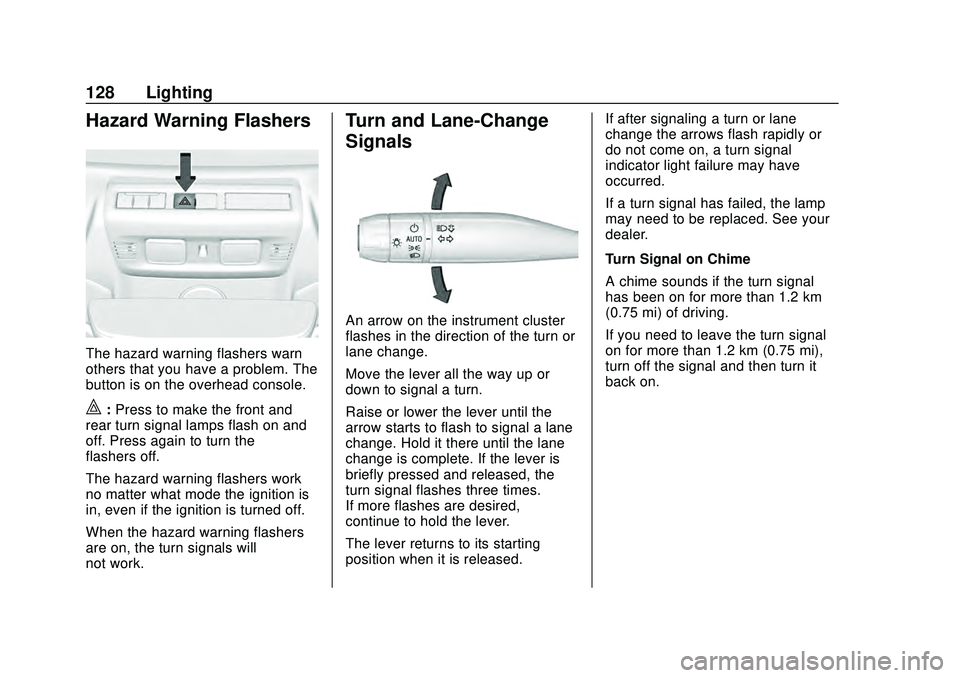
Hazard Warning Flashers
The hazard warning flashers warn
others that you have a problem. The
button is on the overhead console.
|:Press to make the front and
rear turn signal lamps flash on and
off. Press again to turn the
flashers off.
The hazard warning flashers work
no matter what mode the ignition is
in, even if the ignition is turned off.
When the hazard warning flashers
are on, the turn signals will
not work.
Turn and Lane-Change
Signals
An arrow on the instrument cluster
flashes in the direction of the turn or
lane change.
Move the lever all the way up or
down to signal a turn.
Raise or lower the lever until the
arrow starts to flash to signal a lane
change. Hold it there until the lane
change is complete. If the lever is
briefly pressed and released, the
turn signal flashes three times.
If more flashes are desired,
continue to hold the lever.
The lever returns to its starting
position when it is released. If after signaling a turn or lane
change the arrows flash rapidly or
do not come on, a turn signal
indicator light failure may have
occurred.
If a turn signal has failed, the lamp
may need to be replaced. See your
dealer.
Turn Signal on Chime
A chime sounds if the turn signal
has been on for more than 1.2 km
(0.75 mi) of driving.
If you need to leave the turn signal
on for more than 1.2 km (0.75 mi),
turn off the signal and then turn it
back on.
Page 130 of 336

Chevrolet Corvette Owner Manual (GMNA-Localizing-U.S./Canada/Mexico-
12470550) - 2020 - CRC - 4/23/20
Lighting 129
Interior Lighting
Instrument Panel
Illumination Control
The knob for this feature is on the
left side of the instrument panel.
Turn the knob clockwise or
counterclockwise to brighten or dim
all illuminated controls as well as
the feature status indicators. The
knob is functional at night.
Night Mode
At night, when the knob is turned all
the way to the off position, the
instrument cluster will show
minimum feature content (digital
speed, gear indication, coolanttemperature, and the fuel gauge)
with muted colors to reduce light
emission for better visibility. The
Infotainment System display and the
interior lighting are off.
Courtesy Lamps
The interior lamps will come on
when any door is opened,
Kon the
remote key is pressed, or when the
vehicle is turned to OFF.
The hatch/trunk lamps only come on
when the rear compartment is
opened.
Reading Lamps
The reading lamps are in the
overhead console. The lamps go on
when any door is opened, the
remote unlock key is pressed,
or when the ignition is switched off.
When the doors are closed, press
the lamp buttons to turn on
each lamp.
Engine
Compartment Lamp
If equipped, the engine
compartment lamp will turn on
briefly when:
.
Kis pressed on the key.
. Keyless Access is used to
unlock the door.
. Any door is opened.
. The engine compartment hatch
is opened.
The engine compartment lamp will
turn off when:
. All doors and the engine
compartment hatch are closed.
.
Qis pressed on the key.
Page 131 of 336

Chevrolet Corvette Owner Manual (GMNA-Localizing-U.S./Canada/Mexico-
12470550) - 2020 - CRC - 4/23/20
130 Lighting
.The vehicle begins to move after
shifting out of P (Park).
. The ignition is turned on,
or turned from off to ACC/
ACCESSORY.
If any door or the engine
compartment hatch/trunk remains
open, while the vehicle is off, a timer
will turn the lamp off.Lighting Features
Entry Lighting
Some exterior lamps turn on briefly
at night, or in areas with limited
lighting, when
Kis pressed on the
remote key. After about 30 seconds
the exterior lamps turn off.
When any door is opened or remote
unlock pressed, all interior lights
turn on and then interior lamps dim
to off after approximately
20 seconds.
When the driver door is opened, all
interior lights, Driver Information
Center (DIC) lights, and door pocket
lights turn on and then the dome
and remaining interior lamps dim to
off. Entry lighting can be disabled
manually by turning the ignition to
on or ACC/ACCESSORY, or by
pressing
Qon the remote key.
The entry lighting feature for exterior
lighting can be changed. See
“Vehicle Locator Lights” under
Vehicle Personalization 0116.
Exit Lighting
Some exterior lamps come on at
night, or in areas with limited
lighting, when the driver door is
opened after the ignition is turned
off. The dome lamp comes on after
the ignition is turned off. The
exterior lamps and dome lamp
remain on after the door is closed
for a set amount of time, then
automatically turn off.
The exterior lamps turn off
immediately by turning the exterior
lamp control off.
The exit lighting feature for exterior
lighting can be changed. See
Vehicle Personalization 0116.