2020 CHEVROLET CORVETTE keyless entry
[x] Cancel search: keyless entryPage 51 of 336

Chevrolet Corvette Owner Manual (GMNA-Localizing-U.S./Canada/Mexico-
12470550) - 2020 - CRC - 4/23/20
50 Seats and Restraints
{Warning
Sitting in a reclined position when
the vehicle is in motion can be
dangerous. Even when buckled
up, the seat belts cannot do
their job.
For proper protection when the
vehicle is in motion, have the
seatback upright. Then sit well
back in the seat and wear the
seat belt properly.
Memory Seats
If equipped, memory seats allow two
drivers to save and recall their
unique seat positions for driving the
vehicle, and a shared exit position
for getting out of the vehicle. Other
feature positions may also be
saved, such as power mirrors and
power steering wheel, if equipped.
Memory positions are linked to
remote key 1 or 2 for automatic
memory recalls.
Before saving, adjust all available
memory feature positions. Turn the
vehicle on and then press and
release SET; a beep will sound.
Then immediately press and hold 1,
2, or
B(Exit) until two beeps
sound. To manually recall these
positions, press and hold 1, 2, or
B
until the saved position is reached.
Follow the instructions under
“Saving Memory Positions.”
The vehicle identifies the current
driver ’s remote key number (1–8).
See Remote Keyless Entry (RKE)
System Operation 09. Only remote
keys 1 and 2 can be used for
automatic memory recalls. A Driver
Information Center (DIC) welcome message indicating the remote key
number may display for the first few
ignition cycles following a remote
key change. For Seat Entry Memory
to work properly, save the positions
to the memory button (1 or 2)
matching the remote key number
displayed in the DIC welcome
message. Carry the linked remote
key when entering the vehicle.
Vehicle Personalization Settings
.
To have the Seat Entry Memory
movement begin when the
vehicle is started, select the
Settings menu, then Vehicle,
then Seating Position, and then
Seat Entry Memory. Select On or
Off. See “Seat Entry Memory”
later in this section.
. To begin Seat Exit Memory
movement when the vehicle is
turned off and the driver door is
opened, or when the vehicle is
turned off with the driver door
already opened, select the
Settings menu, then Vehicle,
then Seating Position, and then
Page 53 of 336

Chevrolet Corvette Owner Manual (GMNA-Localizing-U.S./Canada/Mexico-
12470550) - 2020 - CRC - 4/23/20
52 Seats and Restraints
Manual Memory recall movement for
1, 2 or
Bbuttons may be initiated
and will complete to the saved
memory position if the vehicle is
shifted in or out of P (Park).
Seat Entry Memory, Driver
Seat Only
The vehicle identifies the number of
the current driver ’s remote key (1–
8). See Remote Keyless Entry
(RKE) System Operation 09. If the
remote key is 1 or 2, and Seat Entry
Memory is enabled in vehicle
personalization, the positions saved
to the same memory button number
1 or 2 are automatically recalled
when the vehicle is turned on.
Remote keys 3–8 will not provide
automatic memory recalls.
To turn Seat Entry Memory on or off,
see “Vehicle Personalization
Settings” previously in this section
and Vehicle Personalization 0116.
The vehicle must be in P (Park) to
start Seat Entry Memory. Seat Entry
Memory recall will complete if the vehicle is shifted out of P (Park)
prior to reaching the saved memory
position.
To stop Seat Entry Memory recall
movement, turn the vehicle off or
press any of the following controls:
.
Power seat
. Memory SET, 1, 2, or
B
.Power mirror, with the driver or
passenger side mirror selected
. Power steering wheel,
if equipped
If the saved memory seat position
does not automatically recall or
recalls to the wrong positions, the
driver ’s remote key number (1 or 2)
may not match the memory button
number that positions were saved
to. Try storing the position to the
other memory button or try the other
remote key.
If the seat or seatback movement
rearward or recline makes contact
with the carpet behind the seat, the
seat will automatically adjust
forward a small distance. If it
remains in contact, memory recalls may not complete. Move the seat
and/or seatback forward a small
distance away from the carpet
behind the seat and try the memory
recall again.
Seat Exit Memory, Driver
Seat Only
Seat Exit Memory is not linked to a
remote key. The position saved toBis used for all drivers. To turn
Seat Exit Memory on or off, see
"Vehicle Personalization Settings"
previously in this section and
Vehicle Personalization 0116.
If turned on, the position saved to
Bis automatically recalled when
one of the following occurs:
. The vehicle is turned off and the
driver door is opened within a
short time.
. The vehicle is turned off with the
driver door open.
To stop Seat Exit Memory
movement, press any of the
following memory controls:
. Power seat
Page 120 of 336

Chevrolet Corvette Owner Manual (GMNA-Localizing-U.S./Canada/Mexico-
12470550) - 2020 - CRC - 4/23/20
Instruments and Controls 119
.Remote Start Auto Cool Seats
. Remote Start Auto Heat Seats
. Remote Window Operation
. Passive Door Unlock
. Passive Door Lock
. Remote Left in Vehicle Alert
. Remote Removed from Vehicle
Alert
Remote Unlock Light Feedback
This setting flashes the exterior
lamps when the vehicle is unlocked
with the remote key.
Touch Off or Flash Lights.
Remote Lock Feedback
This setting specifies how the
vehicle responds when the vehicle
is locked with the remote key.
Touch Off, Lights and Horn, Lights
Only, or Horn Only.
Remote Door Unlock
This setting specifies whether all
doors, or just the driver door, unlock
when pressing
Kon the remote key. Touch All Doors or Driver Door.
Remote Start Auto Cool Seats
This setting automatically turns on
the ventilated seats when using the
remote start function on warm days.
See
Heated and Ventilated Front
Seats 053 and
Remote Vehicle Start 015.
Touch Off or On.
Remote Start Auto Heat Seats
This setting automatically turns on
the heated seats when using the
remote start function on cold days.
See Heated and Ventilated Front
Seats 053 and
Remote Vehicle Start 015.
If equipped with Auto Heated
Steering Wheel, this feature will turn
on when the Remote Start Auto
Heat Seats turn on.
Touch Off or On. Remote Window Operation
When enabled, this feature allows
the windows to be opened remotely
when pressing and holding
Kon the
remote key. See Remote Keyless
Entry (RKE) System Operation 09.
Touch Off or On.
Passive Door Unlock
This setting specifies which doors
unlock when using the button on the
driver door handle to unlock the
vehicle.
Touch Off, All Doors, or Driver
Door Only.
Passive Door Lock
This setting specifies if the vehicle
will automatically lock, or lock and
provide an alert after all the doors
are closed, and you walk away from
the vehicle with the remote key. See
Remote Keyless Entry (RKE)
System Operation 09.
Touch Off, On with Horn
Chirp, or On.
Page 166 of 336
Chevrolet Corvette Owner Manual (GMNA-Localizing-U.S./Canada/Mexico-
12470550) - 2020 - CRC - 4/23/20
Driving and Operating 165
Ignition Positions
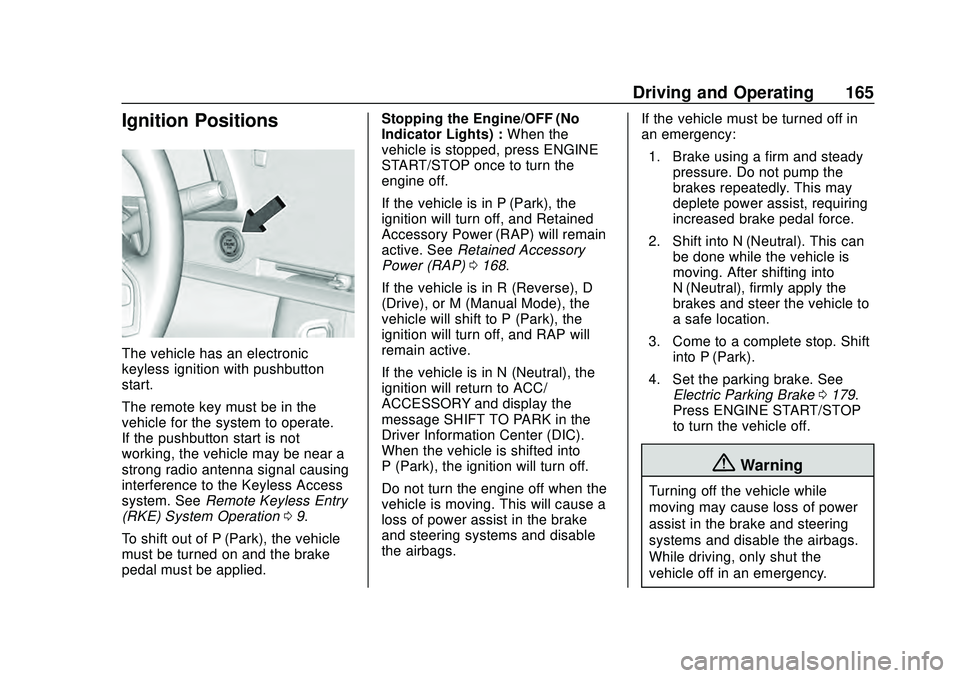
The vehicle has an electronic
keyless ignition with pushbutton
start.
The remote key must be in the
vehicle for the system to operate.
If the pushbutton start is not
working, the vehicle may be near a
strong radio antenna signal causing
interference to the Keyless Access
system. SeeRemote Keyless Entry
(RKE) System Operation 09.
To shift out of P (Park), the vehicle
must be turned on and the brake
pedal must be applied. Stopping the Engine/OFF (No
Indicator Lights) :
When the
vehicle is stopped, press ENGINE
START/STOP once to turn the
engine off.
If the vehicle is in P (Park), the
ignition will turn off, and Retained
Accessory Power (RAP) will remain
active. See Retained Accessory
Power (RAP) 0168.
If the vehicle is in R (Reverse), D
(Drive), or M (Manual Mode), the
vehicle will shift to P (Park), the
ignition will turn off, and RAP will
remain active.
If the vehicle is in N (Neutral), the
ignition will return to ACC/
ACCESSORY and display the
message SHIFT TO PARK in the
Driver Information Center (DIC).
When the vehicle is shifted into
P (Park), the ignition will turn off.
Do not turn the engine off when the
vehicle is moving. This will cause a
loss of power assist in the brake
and steering systems and disable
the airbags. If the vehicle must be turned off in
an emergency:
1. Brake using a firm and steady pressure. Do not pump the
brakes repeatedly. This may
deplete power assist, requiring
increased brake pedal force.
2. Shift into N (Neutral). This can be done while the vehicle is
moving. After shifting into
N (Neutral), firmly apply the
brakes and steer the vehicle to
a safe location.
3. Come to a complete stop. Shift into P (Park).
4. Set the parking brake. See Electric Parking Brake 0179.
Press ENGINE START/STOP
to turn the vehicle off.
{Warning
Turning off the vehicle while
moving may cause loss of power
assist in the brake and steering
systems and disable the airbags.
While driving, only shut the
vehicle off in an emergency.
Page 168 of 336

Chevrolet Corvette Owner Manual (GMNA-Localizing-U.S./Canada/Mexico-
12470550) - 2020 - CRC - 4/23/20
Driving and Operating 167
1. Press the brake pedal, thenpress ENGINE START/STOP
on the instrument panel.
If there is no remote key in the
vehicle or if there is something
causing interference with it, the
Driver Information Center (DIC)
will display a message.
2. When the engine begins cranking, let go of the button
and the engine cranks
automatically until it starts.
If the battery in the remote key
is weak, the DIC will display a
message. The vehicle can still
be driven.
See “Starting the Vehicle with a
Low Transmitter Battery” under
Remote Keyless Entry (RKE)
System Operation 09. If the
remote key battery is dead,
insert it into the cupholder
transmitter pocket to enable
engine starting.
3. Do not race the engine immediately after starting it.
Operate the engine and transmission gently until the oil
warms up and lubricates all
moving parts.
4. If the engine does not start and no DIC message is displayed,
wait 15 seconds before trying
again to let the cranking motor
cool down.
If the engine does not start
after five to 10 seconds,
especially in very cold weather
(below −18 °C or 0 °F), it could
be flooded with too much
gasoline. Try pushing the
accelerator pedal all the way to
the floor while cranking for up
to 15 seconds maximum. Wait
at least 15 seconds between
each try, to allow the cranking
motor to cool down. When the
engine starts, let go of the
accelerator. If the vehicle starts
briefly but then stops again,
repeat these steps. This clears
the extra gasoline from the
engine.Caution
Cranking the engine for long
periods of time, by pressing
ENGINE START/STOP
immediately after cranking has
ended, can overheat and damage
the cranking motor, and drain the
battery. Wait at least 15 seconds
between each try, to let the
cranking motor cool down.
Stopping the Engine
Shift to P (Park) and press and hold
ENGINE START/STOP on the
instrument panel, until the engine
shuts off. If the transmission is not
in P (Park), the engine shuts off and
the vehicle goes into the accessory
mode. The DIC displays SHIFT TO
PARK. When shifted to P (Park) the
vehicle turns off.
If the remote key is not detected
inside the vehicle when it is turned
off, the DIC displays a message.
Page 207 of 336

Chevrolet Corvette Owner Manual (GMNA-Localizing-U.S./Canada/Mexico-
12470550) - 2020 - CRC - 4/23/20
206 Driving and Operating
Warning (Continued)
.Keep sparks, flames, and
smoking materials away
from fuel.
. Do not leave the fuel pump
unattended.
. Avoid using electronic
devices while refueling.
. Do not re-enter the vehicle
while pumping fuel.
. Keep children away from
the fuel pump and never let
children pump fuel.
. Before touching the fill
nozzle, touch a metallic
object to discharge static
electricity from your body.
. Fuel can spray out if the fill
nozzle is inserted too
quickly. This spray can
happen if the tank is nearly
full, and is more likely in hot
weather. Insert the fill nozzle
slowly and wait for any hiss
noise to stop before
beginning to flow fuel. The fuel door unlocks when the
vehicle doors are unlocked. See
Remote Keyless Entry (RKE)
System Operation
09.
To open the fuel door, push and
release the rearward center edge of
the door.
The capless refueling system does
not have a fuel cap. Fully insert and
latch the fill nozzle, begin fueling.
{Warning
Overfilling the fuel tank by more
than three clicks of a standard fill
nozzle may cause:
. Vehicle performance issues,
including engine stalling and
damage to the fuel system.
. Fuel spills.
. Under certain conditions,
fuel fires.
Be careful not to spill fuel. Wait
five seconds after you have finished
pumping before removing the fill
nozzle. Clean fuel from painted
surfaces as soon as possible. See
Exterior Care 0273. Push the fuel
door closed until it latches.
{Warning
If a fire starts while you are
refueling, do not remove the fill
nozzle. Shut off the flow of fuel by
(Continued)
Page 330 of 336

Chevrolet Corvette Owner Manual (GMNA-Localizing-U.S./Canada/Mexico-
12470550) - 2020 - CRC - 4/23/20
Index 329
GaugesEngine Coolant Temperature . . . 99
Fuel . . . . . . . . . . . . . . . . . . . . . . . . . . . . 98
Odometer . . . . . . . . . . . . . . . . . . . . . . . 98
Speedometer . . . . . . . . . . . . . . . . . . . 98
Tachometer . . . . . . . . . . . . . . . . . . . . . 98
Transmission Temperature . . . . . . 99
Trip Odometer . . . . . . . . . . . . . . . . . . 98
Warning Lights and
Indicators . . . . . . . . . . . . . . . . . . . . . 93
General Information
Service and Maintenance . . . . . 284
Towing . . . . . . . . . . . . . . . . . . . . . . . . 208
Vehicle Care . . . . . . . . . . . . . . . . . . 210
Glove Box . . . . . . . . . . . . . . . . . . . . . . . 83
GM Mobility Reimbursement Program . . . . . . . . . . . . . . . . . . . . . . . 306
H
Hatch . . . . . . . . . . . . . . . . . . . . . . . . . . . . 23
Hazard Warning Flashers . . . . . . . 128
Head Restraints . . . . . . . . . . . . . . . . . 47
Head-up Display . . . . . . . . . . . . . . . . 110
HeadlampsAiming . . . . . . . . . . . . . . . . . . . . . . . . 238
Automatic . . . . . . . . . . . . . . . . . . . . . 127
Daytime RunningLamps (DRL) . . . . . . . . . . . . . . . . 126 Headlamps (cont'd)
Flash-to-Pass . . . . . . . . . . . . . . . . . 126
High-Beam On Light . . . . . . . . . . 107
High/Low Beam Changer . . . . . 126
Lamps On Reminder . . . . . . . . . 108
Heated Steering Wheel . . . . . . . . . . . . . . . . . 87
Heated and Ventilated Front Seats . . . . . . . . . . . . . . . . . . . . . . . . . . 53
Heated Mirrors . . . . . . . . . . . . . . . . . . . 31
Heating . . . . . . . . . . . . . . . . . . . . . . . . . 139
High-Beam On Light . . . . . . . . . . . . 107
High-Speed Operation . . . . . . . . . . 254
Hill and Mountain Roads . . . . . . . . 157
Hill Rollback Control . . . . . . . . . . . . 184
Hill Start Assist (HSA) . . . . . . . . . . 181
Hood . . . . . . . . . . . . . . . . . . . . . . . . . . . . 21
Horn . . . . . . . . . . . . . . . . . . . . . . . . . . . . . 87
How to Wear Seat Belts Properly . . . . . . . . . . . . . . . . . . . . . . . . 56
HVAC . . . . . . . . . . . . . . . . . . . . . . . . . . . 139
I
Ignition Positions . . . . . . . . . . . . . . . 165
Immobilizer . . . . . . . . . . . . . . . . . . . . . . 28
Infants and Young Children,
Restraints . . . . . . . . . . . . . . . . . . . . . . 75 Information
Publication Ordering . . . . . . . . . . .311
Infotainment . . . . . . . . . . . . . . . . . . . . 132
Infotainment System . . . . . . . . . . . . 315
Instrument Cluster . . . . . . . . . . . . . . . 94
Instrument Panel Overview . . . . . . . 5
Interior Rearview Mirrors . . . . . . . . . 32
Introduction . . . . . . . . . . . . . . . . . . . . . . . 2
J
Jump Starting - North America . . . . . . . . . . . . . . . . . . . . . . . 267
K
Keyless Entry
Remote (RKE) System . . . . . . . . . . 9
Keys . . . . . . . . . . . . . . . . . . . . . . . . . . . . . . 7
L
Labeling, Tire Sidewall . . . . . . . . . . 249
Lamps
Courtesy . . . . . . . . . . . . . . . . . . . . . . 129
Daytime Running (DRL) . . . . . . 126
Engine Compartment . . . . . . . . . 129
Exterior Controls . . . . . . . . . . . . . . 125
Exterior Lamps OffReminder . . . . . . . . . . . . . . . . . . . 126
Exterior Lighting Battery
Saver . . . . . . . . . . . . . . . . . . . . . . . 131
Page 333 of 336

Chevrolet Corvette Owner Manual (GMNA-Localizing-U.S./Canada/Mexico-
12470550) - 2020 - CRC - 4/23/20
332 Index
R
Radio Frequency Statement . . . . 312
Reading Lamps . . . . . . . . . . . . . . . . . 129
Rear Camera Mirror . . . . . . . . . . . . . 32
Rear Storage . . . . . . . . . . . . . . . . . . . . 84
Rear Vision Camera (RVC) . . . . . 200
Rear Windows . . . . . . . . . . . . . . . . . . . 37
Rearview Mirrors . . . . . . . . . . . . . . . . 32Automatic Dimming . . . . . . . . . . . . . 32
Reclining Seatbacks . . . . . . . . . . . . . 49
Recommended
Fuel . . . . . . . . . . . . . . . . . . . . . . . . . . 204
Recommended Fluids and Lubricants . . . . . . . . . . . . . . . . . . . . . 295
Records Maintenance . . . . . . . . . . . . . . . . . . 297
Recreational Vehicle Towing . . . . 273
Reimbursement Program, GM Mobility . . . . . . . . . . . . . . . . . . . 306
Remote Keyless Entry (RKE) System . . . . . . . . . . . . . . . . . . . . . . . . . . 9
Remote Vehicle Start . . . . . . . . . . . . 15
Replacement Parts Airbags . . . . . . . . . . . . . . . . . . . . . . . . . 73
Maintenance . . . . . . . . . . . . . . . . . . 296
Replacing Airbag System . . . . . . . . 73
Replacing Seat Belt System Parts after a Crash . . . . . . . . . . . . . 62 Reporting Safety Defects
Canadian Government . . . . . . . . 313
General Motors . . . . . . . . . . . . . . . 313
U.S. Government . . . . . . . . . . . . . 312
Retained Accessory Power (RAP) . . . . . . . . . . . . . . . . . . 168
Reverse Tilt Mirrors . . . . . . . . . . . . . . 31
Ride Control Systems
Enhanced TractionSystem (ETS) . . . . . . . . . . . . . . . 195
Roads
Driving, Wet . . . . . . . . . . . . . . . . . . 156
Roadside Assistance Program . . . . . . . . . . . . . . . . . . . . . . . 306
Roof Panel . . . . . . . . . . . . . . . . . . . . . . 37
Rotation, Tires . . . . . . . . . . . . . . . . . . 259
Routing, Engine Drive Belt . . . . . . 301
Run-Flat Tires . . . . . . . . . . . . . . . . . . 247
Running the Vehicle While Parked . . . . . . . . . . . . . . . . . . . . . . . . 171
S
Safety Defects ReportingCanadian Government . . . . . . . . 313
General Motors . . . . . . . . . . . . . . . 313 Safety Defects Reporting (cont'd)
U.S. Government . . . . . . . . . . . . . 312
Safety System Check . . . . . . . . . . . . 61
Scheduling Appointments . . . . . . . 308
Seat Belts . . . . . . . . . . . . . . . . . . . . . . . 55 Care . . . . . . . . . . . . . . . . . . . . . . . . . . . . 61
Extender . . . . . . . . . . . . . . . . . . . . . . . . 61
How to Wear Seat BeltsProperly . . . . . . . . . . . . . . . . . . . . . . . 56
Lap-Shoulder Belt . . . . . . . . . . . . . . 58
Reminders . . . . . . . . . . . . . . . . . . . . . . 99
Replacing after a Crash . . . . . . . . 62
Use During Pregnancy . . . . . . . . . . 61
Seats Head Restraints . . . . . . . . . . . . . . . . 47
Heated and Ventilated Front . . . . 53
Lumbar Adjustment, Front . . . . . . 49
Memory . . . . . . . . . . . . . . . . . . . . . . . . . 50
Power Adjustment, Front . . . . . . . 48
Reclining Seatbacks . . . . . . . . . . . . 49
Securing Child Restraints . . . . . . . . 80
Security
Light . . . . . . . . . . . . . . . . . . . . . . . . . . 107
OnStar . . . . . . . . . . . . . . . . . . . . . . . 318
Vehicle . . . . . . . . . . . . . . . . . . . . . . . . . 26
Vehicle Alarm . . . . . . . . . . . . . . . . . . . 26
Service . . . . . . . . . . . . . . . . . . . . . . . . . 144