Page 154 of 363
Buick Envision Owner Manual (GMNA-Localizing-U.S./Canada/Mexico-
13555857) - 2020 - CRC - 2/25/19
Climate Controls 153
Climate Controls Climate Control Systems Dual Automatic Climate
Control System . . . . . . . . . . . . . 153
Rear Climate Control
System . . . . . . . . . . . . . . . . . . . . . . 156
Air Vents Air Vents . . . . . . . . . . . . . . . . . . . . . 158
Maintenance Passenger Compartment Air
Filter . . . . . . . . . . . . . . . . . . . . . . . . 158
Service . . . . . . . . . . . . . . . . . . . . . . . 159 Climate Control Systems Dual Automatic Climate Control System The heating, cooling, and ventilation for the vehicle can be controlled with
this system.
1. Driver and Passenger
Temperature Controls
2. Heated and Ventilated Front
Seats (If Equipped) 3. Defrost
4. Air Delivery Mode Controls
5. Fan Control
Page 157 of 363
Buick Envision Owner Manual (GMNA-Localizing-U.S./Canada/Mexico-
13555857) - 2020 - CRC - 2/25/19
156 Climate Controls automatically when the interior
temperature is cold and the outside
temperature is about 7 °C (44 °F)
and below. The auto rear defogger
turns off automatically.
If equipped, the heated outside
mirrors turn on when the rear
window defogger button is on and
help to clear fog or frost from the
surface of the mirror. See Heated
Mirrors 0 28 .
CautionDo not try to clear frost or other
material from the inside of the
front windshield and rear window
with a razor blade or anything
else that is sharp. This may
damage the rear window
defogger grid and affect the
radio's ability to pick up stations
clearly. The repairs would not be
covered by the vehicle warranty.
J or
z : Press
J or
z ,
if equipped, to heat the driver or
passenger seat. Press
C or
{ , if equipped, to
ventilate the driver or passenger
seat. See Heated and Ventilated
Front Seats 0 41 .
Sensor The solar sensor, on top of the
instrument panel near the
windshield, monitors the solar heat.
The climate control system uses the
sensor information to adjust the
temperature, fan speed,
recirculation, and air delivery mode
for best comfort.
Do not cover the sensor; otherwise
the automatic climate control system
may not work properly.
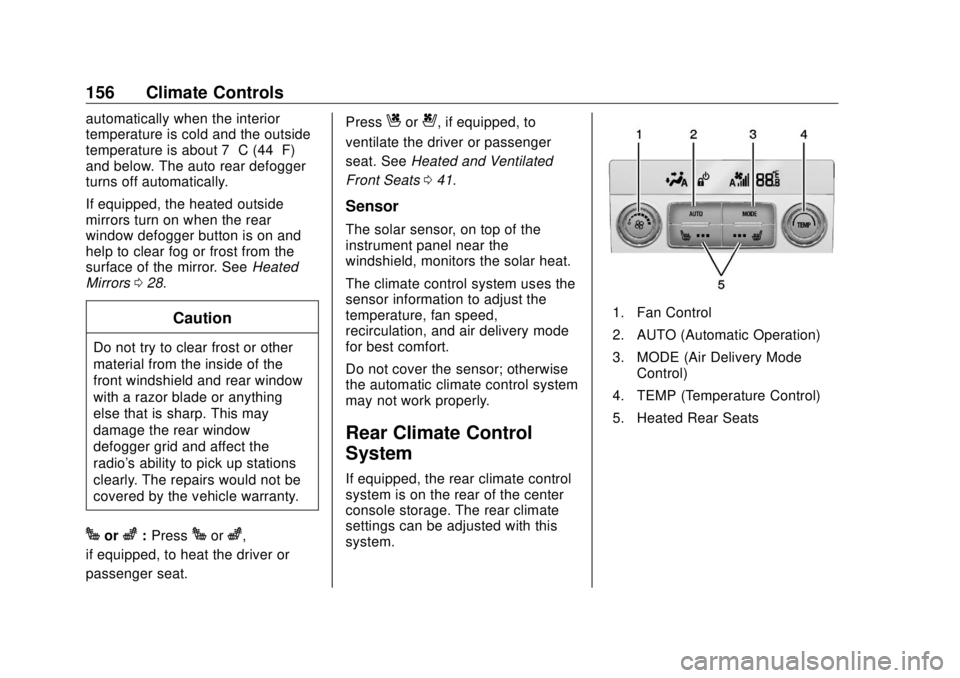
Rear Climate Control
System If equipped, the rear climate control
system is on the rear of the center
console storage. The rear climate
settings can be adjusted with this
system. 1. Fan Control
2. AUTO (Automatic Operation)
3. MODE (Air Delivery Mode
Control)
4. TEMP (Temperature Control)
5. Heated Rear Seats
Page 158 of 363

Buick Envision Owner Manual (GMNA-Localizing-U.S./Canada/Mexico-
13555857) - 2020 - CRC - 2/25/19
Climate Controls 157
Rear Climate Control Display
1. Outside Temperature Display
2. Sync (Synchronized
Temperatures)
3. Rear
P (On/Off)
4. Rear Auto (Automatic
Operation)
5. Rear Control Lockout
6. Rear Fan Control
7. Air Delivery Mode Controls
8. Rear Driver Side and
Passenger Side Temperature
Controls Automatic Operation AUTO : Press AUTO to control the
inside temperature, air delivery, and
fan speed. A is indicated in the
display when automatic operation is
active. If any of the climate control
settings are manually adjusted, this
cancels full automatic operation.
The display only indicates climate
control functions when the system is
in rear independent mode.
Manual Operation
9 : Turn clockwise or
counterclockwise to increase or
decrease the fan speed. Turn
completely counterclockwise to turn
the fan/power off.
TEMP : Turn clockwise or
counterclockwise to increase or
decrease the airflow temperature
into the passenger area. If the
SYNC button is pressed on the front
climate controls, the rear climate
temperature is linked to the driver
temperature setting. MODE : Press to change the
direction of the airflow in the vehicle.
Repeatedly press the button until
the desired mode appears on the
display. Multiple presses will cycle
through the delivery selections.
If the air delivery mode is directing
all the air to the floor, the rear fan
speed indicator will change when
the knob is turned, but the airflow
amount will not. This is normal
operation for the system.
M or
L : If equipped, press
M or
Lto heat the left or right outboard seat
cushion. See Heated Rear Seats
0 45 .
Page 159 of 363

Buick Envision Owner Manual (GMNA-Localizing-U.S./Canada/Mexico-
13555857) - 2020 - CRC - 2/25/19
158 Climate Controls
Air Vents
1. Slider Knob
2. Thumbwheel
Use the slider knobs (1) on the air
vents to change the direction of the
airflow.
Use the thumbwheels (2) near the
air vents to control the amount of
airflow or to shut off the airflow. Operation Tips
.
Clear away any ice, snow,
or leaves from the air inlets at
the base of the windshield that
can block the flow of air into the
vehicle.
.
Clear snow off the hood to
improve visibility and help
decrease moisture drawn into
the vehicle.
.
Keep all outlets open whenever
possible for best system
performance.
.
Keep the path under all seats
clear of objects to help circulate
the air inside the vehicle more
effectively.
.
Use of non-GM approved hood
deflectors can adversely affect
the performance of the system. Maintenance Passenger Compartment
Air Filter The filter removes dust, pollen, and
other airborne irritants from outside
air that is pulled into the vehicle.
The filter should be replaced as part
of routine scheduled maintenance;
see Maintenance Schedule 0 311 .
To find out what type of filter to use,
see Maintenance Replacement
Parts 0 321 .
1. Open the glove box.
Page 174 of 363

Buick Envision Owner Manual (GMNA-Localizing-U.S./Canada/Mexico-
13555857) - 2020 - CRC - 2/25/19
Driving and Operating 173
{ Warning
Things inside the vehicle can
strike and injure people in a
sudden stop or turn, or in a
crash. .
Put things in the cargo
area of the vehicle. In the
cargo area, put them as
far forward as possible.
Try to spread the weight
evenly..
Never stack heavier
things, like suitcases,
inside the vehicle so that
some of them are above
the tops of the seats..
Do not leave an
unsecured child restraint
in the vehicle.
.
Secure loose items in the
vehicle.
(Continued) Warning (Continued) .
Do not leave a seat
folded down unless
needed.
Starting and
Operating New Vehicle Break-In CautionThe vehicle does not need an
elaborate break-in. But it will
perform better in the long run if
you follow these guidelines:
.
Do not drive at any one
constant speed, fast or slow,
for the first 800 km (500 mi).
Do not make full-throttle
starts. Avoid downshifting to
brake or slow the vehicle.
.
Avoid making hard stops for
the first 300 km (200 mi) or
so. During this time the new
brake linings are not yet
broken in. Hard stops with
new linings can mean
premature wear and earlier
replacement. Follow this
(Continued)
Page 260 of 363
Buick Envision Owner Manual (GMNA-Localizing-U.S./Canada/Mexico-
13555857) - 2020 - CRC - 3/12/19
Vehicle Care 259
The vehicle may not be equipped
with all of the fuses, relays, and
features shown.
Fuses Usage
F01 Starter 1
F02 Starter 2
F03 Canister purge
solenoid Fuses Usage
F04 Engine control
module
F05 FlexFuel/Aero
shutter motor
F06 –
F07 –
F08 Engine control
module Fuses Usage
F09 A/C
F10 Canister vent
solenoid
F11 Fuel pump
F12 Heated seats
F13 Engine
coolant pump
F14 –
F15 O2 sensor
F16 Ignition coils
F17 Engine control
module
F18 –
F19 –
F20 DC DC Transformer
F21 Liftgate
F22 ABS
F23 Washer pump
F24 Headlamp washer
F25 –
Page 263 of 363
Buick Envision Owner Manual (GMNA-Localizing-U.S./Canada/Mexico-
13555857) - 2020 - CRC - 3/12/19
262 Vehicle Care
Fuses Usage
F1 –
F2 Front HVAC blower
F3 Power seat
F4 Lighter (China only)
F5 – Fuses Usage
F6 Front power
windows
F7 –
F8 Mid accessory
power outlet
F9 Body control
module 8
F10 Rear power windows Fuses Usage
F11 –
F12 Sunroof
F13 Front heated seats
F14 Outside rearview
mirror
F15 Body control
module 3
F16 –
F17 –
F18 Body control
module 7
F19 Data link connector
F20 SDM
F21 HVAC
F22 Liftgate release
F23 Passive entry/
Passive start
F24 OCC sensor
F25 Steering wheel
controls
F26 Column lock
assembly
Page 271 of 363

Buick Envision Owner Manual (GMNA-Localizing-U.S./Canada/Mexico-
13555857) - 2020 - CRC - 3/12/19
270 Vehicle Care (4) Construction Code :
A letter
code is used to indicate the type
of ply construction in the tire.
The letter “ R ” means radial ply
construction; the letter “ D ”
means diagonal or bias ply
construction.
(5) Rim Diameter :
Diameter of
the wheel in inches.
(6) Service Description :
These
characters represent the load
index and speed rating of the
tire. The load index represents
the load carrying capacity a tire
is certified to carry. The speed
rating is the maximum speed a
tire is certified to carry a load.
Tire Terminology and
Definitions Air Pressure :
The amount of
air inside the tire pressing
outward on each square inch of
the tire. Air pressure is
expressed in kPa (kilopascal)
or psi (pounds per square inch). Accessory Weight :
The
combined weight of optional
accessories. Some examples of
optional accessories are
automatic transmission, power
windows, power seats, and air
conditioning.
Aspect Ratio :
The relationship
of a tire's height to its width.
Belt :
A rubber coated layer of
cords between the plies and the
tread. Cords may be made from
steel or other reinforcing
materials.
Bead :
The tire bead contains
steel wires wrapped by steel
cords that hold the tire onto
the rim.
Bias Ply Tire :
A pneumatic tire
in which the plies are laid at
alternate angles less than
90 degrees to the centerline of
the tread. Cold Tire Pressure :
The
amount of air pressure in a tire,
measured in kPa (kilopascal)
or psi (pounds per square inch)
before a tire has built up heat
from driving. See Tire Pressure
0 272 .
Curb Weight :
The weight of a
motor vehicle with standard and
optional equipment including the
maximum capacity of fuel, oil,
and coolant, but without
passengers and cargo.
DOT Markings :
A code molded
into the sidewall of a tire
signifying that the tire is in
compliance with the U.S.
Department of Transportation
(DOT) Motor Vehicle Safety
Standards. The DOT code
includes the Tire Identification
Number (TIN), an alphanumeric
designator which can also
identify the tire manufacturer,
production plant, brand, and
date of production.


