2020 AUDI E-TRON lock
[x] Cancel search: lockPage 4 of 316
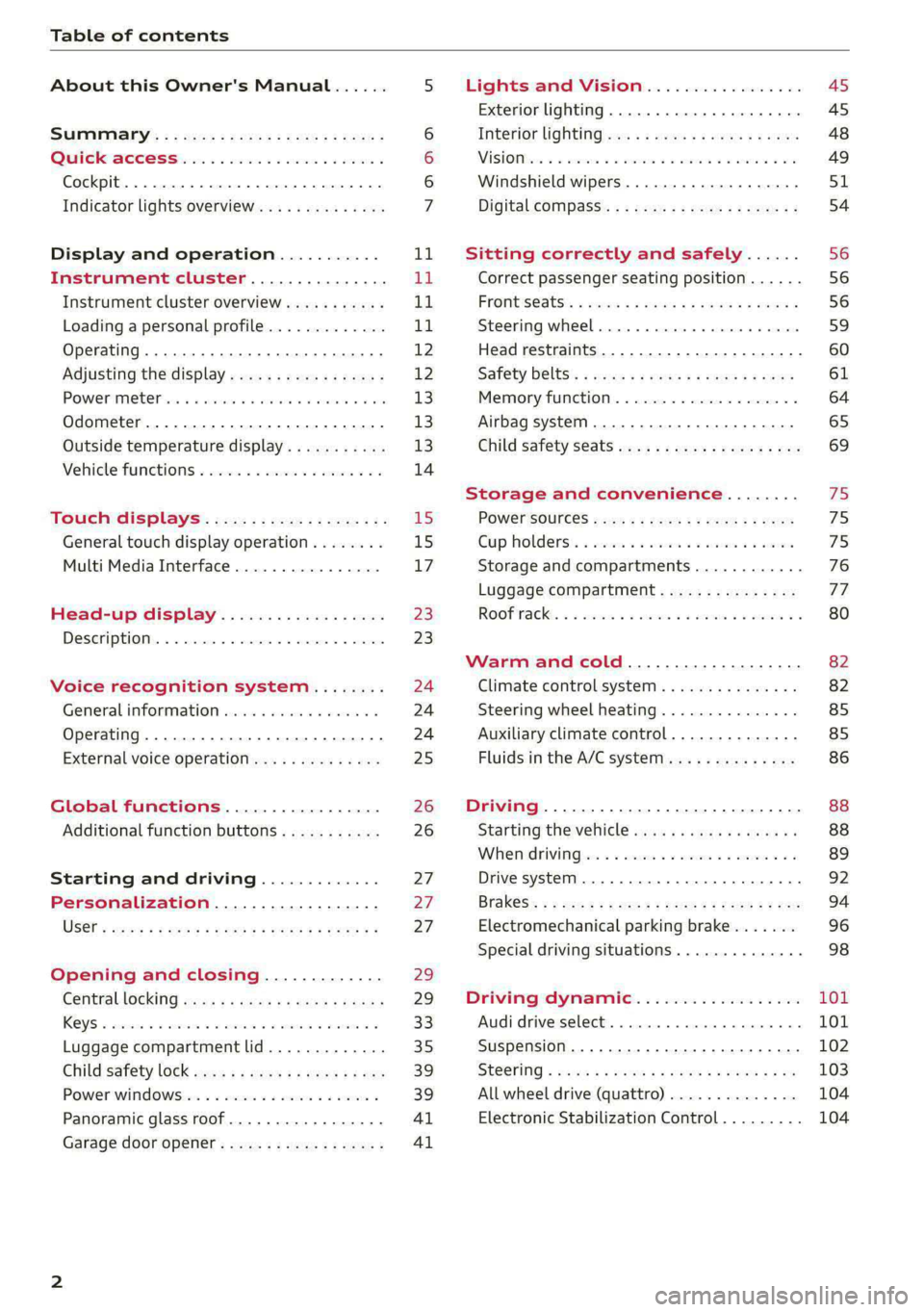
Table of contents
About this Owner's Manual......
SUMIMAry: < = exe : eens: Seen cs sens
QutckeaeCe ssh: «i esis se ois a eaves @
Cockpit. ...... 0... eee eee eee eee
Indicator lights overview...........4..
Display and operation...........
Instrument cluster...............
Instrument cluster overview...........
Loading a personal profile.............
Operating......... 2.00. cece eee eee
Adjusting the display.................
POWEP IMGT cis 6s. sxcwsue o svanens ow shaun 6 a 80a
Odometer.............. cee eee eee ee
Outside temperature display...........
Vehicle functions « ss... seen ve ome ee
TOUCH GISBIAYS): cscs « : wows st eens:
General touch display operation........
Multi Media Interface................
Head-up display..................
DeSGrIPELOIN:. « + asowies « a seen < awtine » coven
Voice recognition system........
General information 00. coe. wen es
Operating..................0..0000.
External voice operation..............
Global functions.................
Additional function buttons...........
Starting and driving.............
Personalization..................
Opening and closing.............
Centrablocking gas « x saws < # aene « naunes
KEYS « sscesus oo oases va aamies wot aeons v Be
Luggage compartment lid.............
Child’satety lOCK sms ¢ ¢ semw se cease ¢ een
Power windowsSec oo vase x a mwas ¥ a arasws ¥
Panoramic glass roof.................
Garage door opener............0.00..
NOD
OO
11
ga:
11
11,
12 12 13 13
13
14
15
15
17
Z3
23
24 24 24
25
26
26
27 27 27
29;
29
33 35
39 39
41 Al
Lights and Vision................. 45
Exterior lighting...............0000ee AS
Interior lightingissss « ¢ ews + ¢ ees es eee 48
MiSIOM iss +o seas os aroma oo ewe wo eS wars 49
Windshield wipers................05- S51
Digital compass’ « < sces ss sees sz wees ae 54
Sitting correctly and safely...... 56
Correct passenger seating position...... 56
PROMUSCStS: + wares x x nouns 6 e RawER ye eae 8 56
Steering wheel. ...........00.- ee ee ee 59
Head restraints...................00. 60
Safety belts’: ¢ esas ss mean ¢ o cere oe ee 61
Memory function..............-.0004 64
Airbag system. .... 2. ee eee eee eee 65
Child safety seats.................000- 69
Storage and convenience........ 75
PoW6r SOUICES scx ¢ x sous x sees x foes 75
Cup holdersss « seiwse + «cnn sw senses + = enue 75
Storage and compartments............ 76
Luggage compartment............... oe
ROOF PACK « + iannce 4 o amiss oo mses ao omamau ¥ 6 80
Warm and cold................... 82
Climate control system............... 82
Steering wheel heating............... 85
Auxiliary climate control.............. 85
Fluids in the A/C system.............. 86
Driving................. 0.00.00 000. 88
Starting the vehicle. ..........eee cues 88
Whenrdrivingser. sess os eeu oe emcee ves 89
Drive system... 02... ee eee eee 92
Brak@Sk: « » seg « eae e + neem © x seme ee ee 94
Electromechanical parking brake....... 96
Special driving situations.............. 98
Driving dynamic.................. 101
Audi drive:seleets, . scvceie «0 assne oo mien oo 101
Suspension..............0 2.020000 ee 102
SEGELING « weg w 5 saree a & wane 5 4 wee 2 Ee 103
All wheel drive (quattro) .............. 104
Electronic Stabilization Control......... 104
Page 8 of 316

Quick access
Quick access
Cockpit
Fig. 1 Cockpit
@ @ @ @
©
OO©CO®O
Door handle
Central locking switch ...........
Vent
Lever for:
—Turn signals and high beams ....
— High beam assistant ..........
— Lane departure warning ........
—Lane guidance ...............
Multifunction steering wheel with:
— Horn Pes
— Driver's airbag ...............
— Operating buttons ............
— Shift paddles ................
Instrument:cluster’ . . wc ee wees
Head-up display ...............
Windshield washer system lever ..
Upper display: « « csi «x ceva 6 # seen
Lower display .................
Lockable glove compartment with:
31
46 46
153
146
— CD/DVD drive 2s: : = news ss sees
@ Front passenger's airbag ........
@ Knee airbag ...................
@ Depending on equipment, buttons
for:
— ‘drive Select wis ss wens so ews we
— Electronic Stabilization Control
(ESE) ces us exes ao samme 0 a orenimn 0
—Emergency flashers ...........
—Defrosting ..................
— Rear window defogger .........
@ MMI On/Off button .............
@ Depending on equipment, buttons
for:
—Parking aid «eevee scenes ceca
— Driver assistance systems ......
@) Depending on equipment:
— Starting the vehicle when there is
STSLUICEION sag x 2 canes ye cme &
— Cup holders: « «2 sors se ness coe
222
65
65
101
105
164
130
Page 9 of 316

4KE012721BE
Quick access
— Audi musicinterface .......... 225
— Audi phone box ............... 175
—SDcardreader ............... 222
SOGKEE vcs sw isiness x x seein sw oem a ws 75
@ Electromechanical parking brake
BUtEON acces ox comme: « 2 sure 2 3 conte © 96
@® Selector lever ..............00. 90
@) [START STOP] button ............ 88
@) Steering wheel adjustment ...... 59
@3) Lever for:
— Cruise control system ......... 139
— Adaptive cruise assist .......... 142
@4 Connection port for the On Board
Diagnostic System (OBD) ........ 288
@3) Hood release ..........-..-0005 241
@8 Memory function buttons ........ 64
@) Buttons for:
PELIQHES ac x 2 wsvcene ao esezoss vo aenere @ s 45
—All-weather lights ............ 45
Luggage compartment lid button . 35
@9) Exterior mirror adjustment ...... 49
69 Buttons for:
— Power windows ............0. 39
—Child safety lock .............. 39
G) Tips
Some the equipment listed here is only instal-
led in certain models or is available as an op-
tion.
Indicator lights overview
The indicator lights in the instrument cluster
blink or turn on. They indicate functions or mal-
functions. Some warning and indicator lights
turn on when you switch the ignition on and must
turn off when the drive system is switched on or
while driving.
With some indicator lights, messages may ap-
pear and warning signals may sound. The indica-
tor lights and messages may be covered by other
displays. To show them again, select the second
tab for messages with the multifunction steering
wheel > page 12.
Some indicator lights in the display can display in
several colors.
A\ Central indicator light
If the A or indicator light turns on, check
the message in the instrument cluster.
The following indicator lights may be available,
depending on the vehicle equipment:
Red indicator lights
Central indicator light
=> page 7,
Instrument cluster
=> page 11
Safety belt
=> page 63
Motor start system
=> page 89
Transmission
=> page 92
Drive system
=> page 94,
Electrical system
=> page 244
Charging system
=>page 115
Electromechanical parking brake
=> page 96
Electromechanical parking brake
=> page 98
Brake system
=> page 96, > page 98,
=> page 243
Brake system
=> page 96, > page 98,
=> page 243
Steering
=> page 103
Steering lock
=> page 103
Page 10 of 316

Quick access
Air suspension
=> page 102
Electrical system
=> page 244
Cooling system
=> page 242
Hood
=> page 241
Charging system
=>page 115
Loose wheel warning
=> page 263
Night vision assist
=> page 136
Night vision assist
=>page 136
Distance warning
=> page 152
Steering intervention request
=> page 146
Safe start monitor
=> page 150,
Driver intervention request
=> page 150
Lane departure warning
=> page 153
Lane departure warning
= page 153
Audi pre sense
=> page 155,
Intersection assist
=> page 162
Yellow indicator lights
Central indicator light
=> page 7
Safety systems
=> page 65
Transmission
=> page 92
Drive system
=> page 94
Cooling system
=> page 242
Drive system
=> page 94
Vehicle sound
=> page 94
Motor start system
=> page 89
Keys
=> page 89
Electromechanical parking brake
=> page 98
Brake system
=> page 96
Electronic Stabilization Control
(ESC)
=> page 104
Electronic Stabilization Control
(ESC)
=> page 104
Electronic Stabilization Control
(ESC)
=>page 105
Anti-lock braking system (ABS)
=> page 106
Anti-lock braking system (ABS)
=> page 106
Steering
=> page 103
Steering lock
=> page 103
All wheel drive
=> page 104
Suspension control
= page 102
Air suspension
=> page 102
Electrical system
=> page 244
Washer fluid level
=> page 246
Windshield wipers
=> page 53
High-voltage battery range
>page 115
Page 11 of 316
4KE012721BE
Quick access
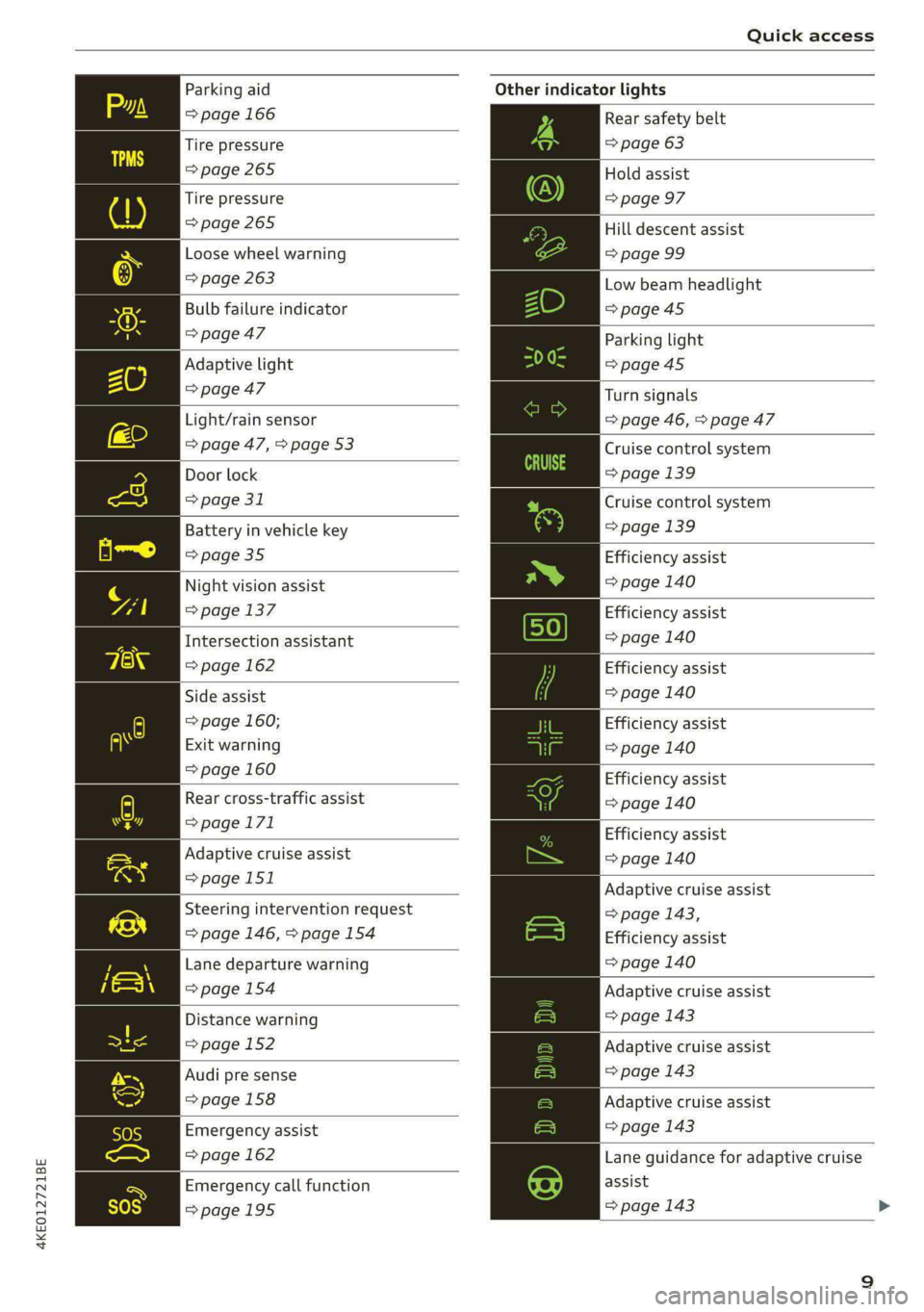
Parking aid
=> page 166
Tire pressure
=> page 265
Tire pressure
=>page 265
Loose wheel warning
=> page 263
Bulb failure indicator
=>page 47
Adaptive light
> page 47
Light/rain sensor
=> page 47, > page 53
Door lock
=> page 31
Battery in vehicle key
> page 35
Night vision assist
=> page 137
Intersection assistant
=> page 162
Side assist
=> page 160;
Exit warning
=> page 160
Rear cross-traffic assist
=>page 171
Adaptive cruise assist
=>page 151
Steering intervention request
=> page 146, >page 154
Lane departure warning
=>page 154
Distance warning
=> page 152
Audi pre sense
=>page 158
Emergency assist
=> page 162
Emergency call function
=>page 195
Other indicator lights
Rear safety belt
=> page 63
Hold assist
=> page 97
Hill descent assist
=> page 99
Low beam headlight
=>page 45
Parking light
=>page 45
Turn signals
=> page 46, > page 47
Cruise control system
=> page 139
Cruise control system
=>page
139
Efficiency assist
=> page 140
Efficiency assist
=> page 140
Efficiency assist
=> page 140
Efficiency assist
=> page 140
Efficiency assist
= page 140
Efficiency assist
=> page 140
Adaptive cruise assist
=> page 143,
Efficiency assist
=> page 140
Adaptive cruise assist
=> page 143
Adaptive cruise assist
=> page 143
Adaptive cruise assist
=> page 143
Lane guidance for adaptive cruise
assist
=> page 143
Page 12 of 316

Quick access
Lane departure warning
=> page 153
High beams
=> page 46
High beam assistant
=> page 46
Rear safety belt
=> page 63
Convenience key
=> page 89
Electromechanical parking brake
=> page 98
Electromechanical parking brake
=> page 98
Hold assist
=> page 98
Hill descent assist
=> page 99
Air suspension
=> page 102
Charging system
=>page 115
High-voltage battery range
>page 115
Parking aid
=> page 166
High beam assistant
=> page 46
Door lock
> page 31
Child safety lock
=> page 39
Speed warning system
=> page 132
Speed warning system
> page 132
Camera-based traffic sign recog-
nition
=> page 133
10
Night vision assist
=> page 137
Cruise control system
=>page 139
Cruise control system
=> page 139
Intersection assistant
=> page 162
Side assist
=> page 160
Distance warning
=> page 152
Rear cross-traffic assist
=>page 171
Adaptive cruise assist
=page 151,
Efficiency assist
=> page 147
Adaptive cruise assist
=> page 148
Lane guidance for adaptive cruise
assist
= page 143
Lane departure warning
=> page 153
Lane departure warning
=>page 154
Audi pre sense
=>page 158
Emergency assist
=> page 162
Page 29 of 316

4KE012721BE
Personalization
Personalization
User
eer @ leelil()
Applies to: vehicles with personal profiles
You can store your customized settings in a per-
sonal profile. Specific settings are stored auto-
matically in the personal profile that is currently
active.
Depending on the equipment, the profile being
used is assigned to the vehicle key currently in
use. The profile that was last active with the key
is loaded when the vehicle is unlocked.
> Applies to: MMI: Press USER on the home
screen.
Use various profiles to link them to specific vehi-
cle settings.
— Create your customized profile. This is helpful
in some situations, for example if multiple peo-
ple share the vehicle and each person would
like to use his or her individual vehicle settings.
— Guest: the guest profile can be used to adjust
settings in the vehicle without changing the
other profiles.
Active profile
— Rename: you can rename your profile so that
you can recognize by name which settings are
stored.
— Copy: you can copy your profile. Select the loca-
tion where the profile will be copied or which
profile should be overwritten. The settings will
be applied.
— Reset: you can reset your active profile to the
factory default settings.
— Reload*: Requirement: the vehicle must be sta-
tionary and the ignition must be switched on.
You can reload your profile, for example if the
seat, mirror, and steering wheel settings could
not be applied when changing profiles.
Profile selection
If you would like to change the profile, select an-
other profile from the list.
Switching personal profiles off
— Applies to: MMI: Select on the home screen:
USER > © > Personal profiles.
The personal profiles are switched on at the fac-
tory. If you do not wish to use the personal pro-
files, you can switch the function off.
@) Tips
— Certain Infotainment and vehicle settings
(such as mirrors) may be stored, depending
on vehicle equipment. You can find addi-
tional information in the MMI. Select on the
home screen: SETTINGS > General > Legal
notes > About Audi connect.
—The guest profile cannot be renamed.
— When changing profiles, the new profile
settings are loaded in the vehicle.
— You can reset all personal profiles to the
factory default settings.
Applies to: vehicles with myAudi login
Requirement: you must have successfully regis-
tered at my.audi.com.
Logging in from the vehicle
Applies to: MMI
> Select on the home screen: USER > myAudi
login.
> Log in to myAudi in the vehicle using your e-
mail address and password.
To transfer existing destinations from the MMI to
your myAudi account one time, confirm the sys-
tem prompts with Yes.
Automatic login
You can select if and when an automatic login to
myAudi in the vehicle should occur.
— Personal profile: Requirement: the personal
profile must be turned on and you must not be
logged in with the guest profile. Log in to
myAudi in the vehicle. Follow the system in-
structions and save your desired personal pro-
file. You will then always be logged in automat-
ically when your personal profile is active.
27
>
Page 31 of 316

4KE012721BE
Opening and closing
Opening and closing
Central locking
General information
Z\ WARNING
— If you leave the vehicle, switch the ignition
off and take the key with you. This applies
particularly when children remain in the ve-
hicle. Otherwise, children could start the ve-
hicle or operate electrical equipment (such
as power windows), which increases the risk
of an accident.
— Applies to: vehicles with anti-theft alarm
system: No one, especially children, should
stay in the vehicle when it is locked from the
outside, because the windows can no longer
be opened from the inside > page 32, Anti-
theft alarm system. Locked doors make it
more difficult for emergency workers to en-
ter the vehicle, which puts lives at risk.
All doors and the luggage compartment lid can
be centrally unlocked and locked at once. You can
select in the MMI if the entire vehicle or only the
driver's door should unlock when unlocking the
vehicle > page 30. The turn signals flash twice
when you unlock the vehicle and flash once when
you lock the vehicle. If they do not flash when
locking, check if all doors and lids are closed.
Depending on the vehicle equipment, you may
have different options for centrally unlocking and
locking your vehicle.
— Vehicle key > page 34
— Sensors in the door handles > page 34
— Lock cylinder on the driver's door > page 32
— Central locking switch inside > page 31
Vehicle key
The term “vehicle key” refers to the remote con-
trol key or convenience key*. The convenience
key* is a remote control key with special func-
tions > page 34 and > page 88.
Power closing*
When closing a door or the luggage compart-
ment lid, you only have to Let it fall lightly into
the latch. It then closes automatically > A.
Automatic locking
If you unlock the vehicle but then do not open
any of the doors, the luggage compartment, or
the hood within a short period time, the vehicle
locks again automatically. This feature prevents
the vehicle from being accidentally left unlocked
for a long period of time.
Automatic locking (Auto Lock)
The Auto Lock function locks all doors and the
luggage compartment lid once the speed has ex-
ceeded approximately 9 mph (15 km/h). The ve-
hicle will unlock again if the unlock function in
the central locking switch is pressed, the “P” gear
is engaged, or the ignition is switched off.
You can open the doors individually from the in-
side by pulling the door handle one time. To open
the rear doors individually, you must pull the
door handle twice.
In the event of a crash with airbag deployment,
the doors will also automatically unlock to allow
access to the vehicle.
Unintentionally locking yourself out
Only lock your vehicle when all of the doors and
the luggage compartment lid are closed and
there is no key in the vehicle. This reduces the
risk of locking yourself out accidentally.
The
following features help to reduce the risk of
locking your vehicle key in the vehicle:
— If the driver's door is open, the vehicle cannot
be locked by pressing the & button on the re-
mote control key or by touching the locking
sensor* on a door.
— If the vehicle key that was used most recently is
inside the luggage compartment, the luggage
compartment lid will automatically open again
after it closes > ©.
— If the last vehicle key that was used is detected
inside the vehicle, it will not be possible to lock >
29