2020 AUDI A8 heating
[x] Cancel search: heatingPage 169 of 360

4N0012721BD
Driver assistance
Changing the cruise control speed
Applies to: vehicles with cruise control system
> To increase or decrease the cruise control speed
in small increments, tap the lever up to the
first level toward @)/C) > page 166, fig. 123.
> To increase or decrease the cruise control speed
in larger increments, tap the lever up to the
second level toward ()/C).
> To increase or decrease the cruise control speed
continuously, tap and hold the lever at the first
or second level toward @)/G).
Overriding or deactivating the cruise
control speed
Applies to: vehicles with cruise control system
You can override or deactivate the cruise control
system. When you deactivate the system, your
cruise control speed will be stored and you can
resume that speed.
Requirement: the system must be switched on
and activated.
Overriding
> To temporarily override the cruise control
speed, press the accelerator pedal.
> Once you release the accelerator pedal, the sys-
tem will adjust back to the stored cruise control
speed.
If you override the cruise control system for a
long period of time, the cruise control system
will be deactivated. The ICRUISE| or 88) indicator
light will be displayed and the cruise control
speed will be saved.
Deactivating
> To deactivate the cruise control speed, press
the lever toward (2) (not locked into place)
=> page 166, fig. 123.
> Press the brake pedal.
ZA WARNING
Resting your foot on the accelerator pedal
could override the cruise control. This will pre-
vent braking interventions by the system.
Seem Leal
Applies to: vehicles with cruise control system
When you switch the system off completely, the
cruise control speed will be deleted.
Requirement: the system must be switched on.
> To switch the system off, press the lever toward
@ (locked into place) > page 166, fig. 123, or
> Switch the ignition off.
Applies to: vehicles with cruise control system
Gk / 3) Speed control system: currently un-
available. See owner's manual
If the indicator light turns on and this message
appears, the cruise control system has been deac-
tivated. There is a temporary malfunction, for ex-
ample the brakes are overheating. Switch the
cruise control system on again later.
Efficiency assist
Applies to: vehicles with efficiency assist
Efficiency assist can assist the driver with predic-
tive information in order to reduce fuel consump-
tion. Depending on vehicle equipment, the sys-
tem may access data from the navigation system,
the camera behind the windshield, and the radar
sensors.
When you remove your foot from the accelerator
pedal, efficiency assist controls downhill mode
with recuperation, depending on the situation.
Adjusting the efficiency assist
You can adjust efficiency assist functions individ-
ually. The settings depend on the vehicle equip-
ment.
— Predictive messages > page 168.
— Predictive control > page 169.
— Accelerator pedal feedback > page 115.
— Interactive accelerator > page 115.
167
Page 276 of 360

Checking and Filling
> Remove the screwdriver from the vehicle tool
kit > page 316.
> Carefully insert the flat side of the screwdriver
from below into the center of the top slot in the
cover > fig. 179.
> Use the screwdriver to pull the cover toward the
center of the vehicle and remove the cover.
> To unlock the fuel filler door, loosen the red
loop from the retainer and then pull on the
loop carefully > fig. 1802 ©.
> Press on the left side of the fuel filler door to
open it > page 271, fig. 177.
@ Note
Only pull on the loop until you feel resistance.
You
will not hear it release. If you continue to
pull, you could damage the emergency re-
lease mechanism.
@ Tips
Applies to: vehicles with plug-in hybrid drive
— The tank will not be vented if the emergency
release function was used on the fuel filler
door. You can only fill a small amount of
fuel in the tank. Fill only until the fuel pump
nozzle turns off for the first time. Drive to
an authorized Audi dealer or authorized
Audi Service Facility immediately to have
the malfunction corrected.
— Pressure can escape if you open the tank cap
after using the emergency release. This can
create noises.
Emissions control
system
General information
Z\ WARNING
The temperature of the exhaust system is
high, both when driving and after stopping
the engine.
— Never touch the exhaust tail pipes once they
have become hot. This could result in burns.
1) Depending on the engine and country
274
— Do not park your vehicle over flammable
materials such as grass or leaves because
the high temperature of the emissions sys-
tem could start a fire.
— Do not apply underbody protectant in the
exhaust system area, because this increases
the risk of fire.
Catalytic converter
Follow the safety precautions > page 274, Gener-
al information.
The vehicle may only be driven with unleaded
gasoline, or the catalytic converter will be de-
stroyed.
Never drive until the tank is completely empty.
The irregular supply of fuel that results from that
can cause engine misfires. Uncombusted fuel
could enter the exhaust system, which could
cause overheating and damage to the catalytic
converter.
Malfunction Indicator Lamp (MIL)
If the [J indicator light blinks or turns on, there
is a malfunction that is causing poor emissions
quality and that could damage the catalytic con-
verter. Drive slowly to an authorized Audi dealer
or authorized Audi Service Facility to have the
malfunction corrected.
The indicator light can also turn on if the fuel fill-
er cap is not closed correctly page 271).
Engine compartment
General information
Special care is required if you are working in the
engine compartment
For work in the engine compartment, such as
checking and filling fluids, there is a risk of in-
jury, scalding, accidents, and burns. For this
reason, follow all the warnings and general >
Page 285 of 360

4N0012721BD
Checking and Filling
> Add coolant mixed in the correct ratio
=> page 281 up to the MAX marking.
> Make sure that the fluid level remains stable.
Add more coolant if necessary.
> Turn the cap to the right to tighten it until you
feel resistance a second time.
Coolant loss usually indicates that there is a leak.
Immediately drive your vehicle to an authorized
Audi dealer or authorized Audi Service Facility
and have the cooling system inspected. If the
cooling system is not leaking, coolant loss can re-
sult from the coolant boiling due overheating
and then being forced out of the cooling system.
voltage system is not sealed, please contact
an authorized Audi dealer or authorized
Audi Service Facility.
— When adding coolant, it may leak into the
inside of high-voltage components and
cause a short circuit, increasing the risk of
fire.
Z\ WARNING
— The engine compartment in any vehicle can
be a dangerous area. Stop the engine and al-
low it to cool before working in the engine
compartment. Always follow the informa-
tion found in > page 274, General informa-
tion.
— Never open the hood if you can see or hear
steam or coolant escaping from the engine
compartment. This increases the risk of
burns. The cooling system is under pressure.
When you no longer see or hear steam or
coolant escaping, you may open the engine
compartment with caution.
— When working in the engine compartment,
remember that the radiator fan can switch
on even if the ignition is switched off, which
increases the risk of injury.
— Coolant additive and coolant can be danger-
ous to your health. For this reason, store the
coolant in the original container and away
from children. There is a risk of poisoning.
() Note
Do not add coolant if the expansion tank is
empty. Air could enter the cooling system and
damage the engine. If this is the case, do not
continue driving. See an authorized Audi deal-
er or authorized Audi Service Facility for assis-
tance.
Brake fluid
BFV-0229|
ZA WARNING
Applies to: vehicles with plug-in hybrid drive
— The coolant expansion tank for the high-
voltage system may only be opened or filled
by an authorized Audi dealer or authorized
Audi Service Facility.
— The coolant expansion tank cap is equipped
with a seal that must never be removed un-
der any circumstances > page 277, fig. 183.
If the coolant expansion tank for the high-
Fig. 186 Engine compartment: cap on brake fluid reservoir
Follow the safety precautions > page 274, Gener-
al information.
Checking the brake fluid level
> Slide the cover that is located below the wind-
shield wipers on the driver's side toward the
windshield and remove the cover.
> Read the brake fluid level on the brake fluid res-
ervoir > page 277, fig. 183. The brake fluid lev-
el must be between the MIN and MAX markings
oA.
The brake fluid level is monitored automatically.
Message
GG / @ Brakes: stop vehicle and check brake
fluid level >
283
Page 287 of 360

4N0012721BD
Checking and Filling
Multiple batteries with different technologies
may be installed in your vehicle:
— Vehicle battery (for example, for starting the
engine, basic power supply) > page 285, 12
Volt vehicle battery or > page 286, Other bat-
tery types
— Auxiliary battery (for example, for recuperation
or optional equipment) > page 286, Other bat-
tery types
— Applies to: Plug-in hybrid drive: High-voltage
battery (for example, for electric driving)
= page 136, Introduction.
Not running the vehicle for long periods of
time
The battery will gradually drain if the vehicle
does not run for long periods of time. To ensure
that the vehicle can still be started, the electrical
equipment will be limited or switched off. Some
convenience functions, such as interior lighting
or power seat adjustment, may not be available
under certain circumstances. The convenience
functions will be available again when you start
the
engine.
Even when electrical equipment is switched off,
the equipment can still drain the battery if the
vehicle is not driven for Long periods of time.
Deep draining results in a chemical reaction that
destroys the inside of the battery. The battery
must be charged every month to prevent this
= page 286. Contact an authorized Audi dealer or
authorized Audi Service Facility for more infor-
mation.
Winter operation
Cold weather places an especially high load on
the 12 Volt vehicle battery. Have the battery
checked by an authorized Audi dealer or author-
ized Audi Service Facility before cold weather be-
gins.
authorized Audi dealer or authorized Audi
Service Facility.
— Never connect a charging cable or jump
start cable directly to the 12 Volt vehicle
battery. Only use the connections in the en-
gine compartment > page 286.
Z\ WARNING
California Proposition 65 Warning:
— Battery posts, terminals and related acces-
sories contain lead and lead compounds,
chemicals known to the State of California
to cause cancer and reproductive harms.
Wash hands after handling.
@) Note
— If the vehicle will be parked for long periods
of time, protect the battery against the cold
so that it will not be destroyed by “freezing”
=> page 286, Charging the 12 Volt vehicle
battery.
— There are electrical components under the
cargo floor behind a trim panel that warm
up during operation. To reduce the risk of
the components overheating, do not store
objects such as blankets under the cargo
floor. If the components overheat, they will
switch off temporarily. This will be indicated
by a message that will be displayed in the
instrument cluster until the temperature re-
turns to normal.
PAO A Ula wer Lasley,
Explanation of warnings:
Always wear eye protection.
ZA\ WARNING
— All work on the battery or electrical system
in your vehicle can result in injuries, chemi-
cal burns, accidents, or burns. Because of
this, all work must be performed only by an
Fire, sparks, open flame, and smoking are
forbidden.
Battery acid is highly corrosive. Always
wear protective gloves and eye protection.
A highly explosive mixture of gases can
form when charging batteries. >
285
Page 315 of 360
4N0012721BD
Care and cleaning
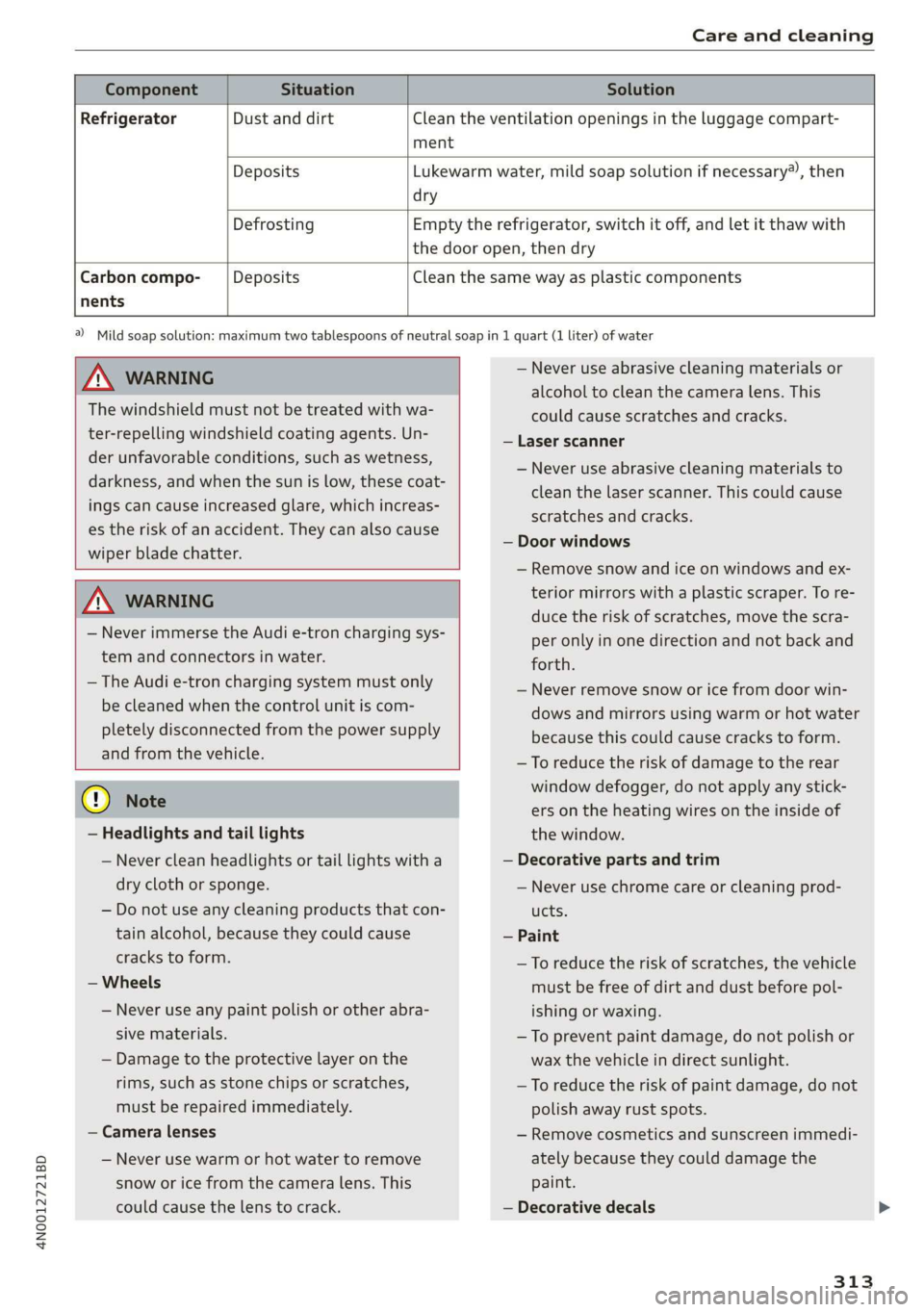
nents
Component Situation Solution
Refrigerator Dust and dirt Clean the ventilation openings in the luggage compart-
ment
Deposits Lukewarm water, mild soap solution if necessary), then
dry
Defrosting Empty the refrigerator, switch it off, and let it thaw with
the door open, then dry
Carbon compo- Deposits Clean the same way as plastic components
Z\ WARNING
The windshield must not be treated with wa-
ter-repelling windshield coating agents. Un-
der
unfavorable conditions, such as wetness,
darkness, and when the sun is low, these coat-
ings can cause increased glare, which increas-
es the risk of an accident. They can also cause
wiper blade chatter.
Z\ WARNING
— Never immerse the Audi e-tron charging sys-
tem and connectors in water.
— The Audi e-tron charging system must only
be cleaned when the control unit is com-
pletely disconnected from the power supply
and from the vehicle.
@) Note
— Headlights and tail lights
— Never clean headlights or tail lights with a
dry cloth or sponge.
— Do not use any cleaning products that con-
tain alcohol, because they could cause
cracks to form.
— Wheels
— Never use any paint polish or other abra-
sive materials.
— Damage to the protective layer on the
rims, such as stone chips or scratches,
must be repaired immediately.
— Camera lenses
— Never use warm or hot water to remove
snow or ice from the camera lens. This
could cause the lens to crack.
a) Mild soap solution: maximum two tablespoons of neutral soap in 1 quart (1 liter) of water
— Never use abrasive cleaning materials or
alcohol to clean the camera lens. This
could cause scratches and cracks.
— Laser scanner
— Never use abrasive cleaning materials to
clean the laser scanner. This could cause
scratches and cracks.
— Door windows
— Remove snow and ice on windows and ex-
terior mirrors with a plastic scraper. To re-
duce the risk of scratches, move the scra-
per only in one direction and not back and
forth.
— Never remove snow or ice from door win-
dows and mirrors using warm or hot water
because this could cause cracks to form.
—To reduce the risk of damage to the rear
window defogger, do not apply any stick-
ers on the heating wires on the inside of
the window.
— Decorative parts and trim
— Never use chrome care or cleaning prod-
ucts.
— Paint
—To reduce the risk of scratches, the vehicle
must be free of dirt and dust before pol-
ishing or waxing.
— To prevent paint damage, do not polish or
wax the vehicle in direct sunlight.
—To reduce the risk of paint damage, do not
polish away rust spots.
— Remove cosmetics and sunscreen immedi-
ately because they could damage the
paint.
— Decorative decals
313
Page 316 of 360

Care and cleaning
—To reduce the risk of damage, do not use
any rough powder or abrasive cleaning
products.
—To reduce the risk of damage, do not pol-
ish decorative decals that have a matte or
printed finish.
— Due to the risk of damage, do not use an
ice scraper to remove snow and ice on win-
dows with decorative decals on them.
— Displays and instrument cluster
— Make sure that the display and instrument
cluster are switched off and have cooled
down before cleaning. To switch off the
upper and lower display, select on the
MMI home screen: SETTINGS > Display &
brightness > MMI > Screen cleaning.
— Displays, the instrument cluster, and the
trim surrounding it must not be cleaned
with dry cleaning methods because they
could become scratched.
— Make sure no fluids enter the spaces be-
tween the instrument cluster and the
trim, because that could cause damage.
— Controls
— Make sure that no fluids enter the con-
trols, because this could cause damage.
— Safety belts
— Do not remove the safety belts to clean
them.
— Never clean safety belts or their compo-
nents with chemicals or with corrosive flu-
ids or solvents and never allow sharp ob-
jects to come into contact with the safety
belts. This could cause damage to the belt
webbing.
—If there is damage to the webbing, the
connections, the retractors, or the buck-
les, have them replaced by an authorized
Audi dealer or authorized Audi Service Fa-
cility.
— Textiles, artificial leather, and Alcantara
— Never treat artificial leather or Alcantara
with leather care products, solvents, floor
polish, shoe polish, spot remover, or simi-
lar products.
— Have a cleaning specialist remove stub-
born stains to reduce the risk of damage.
314
— Never use steam cleaners, brushes, hard
sponges, etc. when cleaning.
— Do not turn on the seat heating* to dry
the seat.
— Objects with sharp edges, such as zippers
or rivets on clothing or belts, can cause
damage to the surface.
— Open hook and loop fasteners, for exam-
ple on clothing, can damage seat covers.
Make sure hook and loop fasteners are
closed.
— Natural leather
— Never treat leather with solvents, floor
polish, shoe polish, spot remover or simi-
lar products.
— Objects with sharp edges, such as zippers
or rivets on clothing or belts, can cause
damage to the surface.
— Never use steam cleaners, brushes, hard
sponges, etc. when cleaning.
— Do not turn on the seat heating* to dry
the seat.
— To help prevent the leather from fading,
do not leave the vehicle in direct sunlight
for long periods of time. If leaving the ve-
hicle parked for long periods of time, you
should cover the leather to protect it from
direct sunlight.
— Refrigerator
— Do not try to speed up the defrosting
process by applying heat.
—To help prevent health risks or damage to
the refrigerator, do not use any abrasive
cleaners, solvents, wax, or strongly scent-
ed or aggressive cleaning products.
— Do not clean the refrigerator with rough
cleaning tools such as steel wool.
— Wall mount clip
— Do not us any abrasive cleaning products
or any that contain alcohol, because these
increase the risk of discoloration.
G) Tips
— Insects are easier to remove from paint that
has been freshly waxed.
— Regular waxing can prevent rust spots from
forming.
Page 330 of 360

Fuses and bulbs
This can cause damage to the electrical sys-
tem and increases the risk of fire.
(G) Note
If a new fuse burns out again shortly after you
have installed it, have the electrical system
checked as soon as possible by an authorized
Audi dealer or authorized Audi Service Facili-
- The following table does not list fuse loca-
tions that are not used.
— Some of the equipment listed in the follow-
ing tables applies only to certain model ver-
sions or certain optional equipment.
Fuse assignment - left side of cockpit
Fig. 211 Left side of the cockpit: fuse panel with plastic
clip
Fuse panel (2) (black)
No. | Equipment
Climate control system, interior air sensor
N Phone, roof antenna
Climate control system, fragrance system,
particulate matter sensor
Head-up display
Audi music interface, USB sockets
Steering column lock
Front MMI display
Instrument cluster
Ol/aOIN/uys
10 | Volume control
11 | Light switch, switch panels
12 | Steering column electronics
328
Fuse panel (@ (black)
14 MMI Infotainment system control module
15 Steering column adjustment
16
Steering wheel heating
Fuse assignment - left footwell
lo} | He
ia i, L
. | Equipment
Engine ignition coils
Engine start
Electric motor coupling
Windshield wiper control module
Left headlight electronics
Climate control system blower
Instrument panel
Windshield wipers
OND)
OMA)
WININI]
eR
Panoramic glass roof
Fuse panel (2) (black)
No. Equipment
Engine mount
Left rear door control module
Page 331 of 360

4N0012721BD
Fuses and bulbs
Windshield washer system/headlight
washer system
Right headlight electronics
Front seat heating
Right rear door control module
Sockets
Left front door control module
Parking heater
. | Equipment
Anti-theft alarm system
Engine control module
Horn
Parking brake
Gateway control module (diagnosis)
Interior headliner lights
Driver assist systems control module
Airbag control module
Electronic Stabilization Control (ESC), An-
ti-Lock Braking System (ABS)
12
Rear climate control unit, diagnostic con-
nector,
light/rain sensor
13) Climate control system
14 Right front door control module
15 Climate control system, body electronics
16 Brake system
13 | Radiator fan
14 | Engine control module
15 | Engine sensors
16 | Fuel pump
Fuse assignment - luggage compartment
Fig. 213 Luggage compartment: fuse panel with plastic
bracket
No. Equipment
Fus 1 |Thermal management
No. | Equipment 5 |Air suspension
2 |Engine components 6 |Automatic transmission
3 | Engine components 7 |Right rear seat adjustment
4 | Engine components 8 |Rear seat heating
5 | Brake light sensor 9 |Central locking, left tail light
6 |Engine components 10 | Front belt tensioner on driver's side
7 |Engine components 11 | Central locking, rear blind, fuel filler door
8 | Engine components 12 |Luggage compartment lid
9 | Engine components
10 | Oil pressure sensor, oil temperature sensor
bh BR Engine start
Bb N
Engine components
No. | Equipment
1 | Rear climate control system blower >
329