2020 AUDI A8 night vision
[x] Cancel search: night visionPage 166 of 360
Driving information
— Night vision assist can only detect pedes-
trians and wild animals located within the
range of the infrared camera.
— Night vision assist cannot detect pedes-
trians or wild animals and mark them if:
— They are not in an upright position, for ex-
ample if they are sitting or lying down
and/or
—The silhouette in the display appears in-
complete or interrupted, for example be-
cause the pedestrian is partially behind a
vehicle or an animal is partially covered by
tall grass.
— Never attempt to swerve around animals if
doing so would endanger you or other road
users.
G@) Tips
— Even though the system evaluates the
shape and heat given off by all detected ob-
jects, there are limits to the system. There
may be false warnings.
— For technical reasons, the image pauses in
split second intervals.
Switching on and off
Applies to: vehicles with night vision assist
The system can be switched on and off in the
MMI > page 157.
> The AUTO light function must be selected for
the night vision assist to automatically activate
when it is dark.
> Switch on the low beams manually to activate
night
vision assist immediately. To do so,
press (2) on the light switch module > page 60,
fig. 47 and select 20.
When activated, the %1 tab appears in the instru-
ment cluster.
> Select in the instrument cluster: tab %
@) Tips
When the night vision assist tab is selected in
the instrument cluster and the low beams are
switched off, the thermal image display dis-
appears only after you have exited the tab.
164
Marking and warning
Applies to: vehicles with night vision assist
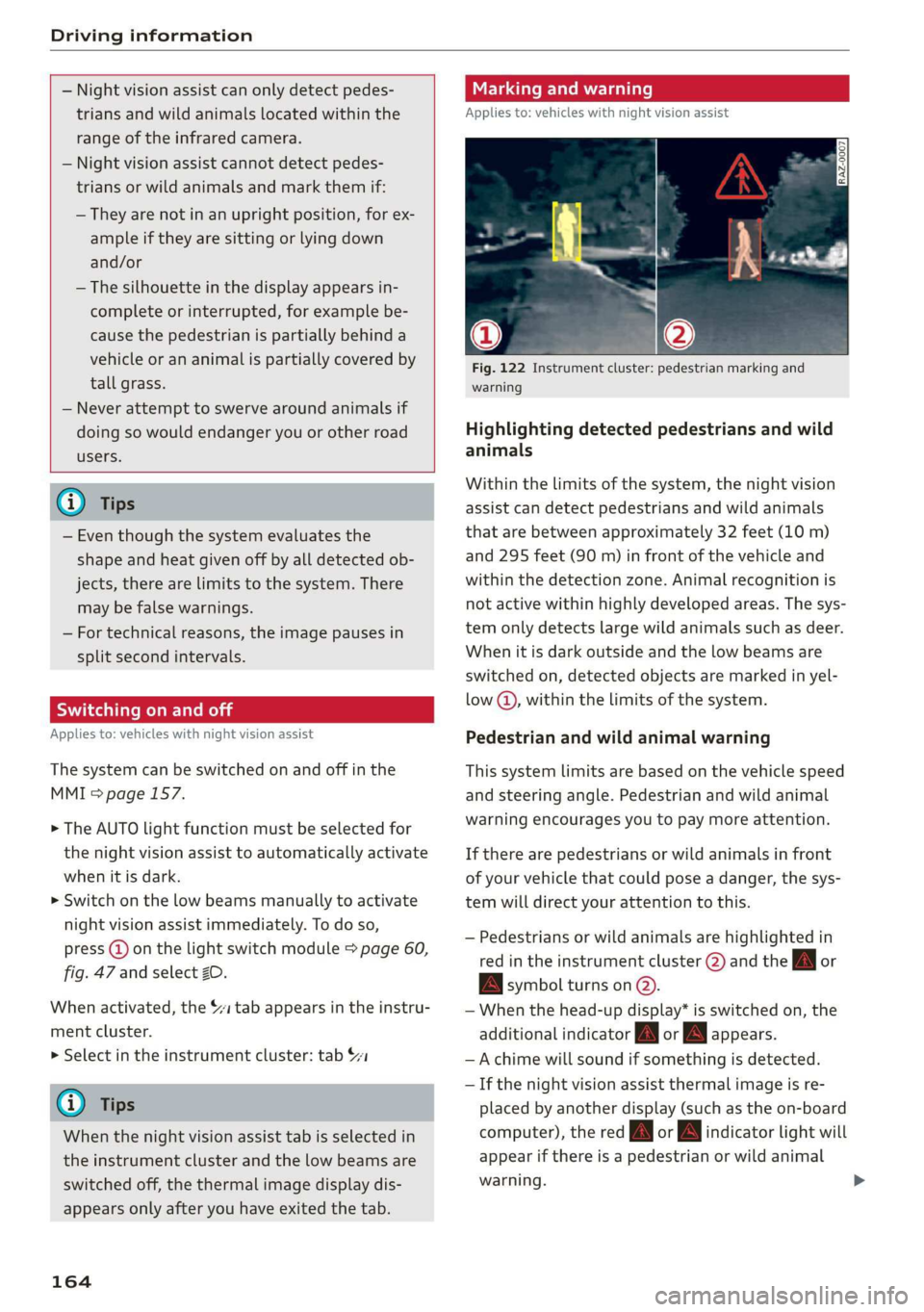
Fig. 122 Instrument cluster: pedestrian marking and
warning
Highlighting detected pedestrians and wild
animals
Within the limits of the system, the night vision
assist can detect pedestrians and wild animals
that are between approximately 32 feet (10 m)
and 295 feet (90 m) in front of the vehicle and
within the detection zone. Animal recognition is
not active within highly developed areas. The sys-
tem only detects large wild animals such as deer.
When it is dark outside and the low beams are
switched on, detected objects are marked in yel-
low @), within the limits of the system.
Pedestrian and wild animal warning
This system limits are based on the vehicle speed
and steering angle. Pedestrian and wild animal
warning encourages you to pay more attention.
If there are pedestrians or wild animals in front
of your vehicle that could pose a danger, the sys-
tem will direct your attention to this.
— Pedestrians or wild animals are highlighted in
red in the instrument cluster (2) and the J or
BA symbol turns on @.
— When the head-up display* is switched on, the
additional indicator [AM or EM appears.
—Achime will sound if something is detected.
—If the night vision assist thermal image is re-
placed by another display (such as the on-board
computer), the red A or A indicator light will
appear if there is a pedestrian or wild animal
warning.
Page 167 of 360
4N0012721BD
Driving information
The Sl symbol will appear when pedestrian and
wild animal detection is not available.
Marking light*
To direct the driver's attention to a pedestrian,
the headlights can flash on the pedestrian when
there is a pedestrian warning.
This occurs at speeds above approximately
35 mph (60 km/h) if you are outside of illuminat-
ed areas and no detected vehicles are shown. The
marking light is not used for wild animals. The
high beam assistant* controls the marking
light*> page 61.
Adjusting the contrast
Applies to: vehicles with night vision assist
Requirement: the night vision assist must be
switched on and the 1 tab must be displayed.
> Applies to: MMI: Select on the home screen:
VEHICLE > Driver assistance > (23) > Night vi-
sion assist.
> To set the desired contrast, move the slider.
G) Tips
Certain settings are stored automatically in
the active personal profile.
Applies to: vehicles with night vision assist
Night vision assist: currently unavailable.
See owner's manual
The system is not functioning correctly so it has
been switched off. If this malfunction persists,
drive immediately to an authorized Audi dealer or
authorized Audi Service Facility to have the mal-
function repaired.
165
Page 332 of 360

Fuses and bulbs
Fuse panel @) (red) Fuse panel (4) (black)
3 | Exhaust treatment, sound actuator 8 | Night vision assist, active suspension
4 |Rear climate control system control panel 9 | Adaptive cruise assist
5 |Right trailer hitch light ll Intersection assistant, driver assist sys-
6 | Trailer hitch positioning motor tems
7 |Trailer hitch 12 | Exterior sound
8 |Left trailer hitch light 14 | Right headlight
9 |Trailer hitch socket 15 [Left headlight
10 | Sport differential Fuse panel (5) (red)
11 | Exhaust treatment No. | Equipment
Fuse panel (8) (brown) 1 |Active suspension
No. | Equipment 2 |Service disconnect switch
1 | Driver assist systems control module 3_ | Refrigerator
2 |Rear Audi phone box 4 | Electric motor
3 | Rear seat adjustment 5 | Brake system
4 |Side assist 6 |High-voltage battery water pump
5 | Rear seat entertainment 7 |Interior climate control
6 |Tire pressure monitoring system 8 |A/C compressor
7 | Emergency call system 9 | Auxiliary battery control module
g | Parking heater radio receiver, fuel tank 10 |High-voltage battery
monitoring 11 |High-voltage battery
9 |Automatic transmission selector lever 14 | Thermal management
10 |TV tuner, data exchange control module 15 | Thermal management
11 | Vehicle opening/start (NFC) Fuse panel © (white)
12 | Garage door opener No. Equipment
13 | Rearview camera, peripheral cameras 1 | Reamecenter armrest heanng
14 | Central locking, tail lights 2 | Rear sliding sunroof
15 | Left rear seat adjustment 3 | CD/DVD player
16 trent belt tensioner on front passenger's 5 lac socket
6 | Passenger’s side rear safety belt tensioner
Fuse panel (4) (black) 7 |Front center armrest heating
No. | Equipment 8 |Rear footrest heating
Seat ventilation, rear seat heating, rear- 11 |Rear Seat Remote
1 |viewsmirror,.cefrigerator, diagnostic:con- 12 |Driver’s side rear safety belt tensioner
nector
2 |Gateway control module (communication) Bulbs
3 |Sound actuator
4 | Transmission heating valve Cs
5 | Engine start, electric motor Your vehicle is equipped with maintenance-free
7 |Active accelerator pedal headlights and tail lights. However, if a light bulb >
330
Page 352 of 360

Index
OPeRatiG’s « exssses wo emcee so cmsnoes ov comes 2 o 2311.
Setting the destination................ 230
MAP
refer to Message Access Profile......... 208
Map preview. .... 00... cece ee ee eee eee 230
Map update........... 0... e eee eee eee 236
ONLINE = sep s » sewn se eee o eR ex ee ee 237.
SD card/USB connection............... 237
Massage function.................00. 73,76
FROME. 6: wissers « oi wean © ovamene a 8 sceceun a 8 emma es 74
Matrix LED headlights .............0e.eee 61
Mechanicalkeyios «+ scauia 6 awa @ 6 scans a © asi 47
Media erase: sy casas & 2 navos x 5 nous 8 2 new 250, 255
DIV OSkec. a 5 were x ures wn ramets 0 8 acannon 250
Supported formats............-000 eee 261
Media center.....................00005 256
Memory card
AUGISDIEt = exes ¢ eas 2 i paws s 3 Ream sc eR 31
SD card reader (MMI). « « wes « » sa ss we 250
Supported types and formats........... 261
Memory PUmetiomcncce « s cmeree « 0 amivive « waveren » « 85
Menu language
refer to Setting the language........... 266
Message Access Profile............00005 208
Messages so cssne » « saanins w s anecams 6 0 sauce 6 a a 208
microSD card reader (Audi tablet).......... 31.
Mild hybrid drive system.............0.. 118
Mirror eompass's « zqes ss sees 5 wows § ew 70
Mirrors
Adjusting exterior mirrors.............-. 66
Dimming..............0 000 e ee eee eee 67
Vanity Mirror’: sens « s cows ¢ 2 eee x tees ae 67
MMI
refer to Multi Media Interface........... 20
Mobile device
refer to Telephone..............2.-00- 200
Mobile phone network
Connection settings ..............00. 212
Mountain passes. « vsenes « ceneus © + ances 6 evens 126
Mountain toads:: + asec
BUEEOMS.. « sccsene so stisous @ weno « wroteas wo 13, 40
Operating...............2..2..0-0000. 13
Programming buttons.................. 40
Voice
recognition system............... 38
350
Multi Media Interface...............0085 20
Menus and symbols............0.2e-008 21
OPECAtING: « x naw « ¢ wows 4 2 wares 5 8 eae 18, 21
Switching the displays on or off.......... 20
MUNG) (MULE), sews 2 3 seems oe eee o re Yai 40
MYAUIs ss aces s cen + pews ss Herwe ov Hews = 41
myAudi navigation................. 226, 229
N
Narrow areas : ssysu a 3 mas 5 # saupe oF aeree Fs 178
Natural
leather care and cleaning......... 312
Navigation ..... 0.0.00. cece eee eee 225
Better fOUtE ssa< 2 yarn 2 2 new se momD § eo 238
GAULIING) scons = eamais ov omases Gs x aaaete x eam 230
Changing thescale.................0. 230
also refertoMap...........--0eee eee 231
Navigation database
Version information...............05- 269
Navigation (instrument cluster) .......... 233
NHITSAc: « 2 sxene x x gems © 2 eee 2s eee 2s see 338
Night vision assist. ............2.-0000- 163
Cleaning the camera.........0eeseeuee 310
Notification center.............. 0s eee aes 22
O
Octane rating (gasoline)................ 270
Odometer............. 00 eee eee eee 15
RESEtEING sous: ¢ « mown 2 » mewn yee e eee 8 15
Office address
refer to Business address.............. 234
OFF (climate control system)............. 105
Oil
referto Engine oil..................4. 277
On-board computer... .. 0.0... 000ee eee ee 16
On Board Diagnostic System (OBD)... 274, 332
Online destination
refer to Online Points of Interest........ 228
Online map
refer to Satellite map...............4. 236
Online media.................02.0000. 252
Online Points of Interest.............0.. 228
Onlinerradio:. « sven 2 = wasn +o esses vv enews # 245
also refer to Online radio.............. 245
Online roadside assistance.............. 224