Page 250 of 657
249
uuAudio System Basic Operation uAudio/Information Screen
Continued
Features
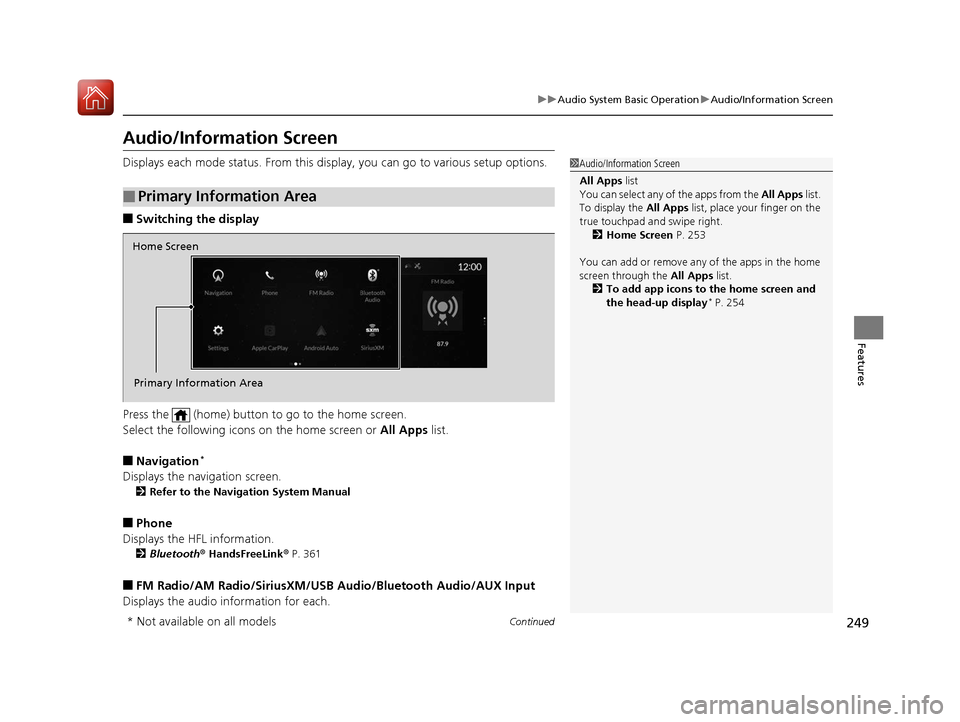
Audio/Information Screen
Displays each mode status. From this display, you can go to various setup options.
■Switching the display
Press the (home) button to go to the home screen.
Select the following icons on the home screen or All Apps list.
■Navigation*
Displays the navigation screen.
2Refer to the Navigation System Manual
■Phone
Displays the HFL information.
2 Bluetooth ® HandsFreeLink ® P. 361
■FM Radio/AM Radio/SiriusXM/USB Audio/Bluetooth Audio/AUX Input
Displays the audio information for each.
■Primary Information Area
1 Audio/Information Screen
All Apps list
You can select any of the apps from the All Apps list.
To display the All Apps list, place your finger on the
true touchpad and swipe right. 2 Home Screen P. 253
You can add or remove any of the apps in the home
screen through the All Apps list.
2 To add app icons to the home screen and
the head-up display
* P. 254
Home Screen
Primary Information Area
* Not available on all models
20 ACURA RDX-31TJB6111.book 249 ページ 2020年2月11日 火曜日 午後2時6分
Page 252 of 657
Continued251
uuAudio System Basic Operation uAudio/Information Screen
Features
You can see the audio, HFL information, navigation mini map*, and clock
information on the secondary informa tion area using the true touchpad B.
■Switching the card
Swipe up or down the true touchpad B to cycle through the following screen.
■Secondary Information Area1Secondary Information Area
SiriusXM ® radio service notifications are displayed in
the secondary information area.
Secondary Information Area
1 Switching the card
The card in the secondary information area will
change depending on the sc reen displayed in the
primary information area.
*1: Appears only when you set a destination on the
Apple CarPlay or Android Auto navigation function.
2 Apple CarPlay P. 302
2 Android Auto P. 306
Models without navigation systemNow Playing Audio
Navigation*1
Clock
* Not available on all models
20 ACURA RDX-31TJB6111.book 251 ページ 2020年2月11日 火曜日 午後2時6分
Page 255 of 657

uuAudio System Basic Operation uAudio/Information Screen
254
Features
■To add app icons to the home screen and the head-up display*
You can add app icons to the home screen and the head-up display.
1. Press the (home) button.
2. Swipe right to display the All Apps screen.
3. Go to an app on the list, then press and
hold true touchpad A.
4. From the pop-up menu, select Add to
Home Page or Add to Heads-Up
Display
*.
u The icon or HUD* appears next to
the app on the list when the
corresponding icon has been added to
the home screen or head-up display.
1 To add app icons to the home screen and the head-up display*
Pre-installed apps may not start up normally. If this
occurs, you need to reset the system.
2 Defaulting All the Settings P. 357
If you perform Factory Data Reset , it may reset all
the settings to their factory default. 2 Defaulting All the Settings P. 357
In case those apps still do not startup normally, even
after Factory Data Reset , contact your dealer.
Each item with HUD is listed on the head-up display
menu.
If you want to hide the it em from the head-up display
menu, select Remove from Heads-Up Display .
Models with head-up display
* Not available on all models
20 ACURA RDX-31TJB6111.book 254 ページ 2020年2月11日 火曜日 午後2時6分
Page 256 of 657

Continued255
uuAudio System Basic Operation uAudio/Information Screen
Features
■To add shortcut icons to the home screen and the head-up display*
Shortcut icons for items stored in Favorite can be added to the home screen and the
head-up display.
1.Select a favorite item, then press and hold
true touchpad A.
u A pop-up menu will appear on the
screen.
2. Select Add to Home Page or Add to
Heads-Up Display
*.
u A short cut icon will be added to the
home screen or the head-up display.
1To add shortcut icons to the home screen and the head-up
display*
You can add an icon to the head-up display directly
from the home screen. Select an icon on the home
screen, then press and hold the true touchpad A.
After that, select Add to Heads-Up Display, and
then press the (back) button or the (home)
button to confirm the change.
Note that icons for Messages, Settings , and
System Update cannot be added to the head-up
display.
Models with head-up display
* Not available on all models
20 ACURA RDX-31TJB6111.book 255 ページ 2020年2月11日 火曜日 午後2時6分
Page 257 of 657

uuAudio System Basic Operation uAudio/Information Screen
256
Features
■To move icons on the home screen
You can change the location of the icons on the home screen. 1.Select the icon you want to move, then
press and hold true touchpad A.
u The screen will change to the
customization screen.
2. Drag the icon to where you want it to be
and then press and ho ld the true touchpad
A.
u The icon will be repositioned and the
screen will remain in the customization
mode.
u After you drag the ic on, keep your finger
on the true touchpad A and then press
down. If you release your finger before
pressing the true touchpad A, the icon
will remain in its original place.
u If you want to reposition the icon on
another page of the home screen, swipe
the true touchpad A.
3. Press the (back) button or the
(home) button to confirm the change.1To move icons on the home screen
Press and hold (home) button to switches to the
customization screen.
Select and hold.
Drag and drop.
20 ACURA RDX-31TJB6111.book 256 ページ 2020年2月11日 火曜日 午後2時6分
Page 258 of 657

Continued257
uuAudio System Basic Operation uAudio/Information Screen
Features
■To remove icons from the home screen and the head-up display*
You can remove icons from the home screen and the head-up display.
1.From the home screen, se lect the icon that
you want to remove, then press and hold
true touchpad A.
u The screen will switch to the
customization screen.
2. Go to Remove from Home Page or
Remove from Heads-Up Display
* and
press the true touchpad A.
u The icon will be removed from the home
screen or the head-up display, and the
screen will remain in the customization
mode.
3. Press the (back) button or the
(home) button to confirm the change.
You can also remove an icon from the home
screen or head-up disp lay directly from the All
Apps list.
1. Go to an item you want to remove, then
press and hold th e true touchpad A.
2. Go to Remove from Home Page or
Remove from Heads-Up Display
* and
press the true touchpad A.
u The icon will be removed from the home
screen or the head-up display.
3. Press the (back) button or the
(home) button to confirm the change.
1To remove icons from the home screen and the head-up display*
Removing an icon from the home screen does not
result in the deletion of the corresponding app.
Press and hold (home) button to switches to the
customization screen.
If you remove a shortcut icon from the home screen,
the function of selected icon also remove from the
head-up display.
Models with head-up displaySelect and hold.
* Not available on all models
20 ACURA RDX-31TJB6111.book 257 ページ 2020年2月11日 火曜日 午後2時6分
Page 261 of 657
260
uuAudio System Basic Operation uAudio/Information Screen
Features
You can edit, show, or hide the audio, phone, navigation* contents on the multi-
information display or the head-up display*.
■To add or remove an items 1.Press the APPS button on the steering
wheel.
2. Roll down the left selector wheel to select
Customize Apps .
3. Move the left selector wheel left to select
Add/Remove .
4. Select an item then press the left selector
wheel.
u The checked items are displayed on the
multi-information display or the head-up
display
*.
■Customizing the Meter or Head-Up Display*
On Multi-Information Display
On Head-Up Display
*
* Not available on all models
20 ACURA RDX-31TJB6111.book 260 ページ 2020年2月11日 火曜日 午後2時6分
Page 262 of 657
261
uuAudio System Basic Operation uAudio/Information Screen
Features
■Editing order
1.Press the APPS button on the steering
wheel.
2. Using the left selector wheel, scroll to
Customize Apps and then press the
selector wheel.
3. Move the selector wheel to the right to go
to the Reorder screen.
4. Scroll to an item you want to move, then
press the left selector wheel.
5. Scroll to where you want to move the
contents, then press the left selector wheel.
On Multi-Information Display
On Head-Up Display
*
* Not available on all models
20 ACURA RDX-31TJB6111.book 261 ページ 2020年2月11日 火曜日 午後2時6分


