2020 ACURA NSX lock
[x] Cancel search: lockPage 390 of 491

388
uuMaintenance Under the Hood and HatchuOpening the Hood
Maintenance
Opening the Hood1.Park the vehicle on a level surface, and set
the parking brake.
2. Pull the hood release handle under the
driver’s side lower corner of the dashboard.
uThe hood will pop up slightly.
3. Pull up the hood latch lever (located under
the front edge of the hood to the center)
and raise the hood. Once you have raised
the hood slightly, you can release the lever.
4. Lift the hood up most of the way.
uThe hydraulic support will lift it up the
rest of the way and hold it up.
When closing, lower it to approximately 12
inches (30 cm), then pr ess down firmly with
your hands, and make su re both right and left
latches are firmly locked in place.
1Opening the Hood
NOTICE
Do not open the hood when the wiper arms are
raised. The hood will strike the wipers, resulting in
possible damage to the hood and/or the wipers.
When closing the hood, check that both right and
left latches are securely latched. If the hood latch lever moves stiffly, or if you can
open the hood without lifti ng the lever, the latch
mechanism should be cl eaned and lubricated.
Pull
Hood Release Handle
Lever
20 ACURA NSX PMC-31T6N6300.book 388 ページ 2019年9月11日 水曜日 午後4時51分
Page 399 of 491
397
uuMaintenance Under the Hood and HatchuCooling System
Maintenance
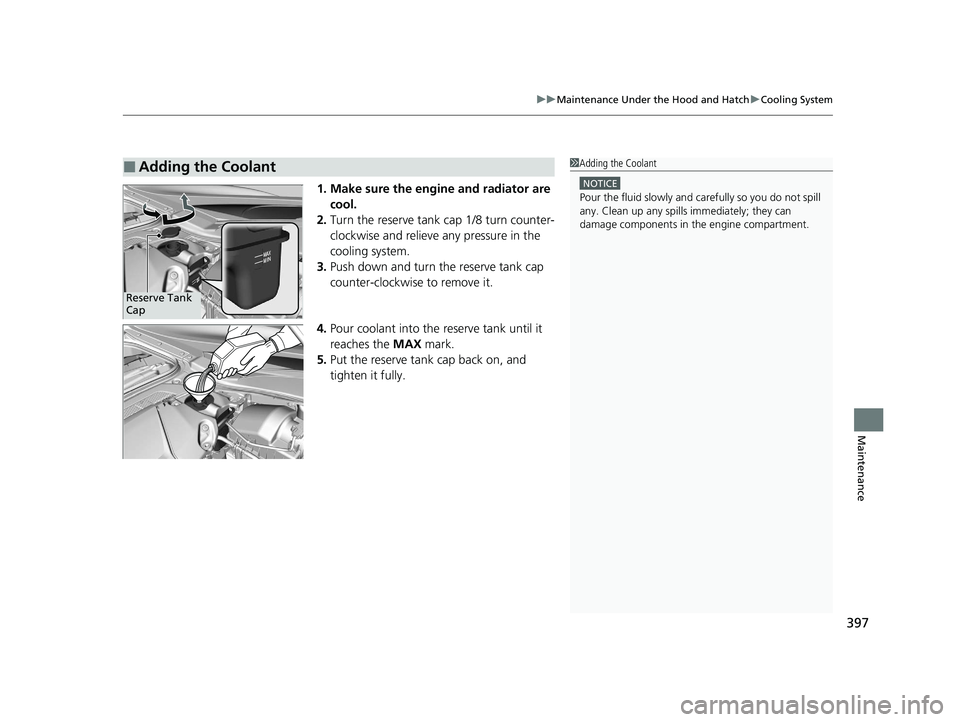
1. Make sure the engine and radiator are cool.
2. Turn the reserve tank cap 1/8 turn counter-
clockwise and relieve any pressure in the
cooling system.
3. Push down and turn the reserve tank cap
counter-clockwise to remove it.
4. Pour coolant into the reserve tank until it reaches the MAX mark.
5. Put the reserve tank cap back on, and
tighten it fully.
■Adding the Coolant1Adding the Coolant
NOTICE
Pour the fluid slowly and ca refully so you do not spill
any. Clean up any spills immediately; they can
damage components in the engine compartment.
Reserve Tank Cap
20 ACURA NSX PMC-31T6N6300.book 397 ページ 2019年9月11日 水曜日 午後4時51分
Page 408 of 491

406
uuChecking and Maintaining Wiper BladesuChanging the Wiper Blade Rubber
Maintenance
7.Insert the flat side of the new wiper blade
onto the bottom part of the holder. Insert
the blade all the way.
8. Install the end of the wiper blade into the
cap.
9. Slide the wiper blade onto the wiper arm
until it locks.
10. Lower both wiper arms.
11. Set the power mode to ON and hold the
wiper switch in the MIST position until
both wiper arms return to the standard
position.
Cap Wiper
Blade
Holder
20 ACURA NSX PMC-31T6N6300.book 406 ページ 2019年9月11日 水曜日 午後4時51分
Page 419 of 491

417
Maintenance
12-Volt Battery
Checking the 12-Volt BatteryCheck the battery terminals for corrosion
monthly.
The battery is protected by a cover.
Remove the cover by pressing the tabs.
Slide the terminal cover on your vehicle’s 12-
volt battery positive + terminal.
The battery condition is monitored by the
sensor on the negative terminal. If there is a
problem with the sensor, the warning
message on the driver information interface
will let you know. Have your vehicle checked
by an authorized Acura NSX dealer.
If your vehicle’s battery is disconnected or goes dead:• The audio system is disabled.
2 Reactivating the audio system P. 164
• The clock resets.
2 Clock P. 104
Charging the AGM Battery
AGM labeled batteries can be damaged if improperly charged. For more information
on how to charge an AGM battery, consult an authorized Acura NSX dealer.
112-Volt Battery
WARNING: Battery post, terminals,
and related accessories contain lead
and lead compounds.Wash your hands after handling.
When you find corrosion, cl ean the battery terminals
by applying a baking powder and water solution.
Clean the terminals with a damp towel. Cloth/towel
dry the battery. Coat the terminals with grease to
help prevent future corrosion.
When replacing the battery, the replacement must be
of the same specifications.
Consult an authorized Acura NSX dealer for more
information.
3WARNING
The battery gives off explosive hydrogen
gas during normal operation.
A spark or flame can cause the battery to
explode with enough force to kill or
seriously hurt you.
When conducting any battery
maintenance, wear prot ective clothing and
a face shield, or have a skilled technician do
it.
Tab
Cover
Terminal
Cover
20 ACURA NSX PMC-31T6N6300.book 417 ページ 2019年9月11日 水曜日 午後4時51分
Page 423 of 491

421
uuCleaninguInterior Care
Maintenance
The floor mats hook over the floor anchors,
which keep the mats from sliding forward. To
remove the mats for cleaning, turn the anchor
knobs to the unlock position. When
reinstalling the mats after cleaning, turn the
knobs to the lock position.
Do not put additional floor mats on top of
the anchored mat.
To properly clean leather:1. Use a vacuum or soft dry cloth first to remove any dirt or dust.
2. Clean the leather with a soft cloth dampen ed with a solution comprised of 90%
water and 10% neutral soap.
3. Wipe away any soap residu e with a clean damp cloth.
4. Wipe away residual water and allo w leather to air dry in the shade.
Do not use abrasive cleaners.
■Floor Mats1Floor Mats If you use any floor mats that were not originally
provided with your vehicle, make sure they are
designed for your specific ve hicle, fit correctly, and
are securely anchored by the floor anchors.
Unlock
Lock
■Maintaining Genuine Leather
■Carbon Fiber Meter Visor and Steering Wheel
1Maintaining Genuine Leather
It is important to clean or wipe away dirt or dust as
soon as possible. Spills can soak into leather resulting
in stains. Dirt or dust ca n cause abrasions in the
leather. In addition, pl ease note that some dark
colored clothing can rub onto the leather seats
resulting in discol oration or stains.
20 ACURA NSX PMC-31T6N6300.book 421 ページ 2019年9月11日 水曜日 午後4時51分
Page 449 of 491

447
uuPower System Won’t StartuEmergency Power System Off
Handling the Unexpected
Emergency Power System Off The ENGINE START/STOP button may be used to turn the power system off due to
an emergency situation even while driving. If you must turn the power system off,
do either of the following operations: • Press and hold the ENGINE START/STOP button for about two seconds.
• Firmly press the ENGINE START/STOP button three times.
The steering wheel will not lock. However, because turning off the engine disables
the power assist the engine provides to the steering and braking systems, it will
require significantly more physical effort an d time to steer and slow the vehicle. Use
both feet on the brake pedal to slow down the vehicle and stop immediately in a
safe place. The gear position automatically changes to
(P after the vehicle comes to a complete
stop. Then, the power mode changes to VEHICLE OFF.
1Emergency Power System Off
Do not press the button while driving unless it is
absolutely necessary for the power system to be
turned off.
20 ACURA NSX PMC-31T6N6300.book 447 ページ 2019年9月11日 水曜日 午後4時51分
Page 465 of 491

463
Handling the Unexpected
When You Cannot Unlock the Fuel Fill Door
If you cannot unlock the fuel fill door, use the following procedure.
1.Open the hatch.
2. Pull the release lever toward you.
uThe release lever unlocks the fuel fill door
when it is pulled.
■What to Do When Unable to Unlock the Fuel Fill Door1When You Cannot Unlock the Fuel Fill Door
After taking these steps, c ontact an authorized Acura
NSX dealer to have your vehicle checked.
Release Lever
20 ACURA NSX PMC-31T6N6300.book 463 ページ 2019年9月11日 水曜日 午後4時51分
Page 481 of 491

Index
479
Index
Index
Numbers
12-Volt Battery Charging System Indicator ........................................... 75, 452
A AAC ........................................................... 208
ABS (Anti-lock Brake System) .................. 362
Accessories and Modifications ................ 426
Accessory Power Socket ........................... 153
Acoustic Vehicle Alerting System ............ 335
Active Damper System Indicator ............... 74
AcuraLink ................................................. 304
Adding the Coolant ................................. 397
Additives Coolant .......................................... 396, 398
Washer ................................................... 400
Adjusting
Mirrors.................................................... 141
Seats....................................................... 144
Steering Wheel ....................................... 140
Temperature ........................................... 100
Agile Handling Assist System .................. 350
Air Conditioning System (Climate Control
System) .................................................... 155
Changing the Mode................................ 156 Defrosting the Windshield and
Windows ...................................... 157, 158
Dust and Pollen Filters ............................. 419 Recirculation/Fresh Air Mode ................... 156
Sensors .................................................... 159
Using Automatic Climate Control ............ 155
Air Pressure ....................................... 408, 469
Airbags ........................................................ 43
Advanced Airbags ..................................... 49
Airbag Care ............................................... 57
Driver’s Knee Airbag .................................. 50
Event Data Recorder .................................... 0
Front Airbags (SRS) .................................... 46
Indicator .............................................. 55, 78
Passenger Front Airbag Off Indicator ......... 56
Sensors ...................................................... 43
Side Airbags .............................................. 52
Side Curtain Airbags .................................. 54
Android Auto ............................................ 219
Anti-lock Brake System (ABS) .................. 362
Indicator .................................................... 78
Apple CarPlay ........................................... 216
Audio Remote Controls ............................ 165
Audio System ............................................ 162
Adjusting the Sound ................................ 181
Changing the Home Screen Icon Layout ................................................... 170
Closing Apps ........................................... 180
Error Messages ........................................ 223
General Information ................................ 226
Home Screen ........................................... 173
iPod ......................................................... 199 Limitations for Manual Operation ............ 183
MP3/WMA/AAC ...................................... 208
Reactivating ............................................ 164
Recommended Devices............................ 227
Remote Controls ..................................... 165
Security Code .......................................... 164
Selecting an Audio Source ....................... 183
Status Area ............................................. 179
Theft Protection ...................................... 164
USB Flash Drives ...................................... 227
USB Ports ................................................ 163
Wallpaper Setup...................................... 171
Audio/Information Screen ....................... 167
Authorized Manuals ................................ 477
Auto Door Locking/Unlocking ................. 118
Auto Engine Stop/Start .............................. 13
Automatic Brake Hold ............................. 360
Indicator............................................ 72, 360
Automatic Brake Hold System
Indicator............................................ 72, 360
Automatic Operation (automatic lighting control) .................................................... 132
Average Fuel Economy ............................ 101
Average Speed ......................................... 101
20 ACURA NSX PMC-31T6N6300.book 479 ページ 2019年9月11日 水曜日 午後4時51分