2019 VOLVO XC90 TWIN ENGINE mirror
[x] Cancel search: mirrorPage 491 of 697
STARTING AND DRIVING
}}
* Option/accessory. 489
Recovery
This section refers to transporting the vehicle
with a tow truck or similar vehicle.
Call a professional towing service for assistance.
In certain conditions, the towing eyelet can be
used to pull the vehicle onto a flatbed tow truck.
CAUTION Note that vehicles with Twin Engine must
always be towed raised with all wheels on the
tow truck.
For vehicles equipped with leveling control*:
If the vehicle is equipped with pneumatic suspen-
sion, this feature must be turned off before the
vehicle is lifted onto a tow truck. Turning off the
function in the center display.
1. Tap Settings in the Top view.
2.
Tap My Car Parking Brake and
Suspension .
3. Select Disable Leveling Control.
The vehicle's location and ground clearance
determine if it can be lifted onto a tow truck. If
the incline of the tow truck is too steep or if the
ground clearance under the vehicle is insufficient,
attempting to pull it up may result in damage. In
this case, the vehicle should only be lifted with
the tow truck's lifting equipment.
WARNING No person or object should be behind the tow
truck when the vehicle is lifted onto the bed
of the truck.
Related information
Attaching and removing the towing eyelet
(p. 488) HomeLink
®
*10
HomeLink ®11
is a programmable remote control,
integrated in the vehicle electrical system, that
can control up to three different devices (e.g.
garage door opener, alarm system, outdoor and
indoor lighting) and thereby replace the remote
controls for these.
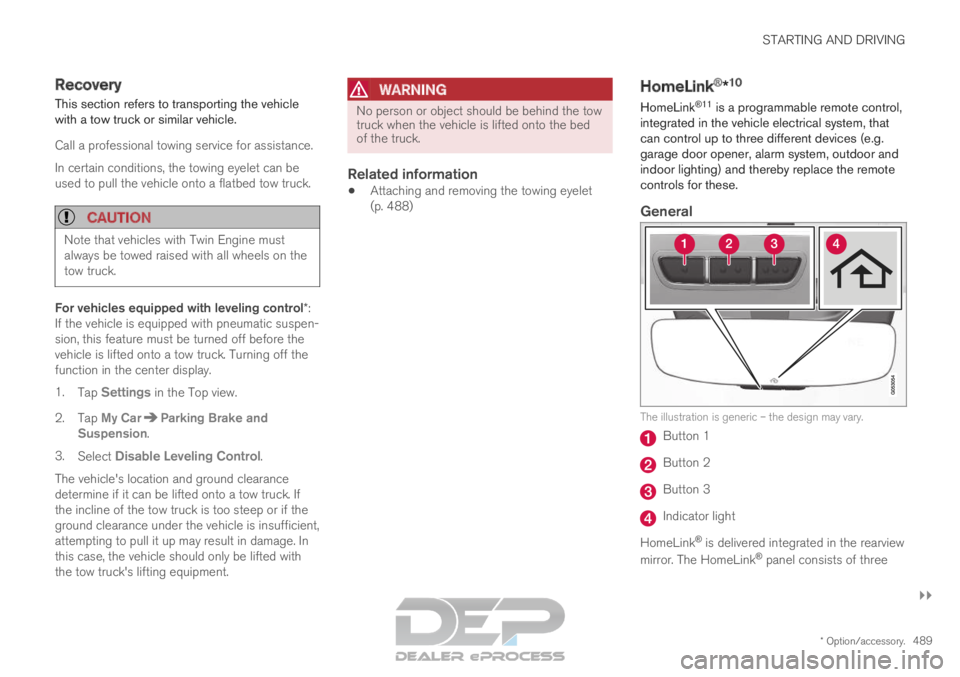
General The illustration is generic – the design may vary.
Button 1
Button 2
Button 3
Indicator light
HomeLink ®
is delivered integrated in the rearview
mirror. The HomeLink ®
panel consists of three
Page 492 of 697

||STARTING AND DRIVING
* Option/accessory.
490 programmable buttons and an indicator light in
the mirror.
For more information about HomeLink
®
, please
visit www.HomeLink.com, www.youtube.com/
HomeLinkGentex or call 1-800-355-3515.
Save the original remote controls for future pro-
gramming (e.g. for use in another vehicle). It is
also advisable to delete the button programming
if the vehicle is sold.
Related information
Using HomeLink ®
* (p. 491)
Programming HomeLink ®
* (p. 490)
Type approval for HomeLink ®
* (p. 492) Programming HomeLink
®
*12
Follow these instructions to program
HomeLink ®
, reset all programming, or program
individual buttons.
NOTE In some vehicles, the ignition must be on or in
the "accessory position" before HomeLink
®
can be programmed or used. It can be a good
idea to put new batteries in the remote con-
trol being replaced by HomeLink ®
for faster
programming and better radio signal trans-
mission. The HomeLink ®
buttons should be
reset before programming.
WARNING While HomeLink
®
is being programmed, the
garage door or gate being programmed may
be activated. Make sure that no one is near
the door or gate during programming. When
programming a garage door opener, it is
advised to park outside of the garage. 1.
Point the remote control at the HomeLink ®
button to be programmed and hold it about
2-8 cm (1-3 inches) from the button. Do not
obstruct the HomeLink ®
indicator light.
Note: Some remote controls are more effec-
tive at programming HomeLink ®
from a dis-
tance of about 15-20 cm (6-12 inches). Try
moving the remote control closer or further
away if you are experiencing any difficulties
programming.
2.
Press and hold both the remote control but-
ton and the HomeLink ®
button to be pro-
grammed.
3. Do not release the buttons until the indicator light has stopped flashing slowly (about once
a second) and either flashes quickly (about
10 times a second) or glows steadily.
>Steady glow: Indication that program-
ming is complete. Press the programmed
button twice to activate.
Flashing quickly: The device being pro-
grammed with HomeLink ®
may have a
security function that requires an extra
step. Try pressing the programmed button
twice to see whether the programming
works. Otherwise, continue with the fol-
lowing steps. 10
Certain markets only.
11 HomeLink and the HomeLink house symbol are registered trademarks of Gent\
ex Corporation.
12 Certain markets only.
Page 495 of 697

STARTING AND DRIVING
}}
* Option/accessory. 493
Compass*
An integrated compass in the upper right corner
of the rearview mirror shows the direction the
vehicle is traveling. Rearview mirror with compass.
Eight different compass directions are shown
with the abbreviations: N (north),
NE (northeast),
E (east), SE (southeast), S (south), SW (south-
west), W (west) and NW (northwest).
Related information
Activating and deactivating the compass*
(p. 493)
Calibrating the compass* (p. 493) Activating and deactivating the
compass*
An integrated compass in the upper right corner
of the rearview mirror shows the direction the
vehicle is traveling.
Activating and deactivating the
compass
The compass is automatically activated when the
vehicle is started.
To deactivate/activate the compass manually:
– Use a paper clip or similar object to press the
button on the bottom of the mirror.
Related information
Compass* (p. 493)
Calibrating the compass* (p. 493) Calibrating the compass*
The globe is divided into 15 magnetic zones.
The compass should be calibrated if the vehicle
is driven from one zone to another.
To calibrate the compass:
1.
Stop the vehicle in a large, open area away
from steel constructions and high-voltage
power lines.
2. Start the engine and switch off all electrical equipment (climate system, wipers, etc.) and
make sure all doors are closed.
NOTE Calibration may fail or not even be initiated if
electrical equipment is not turned off.
3. Hold the button on the bottom of the rear-
view mirror pressed for about 3 seconds
(using e.g. a paper clip). The number of the
current magnetic zone is shown.
Page 496 of 697

||STARTING AND DRIVING
* Option/accessory.
494 15
14
13
12
11
9
8
7
6
5
4
3
2
1
10Magnetic zones.
4. Press the button on the underside of the
mirror repeatedly until the desired magnetic
zone ( 1–15) appears (see the map of mag-
netic zones).
5. Wait until the display again shows C, or
press and hold the button on the underside
of the rearview mirror for approx. 6 seconds
until
C is displayed.
6.
Drive slowly in a circle at a speed of no more
than 10 km/h (6 mph) until a compass direc-
tion is shown in the display. This indicates
that calibration is complete. Drive in a circle
two more times to fine-tune the calibration.
7. Vehicles with heated windshields*: If C is
shown in the display when the windshield
heating function is activated, perform step 6
above with the heating function on.
8.
Repeat the above procedure as needed.
Related information
Compass* (p. 493)
Activating and deactivating the compass*
(p. 493)
Page 600 of 697

LOADING, STORAGE AND PASSENGER COMPARTMENT
* Option/accessory.
598 Sun visors
In the ceiling in front of the driver and front pas-
senger, there are sun visors that can be lowered
and angled to the side as necessary.
The illustration is generic – the design may vary.
The mirror lighting* comes on automatically when
the cover is lifted up.
The mirror frame has a holder for e.g. cards or
tickets.
Related information
Passenger compartment interior (p. 592) Cargo compartment
The vehicle has a flexible cargo compartment
that makes it possible to carry and secure large
objects.
The cargo compartment capacity can be consid-
erably increased by folding down the backrests in
the second and third rows* of seats. To make
loading and unloading easier, the rear section of
the vehicle can be raised and lowered using the
level control function*. Use the load anchoring
eyelets or grocery bag holders to help secure
objects in place, and the retractable cargo com-
partment cover* to help conceal objects in the
cargo compartment.
If the vehicle is equipped with a temporary spare
tire, this is secured to the cargo compartment
floor under the cover. The towing eyelet and tire
sealing system are located under the cargo com-
partment floor.
Related information
Loading recommendations (p. 598)
Grocery bag holders (p. 600)
Load anchoring eyelets (p. 601)
Installing and removing the cargo compart-
ment cover* (p. 601) Loading recommendations
There are a number of things to consider when
carrying loads in or on the vehicle.
Load-carrying capacity is determined by the vehi-
cle's curb weight. The total weight of all passen-
gers and any installed accessories reduces the
vehicle's load-carrying capacity by the corres-
ponding amount.
WARNING The vehicle's driving characteristics change
depending on the weight and position of the
load.
Loading the cargo compartment/trunk
Position objects so they are pressing against
the rear seat backrests.
Distribute the load evenly.
Heavy objects should be positioned as low
as possible. Avoid placing heavy objects on
folded-down seat backrests.
Cover sharp corners with a soft cloth or simi-
lar to help prevent damage to the upholstery.
Use the load anchoring eyelets and tension-
ing straps or similar to secure all objects.
Page 641 of 697

MAINTENANCE AND SERVICE
}}
* Option/accessory. 639
Fuse pliers are provided on the inside of the fuse
box cover to assist in removing and inserting
fuses.
There are also spaces for several extra fuses in
the distribution box in the engine compart-
ment.
Positions
Fuses 1, 3-21, 23-36, 39-53 and 55-59 are
"Micro" fuses.
Fuses 2-22, 37-38 and 54 are "MCase"
fuses and should only be replaced by a work-
shop 17
. Function
Ampere–
––
––
–Movement sensor*
5Media player
5Instrument panel
5Center console buttons
5Sun sensor
5 Function
Ampere Sensus control module
20 –
– Steering wheel module
5 Module for start knob and
parking brake controls
5 Heated steering wheel* mod-
ule 15 –
– –
– –
– –
– Climate system control mod-
ule
10 –
– Data link connector OBD-II 10
Center display
5 Climate system blower module
(front)
40 Function
Ampere USB HUB
5 Instrument lighting; Interior
lighting; Rearview mirror auto-
dim function*; Rain and light
sensors*; Rear tunnel console
keypad, second row of seats* A
;
Power front seats *; Rear door
control panels; Climate system
blower module left/right
Power rear seats B
; Display for
rear seat convenience func-
tions B
; Rear seat massage
function B 7.5 Control module for driver sup-
port functions
5 Panoramic roof with sun cur-
tain*
20 Head-up display*
5 Passenger compartment light-
ing
5 –
–17
An authorized Volvo workshop is recommended.
Page 655 of 697

MAINTENANCE AND SERVICE
653
Automatic car washes
The vehicle should be washed as soon as it
becomes dirty. This makes the vehicle easier to
clean because dirt does not attach as strongly. It
also reduces the risk of scratches and keeps the
vehicle looking new.
An automatic car wash is a fast and easy way to
keep your vehicle clean, but it does not reach all
areas of the vehicle. For best results, Volvo rec-
ommends hand washing your vehicle or supple-
menting automatic car washes with a hand wash.
NOTE
Volvo recommends not washing the vehicle in
an automatic car wash during the first few
months; the paintwork on new vehicles takes
some time to fully harden.
CAUTION
Before driving the vehicle into a car wash,
deactivate the Automatic Braking when Sta-
tionary and Automatic Parking Brake Applica-
tion functions. If the functions are not deacti-
vated, the brake system will seize when the
vehicle is stationary and the vehicle will not be
able to roll.
CAUTION For automatic car washes in which the vehicle
is pulled forward on rolling wheels:
1.
Before washing the vehicle, make sure
that the automatic rain sensor is deacti-
vated. If it is not deactivated and inadver-
tently starts, the wiper arms could be
damaged.
2. To help prevent damage from the auto- matic car wash machinery, make sure
that the door mirrors are folded in, anten-
nas retracted or removed, and any auxili-
ary lights secured.
3. Drive into the automatic car wash.
4. Turn off the "Automatic Braking when Stationary" function using the button
in the tunnel console.
5.
Turn off the "Automatic Parking Brake
Application" function in the center dis-
play's Top view.
6. Turn off the engine by turning the start knob in the tunnel console clockwise.
Hold the knob in position for at least
2 seconds.
The vehicle is now ready for the automatic car
wash.
CAUTION The system will automatically change to P
mode if the above steps are not followed. In P
mode, the wheels are locked, which they
should not be when the vehicle is being
washed in a car wash.
Related information
Cleaning the exterior (p. 650)
Polishing and waxing (p. 651)
Hand washing (p. 651)
High-pressure washing (p. 654)
Cleaning the wiper blades (p. 654)
Cleaning exterior plastic, rubber and trim
components (p. 655)
Cleaning rims (p. 656)
Corrosion protection (p. 656)
Page 670 of 697

||SPECIFICATIONS
668
Dimensions
mminches
I
Wheel track,
rear H 1667
I
1675 J 65.6
I
65.9 J
Wheel track,
rear K 1671
I
1679 J 65.8
I
66.1 J
J Load width, floor 1192 46.9
K Width 1923L
1931 M
1958 N 75.7
L
76.0 M
77.1 N Dimensions
mminches
L
Width incl.
rearview mir-
rors 2140 84.3
M Width incl. folded rear-
view mirrors 2008 79.1 A
At curb weight + 2 people. (Varies slightly depending on tire
dimensions, chassis, etc.)
B Does not apply to vehicles with 3 or 4 seats.
C From the second row of seats in 7-seat models*.
D Vehicles with 3 or 4 seats.
E Vehicles with 5 seats.
F Vehicles with 7 seats.
G Including roof antenna, at curb weight.
H Vehicles without pneumatic suspension.
I Vehicles with 19-inch wheels.
J Vehicles with 20, 21 and 22-inch wheels.
K Vehicles with pneumatic suspension.
L Chassis width.
M Width for vehicles with 19-inch wheels.
N Width for vehicles with 20, 21 and 22-inch wheels.
Related information
Weights (p. 669)