2019 VOLVO XC90 TWIN ENGINE lock
[x] Cancel search: lockPage 218 of 697

||CLIMATE CONTROL
* Option/accessory.
216 Blower control for front seats.
AUTO - Automatic climate control.
Rear climate control
All climate system functions for the rear seat can
be controlled from the
Rear climate tab. 2nd row climate
- Climate functions for the
second row of seats. Blower control for the
second row of seats. 3rd row climate
- Climate functions for the
third row of seats*. Rear seat temperature control.
Rear seat heating control*.
Parking climate
Parking climate functions can be controlled from
the
Parking climate tab.
Climate controls on the rear side of the
tunnel console Rear seat heating control*.
Blower control for rear seats.
Rear seat temperature control.
Button for locking/unlocking climate panel.
The climate panel has a screen lock to help pre-
vent inadvertently changing blower speed and
temperature. When the screen is locked, only the
controls for seat adjustment* and the unlock but-
ton will be displayed.
After unlocking, blower speed and temperature
can also be changed from the climate panel and
all selected climate settings will be displayed. The
screen locks automatically after a period of inac-
tivity.
Page 229 of 697

CLIMATE CONTROL
* Option/accessory.227
2.
Tap the desired blower speed, 1-5.
The blower speed for the second and third
rows of seats* can be switched off by tap-
ping 2nd row climate.
The blower speed for the third row of seats is
linked to the setting for the second row, but
can be switched off separately by pressing
3rd row climate.
>
The blower speed will be changed and the
buttons for the set speed will light up.
Setting blower speed for the rear seats
from the rear seats
1. Tap the unlock button on the tunnel con- sole's climate panel to access the controls. Blower controls on the rear climate panel of the tunnel
console.
2.
Tap the desired blower speed, 1-5.
>
The blower speed will be changed and the
buttons for the set speed will light up.
NOTE The blower speed for the rear seat cannot be
set if the blower speed for the front seat is
Off.
The rear seat blower speed can only be
turned off from the climate view in the center
display.
NOTE The climate system automatically adapts air-
flow as needed within the set blower speed,
which means that airflow speed may vary
slightly within the same blower speed.
Related information
Climate system controls (p. 215)
Page 231 of 697

CLIMATE CONTROL
}}
229 Temperature control.
3. Set the temperature by:
dragging the control to the desired tem-
perature
tapping
+− to raise/lower the tempera-
ture.
>
The temperature will be set and the but-
ton will display the new temperature.
Setting the temperature for the rear
seats from the rear seats
1. Tap the unlock button on the tunnel con- sole's climate panel to access the controls. Temperature controls on the rear climate panel of the
tunnel console.
2.
Tap the left or right side's <> buttons to
lower/raise the temperature.
>
The temperature will be changed and the
climate panel screen will show the new
temperature.
NOTE Heating/cooling cannot be accelerated by
choosing a higher/lower temperature than
the desired temperature.
Related information
Climate system controls (p. 215) Synchronize temperature
The temperature in the different climate zones of
the vehicle can be synchronized with the tem-
perature set for the driver's side. Synchronization button on the driver's side temperature
control.
1. Tap the driver's side temperature button in
the center display's climate bar to open the
control.
2. Tap Synchronize temperature .
>
The temperature for all of the vehicle's cli-
mate zones will be synchronized with the
one set for the driver's side and the syn-
chronization symbol will be displayed next
to the temperature button.
Synchronization is stopped with another press on Synchronize temperature or by changing the
temperature setting for a climate zone other than
the driver's.
Page 237 of 697

CLIMATE CONTROL
}}
235
4.
Tap Date to set a time for a specific date.
Tap Days to set a time for one or more days
of the week.
With Days: Activate/deactivate the repeat
function by selecting/deselecting the
Repeat weekly checkbox.
5. With Date: Select a date for preconditioning
by scrolling in the date list using the arrows.
With Days: Select days of the week for pre-
conditioning by tapping the buttons for the
days.
6.
Set the time at which preconditioning should
be completed by scrolling using the arrows in
the clock.
7. Tap Confirm to add a timer setting.
>
The timer setting will be added to the list
and activated.
Editing a timer setting1. Open Climate view in the center display.
2. Select the Parking climate tab.
3.
Tap the timer setting you would like to
change.
> A pop-up window will appear.
4. To edit a timer setting, follow the procedures described under the heading "Adding a timer
setting" above.
Related information
Preconditioning (p. 232)
Preconditioning timer (p. 234)
Activating and deactivating preconditioning
timer (p. 235)
Deleting preconditioning timer settings
(p. 236) Activating and deactivating
preconditioning timer
Timer settings in the preconditioning timer can
be activated or deactivated as needed. Timer buttons in the Parking climate tab in Climate
view.
1. Open Climate view in the center display.
2.
Select the Parking climate tab.
3.
Activate/deactivate a timer setting by tap-
ping the timer button to the right of the set-
ting.
> The timer setting is activated/deactivated and the button lights up/goes out.
Related information
Preconditioning (p. 232)
Preconditioning timer (p. 234)
Page 239 of 697

CLIMATE CONTROL
237
Climate comfort retaining function
The climate in the passenger compartment can
be maintained when the vehicle is parked, e.g. if
the engine is turned off but the driver or passen-
gers remain in the vehicle.
This function can only be direct-started.
The function utilizes several of the vehicle's sys-
tems: Residual heat from the engine is used to
help heat the passenger compartment to a
comfortable temperature.
In warm weather, the ventilation system cools
the passenger compartment by blowing air in
from outside.
NOTE Climate comfort maintenance will be deacti-
vated if the vehicle is locked from the outside
in order to avoid using residual engine heat
unnecessarily. This function is intended to be
used to maintain climate comfort when the
driver or a passenger remains in the vehicle
after the engine is turned off.
Related information
Parking climate (p. 231)
Starting and switching off the climate retain-
ing function when parking (p. 237) Starting and switching off the
climate retaining function when
parking
The climate retaining function maintains the cli-
mate settings in the vehicle after the engine has
been switched off. The function can be activated
in the center display. Button for retaining climate comfort in the Parking
climate tab in Climate view.
1. Open Climate view in the center display.
2.
Select the Parking climate tab.
3. Tap Keep climate comfort.
>
The climate comfort retaining function will
be activated/deactivated and the button
light will go on/off.
NOTE Maintained climate comfort is not possible
when there is not sufficient residual engine
heat to maintain the climate settings in the
passenger compartment, or if the outside
temperature is above approximately 20 °C
(68 °F).
NOTE
Climate comfort maintenance will be deacti-
vated if the vehicle is locked from the outside
in order to avoid using residual engine heat
unnecessarily. This function is intended to be
used to maintain climate comfort when the
driver or a passenger remains in the vehicle
after the engine is turned off.
Related information
Climate comfort retaining function (p. 237)
Page 244 of 697

KEY, LOCKS AND ALARM
* Option/accessory.
242 Lock indication
When the vehicle is locked or unlocked, the turn
signals will flash to indicate that the vehicle has
been locked or unlocked correctly.
Exterior confirmationLocking
The turn signals will flash once and the door
mirrors will fold in 1
to confirm the vehicle is
locked.
Unlocking
The turn signals will flash twice and the door
mirrors will fold out 1
to confirm the vehicle is
unlocked.
All doors, tailgate and hood must be closed for
confirmation to be given. If only the driver's door
is closed when the vehicle is locked 2
, the vehicle
will be locked but the turn signals will only flash
to indicate locking when all doors and the hood
and tailgate have been closed.
Lock and alarm indicator The locks and alarm indicator on the dashboard will dis-
play the status of the locking system.
A long flash indicates that the vehicle is locked.
When the vehicle is locked, this will be indicated
by short, pulsing flashes.
Other indicators
The home safe lighting and approach lighting
functions also indicate when the vehicle is locked
or unlocked.
Lock button indicators
Front door Lock buttons with indicator lights in front door.
Illuminated indicator lights in both front door lock
buttons indicate that all doors are locked. If any
door is opened, the lights in both doors will go
out. 1
Only vehicles with power folding mirrors.
2 Does not apply to vehicles equipped with keyless locking/unlocking (Pas\
sive Entry*).
Page 245 of 697

KEY, LOCKS AND ALARM
}}
* Option/accessory. 243
In rear door*Lock button with indicator light in rear door.
Illuminated indicator lights in each door indicate
that that particular door is locked. If any door is
unlocked and opened, the indicator light in that
door will go out. The lights in the other doors will
remain illuminated.
Related information
Lock confirmation settings (p. 243)
Welcome Light (p. 161)
Using home safe lighting (p. 161) Lock confirmation settings
Settings for how the vehicle confirms locking
and unlocking can be adjusted in the center dis-
play's Settings menu.
Locking response:
1.
Tap Settings in the center display's Top
view.
2.
Tap My Car Locking
.
3. Tap Visible Locking Feedback to deacti-
vate the function or to select when the vehi-
cle should provide a visible response: during
Lock, Unlock or Both.
4.
Select to receive an audible response when
locking the vehicle by marking Audible
Locking Feedback.
Folding door mirrors* confirmation:
1. Tap Settings in the center display's Top
view.
2.
Tap My Car Mirrors and Convenience
.
3. Select Fold Mirror When Locked to acti-
vate or deactivate the function.
Related information
Lock indication (p. 242) Remote key
The remote key is used to lock and unlock doors
and the tailgate. The remote key must be in the
vehicle in order to start the engine. Remote control key
3
, on left, and button-less key ((Key
Tag)*), on right.
The remote key is not physically used to start the
ignition because the vehicle is standard-equipped
with keyless start (Passive Start).
To start the vehicle, the key must be in the front
section of the passenger compartment, e.g. in the
driver's pocket or in a cup holder in the tunnel
console. 3
The illustration is generic - details may vary according to vehicle mode\
l.
Page 246 of 697
||KEY, LOCKS AND ALARM
* Option/accessory.
244 The keyless system for locking/unlocking the
doors and tailgate (Passive Entry*) is available as
an option. This system has a range in a semicircle
with a radius of approximately 1.5 meter (5 feet)
out from the driver's door and approx. 1 meter
(3 feet) out from the tailgate.
With keyless start in combination with keyless
locking and unlocking, the remote key can be
located anywhere in the passenger compartment
or cargo compartment in order to start the
engine.
Each remote key supplied with the vehicle can be
linked to a driver profile with unique settings for
the vehicle. When a key with a specific profile is
used, the vehicle settings are adjusted according
to that profile.
Buttonless key, Key TagFor vehicles equipped with keyless locking and
unlocking*, a smaller, lighter and button-less key
(Key Tag 4
) is also provided. It works the same
way as the regular remote key as regard keyless
start and keyless locking and unlocking. The key
is waterproof up to a depth of approx. 10 meters
(30 feet) for up to 60 minutes. It does not have a
detachable key blade and its battery cannot be
replaced.
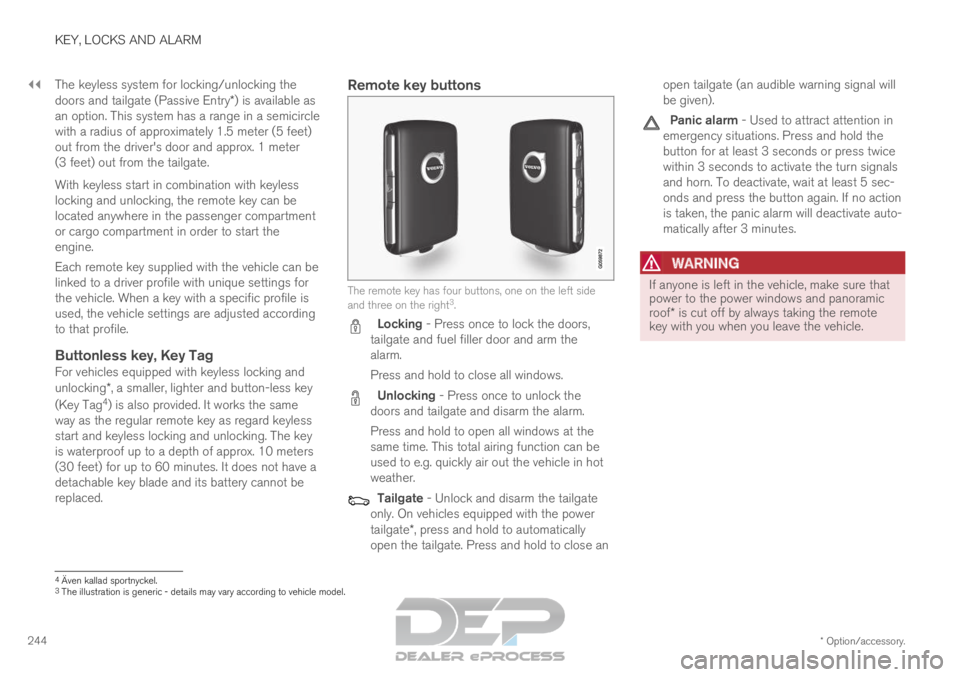
Remote key buttons The remote key has four buttons, one on the left side
and three on the right
3
. Locking - Press once to lock the doors,
tailgate and fuel filler door and arm the
alarm.
Press and hold to close all windows. Unlocking - Press once to unlock the
doors and tailgate and disarm the alarm.
Press and hold to open all windows at the
same time. This total airing function can be
used to e.g. quickly air out the vehicle in hot
weather. Tailgate - Unlock and disarm the tailgate
only. On vehicles equipped with the power
tailgate*, press and hold to automatically
open the tailgate. Press and hold to close an open tailgate (an audible warning signal will
be given). Panic alarm - Used to attract attention in
emergency situations. Press and hold the
button for at least 3 seconds or press twice
within 3 seconds to activate the turn signals
and horn. To deactivate, wait at least 5 sec-
onds and press the button again. If no action
is taken, the panic alarm will deactivate auto-
matically after 3 minutes.
WARNING If anyone is left in the vehicle, make sure that
power to the power windows and panoramic
roof* is cut off by always taking the remote
key with you when you leave the vehicle. 4
Även kallad sportnyckel.
3 The illustration is generic - details may vary according to vehicle mode\
l.