2019 VOLVO XC90 TWIN ENGINE radio
[x] Cancel search: radioPage 598 of 697

LOADING, STORAGE AND PASSENGER COMPARTMENT
* Option/accessory.
596 Using the electrical outlets
The 12 V outlet can be used for devices
intended for this such as MP3 players, coolers
and cellular phones.
The high-voltage outlet* can be used for devices
intended for this, such as chargers, laptops, etc.
The ignition must be in at least mode I for the
outlets to supply current. The outlets will then be
active as long as there is sufficient charge in the
start battery.
If the engine is turned off and the vehicle is
locked, the outlets will be deactivated. If the
engine is turned off and the vehicle remains
unlocked, the sockets will remain active for up to
7 minutes.
NOTE Bear in mind that using the electrical outlets
when the engine is off could cause the starter
battery to have too low of a charge level,
which could limit other functionality.
Accessories connected to the electrical out-
lets can be activated even when the vehicle
electrical system is off or if preconditioning is
used. For this reason, disconnect plugs when
they are not in use to prevent the starter bat-
tery from becoming discharged.
WARNING
Do not use accessories with large or
heavy plugs – they could damage the out-
let or come loose while you are driving.
Do not use accessories that could cause
disruptions to e.g. the vehicle's radio
receiver or electrical system.
Position the accessory so that there is no
risk of it injuring the driver or passengers
in the event of heavy braking or a colli-
sion.
Pay attention to connected accessories
as they can generate heat that could burn
passengers or the interior.
Using 12 V outlets1. Remove the stopper (tunnel console) or fold
down the cover (trunk/cargo compartment)
over the socket and plug in the device.
2. Unplug the device and put the stopper back in (tunnel console) or fold up the cover
(trunk/cargo compartment) when the socket
is not in use or left unattended.
CAUTION The maximum power is 120 W (10 A) per
outlet.
Using high-voltage outletsThe ignition must be in at least mode I for outlets
to supply current. The outlets will then be active
as long as there is sufficient charge in the start
battery.
1. Slide down the cover over the outlet and plug
in the device.
>
The LED 2
light on the outlet will indicate
its status.
2. The outlet is supplying electrical current when the light is glowing steadily green.
3. Disconnect the device by pulling out the plug (do not pull on the cord).
Pull up the cover when the outlet is not in
use or is left unattended.
CAUTION The maximum power is 150 W.
WARNING
Do not attempt to alter or repair the high-volt-
age outlet on your own. Volvo recommends
contacting an authorized Volvo workshop.
2
LED (Light Emitting Diode)
Page 616 of 697

||MAINTENANCE AND SERVICE
* Option/accessory.
614
NOTE Data downloading can affect other services
such as transfer data, e.g. web radio. If the
affect on other services is experienced as
problematic, the download can be interrupted.
Alternatively, it may be appropriate to switch
off or cancel other services.
NOTE
An update can be interrupted when the igni-
tion is switched off and the vehicle is left.
However, the update does not have to be
completed before the vehicle is left as the
update is resumed the next time the vehicle is
used.
Updating all system software
–
Select Install all at the bottom of the list.
To avoid displaying a list, select Install all via
System updates .
Updating individual system software
–Select Install to choose the software you
would like to download.
Canceling software download
– Tap the checkbox in the activity indicator that
replaced
Install when the download began. Note that only a download can be cancelled. An
installation cannot be cancelled once it has
begun.
Deactivating the background search for
software update
Automatic background searching for software
updates is activated as the default factory setting,
but the function can be deactivated.
1. Tap Settings in the center display's Top
view.
2.
Tap System Download Center
.
3. Tap to deselect Auto Software Update.
Related information
Download Center (p. 613)
Internet-connected vehicle* (p. 541)
Navigating in the center display's views
(p. 115) Vehicle status
The vehicle's general status can be displayed in
the center display along with the option to
schedule service 3
.
The
Car Status app is started
from the center display's App
view and has four tabs: 3
Certain markets only.
Page 679 of 697

INDEX
677
1, 2, 3 ... 4WD
452
A ABS
anti-lock brakes
439
AC (Air conditioning) 230
ACC - Adaptive Cruise Control 300, 303,
304, 305, 306, 307, 309, 310, 311, 312, 313, 314
Accessories and extra equipment 35 installation 36
Accessory installation warning 36, 37
Active Bending Lights 159
Adapting driving characteristics 278, 454
Adaptive Cruise Control 300, 303, 304, 305, 306, 307, 309, 310, 311, 312, 313, 314 change cruise control functionality 313
function 300
manage speed 304, 305
pass 309, 310
radar sensor 332
set time interval 306, 307
troubleshooting 312
Adjusting the steering wheel 201 Airbag
52
activation/deactivation
56
driver's side 53
passenger side 53, 56
Air bag, see Airbag 52
Air conditioning 230
Air conditioning, fluid volume and grade 674
Air distribution 209
air vents 209, 211
changing 210
defrosting 222
recirculation 221
table showing options 212
Air quality 206, 208
allergy and asthma 208
passenger compartment filter 209
Air recirculation 221
Alarm 273
deactivating 274
Allergy and asthma-inducing substances 208
All Wheel Drive, AWD 452
All Wheel Drive (AWD) 452
All Wheel Drive (four-wheel drive) 452
Android Auto 530, 532
Antenna location 262 Apple CarPlay
527, 529
Approach lighting 161
Apps 498
Assistance at risk of collision 380, 381, 382, 383, 384, 385, 386, 387, 389
Audio and media 496
Audio system HD digital radio 508
SiriusXM® Satellite radio 508, 509, 511
Auto-climate 220
Auto hold 446
Auto-hold brakes 446
activate and deactivate 446
after collision 447
Automatic car wash 653
Automatic high beam 157
Automatic locking 266
Automatic relocking 246, 259
Automatic Speed Limiter 287, 289, 290, 291
Automatic transmission 449
kickdown 452
oil 673
Trailer 483
Auxiliary heater 239
INDEX
Page 684 of 697
INDEX
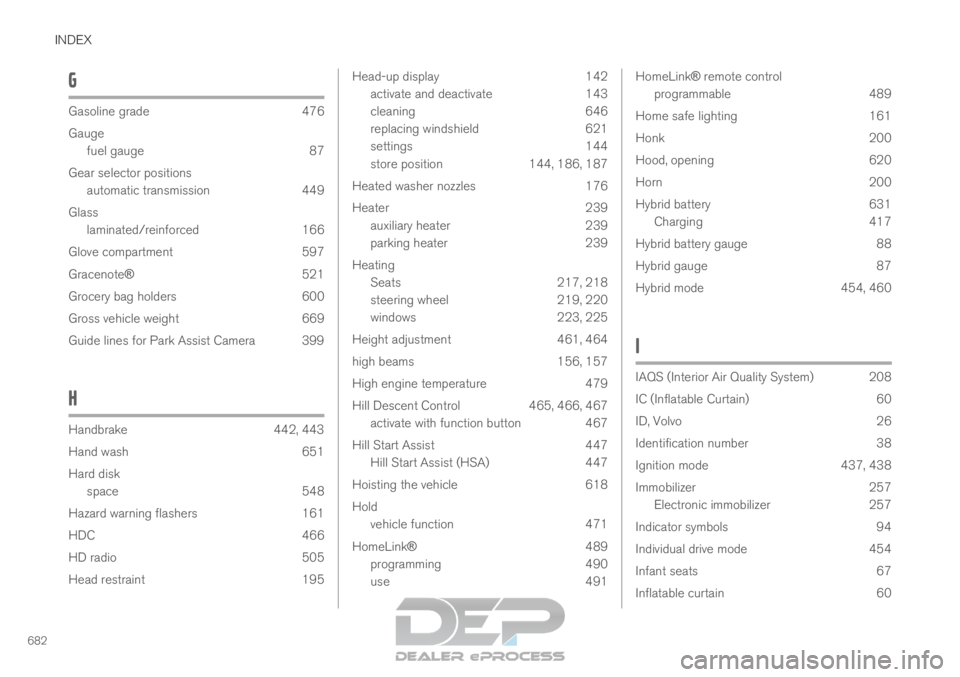
682G Gasoline grade
476
Gauge fuel gauge
87
Gear selector positions automatic transmission 449
Glass laminated/reinforced 166
Glove compartment 597
Gracenote® 521
Grocery bag holders 600
Gross vehicle weight 669
Guide lines for Park Assist Camera 399
H Handbrake
442, 443
Hand wash
651
Hard disk space 548
Hazard warning flashers 161
HDC 466
HD radio 505
Head restraint 195 Head-up display
142
activate and deactivate
143
cleaning 646
replacing windshield 621
settings 144
store position 144, 186, 187
Heated washer nozzles 176
Heater 239
auxiliary heater 239
parking heater 239
Heating Seats 217, 218
steering wheel 219, 220
windows 223, 225
Height adjustment 461, 464
high beams 156, 157
High engine temperature 479
Hill Descent Control 465, 466, 467
activate with function button 467
Hill Start Assist 447
Hill Start Assist (HSA) 447
Hoisting the vehicle 618
Hold vehicle function 471
HomeLink® 489
programming 490
use 491 HomeLink® remote control
programmable 489
Home safe lighting 161
Honk 200
Hood, opening 620
Horn 200
Hybrid battery 631
Charging 417
Hybrid battery gauge 88
Hybrid gauge 87
Hybrid mode 454, 460
I IAQS (Interior Air Quality System) 208
IC (Inflatable Curtain)
60
ID, Volvo 26
Identification number 38
Ignition mode 437, 438
Immobilizer 257
Electronic immobilizer 257
Indicator symbols 94
Individual drive mode 454
Infant seats 67
Inflatable curtain 60
Page 688 of 697

INDEX
686disconnect 536
phone call 537, 539
text message 538
voice control 147
Pilot Assist 316, 319, 320, 322, 323, 324, 326, 327, 328, 329, 330
pass 326, 327
pinch protection 166 resetting 167
PIN code 545
Polishing 651
Position lights 154
Power 671 electric motor 671
Power folding door mirrors 171
Power panoramic roof 172
Power save mode 480
Power seats 185
Power tailgate 266
Power windows 167, 168 pinch protection 166
Preconditioning 232 start/stop 233
timer 234
Pressure wash 654
Privacy Policy (Customer Privacy Policy) 35 Private locking
271
activation/deactivation
272
PROPOSITION 65 WARNING 481
R Radar sensor
303, 332
limitations
333
Radar unit 332
Radio 501 changing radio waveband and radio sta-
tion 502
HD radio 505
RBDS 505
search radio station 503
settings 504
SiriusXM® Satellite radio 508, 509, 511
start 501
voice control 148
Radio favorites 503
Rain sensor 177, 178
Rain sensor's memory function 178
Raise the rear end 599
Rear camera 396, 397, 399, 401, 402, 403, 404, 405
Rear door sun shade 169 Rear seat
adjusting backrest tilt
197
blower 226
climate 215
folding backrest 193, 199
getting in/getting out 198
head restraint 195
heating 218
moving forward/rearward 197
temperature 228
Rear sensors 390, 391, 392, 393, 394, 395
Rearview/door mirrors dimming 170
heating 225
interior 169
Rearview mirror 169
dimming 170
Rear window heating 225
washers 180, 181
wipers 180, 181
Recalls 45
Recommendations when driving 472
Recommendations when loading 598
Recovery 489
Red Key 253
settings 253
Page 689 of 697

INDEX
687
Refrigerant 621
climate system 674
Refueling filling 475
fuel filler door, fuel flap 474
Remote immobilizer 257
Remote key 243 battery replacement 249
connecting to driver profile 138
detachable key blade 254
loss 252
Range 248
Remote updates 613
Reporting safety defects 44
Resetting door mirrors 171
Resetting settings 134 change of owner 134
Driver profile 139
Resetting trip odometer 92
Road Sign Information 364, 365, 366 limitations 369
operation 366, 367, 368
Road trip 472
Roll Stability Control 279
Roof load, max. weight 669
RSC (Roll Stability Control) 279
Run-off Mitigation 381, 382, 383 S
Safety
42
pregnancy
43
Safety belt, see Seat belt 47
Safety defects, reporting 44
Safety mode 61 starting/moving 62
Sealing compound 582
Seat, see Seats 184
Seat belt reminder 51
Seat belts 47 Automatic locking retractor/Emergency
locking retractor 65
buckling/unbuckling 48
pregnancy 43
seat belt reminder 51
seat belt tensioner 50
securing child restraint systems 67, 69, 71
Seat belt tensioner 50 resetting 51
Seats heating 217, 218
manual front seat 184
power front seats 185
store position 186, 187
ventilation 219
whiplash protection 46 Sensors
air quality
209
climate 204
Sensus connection and entertainment 30
Sensus Navigation 366
Service position 661
Service program 610
Set time interval 298
settings Categories 135
contextual 133
resetting 134
Shiftlock 452
Side airbag 60
Side Impact Protection System 60
SIM card 545
SIPS (Side Impact Protection System) 60
Sirius Satellite radio Travel link 512
SiriusXM® Satellite radio traffic information 508, 509, 511
Slippery conditions 472, 473
Slippery road conditions 473
Software updates 33
Sound experience 497
Page 692 of 697

INDEX
690Turn signals 158
Twin Engine
general 416
Type approval radar system 336
U Uniform Tire Quality Grading
566
Units
132
Unlocking settings 247
with key blade 255
USB socket for connecting media 525
V Vehicle care 650, 651, 653, 654, 655, 656
leather upholstery
648
Vehicle Event Data 33
Vehicle functions in the center display 122
Vehicle key bat. low 249 Vehicle modem
connecting vehicle to Internet
544
settings 545
Vehicle recovery 489
Vehicle status 614
inflation pressure 572
Vehicle upholstery 645, 647, 648, 649, 650
Vehicle weight 669
Ventilation 209, 210, 211
Seats 219
Video 522, 524
settings 523
Voice control 145
climate 205
phone 147
radio and media 148
settings 148
VOL mark 560
Volvo ID 26
create and register 26 W
Warning light
Adaptive Cruise Control
303
stability and traction control system 279
Warning lights airbags SRS 97
alternator does not charge 97
brake system error 97
low oil pressure 97
parking brake applied 97
seat belt reminder 97
starter battery not charging 97
WARNING 97
Warning sound parking brake 445
warning symbols 97
Warning symbols safety 42
Warranties 610
Washer Headlights 179
rear window 180, 181
washer fluid, filling 662
Windshield 179
Washer fluid 176, 662
Washer nozzles, heated 176
Waxing 651