2019 VOLVO XC90 TWIN ENGINE belt
[x] Cancel search: beltPage 99 of 697

DISPLAYS AND VOICE CONTROL
97
Warning symbols in the instrument
panel
The warning symbols alert the driver that an
important function is activated or that a serious
fault or error has occurred. Symbol
Meaning WARNING
The red warning symbol illuminates
to indicate that a fault has been
detected that could affect safety
and/or driveability. An explanatory
message will be simultaneously
displayed in the instrument panel.
The warning symbol may also illu-
minate in combination with other
symbols.
Seat belt reminder
This symbol will glow steadily or
flash if the driver or front seat pas-
senger has not fastened their seat
belt or if anyone in the rear seat
has removed their seat belt. Symbol
Meaning Airbags
If this symbol remains illuminated
or comes on while driving, a fault
has been detected in one of the
vehicle's safety systems. Read the
message in the instrument panel.
Volvo recommends contacting an
authorized Volvo workshop.
A
B
Fault in brake system
If this symbol illuminates, the brake
fluid level may be too low. Contact
your nearest authorized workshop
to have the brake fluid level
checked and adjusted. A
BParking brake on
This symbol glows steadily when
the parking brake is applied.
A flashing symbol indicates that a
fault has occurred. Read the mes-
sage in the instrument panel. Symbol
Meaning Low oil pressure
If this symbol illuminates while driv-
ing, the engine oil level is too low.
Stop the engine immediately and
check the engine oil level. Add oil if
necessary. If the symbol illuminates
and the oil level is normal, contact
a workshop. Volvo recommends
contacting an authorized Volvo
workshop.
Generator not charging
This symbol illuminates during driv-
ing if a fault is detected in the elec-
trical system. Contact a workshop.
Volvo recommends contacting an
authorized Volvo workshop.
Collision risk
City Safety warns the driver if there
is a risk of a collision with another
vehicle, pedestrian, cyclist or large
animal.
A
Canadian models.
B US models.
Related information
Indicator symbols in the instrument panel
(p. 94)
Instrument panel (p. 84)
Page 195 of 697

SEATS AND STEERING WHEEL
}}
* Option/accessory. 193Move the passenger seat forward/rearward
by moving the control forward/rearward.
Change the backrest tilt of the passenger
seat by moving the control forward/back-
ward.
Related information
Manual front seats (p. 184)
Power* front seats (p. 185)
Adjusting the power* front seats (p. 185)
Storing positions for seats, mirrors and head-
up display* (p. 186)
Using stored positions for seats, mirrors and
head-up display* (p. 187)
Adjusting front seat massage settings*
(p. 189)
Adjusting* front seat cushion length (p. 189)
Front seat massage* settings (p. 188)
Adjusting front seat side bolster settings*
(p. 190)
Adjusting front seat lumbar support* (p. 191) Folding the second row backrests
The second row of seats has three individual
seating positions. The backrests can be folded
down separately.
WARNING
Adjust the seat and ensure it locks into
position before driving. Use caution when
adjusting the seat. Uncontrolled or care-
less adjustments could lead to injury.
Long objects must always be securely
tied down to help prevent injury or dam-
age in the event of sudden braking.
Always turn off the engine and apply the
parking brake when loading or unloading
the vehicle.
Put the gear selector in P to help prevent
the gear selector from being inadvertently
moved.
CAUTION When the backrest is folded down, make sure
there are no objects in the rear seat, and the
seat belts are not buckled. Otherwise there is
a risk of damage to the upholstery.
Page 233 of 697

CLIMATE CONTROL
}}
* Option/accessory. 231
Activating and deactivating climate
control for the third-row seats*
The air conditioning cools and dehumidifies
incoming air as needed. Air conditioning button in the Rear climate tab in Cli-
mate view.
1. Open Climate view in the center display and select the Rear climate tab.
2. Tap 3rd row climate.
>
The air conditioning is activated/deacti-
vated and the button lights up/goes out.
NOTE The air conditioning for the third row of seats
is automatically activated if any of the third
row seat belts are buckled.
It is not possible to manually activate air con-
ditioning for the third row of seats if the main
air conditioning system is deactivated or the
climate system for the second row of seats is
deactivated.
Related information
Climate system controls (p. 215) Parking climate
Parking climate is an umbrella term for various
functions that improve the passenger compart-
ment climate when the vehicle is parked, e.g.
preconditioning. Parking climate functions are controlled from the
Parking climate tab in the center display's Climate view.
Related information
Climate (p. 204)
Preconditioning (p. 232)
Page 306 of 697

DRIVER SUPPORT
* Option/accessory.
304 Head-up display for Adaptive Cruise
Control with collision warning
In vehicles equipped with a head-up display*, a
flashing warning symbol will be displayed on the
windshield. Collision warning symbol on the windshield
41
.
NOTE Visual warnings on the windshield may be dif-
ficult to notice in cases of strong sunlight,
reflections, extreme light contrasts, or if the
driver is wearing sunglasses or is not looking
straight ahead.
Related information
Adaptive Cruise Control* (p. 300)
Head-up display* (p. 142) Activating and starting Adaptive
Cruise Control
Adaptive Cruise Control (ACC
42
) must first be
activated and then started before it can regulate
speed and distance.
Putting Adaptive Cruise Control in
standby mode Note: This illustration is general and details may vary
depending on model.
Adaptive Cruise Control is in standby mode each
time the engine is started. To put ACC in standby
mode from active mode:
–
Press ◀ (2) or ▶ (3) on the steering wheel
keypad and scroll to the (4) function.
>
The symbol will appear and Adaptive
Cruise Control will go into standby mode.
Starting/activating Adaptive Cruise
Control
To start ACC:
The driver's seat belt must be buckled and
the driver's door must be closed.
There must be a vehicle ahead (target vehi-
cle) within a reasonable distance or your
vehicle's current speed must be at least
15 km/h (9 mph). Note: This illustration is general and details may vary
depending on model.
–
With the (4) function displayed, press
(1) on the steering wheel keypad.
>
Adaptive Cruise Control will start and the
current speed will be stored, which will be
shown by numbers in the center of the
speedometer. 41
Note: This illustration is general and details may vary depending on mod\
el.
Page 310 of 697

||DRIVER SUPPORT
308
To temporarily deactivate Adaptive Cruise Control
and put it in standby mode:
– Press the button on the steering wheel
(2).
> The symbol in the instrument panel
changes color from WHITE to GRAY and
the set speed in the center of the speed-
ometer will change from BEIGE to GRAY.
WARNING
If Adaptive Cruise Control is in standby
mode, the driver must intervene and regu-
late both speed and distance to the vehicle
ahead.
If the vehicle comes too close to a vehicle
ahead when Adaptive Cruise Control is in
standby mode, the driver is instead warned
of the short distance by the Distance Alert
function.
Standby mode due to action by the driver
Adaptive Cruise Control will be temporarily deac-
tivated and put in standby mode if:
the brakes are applied
the gear selector is moved to N
the vehicle is driven faster than the set
speed for more than 1 minute Temporarily increasing speed using the accelera-
tor pedal, e.g. when passing another vehicle, will
not affect the setting. The vehicle will return to
the set speed when the accelerator pedal is
released.
Automatic standby mode
Adaptive Cruise Control is dependent on other
systems, such as Electronic Stability Control
(ESC
47
). If any of these other systems stops
working, Adaptive Cruise Control will automati-
cally switch off.
WARNING With automatic standby mode, the driver is
warned by an acoustic signal and a message
on the instrument panel.
The driver must then regulate vehicle
speed, apply the brakes if necessary, and
maintain a safe distance to other vehicles.
Adaptive Cruise Control may go into standby
mode if: your vehicle's speed goes below 5 km/h
(3 mph) and ACC cannot determine if the
vehicle ahead is stationary or if it is another
object, e.g. a speed bump.
your vehicle's speed goes under 5 km/h
(3 mph) and the vehicle ahead turns so that
ACC no longer has a vehicle to follow.
the driver opens the door.
the driver unbuckles the seat belt.
the engine speed (rpm) is too low/high.
one or more of the wheels lose traction.
the brake temperature is high.
the parking brake is applied.
the camera/radar sensor is covered by snow
or heavy rain (the camera lens/radar waves
are blocked)
Reactivating Adaptive Cruise Control
from standby mode Note: This illustration is general and details may vary
depending on model.
47
Electronic Stability Control
Page 314 of 697

||DRIVER SUPPORT
* Option/accessory.
312 This occurs if Adaptive Cruise Control is keeping
the vehicle stationary using the brakes and:
the driver opens the door or unbuckles
his/her seat belt
ACC has kept the vehicle at a standstill for
more than approx. 5 minutes
the brakes overheat
the driver switches off the engine manually.
Related information
Adaptive Cruise Control* (p. 300) Adaptive Cruise Control limitations
Adaptive Cruise Control (ACC 53
) may have lim-
ited functionality in certain situations.
Steep roads and/or heavy loadsAdaptive Cruise Control is primarily intended to
be driven on flat roads. The function may not be
able to maintain the correct time interval to the
vehicle ahead when driving down steep hills. The
driver should be extra attentive and prepared to
apply the brakes.
Do not use Adaptive Cruise Control if the
vehicle is carrying a heavy load or towing a
trailer.
Other limitations
The
Off Road drive mode cannot be
selected if Adaptive Cruise Control is acti-
vated.
NOTE The function uses the vehicle's combined
camera and radar unit, which has certain gen-
eral limitations; see sections "Camera limita-
tions" and "Radar sensor limitations".
Related information
Adaptive Cruise Control* (p. 300)
Camera limitations (p. 338)
Radar sensor limitations (p. 333) 53
Adaptive Cruise Control
Page 322 of 697

||DRIVER SUPPORT
* Option/accessory.
320
NOTE Visual warnings on the windshield may be dif-
ficult to notice in cases of strong sunlight,
reflections, extreme light contrasts, or if the
driver is wearing sunglasses or is not looking
straight ahead.
WARNING
Pilot Assist only issues a warning for vehicles
detected by its camera and radar unit – thus,
a warning may come after a delay or not at all.
Never wait for a warning. Apply the
brakes when necessary!
Related information
Pilot Assist (p. 316) Head-up display for Pilot Assist
during collision risks
In vehicles equipped with a head-up display*, a
flashing warning symbol will be displayed on the
windshield. Collision warning symbol on the windshield
59
.
NOTE Visual warnings on the windshield may be dif-
ficult to notice in cases of strong sunlight,
reflections, extreme light contrasts, or if the
driver is wearing sunglasses or is not looking
straight ahead.
Related information
Pilot Assist (p. 316)
Head-up display* (p. 142) Activating and starting Pilot Assist
Pilot Assist must first be activated and then
started before it can help regulate speed and
distance and provide steering assistance.
Note: This illustration is general and details may vary
depending on model.
To start Pilot Assist:
The driver's seat belt must be buckled and
the driver's door must be closed.
There must be a vehicle ahead (target vehi-
cle) within a reasonable distance or your
vehicle's current speed must be at least
15 km/h (9 mph). 59
Note: This illustration is general and details may vary depending on mod\
el.
Page 327 of 697
DRIVER SUPPORT
}}
325
Standby mode due to action by the driver
Pilot Assist will be temporarily deactivated and
put in standby mode if: the brakes are applied.
the gear selector is moved to N
a turn signal is used for more than 1 minute.
the vehicle is driven faster than the set
speed for more than 1 minute
Temporarily increasing speed using the accelera-
tor pedal, e.g. when passing another vehicle, will
not affect the setting. The vehicle will return to
the set speed when the accelerator pedal is
released.
When the turn signals are used, Pilot Assist's
steering assistance will be temporarily deacti-
vated. When the turn signal is switched off, steer-
ing assistance will be automatically reactivated if
the traffic lane's side markings can still be
detected.
Automatic standby mode
Pilot Assist is dependent on other systems, such
as Electronic Stability Control (ESC 61
). If any of
these other systems stops working, Pilot Assist
will automatically switch off.
WARNING With automatic standby mode, the driver is
warned by an acoustic signal and a message
on the instrument panel.
The driver must then regulate vehicle
speed, apply the brakes if necessary, and
maintain a safe distance to other vehicles.
Adaptive Cruise Control may go into standby
mode if, e.g.:
the driver opens the door.
the brake temperature is high.
the driver's hands are not on the steering
wheel.
the parking brake is applied.
the engine speed (rpm) is too low/high.
the driver unbuckles the seat belt.
one or more of the wheels lose traction.
the camera/radar sensor is covered by snow
or heavy rain (the camera lens/radar waves
are blocked)
your vehicle's speed goes below 5 km/h
(3 mph) and Pilot Assist cannot determine if
the vehicle ahead is stationary or if it is
another object, e.g. a speed bump.
your vehicle's speed goes under 5 km/h
(3 mph) and the vehicle ahead turns so that
Pilot Assist no longer has a vehicle to follow.
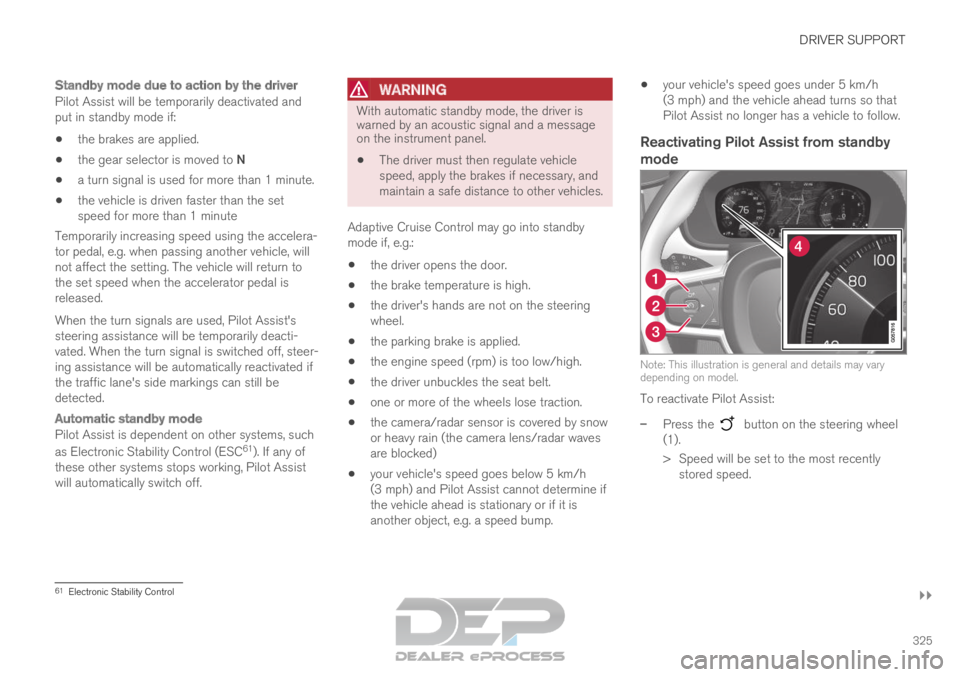
Reactivating Pilot Assist from standby
mode Note: This illustration is general and details may vary
depending on model.
To reactivate Pilot Assist:
–
Press the button on the steering wheel
(1).
>
Speed will be set to the most recently
stored speed. 61
Electronic Stability Control