2019 VOLVO XC90 TWIN ENGINE wheel
[x] Cancel search: wheelPage 161 of 697
LIGHTING
}}
* Option/accessory. 159
Active Bending Lights*
Active Bending Lights (ABL) are designed to
help provide maximum illumination in curves and
intersections. Depending on equipment level,
vehicles with LED 5
headlights* may be equipped
with Active Bending Lights. Headlight pattern with function deactivated (left) and
activated (right).
Active Bending Lights follow the movement of
the steering wheel to help provide maximum illu-
mination in curves and intersections, helping to
improve visibility for the driver.
The function is automatically activated when the
engine is started. If a fault is detected in the sys-
tem, the symbol will illuminate in the
instrument panel and a message will be dis-
played. The function is only active in weak daylight or
dark conditions and only when the vehicle is mov-
ing and the low beams are on.
Deactivating/activating the functionThe function is activated as the default factory
setting and can be activated and deactivated in
the center display's Function view:
Tap the Active BendingLights button.
Related information
Adjusting light functions via the center dis-
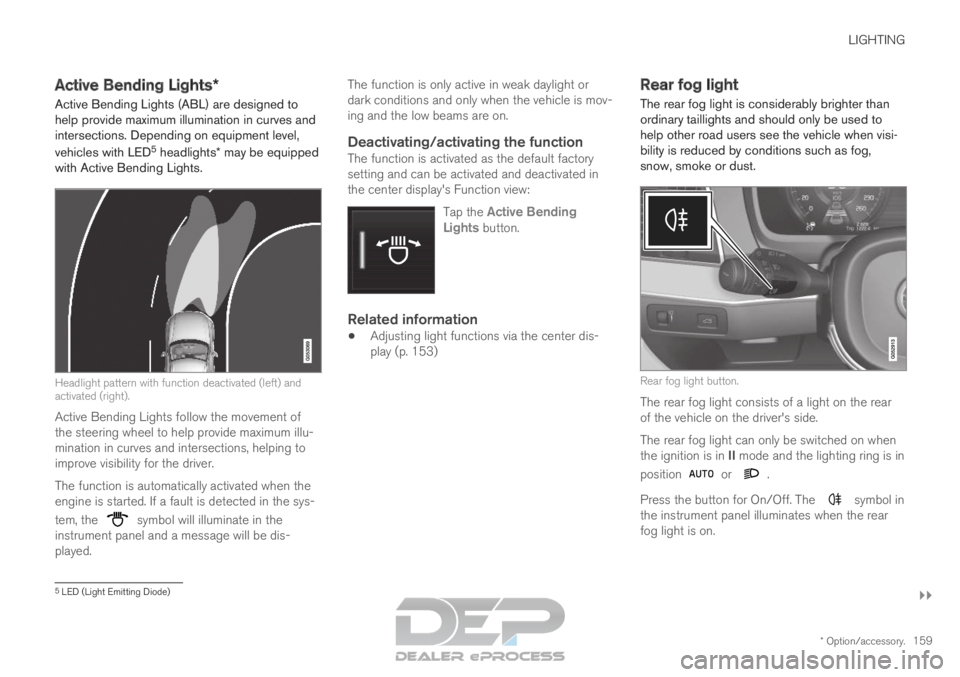
play (p. 153) Rear fog light
The rear fog light is considerably brighter than
ordinary taillights and should only be used to
help other road users see the vehicle when visi-
bility is reduced by conditions such as fog,
snow, smoke or dust. Rear fog light button.
The rear fog light consists of a light on the rear
of the vehicle on the driver's side.
The rear fog light can only be switched on when
the ignition is in II mode and the lighting ring is in
position or .
Press the button for On/Off. The symbol in
the instrument panel illuminates when the rear
fog light is on. 5
LED (Light Emitting Diode)
Page 162 of 697

||LIGHTING
160
The rear fog light turns off automatically when
the ignition is switched off or when the steering
wheel lever lighting ring is in position
or
.
NOTE
Regulations concerning rear fog light use vary
from country to country.
Related information
Lighting panel and controls (p. 152)
Ignition modes (p. 437) Brake lights
The brake lights are automatically illuminated
when braking.
The brake lights illuminate when the brake pedal
is depressed. They also illuminate when the
brakes are automatically applied by one of the
driver support systems.
Related information
Emergency brake lights (p. 160)
Brake functions (p. 438) Emergency brake lights
The emergency brake lights are activated to
warn following vehicles of hard braking.
This function causes an additional taillight on
each side of the vehicle to illuminate.
The emergency brake lights are activated in the
event of hard braking or if the ABS system is
activated and the vehicle is traveling at a high
speed.
After the driver decelerates to a low speed and
then releases the brake, the brake lights resume
their normal brightness.
Related information
Brake lights (p. 160)
Brakes (p. 439)
Hazard warning flashers (p. 161)
Page 163 of 697

LIGHTING
* Option/accessory.161
Hazard warning flashers
Hazard warning flashers warn other road users
by all of the vehicle's turn signals being activated
at the same time. The function can be used to
warn about a traffic hazard. Hazard warning flashers button.
Press the button to activate the hazard warning
flashers.
NOTE Regulations concerning the use of hazard
warning flashers may vary from country to
country.
Related information
Emergency brake lights (p. 160)
Using turn signals (p. 158) Using home safe lighting
Some of the exterior lights remain on to illumi-
nate the area around the vehicle. This is called
home safe lighting.
To activate home safe lighting:
1.
Switch off the ignition.
2. Push the left-side steering wheel lever toward the dashboard and release.
3. Exit the vehicle and lock the doors.
When the function is activated, a symbol will be
shown in the instrument panel and the parking
lights, outer door handle lights* and the license
plate lights will be illuminated.
The length of time home safe lighting remains
illuminated can be set in the center display.
Related information
Adjusting light functions via the center dis-
play (p. 153)
Welcome Light (p. 161) Welcome Light
Approach lighting is activated when the vehicle
is unlocked and can be used to provide light as
you walk toward the vehicle.
The function is activated when the remote key is
used for unlocking. The parking lights, outer door
handle lights*, license plate lights, interior ceiling
lights, footwell lighting and trunk/cargo compart-
ment lighting will be illuminated. If a door is
opened while the function is activated, the light-
ing in the outer door handle* and the interior
lighting will remain illuminated for a longer period
of time.
This function can be activated and deactivated in
the center display.
Related information
Adjusting light functions via the center dis-
play (p. 153)
Using home safe lighting (p. 161)
Remote key (p. 243)
Page 165 of 697

LIGHTING
* Option/accessory.163Reading lights over the rear seat
6
. In vehicles with panoramic roofs*, there are two lamp
units, one on each side of the ceiling. 7
Briefly press the button on the light to turn on or
off the reading lights. To adjust the brightness,
press and hold the button.
Glove compartment lightingThe glove compartment lighting comes on or
goes off when the glove compartment is opened
or closed.
Vanity mirror lighting*The vanity mirror lighting comes on or goes off
when the cover over the mirror is opened or
closed.
Ground lighting*The ground lighting comes on or goes off when a
door is opened or closed.
Doorsill lightingThe doorsill lighting comes on or goes off when a
door is opened or closed.
Cargo compartment lightingThe cargo compartment lighting comes on or
goes off when the cargo compartment is opened
or closed.
Ambient LightingThe ambient lighting comes on when the doors
are opened and goes out when the vehicle is
locked. Ambient lighting brightness can be
adjusted in the center display and also fine-tuned
using the thumb wheel in the dashboard.
Mood lighting*The vehicle is equipped with LEDs that provide
faint lighting in various colors. This lighting is on
when the engine is running. Mood lighting can be
adjusted in the center display and also fine-tuned
using the thumb wheel in the dashboard.
Lighting in the door storage
compartments
Lighting in the door storage compartments
comes on when the doors are opened and goes
out when the vehicle is locked. The brightness
can be adjusted using the thumb wheel in the
dashboard.
Lighting in the tunnel console's front cup holder
The lighting in front console cup holders
switches on when the vehicle is unlocked and off
when the vehicle is locked. The brightness can
be adjusted using the thumb wheel in the dash-
board.
Related information
Adjusting interior lighting (p. 164)
Lighting panel and controls (p. 152)
Ignition modes (p. 437)
Passenger compartment interior (p. 592) 6
There are also reading lights over the third row of seats*.
7 Does not apply to the third row of seats*.
Page 166 of 697

LIGHTING
* Option/accessory.
164 Adjusting interior lighting
Illumination in the vehicle varies depending on
ignition mode. The interior lighting can be
adjusted with a thumb wheel in the dashboard
and certain light functions can also be adjusted
via the center display.
The thumb wheel on the dash-
board to the left of the steering
wheel can be used to adjust
the brightness of the display
lighting, instrument lights,
ambient lighting and mood
lighting*.
Adjust ambient decor lighting1.Tap Settings in the Top view in the center
display.
2.
Tap My Car Lights and Lighting
Interior Lighting.
3.
Choose from among the following settings:
Under Ambient Light Intensity, select
Off, Low or High.
Under
Ambient Light Level, select
Reduced or Full.
Adjusting mood lighting*The vehicle is equipped with several LEDs that
provide faint lighting in various colors. This light-
ing is on when the engine is running.
Changing the brightness
1. Tap Settings in the Top view in the center
display.
2.
Tap My Car Lights and Lighting
Interior Lighting Interior Mood Lighting
.
3. Under Interior Mood Light Intensity, select
Off,
Low or High.
Changing the color of the light
1. Tap Settings in the Top view in the center
display.
2.
Tap My Car Lights and Lighting
Interior Lighting Interior Mood Lighting
.
3. Choose By Temperature or By Color to
change the color of the light.
If By Temperature is selected, the light will change according to the temperature set for
the passenger compartment.
If By Color is selected, the subcategory
Theme Colors can be used to make further adjustments.
Related information
Interior Lighting (p. 162)
Adjusting light functions via the center dis-
play (p. 153)
Ignition modes (p. 437)
Page 178 of 697

WINDOWS, GLASS AND MIRRORS
* Option/accessory.
176
Keyless locking and unlocking* (p. 259)
Locking and unlocking using the remote key
(p. 246) Wiper blades and washer fluid
The wipers and the washer fluid are used to
improve visibility and the headlight pattern.
The washer nozzles are heated* automatically in
cold weather to prevent the washer fluid from
freezing.
When there is approximately 1 liter (1 qt) of
washer fluid remaining, a message to refill will
appear in the instrument panel.
Related information
Using the rain sensor (p. 177)
Using the windshield and headlight washers
(p. 179)
Using automatic rear window wiping when
backing up (p. 181)
Using the rain sensor's memory function
(p. 178)
Using the rear window wiper/washer
(p. 180)
Filling washer fluid (p. 662)
Windshield wipers in the service position
(p. 661)
Replacing windshield wiper blades (p. 660)
Changing rear window wipers (p. 659)
Using the windshield wipers (p. 176) Using the windshield wipers
The windshield wipers clean the windshield. The
right-side steering wheel lever is used to adjust
windshield wiper settings. Right-hand steering wheel lever.
Thumb wheel, used to set rain sensor sensi-
tivity and interval wiper speed.
Single sweepMove the lever down and release for a
single sweep.
Wipers offMove the lever to position 0 to turn off
the windshield wipers.
Interval wipersSet the number of sweeps per time unit
with the thumb wheel when interval wip-
ers are selected.
Page 179 of 697

WINDOWS, GLASS AND MIRRORS
}}
177
Continuous wipersMove the lever upward for the wipers to
operate at normal speed. Move the lever upward again for the wip-
ers to operate at high speed.
CAUTION
Before activating the wipers, make sure that
the wiper blades are not frozen in place and
that any snow or ice on the windshield and
rear window has been scraped away.
CAUTION
Use plenty of washer fluid when the wipers
clean the windshield. The windshield must be
wet when the windshield wipers are working.
Related information
Using the rain sensor (p. 177)
Using the windshield and headlight washers
(p. 179)
Using automatic rear window wiping when
backing up (p. 181)
Wiper blades and washer fluid (p. 176)
Using the rain sensor's memory function
(p. 178)
Using the rear window wiper/washer
(p. 180)
Filling washer fluid (p. 662)
Windshield wipers in the service position
(p. 661)
Replacing windshield wiper blades (p. 660)
Changing rear window wipers (p. 659) Using the rain sensor
The rain sensor monitors the amount of water on
the windshield and automatically starts the wind-
shield wipers. Rain sensor sensitivity can be
adjusted using the thumb wheel on the right-
hand steering wheel lever. Right-hand steering wheel lever.
Rain sensor button
Thumb wheel, sensitivity/interval wiper speed
When the rain sensor is activated, the rain
sensor symbol will be displayed in the instrument
panel.
Activating the rain sensorWhen the rain sensor is activated, the engine
must be running or the ignition must be in mode I
or II. The windshield wiper lever must also be in
position 0 or in the single sweep position.
Page 180 of 697

||WINDOWS, GLASS AND MIRRORS
178
Activate the rain sensor by pressing the rain sen-
sor button .
If the lever is pressed down, the wipers will make
additional sweeps across the windshield.
Turn the thumb wheel upward for increased sen-
sitivity and downward for decreased sensitivity.
The wipers will make one extra sweep when the
thumb wheel is turned upward.
Deactivate the rain sensor
Deactivate the rain sensor by pressing the rain sensor button or moving the lever upward to
another wiper mode.
The rain sensor is automatically deactivated in
ignition mode 0 or when the engine is switched
off.
The rain sensor is also automatically deactivated
when the wiper blades are put in the service
position. The rain sensor will reactivate when
service mode is switched off.
CAUTION The windshield wipers may start inadvertently
and be damaged in automatic car washes.
Deactivate the rain sensor when the engine is
running or when the ignition is in mode I or II.
The symbol in the instrument panel will go
out.
Related information
Using the windshield and headlight washers
(p. 179)
Using automatic rear window wiping when
backing up (p. 181)
Wiper blades and washer fluid (p. 176)
Using the rain sensor's memory function
(p. 178)
Using the rear window wiper/washer
(p. 180)
Filling washer fluid (p. 662)
Windshield wipers in the service position
(p. 661)
Replacing windshield wiper blades (p. 660)
Changing rear window wipers (p. 659)
Using the windshield wipers (p. 176) Using the rain sensor's memory
function
The rain sensor monitors the amount of water on
the windshield and automatically starts the wind-
shield wipers.
Activating/deactivating memory
function
The rain sensor's memory function can be set to
activate so that the rain sensor button does not
need to be pressed each time the engine is
started:
1.
Tap Settings in the Top view in the center
display.
2.
Tap My Car Wipers
.
3. Select Rain Sensor Memory to activate/
deactivate the memory function.
Related information
Using the rain sensor (p. 177)
Using the windshield and headlight washers
(p. 179)
Using automatic rear window wiping when
backing up (p. 181)
Wiper blades and washer fluid (p. 176)
Using the rear window wiper/washer
(p. 180)
Filling washer fluid (p. 662)