2019 VOLVO XC90 TWIN ENGINE fuel
[x] Cancel search: fuelPage 93 of 697

DISPLAYS AND VOICE CONTROL
91
Displaying trip data in the
instrument panel
Data recorded and calculated by the trip com-
puter can be displayed on the instrument panel.
This data is stored in a trip computer app. You
can choose which information the instrument
panel will display in the app menu. Open and navigate in the app menu
2
using the right-
hand steering wheel keypad. App menu
Left/right
Up/down
Confirm 1.
Open the app menu in the instrument panel
by pressing (1).
(The App menu cannot be opened while
there is an unacknowledged message in the
instrument panel. The message must be con-
firmed before the App menu can be opened.)
2. Navigate to the trip computer app by moving left or right using (2).
> The top four menu rows show measuredvalues for trip odometer TM. The next four
menu rows show measured values for trip
odometer TA. Scroll up or down in the list
using (3).
3. Scroll down to the option buttons to choose which information to show in the instrument
panel:
Distance to empty tank
Odometer
Mileage for trip odometer TM, TA or no
display of mileage
Current fuel consumption, average fuel
consumption for TM or TA, or no display
of fuel consumption
Tourist (alternative speedometer).
Distance to discharged battery
Select or clear a selection using the O but-
ton (4). The change will apply immediately.
Related information
Trip computer (p. 89)
Resetting the trip odometer (p. 92) 2
The illustration is generic - details may vary according to vehicle mode\
l.
Page 94 of 697

DISPLAYS AND VOICE CONTROL
92Resetting the trip odometer
Resetting the trip odometer using the left-side
steering wheel lever. –
Reset all information in trip odometer TM (i.e.
mileage, average fuel consumption, average
speed and driving time) by pressing and
holding the RESET button on the left-hand
steering wheel lever.
Tapping the RESET button only resets the
distance driven.
The TA trip odometer can not be manually reset.
It resets automatically if the vehicle is not used
for four hours or more.
Related information
Trip computer (p. 89) Displaying trip statistics in the
center display
Trip computer statistics can be displayed graphi-
cally in the center display, providing an overview
that facilitates more fuel-efficient driving.
Open the
Driver performance
app in the App view to display
trip statistics.
Each bar in the graph repre-
sents a driving distance of 1
kilometers, 10 kilometers or
100 kilometers (or miles). The bars are added
from the right as you drive. The bar at the far right
shows the data for the current trip.
Average fuel consumption and total driving time
are calculated from the most recent reset of the
trip statistics.
Fuel and electricity consumption are shown in
separate graphs. The electricity consumption
shows "net" consumption, i.e. consumed current
minus regenerated current generated by braking. Trip computer statistics
3
.
Related information
Trip statistics settings (p. 93)
Trip computer (p. 89) 3
The illustration is generic - details may vary according to vehicle mode\
l.
Page 246 of 697
||KEY, LOCKS AND ALARM
* Option/accessory.
244 The keyless system for locking/unlocking the
doors and tailgate (Passive Entry*) is available as
an option. This system has a range in a semicircle
with a radius of approximately 1.5 meter (5 feet)
out from the driver's door and approx. 1 meter
(3 feet) out from the tailgate.
With keyless start in combination with keyless
locking and unlocking, the remote key can be
located anywhere in the passenger compartment
or cargo compartment in order to start the
engine.
Each remote key supplied with the vehicle can be
linked to a driver profile with unique settings for
the vehicle. When a key with a specific profile is
used, the vehicle settings are adjusted according
to that profile.
Buttonless key, Key TagFor vehicles equipped with keyless locking and
unlocking*, a smaller, lighter and button-less key
(Key Tag 4
) is also provided. It works the same
way as the regular remote key as regard keyless
start and keyless locking and unlocking. The key
is waterproof up to a depth of approx. 10 meters
(30 feet) for up to 60 minutes. It does not have a
detachable key blade and its battery cannot be
replaced.
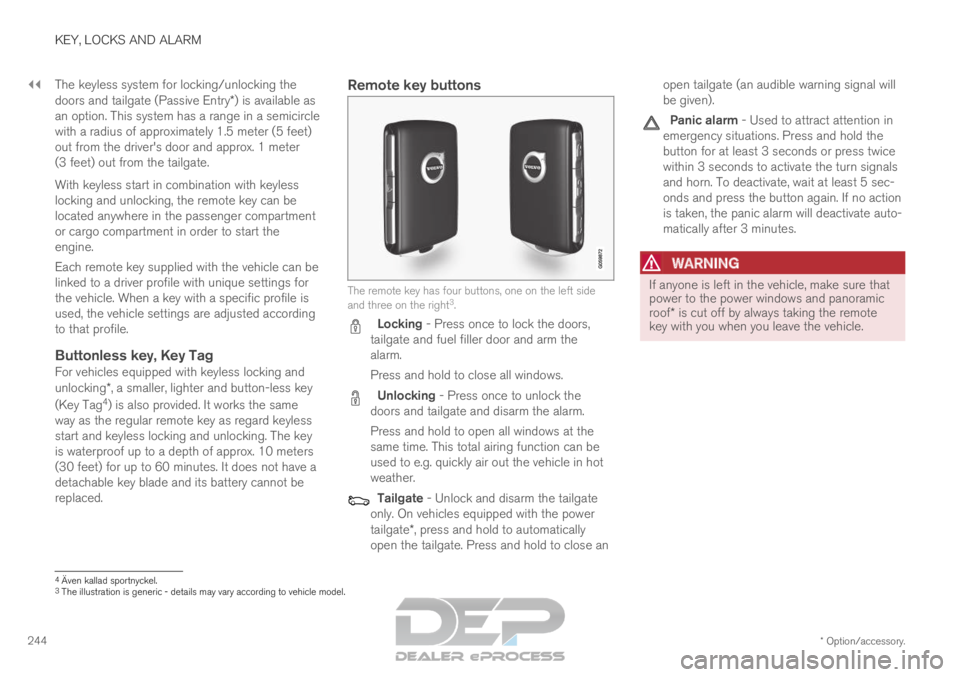
Remote key buttons The remote key has four buttons, one on the left side
and three on the right
3
. Locking - Press once to lock the doors,
tailgate and fuel filler door and arm the
alarm.
Press and hold to close all windows. Unlocking - Press once to unlock the
doors and tailgate and disarm the alarm.
Press and hold to open all windows at the
same time. This total airing function can be
used to e.g. quickly air out the vehicle in hot
weather. Tailgate - Unlock and disarm the tailgate
only. On vehicles equipped with the power
tailgate*, press and hold to automatically
open the tailgate. Press and hold to close an open tailgate (an audible warning signal will
be given). Panic alarm - Used to attract attention in
emergency situations. Press and hold the
button for at least 3 seconds or press twice
within 3 seconds to activate the turn signals
and horn. To deactivate, wait at least 5 sec-
onds and press the button again. If no action
is taken, the panic alarm will deactivate auto-
matically after 3 minutes.
WARNING If anyone is left in the vehicle, make sure that
power to the power windows and panoramic
roof* is cut off by always taking the remote
key with you when you leave the vehicle. 4
Även kallad sportnyckel.
3 The illustration is generic - details may vary according to vehicle mode\
l.
Page 296 of 697

||DRIVER SUPPORT
294
For vehicles with both CC and ACC
–
Change a set speed by pressing the (1)
or (3) buttons briefly or by pressing and
holding them:
Press briefly: Press briefly: each press
changes the speed in +/- 5 mph
(+/- 5 km/h) increments.
Press and hold: release the button when
the set speed indicator (4) has moved to
the desired speed.
The most recently set speed will be stored.
If speed is increased by depressing the accelera-
tor pedal while pressing the (1) button on
the steering wheel, the vehicle's speed when the
button is pressed will be stored as the set speed.
Temporarily increasing speed using the accelera-
tor pedal, e.g. when passing another vehicle, will
not affect the setting. The vehicle will return to
the set speed when the accelerator pedal is
released.
Using engine braking instead of
applying the brakes
Cruise Control regulates speed by lightly applying
the brakes. On downgrades, it can sometimes be
desirable to roll a bit faster and let speed be
reduced instead by engine braking alone. The
driver can temporarily disengage the Cruise Con-
trol braking function. To disengage CC:
– Press the accelerator pedal about halfway
down and then release it.
>
Cruise Control will automatically disen-
gage the automatic brake function and
speed will only be reduced using the
engine braking function.
How drive mode affects cruise controlThe way the cruise control maintains the vehicle's
speed can vary depending on the selected drive
mode 26
.
Cruise Control Eco Cruise with ECO drive
mode
In the ECO drive mode, cruise control's accelera-
tion and deceleration will be smoother than in
other drive modes to help provide optimal fuel
efficiency and reduced environmental impact.
Because of this, the vehicle's actual speed may
be slightly above or below the set speed.
Cruise Control Dynamic Cruise
With the Dynamic drive mode, cruise control's
acceleration and deceleration will be faster and
more immediate than in other drive modes.
Related information
Cruise control (p. 291)
Drive modes (p. 454) Deactivating and putting Cruise
Control in standby mode
Cruise Control (CC 27
) can be temporarily put
into standby mode and then reactivated.
Deactivating and putting Cruise Control
in standby mode Note: This illustration is general and details may vary
depending on model.
To put Cruise Control in standby mode:
–
Press the button on the steering wheel
(2).
>
The Cruise Control markings and symbols
will change from WHITE to GRAY, indicat-
ing that Cruise Control is temporarily
deactivated and the driver needs to con-
trol the vehicle's speed. 26
For more information, see "Drive modes".
Page 309 of 697
DRIVER SUPPORT
}}
* Option/accessory. 307
NOTE
The greater the vehicles' speed, the
greater the distance between them for a
set time interval.
Only use the time intervals permitted by
local traffic regulations.
If the Adaptive Cruise Control does not
seem to respond with a speed increase
when activated, it may be because the
time interval to the vehicle ahead is
shorter than the set time interval.
WARNING
Only use a time interval suitable for the
current traffic conditions.
The driver should be aware that short
time intervals give them limited time to
react and act to any unforeseen traffic
situation.
Setting how ACC should maintain
distance* to the vehicle ahead
A number of different settings can be made for
how Adaptive Cruise Control should maintain a
time interval to the vehicle ahead. Settings are
made using the DRIVE MODE controls. Select one of the following:
Eco - ACC will focus on providing optimal
fuel economy, which will increase the time
interval to the vehicle ahead.
Comfort - ACC will focus on following the
set time interval to the vehicle ahead as
smoothly as possible.
Dynamic
- ACC will focus on following the
set time interval to the vehicle ahead more
exactly, which could mean faster acceleration
and heavier braking.
For more information, see "Drive modes".
Related information
Adaptive Cruise Control* (p. 300)
Drive modes (p. 454)
Managing Cruise Control speed (p. 293) Deactivating/reactivating Adaptive
Cruise Control
Adaptive Cruise Control (ACC
46
) can be tempo-
rarily put into standby mode and then reactiva-
ted.
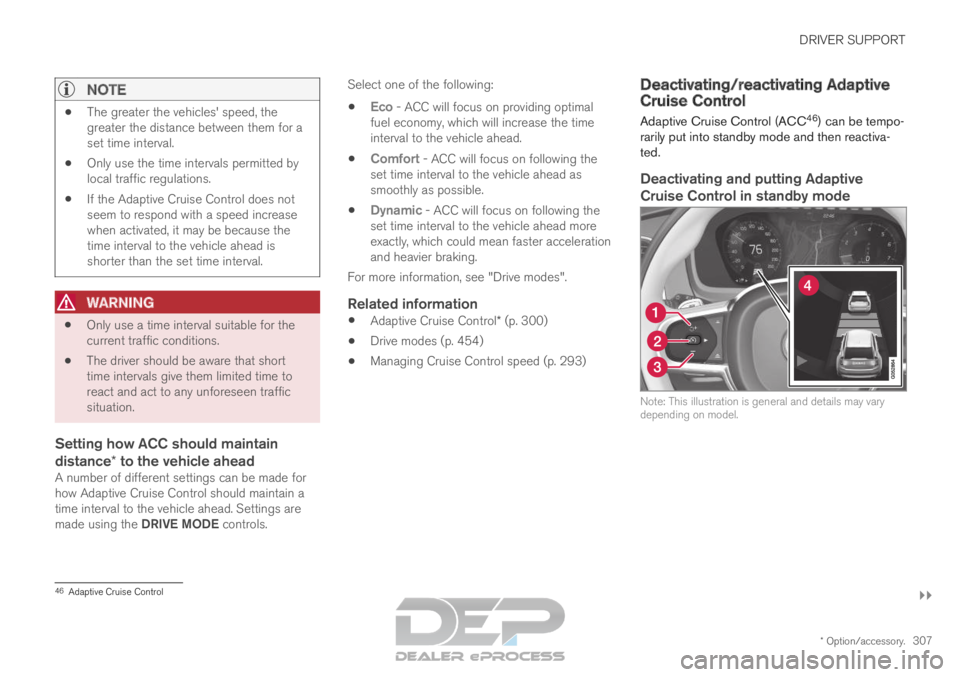
Deactivating and putting Adaptive
Cruise Control in standby mode Note: This illustration is general and details may vary
depending on model.
46
Adaptive Cruise Control
Page 326 of 697

||DRIVER SUPPORT
324
Select one of the following:
Eco - Pilot Assist will focus on providing
optimal fuel economy, which will increase the
time interval to the vehicle ahead.
Comfort - Pilot Assist will focus on following
the set time interval to the vehicle ahead as
smoothly as possible.
Dynamic - Pilot Assist will focus on follow-
ing the set time interval to the vehicle ahead
more exactly, which could mean faster accel-
eration and heavier braking.
For more information, see "Drive modes".
Related information
Pilot Assist (p. 316)
Drive modes (p. 454)
Managing Cruise Control speed (p. 293) Deactivating/reactivating Pilot
Assist
Pilot Assist
can be temporarily put into standby
mode and then reactivated.
Deactivating and putting Pilot Assist in
standby mode Note: This illustration is general and details may vary
depending on model.
To temporarily deactivate Pilot Assist and put it in
standby mode:
–
Press the button on the steering wheel
(2).
>
Pilot Assist goes into standby mode - the
symbol (8) in the instrument panel
changes color from WHITE to GRAY and
the set speed in the center of the speed-
ometer will change from BEIGE to GRAY.
...or... –
Press the ◀ button on the steering wheel (3).
>
Pilot Assist is turned off and Adaptive
Cruise Control will go into active mode.
WARNING
With Pilot Assist in standby mode, the
driver must intervene and steer and regu-
late both speed and distance to the vehi-
cle ahead.
If the vehicle comes too close to a vehicle
ahead when Pilot Assist is in standby
mode, the driver is instead warned of the
short distance by the Distance Alert func-
tion.
Page 418 of 697
HYBRID INFORMATION
416General information about Twin
Engine
Twin Engine vehicles are driven just like any
other vehicle, but certain functions differ from a
vehicle powered exclusively by gasoline. The
electric motor powers the vehicle primarily at low
speeds; the gasoline engine is used at higher
speeds or during more active driving.
The instrument panel displays Twin Engine-spe-
cific information - charging information, selected
drive mode, distance to discharged battery and
hybrid battery charge level.
Different drive modes can be selected while driv-
ing, e.g. electric power only or, if more power is
needed, a combination of electric and gasoline
power. The vehicle calculates the optimal combi-
nation of driveability, driving experience, environ-
mental impact and fuel economy for the selected
drive mode.
In order to function optimally, the hybrid battery
(and its electrical drive systems) and the gasoline
engine (and its drive systems) must be at the
correct operating temperature. Battery capacity
can be considerably reduced if the battery is too
cold or too hot. Preconditioning prepares the
vehicle's drive systems and passenger compart-
ment before driving to help reduce both wear and
energy consumption. It also helps increase the
hybrid battery's range.
The hybrid battery which powers the electric
motor is recharged using the charging cable. It can also be recharged during light braking and
through engine braking in gear position B. The
combustion engine can also help recharge the
hybrid battery.
Important
No electrical current
Keep in mind that if there is no electrical current
to the vehicle, i.e. the ignition is switched off or
the start battery is discharged, certain functions
such as brakes, power steering, etc. will not work.
WARNING If the vehicle does not have electrical current
and both the electric motor and the gasoline
engine are switched off, the brakes cannot be
used to stop the vehicle.
Towing not permitted
Never tow a Twin Engine vehicle behind another
vehicle, as this could damage the electric motor.
Exterior engine noise
WARNING
Please be aware that there is no sound from
the engine when the vehicle is being powered
by the electric motor and it may be difficult to
detect by children, pedestrians, cyclists and
animals. This is especially true at low speeds.
High-voltage electrical current
WARNING A number of electrical components in Twin
Engine Plug-in Hybrid vehicles use high-volt-
age current and can be extremely dangerous
if handled incorrectly. These components and
any orange wiring in the vehicle may only be
handled by trained and qualified Volvo service
technicians.
Do not touch anything that is not clearly descri-
bed in this Owner's Manual.
Related information
Charging the hybrid battery (p. 417)
Hybrid gauge (p. 87)
Drive modes (p. 454)
Starting and stopping preconditioning
(p. 233)
Hybrid battery (p. 631)
Factors affecting electric motor range
(p. 469)
Page 419 of 697

HYBRID INFORMATION
}}
417
Gear selector positions for automatic trans-
missions (p. 449)
Towing using a towline (p. 487) Charging the hybrid battery
In addition to the conventional fuel tank, your
vehicle is also equipped with a rechargeable
lithium-ion hybrid battery.
WARNING California Proposition 65
Operating, servicing and maintaining a pas-
senger vehicle can expose you to chemicals
including engine exhaust, carbon monoxide,
phthalates, and lead, which are known to the
State of California to cause cancer and birth
defects or other reproductive harm. To mini-
mize exposure, avoid breathing exhaust, do
not idle the engine except as necessary, serv-
ice your vehicle in a well ventilated area and
wear gloves or wash your hands frequently
when servicing your vehicle. For more infor-
mation go to www.P65Warnings.ca.gov/
passenger-vehicle.
The hybrid battery can be recharged using the
charging cable stored in a storage space in the
cargo compartment.
WARNING The hybrid electrical system in your vehicle
uses high voltage electrical current. Any dam-
age to this system or to the hybrid battery
may result in the danger of overheating, fire,
or serious injury. If the vehicle is involved in a
collision or subjected to flooding, fire, etc.,
have it inspected by a trained and qualified
Volvo service technician. Prior to this inspec-
tion, the vehicle should be parked outdoors at
a safe distance from any building or poten-
tially flammable materials.
The hybrid battery's charging time depends on
the charging current used.
NOTE The capacity of the hybrid battery diminishes
somewhat with age and use, which could
result in increased use of the gasoline engine
and consequently, slightly higher fuel con-
sumption.
WARNING
If the hybrid battery needs to be replaced, this
may only be done by a Volvo retailer or
authorized Volvo workshop.