2019 VOLVO XC90 TWIN ENGINE change
[x] Cancel search: changePage 118 of 697

||DISPLAYS AND VOICE CONTROL
* Option/accessory.
116
NOTE In Home view's standard mode – short press
on the Home button. An animation describing
access to the various views is shown on the
screen.
NOTE
When the vehicle is moving:
Certain functions (e.g. using the center
display's keyboard) may be deactivated.
Certain texts (e.g. those generated by
apps) will be shortened to three rows.
Tap the
Read out button to have the
entire message read aloud.
The message will be shortened to one
row. Tap the
Read out button to have
the entire message read aloud.
Status barCurrent vehicle activities are shown at the top of
the screen in the status bar. Network and con-
nection information is shown to the left of the
status bar. Media-related information, the clock
and information about background activities are
shown to the right.
Top view Top view when expanded.
There is a tab in the center of the status bar at
the top of the screen. Open Top view by tapping
the tab or by dragging/swiping from the top of
the screen downward.
Top view always provides access to:
Settings
Owner's manual
Profile
The vehicle's stored messages.
In certain cases, Top view provides access to:
Contextual setting (e.g. Navigation
Settings ). Change settings directly in Top view when an app (e.g. navigation) is being
used.
Contextual Owner's Manual (e.g.
Navigation
Manual). Access articles in the digital
Owner's Manual related to the content
shown on the screen, directly in Top view.
To exit Top view, tap the screen outside Top view,
press the Home button or tap the screen at the
bottom of Top view and swipe upward. The views
behind will become visible again and can be
used.
NOTE The top view is not available at start-up/shut-
down or when a message is being shown on
the screen. Similarly, it is not available when
the climate view is shown.
Climate viewThe climate bar is always visible at the bottom of
the screen. The most common climate settings
can be made directly there, such as setting tem-
perature and seat heating*.
Tap the symbol in the center of the cli-
mate bar to open Climate view and
access additional climate system set-
tings. Tap the symbol to close Climate view
and return to a previous view.
Page 124 of 697

DISPLAYS AND VOICE CONTROL
122Function view in the center display
Function view, which is one of the center dis-
play's basic views, contains all of the vehicle's
function buttons. From the Home view, navigate to Function view by swiping from left to right
over the screen
8
.
Different types of buttonsThere are three different types of buttons for
vehicle functions; see below: Type of button
Functions Vehicle function affected
Function buttons
Have On/Off modes.
When a function is active, an LED indicator light will illuminate to the\
left of the button's icon.
Press the button to turn the function on or off. Most buttons in Function view are func-
tion buttons.
Trigger buttons Do not have On/Off modes. Pressing a trigger button opens a window for the function. This can be, \
for example, a win-
dow to change seat position.
Camera
Headrest Fold
Head-up Display Adjustments
Parking buttons Have On/Off and scanning modes. Similar to function buttons, but have an extra mode for parking scanning\
.
Park In
Park Out 8
Applies for left-hand drive vehicles. For right-hand drive vehicles, swi\
pe in the other direction.
Page 126 of 697

DISPLAYS AND VOICE CONTROL
124Moving apps and buttons in the
center display
The apps and buttons for vehicle functions can
be moved and organized in the App and Func-
tion views.
1. Swipe from right to left 9
to access App view
or swipe from left to right 9
to access Func-
tion view.
2.
Press and hold an app or button.
> The app or button will change size and become slightly transparent. It can then
be moved.
3. Drag the app or button to an available posi- tion in the view.
A maximum of 48 rows can be used to position
apps or buttons. To move an app or button out-
side the visible view, drag it to the bottom of the
view. New rows will be added and the app or but-
ton can be placed in one of these.
Apps or buttons placed below the view's normal
display will not be visible on the screen.
Swipe the screen to scroll up or down in the view
to display information outside the view.
NOTE Hide the apps that are rarely or never used by
moving them far down, outside of the visible
view. This makes it easier to find the apps
used more frequently.
NOTE
Apps and vehicle function buttons cannot be
situated at spots already in use.
Related information
Function view in the center display (p. 122)
Apps (p. 498)
Handling the center display (p. 112) Symbols in the center display status
bar
Overview of symbols displayed in the center dis-
play status bar.
The status bar shows current vehicle activities
and in certain cases, also their status. Due to the
limited space in the status bar, not all symbols
will be displayed at all times. Symbol
Meaning Connected to the Internet.
Could not connect to Internet.
Roaming activated.
Cell phone network signal strength.
Bluetooth device connected.
Bluetooth activated but no device
connected.
Information sent to and from GPS.
Connected to Wi-Fi network.
9
Applies for left-hand drive vehicles. For right-hand drive vehicles, swi\
pe in the other direction.
Page 130 of 697

||DISPLAYS AND VOICE CONTROL
128 Row showing suggestions for words or char-
acters
10
. The suggested words change as
new letters are entered. Scroll through the
list of suggested words by tapping the right
or left arrows. Tap a suggestion to select it.
Please note that this function is not available
in all languages. When unavailable, this row
will not be shown on the keyboard. Available characters are adapted to the lan-
guage selected for the keyboard (see num-
ber 7 below). Tap a character to enter it.
Different buttons are displayed here depend-
ing on the context in which the keyboard is
used, e.g. @ to enter an email address or the
return key to start a new line. This button hides the keyboard. In cases
where this is not possible, the button will not
be displayed.
Used to enter uppercase letters. Tap once to
enter one uppercase letter and then con-
tinue with lowercase letters. Tap twice for
caps lock (all text will be entered in upper-
case letters). Tap again to return the key-
board to lowercase letters. In this mode, the
first letter after a period, exclamation point or
question mark will be automatically entered
in uppercase form. The first letter entered in
text fields will also be uppercase. In text
fields intended for names or addresses, each
word will be automatically started with an uppercase letter. In text fields intended for
passwords, website addresses or email
addresses, all letters will automatically be
lowercase unless uppercase is selected. Used to enter numbers. The number key-
board (2) will then be displayed. Tap
,
which is shown instead of in number
mode, to return to the keyboard with letters,
or to display the keyboard with special
characters. Used to change the keyboard language, e.g.
EN
. The available characters and word sug-
gestions (1) vary depending on the selected
language. In order to toggle between key-
board languages, the languages must first be
added under Settings. Space bar.
Delete. Tap to delete characters one at a
time. Press and hold to delete multiple char-
acters quickly.
Used to change to handwriting mode.
Tap the confirm button over the keyboard (not
shown in illustration) once to confirm the text that
has been entered. The button's appearance dif-
fers depending on the context.
Variants of letters or characters Variants of a letter or character, e.g. é or è, can
be entered by pressing and holding the letter or
character. A box containing possible variants of
the letter or character will appear. Tap the
desired variant. If no variant is selected, the origi-
nal letter/character will be used.
Related information
Changing keyboard language in the center
display (p. 129)
Entering characters, letters and words by
hand in the center display (p. 129)
Handling the center display (p. 112)
Handling text messages (p. 538) 10
For Asian languages.
Page 131 of 697
DISPLAYS AND VOICE CONTROL
}}
129
Changing keyboard language in the
center display
In order to toggle between keyboard languages,
the languages must first be added under
Settings.
Adding or deleting languages in
Settings
The keyboard is automatically set to the same
language as the system language. The keyboard
language can be manually changed without
affecting the system language.
1. Tap Settings in Top view.
2.
Tap System System Languages and
Units Keyboard Layouts.
3.
Select one or more languages in the list.
> It is now possible to toggle between the selected languages using the keyboard.
If no language has been selected under
Settings, the keyboard will remain in the same language as the vehicle's system language.
Toggling between keyboard languages
If more than one language has
been selected in Settings, the
button in the keyboard can be
used to switch between the dif-
ferent languages. To toggle between keyboard languages from the
list:
1.
Press and hold the button.
> A list will appear.
2. Select the desired language. If more than four languages have been selected under
Settings, you can scroll through the list
shown on the keyboard.
>
The keyboard and word suggestions will
be adapted to the selected language.
To change keyboard language without displaying
the list:
– Tap the button.
>
The keyboard layout will change to the
next language in the list without display-
ing the list.
Related information
Changing system language (p. 132)
Using the center display keyboard (p. 126) Entering characters, letters and
words by hand in the center display
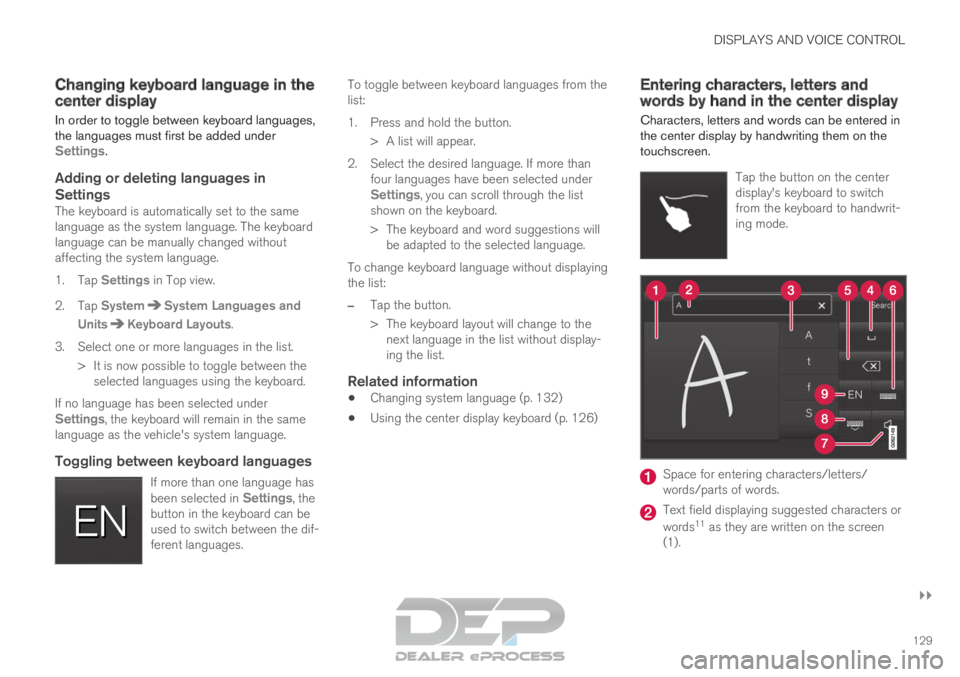
Characters, letters and words can be entered in
the center display by handwriting them on the
touchscreen.
Tap the button on the center
display's keyboard to switch
from the keyboard to handwrit-
ing mode. Space for entering characters/letters/
words/parts of words.
Text field displaying suggested characters or
words
11
as they are written on the screen
(1).
Page 132 of 697

||DISPLAYS AND VOICE CONTROL
130 Suggestions for characters/letters/words/
parts of words. You can scroll through the
list.
Space bar. Blank spaces can be created by
writing a dash (‒) in the field for handwritten
letters (1). See "Writing blank spaces in free-
text fields" below. Delete. Tap once to erase one character/
letter at a time. Wait a moment before tap-
ping again to erase the next character, letter
etc.
Return to the standard keyboard layout.
Switch off/on screen tap sounds.
Hide the keyboard. In cases where this is not
possible, the button will not be displayed.
Change language for text input.
Handwriting characters/letters/words
1. Write a character, a letter, a word or parts of
a word in the field for handwritten letters (1).
Write the word or part of the word vertically
or horizontally.
> A number of suggestions for characters,letters or words will be displayed (3). The
most likely will be shown at the top of the
list.
CAUTION Do not use sharp objects on the screen as
this could cause scratches.
2. The character/letter/word will be entered
automatically after a short pause if no other
action is taken.
>
The character/letter/word at the top of
the list will be used. Tap one of the other
characters/letters/words in the list to use
it instead.
Erasing/changing handwritten characters/
letters Erase text in the text field (2) by swiping over the hand-
writing field (1).
–
Characters/letters can be erased or changed
in several ways:
Tap the desired letter or word in the list
(3).
Tap the delete button (5) to erase the let-
ter and start again.
Swipe horizontally from right to left 12
over
the handwriting field (1). Erase several let-
ters at once by swiping over the area sev-
eral times.
Tap the X box in the text field (2) to erase
all written text. 11
Certain system languages only.
12 For Arabic keyboards, swipe in the other direction. Swiping from right t\
o left will create a blank space.
Page 133 of 697

DISPLAYS AND VOICE CONTROL
131
New lines in free-text fields in handwriting
modeCreate a new line by drawing above the characters in
the handwriting field as shown in the illustration
13
.
Writing blank spaces in free-text fields Make a blank space by drawing a line from left to right
14
.
Related information
Using the center display keyboard (p. 126) Changing the appearance of the
center display
The appearance of the center display can be
changed by selecting a different theme.
1. Tap Settings in the Top view.
2.
Tap My Car Displays Display
Themes .
3. Select a theme, e.g. Minimalistic or
Chrome Rings.
In addition to these themes, you can also choose
between Normal and Bright. In Normal, the background of the screen is dark and the text is
light. This option is the default setting for all
themes. If the bright version is selected, the
background will be light and the text will be dark.
This option can, for example, make the screen
easier to see in bright daylight conditions.
These alternatives are always available for selec-
tion and are not affected by the ambient lighting.
Related information
Changing settings in the center display's Top
view (p. 132)
Activating and deactivating the center display
(p. 115)
Cleaning the center display (p. 645) Turning off and adjusting the
volume of the center display system
sounds
The volume of the center display system sounds
can be adjusted or turned off completely.
1. Tap Settings in the Top view in the center
display.
2.
Tap Sound System Volumes
.
3. Pull the control under Touch Sounds to
adjust the volume or turn off screen tap
sounds. Pull the control to the desired sound
level.
Related information
Center display overview (p. 109)
Changing settings in the center display's Top
view (p. 132)
Sound settings (p. 496) 13
For Arabic keyboards, draw the same character, but in mirror image.
14 For Arabic keyboards, draw the line from right to left.
Page 134 of 697

DISPLAYS AND VOICE CONTROL
132Changing system units of
measurement
Unit settings are adjusted in the Settings menu
in the center display.
1. Tap Settings in the Top view in the center
display.
2.
Proceed to System System Languages
and Units Units of Measurement.
3.
Choose a measurement standard:
Metric - kilometers, liters and degrees
Celsius.
Imperial - miles, gallons and degrees
Celsius.
US - miles, gallons and degrees Fahren-
heit.
>
The units in the instrument panel, center
display and head-up display are changed.
Related information
Center display overview (p. 109)
Changing settings in the center display's Top
view (p. 132)
Changing system language (p. 132) Changing system language
Language settings are adjusted in the
Settings
menu in the center display.
NOTE Changing languages in the center display
could mean that certain owner's information
will not comply with national or local laws and
regulations. Do not change to a language that
you do not fully understand, as this could
make it difficult to navigate back through the
menu.
1.
Tap Settings in the Top view in the center
display.
2.
Proceed to System System Languages
and Units .
3. Select System Language. A voice control
symbol indicates that the language can be
used for voice commands.
>
Languages in the instrument panel, center
display and head-up display are changed.
Related information
Center display overview (p. 109)
Changing settings in the center display's Top
view (p. 132)
Changing system units of measurement
(p. 132) Changing settings in the center
display's Top view
You can change settings and information for
many of the vehicle's functions via the center
display.
1. Open Top view by tapping the tab at the top of the screen or by dragging/swiping from
the top of the screen downward.
2. Tap Settings to open the Settings menu. Top view with Settings button.
3. Tap one of the categories and sub-catego-
ries to navigate to the desired setting.
4.
Change the setting(s). Different types of set-
tings are changed in different ways.
> Changes are saved immediately.