2019 VOLVO XC90 TWIN ENGINE change
[x] Cancel search: changePage 88 of 697

DISPLAYS AND VOICE CONTROL
86Instrument panel settings
Display settings for the instrument panel can be
set via the instrument panel's app menu and via
the center display's Settings menu.
Settings via instrument panel's app
menu The illustration is generic – layout may vary.
The app menu will open and can be controlled
using the right-side steering wheel keypad.
The app menu can be used to set what informa-
tion will be displayed in the instrument panel:
trip computer
media player
phone
navigation system.
Settings via center display
Selecting type of information
1.
Tap Settings in the center display's Top
view.
2.
Tap My Car Displays Driver Display
Information .
3.
Select a background:
Show no information in the
background
Show information for current playing
media
Show navigation even if no route is
set.
Select theme
1.
Tap Settings in the center display's Top
view.
2.
Tap My Car Displays Display
Themes
3. Select a theme (appearance) for the instru- ment panel:
Glass
Minimalistic
Performance
Chrome Rings.
Select language
1.
Tap Settings in the center display's Top
view. 2.
Tap
System System Languages and
Units System Language
to select lan-
guage.
> A change made here will affect the lan- guage in all displays.
The settings are personal and saved automati-
cally in the active driver profile.
Related information
Instrument panel (p. 84)
Handling the App menu in the instrument
panel (p. 104)
Changing settings in the center display's Top
view (p. 132)
Page 91 of 697

DISPLAYS AND VOICE CONTROL
}}89
Symbols in the hybrid battery gauge The symbol in the hybrid battery gauge indi-
cates that the Hold function is activated. The symbol indicates that the Charge function
is activated.
Related information
Instrument panel (p. 84)
Charging the hybrid battery (p. 417)
"Hold" and "Charge" functions (p. 471) Trip computer
The vehicle's trip computer registers data while
driving such as mileage, fuel consumption and
average speed.
To help promote fuel-efficient driving, data is
recorded on both current and average fuel con-
sumption. Data from the trip computer can be
displayed in the instrument panel.
Example of trip computer information in the instrument
panel.
1
The trip computer includes the following gauges:
Trip odometer
Odometer
Current fuel consumption
Distance to empty tank
Distance to discharged battery
Tourist - alternative speedometer
Unit standards for distance, speed, etc. can be
changed via system settings in the center display.
Trip odometerThere are two trip odometers: TM and TA.
TM can be reset manually and TA is reset auto-
matically if the vehicle is not used for four hours.
During a drive, the trip odometer registers data
on:
Mileage
Driving time
Average speed
Average fuel consumption
The readings since the trip odometer's last reset
are displayed.
OdometerThe odometer records the vehicle's total mileage.
This reading cannot be reset.
Current fuel consumptionThis gauge shows the vehicle's fuel consumption
at that moment. The reading is updated about
once a second.
Distance to empty tankThe trip computer calculates the distance that
can be driven on the fuel remaining in the tank. 1
The illustration is generic - details may vary according to vehicle mode\
l.
Page 92 of 697

||DISPLAYS AND VOICE CONTROL
90
This calculation is based on average fuel con-
sumption during the last 30 km (20 miles) and
the amount of fuel remaining in the tank.
When the gauge displays "----", there is not
enough fuel remaining to calculate the remaining
mileage. Refuel as soon as possible.
NOTE
This may vary if your driving style changes.
An economical driving style will generally
increase how far you can drive on a certain
amount of fuel.
Distance to discharged batteryThe gauge shows the approximate dis-
tance that can be driven with the
remaining current in the hybrid battery.
When the gauge displays "----", there is little
charge remaining in the battery and distance
cannot be reliably calculated.
This calculation is based on average consump-
tion with a normally loaded vehicle in normal driv-
ing conditions, and takes into account whether
the air conditioning is on or off. Changing drive
modes from
Hybrid to Pure may increase the
calculated distance because Pure mode has
reduced climate control settings (ECO Climate).
NOTE This may vary if your driving style changes.
An economical driving style will generally
increase how far you can drive on a certain
amount of fuel.
Starting values for fully charged hybrid
battery
Because it is difficult to predict driving style and
other factors that affect the range of electric
motors, Volvo uses a starting value when the
vehicle is fully charged. This starting value pro-
vides an "up to" amount instead of a prediction
on the range of the electric current in the motor.
The difference in starting value between
Hybrid
and
Pure is because the vehicle is permitted to
use more current from the hybrid battery in Pure
mode, and because the vehicle switches to ECO
Climate.
Mileage when using electric motor
To achieve the longest possible mileage when
using the electric motor, the driver of an electric
vehicle also needs to think about conserving
electricity. The more electricity consumers
(stereo, heated windows/mirrors/seats, very cold
air from climate control system, etc.) that are
active, the shorter the potential mileage.
NOTE In addition to high electrical consumption in
the passenger compartment, rapid accelera-
tion, sudden braking, high speeds, heavy
loads, low ambient temperatures and driving
up hills can reduce possible driving distance.
Tourist - alternative speedometerThe alternative digital speedometer makes it eas-
ier to drive in countries where speed limit signs
are shown in a different measurement unit than
the one shown in the vehicle's gauges.
When used, the digital speed is displayed in the
opposite unit to that shown in the analog speed-
ometer. If mph is used in the analog speedome-
ter, the equivalent speed in km/h will be shown
in the digital speedometer.
Related information
Displaying trip data in the instrument panel
(p. 91)
Resetting the trip odometer (p. 92)
Displaying trip statistics in the center display
(p. 92)
Instrument panel (p. 84)
Changing system units of measurement
(p. 132)
Page 93 of 697

DISPLAYS AND VOICE CONTROL
91
Displaying trip data in the
instrument panel
Data recorded and calculated by the trip com-
puter can be displayed on the instrument panel.
This data is stored in a trip computer app. You
can choose which information the instrument
panel will display in the app menu. Open and navigate in the app menu
2
using the right-
hand steering wheel keypad. App menu
Left/right
Up/down
Confirm 1.
Open the app menu in the instrument panel
by pressing (1).
(The App menu cannot be opened while
there is an unacknowledged message in the
instrument panel. The message must be con-
firmed before the App menu can be opened.)
2. Navigate to the trip computer app by moving left or right using (2).
> The top four menu rows show measuredvalues for trip odometer TM. The next four
menu rows show measured values for trip
odometer TA. Scroll up or down in the list
using (3).
3. Scroll down to the option buttons to choose which information to show in the instrument
panel:
Distance to empty tank
Odometer
Mileage for trip odometer TM, TA or no
display of mileage
Current fuel consumption, average fuel
consumption for TM or TA, or no display
of fuel consumption
Tourist (alternative speedometer).
Distance to discharged battery
Select or clear a selection using the O but-
ton (4). The change will apply immediately.
Related information
Trip computer (p. 89)
Resetting the trip odometer (p. 92) 2
The illustration is generic - details may vary according to vehicle mode\
l.
Page 95 of 697

DISPLAYS AND VOICE CONTROL
93
Trip statistics settings
Trip statistics settings can be reset or adjusted.
1. Open the Driver performance app in the
App view to display trip statistics. 2.
Tap Preferences to
change the graph scale. Select 1, 10 or
100 km/miles for the bar.
reset data after each trip. Performed when
the vehicle remains stationary for more
than 4 hours.
reset data for current trip.
Trip statistics, calculated average consump-
tion, and total driving time are always reset
simultaneously.
Unit standards for distance, speed, etc. can be
changed via system settings in the center display.
Related information
Displaying trip statistics in the center display
(p. 92)
Trip computer (p. 89)
Resetting the trip odometer (p. 92) Date and time
The clock is displayed in both the instrument
panel and the center display.
Location of clock Location of clock in 12" and 8" instrument panels.
In the center display, the clock is located at the
top right of the status bar.
Certain messages and other information may
obscure the clock in the instrument panel.
Time and date settings
– Select Settings System Date and
Time in the center display's Top view to
change settings for time and date format.
Adjust the time and date by tapping the up or
down arrows on the touchscreen.
Automatic time for vehicles with GPS
When the vehicle is equipped with a navigation
system, Auto Time is also available. The time
zone will then be automatically set to the vehi-
cle's location. In some navigation systems, the
current location must also be set to determine
the correct time zone. If Auto Time is not selected, the time and date can be adjusted
using the up and down arrows on the
touchscreen.
Daylight savings time
In some countries, an automatic change to day-
light savings time can be selected by activating
Auto. For other countries, daylight savings time
can be changed by selecting On or
Off.
Related information
Instrument panel (p. 84)
Changing settings in the center display's Top
view (p. 132)
Page 96 of 697
DISPLAYS AND VOICE CONTROL
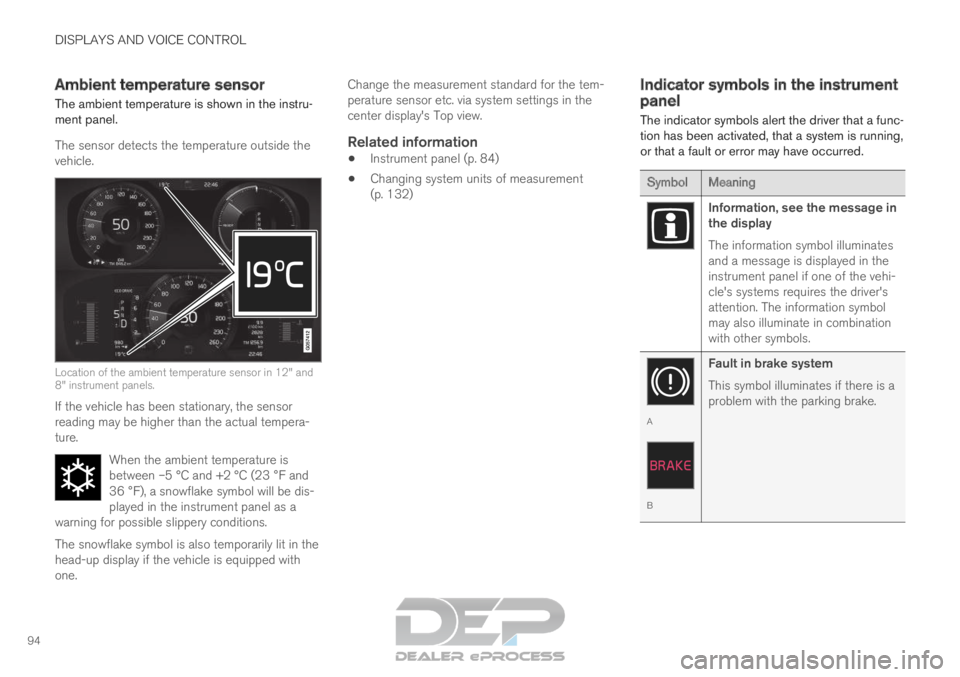
94Ambient temperature sensor
The ambient temperature is shown in the instru-
ment panel.
The sensor detects the temperature outside the
vehicle. Location of the ambient temperature sensor in 12" and
8" instrument panels.
If the vehicle has been stationary, the sensor
reading may be higher than the actual tempera-
ture.
When the ambient temperature is
between –5 °C and +2 °C (23 °F and
36 °F), a snowflake symbol will be dis-
played in the instrument panel as a
warning for possible slippery conditions. The snowflake symbol is also temporarily lit in the
head-up display if the vehicle is equipped with
one. Change the measurement standard for the tem-
perature sensor etc. via system settings in the
center display's Top view.
Related information
Instrument panel (p. 84)
Changing system units of measurement
(p. 132) Indicator symbols in the instrument
panel
The indicator symbols alert the driver that a func-
tion has been activated, that a system is running,
or that a fault or error may have occurred. Symbol
Meaning Information, see the message in
the display
The information symbol illuminates
and a message is displayed in the
instrument panel if one of the vehi-
cle's systems requires the driver's
attention. The information symbol
may also illuminate in combination
with other symbols.
A
B
Fault in brake system
This symbol illuminates if there is a
problem with the parking brake.
Page 102 of 697

||DISPLAYS AND VOICE CONTROL
100
FreeType Project License
1. 1 Copyright 1996-1999 by David Turner,
Robert Wilhelm, and Werner Lemberg
Introduction The FreeType Project is
distributed in several archive packages; some
of them may contain, in addition to the
FreeType font engine, various tools and
contributions which rely on, or relate to, the
FreeType Project. This license applies to all
files found in such packages, and which do
not fall under their own explicit license. The
license affects thus the FreeType font
engine, the test programs, documentation
and makefiles, at the very least. This license
was inspired by the BSD, Artistic, and IJG
(Independent JPEG Group) licenses, which
all encourage inclusion and use of free
software in commercial and freeware
products alike. As a consequence, its main
points are that: o We don't promise that this
software works. However, we are be
interested in any kind of bug reports. (`as is'
distribution) o You can use this software for
whatever you want, in parts or full form,
without having to pay us. (`royalty-free'
usage) o You may not pretend that you wrote
this software. If you use it, or only parts of it,
in a program, you must acknowledge
somewhere in your documentation that
you've used the FreeType code. (`credits')
We specifically permit and encourage the
inclusion of this software, with or without
modifications, in commercial products, provided that all warranty or liability claims
are assumed by the product vendor. Legal
Terms 0. Definitions Throughout this license,
the terms `package', `FreeType Project', and
`FreeType archive' refer to the set of files
originally distributed by the authors (David
Turner, Robert Wilhelm, and Werner
Lemberg) as the `FreeType project', be they
named as alpha, beta or final release. `You'
refers to the licensee, or person using the
project, where `using' is a generic term
including compiling the project's source code
as well as linking it to form a `program' or
`executable'. This program is referred to as `a
program using the FreeType engine'. This
license applies to all files distributed in the
original FreeType archive, including all source
code, binaries and documentation, unless
otherwise stated in the file in its original,
unmodified form as distributed in the original
archive. If you are unsure whether or not a
particular file is covered by this license, you
must contact us to verify this. The FreeType
project is copyright (C) 1996-1999 by David
Turner, Robert Wilhelm, and Werner
Lemberg. All rights reserved except as
specified below. 1. No Warranty THE
FREETYPE ARCHIVE IS PROVIDED `AS IS'
WITHOUT WARRANTY OF ANY KIND,
EITHER EXPRESSED OR IMPLIED,
INCLUDING, BUT NOT LIMITED TO,
WARRANTIES OF MERCHANTABILITY AND
FITNESS FOR A PARTICULAR PURPOSE.
IN NO EVENT WILL ANY OF THE
AUTHORS OR COPYRIGHT HOLDERS BE
LIABLE FOR ANY DAMAGES CAUSED BY
THE USE OR THE INABILITY TO USE, OF
THE FREETYPE PROJECT. As you have not
signed this license, you are not required to
accept it. However, as the FreeType project
is copyrighted material, only this license, or
another one contracted with the authors,
grants you the right to use, distribute, and
modify it. Therefore, by using, distributing, or
modifying the FreeType project, you indicate
that you understand and accept all the terms
of this license.
2. Redistribution Redistribution and use in source and binary forms, with or without
modification, are permitted provided that the
following conditions are met: o Redistribution
of source code must retain this license file
(`licence.txt') unaltered; any additions,
deletions or changes to the original files
must be clearly indicated in accompanying
documentation. The copyright notices of the
unaltered, original files must be preserved in
all copies of source files. o Redistribution in
binary form must provide a disclaimer that
states that the software is based in part of
the work of the FreeType Team, in the
distribution documentation. We also
encourage you to put an URL to the
FreeType web page in your documentation,
though this isn't mandatory. These conditions
apply to any software derived from or based
Page 106 of 697

||DISPLAYS AND VOICE CONTROL
104
App
Functions
Trip com-
puter Select a trip odometer, change
instrument panel display set-
tings, etc.
Media player
Select active source for media
player.
Phone Call a contact from the call list.
Navigation Guide to destination, etc.
Related information
Instrument panel (p. 84)
Center display overview (p. 109)
Handling the App menu in the instrument
panel (p. 104) Handling the App menu in the
instrument panel
The App (application) menu in the instrument
panel is controlled using the right-side steering
wheel keypad. App menu and right-side steering wheel keypad.
Open/close
Left/right
Up/down
Confirm
Opening and closing the app menu
–
Tap open/close (1).
(The App menu cannot be opened while
there is an unacknowledged message in the
instrument panel. The message must be con-
firmed before the App menu can be opened.)
>
The App men opens/closes.
The App menu turns off automatically after a
period of inactivity or after certain selections are
made.
Navigating and making selections in the
App menu
1. Navigate among the apps available by press- ing the left/right arrow keys (2).
> Functions for the previous/next app willbe shown in the App menu.
2. Scroll through the functions for the selected app using the up or down arrows (3).
3. Confirm or make a selection for the function by pressing confirm (4).
> The function will be activated and, forsome selections, the App menu will then
close.
The next time the App menu is opened, the func-
tions for the most recently selected app will be
displayed automatically.