2019 VOLVO XC90 TWIN ENGINE low beam
[x] Cancel search: low beamPage 157 of 697

LIGHTING
}}
* Option/accessory. 155
With the steering wheel lever's lighting ring in the position, the daytime running lights (DRL
1
)
will illuminate when the vehicle is driven in day-
light conditions. The headlights will switch auto-
matically from daytime running lights to low
beams in weak daylight or dark conditions. The
headlights will also switch to low beams if the
front fog lights* and/or rear fog light are acti-
vated.
US models: When mode is selected, the
daytime running lights can be deactivated in the
center display. The parking lights will also be
deactivated. In weak daylight or dark conditions,
the parking lights and low beams will be illumi-
nated.
US models: With the lighting ring in the or position, the daytime running lights will
be off.
Canadian models: With the lighting ring in the or position, the daytime running
lights will be on.
NOTE Volvo recommends use of Daytime Running
Lights in the US. Its use is mandatory in Can-
ada.
WARNING The system is an energy saving aid – it cannot
in all situations determine when the daylight is
too weak or not strong enough, e.g. when
there is fog or rain.
The driver is always responsible for driving the
vehicle with lighting that is safe for the traffic
conditions and as specified by applicable traf-
fic regulations.
Related information
Lighting panel and controls (p. 152)
Ignition modes (p. 437)
Low beams (p. 155) Low beams
When driving with the lighting ring in the position, low beam will be automatically acti-
vated in weak daylight or dark conditions, when
the ignition is in the II position.
Lighting ring in AUTO position.
With the lighting ring in the
position, the
low beams will also be automatically activated if
the rear fog light is activated.
With the lighting ring in the position, low
beams will always be on when the ignition is in
the II position. 1
Daytime Running Lights
Page 158 of 697

||LIGHTING
156
Tunnel detection
The vehicle will detect if it enters a tunnel and
shift from daytime running lights to low beams.
Note that the left-hand steering wheel lever must
be in
position for tunnel detection to work.
Related information
Lighting panel and controls (p. 152)
Ignition modes (p. 437)
Daytime running lights (p. 154) Using high beam
High beam is operated via the left-hand steering
wheel lever. High beam is the vehicle's strongest
lighting and should be used when driving in dark
conditions, provided it does not blind other road
users, to improve visibility. Steering wheel lever with lighting ring.
High beam flash
Move the steering wheel lever slightly back-
ward to the high beam flash mode. The high
beams will illuminate until the lever is
released.
High beams
The high beams can be activated when the
lighting ring is in mode
2
or .
Activate high beams by moving the steering wheel lever forward. Deactivate by moving
the steering wheel lever backward.
When the high beams are activated, the symbol will be illuminated in the instrument panel.
Related information
Lighting panel and controls (p. 152)
Active high beam (p. 157) 2
When the low beams are on.
Page 159 of 697

LIGHTING
}}
* Option/accessory. 157
Active high beam
Active high beams is a function that uses cam-
era sensors in the upper edge of the windshield
to detect the headlights of approaching vehicles
or the taillights of the vehicle directly ahead.
When either of these is detected, the vehicle's
headlights will automatically switch from high
beams to low beams. Active high beam is enabled by moving the lighting ring
on the steering wheel lever to
.
The function can also detect street lighting.
When the camera sensor no longer detects an
approaching vehicle or a vehicle ahead, the head-
lights will return to high beams. This function can be used in dark conditions
when the vehicle's speed is approx. 20 km/h
(approx. 12 mph) or higher.
If active high beams are deactivated when the
high beams are on, the headlights will automati-
cally switch to low beams.
When active high beams are activated, a white symbol will be displayed in the instrument
panel.
When high beams are on, the symbol will be blue.
For LED headlights, this applies even if the high
beams are partially dimmed, i.e. if the headlights
are illuminated with slightly more than low beams.
Vehicles with LED 3
headlights*
If the active high beams are equipped with the
auto on/off function 4
, the headlights will return to
high beams a second or so after the camera sen-
sor no longer detects the headlights of approach-
ing vehicles or the taillights of a vehicle ahead.
Limitations for active high beams
The camera sensor on which the function is
based has limitations. If this symbol and the message Active
High Beam Temporarily unavailable is displayed in the instru-
ment panel, switching between high
and low beams must be done manually. The light-
ing ring on the steering wheel lever can remain in
the position. The symbol will go out
when the message is displayed. The same applies if this symbol along
with the message
Windscreen
sensor Sensor blocked, see Owner's manual is displayed. Active high beams may be temporarily unavailable
in certain situations, e.g. heavy fog or rain. When
active high beams become available again, or the
windshield sensors are no longer blocked, the
message will disappear and the
symbol will
be displayed.
WARNING Automatic high beam is an aid in using the
best possible light based on prevailing condi-
tions.
The driver is always responsible for manually
switching between high and low beam when
traffic situations or weather conditions require
this.
3
LED (Light Emitting Diode)4 Depends on the vehicle's equipment level.
Page 161 of 697
LIGHTING
}}
* Option/accessory. 159
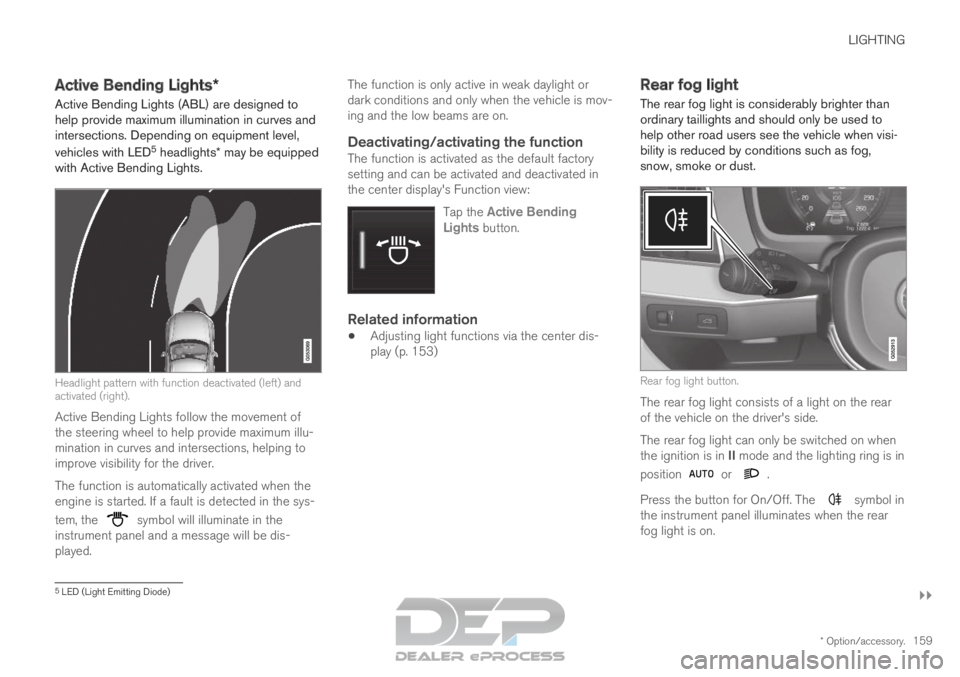
Active Bending Lights*
Active Bending Lights (ABL) are designed to
help provide maximum illumination in curves and
intersections. Depending on equipment level,
vehicles with LED 5
headlights* may be equipped
with Active Bending Lights. Headlight pattern with function deactivated (left) and
activated (right).
Active Bending Lights follow the movement of
the steering wheel to help provide maximum illu-
mination in curves and intersections, helping to
improve visibility for the driver.
The function is automatically activated when the
engine is started. If a fault is detected in the sys-
tem, the symbol will illuminate in the
instrument panel and a message will be dis-
played. The function is only active in weak daylight or
dark conditions and only when the vehicle is mov-
ing and the low beams are on.
Deactivating/activating the functionThe function is activated as the default factory
setting and can be activated and deactivated in
the center display's Function view:
Tap the Active BendingLights button.
Related information
Adjusting light functions via the center dis-
play (p. 153) Rear fog light
The rear fog light is considerably brighter than
ordinary taillights and should only be used to
help other road users see the vehicle when visi-
bility is reduced by conditions such as fog,
snow, smoke or dust. Rear fog light button.
The rear fog light consists of a light on the rear
of the vehicle on the driver's side.
The rear fog light can only be switched on when
the ignition is in II mode and the lighting ring is in
position or .
Press the button for On/Off. The symbol in
the instrument panel illuminates when the rear
fog light is on. 5
LED (Light Emitting Diode)
Page 181 of 697

WINDOWS, GLASS AND MIRRORS
}}
* Option/accessory. 179
Windshield wipers in the service position
(p. 661)
Replacing windshield wiper blades (p. 660)
Changing rear window wipers (p. 659)
Using the windshield wipers (p. 176) Using the windshield and headlight
washers
The windshield and headlight washers clean the
windshield and headlights. Use the right-side
steering wheel lever to start the windshield and
headlight washers.
Starting the windshield and headlight
washers Washing function, right-hand steering wheel lever.
–
Move the right-hand steering wheel lever
toward the steering wheel to start the wind-
shield and headlight washers.
>
After the lever is released, the wipers
make several extra sweeps.
CAUTION Avoid activating the washer system when it is
frozen or the fluid reservoir is empty. Other-
wise, there is a risk of damaging the pump.
Headlight washer*To save washer fluid, the headlights are washed
automatically according to a defined interval
when the headlights are on.
Reduced washingWhen there is about 1 liter (1 qt) of washer fluid
left in the reservoir and the
Washer fluid Level
low, refill message is displayed in the instrument
panel together with the symbol, the washer
fluid supply to the headlights is cut off. This is to
prioritize windshield cleaning and visibility
through it. The headlights are only washed if high
or low beam is on.
Related information
Using the rain sensor (p. 177)
Using automatic rear window wiping when
backing up (p. 181)
Wiper blades and washer fluid (p. 176)
Using the rain sensor's memory function
(p. 178)
Using the rear window wiper/washer
(p. 180)
Filling washer fluid (p. 662)
Page 339 of 697

DRIVER SUPPORT
* Option/accessory.337
Camera
The camera is used by several driver support
systems to e.g. detect lane marker lines or road
signs. Note: This illustration is general and details may vary
depending on model.
The camera is used by the following functions:
Adaptive Cruise Control*
Pilot Assist*
Lane Keeping Aid*
Steering assistance at risk of collision
City Safety
Driver Alert Control*
Road Sign Information*
Active high beams*
Related information
Camera limitations (p. 338)
Recommended maintenance for the camera/
radar sensor (p. 341)
Page 686 of 697

INDEX
684Lighting
Active Bending Lights 159
approach lighting 161
automatic high beam 157
automatic lighting controls, passenger
compartment 162
brake lights 160
controls 152, 162, 164
daytime running lights 154
display lighting 164
emergency brake lights 160
Hazard warning flashers 161
high beams 156, 157
home safe lighting 161
in passenger compartment 162, 164
instrument illumination 164
instrument lighting 164
low beams 155
position lights 154
rear fog light 159
settings 153
Turn signals 158
Lighting, replacing bulbs 626
Limp home 448
Load anchoring eyelets cargo compartment 601
Load anchoring hooks 600
Load carriers 600
Load index 564 Loading
general
598
load anchoring eyelets 601
long load 599
Lock indication 242
setting 243
Locking/unlocking Tailgate 247, 261
Locking wheel bolts 575
Locks Locking 246
unlocking 246
Long-term storage 432
Low battery charge level start battery 480
Low beams 155
Lower the rear end 599
Low oil level 624
Low-speed driving 464
activate with function button 465 M
Maintained climate comfort
237
start/stop
237
Maintenance 610
corrosion protection 656
Max. axle weight 669
Max. roof load 669
Media player 518, 520
compatible file formats 525, 526
voice control 148
Messages and symbols Adaptive Cruise Control 314
Collision warner with auto-brake 353
Messages in BLIS 359
Messages in display 105, 140
handling 106, 140
saved 107, 141
Mileage 89
electric motor 469
Misting condensation in headlights 650, 653
Mood lighting 163, 164