2019 VOLVO XC90 TWIN ENGINE brake
[x] Cancel search: brakePage 63 of 697

SAFETY
}}61
WARNING Volvo recommends contacting an authorized
Volvo workshop for repair. Incorrectly per-
formed repairs to the inflatable curtain system
could impair function and lead to serious
injury.
WARNING
Never hang or attach heavy objects in the
handle in the ceiling. The hooks are only
intended for lightweight garments (not for
hard objects such as umbrellas).
Never screw or mount anything to the vehi-
cle's headlining, door pillars or side panels.
This could impair the intended protective
properties. Volvo recommends only using
Volvo original parts that are approved for
placement in these areas.
WARNING
If objects are loaded higher than the upper
edge of the side windows, leave a 10 cm (4
in.) space between the objects and the win-
dow. Objects placed closer to this could
impede the function of the inflatable curtain
concealed inside the headlining.
WARNING
The inflatable curtain is a supplement to the
seat belt. Always wear your seat belt.
Related information
Airbags (p. 52) Safety mode
Safety mode is a feature that is triggered after a
collision if there is potential damage to an impor-
tant function in the vehicle, such as the fuel
lines, sensors for one of the safety systems, the
brake system, etc.
If the vehicle has been involved in a collision, the
text
Safety mode See Owner's manual may
appear in the instrument panel along with the
warning symbol if the panel is undamaged and
the vehicle's electrical system is intact. The mes-
sage indicates that one or more of the vehicle's
functions may be reduced.
WARNING Never attempt to restart the vehicle if you
smell fuel fumes when the message
Safety
mode See Owner's manual is displayed in the instrument panel. Leave the vehicle imme-
diately.
If safety mode has been set, it may be possible to
reset the system in order to start and move the
vehicle a short distance, for example, if it is block-
ing traffic.
Page 84 of 697

DISPLAYS AND VOICE CONTROL
* Option/accessory.
82 Instruments and controls in left-
hand drive vehicles
The overviews show the location of the vehicle's
displays and controls.
Steering wheel and dashboard Parking lights, daytime running lights, low
beams, high beams, turn signals, rear fog
light, trip computer reset
Steering wheel paddles for manual shifting*
Head-up display*
Instrument panel
Wipers and washers, rain sensor*
Right-side steering wheel keypad
Steering wheel adjustment Horn
Left-side steering wheel keypad
Hood open
Display lighting, tailgate unlock/open*/
close*, halogen headlight height adjustment
Ceiling console Front reading lights and courtesy lighting
Panoramic roof*
Ceiling console display ON CALL button
HomeLink
®
*
Center and tunnel console Center display
Hazard warning flashers, defrosting, media,
glove compartment open
Gear selector
Start knob
Drive modes
Parking brake
Auto-hold brakes
Driver's door
Page 86 of 697

DISPLAYS AND VOICE CONTROL
* Option/accessory.
84 Instrument panel
The instrument panel displays information rela-
ted to the vehicle and driving.
The instrument panel contains gauges, indicators
and monitoring and warning symbols. What is
shown in the instrument panel varies depending
on the equipment, settings and functions cur-
rently active.
The instrument panel is activated as soon as a
door is opened, i.e. in ignition mode 0. The panel
will power down after a short period of time if it is
not used. To reactivate it, do one of the following:
Depress the brake pedal.
Activate ignition mode I.
Open one of the doors.
WARNING If the instrument panel turns off, does not
activate when the ignition is switched on, or
part/all of the panel cannot be read, do not
drive the vehicle. Consult a workshop immedi-
ately. Volvo recommends an authorized Volvo
workshop.
WARNING
If the instrument panel is not functioning
properly, information about brakes, airbags or
other safety-related systems may not be dis-
played. The driver will then not be able to
check the status of the vehicle systems or
receive relevant warnings and information.
Location in the instrument panel:
Left side
In the centerRight side
Speedometer
Indicator and warning symbols Tachometer/Hybrid gaugeA
Trip odometer Ambient temperature sensorGear indicator
Odometer B
Clock Drive Mode
(Hybrid, Off Road, Pure, Power or AWD)
Cruise control/speed limiter information Message (also graphics in some cases) Fuel gauge
Road sign information* Door and seat belt status
Hybrid gauge
– Hybrid battery's charge levelDistance to empty tank
Page 89 of 697

DISPLAYS AND VOICE CONTROL
}}87
Fuel gauge
The fuel gauge in the instrument panel shows
the fuel level in the tank. The beige area in the fuel gauge indicates the
amount of fuel left in the tank.
When the fuel level is low and it is time to refuel,
the fuel pump symbol will illuminate with an
amber-colored light. The trip computer also indi-
cates the approximate distance driven on the fuel
remaining in the tank.
Related information
Instrument panel (p. 84)
Hybrid gauge (p. 88)
Refueling (p. 475)
Fuel tank volume (p. 674) Hybrid gauge
In Hybrid and Pure drive modes, the instrument panel will display a hybrid gauge, which can help
the driver achieve optimal driving economy. The hybrid gauge shows the ratio between the
electric motor's current power consumption and
the remaining available power. This information is
shown in various ways.
Symbols in the hybrid gauge
Indicates the current available power
from the electric motor. A solid symbol
indicates that the electric motor is
being used.
A hollow symbol indicates that the
electric motor is not being used. Indicates the power level when the
internal combustion engine starts. A
solid symbol indicates that the internal
combustion engine is being used.
Indicates the power level when the
internal combustion engine will start. A
hollow symbol indicates that the inter-
nal combustion engine is not being
used. Indicates that the hybrid battery is
being charged, e.g. by lightly pressing
the brake pedal.
Driver-requested power
The hybrid gauge displays the amount of power
requested (utilized) by the driver through pres-
sure on the accelerator pedal. The higher the
reading on the scale, the more power utilized in
the current gear. The mark between the lightning
symbol and the drop symbol indicates the point
at which the combustion engine will start.
Page 90 of 697

||DISPLAYS AND VOICE CONTROL
88
For example:
The vehicle has been started, but is stationary and no
power is being requested.
The electric motor cannot supply the requested power
and the internal combustion engine will start. The vehicle is generating current to recharge the battery,
e.g. during light braking or engine braking on a down-
slope.
Related information
Drive modes (p. 454)
Instrument panel (p. 84)
Brakes (p. 439)
Using the electric motor only (p. 469)
Starting and stopping the combustion engine
in Twin Engine vehicles (p. 454) Hybrid gauge
The hybrid battery gauge shows how much cur-
rent is left in the hybrid battery. The current in the hybrid battery is used to power
the electric motor, but can also be used to heat
or cool the vehicle. The trip computer calculates
an approximate driving distance with the remain-
ing current in the hybrid battery.
Page 96 of 697
DISPLAYS AND VOICE CONTROL
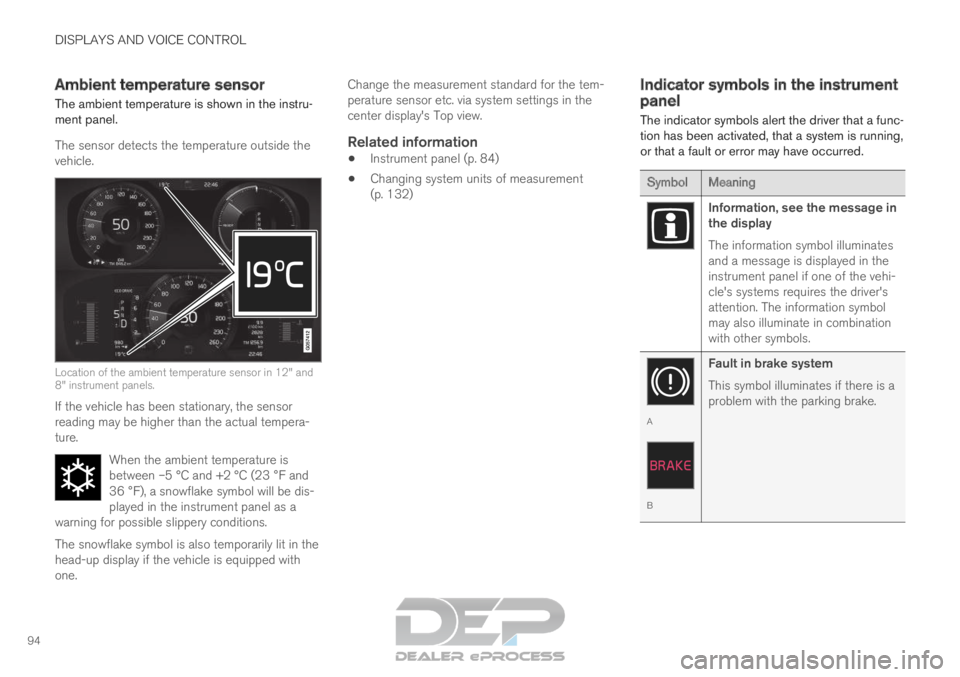
94Ambient temperature sensor
The ambient temperature is shown in the instru-
ment panel.
The sensor detects the temperature outside the
vehicle. Location of the ambient temperature sensor in 12" and
8" instrument panels.
If the vehicle has been stationary, the sensor
reading may be higher than the actual tempera-
ture.
When the ambient temperature is
between –5 °C and +2 °C (23 °F and
36 °F), a snowflake symbol will be dis-
played in the instrument panel as a
warning for possible slippery conditions. The snowflake symbol is also temporarily lit in the
head-up display if the vehicle is equipped with
one. Change the measurement standard for the tem-
perature sensor etc. via system settings in the
center display's Top view.
Related information
Instrument panel (p. 84)
Changing system units of measurement
(p. 132) Indicator symbols in the instrument
panel
The indicator symbols alert the driver that a func-
tion has been activated, that a system is running,
or that a fault or error may have occurred. Symbol
Meaning Information, see the message in
the display
The information symbol illuminates
and a message is displayed in the
instrument panel if one of the vehi-
cle's systems requires the driver's
attention. The information symbol
may also illuminate in combination
with other symbols.
A
B
Fault in brake system
This symbol illuminates if there is a
problem with the parking brake.
Page 97 of 697

DISPLAYS AND VOICE CONTROL
}}95 Symbol
Meaning A
B
Fault in ABS system
If this symbol is illuminated, the
ABS system is malfunctioning. The
vehicle's regular brakes will still
work, but without the ABS function. A
B
Auto-brake on
This symbol illuminates when the
function is activated and the brakes
or parking brakes are being used.
The brakes hold the vehicle at a
standstill after it has stopped. Symbol
Meaning Tire pressure system
This symbol illuminates to indicate
low tire pressure. If there is a fault
in the tire pressure system, the
symbol will first flash for approxi-
mately 1 minute and then glow
steadily. This may occur if the sys-
tem cannot detect or alert the
driver of low tire pressure as
intended.
Emission control system
If this symbol illuminates after star-
ting the engine, it could indicate a
fault in the vehicle's emission con-
trol system. Have the vehicle
checked by a workshop. Volvo rec-
ommends contacting an authorized
Volvo workshop.
Left/right turn signals
These symbols flash when the turn
signals are used. Symbol
Meaning Parking lights
This symbol illuminates when the
parking lights are on.
Fault in headlight system
This symbol illuminates if a fault
has been detected in the ABL
(Active Bending Lights) function or
another fault in the headlight sys-
tem.
Active high beams on
This symbol lights up in blue when
the active high beams are on.
Active high beams off
This symbol lights up in white when
the active high beams are off.
High beams on
This symbol illuminates when the
high beams are on or flashed.
Active high beams on
This symbol lights up in blue when
the active high beams are on. Park-
ing lights are on.
Page 99 of 697

DISPLAYS AND VOICE CONTROL
97
Warning symbols in the instrument
panel
The warning symbols alert the driver that an
important function is activated or that a serious
fault or error has occurred. Symbol
Meaning WARNING
The red warning symbol illuminates
to indicate that a fault has been
detected that could affect safety
and/or driveability. An explanatory
message will be simultaneously
displayed in the instrument panel.
The warning symbol may also illu-
minate in combination with other
symbols.
Seat belt reminder
This symbol will glow steadily or
flash if the driver or front seat pas-
senger has not fastened their seat
belt or if anyone in the rear seat
has removed their seat belt. Symbol
Meaning Airbags
If this symbol remains illuminated
or comes on while driving, a fault
has been detected in one of the
vehicle's safety systems. Read the
message in the instrument panel.
Volvo recommends contacting an
authorized Volvo workshop.
A
B
Fault in brake system
If this symbol illuminates, the brake
fluid level may be too low. Contact
your nearest authorized workshop
to have the brake fluid level
checked and adjusted. A
BParking brake on
This symbol glows steadily when
the parking brake is applied.
A flashing symbol indicates that a
fault has occurred. Read the mes-
sage in the instrument panel. Symbol
Meaning Low oil pressure
If this symbol illuminates while driv-
ing, the engine oil level is too low.
Stop the engine immediately and
check the engine oil level. Add oil if
necessary. If the symbol illuminates
and the oil level is normal, contact
a workshop. Volvo recommends
contacting an authorized Volvo
workshop.
Generator not charging
This symbol illuminates during driv-
ing if a fault is detected in the elec-
trical system. Contact a workshop.
Volvo recommends contacting an
authorized Volvo workshop.
Collision risk
City Safety warns the driver if there
is a risk of a collision with another
vehicle, pedestrian, cyclist or large
animal.
A
Canadian models.
B US models.
Related information
Indicator symbols in the instrument panel
(p. 94)
Instrument panel (p. 84)