2019 VOLVO XC60 TWIN ENGINE instrument panel
[x] Cancel search: instrument panelPage 5 of 695

3
Top tether anchors72
Lower child seat attachment points73
ISOFIX/LATCH lower anchors74
Integrated booster cushion*75
Folding up the integrated boostercushion*77
Folding down the integrated boostercushion*78
DISPLAYS AND VOICE CONTROL
Instruments and controls in left-handdrive vehicles82
Instrument panel84
Instrument panel settings86
Fuel gauge87
Hybrid gauge87
Hybrid gauge88
Trip computer89
Displaying trip data in the instrumentpanel91
Resetting the trip odometer92
Displaying trip statistics in the centerdisplay92
Trip statistics settings93
Date and time93
Ambient temperature sensor94
Indicator symbols in the instrument panel94
Warning symbols in the instrument panel97
Instrument panel licenses98
App menu in instrument panel103
Handling the App menu in the instru-ment panel104
Messages in the instrument panel105
Handling messages in the instru-ment panel106
Handling messages saved from theinstrument panel107
Center display overview109
Handling the center display112
Activating and deactivating the cen-ter display115
Navigating in the center display's views115
Handling tiles in the center display119
Function view in the center display122
Moving apps and buttons in the cen-ter display124
Symbols in the center display status bar124
Using the center display keyboard126
Changing keyboard language in thecenter display129
Entering characters, letters andwords by hand in the center display129
Changing the appearance of thecenter display131
Turning off and adjusting the volumeof the center display system sounds131
Changing system units of measurement132
Changing system language132
Changing settings in the center dis-play's Top view132
Opening contextual setting in thecenter display133
Page 10 of 695

8
Pilot Assist limitations323
Pilot Assist* symbols and messages324
Radar sensor326
Radar sensor limitations327
Recommended maintenance for theradar sensor330
Radar sensor type approval330
Camera331
Camera limitations332
Recommended maintenance for thecamera/radar sensor335
City Safety™335
City Safety parameters and sub-functions336
Setting a warning distance for City Safety338
Detecting obstacles with City Safety339
City Safety in crossing traffic341
Limitations of City Safety in crossingtraffic342
City Safety steering assistance forevasive maneuver343
City Safety steering assistance limi-tations during evasive maneuvers343
City Safety and delayed evasivemaneuvers344
City Safety braking for oncomingvehicles*345
City Safety limitations346
City Safety messages348
Rear Collision Warning349
Rear Collision Warning limitations349
BLIS*350
Activating/deactivating BLIS351
BLIS limitations352
Recommended maintenance for BLIS353
BLIS messages354
Cross Traffic Alert*355
Activating/deactivating Cross TrafficAlert356
Cross Traffic Alert limitations356
Recommended maintenance forCross Traffic Alert357
Cross Traffic Alert messages358
Road Sign Information*359
Activating/deactivating Road SignInformation360
Road Sign Information and sign displays361
Road Sign Information and SensusNavigation361
Road Sign Information with SpeedWarning and Settings362
Activating/deactivating Speed Warn-ing in Road Sign Information363
Road Sign Information with speedcamera information363
Road Sign Information limitations364
Driver Alert Control365
Activating/deactivating Driver AlertControl366
Selecting guidance to a rest area ifthe Driver Alert Control warning hasbeen given
367
Driver Alert Control limitations367
Lane Keeping Aid367
Steering assistance with Lane Keep-ing Aid369
Activating/deactivating Lane Keeping Aid370
Selecting type of assistance for LaneKeeping Aid370
Lane Keeping Aid limitations371
Lane Keeping Aid symbols and mes-sages372
Lane Keeping Aid symbols in theinstrument panel374
Steering assistance at risk of collision375
Activating/deactivating steeringassistance during collision risks375
Run-Off Mitigation with steeringassistance376
Run-Off Mitigation with steeringassistance levels376
Activating/deactivating Run-Off Miti-gation with steering assistance377
Page 11 of 695

9
Limitations of Run-Off Mitigationwith steering assistance378
Steering assistance during collisionrisks from oncoming traffic378
Activating/deactivating Steeringassistance during collision risks withoncoming vehicles
379
Limitations of steering assistanceduring collision risks from oncomingtraffic
380
Steering assistance during collisionrisks from behind*381
Activating/deactivating Steeringassistance during collision risks frombehind*
382
Limitations of steering assistanceduring collision risks from behind382
Symbols and messages for steeringassistance during collision risks384
Park Assist*385
Park Assist front, rear and sides386
Activating/deactivating Park Assist387
Park Assist limitations388
Recommended maintenance forPark Assist389
Park Assist symbols and messages390
Park Assist Camera*391
Park Assist Camera views392
Park Assist Camera trajectory lines394
Sensor field from Park Assist forPark Assist Camera396
Starting the Park Assist Camera397
Park Assist Camera limitations398
Recommended maintenance of thePark Assist Camera399
Park Assist Camera symbols andmessages400
Park Assist Pilot* 401
Types of parking with Park Assist Pilot401
Parking with Park Assist Pilot403
Leaving a parking space with ParkAssist Pilot405
Park Assist Pilot* limitations 406
Recommended maintenance forPark Assist Pilot408
Park Assist Pilot* messages409
HYBRID INFORMATION
General information about Twin Engine412
Charging the hybrid battery413
Charging current415
Charge cable415
Charging cable residual current device417
Charging cable temperature monitoring418
Opening and closing the chargingsocket cover418
Initiating hybrid battery charging419
Charging status in the vehicle'scharging socket421
Charging status in the chargingcable's charging module421
Charging status in the instrument panel423
Stopping hybrid battery charging425
Twin Engine symbols and messagesin the instrument panel426
Long-term storage of vehicles withhybrid batteries428
Page 33 of 695

YOUR VOLVO
}}
* Option/accessory.31
Different types of information are shown in different displays depending on how the information should be prioritized.
Head-up display *
The head-up display presents information thatthe driver should react to immediately.For example, traffic warnings, speed information
and navigation messages*. Road sign informationand incoming phone calls are also shown in thehead-up display. These can be handled using theright-side steering wheel keypad or the centerdisplay.
Instrument panel
The instrument panel displays informationsuch as speed, incoming phone calls or the track
Page 34 of 695
||
YOUR VOLVO
* Option/accessory.32
currently playing. It is controlled using the steer-ing wheel keypads.
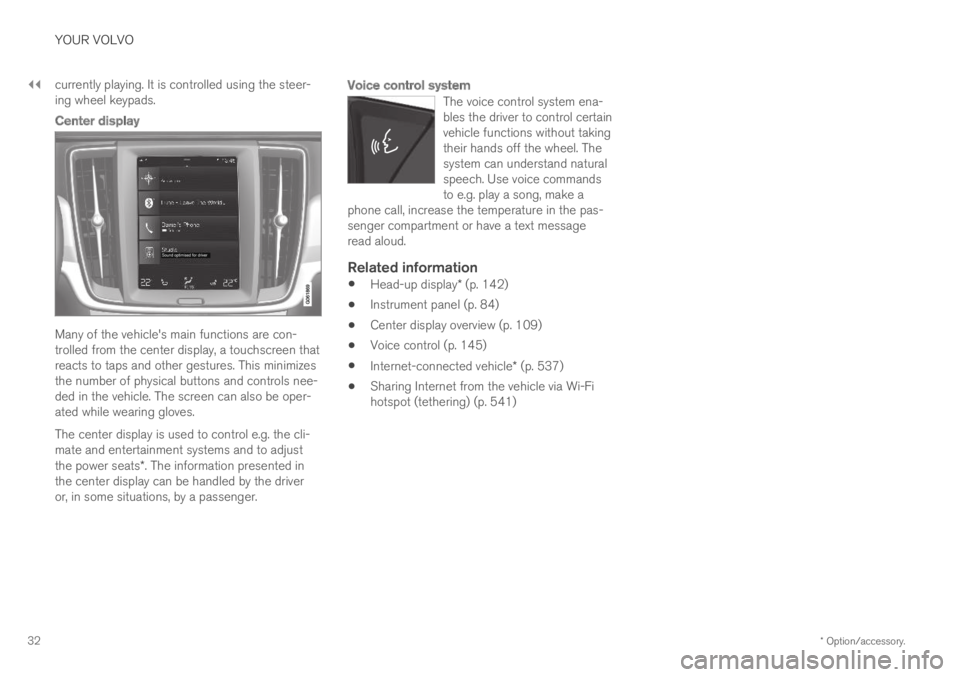
Center display
Many of the vehicle's main functions are con-trolled from the center display, a touchscreen thatreacts to taps and other gestures. This minimizesthe number of physical buttons and controls nee-ded in the vehicle. The screen can also be oper-ated while wearing gloves.
The center display is used to control e.g. the cli-mate and entertainment systems and to adjustthe power seats*. The information presented inthe center display can be handled by the driveror, in some situations, by a passenger.
Voice control system
The voice control system ena-bles the driver to control certainvehicle functions without takingtheir hands off the wheel. Thesystem can understand naturalspeech. Use voice commandsto e.g. play a song, make aphone call, increase the temperature in the pas-senger compartment or have a text messageread aloud.
Related information
Head-up display* (p. 142)
Instrument panel (p. 84)
Center display overview (p. 109)
Voice control (p. 145)
Internet-connected vehicle* (p. 537)
Sharing Internet from the vehicle via Wi-Fihotspot (tethering) (p. 541)
Page 44 of 695

SAFETY
42
Safety
The vehicle is equipped with a number of safetysystems that work together to help protect thevehicle's driver and passengers in the event ofan accident.
The vehicle is equipped with a number of sensorsthat may react in the event of an accident andactivate different safety systems, such as the air-bag system and seat belt tensioners. Dependingon the specific conditions of the accident, e.g.collisions at certain angles, overturning or swerv-ing, the systems react differently to help providethe best protection.
There are also mechanical safety systems suchas the Whiplash Protection System. The vehicleis also built so that a large part of the force of acollision is distributed to the vehicle's members,pillars, floor, roof and other parts of the body.
After an accident, the vehicle's safety mode maybe activated if any important function in the vehi-cle has been damaged.
Warning symbol in the instrument panel
The warning symbol in the instrumentpanel illuminates when the vehicle'selectrical system is in ignition mode II.The symbol will go out after approx. 6seconds if no faults are detected in the vehicle'ssafety systems.
WARNING
If the warning symbol remains illuminated orswitches on while driving and the messageSRS airbag Service urgent Drive toworkshop is displayed in the instrumentpanel, this indicates that something in thesafety system is not functioning properly.Volvo recommends contacting an authorizedVolvo workshop for repairs as soon as possi-ble.
WARNING
Never attempt to alter or repair any of thevehicle's safety systems yourself. Incorrectlyperformed repairs to any system could impairfunction and lead to serious injury. Volvo rec-ommends contacting an authorized Volvoworkshop.
If this dedicated warning symbol is notfunctioning, the general warning sym-bol will illuminate instead and the samemessage will be displayed in the instru-ment panel.
Related information
Safety during pregnancy (p. 43)
Occupant safety (p. 43)
Reporting safety defects (p. 44)
Recall information (p. 45)
Seat belts (p. 47)
Airbags (p. 52)
Whiplash Protection System (p. 46)
Safety mode (p. 61)
Child safety (p. 63)
Page 53 of 695

SAFETY
}}
* Option/accessory.51
Resetting the electric seat belt
tensioners*
The electric seat belt tensioners are designed tobe reset automatically, but if the seat beltremains taut it can be reset manually.
1. Stop the vehicle in a safe location.
2.Unbuckle the seat belt and then rebuckle it.
> The seat belt and the electric seat belttensioner will be reset.
WARNING
Never attempt to alter or repair the seat belton your own. Volvo recommends contactingan authorized Volvo workshop.
If the seat belt has been exposed to extremeforces, e.g. in conjunction with a collision, theentire seat belt must be replaced. Even if theseat belt appears undamaged, some of itsprotective properties may have been lost. Alsoreplace the seat belt if it is worn or damaged.The new seat belt must be type approved andintended for the same seating position as thereplaced seat belt.
Related information
Seat belt tensioners (p. 50)
Seat belts (p. 47)
Door and seat belt reminders
This system is intended to remind occupants tobuckle their seat belts and to alert the driver if adoor, hood or other opening (trunk, sunroof,etc.) is open.
Graphics in the instrument panel
Graphics in the instrument panel with various types ofwarnings. The warning colors for the doors/tailgate varydepending on the vehicle's speed.
The instrument panel graphic shows the seatswhere seat belts are buckled and not buckled.
The same graphic also indicates if the hood, tail-gate, fuel filler door or any door is open.
Confirm the graphic by briefly pressing the Obutton on the right-side steering wheel keypad.
Seat belt reminder
Reminder light in ceiling console.
The seat belt reminder consists of an audible sig-nal and a symbol in the instrument panel.
The reminder light varies depending on the vehi-cle's speed, driving time and distance driven.
A seat belt status graphic in the instrument panelindicates when the driver's or a passenger's seatbelt is buckled or unbuckled.
Child seats are not included in the seat beltreminder system.
Front seats
An audible signal and an indicator light remindunbuckled occupants to fasten their seat belts.
Page 54 of 695

||
SAFETY
52
Rear seat
The rear seat belt reminder has two functions:
To indicate which seat belts are buckled inthe rear seats. This will also be displayed inan instrument panel graphic.
To provide audio and visual reminders if anyseat belt in the rear seat is removed whilethe vehicle is in motion. The reminder willstop when the seat belt has been rebuckled.
Door/hood/tailgate and fuel filler door
reminder
If the hood, tailgate, fuel filler door or any door isnot properly closed, this will be indicated by agraphic in the instrument panel. Stop the vehiclesafely and close the open door, hood, etc.
If the vehicle is moving at a speedunder approx. 10 km/h (6 mph), theinformation symbol will illuminate in theinstrument panel.
If the vehicle is moving at a speedabove approx. 10 km/h (6 mph), thewarning symbol will illuminate in theinstrument panel.
Related information
Seat belts (p. 47)
Buckling and unbuckling seat belts (p. 48)
Airbags
The vehicle is equipped with airbags and inflat-able curtains for the driver and passengers.
WARNING
If the airbag warning light stays on afterthe engine has started or if it illuminateswhile you are driving, have the vehicleinspected by a trained and qualified Volvoservice technician as soon as possible.
Never attempt to alter or repair any of thevehicle's safety systems yourself. Incor-rectly performed repairs to any systemcould impair function and lead to seriousinjury. All work on these systems shouldbe performed by a trained and qualifiedVolvo service technician.
WARNING
If your vehicle has become water-damaged inany way (e.g., soaked floor mats/standingwater on the floor of the vehicle), do notattempt to start the engine. This may causeairbag deployment, which could result in seri-ous injury. Volvo recommends towing thevehicle directly to an authorized Volvo work-shop.
Before attempting to tow the vehicle:
1.Switch off the ignition for at least 10minutes and disconnect the battery.
2. Follow the instructions for manually over-riding the shiftlock system.
Deployed airbags
WARNING
If any of the airbags have deployed:
Do not attempt to drive the vehicle. Haveit towed to an authorized workshop.
If necessary, seek medical attention.
Related information
Safety (p. 42)
Driver/passenger-side airbags (p. 53)
Side airbags (p. 59)
Inflatable curtain (p. 60)