2019 VOLVO XC60 TWIN ENGINE warning
[x] Cancel search: warningPage 99 of 695

DISPLAYS AND VOICE CONTROL
97
Warning symbols in the instrumentpanel
The warning symbols alert the driver that animportant function is activated or that a seriousfault or error has occurred.
SymbolMeaning
WARNING
The red warning symbol illuminatesto indicate that a fault has beendetected that could affect safetyand/or driveability. An explanatorymessage will be simultaneouslydisplayed in the instrument panel.The warning symbol may also illu-minate in combination with othersymbols.
Seat belt reminder
This symbol will glow steadily orflash if the driver or front seat pas-senger has not fastened their seatbelt or if anyone in the rear seathas removed their seat belt.
SymbolMeaning
Airbags
If this symbol remains illuminatedor comes on while driving, a faulthas been detected in one of thevehicle's safety systems. Read themessage in the instrument panel.Volvo recommends contacting anauthorized Volvo workshop.
A
B
Fault in brake system
If this symbol illuminates, the brakefluid level may be too low. Contactyour nearest authorized workshopto have the brake fluid levelchecked and adjusted.
A
B
Parking brake on
This symbol glows steadily whenthe parking brake is applied.
A flashing symbol indicates that afault has occurred. Read the mes-sage in the instrument panel.
SymbolMeaning
Low oil pressure
If this symbol illuminates while driv-ing, the engine oil level is too low.Stop the engine immediately andcheck the engine oil level. Add oil ifnecessary. If the symbol illuminatesand the oil level is normal, contacta workshop. Volvo recommendscontacting an authorized Volvoworkshop.
Generator not charging
This symbol illuminates during driv-ing if a fault is detected in the elec-trical system. Contact a workshop.Volvo recommends contacting anauthorized Volvo workshop.
Collision risk
City Safety warns the driver if thereis a risk of a collision with anothervehicle, pedestrian, cyclist or largeanimal.
ACanadian models.BUS models.
Related information
Indicator symbols in the instrument panel(p. 94)
Instrument panel (p. 84)
Page 125 of 695

DISPLAYS AND VOICE CONTROL
123
Button modes
When a function or parking button's LED indica-tor is green, the function is activated (on). Forsome functions, an additional text explaining thefunction will be shown when the function is ini-tially activated. The text will be displayed for a fewseconds and then the button will be displayedwith the LED indicator illuminated.
For Lane Keeping Aid, for example, the textWorks only at certain speeds will be displayedwhen the button is pressed.
Press the button once briefly to activate or deac-tivate the function.
The function is deactivated when the LED indica-tor light is switched off.
A warning triangle in the right-hand section ofthe button indicates that something is not work-ing correctly.
Related information
Handling the center display (p. 112)
Navigating in the center display's views(p. 115)
Page 144 of 695
DISPLAYS AND VOICE CONTROL
* Option/accessory.142
Head-up display*
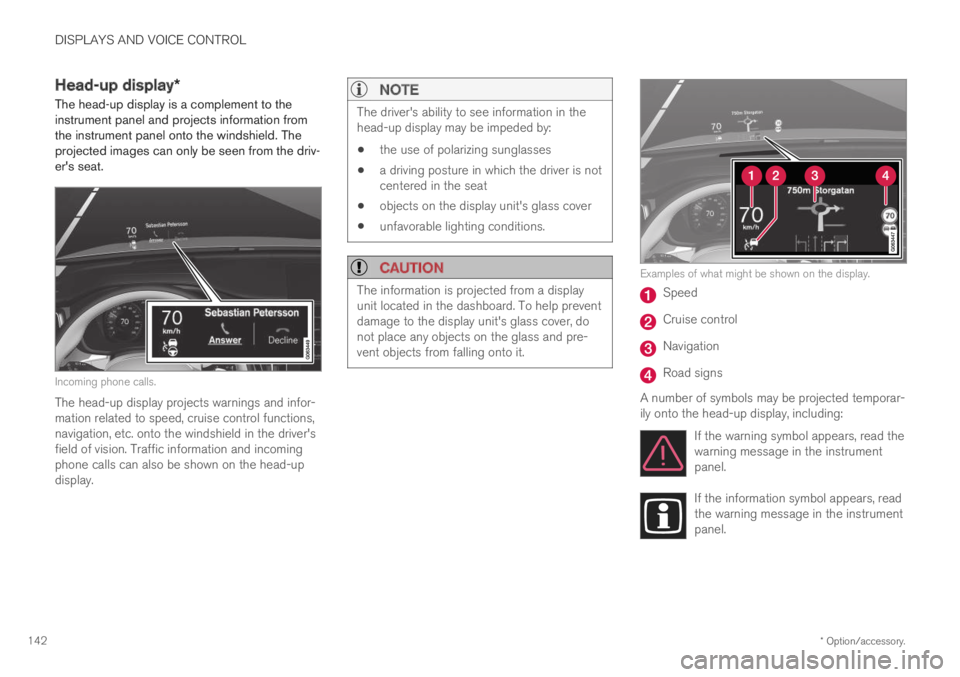
The head-up display is a complement to theinstrument panel and projects information fromthe instrument panel onto the windshield. Theprojected images can only be seen from the driv-er's seat.
Incoming phone calls.
The head-up display projects warnings and infor-mation related to speed, cruise control functions,navigation, etc. onto the windshield in the driver'sfield of vision. Traffic information and incomingphone calls can also be shown on the head-updisplay.
NOTE
The driver's ability to see information in thehead-up display may be impeded by:
the use of polarizing sunglasses
a driving posture in which the driver is notcentered in the seat
objects on the display unit's glass cover
unfavorable lighting conditions.
CAUTION
The information is projected from a displayunit located in the dashboard. To help preventdamage to the display unit's glass cover, donot place any objects on the glass and pre-vent objects from falling onto it.
Examples of what might be shown on the display.
Speed
Cruise control
Navigation
Road signs
A number of symbols may be projected temporar-ily onto the head-up display, including:
If the warning symbol appears, read thewarning message in the instrumentpanel.
If the information symbol appears, readthe warning message in the instrumentpanel.
Page 145 of 695

DISPLAYS AND VOICE CONTROL
* Option/accessory.143
The snowflake symbol will illuminate ifthere is a risk of slippery conditions.
NOTE
People with certain types of vision problemsmay experience headaches or eye strainwhen using the head-up display.
City Safety in head-up-display
If a collision warning is given, the information inthe head-up display will be replaced by a CitySafety graphic. This graphic will illuminate even ifthe head-up display is turned off.
A City Safety graphic flashes to attract the driver's atten-tion.
Related information
Activating and deactivating the head-up dis-play* (p. 143)
Cleaning the head-up display* (p. 644)
Replacing a windshield with head-up display*(p. 619)
Activating and deactivating the
head-up display*
The head-up display can be activated and deac-tivated when the vehicle has been started.
Press the Head-up Displaybutton in the center display'sFunction view. An indicator lightin the button will illuminatewhen the function is activated.
Related information
Head-up display settings* (p. 144)
Head-up display* (p. 142)
Page 147 of 695
DISPLAYS AND VOICE CONTROL
}}
* Option/accessory.145
Calibrating the horizontal position
If the windshield or display unit has beenreplaced, the head-up display's horizontal posi-tion may need to be calibrated. Calibration meansthat the projected image is rotated clockwise orcounterclockwise.
1.Tap Settings in the center display's Topview.
2.Select My CarDisplaysHead-Up
Display OptionsHead-Up DisplayCalibration.
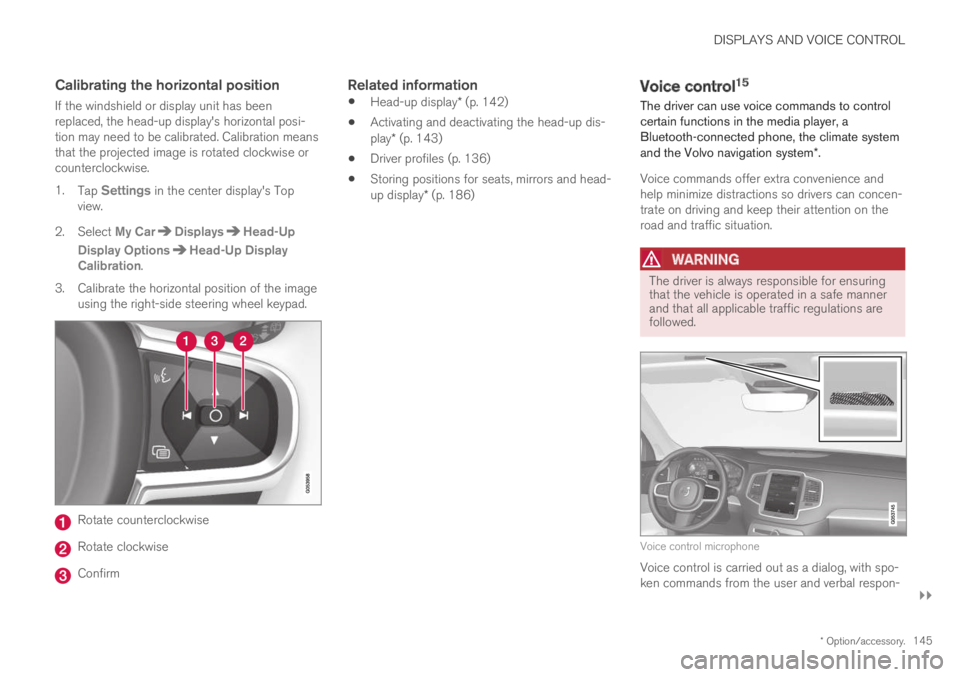
3.Calibrate the horizontal position of the imageusing the right-side steering wheel keypad.
Rotate counterclockwise
Rotate clockwise
Confirm
Related information
Head-up display* (p. 142)
Activating and deactivating the head-up dis-play* (p. 143)
Driver profiles (p. 136)
Storing positions for seats, mirrors and head-up display* (p. 186)
Voice control15
The driver can use voice commands to controlcertain functions in the media player, aBluetooth-connected phone, the climate systemand the Volvo navigation system*.
Voice commands offer extra convenience andhelp minimize distractions so drivers can concen-trate on driving and keep their attention on theroad and traffic situation.
WARNING
The driver is always responsible for ensuringthat the vehicle is operated in a safe mannerand that all applicable traffic regulations arefollowed.
Voice control microphone
Voice control is carried out as a dialog, with spo-ken commands from the user and verbal respon-
Page 155 of 695

LIGHTING
* Option/accessory.153
WARNING
The vehicle lighting system cannot in all situa-tions determine when the daylight is too weakor not strong enough, e.g. when there is fogor rain.
The driver is always responsible for driving thevehicle with lighting that is safe for the trafficconditions and as specified by applicable traf-fic regulations.
Thumbwheel in instrument panel
Thumb wheel (to the left) for adjusting interior bright-ness.
Related information
Adjusting light functions via the center dis-play (p. 153)
Interior Lighting (p. 162)
Parking lights (p. 154)
Using turn signals (p. 158)
Using high beam (p. 156)
Low beams (p. 155)
Rear fog light (p. 159)
Active Bending Lights* (p. 159)
Brake lights (p. 160)
Emergency brake lights (p. 160)
Hazard warning flashers (p. 161)
Adjusting light functions via thecenter display
A number of light functions can be adjusted andactivated via the center display. These includeactive high beams, home safe lighting andapproach lighting.
1.Tap Settings in the Top view.
2.Tap My CarLights and Lighting.
3.Select Exterior Lights or Interior Lightingand then the function that you would like toadjust.
Related information
Lighting panel and controls (p. 152)
Active high beam (p. 157)
Using home safe lighting (p. 161)
Welcome Light (p. 161)
Using turn signals (p. 158)
Changing settings in the center display's Topview (p. 132)
Function view in the center display (p. 122)
Page 157 of 695

LIGHTING
}}
* Option/accessory.155
With the steering wheel lever's lighting ring in the
position, the daytime running lights (DRL1)will illuminate when the vehicle is driven in day-light conditions. The headlights will switch auto-matically from daytime running lights to lowbeams in weak daylight or dark conditions. Theheadlights will also switch to low beams if thefront fog lights* and/or rear fog light are acti-vated.
US models: When mode is selected, thedaytime running lights can be deactivated in thecenter display. The parking lights will also bedeactivated. In weak daylight or dark conditions,the parking lights and low beams will be illumi-nated.
US models: With the lighting ring in the
or position, the daytime running lights willbe off.
Canadian models: With the lighting ring in the
or position, the daytime runninglights will be on.
NOTE
Volvo recommends use of Daytime RunningLights in the US. Its use is mandatory in Can-ada.
WARNING
The system is an energy saving aid – it cannotin all situations determine when the daylight istoo weak or not strong enough, e.g. whenthere is fog or rain.
The driver is always responsible for driving thevehicle with lighting that is safe for the trafficconditions and as specified by applicable traf-fic regulations.
Related information
Lighting panel and controls (p. 152)
Ignition modes (p. 433)
Low beams (p. 155)
Low beams
When driving with the lighting ring in the position, low beam will be automatically acti-vated in weak daylight or dark conditions, whenthe ignition is in the II position.
Lighting ring in AUTO position.
With the lighting ring in the position, thelow beams will also be automatically activated ifthe rear fog light is activated.
With the lighting ring in the position, lowbeams will always be on when the ignition is inthe II position.
1Daytime Running Lights
Page 159 of 695

LIGHTING
}}
* Option/accessory.157
Active high beam
Active high beams is a function that uses cam-era sensors in the upper edge of the windshieldto detect the headlights of approaching vehiclesor the taillights of the vehicle directly ahead.When either of these is detected, the vehicle'sheadlights will automatically switch from highbeams to low beams.
Active high beam is enabled by moving the lighting ring
on the steering wheel lever to .
The function can also detect street lighting.When the camera sensor no longer detects anapproaching vehicle or a vehicle ahead, the head-lights will return to high beams.
This function can be used in dark conditionswhen the vehicle's speed is approx. 20 km/h(approx. 12 mph) or higher.
If active high beams are deactivated when thehigh beams are on, the headlights will automati-cally switch to low beams.
When active high beams are activated, a white
symbol will be displayed in the instrumentpanel.
When high beams are on, the symbol will be blue.For LED headlights, this applies even if the highbeams are partially dimmed, i.e. if the headlightsare illuminated with slightly more than low beams.
Vehicles with LED 3
headlights *
If the active high beams are equipped with the
auto on/off function4, the headlights will return tohigh beams a second or so after the camera sen-sor no longer detects the headlights of approach-ing vehicles or the taillights of a vehicle ahead.
Limitations for active high beams
The camera sensor on which the function isbased has limitations.
If this symbol and the message ActiveHigh Beam Temporarilyunavailable is displayed in the instru-ment panel, switching between highand low beams must be done manually. The light-ing ring on the steering wheel lever can remain in
the position. The symbol will go outwhen the message is displayed.
The same applies if this symbol alongwith the message Windscreensensor Sensor blocked, seeOwner's manual is displayed.
Active high beams may be temporarily unavailablein certain situations, e.g. heavy fog or rain. Whenactive high beams become available again, or thewindshield sensors are no longer blocked, the
message will disappear and the symbol willbe displayed.
WARNING
Automatic high beam is an aid in using thebest possible light based on prevailing condi-tions.
The driver is always responsible for manuallyswitching between high and low beam whentraffic situations or weather conditions requirethis.
3
LED (Light Emitting Diode)
4Depends on the vehicle's equipment level.