2019 VOLVO XC60 TWIN ENGINE battery
[x] Cancel search: batteryPage 427 of 695

HYBRID INFORMATION
* Option/accessory.425
Stopping hybrid battery charging
To stop charging of the hybrid battery, unlockthe vehicle, unplug the charging cable from thevehicle's charging socket and then unplug thecable from the 120/240 V outlet (alternatingcurrent).
CAUTION
Before the charging cable is removed fromthe vehicle's charging socket, the vehiclemust be unlocked using the unlock button onthe remote key. This must be done even if thevehicle's doors are already unlocked. If thevehicle is not unlocked using the unlock but-ton, the charging cable or system may bedamaged.
NOTE
Always unlock the vehicle so that charging iscut off before the connection to the120/240 V outlet (AC, alternating current) isdisconnected. Note that the charging cablemust be disconnected from the vehicle'scharging socket before it is disconnectedfrom the 120/240 V outlet, partly to preventdamage to the system and party to preventunintentional interruption of charging.
Unlock the vehicle with the remote key.Charging will stop.
Press the lock button on the chargingcable's handle. The handle will be released/unlocked. Unplug the cable from the vehi-cle's charging socket and close the chargerdoor.
Unplug the cable from the 120/240 V outlet.
Stow the charging cable in the storage com-partment under the cargo area floor.
Charging cable automatically locks
If the charging cable cannot be removed from thecharging socket, it will automatically lock intoplace again after unlocking to maximize chargingand range and to enable preconditioning beforedriving. The charging cable can be removed againif the vehicle is unlocked using the remote key.For vehicles with Passive Entry*, the handle canbe used to lock and unlock.
Related information
Opening and closing the charging socketcover (p. 418)
Charge cable (p. 415)
Charging the hybrid battery (p. 413)
Initiating hybrid battery charging (p. 419)
Page 428 of 695

HYBRID INFORMATION
426
Twin Engine symbols and messagesin the instrument panel
A number of symbols and messages relating tothe Twin Engine may be displayed in the instru-
ment panel. They may also appear in combina-tion with general indicator and warning symbolsand disappear when the necessary action hasbeen taken.
SymbolMessageMeaning
12 V Battery
Charging fault, service urgent. Driveto workshop
Battery fault. Contact a workshopA to have the battery checked as soon as possible.
12 V Battery
Charging fault Stop safely
Battery fault. Stop the vehicle as soon as possible and contact a workshopA to have the batterychecked.
12 V Battery
Fuse failure Service required
Battery fault. Contact a workshopA to have the system checked as soon as possible.
Hybrid battery
Overheated, stop safely
The hybrid battery's temperature seems to be rising at an abnormal rate. Stop the vehicle and turn
off the engine. Wait at least 5 minutes before driving. Call a workshopA or inspect the vehicle tomake sure everything seems normal before continuing to drive.
Reduced performance
Max vehicle speed limited
The hybrid battery's charge level is too low for driving at high speeds. Charge the battery as soon aspossible.
Hybrid system
Harsh behavior at low speed, vehicleok to use
The hybrid system is not functioning properly. Contact a workshopA to have the system checked assoon as possible.
Page 429 of 695

HYBRID INFORMATION
427
SymbolMessageMeaning
Hybrid system failure
Service required
The hybrid system is not functioning. Contact a workshopA to have the system checked as soon aspossible.
Charge cable
Remove before start
Displayed when the driver attempts to start the vehicle with the charging cable still connected.Remove the charging cable and close the charger cover.
Charge cable
Removed? Turn and hold start knob7s
Displayed when the driver again attempts to start the vehicle with the charging cable connected.Disconnect the charging cable or verify that the cable is completely disconnected and the chargercover is closed.
AAn authorized Volvo workshop is recommended.
Related information
Initiating hybrid battery charging (p. 419)
Stopping hybrid battery charging (p. 425)
Charging the hybrid battery (p. 413)
Warning symbols in the instrument panel(p. 97)
Indicator symbols in the instrument panel(p. 94)
Hybrid gauge (p. 87)
Hybrid gauge (p. 88)
Page 430 of 695

HYBRID INFORMATION
428
Long-term storage of vehicles withhybrid batteries
To help minimize degradation of the hybrid bat-tery if the vehicle is not driven for a prolongedperiod (longer than 1 month) the hybrid batterycharge level should be kept at approx. 25%according to the gauge in the instrument panel.
Do as follows:
1. If the hybrid battery charge level is high, drivethe vehicle until the charge level is approxi-mately 25%. If the charge level is low, chargethe battery until the level reaches approxi-mately 25%.
2.If the vehicle is not driven for more than 6months or the hybrid battery's charge level isnoticeably below the 25% mark, charge thebattery to about 25% to help compensate forthe natural battery discharge that occurs inlong-term storage. Regularly check thecharge level using the gauge in the instru-ment display.
NOTE
Store the vehicle in as cool a location as pos-sible to minimize battery aging during long-term storage. In the summer, park the vehicleindoors or in a shady location, whichever iscooler.
Related information
Initiating hybrid battery charging (p. 419)
Hybrid gauge (p. 88)
Charging the hybrid battery (p. 413)
Page 433 of 695

STARTING AND DRIVING
}}
431
In some situations, such as in cold weather or ifthe hybrid battery's charge level is too low, thegasoline engine will start instead.
The vehicle should not be started with the charg-ing cable connected. However, if the cable can-not be pulled out or if the vehicle incorrectlydetects a cable that is not connected, the vehiclecan be started using an override procedure:
1.Press the brake pedal and turn the startknob clockwise.
2.Charge cable Remove before start willappear in the instrument panel.
3.Turn the start knob clockwise again.
4.Removed? Turn and hold start knob 7swill appear. Turn the knob clockwise and holdit for 7 seconds to start the vehicle.
Location of the backup reader in the tunnel console.
If the Vehicle key not found message is shownin the instrument panel at start, place the remotekey at the backup reader and then make a newstart attempt.
NOTE
When the remote key is placed in the backupreader, make sure that no other vehicle keys,metal objects or electronic devices (e.g. cellu-lar phones, tablets, laptops or chargers) are inthe backup reader. Multiple vehicle keys closeto each other in the backup reader can dis-rupt their functionality.
If Vehicle start System check, wait is dis-played in the instrument panel while attemptingto start the vehicle, wait until the message disap-pears and try again to start the vehicle.
CAUTION
If the engine has not responded after 3attempts – wait for 3 minutes before startinga new attempt. Starting capability increases ifthe starter battery is given time to recover.
NOTE
The vehicle cannot be started if the hybridbattery is discharged.
WARNING
Never remove the remote control key fromthe vehicle while driving.
WARNING
Always remove the remote key from thepassenger compartment when you leavethe vehicle and make sure the ignition isin mode 0.
Always put the gear selector in P andapply the parking brake before leavingthe vehicle. Never leave the vehicle unsu-pervised while the engine is running.
Always open the garage door fully andmake sure that ventilation is very goodbefore starting the engine in a garage.The exhaust fumes produced by the vehi-cle contain carbon monoxide, which isinvisible and odorless but very toxic.
NOTE
With a cold start, idling speed may be consid-erably higher than normal for certain enginetypes. This is done to get the emissions sys-tem up to normal operating temperature asquickly as possible, which minimizes exhaustemissions and protects the environment.
Page 434 of 695
||
STARTING AND DRIVING
432
CAUTION
When starting in cold weather, the auto-matic transmission may shift up at slightlyhigher engine speeds than normal untilthe automatic transmission fluid reachesnormal operating temperature.
Do not race a cold engine immediatelyafter starting. This could prevent fluidsfrom properly lubricating vital compo-nents in the engine before it has reachedthe proper operating temperature.
The engine should be idling when thegear selector is moved. Never accelerateuntil the gear is fully engaged. Accelerat-ing rapidly before a gear is properlyengaged could lead to harder wear ofcomponents.
To help prevent the transmission oil fromoverheating, select P or N when idling ata standstill for prolonged periods of time.
Related information
Switching off the vehicle (p. 432)
Ignition modes (p. 433)
Adjusting the steering wheel (p. 198)
Jump starting using another battery (p. 477)
Selecting ignition mode (p. 434)
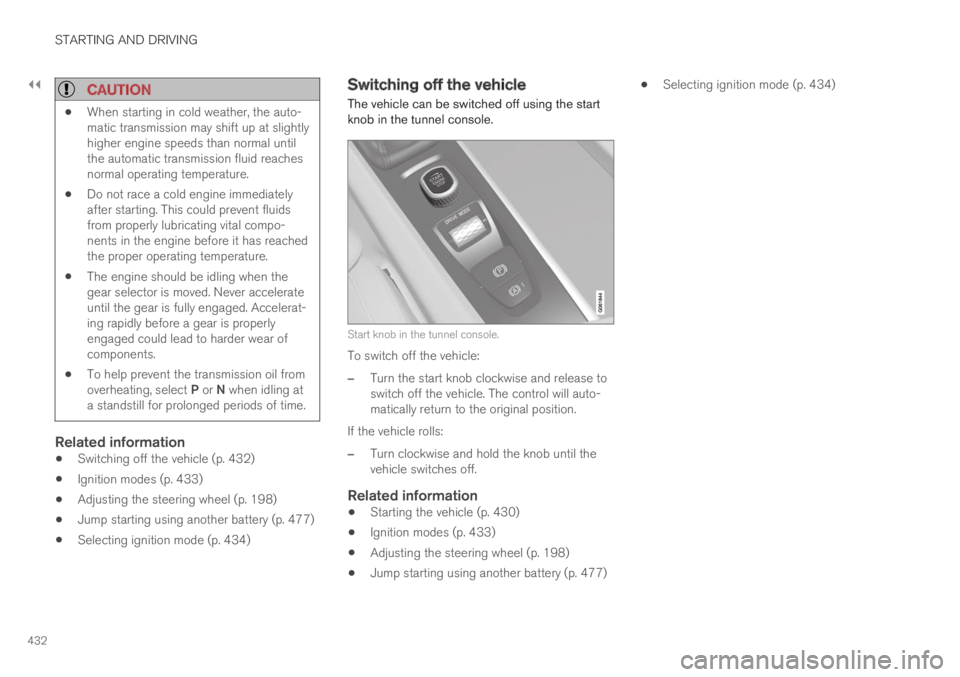
Switching off the vehicle
The vehicle can be switched off using the startknob in the tunnel console.
Start knob in the tunnel console.
To switch off the vehicle:
–Turn the start knob clockwise and release toswitch off the vehicle. The control will auto-matically return to the original position.
If the vehicle rolls:
–Turn clockwise and hold the knob until thevehicle switches off.
Related information
Starting the vehicle (p. 430)
Ignition modes (p. 433)
Adjusting the steering wheel (p. 198)
Jump starting using another battery (p. 477)
Selecting ignition mode (p. 434)
Page 435 of 695

STARTING AND DRIVING
* Option/accessory.433
Ignition modes
The vehicle's ignition can be put in variousmodes (levels) to make different functions availa-ble.
To enable the use of a limited number of func-tions when the engine is not running, the ignitioncan be put in one of three different levels: 0, Iand II. These levels are referred to as "ignitionmodes" in the Owner's Manual.
The following table shows which functions areavailable in each ignition mode:
ModeFunctions
0The odometer, clock and tem-
perature gauge are illuminatedA.
The power* seats can beadjusted.
The power windows can be used.
The center display is activated
and can be usedA.
The infotainment system can be
usedA.
In this mode, the functions are availa-ble for a limited time and then switchoff automatically.
IThe panoramic roof, power win-dows, 12-volt electrical socket inthe passenger compartment,Bluetooth, navigation, phone,blower and windshield wipers canbe used.
The power seats can be adjusted.
The 12-volt electrical socket* inthe cargo compartment can beused.
Electrical current will be takenfrom the battery in this ignitionmode.
ModeFunctions
IIThe headlights illuminate.
Warning/indicator lights illumi-nate for 5 seconds.
A number of other systems areactivated. However, seat and rearwindow heating can only be acti-vated when the engine is running.
This ignition mode uses a lot ofcurrent from the battery andshould be avoided whenever pos-sible!
AAlso activated when the door is opened.
Related information
Starting the vehicle (p. 430)
Adjusting the steering wheel (p. 198)
Jump starting using another battery (p. 477)
Selecting ignition mode (p. 434)
Page 436 of 695

STARTING AND DRIVING
434
Selecting ignition mode
The vehicle's ignition can be put in variousmodes (levels) to make different functions availa-ble.
Selecting an ignition mode
Start knob in the tunnel console.
Ignition mode 0 - Unlock the vehicle andkeep the remote key in the passenger com-partment.
NOTE
To set level I or II without engine start – donot depress the brake pedal (or clutch pedalfor vehicles with manual transmission) whenselecting this ignition mode.
Ignition mode I - Turn the start knob clock-wise and release it. The control will automati-cally return to the original position.
Ignition mode II - Turn the start knob clock-wise and hold it there for approx. 5 seconds.Release the knob, which will automaticallyreturn to its original position.
Back to ignition mode 0 - To return to igni-tion mode 0 from mode I and II, turn the startknob clockwise and release it. The controlwill automatically return to the original posi-tion.
Related information
Starting the vehicle (p. 430)
Switching off the vehicle (p. 432)
Ignition modes (p. 433)
Adjusting the steering wheel (p. 198)
Jump starting using another battery (p. 477)
Brake functions
The vehicle's brakes are used to reduce speedor prevent the vehicle from rolling.
In addition to the wheel brakes and parkingbrakes, the vehicle is also equipped with a num-ber of automatic brake assist functions. Thesesystems help the driver by e.g. keeping the vehi-cle stationary when the brake pedal is notdepressed (e.g. at a traffic light or intersection),when starting up a hill or when driving down a hill.
Depending on how the vehicle is equipped, thefollowing brake assist functions may be included:
Auto-hold brakes (Auto Hold)
Hill Start Assist (Hill Start Assist)
Braking assist after a collision
City Safety
Hill Descent Control (Hill Descent Control)
Related information
Brakes (p. 435)
Parking brake (p. 438)
Auto-hold brakes (p. 442)
Braking assist after a collision (p. 443)
Hill Start Assist (p. 443)
City Safety™ (p. 335)
Hill Descent Control (p. 462)