2019 VOLVO XC60 TWIN ENGINE steering
[x] Cancel search: steeringPage 304 of 695

||
DRIVER SUPPORT
302
To temporarily deactivate Adaptive Cruise Controland put it in standby mode:
–Press the button on the steering wheel(2).
>The symbol in the instrument panelchanges color from WHITE to GRAY andthe set speed in the center of the speed-ometer will change from BEIGE to GRAY.
WARNING
If Adaptive Cruise Control is in standbymode, the driver must intervene and regu-late both speed and distance to the vehicleahead.
If the vehicle comes too close to a vehicleahead when Adaptive Cruise Control is instandby mode, the driver is instead warnedof the short distance by the Distance Alertfunction.
Standby mode due to action by the driver
Adaptive Cruise Control will be temporarily deac-tivated and put in standby mode if:
the brakes are applied
the gear selector is moved to N
the vehicle is driven faster than the setspeed for more than 1 minute
Temporarily increasing speed using the accelera-tor pedal, e.g. when passing another vehicle, willnot affect the setting. The vehicle will return tothe set speed when the accelerator pedal isreleased.
Automatic standby mode
Adaptive Cruise Control is dependent on othersystems, such as Electronic Stability Control
(ESC46). If any of these other systems stopsworking, Adaptive Cruise Control will automati-cally switch off.
WARNING
With automatic standby mode, the driver iswarned by an acoustic signal and a messageon the instrument panel.
The driver must then regulate vehiclespeed, apply the brakes if necessary, andmaintain a safe distance to other vehicles.
Adaptive Cruise Control may go into standbymode if:
your vehicle's speed goes below 5 km/h(3 mph) and ACC cannot determine if thevehicle ahead is stationary or if it is anotherobject, e.g. a speed bump.
your vehicle's speed goes under 5 km/h(3 mph) and the vehicle ahead turns so thatACC no longer has a vehicle to follow.
the driver opens the door.
the driver unbuckles the seat belt.
the engine speed (rpm) is too low/high.
one or more of the wheels lose traction.
the brake temperature is high.
the parking brake is applied.
the camera/radar sensor is covered by snowor heavy rain (the camera lens/radar wavesare blocked)
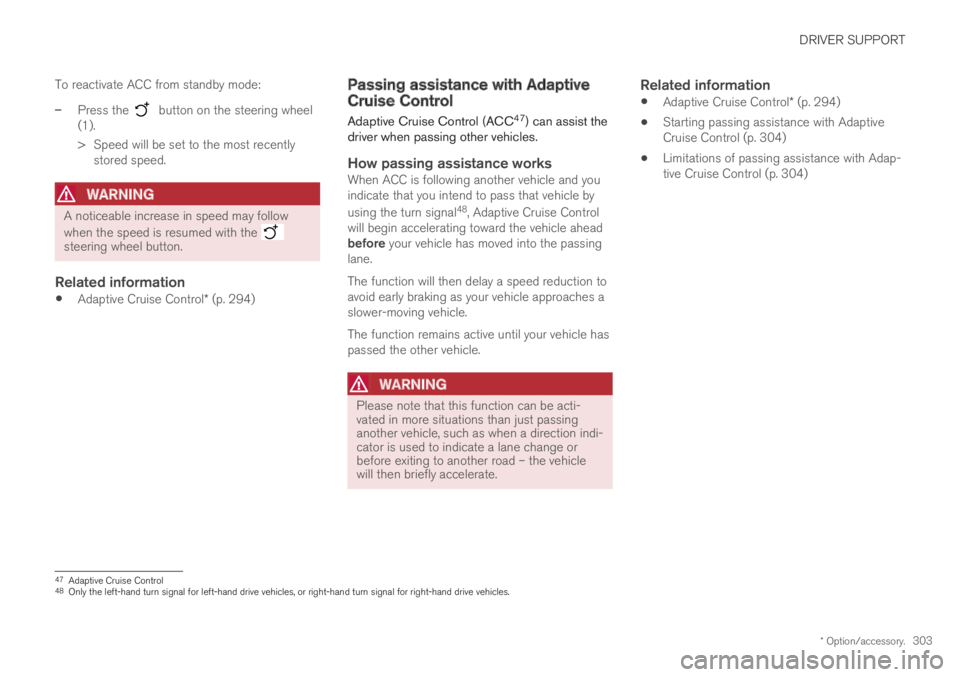
Reactivating Adaptive Cruise Control
from standby mode
Note: This illustration is general and details may varydepending on model.
46Electronic Stability Control
Page 305 of 695
DRIVER SUPPORT
* Option/accessory.303
To reactivate ACC from standby mode:
–Press the button on the steering wheel(1).
>Speed will be set to the most recentlystored speed.
WARNING
A noticeable increase in speed may follow
when the speed is resumed with the steering wheel button.
Related information
Adaptive Cruise Control* (p. 294)
Passing assistance with AdaptiveCruise Control
Adaptive Cruise Control (ACC47) can assist thedriver when passing other vehicles.
How passing assistance works
When ACC is following another vehicle and youindicate that you intend to pass that vehicle by
using the turn signal48, Adaptive Cruise Controlwill begin accelerating toward the vehicle aheadbefore your vehicle has moved into the passinglane.
The function will then delay a speed reduction toavoid early braking as your vehicle approaches aslower-moving vehicle.
The function remains active until your vehicle haspassed the other vehicle.
WARNING
Please note that this function can be acti-vated in more situations than just passinganother vehicle, such as when a direction indi-cator is used to indicate a lane change orbefore exiting to another road – the vehiclewill then briefly accelerate.
Related information
Adaptive Cruise Control* (p. 294)
Starting passing assistance with AdaptiveCruise Control (p. 304)
Limitations of passing assistance with Adap-tive Cruise Control (p. 304)
47Adaptive Cruise Control48Only the left-hand turn signal for left-hand drive vehicles, or right-hand turn signal for right-hand drive vehicles.
Page 307 of 695

DRIVER SUPPORT
}}
* Option/accessory.305
WARNING
When Adaptive Cruise Control follows anothervehicle at speeds over approx. 30 km/h(20 mph) and changes target vehicle – from amoving vehicle to a stationary one – AdaptiveCruise Control will ignore the stationary vehi-cle and instead accelerate to the storedspeed.
The driver must then intervene and applythe brakes.
Automatic standby mode when switching
targets
Adaptive Cruise Control will be disabled and gointo standby mode:
if your vehicle's speed goes below 5 km/h(3 mph) and Adaptive Cruise Control cannotdetermine if the target object is a stationaryvehicle or another object, e.g. a speed bump.
if your vehicle's speed goes under 5 km/h(3 mph) and the vehicle ahead turns so thatAdaptive Cruise Control no longer has a vehi-cle to follow.
Related information
Adaptive Cruise Control* (p. 294)
Automatic braking with AdaptiveCruise Control
The Adaptive cruise control (ACC51) has a spe-cial brake function in slow traffic and while sta-tionary.
Braking function in slow traffic and at a
standstill
In slow-moving, stop-and-go traffic or when stop-ped at a traffic light, driving will resume automati-cally if the vehicle is stopped for less thanapprox. 3 seconds. If it takes more than 3 sec-onds for the vehicle ahead to begin moving again,Adaptive Cruise Control will go into standbymode and the Auto-hold brake function will acti-vate.
–Adaptive Cruise Control can be reactivated inone of the following ways:
Pressing the button on the steeringwheel keypad.
Pressing the accelerator pedal.
>Adaptive Cruise Control will resume fol-lowing the vehicle ahead if it begins tomove within approx. 6 seconds.
NOTE
ACC can keep the vehicle stationary for nomore than 5 minutes – after that time theparking brake is applied and Adaptive CruiseControl is deactivated.
The parking brake must be released beforeAdaptive Cruise Control can be reactivated.
Deactivation of the Auto-hold brake function
In certain situations, Auto-hold will be deactivatedwhen the vehicle is at a standstill and AdaptiveCruise Control will go into standby mode. Thismeans that the brakes will be released and thevehicle could begin to roll. The driver mustactively apply the brakes to keep the vehicle sta-tionary.
This can occur if:
the driver depresses the brake pedal
the parking brake is applied
the gear selector is moved to the P, N or Rpositions
the driver puts Adaptive Cruise Control instandby mode.
Auto Activate Parking Brake
In certain situations, the parking brake will beapplied to keep the vehicle at a standstill.
50Adaptive Cruise Control51Adaptive Cruise Control
Page 309 of 695

DRIVER SUPPORT
* Option/accessory.307
Switching between Cruise Controland Adaptive Cruise Control
In vehicles equipped with Adaptive Cruise Con-trol (ACC), the driver can switch between CruiseControl (CC) and ACC.
A symbol in the instrument panel indicates whichcruise control system is active
CCACC
AA
Cruise controlAdaptive Cruise Control
AWHITE symbol: The function is active. GRAY symbol: Standbymode
Switching from ACC to CC
To do so:
1.Press the button on the steering wheelkeypad to put Adaptive Cruise Control instandby mode.
2.Tap the Cruise Control button in the centerdisplay's Function view. The button's indica-tor will change from GRAY to GREEN.
>The symbol in the instrument panel will
change from ACC to CC, indicating that Adaptive Cruise Con-trol is off and Cruise Control is in standbymode.
3.Pressing the button on the steeringwheel keypad.
>Cruise Control will start and the vehicle'scurrent speed will be set.
WARNING
Switching from ACC to CC means that thevehicle:
will no longer maintain a preset timeinterval to the vehicle ahead.
will only follow the stored speed and thedriver must therefore apply the brakeswhen necessary.
If CC is active when the engine is turned off, ACCwill be automatically activated the next time theengine is started.
Switching from CC to ACC
To do so:
1.Press the button on the steering wheelkeypad to put Cruise Control in standbymode.
2.Tap the Cruise Control button in Functionview. The button's indicator will change fromGREEN to GRAY.
>The symbols in the instrument panel will
switch from CC to ACCto indicate that Adaptive Cruise Control isin standby mode.
3.Pressing the button on the steeringwheel keypad.
>Adaptive Cruise Control will go into activemode and set the vehicle's current speedand the selected time interval to the vehi-cle ahead.
Related information
Adaptive Cruise Control* (p. 294)
Cruise control (p. 285)
Page 311 of 695

DRIVER SUPPORT
* Option/accessory.309
SymbolMessageMeaning
The symbol is WHITE.The vehicle is maintaining the set speed.
Adaptive Cruise Contr.
Unavailable
The symbol is GRAY.
Adaptive Cruise Control is in standby mode.
Adaptive Cruise Contr.
Service required
The symbol is GRAY.
The system is not functioning as intended. Contact a workshop ‒ an authorized Volvo workshop isrecommended.
Windscreen sensor
Sensor blocked, see Owner's manual
Clean the windshield in front of the camera and radar sensors.
A text message can be erased by briefly pressing
the button in the center of the right-sidesteering wheel keypad.
If the message persists: Contact a workshop ‒ anauthorized Volvo workshop is recommended.
Related information
Adaptive Cruise Control* (p. 294)
Page 312 of 695

DRIVER SUPPORT
310
Pilot Assist
Pilot Assist helps the driver keep the vehicle inthe current traffic lane by providing steeringassistance and maintaining an even speed and aset time interval to the vehicle ahead.
How Pilot Assist works
The Pilot Assist function is primarily intended foruse on highways and other major roads where itcan help provide a more comfortable and relaxingdriving experience.
The camera/radar sensor monitors the distance to thevehicle ahead and detects lane markings56.
Camera and radar sensor
Distance monitor
Lane marker line monitors
The driver sets the desired speed and distance tothe vehicle ahead. Pilot Assist monitors the dis-tance to the vehicle ahead and the traffic lane'sside markers using the camera and radar sensor.The system maintains the set time interval to thevehicle ahead by automatically adjusting yourvehicle's speed and keeps your vehicle in its laneby providing steering assistance.
Pilot Assist's steering assistance is based onmonitoring the direction of the vehicle ahead andthe traffic lane's side marker lines. The driver canoverride Pilot Assist's steering recommendationsat any time and steer in another direction, e.g. tochange lanes or avoid obstacles on the road.
If the camera/radar sensor cannot detect thelane's side marker lines or if Pilot Assist is unablefor some other reason to clearly interpret thelane, Pilot Assist will temporarily deactivate steer-ing assistance until it can once again interpretthe lane markings. However, the speed and dis-tance warnings will remain active.
WARNING
Pilot Assist is deactivated automatically andresumes working without prior notice.
The color of the steering wheelsymbol indicates the currentstatus of steering assistance:
• GREEN indicates that steer-ing assistance is active
• GRAY (as shown in illustra-tion) indicates that steering assistance is deacti-vated.
56Note: This illustration is general and details may vary depending on model.
Page 313 of 695

DRIVER SUPPORT
}}
311
WARNING
The Pilot Assist function is supplementarydriver support intended to facilitate driv-ing and help make it safer – it cannothandle all situations in all traffic, weatherand road conditions.
The driver is advised to read all sectionsin the Owner's Manual about this functionto learn of its limitations, which the drivermust be aware of before using the func-tion (see the link list at the end of thisarticle).
Pilot Assist should only be used if thereare clear lane lines painted on each sideof the lane. All other use will increase therisk of contact with nearby obstacles thatcannot be detected by the functions.
Pilot Assist is not a substitute for the driv-er's attention and judgment. The driver isalways responsible for ensuring the vehi-cle is driven in a safe manner, at theproper position within the lane, at theappropriate speed, with an appropriatedistance to other vehicles, and in accord-ance with current traffic rules and regula-tions.
NOTE
Depending on market, this function may beeither Standard or Optional.
Pilot Assist regulates speed by accelerating andbraking. It is normal for the brakes to emit a slightsound when they are being used to adjust speed.
Pilot Assist attempts to smoothly regulate speed.The driver must apply the brakes in situationsrequiring immediate braking. For example, whenthere are great differences in speed betweenvehicles or if the vehicle ahead brakes suddenly.Due to limitations in the camera and radar sen-sor, braking may occur unexpectedly or not at all.
Pilot Assist is designed to follow a vehicle aheadin the same lane and maintain a time interval tothat vehicle set by the driver. If the radar sensordoes not detect a vehicle ahead, it will insteadmaintain the speed set by the driver. This will alsohappen if the speed of the vehicle aheadexceeds the set speed for your vehicle.
Pilot Assist can follow another vehicle atspeeds from a standstill up to 200 km/h(125 mph).
Pilot Assist can provide steering assistancefrom near-stationary speeds up to 140 km/h(87 mph).
WARNING
Pilot Assist is not a collision avoidancesystem. The driver must intervene if thesystem fails to detect a vehicle ahead.
Pilot Assist does not brake for people,animals, objects, small vehicles (e.g.cycles and motorcycles), low trailers aswell as oncoming, slow or stationary vehi-cles.
Do not use Pilot Assist in demanding sit-uations, such as in city traffic, at intersec-tions, on slippery surfaces, with a lot ofwater or slush on the road, in heavy rain/snow, in poor visibility, on winding roads,on highway on- or off-ramps, or with atrailer connected to the vehicle.
CAUTION
Maintenance of the integrated components inPilot Assist may only be performed by a work-shop – an authorized Volvo workshop is rec-ommended.
In curves and forks in the road
Pilot Assist is designed to interact with the driver.The driver should never wait for steering assis-tance from Pilot Assist, but instead should alwaysbe ready to increase his or her own steeringefforts, particularly in curves.
Page 314 of 695

||
DRIVER SUPPORT
312
When the vehicle is approaching an off-rampor a fork in the road, the driver should steertoward the desired lane to indicate to PilotAssist the desired direction of travel.
Pilot Assist strives to keep the vehicle
in the center of the lane
When Pilot Assist provides steering assistance, itstrives to position the vehicle in the center of thelane between the lane markings. For the smooth-est driving experience possible, the driver shouldpermit the vehicle to find the optimal positioning.The driver should check that the vehicle is posi-tioned safely in the lane and can always adjustthe vehicle's position by applying more force tothe steering wheel.
If Pilot Assist does not position the vehicleappropriately in the lane, the driver shouldturn off Pilot Assist or switch to AdaptiveCruise Control.
Overview
Controls
Function buttons and symbols56.
: Activates Pilot Assist from standbymode and resumes the set speed and timeinterval
: Increases the set speed
: From standby mode - activates PilotAssist and sets the current speed
: From active mode - deactivates/putsPilot Assist in standby mode
◀: Switches from Pilot Assist to AdaptiveCruise Control
: Reduces the set speed
Increases the time interval to the vehicleahead
▶: Switches from Adaptive Cruise Control toPilot Assist
Reduces the time interval to the vehicleahead
Function symbol
Symbols for target vehicle and distance tothe vehicle ahead
Symbol for activated/deactivated steeringassistance
56Note: This illustration is general and details may vary depending on model.